Elementor Twitter Feed Widget

Showcase tweets, images, and videos from X (formerly Twitter) on your Elementor website to enrich content and help visitors follow your latest updates.
4.8 rating
10,000+ reviews
Free plan available
Create Widget for Free
No credit card needed
Elementor Twitter Feed Widget

Create your Twitter Feed widget

Configure your widget and add it to your Elementor website for free!

Screenshots

Elementor Twitter Feed Widget
Display your Twitter account with all functionality and details available
Select the best testimonials about your business and show them on the site
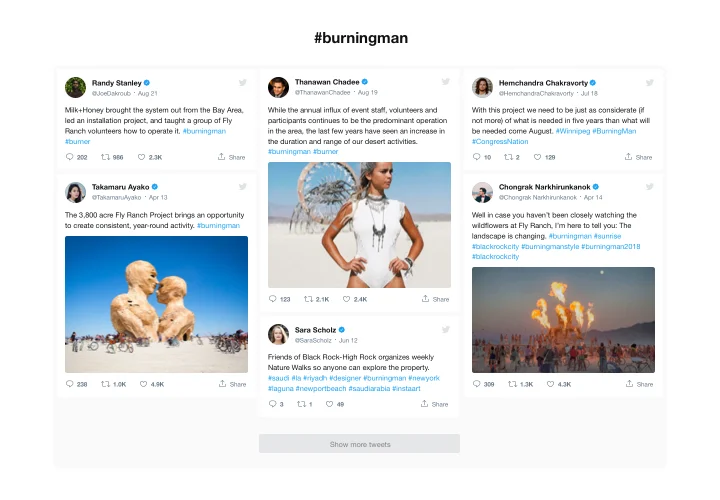
Create a selection of Tweets with required hashtags for your site
Choose the color of active feed elements to add a custom touch
Clean minimalistic look will fit any website design concept
Responsive and mobile optimized for smooth user experience
1 / 6

Why People Love Elfsight

Your Twitter posts shouldn’t just live on your profile – they can bring energy and trust right into your website. With the Elfsight Twitter widget, you can display your feed in a clean, stylish way that fits seamlessly with your Elementor design.

It’s quick to set up and doesn’t require any coding skills. Think of it like plugging in a live news channel for your business – your updates, your announcements, your conversations – all right where your visitors already are.

Did you know?

According to a Sprout Social Index report, 68% of people follow brands on social media to keep up with news and updates.

Bring those updates straight to your website – add the Elfsight Twitter widget and keep your visitors in the loop without extra clicks.

Key Features of the Elementor Twitter Feed Widget

Here’s what makes this widget especially useful for businesses and creators:

  • Multiple display layouts: Show tweets in a grid, carousel, or list – whichever works best with your website’s design.
  • Customizable design: Adjust fonts, colors, and spacing so the feed blends in naturally.
  • Show different types of content: Embed timelines, user feeds, testimonials, or hashtags to highlight what matters most.
  • Real-time updates: New tweets appear automatically, so your visitors always see the latest posts.
  • Responsive by default: Whether on desktop, tablet, or phone, your feed will always look great.
  • Easy setup: No need to mess with code – just copy, paste, and your feed is live.

Test all features in the free editor – no signup needed

How to Add the Twitter Feed to Elementor

Embedding Twitter posts on your Elementor website is quick and beginner-friendly with Elfsight. Follow these steps to get started:

  1. Select a template: Open the Elfsight editor and pick a feed template that you prefer.
  2. Customize the feed: Choose the content you want to display, post elements, adjust the style.
  3. Generate the code: Click “Add to website for free”, then copy the generated code snippet.
  4. Embed on your website: In Elementor, use the HTML block and paste the code where you want the feed to appear.

Need help? Explore the blog tutorial on adding a Twitter feed to your website. Suggest new ideas in the Wishlist and see the latest updates in the Changelog.

Do I need Elementor Pro to use the Twitter widget widget

You can add the widget using Elementor Free while some advanced display and layout options may require Elementor Pro.

Is the Twitter Feed compatible with Elementor layouts?

Elfsight integrates smoothly with Elementor sections, columns, and templates, adapting automatically to responsive designs.

How often are new tweets added to the feed?

Elfsight synchronizes with X (Twitter) about every 48 hours, ensuring updated content without compromising loading speed on your Elementor pages.

Do I need to configure Twitter API credentials?

No, Elfsight handles authorization internally, so no API keys or developer setup are required.

Can I display only selected tweets?

You can manually insert tweet URLs to showcase specific posts or exclude individual tweets to refine your feed on your Elementor page.

Can tweets be filtered by hashtag or keyword?

Yes, you can configure the widget to pull tweets containing chosen hashtags or keywords to highlight relevant topics.

Are media files supported in the feed?

Images and GIFs appear directly in the widget, while video content opens on X (Twitter) when clicked.

Can I add a Follow button?

Yes, the header can include a Follow button, allowing visitors to connect with your profile easily.

Does the Twitter widget support private accounts?

No, only public profiles and publicly available tweets can be displayed within the feed.

Pricing

14-day money back guarantee. Risk-free, you can cancel at anytime.
Elfsight Apps
Platform-independent version
from $0 / month
start with free plan
Unlimited domains
Fast customer support
Charge-free installation service
Great deal for multiple apps
Easy to edit