

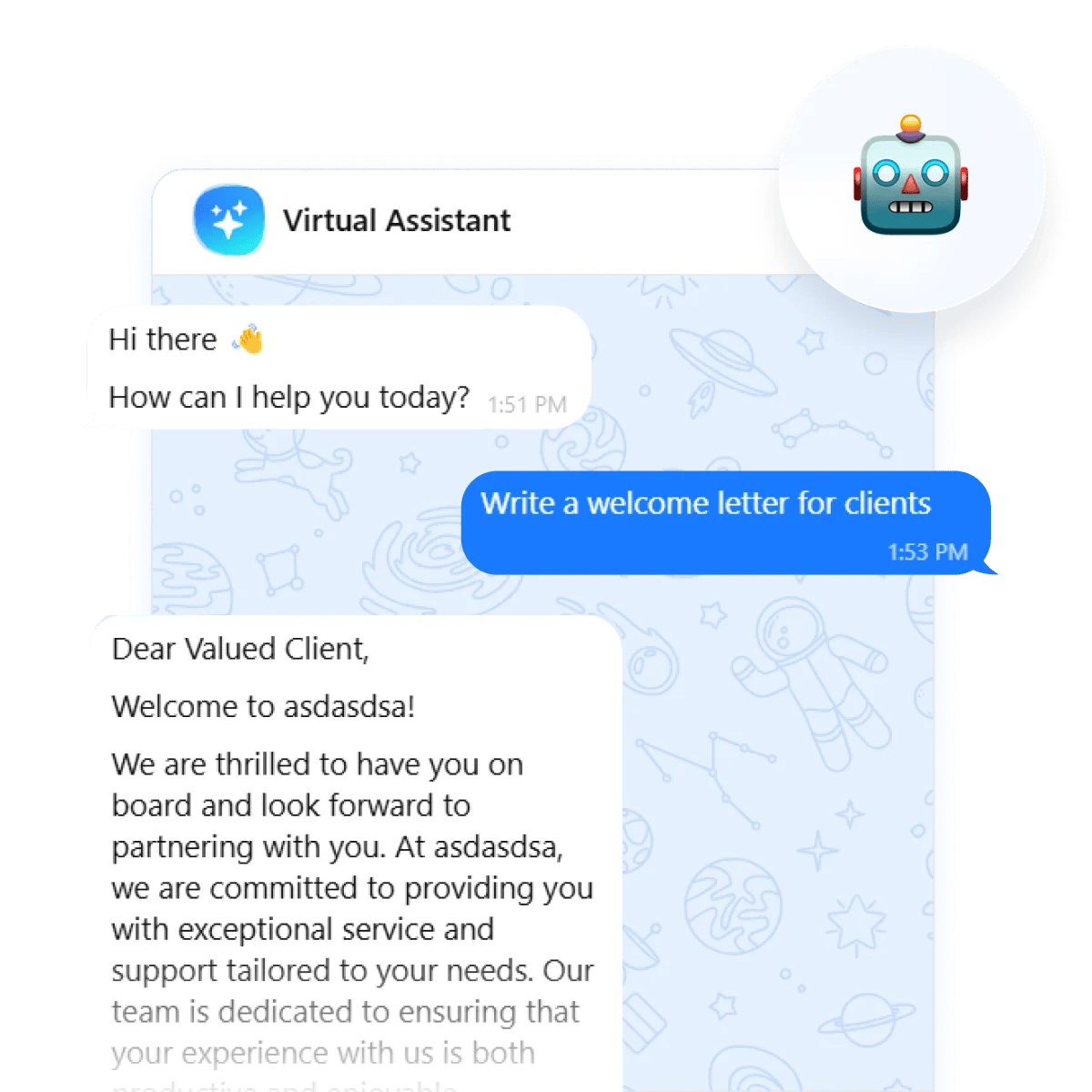
We ran our AI chatbot against 2,498 real support tickets. The result? 89% answers rated useful, and first-response time cut from 1–2 days to under 5 minutes.
Adding an AI chatbot to your website usually comes down to three steps: train it on your content, configure its behavior and appearance, and embed it on your site. With a no-code tool like the Elfsight AI Chatbot widget, you can get the foundation live in minutes. The bigger difference in results comes from how you prepare the chatbot, define its scope, and maintain it after launch.
This guide covers the full process: how to train the chatbot effectively, configure it for real customer interactions, embed it on your website, and measure whether it’s actually helping visitors once it’s live.
- Training your chatbot on real support data: 89% useful responses, 17% full AI resolution
- The setup takes minutes – the preparation before it is what determines performance
- Most chatbot problems trace back to poor instructions and lack of customer-centric setup
- Five metrics actually tell you if the chatbot is working on your website
Add a Chatbot to Your Website in 4 Steps
For those who want to skip the setup learning curve for now, here’s a streamlined workflow to get your AI chatbot up and running right away:
- Open the Elfsight editor and pick a chatbot template.
- Enter your website URL to train it on your business data.
- Configure your chatbot’s style and behavior.
- Paste the embed code into your website’s backend.
Make your own AI chatbot in the interactive editor below ↓
What to Decide Before You Start
The AI is only as good as what you feed it. Before you open a chatbot editor, work through these five decisions – it will save you hours of iteration:
Define the chatbot’s primary job
Whether it’s FAQ deflection, lead capture, appointment booking, or link routing — pick one as the priority. It determines your knowledge base structure, form settings, and chat configuration. A chatbot built for lead capture needs a required contact form early in the conversation. One built for FAQ deflection needs knowledge base depth over form display.
Organize your knowledge base
Pull together your top 20 FAQs, current pricing, return and shipping policies, contact details, product or service descriptions – preferably compiled with common user questions and struggles in mind. Don’t launch until these are loaded. For a detailed walkthrough on structuring this content, see the chatbot knowledge base guide.
Audit for contradictions
If your knowledge base contains both an old and a new version of the same return policy, the AI may surface either one or mix them up. The model synthesizes across all available content, so a single outdated entry can corrupt answers on related topics. Remove duplicates and conflicting versions before you train. Getting the foundation right will save you the headache of identifying gaps later.
Set scope boundaries
Define which topics the chatbot handles and which it deflects to a human. Write these boundaries explicitly into the assistant instructions. Then configure fallback paths via the Contact Human option with redirect channels (e.g., email, WhatsApp, phone). A chatbot that admits its limits and redirects appropriately creates a better experience than one that confidently serves incorrect answers.
Configure its tone of voice
The chatbot should sound like an extension of your brand, not a generic bot. Write 2-3 example responses in the tone you want and use them as a reference when configuring instructions. Then distill that voice into a greeting message — one sentence that tells the visitor what the chatbot can help with. Not “Hello!” (gives visitors zero reason to type) and not a sales pitch. We explore this in more depth in the chatbot personality guide.
How to Integrate a Chatbot in a Website Step by Step
With the preparation done, the actual setup moves quickly. Elfsight’s AI Chatbot trains on your business data and embeds on any website platform with a simple HTML snippet.
Step 1: Configure your chatbot profile
To start, select a predesigned template in the editor – there are 30+ presets to choose from. Just pick one that makes the most sense for your use case – you can always make changes later.
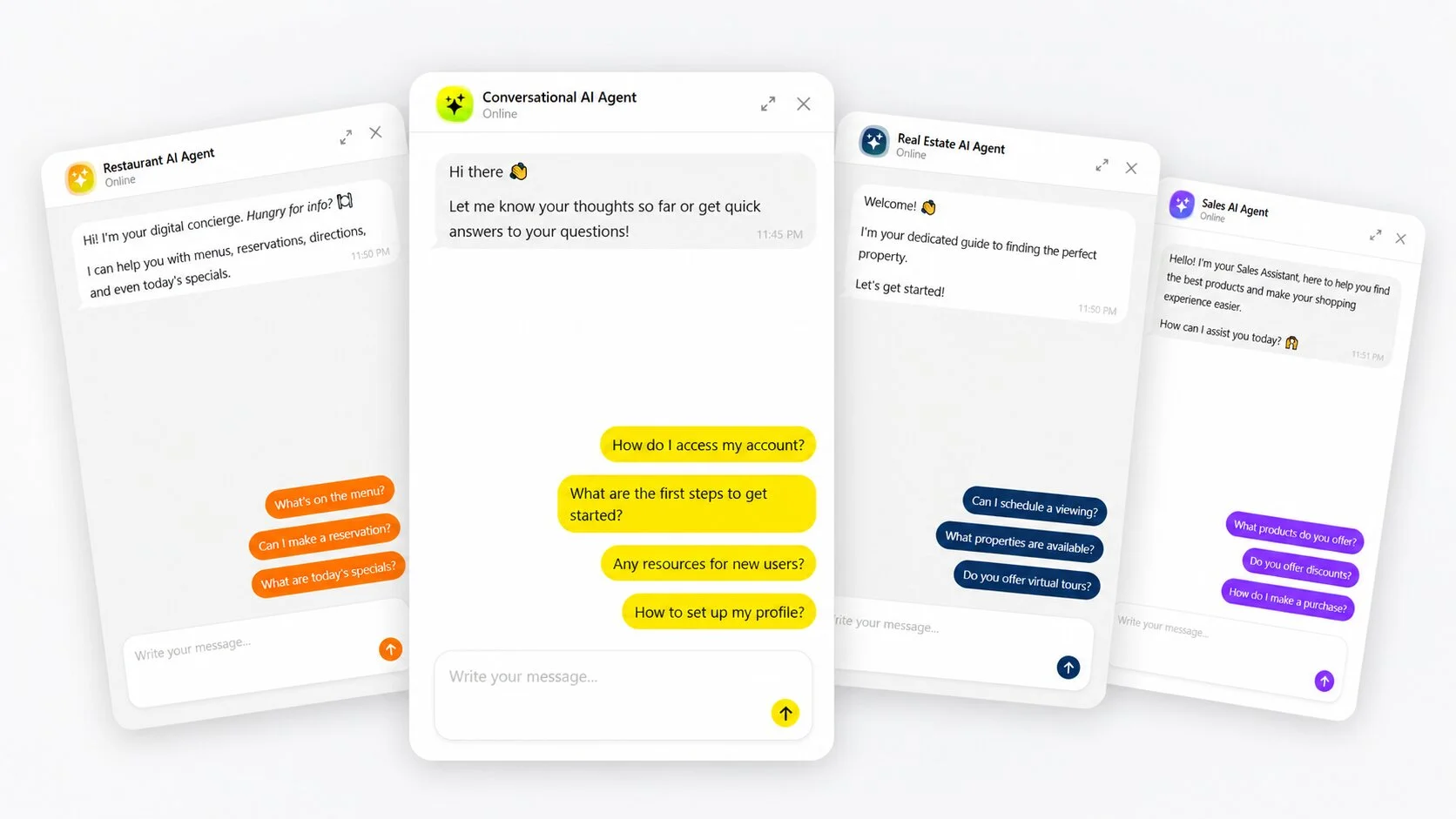
Once you’ve done that, paste in your website URL or enter business details manually. The widget will automatically pull up to 200 pages from your sitemap for training.
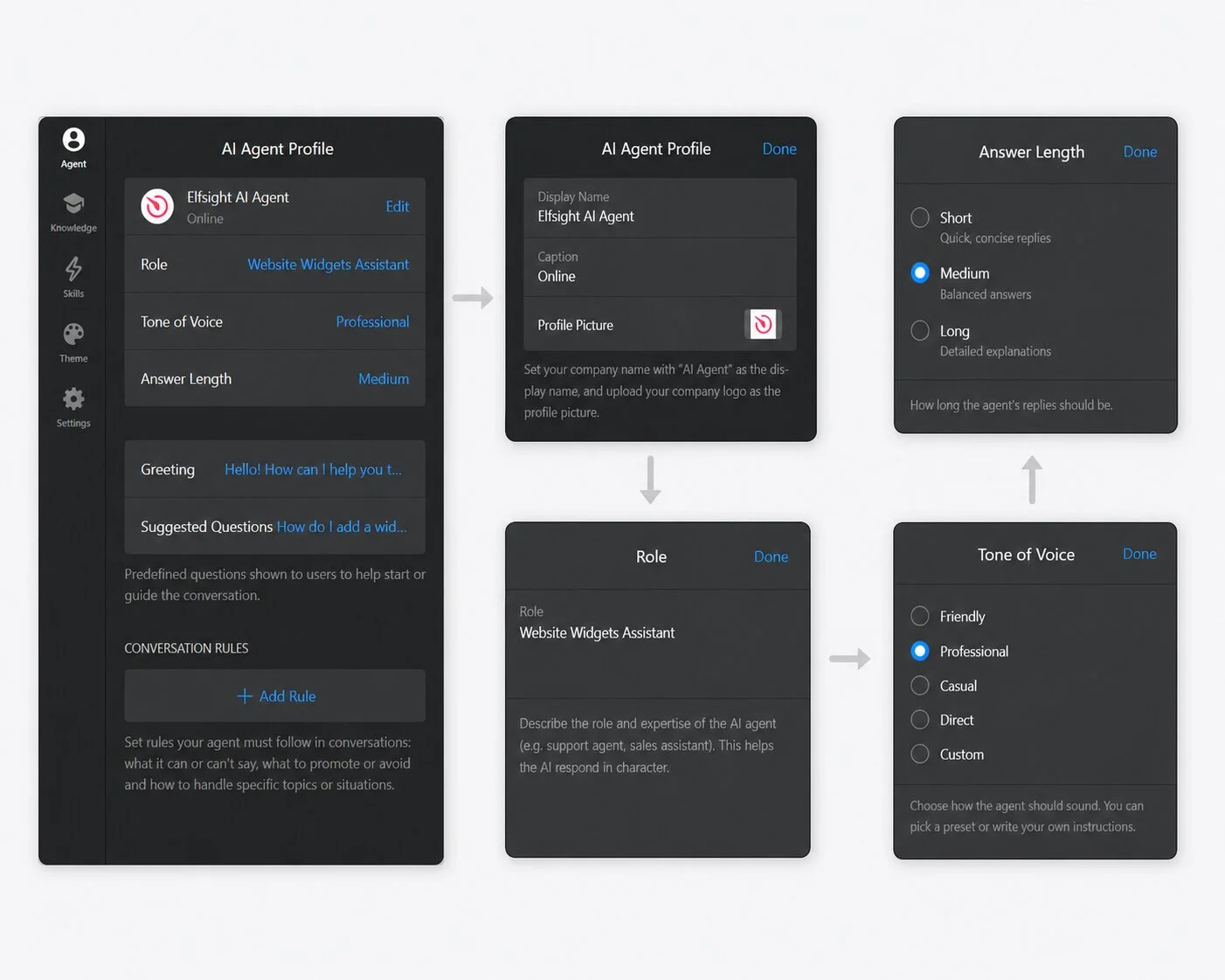
The Agent tab is where you define your chatbot’s identity and behavior. Start with the AI Agent Profile:
- Display Name and Caption — set your business or agent name and a caption (e.g., “Online”)
- Profile Picture — upload your company logo or a custom avatar
- Role — describe the agent’s area of expertise to help it respond in character
- Tone of Voice — configure your chatbot’s personality (choose from presets or customize)
- Answer Length — establish how long and detailed the AI responses should be
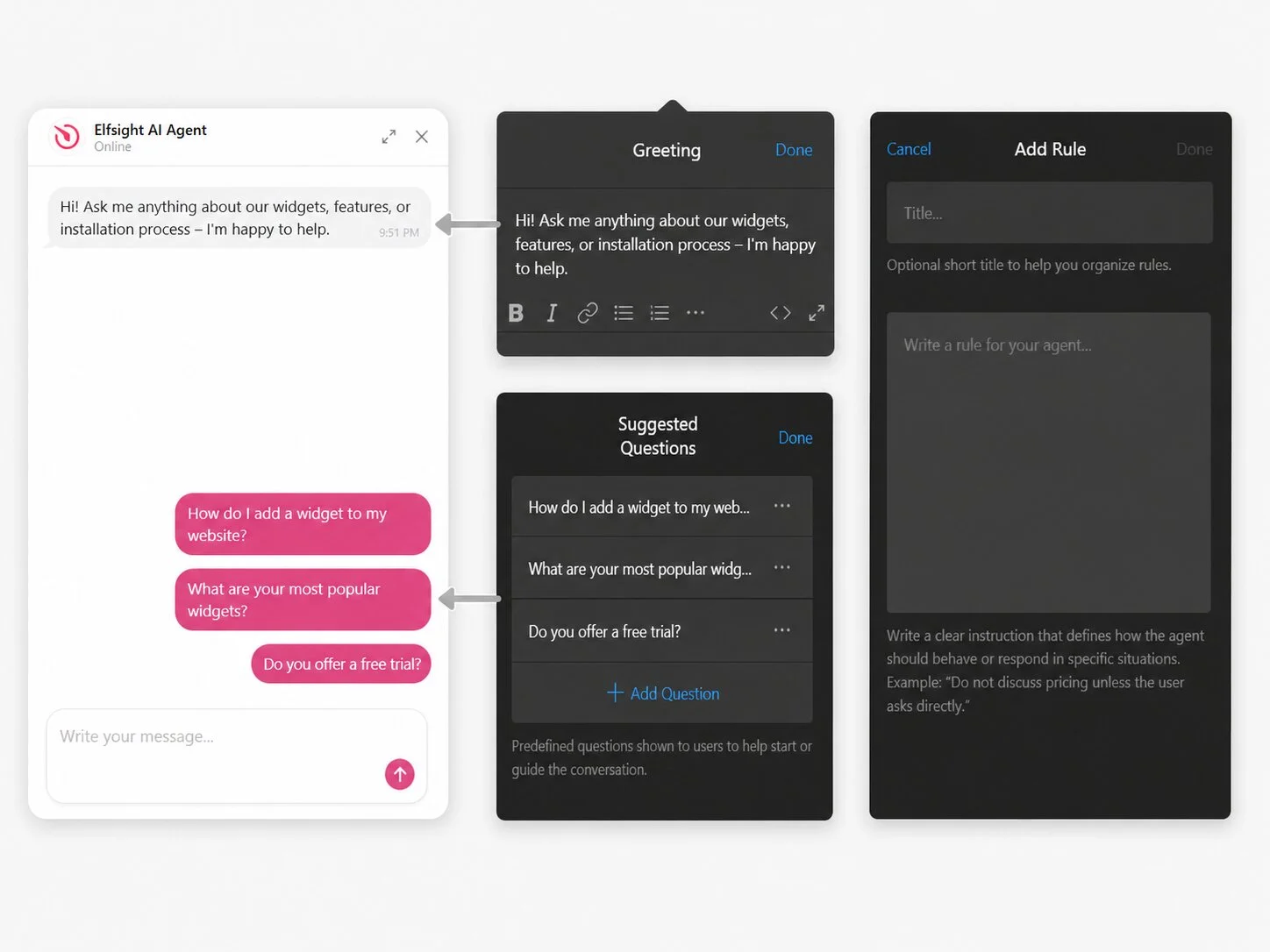
Below the profile, configure the conversation interface:
- Greeting — craft the first message that tells people what the chatbot can help with
- Suggested Questions — guide visitors toward topics the chatbot handles well
- Conversation Rules — set up individual rules that define specific behaviors
Step 2: Build the knowledge base
The Knowledge tab is where you load the content that the chatbot draws its answers from. The AI only knows what you put here — it doesn’t browse the internet or make things up (when properly scoped).
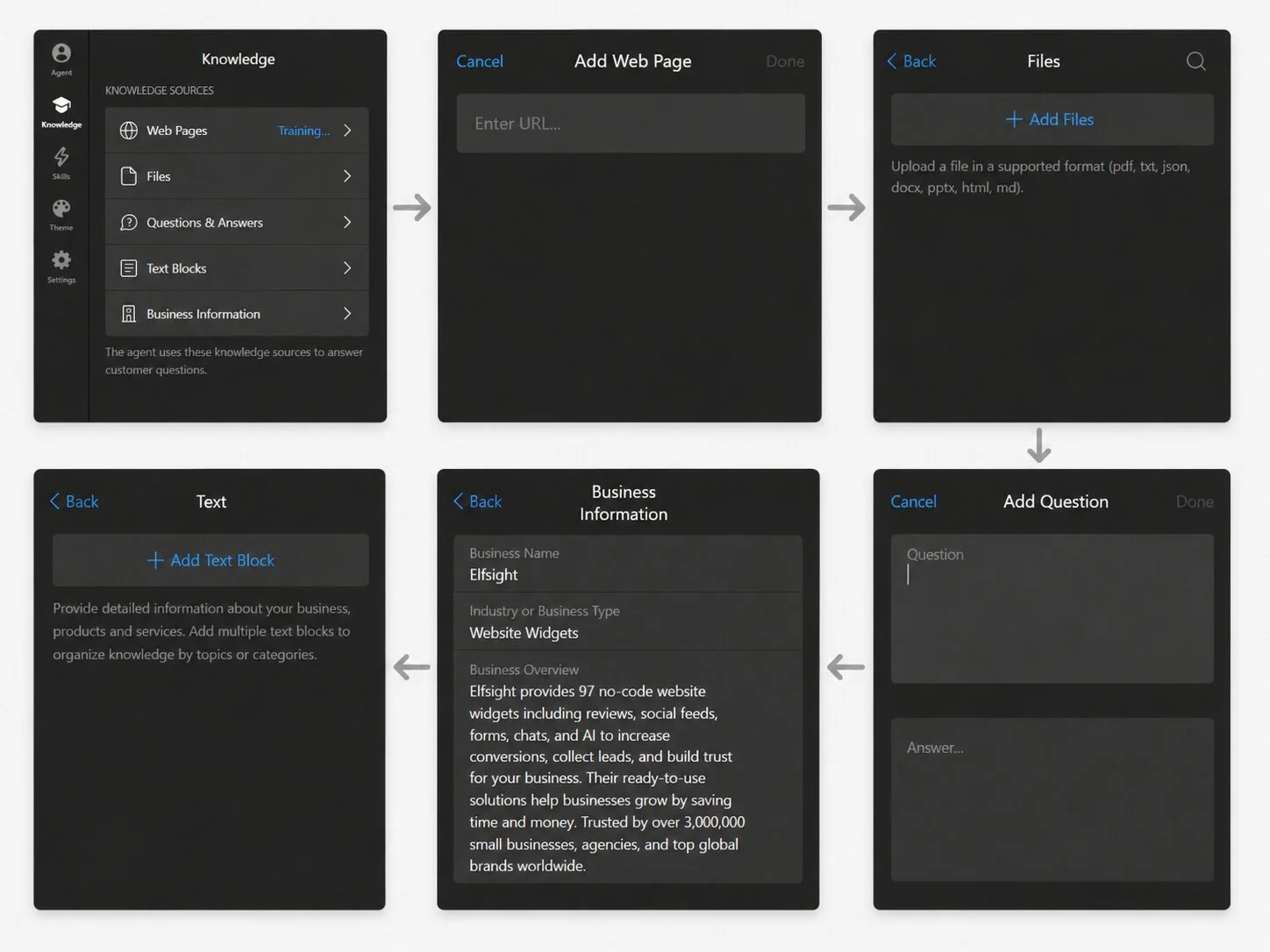
- Web Pages — add/delete individual URLs from your sitemap (200 pulled automatically)
- Files — upload PDF, DOCX, TXT, JSON, HTML, MD, or PPTX files with policies, product catalogs, etc.
- Questions & Answers — fill in predefined Q&A pairs for high-stakes topics like pricing
- Text Blocks — add freeform content like seasonal offers or anything not on your website
- Business Information — describe core business details (hours, location, contact info)
Step 3: Set up AI chatbot skills
The Skills tab houses four capabilities that extend what the chatbot can do beyond answering questions:
Collect Contacts
For lead collection, you can show a simple built-in form that captures the user’s name, email, and phone number (with country code). Configure when it appears: optionally before chat, mandatory before the agent’s reply, or after the first reply.
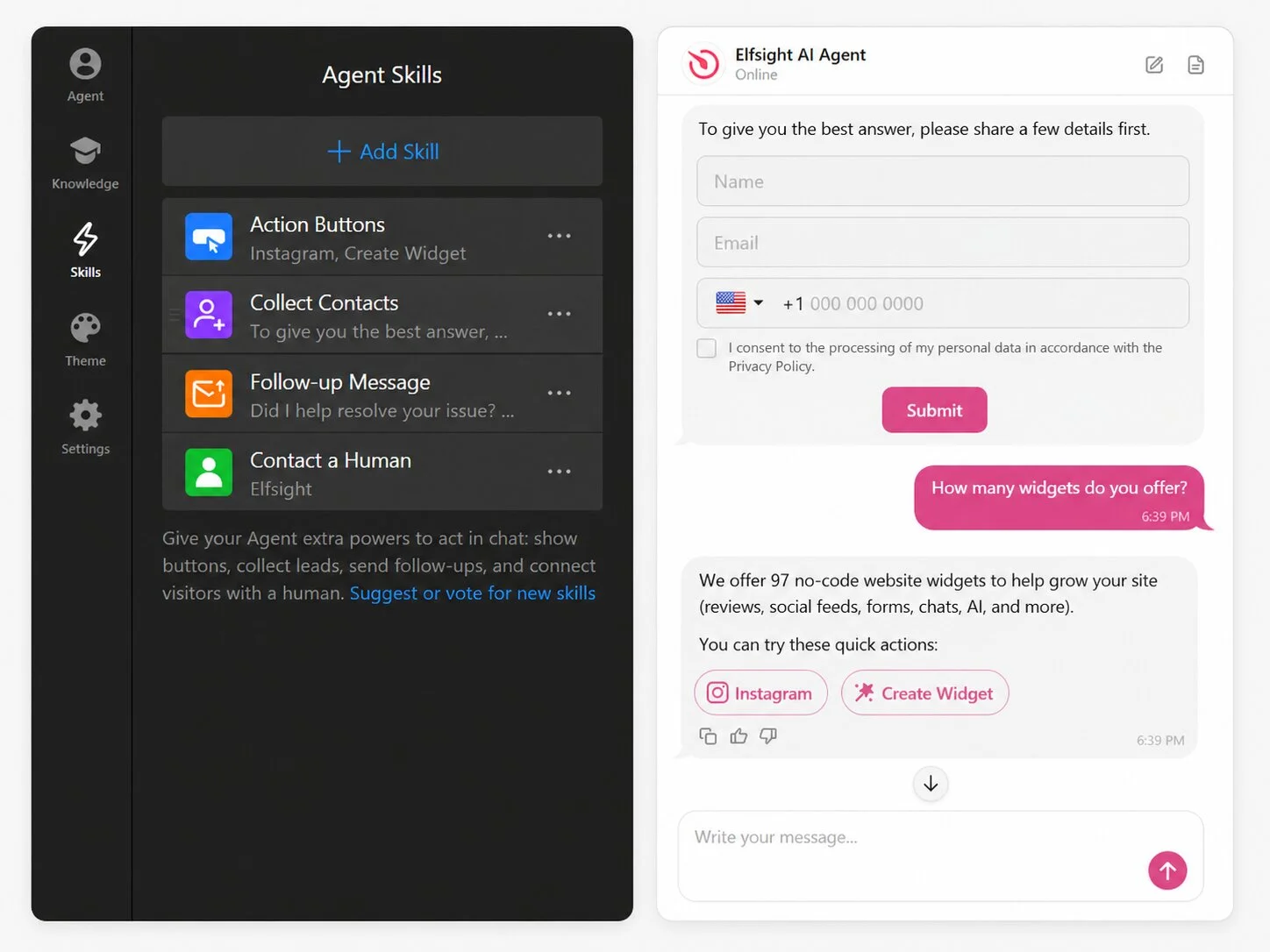
Don’t forget to configure the request for visitor details and Success Message fields (use [name] to display users’ real names). Check the Consent Checkbox to let users know their personal data is secure.
Follow-up Message
To re-engage visitors who opened the chat but got distracted, or to share additional info and offers, craft a follow-up message to send to users after a period of inactivity (e.g., 5 minutes).
Contact a Human
This skill lets you set up a fallback path that allows the visitor to contact a person instead. You can set up a human agent’s profile (photo, name, position), write their short bio, and configure contact buttons to redirect users to other channels – WhatsApp, email, call, Instagram, etc.
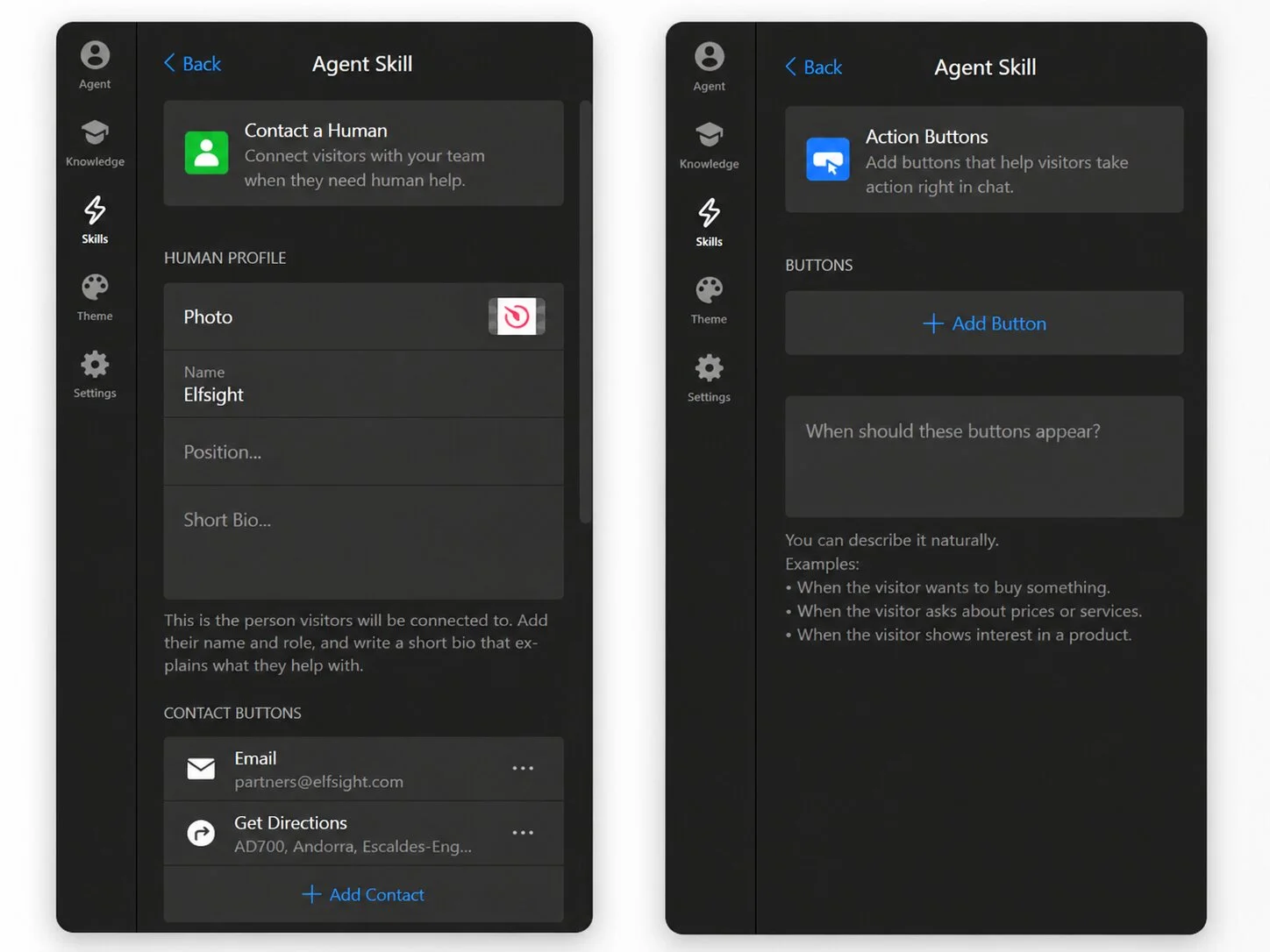
Offer human contact when:
- Visitor explicitly requests human help
- Agent can’t provide an answer
- User types in certain keywords
- Response rated “bad” via thumbs down
- Visitor is inactive for a set time
- or other custom situations
Action Buttons
Custom buttons can be set to appear conditionally (e.g., “When the visitor asks about purchasing”). These allow visitors to take quick actions right from the chat – get directions, follow you on X, save your contact details, etc.
Suggest or vote for new chatbot Skills in our Community – we’re always open to new ideas.
Step 4: Customize the style
The Theme tab controls how the chatbot looks. Pick from six adaptive themes or customize appearance from scratch. Then set an accent color from the palette to match your brand.
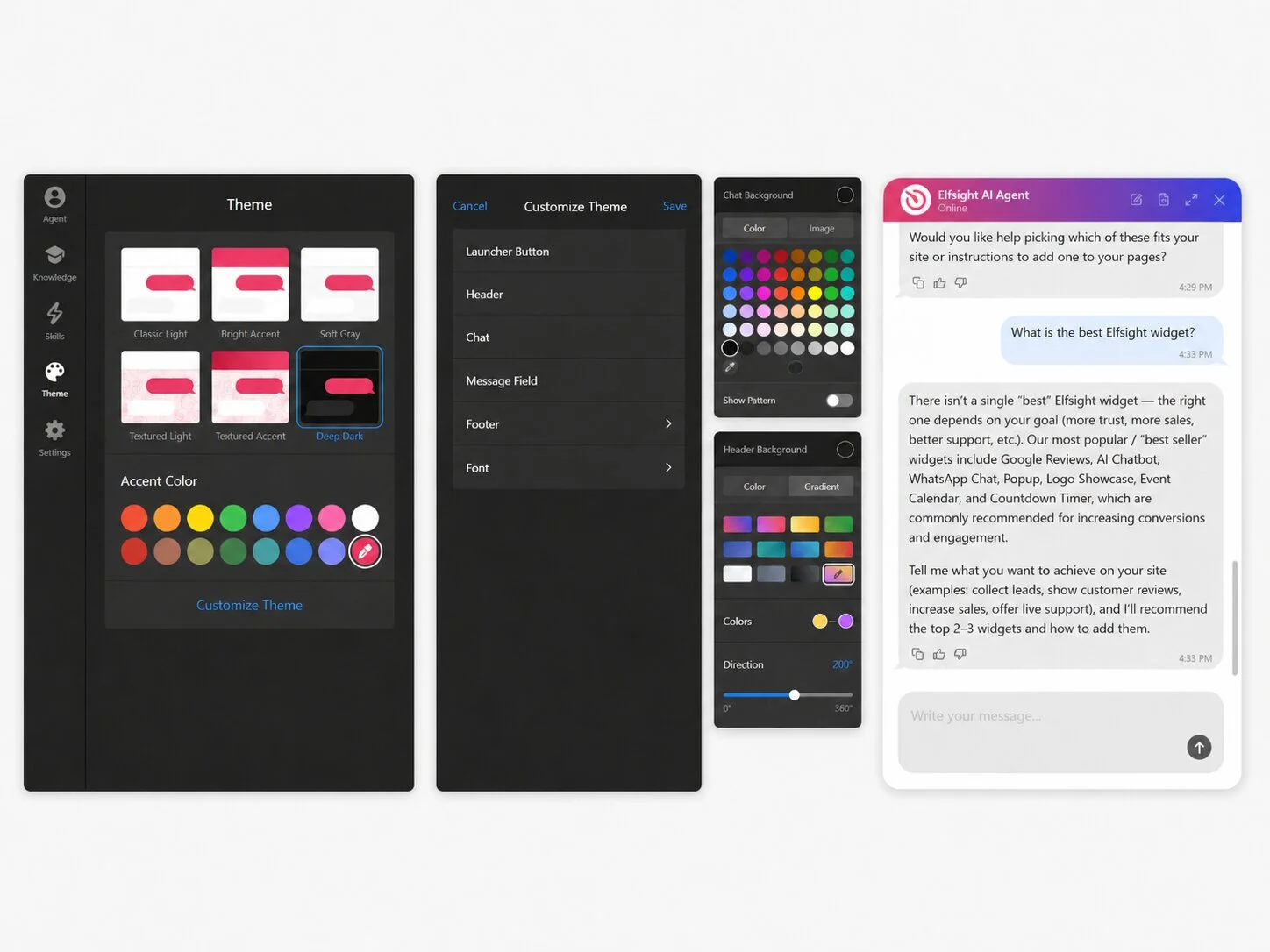
For granular control, click “Customize Theme” to adjust individual elements:
- Launcher Button — background color, icon color, and size (S/M/L)
- Header & Footer — background and text color, with solid color or gradient options, footer text color
- Chat — message field colors, action button color, chat background, corner radius, and more
- Message Field — background, text color, border color, and send button color
- Font – choose a font from the library that matches your website’s font family
Every visual element is individually customizable, so the chatbot can match your website’s design organically rather than looking bolted on.
Step 5: Adjust chatbot settings
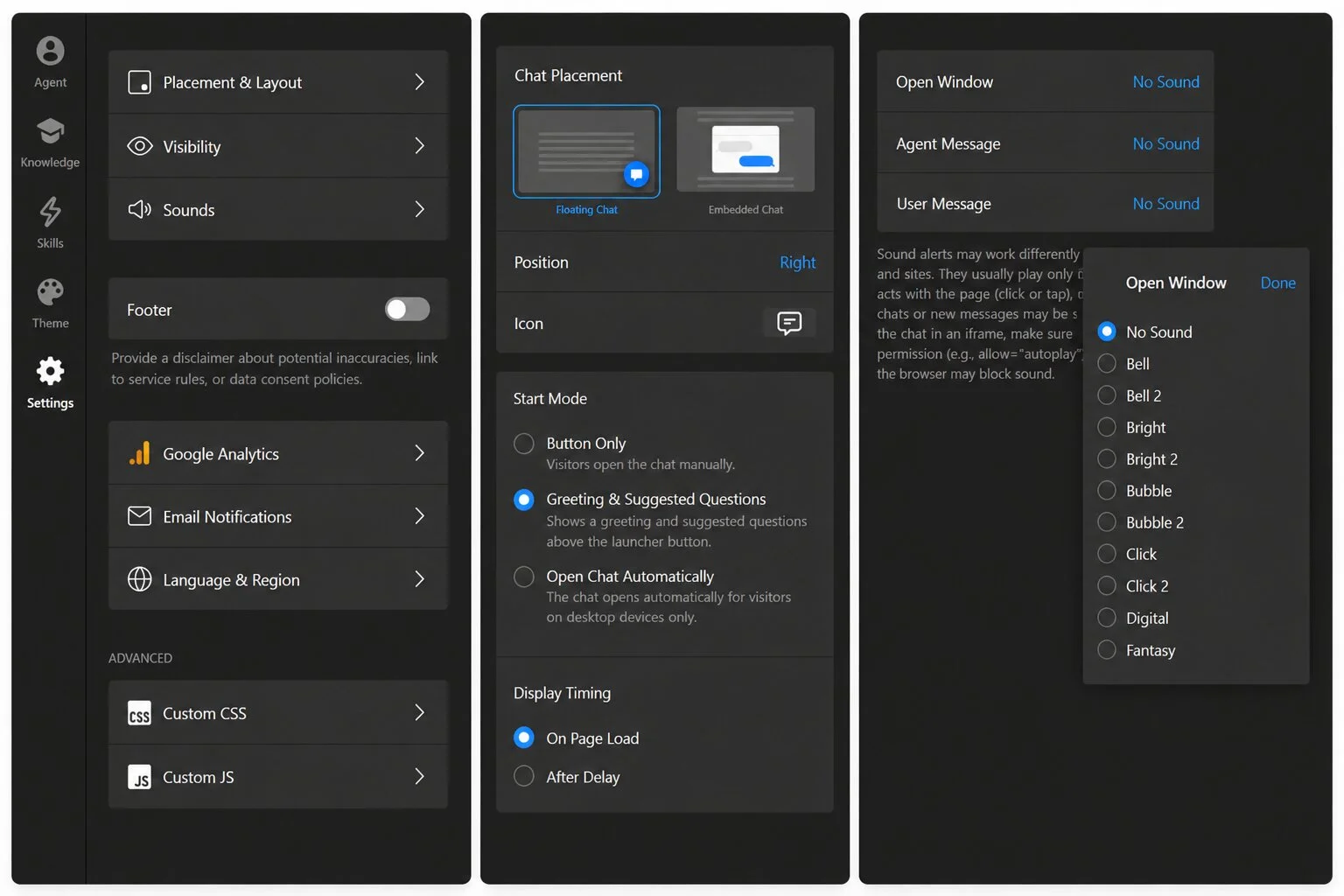
The Settings tab covers two areas: how the chatbot appears on your site, and what happens behind the scenes – advanced capabilities included.
Display and behavior
- Placement & Layout — pick the chat window placement, start mode, and display timing
- Visibility — show or hide the chatbot on specific pages and devices to fit your use case
- Footer — add a disclaimer about AI limitations or link to your privacy policy
- Sounds — toggle notification sounds for new messages
Integrations and advanced settings
- Google Analytics — connect your GA account directly to track chatbot interactions by adding events
- Email Notifications — configure email delivery of chat transcripts and visitor contact details
- Language & Region — choose from 76 localized language presets or edit text strings manually
- Custom CSS — override default styling for advanced visual adjustments
- Custom JS — add event tracking, third-party integrations, or custom behavior scripts
Step 6: Embed the chatbot on your website
Click “Add to Website” or “Publish” in the editor to get your embed code — a short HTML snippet. Paste it into your website’s Custom HTML block and update.

The widget works on WordPress, Shopify, Wix, Squarespace, Webflow, and any platform that accepts custom HTML. For platform-specific instructions, Elfsight maintains setup guides for every major CMS.
Here’s a quick video tutorial you can follow along:
Mistakes That Kill Chatbot Performance
A Netguru analysis found that 67% of businesses reported their chatbot technology didn’t meet expectations, and nearly half said it doesn’t accurately solve issues or gets intent wrong. The patterns behind those numbers are consistent – and avoidable:
| Mistake | How to avoid it |
|---|---|
| Useless greeting and quick replies | “Hi! How can I help?” gives visitors zero reason to engage. Replace it with a specific scope statement — “I can help with pricing, shipping, returns, and product setup” — and pair it with suggested questions that guide visitors toward topics the chatbot handles well. |
| Writing instructions as marketing copy | Our study found that KB files rephrased from product pages produced bland, unhelpful responses. Documentation written from the customer’s perspective (real questions, real mistakes, real edge cases) performs better. |
| Skipping tone and personality setup | A skateboard shop and a law firm shouldn’t sound the same, even if both pick “Professional.” Write 2-3 conversation rules that reflect how your brand actually communicates. |
| Testing with invented questions | Pull 10–15 real messages from your support inbox. Real visitors ask “my order hasn’t arrived and nobody’s answering,” not “What are your hours?” The specificity and emotional register are different. |
| Not reviewing transcripts after launch | Check conversation logs weekly during the first month. Look for repeated questions the bot couldn’t answer, technically correct but confusing answers, and topics where the bot should have escalated but didn’t. |
| No fallback behavior configured | Set up Contact a Human before launch — at minimum for “visitor asks for a human” and “AI can’t answer” triggers. Visitors don’t object to AI; they object to feeling trapped by it. |
So what’s the takeaway? Treat the chatbot as a system you configure, not a product you install and forget. The embed takes five minutes. The knowledge base, the scope boundaries, the greeting, the fallback behavior — that’s where performance is won or lost.
How to Tell If Your Chatbot Is Working
The global chatbot market reached approximately $7 billion in 2026, but the market size doesn’t tell you whether individual chatbots work. A chatbot without metrics is a guess. Below are the benchmarks that define good performance, along with five metrics you should track.
What good performance looks like
Chatbots perform best on high-volume, repeatable queries where the answer already exists in your business content. When Elfsight tracked 2,498 AI-handled support tickets over three weeks, the topics with the highest success rates were:
- Informational queries — pricing breakdowns, plan comparisons, feature explanations
- Policy questions — GDPR, data processing, refund conditions
- Configuration help — widget setup, troubleshooting steps, settings walkthroughs
E-commerce data tells the same story at scale: sites using chatbots resolve 89.2% of customer inquiries and handle 6x more conversations per month, with the common pattern being structured, factual questions with answers drawn from existing content.
Chatbots are not so good at this
68% of consumers have used a customer service chatbot, and 35% say chatbots solve their problems efficiently. Yet 77% still find them frustrating – a gap that tracks to configuration, not technology.
Where chatbots consistently struggle is with tasks that require judgment, account-level access, or actions across external systems: billing discrepancies, refund eligibility decisions, and site-specific debugging. That’s not a failure of the chatbot – it’s a failure of expectations if you didn’t define scope boundaries during setup.
That pattern is clearly evident in the data. A Gartner survey found chatbot resolution rates as low as 17% for billing disputes, compared to 58% for returns and cancellations — issues that tend to follow more structured workflows.
What to measure to be a step ahead
These five metrics tell you whether your chatbot is working and where to focus iteration:
| Metric | What it tracks | Target range | What it tells you |
|---|---|---|---|
| Engagement rate | % of visitors who interact with the chatbot after encountering it | 35–40% of exposed visitors | Whether your greeting and placement are working |
| Containment rate | % of conversations resolved without human handoff | 65%+ resolved without human | Whether your KB covers the right topics |
| Resolution rate | % of conversations where the visitor’s question was actually answered | 78% (AI avg), 85%+ (top performers) | Whether visitors are getting real answers |
| Lead capture rate | % of conversations that resulted in a collected contact | Depends on primary job | Whether form placement and timing are working |
| Escalation rate | % of conversations that ended with human handoff | <15% for routine queries | Whether fallback behavior is configured correctly |
The benchmarks above summarize what “good” looks like across the key metrics. For a full metrics framework and tracking tips, see the chatbot KPI guide.
Other Ways to Integrate a Chatbot
Elfsight is a no-code widget builder – fast to set up, no technical overhead, built for SMBs. But it’s one tool category. Depending on your needs, other approaches may fit better:
- E-commerce and multichannel platforms (Tidio, Crisp, Freshchat) bundle chatbots with live chat, ticketing, and multichannel messaging. Useful if you need a full support stack, but pricing and complexity are higher.
- Enterprise support suites (Intercom, Zendesk) offer AI agents with deep CRM integration, SLAs, and advanced routing. Powerful at scale, but priced for scale too.
- Building your own via API (OpenAI, Anthropic) gives you maximum control over behavior, integrations, and data handling. Requires development time, hosting, and ongoing maintenance.
For a detailed comparison of specific platforms, see the best AI chatbot for website roundup.
Frequently Asked Questions
How much does it cost to add an AI chatbot to my website?
Free options exist — Elfsight offers a free plan with 50 messages per month, and HubSpot provides a free rule-based chatbot builder. AI-capable plans for SMBs typically range from $5 to $39 per month depending on the platform and message volume. Enterprise tools like Intercom use per-resolution pricing plus seat costs, which can scale to thousands per month at high volumes. For a full breakdown, see the chatbot cost guide.
How do I make an AI chatbot that answers questions accurately?
Accuracy comes from the knowledge base, not the AI model. Load specific, current, non-contradictory content: your top FAQs, pricing, policies, and product details. Set explicit scope boundaries in the assistant instructions so the chatbot declines topics it shouldn’t answer rather than guessing. Q&A pairs are useful for high-stakes answers where wording matters — pricing commitments, legal disclaimers, refund conditions. Review conversation transcripts in the first week and fill any gaps the chatbot couldn’t cover.
How long before a chatbot starts performing well?
If the knowledge base is pre-loaded before launch, basic effectiveness begins in the first week. Meaningful optimization happens over the first month as you review transcripts, close content gaps, and refine the assistant instructions. Ongoing refinement is indefinite — the knowledge base should be updated whenever products, pricing, or policies change. No rigorous study quantifies the exact timeline, but the pattern across implementations is consistent: preparation quality determines starting performance, and iteration determines the ceiling.
Is an AI chatbot worth it for a small business?
For high-volume, routine inquiries — pricing, hours, shipping, product questions, basic troubleshooting — yes. These make up the majority of support volume for most SMBs and are exactly what AI chatbots handle well. For complex or high-touch businesses where every interaction requires human judgment, a chatbot may add friction rather than reduce it. The practical test: look at your last 50 support tickets. If more than half are repetitive questions with standardized answers, a chatbot will help. For a fuller picture, see the chatbot pros and cons breakdown.
Does adding a chatbot widget slow down my website?
Well-built widgets load asynchronously and use lazy loading — they don’t block page rendering. Independent testing of 21 chat widgets found that almost all load in parallel with page content, with download sizes ranging from under 100KB to over 700KB depending on the tool. The practical impact is typically negligible for lightweight widgets. Check your Core Web Vitals before and after installation to confirm.
Where to Start
The embed is the easy part. When Elfsight measured its own chatbot across hundreds of support tickets, the 89% useful-response rate didn’t come from the underlying AI model. It came from a knowledge base grounded in real customer questions and edge cases, clear instructions, and ongoing iteration.
The chatbot’s performance ceiling is set before the first visitor ever types a message, so start with the prep. Gather your top 20 FAQs, audit your existing content for contradictions, and define what the chatbot should and shouldn’t answer. Once you’ve established your foundation, the Elfsight AI Chatbot editor gets you from zero to embedded in under an hour – with rich customization, behavior control, and no coding required whatsoever.
Join the discussion →
3 more replies



Honestly the “more forgiving” part is so real
I run a small service business and when response times slip, people get so frustrated in live chat.. Once we added a chatbot to handle that first touch, complaints about wait times dropped noticeably, even though the actual resolution time didn’t change much.
I think people just hate the feeling of being ignored more than they hate waiting.
Glad to hear that adding a chatbot helped reduce customer frustration in your case, Jasmine
That’s a really interesting distinction, actually – perceived wait vs actual wait. It’s kind of like how loading spinners make apps feel faster even though nothing changed on the backend. Perhaps you’re right in thinking that people are more tolerant towards AI, because they’re certain it’s not “ignoring” them on purpose.
There is no doubt that AI chatbots help both businesses and customers – PROVIDED – the AI chatbot architecture is solid, reliable, constantly improving, and provides accurate answers. Otherwise, the business has more to lose than the customer.
For example, if I ask the bot: “How much do you charge for XYZ service?” and the bot answers: “It depends. Can I help you schedule that service?”, the visitor – most likely – is NOT going to visit that business or website again. So, be mindlful. Select an AI Chatbot (LLM) that can be easily and properly trained and is capable of doing an external search – which will help improve the chatbot’s answers.
While Elfsight’s AI Chatbot is great for basic inquiries, it gets a bit lost when complex situations are presented. At my end, I’m constantly training Elfsight’s AI Chatbot in order to achieve our goals – which are not that complicated. For me, it’s a constant struggle, but I do understand it’s driven by the LLM selected by Elfsight (i.e., ChatGPT-5 mini).
Overall, Elfsight’s AI Chatbot is great, but there’s plenty of room to improve it.
Peace!
Accurate answers and continuous improvement are definitely non-negotiable – fully agree there.
The training aspect is a great callout, too. LLM behavior isn’t always intuitive, it’s often less about the amount of data and more about how specifically it’s structured and framed – small changes can make a big difference in output quality.
Appreciate you sharing your experience, Petar!
Hi @Kristina
Implementing an AI chatbot was a long-held dream of mine. Thanks to Elfsight, it was relatively easy to realize.
It’s not exactly being adopted yet, but I think that will change.
I believe in productivity over making phone calls or processing customer emails, especially when skilled workers are scarce.
Skilled workers in a trades business shouldn’t waste their time on that.
“Use your time for what matters” and focus on the 20% of tasks that deliver 80% of the success.
An AI telephone assistant would then be the perfect finishing touch.
I would like to get more engagement on my chatbot but not much from visitors on the website. Going to try somethings to get more attention with it. Its new and our visitors are older so that has its own issue. I like Elfsight’s chatbot the most and will be happy when others use it. Keep up the good work Elfsight.
Thanks for sharing this! The older audience thing is a real factor, but I think it’s also an opportunity. Older visitors tend to have more specific questions and less patience for digging through pages, so once they try the chatbot and get a quick answer, adoption usually picks up. A well-phrased first welcome message and quick replies can do the heavy lifting for catching attention, too. Would be curious to hear what you try and how it goes!
We just added a chatbot 2 weeks ago on our site and already I’ve noticed that I’m getting way less email regarding topics already on our site that folks were clearly just too lazy to find and would send an email instead. Very happy so far.
That’s a great early signal, @Louis_Fullagar1!
I’m curious, have you noticed how much email volume dropped so far? Even roughly?
Also wondering if others saw a similar effect after adding a chatbot – did it actually reduce support load, or just shift it?
So the volume of total email has dropped slightly. I’m obviously getting chatbot summaries instead which is new. But those I’m just reading rather than having to respond with a detailed email that takes a few minutes to write each time so in that sense it’s way better time wise.
Interesting take!
So it’s not only a reduction (slight, but still), but faster handling as well.
Curious if others are seeing this too – is it a real reduction in support load, or more of a shift in format?
For me it’s both