
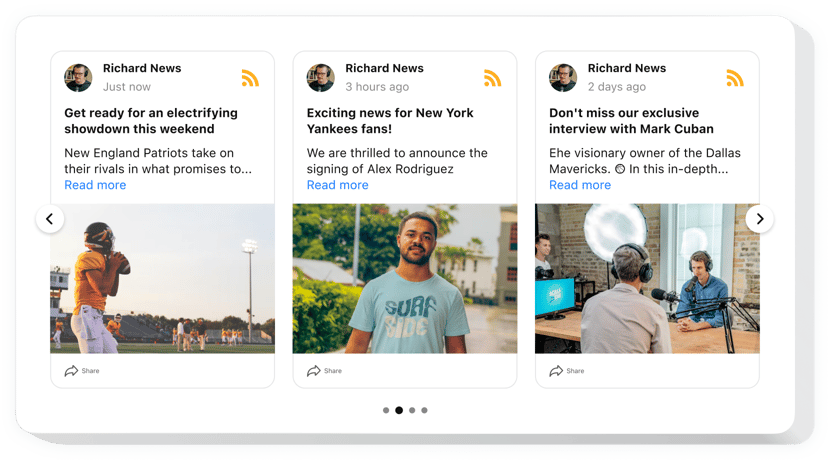
Wix RSS Feed app

Create an RSS feed on your Wix website to share articles, blog posts, and updates, expanding your reach and letting users follow your latest posts anywhere.
4.8 rating
10,000+ reviews
Free plan available
Create Widget for Free
No credit card needed
Wix RSS Feed app

Create your RSS Feed app

Configure your RSS Feed and add it to your Wix website for free!

Description

Elfsight RSS Feed for Wix is an exclusive app for marketing emotions and experiences. By using it you can form customized feed composed of the content from diverse blogs – and demonstrate it right on your website. Exert the total control over a displayed content and remove spam and any unwelcome content by the means of manual moderation. Fully responsive online-configurator offers you multiple templates to pick.

Make your website more successful for business targets by means of RSS Feed

The central features contain

  • Conceal the header to make your app look minimalistic.
  • Get rid of any spam and unwilling content with manual moderation.
  • Select one out of six layouts available: Carousel, Slider, Collage, Grid, List, Masonry.
  • Let your posts appear in a pop-up mode.

You can try the full capabilities of the app in the free editor

How do I embed RSS Feed on my Wix website?

Just take a couple of steps described below to insert the app.

  1. Manage our free editor and start forming your custom-made app.
    Choose the preferable interface and functional traits of the tool and apply the edits.
  2. Receive the individual code exposed in the box on Elfsight Apps.
    As soon as the establishing of your app is done, copy the individual code from the appearing popup and save it for further use.
  3. Enter on using the app on your Wix site.
    Embed the code you’ve saved recently in your page and apply the adjustments.
  4. Done! The integration is fully performed.
    Go to your website to see how the app performs.

If you experience some difficulties, don’t hesitate to get in touch with our support team. Our consultants will be excited to help you with all the difficulties you might have with the product.

Do I need a Wix Premium plan to embed the RSS Feed?

You can install the app on a free Wix website using the standard embed method. Premium plans additionally allow installation via Settings → Custom Code, which avoids iframe embedding.

Is the RSS Feed app compatible with Wix layouts?

Yes, Elfsight integrates smoothly with Wix sections and automatically adjusts to your Wix website’s responsive design.

Can I add multiple RSS sources to one app?

Yes, you can merge several RSS links into a single feed display, combining content from different websites.

Are complete articles shown or previews only?

Elfsight displays headlines, excerpts, dates, and images, while full articles open in popup or external view.

Can I choose which post elements are displayed on Wix?

Yes, you can control visibility of author details, dates, thumbnails, share buttons, and source icons.

What popup modes are available on my Wix website?

Popup view includes slider-style browsing or continuous scroll feed, improving user engagement.

Does the app support post thumbnails?

Yes, featured images from RSS enclosures are automatically extracted and displayed with each entry.

Can I filter posts by keywords or source?

Yes, keyword filtering and source selection help you display only relevant content streams on your Wix website.

Are private RSS feeds compatible?

Elfsight supports public RSS URLs only. Private or secured feeds require public access to function.

Pricing

14-day money back guarantee. Risk-free, you can cancel at anytime.
Elfsight Apps
Platform-independent version that works on any site
from $0 / month
start with a free plan
Unlimited domains
24/7 company support
Free installation help
Flexible design