User-generated content on Instagram is anything real customers create about your brand, rather than content you produce yourself — photos, Reels, Stories, captions, comments. That pool of authentic content is among the cheapest and most credible forms of social proof a small- to medium-sized business can tap into.
This guide covers the full job: understanding what makes Instagram UGC work, collecting it, clearing the rights to reuse it, and displaying it where it counts — natively on Instagram and on your own website.
- Organic UGC and paid “UGC-style” content follow different rules and carry different costs.
- A tag, a like, or a public post gives you no automatic license to reuse the content.
- Incentivized UGC like contests and freebies must be disclosed under FTC rules.
- Your website is a high-value place to display cleared UGC.
Why Instagram UGC works
On Instagram, UGC means content created by customers and fans, not by the brand’s marketing team. If you’ve wondered what UGC on Instagram looks like in practice, it’s the tagged photo of someone wearing your product, the unboxing Reel, the Story shout-out, the review left in your comments.
Its power comes from social proof. People trust other people more than they trust advertising, and Instagram social proof — visible, public, and tied to a real account — carries weight that a polished brand campaign can’t replicate. That trust is exactly why UGC has become a staple of social media marketing, and why it’s worth the effort to collect and display it well.
Organic UGC vs. paid creator content
There’s a distinction worth drawing early, because the UGC industry tends to blur it. Many UGC platforms use the term to mean paid “UGC-style” creator content — videos a brand commissions from a creator that are designed to look organic. That isn’t the same as genuine customer content. The difference comes down to who made it and why: a paid creator brings commercial intent, whereas a customer shares an unsolicited opinion.
For most small businesses, the valuable, trust-building, free version is organic customer UGC. When organic content is thin, platforms such as Higgsfield, shaped around an AI Video Generator, offer a third option for producing supplementary footage without commissioning a paid creator. As the rights and FTC sections below explain, paid creator content also carries disclosure obligations that organic content usually doesn’t. Here’s how the two compare:
| Attribute | Organic customer UGC | Paid creator content |
|---|---|---|
| Who creates it | A real customer or fan | A creator the brand hires |
| Motivation | Genuine enthusiasm | A paid agreement |
| Typical cost | Free | Per-video or campaign fee |
| Disclosure required | Only if incentivized | Always (paid partnership) |
| Best use | Authentic social proof | Polished, on-brand assets |
The trust behind it
The trust advantage shows up in the data. Edelman’s 2025 Trust Barometer found that 80% of consumers look to peers rather than brand experts as a trusted source of information about brands. That shift is what makes a customer’s Instagram post more persuasive than a brand’s own claims.
Scale reinforces it: Instagram surpassed 3 billion monthly active users in 2025, though that’s a milestone figure Meta announced rather than an audited quarterly number — eMarketer estimates the deduplicated, spam-adjusted base is closer to 1.5 billion. Either way, it’s the largest visual-first network, which makes it the richest source of image and video UGC available to a brand.
It converts on Instagram and on your website
UGC earns engagement on Instagram itself, where it’s native to the feed. Instagram’s 2025–2026 algorithm reportedly favors original content over repost-heavy accounts, rewarding brands that build a genuine community rather than recycle content. The same content also does real work off-platform, on your website.
Shoppers’ expectations
In Bazaarvoice’s Shopper Experience Index, 55% of shoppers said they’re unlikely to buy a product without UGC, such as reviews, photos, or Q&A. The website-specific picture is just as clear: 74% of shoppers want to see customer content on brand websites, 40% won’t buy if a product page has none, and 62% are more likely to purchase when they can view customer photos and videos.
These figures aren’t a promise of a fixed conversion lift. An honest reading of the research is directional: on-site customer content consistently aligns with more confident buyers. Displaying UGC on your website doesn’t compete with posting it on Instagram — it extends the same proof to the place where the purchase actually happens. Before any of that pays off, though, you need content worth displaying.
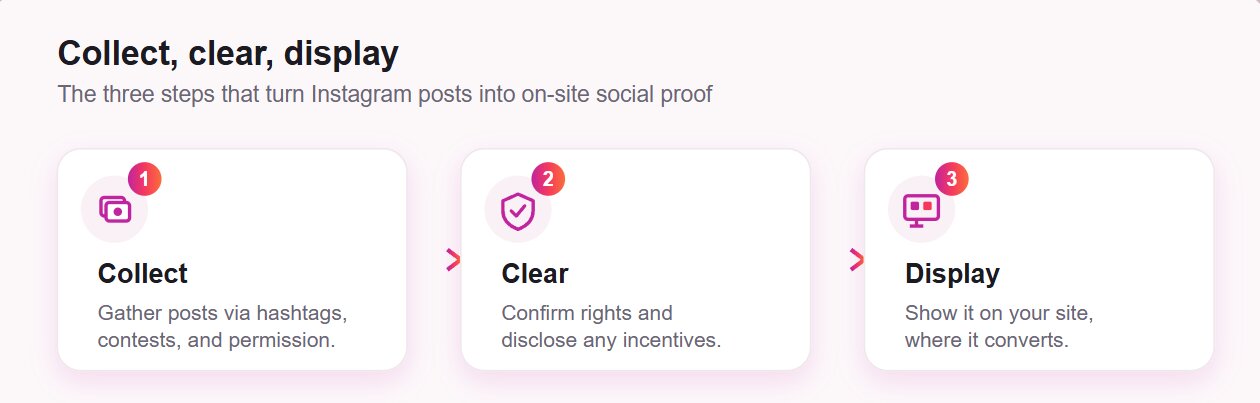
How to collect Instagram UGC
Collecting Instagram UGC is mostly about giving people a reason and a way to create it, then keeping track of what comes in. Five methods do most of the work, and they stack well together:
- Create a branded hashtag and promote it consistently so UGC posts are easy to find and group.
- Engage with people already tagging you by replying and reacting, which builds the habit of sharing.
- Run a contest or giveaway to spark a wave of entries (compliant with disclosure rules)
- Ask permission to feature content that customers have already posted about you.
- Collaborate with creators when you need higher-production content to supplement organic posts.
Make it easy to participate
Participation climbs when you remove the guesswork. Customers create more when a brand tells them what to make: a clear prompt, a theme, or an example gives people something to act on, yet most brands never provide it. A defined hashtag paired with a sample post does more for entry volume than a vague “tag us” ever will. Branded AR filters work the same way – Banuba and similar SDK vendors supply the face tracking, and the brand ships a filter people can open, use and post from in one tap.
Product sampling is an underused tactic for the “empty room” problem, where no reviews means no buyers and no buyers means no reviews. Sending free product to customers in exchange for honest content seeds that first wave. One Bazaarvoice case study credited a sampling program with a 405% increase in review volume and a 48% rise in revenue per visit for the sampled products. Collecting content is the straightforward part — reusing it legally is where most brands get sloppy.
Clearing the rights
“Just because a customer tags your brand doesn’t mean you own the content.” — Victoria Owen, Content Strategist, Bazaarvoice
Here’s the rule that surprises people: posting publicly, tagging your brand, or using your hashtag doesn’t automatically give a brand the right to reuse someone’s content. Copyright vests automatically in the creator of the post the moment it’s made, and a like or a mention doesn’t transfer it. Instagram’s own Help Center states that you should only post content you have the right to use.
Reusing someone else’s content cleanly means thinking in four layers:
| Layer | What it covers | What to do |
|---|---|---|
| Copyright | The photo or video itself | Get written permission before reusing |
| Likeness | Identifiable people in the frame | Get their consent too, especially for commercial use |
| Music / audio | A Reel’s licensed soundtrack | Don’t assume the on-platform music license travels off-platform |
| Scope of use | Where and how you’ll use it | Confirm permission covers your specific use; a feed repost isn’t ad rights |
Beyond those four layers, how you place the content on your site matters too. Two approaches come up most often, and they carry different weight.
Reposting
Reposting means downloading content and re-uploading it to your own channel, which creates a copy that lives on your side. Because that copy is yours, getting the creator’s explicit permission first is the safe move, and a quick comment or direct message is usually enough to secure it.
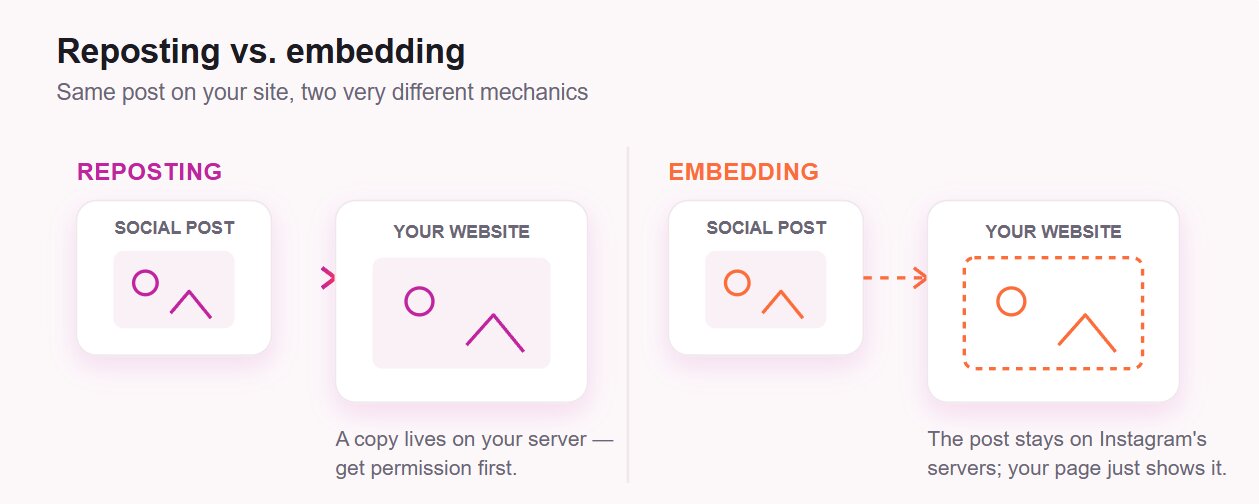
Embedding
Embedding uses code that displays the post while it stays hosted on Instagram’s servers, so no copy is made on your end. It’s the lighter-touch way to surface customer posts, and Instagram lets creators disable embedding of their posts, so honor that setting when it’s switched on.
In practice, risk rises with placement. A social-proof gallery on your homepage is low-risk and extremely common, while putting someone’s content next to a Buy button, in a paid ad, or in any way that implies endorsement is where permission stops being optional. Two duties apply regardless of method: the likeness rights of identifiable people, and FTC disclosure when content was incentivized.
The cleanest path of all is to lead with content you own, then add customer content with a quick “mind if we feature this?” and always honor takedown requests.
FTC Rules for Incentivized UGC
The moment you give someone something of value for creating content — a discount, a free product, a contest entry, even a chance to be featured — you’ve created what the FTC calls a material connection, and it has to be disclosed clearly and conspicuously.
For a UGC contest, one nuance matters most. Offering a reward in exchange for a post (any honest opinion) is fine as long as the connection is disclosed. Conditioning the reward on a positive or five-star post is not allowed, nor is suppressing negative content.
The principle is simple: incentivize the act of posting, not the sentiment. If you’ve run a review campaign before, this will feel familiar, since the same disclosure logic applies when you ask customers for Google reviews. With content collected and cleared, the payoff is in how you display it.
Displaying UGC on your website
Two decisions shape the payoff: where the content sits on your site, and how you get it there. The first is about matching the right type of UGC to the page where it carries the most weight, and the second is the practical setup.
Where to display it
The conversion data from earlier points to a handful of placements that do the most work. Match the format of the content to the page where it has the most influence:
| UGC format | Placement | Impact |
|---|---|---|
| Customer photos and reviews | Product pages | Reassures buyers at the moment of decision |
| Live Instagram feed gallery | Homepage or landing page | Builds trust quickly with fresh, visible proof |
| Testimonial / social-proof blocks | Near calls to action | Nudges undecided visitors toward acting |
| Branded-hashtag feed | Dedicated UGC gallery page | Showcases a stream of community content (apply per-post rights) |
The cleanest of these to maintain is a live feed of your own posts, since you own that content outright. Featured customer content and hashtag feeds add reach and variety, with the permission steps from the rights section applied to anything other people created.
The setup process
For a non-technical setup, a no-code Instagram feed widget like Elfsight’s embeds your content on your website as an auto-updating gallery, with no developer required. The setup is short and repeatable:
- Choose a template and point the feed at your own public account
- Curate which posts appear with filters plus and a post-count limit.
- Customize the visual style of your feed to match your website.
- Copy and paste the embed snippet into a Custom HTML block of your site.
Build your own UGC Instagram feed in the interactive editor ↓
For a full walkthrough, our guide to embedding an Instagram feed covers each step. Developers who’d rather build against the platform directly can work with the Instagram Graph API instead.
Frequently asked questions
Do I need permission to display my own Instagram posts on my website?
Can I reuse the same Instagram UGC in paid ads that I show on my site?
What should I do if a customer asks me to remove content I've featured?
Can I display UGC from a private Instagram account?
Is taking a screenshot of a post safer than embedding it?
Putting Instagram UGC to work
Instagram UGC is social proof you don’t have to manufacture. It works on Instagram, where authentic posts earn engagement, and it works on your website, where customer photos and reviews give buyers the confidence to act. The two reinforce each other rather than compete for your attention or budget.
The advantage goes to brands that handle the unglamorous middle well: deliberately collecting content, honestly clearing rights, and properly disclosing incentives. Start with what you already own by embedding your account’s posts as a social proof block, then layer in cleared customer content as your collection grows. Handled this way, Instagram UGC becomes a trust engine that keeps running with very little upkeep.
Key references
- Bazaarvoice — 64 User-Generated Content Statistics to Know: https://www.bazaarvoice.com/blog/user-generated-content-statistics-to-know/
- Edelman — 2025 Trust Barometer Special Report: Brand Trust, From We to Me: https://www.edelman.com/trust/2025/trust-barometer/special-report-brands
- Later — User-Generated Content Rules: https://later.com/blog/user-generated-content-rules/
- Instagram Help Center — Intellectual Property: https://help.instagram.com/354736791367645/
- Venable — Embedded Instagram Content Passes the Server Test: https://www.venable.com/insights/publications/2023/07/embedded-instagram-content-passes-the-server
- FTC — Updated Advertising Guides to Combat Deceptive Reviews and Endorsements: https://www.ftc.gov/news-events/news/press-releases/2023/06/federal-trade-commission-announces-updated-advertising-guides-combat-deceptive-reviews-endorsements