Hotels are the one local business Google doesn’t treat like the rest. When a traveler looks up your property, the rating they see isn’t just the reviews on your listing. Google assembles a broader picture from sources across the web. That’s why Google hotel reviews so often feel unpredictable: the score shifts, and attributes appear that nobody wrote.
This guide explains how the system works: what feeds your rating, why your class rating is separate, and what you can and can’t change. It then covers collecting reviews in line with Google’s rules, responding well, handling complaints and removals, and showing your best reviews on the one surface you fully own: your website.
- Google assembles hotel review information from across the web.
- Your review rating and your hotel class rating are two different ratings.
- You can’t delete genuine reviews or edit Google’s attribute highlights.
- Google’s rules prohibit incentives, review gating, and on-premises pressure.
Why reviews carry extra weight in hospitality
A hotel stay is a high-commitment purchase: expensive, hard to reverse, impossible to preview. That puts reviews at the center of the decision, which is why Google reviews for hotels do more work than in most categories. A guest rarely chooses between you and nothing – they’re comparing you against three or four others, and your reviews are the tiebreaker.
How travelers use reviews before booking
Reading reviews is now near-universal, and the bar for “good enough” is rising. Recent research found that 97% read reviews for local businesses, and the share who always read them rose from 29% to 41% in a year. Rating and volume thresholds tightened, too, which matters where guests filter hard before reading a word.
| Traveler behavior | Share of consumers |
|---|---|
| Read reviews for local businesses | 97% |
| “Always” read reviews (up from 29%) | 41% |
| Will only use a business rated 4.5 stars or higher (up from 17%) | 31% |
| Won’t use a business with fewer than 20 reviews | 47% |
For a hotel, those last two figures are the ones to sit with. A property with a thin review count or a middling average drops off the shortlist before a traveler reads a single comment. Volume and rating work as a gate to consideration, not just a detail on the page.
Google is essential, but no longer the whole picture
Google is still where most travelers land, but its grip is loosening. Its share as the top review platform fell from 83% to 71% in a year, the average consumer uses six review sites, and AI tools for local recommendations jumped from 6% to 45%. For hotels, the shift is sharper, since online travel agencies already command much of the booking attention.
Google is necessary but not sufficient: a strong presence wins you a shortlist spot, but the traveler will cross-check the OTAs and, increasingly, ask an AI assistant before booking. Holding those surfaces together starts with how Google handles hotels specifically, which is where most guidance goes quiet.
How Google hotel reviews actually work
Google runs hotels through a different system than it does for ordinary listings, and the gap between what hoteliers expect and what Google does is the source of most confusion. Four mechanics explain nearly all of it.
Your score is assembled from across the web
The reviews and star count on your Business Profile come from Google users. But in Google’s hotel surfaces, the picture a traveler sees is pulled from a wider pool, and Google says so plainly in its documentation for hotel owners.
“Google uses hotel review summaries from TrustYou, a third-party review service, for some hotel listings.” — Google Hotel Center Help
TrustYou builds those summaries by aggregating scores from across the web, and Google says the overall rating it shows is “based on user ratings and other signals.” So the number a guest sees can reflect much more than the reviews on your Google listing. It’s a key reason the score can feel disconnected from your own profile.
Review rating vs. hotel class rating
Google shows hotels two different ratings, and they get mixed up constantly. The review rating reflects guest sentiment; the class rating describes the property’s tier, such as amenities and price band.
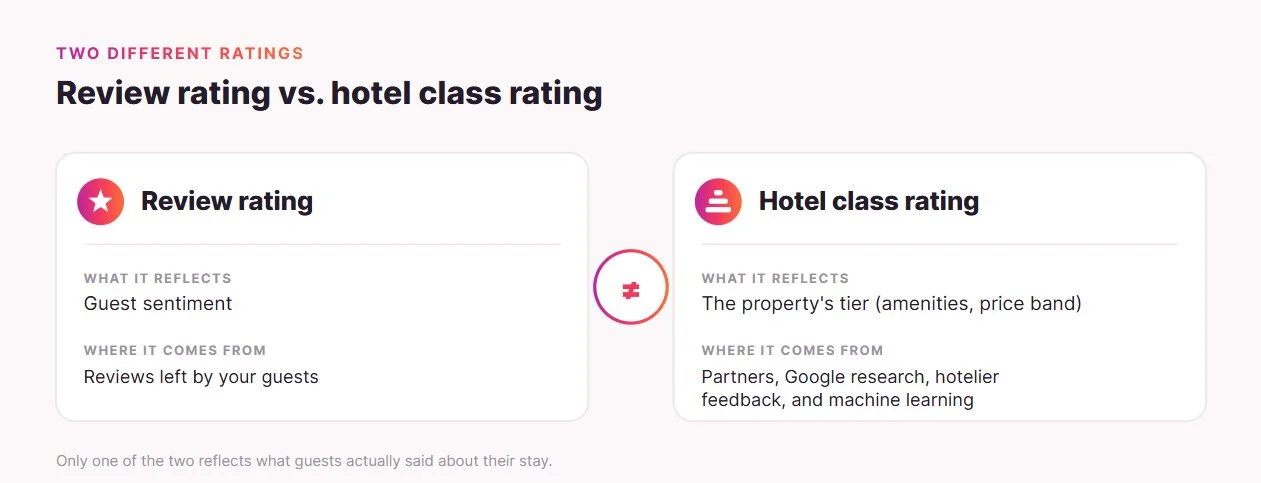
That class rating comes from third-party partners, Google’s research, hotelier feedback, and machine learning. Google states the two ratings are different, which is worth knowing before you read too much into a number on your panel.
Hotels live in their own search experience
After Google’s 2018 algorithm change, independent hotel sites were largely pushed out of organic “hotel + location” results in favor of the OTAs. The hotel pack, built from Business Profile listings, became the main way a property surfaces on its own terms.
Google then ended “Book on Google” in 2022, which raised the value of your own listing for direct, commission-free bookings through Free Booking Links.
Reviews matter for that stage too. They’re consistently cited as local-pack ranking factors, so a healthy review profile helps your property surface in the searches that drive bookings.
Attribute highlights come from your guests’ words
Google reads review text and uses it to score attributes like cleanliness or location: a comment that the room was spotless becomes a positive signal for cleanliness. These highlights come from guest reviews, and you can’t edit them or customize the “Hotel details” summary Google builds.
There’s no box to tick to fix a weak attribute. The only way to move it is to generate genuine guest text that reflects a better experience, which leads to the real question: what can you actually control?
What you can and can’t control
Once you see the mechanics, the picture clarifies. A meaningful part of your Google reputation is assembled by Google and isn’t directly editable, while a separate set of levers is fully in your hands. Sorting one from the other is the difference between productive effort and frustration.
| Element | Direct control? |
|---|---|
| Business Profile accuracy and completeness | Yes |
| Generating fresh, genuine reviews (compliantly) | Yes |
| Public responses to every review | Yes |
| Flagging reviews that break Google’s policies | Yes |
| Your Booking, Expedia, and Tripadvisor profiles | Yes |
| Reviews shown on your own website | Yes |
| The aggregated cross-web score | No |
| NLP-derived attribute highlights | No |
| The hotel class rating | No |
| Deleting genuine negative reviews | No |
The rest of this guide works through the left-hand column, because that’s where your time pays off. It starts with the rules that govern how you’re allowed to collect reviews, which changed materially in 2026.
The new rules every hotel needs to know
Before you collect a single review, know what changed, because several common hospitality tactics are now off-limits. Two layers apply: Google’s platform policy and US federal law. Hospitality is the most incentive-happy vertical there is, so this is where well-meaning hotels most often cross the line.
What Google now prohibits
Google’s review policy has sharpened and is now actively enforced. The most consequential rule for hotels is the ban on incentives, stated directly in the policy text.
“Offer incentives — such as payment, discounts, free goods and/or services — in exchange for posting any review or revision or removal of a negative review.” — Google Maps user-generated content policy
That clause is what makes “leave a review, get 10% off your next stay” a violation. Alongside it, Google prohibits a cluster of related practices that hotels lean on:
- Incentives: discounts, free nights, loyalty points, or prize-draw entries tied to leaving a review.
- Review gating: routing happy guests to Google while steering unhappy ones elsewhere.
- On-premises pressure: front-desk tablets, lobby kiosks, or “review before you check out” prompts.
- Staff quotas: directing staff to collect a set number of reviews.
- Specific-content requests: asking guests to name a staff member or include particular wording.
The FTC rule adds a legal layer
In addition to the platform’s rules, US federal law now carries civil penalties. The FTC’s rule on consumer reviews took effect on October 21, 2024, with penalties up to $52k per violation. Its key prohibition for hotels covers conditional incentivized reviews: you can’t tie compensation to a review expressing a set sentiment, stated or implied.
“Fake reviews not only waste people’s time and money, but also pollute the marketplace and divert business away from honest competitors.” — Lina M. Khan, then FTC Chair
There’s a deliberate carve-out worth holding on to: a general request to all guests to post their honest experiences is fine. Google and the FTC land in the same place, ask everyone honestly with no strings, which makes the compliance playbook simpler than the list of bans suggests.
How to get more hotel reviews on Google
Google still wants businesses to collect reviews; it just wants the ask to be neutral and unincentivized. For hotels, that leaves a clear set of channels that work and a few habits to drop. The table below maps everyday tactics against the new rules.
| Tactic | Status under new rules |
|---|---|
| Post-stay email or SMS asking for honest feedback | Compliant |
| Printed in-room QR card linking to your review form | Compliant |
| Google-sanctioned post-stay survey provider | Compliant |
| A natural verbal ask at checkout, no reward attached | Compliant |
| Front-desk tablet or lobby kiosk to review on-site | Not compliant (on-premises pressure) |
| Discount, free night, or loyalty points for a review | Not compliant (incentive) |
| Routing only satisfied guests to Google | Not compliant (gating) |
The post-stay email or SMS is the workhorse, because it reaches the guest after departure, when pressure isn’t a factor and the experience is fresh. For international properties, sending the request in the guest’s language lifts response rates.
Post-stay surveys
Google also sanctions a hotel-specific channel that doesn’t exist in other verticals: guests can submit a Google review through a post-stay satisfaction survey from approved providers.
- Customer Alliance
- Medallia
- Revinate
- ReviewPro
- TrustYou
The one condition is that the survey must go to every guest as a neutral request, not as a filter that quietly routes only the happy ones to Google. For the exact wording and timing of a compliant request, our guide to asking for Google reviews walks through the mechanics.
Responding to hotel reviews
Collecting reviews is half the job. Responding is the other half, and for hotels, it carries unusual weight. A reply to a negative review isn’t really for the reviewer. It’s for every future guest comparing your property against the one down the street. A calm, accountable response that offers to resolve things offline reads as insurance to that audience.
The behavioral case is strong: 88% of consumers would use a business that responds to all reviews, versus 47% for one that never responds. That’s a real swing in conversion, and it’s the right reason to respond, for trust rather than ranking.
Google hasn’t confirmed response rate as a ranking factor, and replying can’t change your star average. Treat responses as reputation work, not an algorithm lever.
Handling Google hotel reviews complaints and removal
One of the most common things hoteliers bring to Google is some version of “how do I get this review taken down.” It’s also where google hotel reviews complaints usually start: not with travelers filing grievances, but with owners trying to remove a damaging review. The honest answer reframes the problem rather than solving it the way most hope.
Why most reviews can’t be removed
Google removes reviews only when they break its content policies: spam, fake submissions, conflicts of interest, or off-topic content. Genuine criticism, even when it feels harsh or unfair, stays up. Older reviews generally can’t be removed, with narrow exceptions such as a change of ownership or location.
How to flag a review that breaks the rules
For reviews that genuinely violate policy, flagging is the route. Reviews pass through automated moderation before going live, so some appear within minutes, while others take about two weeks.
When a review clearly breaks the rules, the process is straightforward:
- Find the review on your Business Profile or in Google Maps.
- Use the flag or report option and select the violation type.
- Wait for Google’s automated and manual review of the report.
- If it’s wrongly denied, escalate through Google’s business support.
Because removal is the exception rather than the rule, our walkthrough on flagging and escalating a review is worth reading before you invest time in a removal request.
The real lever is response, not removal
The aggregated score, the attribute highlights, and genuine reviews aren’t yours to edit. So the tools that move your reputation are the ones you control: a strong public response to every review, plus a steady flow of fresh, genuine reviews.
One old complaint matters far less when it sits among recent, positive feedback, which is exactly what compliant collection produces. That’s the loop worth investing in.
Managing reviews across Booking, Expedia, and Tripadvisor
Travelers rarely stop at one site. Cross-industry data shows 36% of consumers use two review sites and 41% use three or more, thus an independent property needs at least one strong OTA profile beside its Google one.
Knowing each platform’s quirks helps you manage them without trying to force them into alignment:
| Platform | How reviews work | What to watch |
|---|---|---|
| Booking.com | Score drives search ranking; an 8.0+ earns an “Excellent” badge | Reviews are recency-weighted since 2025; subcategory scores double as an operational diagnostic |
| Expedia Group | Verified reviews: only guests who booked and stayed can leave one | 400-word reply limit; aim to respond within 24 hours; strong scores can aid placement and VIP Access |
| Tripadvisor | Popularity Index ranks on review quality, recency, and quantity | Solicitation is monitored; advise guests to review after checkout |
Review platforms shape your reputation
These surfaces also indirectly shape the Google picture. Google links and licenses third-party sources and uses TrustYou summaries, so your OTA reputation influences what travelers see across Google’s hotel surfaces, even though your Business Profile review score stays Google-user-only. You manage each surface; you don’t merge them.
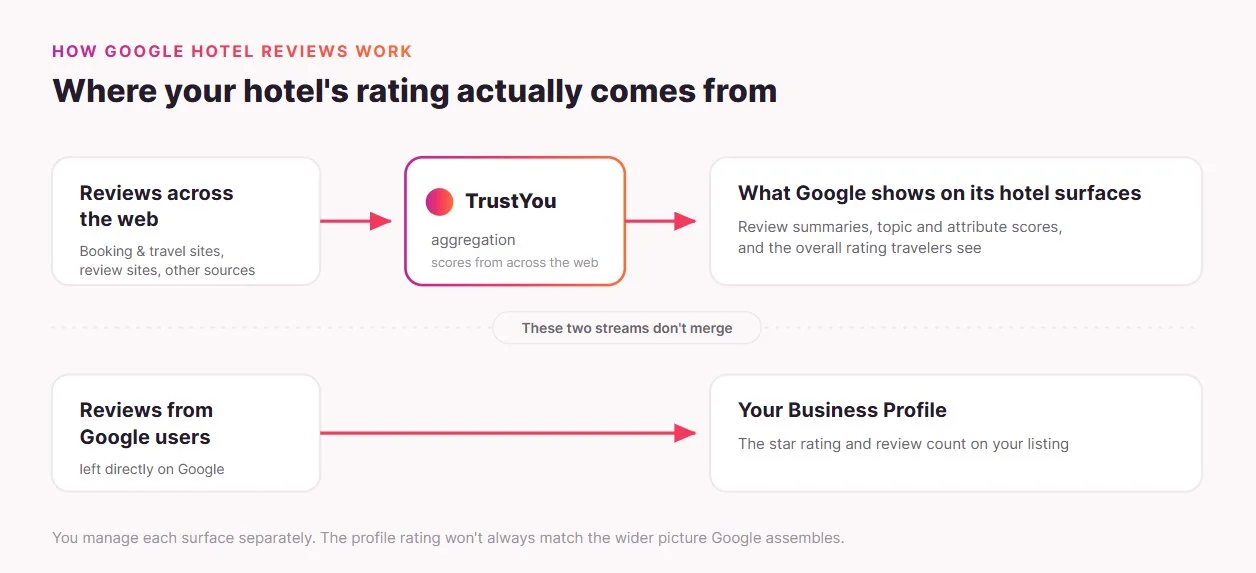
The payoff for keeping them healthy is direct: a strong profile drives commission-free bookings through Google’s Free Booking Links, the core ROI argument for an independent hotel.
Displaying your Google reviews on your hotel website
There’s one surface a hotelier controls outright, and some disregard it – your own website. Showing your existing Google reviews there is a display action, not a solicitation, sitting outside the collection rules covered earlier. It also lets you decide which proof a guest sees at the time of booking, rather than relying on a Google-assembled score you can’t edit.
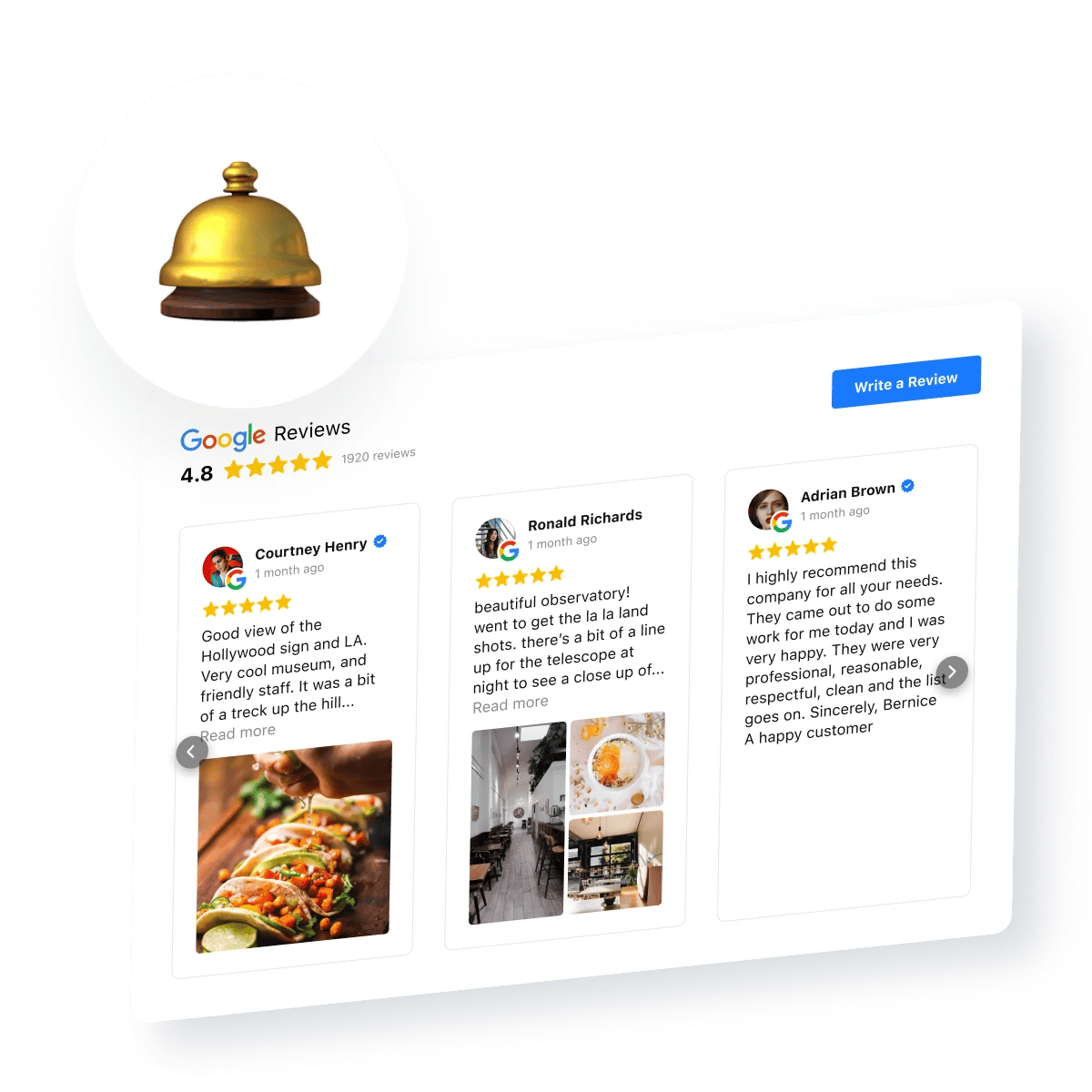
Elfsight’s Google Reviews widget is built for this. It automatically pulls your Business Profile reviews, displays them in a chosen layout and color scheme, shows reviewer photos and your owner replies, and lets you filter, sort, and pin your strongest feedback to the top. The “Write a Review” button is a simple open redirect to your Google profile, so it stays compliant with no incentive attached.
Build your custom Google hotel reviews widget ↓
Elfsight’s tools for travel and hospitality sites cover other booking-adjacent widgets in the same no-code setup.
Frequently asked questions
Can a hotel pay to have negative Google reviews removed?
Why is my hotel's Google rating different from my Booking.com or Tripadvisor score?
How long does a Google review take to appear after a guest submits it?
Do Google reviews affect my hotel's Google Ads or paid placement?
Should a brand-new independent hotel focus on Google reviews or OTA reviews first?
Where hoteliers should focus
A few parts of your Google reputation cause most of the frustration: the aggregated score, the attribute highlights, and the class rating. None of them is yours to edit, and no amount of effort changes that directly.
The parts that move the needle are entirely in your hands: a complete profile, fresh post-stay reviews, a reply to everyone, and clean OTA profiles. Your website is the one surface you own outright, where you choose which proof a guest sees. Start with what you control, and the score Google assembles elsewhere will track the experience you deliver.
Key references
- Google — Hotel Center Help, “Frequently asked questions for hotel owners.” https://support.google.com/hotelprices/answer/7219055
- Google — Business Profile Help, “Hotel class ratings.” https://support.google.com/business/answer/7660515
- BrightLocal — Local Consumer Review Survey 2026. https://www.brightlocal.com/research/local-consumer-review-survey/
- FTC — “Rule on the Use of Consumer Reviews and Testimonials” (16 CFR Part 465), announced August 14, 2024. https://www.ftc.gov/news-events/news/press-releases/2024/08/federal-trade-commission-announces-final-rule-banning-fake-reviews-testimonials
- Whitespark — Local Search Ranking Factors (2026), published November 6, 2025. https://whitespark.ca/local-search-ranking-factors/