Welcome, Hunter! 👋 Enjoy 50% OFF annual plans with code PRODUCTHUNT — limited time ⏳
50% OFF annual plans — code PRODUCTHUNT
BLACK FRIDAY SALE 50% OFF +1 FREE MONTH LIMITED TIME DEAL Grab The Deal
50% OFF +1 FREE MONTH Grab The Deal

Squarespace Event Calendar plugin
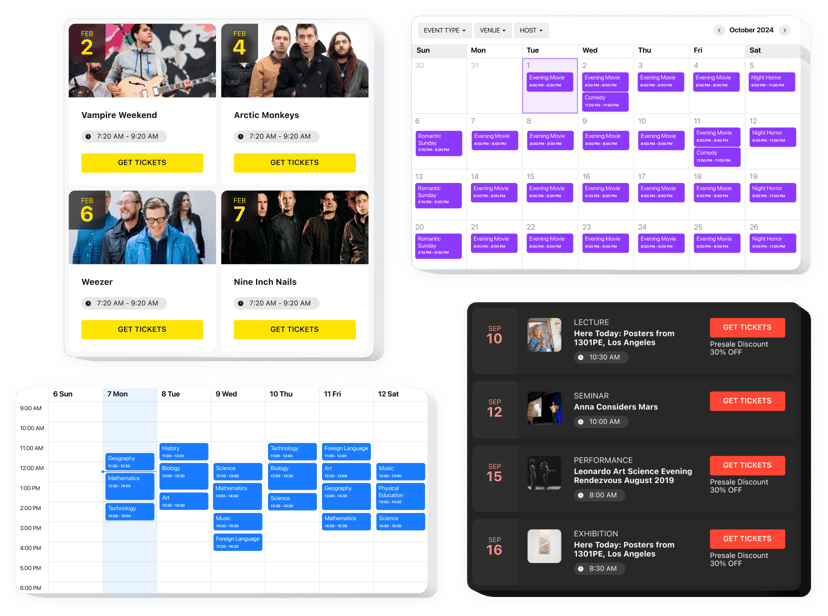
Present event schedules on your Squarespace website to show upcoming activities, organize agendas, and keep visitors informed, driving registrations and participation.
4.8 rating
10,000+ reviews
Free plan available
Create Widget for Free
No credit card needed
Squarespace Event Calendar plugin

Create your Event Calendar plugin

Configure your Event Calendar and add it to your Squarespace website for free!

Screenshots

Squarespace Event Calendar plugin
1 / 6

Embed Event Calendar with Elfsight Widget

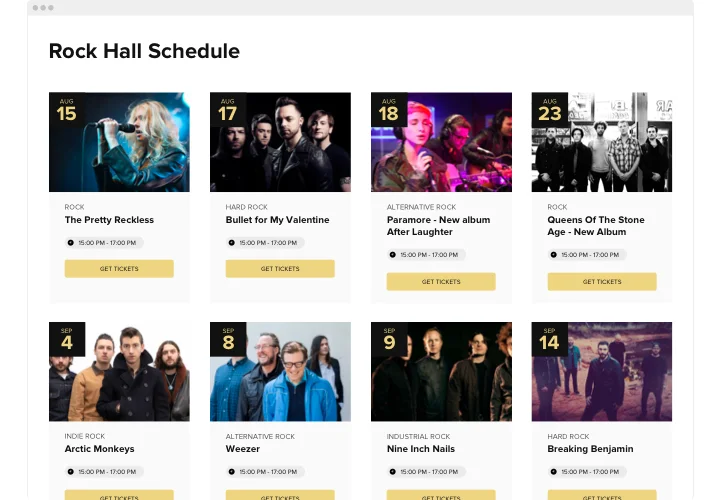
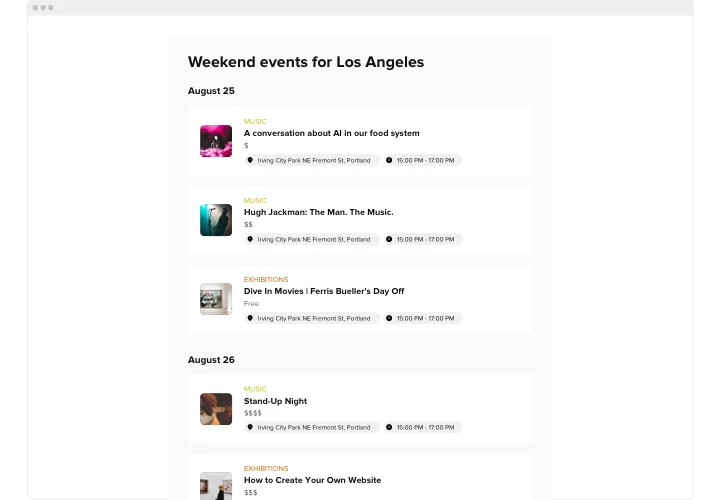
Elfsight Calendar plugin is a remarkable tool enabling you smoothly share your events with your visitors. It includes good deal of options for displaying upcoming activities the most showy way. Customize it to blend the design with your page’s aesthetics. Create multiple number of events, add tags, upload your custom pictures and videos, and keep visitors informed about your plans.

Our Events Calendar widget can help you conveniently display your future activities and boost the engagement rate on your website.

Main features of Event Calendar Plugin

Check a list of all the functions of Squarespace Event Calendar. You can set them right in the editor and they will help you shape the widget right for your use-case.

  • Use adaptable content options to comprehend the widget for your type of events.
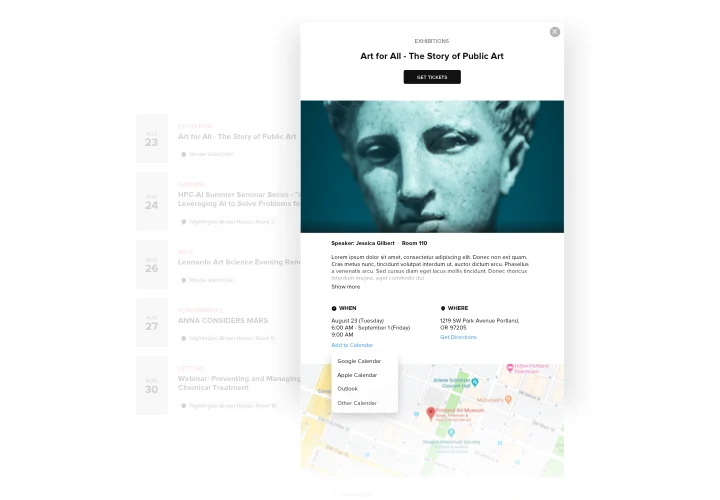
  • Let users add your events to their most used apps.
  • Initiate different types of events, specify locations and add hosts.
  • Categorize all your activities and confer them tags.
  • Discriminate between four layout options.

You can try all widget’s functional traits right in the demo

How to add Event Calendar to Squarespace?

The Squarespace events calendar has a straightforward integration process. After creating the widget, you recieve a special HTML code to add to your website in order to complete the integration. To embed plugin, simply follow the instructions below.

  • Design your custom Calendar plugin
    By means of our free demo, shape a widget with a custom look and functional traits.
  • Get the personal code to display the plugin
    After you have created your widget, you will acquire the installation code from the appearing notification on Elfsight Apps. Copy this code.
  • Integrate the calendar on your website
    Define the area you plan to display the plugin to and add the saved code there. Apply the edits.
  • You’re done!
    Visit the website, to see your plugin.

Take a minute to communicate to our support service if you need help or having something to ask. We will be happy to help with every enquiry.

Is the Event plugin compatible with Squarespace 7.0 and 7.1?

Yes, the Event Calendar works on all Squarespace versions, including classic 7.0 and the latest 7.1 with Fluid Engine, and it integrates smoothly with any template.

Which Squarespace plans support adding the Event Calendar?

You’ll need a plan that allows custom code. Squarespace’s Business or higher plans are required for embedding JavaScript widgets – Personal/Basic plans don’t support code blocks or header/footer injections for scripts.

Can I import events from Google Calendar?

The plugin supports syncing with a Google Calendar: you connect your account, choose which calendar to sync, and the Google events replace manual ones on your Squarespace website.

How does Elfsight handle event time zones?

The Event Calendar plugin lets you either fix the event time zone (so visitors see the original zone) or display the time in each visitor’s local zone by enabling “Events in Visitor Local Time Zone”.

Is there a keyword search for events?

You can enable a search field. When activated, it adds a search bar above the calendar where users can type in keywords.

Can I control events per page for desktop and mobile?

Yes, you have control over the count. In the settings, “Events Per Page” (for desktop) lets you specify how many events to show on each page of the list/grid.

Can visitors filter events by type, venue, or host?

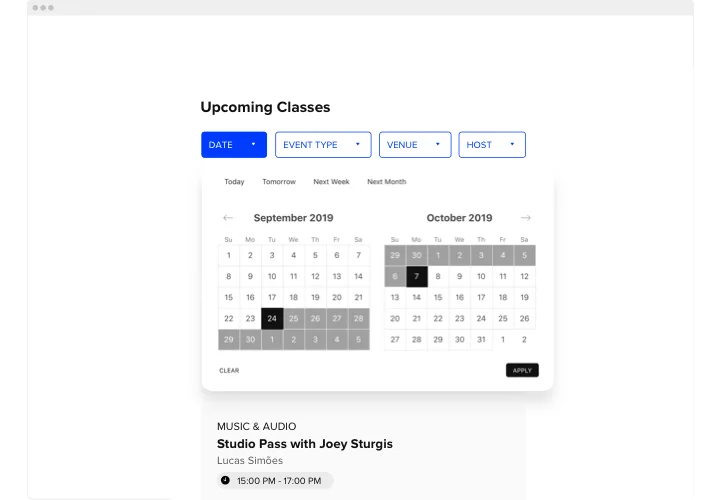
The plugin supports filters by Date, Event Type, Venue, Host and Tags, which visitors can use to narrow down events.

Can I hide event times in the calendar?

Yes, you may disable the display of the time in both the event cards and pop-ups via the Layout → Event Elements settings, or mark the event as “All Day” so only the date is shown.

Can I add images or videos to events?

In the Elfsight Event Calendar plugin, you can upload event images (.jpeg, .png, .svg, .gif, .webp) with a recommended size of ~1280×720 px under 1 MB, and add videos via YouTube or Vimeo links, which will appear as playable media in the event popup.

Can I add a payment or ticket button to events on my Squarespace page?

You can enable a button for each event, add a link (e.g., to a checkout page), rename the button and choose whether it opens in a new tab.

How can users share events with others?

Within the event popup, there are usually simple share options: for example, a Copy Link button and an Email share button.

Can visitors add events to their personal calendars?

Yes, each event can include an “Add to Calendar” link (often found in the event popup, near the date/time). This typically provides an ICS file for the event, which is a universal calendar file format.

Pricing

14-day money back guarantee. Risk-free, you can cancel at anytime.
Elfsight Apps
Cross-platform version that works on any website
from $0 / month
start with free plan
Unlimited domains
24/7 customer support and well documented
Free installation help
100% customizable
Great deal for multiple apps
Black Friday Sale
50% OFF
+1 FREE MONTH
The Biggest Sale of the Year. Don't Miss Out!
Grab The Deal