
HTML Sales Notification widget
Show purchase alerts on your HTML website to highlight real customer activity, build urgency, and motivate visitors to act faster.
Create Widget for Free
No credit card needed
Trusted by over 3,000,000 small business, agencies and top global brands worldwide
Create HTML Sales Notification widget
Design your Sales Notification widget and add it to your HTML website for free.
Embed Sales Notification to HTML with the Elfsight widget
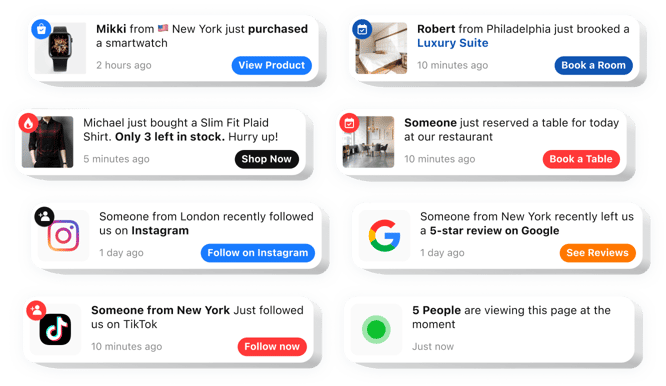
The HTML Sales Notification widget is an effective solution to boost engagement and drive sales on your website. It displays real-time notifications of recent purchases to create buyer assurance and encourage visitors to buy. This no-code tool ebmeds into your website effortlessly and is fully adjustable to fit your brand’s colors. It boosts conversions, creating urgency and promoting faster decisions.Create your personalized sales notification for a better presentation of your brand’s trust signals and activity
This adaptable tool not only establishes trust by demonstrating recent activity but also motivates visitors to take action through targeted alerts. Below is a thorough list of its key advantages:
- Simple integration. The app is incredibly easy to set up, without coding knowledge, enabling rapid deployment on your website.
- Cohesive appearance. Tailored flexibility to align with your website’s look and feel, ensuring a flawless experience.
- Real-time sales notifications. Instant updates on recent purchases provide visitors with a sense of trust-building transparency.
- Urgency notifications. Limited availability messages and timed promotions build urgency and motivate quicker purchase decisions.
- Adaptable appearance. Fully customizable elements, so you can adjust all the elements to match your brand identity.
- Diverse alerts. From live transactions to restocks, the app keeps customers engaged.
How to add Sales Notification into my HTML website?
To place the notifications widget on your website, follow these quick steps:
- Enter the editor and select a template that aligns with your site’s style.
- Modify the widget by altering its layout, text, visuals, and adding features like a badge.
- Save your changes and extract the provided HTML code.
- Embed the code into your website’s CMS and confirm the changes.
- You’re done! Your HTML order notification widget is now active.
For in-depth instructions, refer to our article on how to create a Sales Notification widget.
If you experience any problems as you embed the widget into your website, be sure to contact our Customer Support team. We will be glad to help you add and manage your Sales Notification widget.
Can I add Sales Notification widget to a static HTML website?
Yes, Elfsight works on any static HTML website. Simply paste the installation code into your page source where you want your widget to appear.
Do I need special hosting to use Sales Notification on HTML?
No special hosting plan is required. As long as your HTML website supports JavaScript, the widget will display and function properly.
What types of notifications can be displayed?
Elfsight can show recent purchases, bookings, reviews, registrations, or follower updates as small popups on your HTML website, helping create real-time social proof.
How many notification popups can I create?
There is no strict limit. You can create multiple notifications in the widget and rotate them to highlight ongoing activity or promotions.
Can I control how frequently popups appear?
Yes, Elfsight lets you define the initial delay, display duration, and time between popups to maintain a balanced browsing experience.
Are animation effects supported?
Yes, notifications can fade, slide, bounce, or zoom in, drawing attention without overwhelming visitors on your HTML website.
Can popup positions differ on desktop and mobile?
Yes, you can choose separate screen positions for desktop and mobile views to optimize visibility on all devices.
Can visitors close popups manually?
Yes, an optional close button allows users to dismiss notifications for a distraction-free browsing experience.
Can the order of notifications be randomized?
Elfsight includes a shuffle option so visitors see varied messages instead of the same sequence repeatedly.
Can notifications link to product pages?
Yes, each popup can include a custom URL, directing users to specific offers while allowing click tracking in analytics tools.
Pricing
14-day money back guarantee. Risk-free, you can cancel at anytime.
Elfsight Apps
Platform-independent version
From $0 / month
start with a free plan
Unlimited websites
Dedicated and on-time support
Free installation assistance
Totally customizable
100% customizable
