
Best-in-Class
Coding-Free
Easy-to-Use
Website Translator Widget
Translate your content into 100+ languages with an easy switcher to help global visitors browse comfortably in their preferred language.
Create Widget for Free
No credit card needed
Trusted by over 3,000,000 small business, agencies and top global brands worldwide
Create your Website Translator widget
Configure your widget and add it to your website for free!
Why do I need Elfsight Website Translator?
Welcome visitors from anywhere. Expand your reach.
Make your website accessible in any language
Instantly present your content in multiple languages so more people understand your brand.
Increase global conversions by +40%
People buy more when they can read your content in their native language.
Cut localization costs with automated translation
No need for multiple websites – one translation widget does the job.
99.9%
websites support
1000+
hours of development invested
1 min
to start using the widget
97%
customer satisfaction rate
Join 3,000,000 customers already using Elfsight Apps
You can start with creating your first Elfsight Website Translator widget for free.





















What makes Elfsight Website Translator special?
TRANSLATION
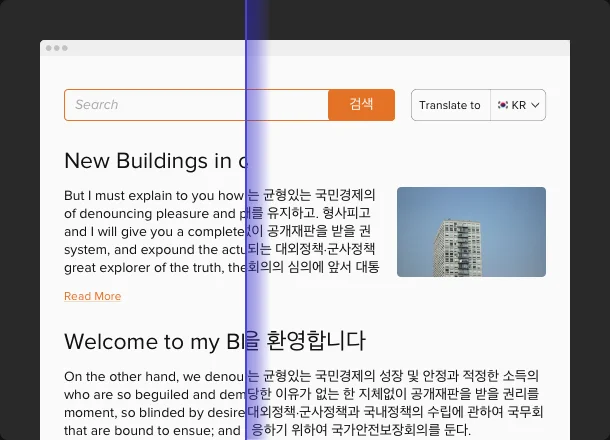
Translate your website in all popular languages
With Elfsight Website Translator, you can create multi-language versions of your website with minimal effort! Provide translations for separate pages, menu items, notifications, blog articles, checkout pages, and any other sections you need. The widget offers instant automatic website translation powered by Google AI and remembers user language preferences, providing a personalized browsing experience that keeps visitors engaged.
CULTURAL CONNECTION
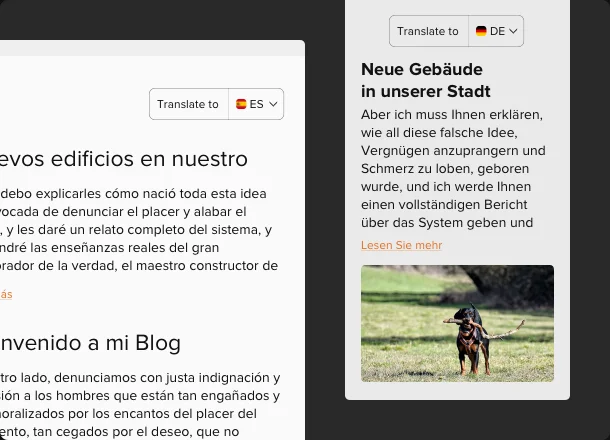
Get accurate translation when it comes to idioms
Elfsight’s Website Translator is a smart and powerful way to translate the meaning, not just the words. You can stay sure that there will be no weird phrases that make no sense in another language. Empowered with Google AI, the widget knows how to translate idioms and proverbs, so that they are understandable across the world.
STYLE
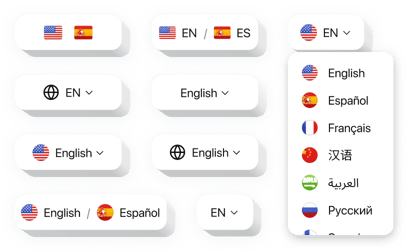
Benefit from a variety of options to create your own design
We offer an exceptional widget for non-professionals: choose from 22 predefined widget styles and customize colors and fonts to match your brand. Embed the widget inline or as a floating element, with three size options to fit any layout. Optimized for all devices and screens, our widget uses page-speed friendly lazy loading. Enjoy tech-free customization in our free configurator, or use custom CSS and JS editors for advanced tweaks.
Live demo
Try all the features of Website Translator in live demo now. No fees. No registration. No coding.
Try now
Why Elfsight widget of all others?
We will provide you with a large variety of tools. From today onward you won’t have to be worried about your overall website functioning. Elfsight cloud-based plugins are provided with a plethora of opportunities you are able to operate the way you like. And if you have any problems, our proficient assistance team is always eager to assist!

User-friendly console
Using our easy-to-use dashboard you’ll be able to set up and integrate any widget into your website in a minute! No need to hire a professional developer or learn how to code.

People you can count on
Seamless embeddedness and regular contact with our strong team will grant your delightful acquaintance with our tools.

Remarkable Elfsight Apps service
Cloud solutions provide remarkable loading speed and immediate trouble adjustments. You ’ll have the latest stable version of the hardware you employ.
What our customers say ❤️

Widgets installed effortlessly and functioned just as promised. When I faced an issue, the rapid and detailed response from the customer service team was a refreshing surprise. Truly delightful!

Exceptional customer interaction! Encountered a sizing hiccup, and their team was proactive in resolving it, keeping in constant communication.

We utilize three of their products along with their corresponding plugins. Just what we needed. They're easy to handle, provide various design capabilities, and deliver fantastic customer service.

I had issues with their Website Translator widget tool on my page so I contacted help staff. They returned to me with a solution that rebuilt everything. Awesome widget and great support!

Overall rating should be 5 stars and especially their support team is fantastic. Hey guys, I surely recommend this tool for those who want to use Website Translator on your WP page. This is really awesome!!!

I am amazed by the customer support team, offering options and wide design customisation options giving me an opportunity to adjust it to fit the page design.
Thank you for making it!
Frequently Asked Questions
What translation engine is used by the Website Translator?
Elfsight uses Google translation engine to analyze page context and generate accurate, meaning-preserving translations.
How does the Translator widget handle idioms and complex phrases?
Google translation engine understands idioms and cultural nuances so translated phrases reflect the intended meaning.
Can I exclude specific parts of the page from translation?
Elfsight includes granular exclusions, letting you mark elements or text fragments that must stay in the original language.
Are email addresses excluded from translation?
Yes, email addresses remain intact and are not modified by the engine.
Does the widget support manual translation edits?
You can add words or phrases to translation exclusions, and full custom translation editing is in development.
Can I use the Website Translator on any website platform?
Definitely. Elfsight works with all major builders like BigCommerce, Blogger, Drupal, Facebook Page, Elementor, Joomla, jQuery, iFrame, Magento, HTML, a href="https://elfsight.com/website-translator-widget/opencart/" target="_blank">OpenCart, Shopify, Squarespace, Webflow, Webnode, Weebly, Wix, WordPress, WooCommerce, Google Sites, and many other platforms.
How can I embed the translation widget on my website?
You can add automatic website translation with minimal setup:
- Pick the template of the language switcher in the intuitive editor.
- Select supported languages and display options.
- Embed the code into your website.
Visitors will be able to switch languages instantly.
If you have any questions, feel free to contact our Support team. They're always ready to assist.
Does Website Translator support tracking conversions per language?
With Google Analytics connected, the widget lets you track events such as Language Changed and Widget Opened (triggered when a visitor opens the language dropdown) to measure language selection behavior.
Join 3,000,000 customers already using Elfsight Apps
Get the taste of 80+ powerful apps by Elfsight. No credit card. Joining is free!
Get started
Get 20% discount now!
