Most developers come to the LinkedIn API with two questions: what can I build, and what will it cost? LinkedIn doesn’t offer a single API but rather a collection of products, and while basic features like login and posting are available through self-serve access, most of the valuable data and functionality are behind partner approval programs.
That means the real challenge isn’t using the API – it’s getting access to it. Ads, recruiting, company data, sales tools, messaging, and search capabilities typically require LinkedIn approval, custom pricing, and often a lengthy review process. This guide breaks down which APIs are open, which require partnership access, what they cost, and where unofficial alternatives fit into the picture.
- LinkedIn’s API is a family of gated products, not a single endpoint.
- Scrapers and unofficial APIs carry real legal and platform-dependency risk.
- Only Sign In and Share on LinkedIn are free and self-serve.
- Details to plan for: data-based versioning and undocumented rate limits model.
- Next steps for your case — build free, apply for partner access, or skip the API.
Does LinkedIn Have an API? The Gated-Product Reality
“Open Permissions are the only permissions that are available to all developers without special approval.” — Getting Access to LinkedIn APIs, Microsoft Learn.
LinkedIn’s developer platform is organized into “products” you add to an app in the Developer Portal, and each one maps to a set of OAuth permissions, or scopes. There’s no single “LinkedIn API” you request and receive — there’s a catalog, and your access depends on which product you’re after and whether LinkedIn grants it.
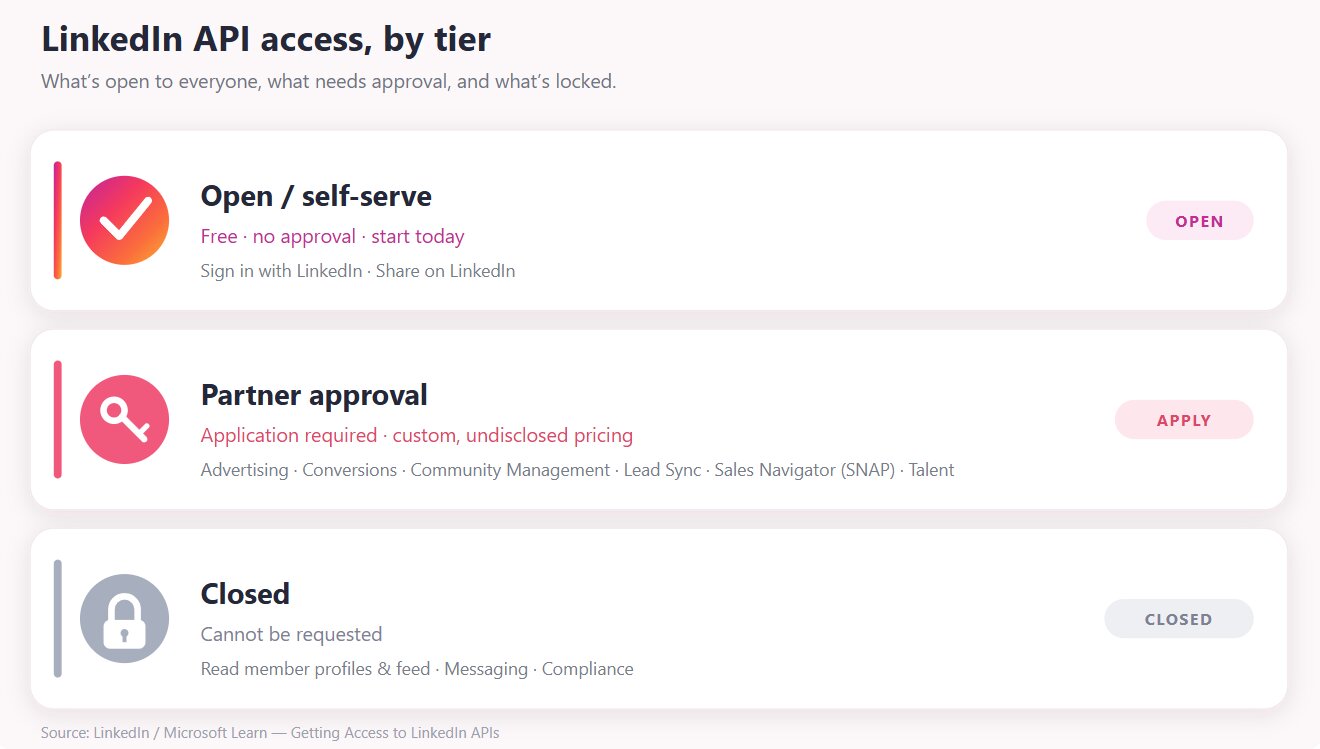
LinkedIn API access sorts into three levels. Open permissions need no approval: Sign In with LinkedIn (openid, profile, email) and Share on LinkedIn (w_member_social). Partner-gated programs cover the Marketing, Sales, Talent, and Learning APIs, each of which requires an application and approval.
A few permissions are closed outright — most notably reading a member’s own posts and feed (r_member_social), which LinkedIn has paused new requests for, and the Compliance API (r_compliance, w_compliance), restricted to regulated enterprises and not requestable through the normal flow.
Knowing which doors are open, which need a key, and which are locked before you start saves weeks of planning around access you’ll never get. The next section maps those tiers to what you’d actually want to build.
What You Can Build With the LinkedIn API
Before mapping the platform in detail, start from intent: what are you trying to build, and can the official API deliver it?
Two of these are free and self-serve — signing in with LinkedIn and posting to a member’s own profile — and the next section covers how to set them up. Everything else worth building sits behind a partner application.
Take a look at approval-gated products and what each one asks for beyond the application itself:
| You want to… | Product / permission needed | What it takes |
|---|---|---|
| Publish or manage content on a company Page; read Page and post analytics | Community Management API: w_organization_social, r_organization_social | Approval (Development → Standard tiers) plus a company-page admin role. |
| Manage ad campaigns, targeting, and reporting | Advertising API (Marketing Developer Platform) | Approved Marketing partner. |
| Track off-LinkedIn conversions for ads | Conversions API (Marketing Platform) | Marketing partner; Developer Portal application. |
| Sync Lead Gen Form leads into a CRM | Lead Sync API (Marketing Platform) | Partner application. |
| Build sales-intelligence or CRM enrichment | Sales Navigator Application Platform (SNAP): r_sales_nav_* | Approved SNAP partner (incorporated company). |
| Source candidates, post jobs, integrate an ATS | Talent Solutions programs (RSC, Apply Connect, Premium Job Posting) | Approved Talent partner. No self-serve job-search API. |
The LinkedIn API is genuinely strong at two self-serve tasks: letting members sign in and letting them post to their own profiles. Beyond that, it’s a partner platform built for companies creating ads, sales, recruiting, and Page tooling — accessible, but only after an approval process.
The Open Tier: Building Without Approval
The good news for most developers is that the two genuinely useful self-serve products address many common needs. Both are free, require no approval, and have no time limit, which makes them the natural starting point for any website integration.
The first is Sign In with LinkedIn, which lets visitors authenticate with their LinkedIn account and returns their basic profile (name, headline, photo) plus their primary email through the openid, profile, and email scopes.
The second is Share on LinkedIn, which uses w_member_social to post, comment, or like on behalf of the authenticated member — in other words, to their own profile. Between them, you can build social login and let users publish to their own feed without ever filing a partner application.
Use OpenID Connect for sign-in
There’s one detail worth getting right, because it’s the difference between an integration that works and one that fails at the auth step. The classic “Sign In with LinkedIn” flow relied on the scopes r_liteprofile and r_emailaddress, and those were deprecated on August 1, 2023. New apps can’t use them. The current method is Sign In with LinkedIn using OpenID Connect, which uses openid, profile, and email.
r_liteprofile and r_emailaddress. If your auth library or copied snippet uses those scopes, swap to the OpenID Connect scopes before you debug anything else — the deprecation broke integrations across several popular auth libraries when it landed.The Honest Answer on LinkedIn API Pricing and Costs
LinkedIn API pricing is the highest-intent question in this whole topic, and the one competitors handle worst. The honest answer splits into two parts — a small, verifiable piece and a large gray area — so it’s worth taking them in turn.
What’s actually free, and what isn’t
The verifiable part is short: the two self-serve products are free, with no approval step and no expiry. For everything else, LinkedIn does not publish pricing: partner-program access is negotiated per applicant based on use case, the type of data you need, and volume.
Here’s how LinkedIn API costs actually work across the three access categories.
| Access type | Cost | What determines it |
|---|---|---|
| Open / self-serve (Sign In, Share) | Free, no time limit | Nothing — available to all developers |
| Partner programs (Marketing, Sales, Talent, Learning) | Custom-negotiated, not published | Use case, data access type, volume |
| Closed permissions (Compliance, member-post read) | Not available | Not open for application |
About those dollar figures you’ll see elsewhere: numbers like “$699 a month for Marketing” or “$900 per recruiter seat” are third-party estimates, not LinkedIn’s rates. Since LinkedIn negotiates privately and partners sign NDAs, there’s no public price sheet to point to.
The Sales Navigator subscription ≠ API
One conflation causes a lot of confusion, so it’s worth separating cleanly. The Sales Navigator subscription is a LinkedIn seat product you buy through the website.
The Sales Navigator API (SNAP) is a partner program you apply to. The Core subscription tier starts at US$119.99 per month, or US$1,079.88 billed annually, per license — but paying for that subscription does not give you API access. SNAP requires a separate, approved partnership regardless of which subscription you hold.
The real cost is the gate, not the price
For a partner-gated integration, the binding constraint usually isn’t a sticker price at all. It’s the approval gate, the review timeline, and the ongoing maintenance. Community and vendor reports put partner review anywhere from a few weeks to three to six months, with no official target published. Budget for that timeline and for keeping the integration current, and the dollar amount becomes the smaller of your concerns.
LinkedIn API by Product: What’s Actually Available
With the map and the pricing reality in place, here’s how each commonly searched product holds up in practice. This is where the difference between “LinkedIn has an API for that” and “you can actually use it” becomes concrete.
📝 LinkedIn Posts API
The LinkedIn Posts API is part of the Community Management API, and access depends on whose content you’re touching. Writing a post on your own behalf uses w_member_social, which is open and self-serve through Share on LinkedIn.
Writing for an organization uses w_organization_social, which requires Community Management approval plus a company-page admin role. Reading a member’s posts uses the closed r_member_social permission.
There’s also no native scheduling — if you want timed posts, you’ll need to build the queue yourself or pair it with a third-party scheduler.
📣 LinkedIn Advertising and Conversions APIs
The LinkedIn Advertising API lives in the Marketing Developer Platform. It’s approval-gated, uses the Development and Standard tier split covered below, and follows date-based versioning. Access to it is also a prerequisite for related Marketing endpoints such as Matched Audiences, Audience Insights, and Media Planning.
The LinkedIn Conversions API sits in the same Marketing family and handles conversion tracking and off-LinkedIn attribution; you apply for it through the Developer Portal under the Marketing terms.
💼 LinkedIn Sales Navigator API
The LinkedIn Sales Navigator API is available only through the SNAP partner program, using the r_sales_nav_* scopes, and it’s aimed at CRM integration and sales intelligence. As noted above, this is distinct from the Sales Navigator subscription — the API is a partnership, not a feature you unlock by upgrading your seat.
🔍 LinkedIn API for Jobs and Search
This is where expectations and reality diverge most sharply. Searches for a LinkedIn API jobs endpoint or a LinkedIn API job search feature are common, but neither exists publicly. Job and recruiting data lives inside the Talent Solutions partner programs — Recruiter System Connect, Apply Connect, and Premium Job Posting — which are open to incorporated-company partners, not individual developers.
There’s also no general-purpose LinkedIn search API; people-search capability exists only inside restricted partner contexts like Sales and Talent. For most developers building on a website, none of these routes are officially available.
💬 LinkedIn Messaging API
There is no official LinkedIn messaging API for sending or receiving messages. The only messaging-adjacent official access is the Compliance API, which is closed, read-and-archive-only, and built for regulated enterprises rather than outreach. Any product marketed as a “LinkedIn Messaging API” is unofficial and runs on a logged-in user session, which puts it outside LinkedIn’s terms.
How LinkedIn API Access Works: Apps & OAuth Flows
If you’re pursuing any LinkedIn integration (free or partner-gated), the setup path is the same at the start, and it’s well documented in the official Marketing Quick Start.
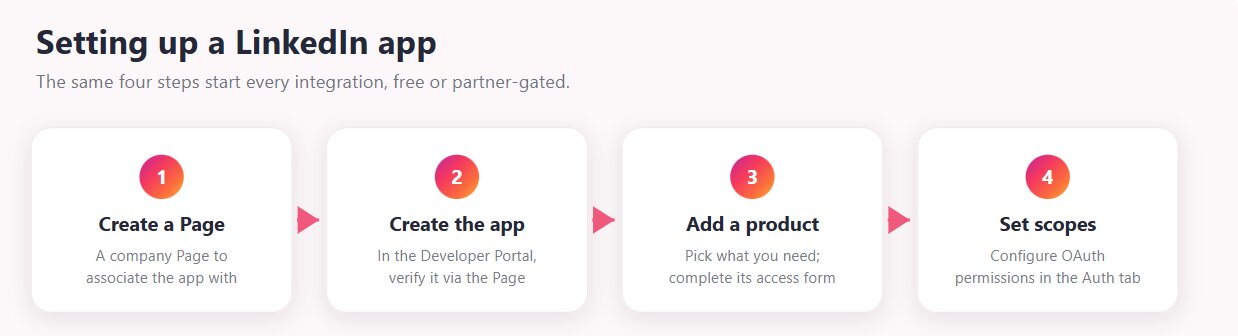
As a LinkedIn API developer, you’ll work entirely inside the Developer Portal.
- Create a LinkedIn Page (a company page) that is required to associate with your app.
- Create an app in the Developer Portal and verify it through the associated Page.
- Open the app’s Products tab, add the product you need, and complete its access form.
- Configure your OAuth scopes under the Auth tab.
Two OAuth flows
LinkedIn supports two authentication flows, and which one you use depends on whether you’re acting for a person or for your application.
The 3-legged flow, also called Member Authorization, is for acting on a specific member’s behalf — this is what Sign In and Share use. The 2-legged flow, also called Application Authorization or client credentials, is for data that isn’t tied to a specific member.
The Operational Gotchas: Versioning and Rate Limits
Two operational details break more integrations than any access question, and both are easy to plan for once you know they exist. The first is versioning; the second is the way rate limits are handled.
Date-based versioning
LinkedIn moved to date-based API versioning in June 2022, and the mechanics are strict. The rules, from the official versioning documentation, are worth committing to memory:
- A new version ships every month, and each one is supported for at least a year before it’s sunset.
- Every versioned call must send a header in the form
LinkedIn-Version: YYYYMMFor example, LinkedIn-Version: 202601 for the January 2026 release. - There is no default version. A missing or expired version header returns an error.
- Versioned APIs use the base path
https://api.linkedin.com/rest/– replacing the legacy unversioned /v2/ path now being sunset. - Talent (LTS) APIs version quarterly rather than monthly.
The practical takeaway is to track your version header against the sunset calendar. An integration that works fine for a year can break overnight when its pinned version retires, and the fix is usually a one-line header bump you’d rather make on your schedule than during an outage.
Rate limits
“Standard rate limits are not published in documentation.” — LinkedIn API Rate Limiting, Microsoft Learn.
LinkedIn enforces rate limits, but it deliberately doesn’t publish the numbers — a point its documentation makes directly. What the rate-limiting documentation does specify is the model:
There are two limit types. Application limits cap the total daily calls for the app, and Member limits cap the daily calls a single member’s token can make through the app. Limits reset at midnight UTC, and exceeding one returns an HTTP 429.
You look up the actual per-endpoint figure in the Developer Portal under your app’s Analytics tab, which only shows endpoints you’ve called at least once that UTC day. Developer admins also receive an email alert when an endpoint reaches 75% of its quota, though it’s app-level only and can lag by an hour or two.
LinkedIn API Alternatives and Their Risks
Because official access is so gated, an ecosystem of alternatives has grown up around it, and they fall into three broad routes. Each is worth understanding, and each carries a risk that’s easy to underweight when you’re staring at a closed permission you need.
Direct scraping
Whether DIY or via scraping APIs, it is technically feasible on public pages but operationally and legally fraught — due to anti-bot defenses, terms-of-service breaches, and the constant need for maintenance as the site changes.
Unified or account-connection APIs
These require you to connect a real LinkedIn account, and the provider executes calls within that account’s permissions. It feels more compliant than scraping, but it still operates outside official partner channels and depends on session access that LinkedIn can disrupt.
Unofficial data APIs
Unofficial APIs sell endpoints that LinkedIn won’t grant directly, which is the most exposed of the three.
Cautionary tale
The most notable recent example is Proxycurl. The LinkedIn data API, reportedly generating about $10M in annual revenue, shut down on July 4, 2025, after Microsoft sued it in January 2025, alleging it used hundreds of thousands of fake accounts to scrape LinkedIn profiles at scale.
Founder Steven Goh explained the decision to fold rather than fight in stark terms:
“Regardless of the merits of LinkedIn’s lawsuit, there is no winning in fighting this.” — Steven Goh, founder, Proxycurl.
His reasoning is the whole lesson: even a courtroom win wouldn’t recover the legal fees, and Microsoft’s litigation budget is effectively unlimited. Building a business on data access the platform can revoke — or sue over — is a dependency risk, not just a technical choice.
LinkedIn APIs: Choosing Your Path
Now that the map is clear, your next move comes down to which of three situations you’re in: you need the open APIs, you need partner data, or the official platform doesn’t cover your case. Each has a concrete starting point.
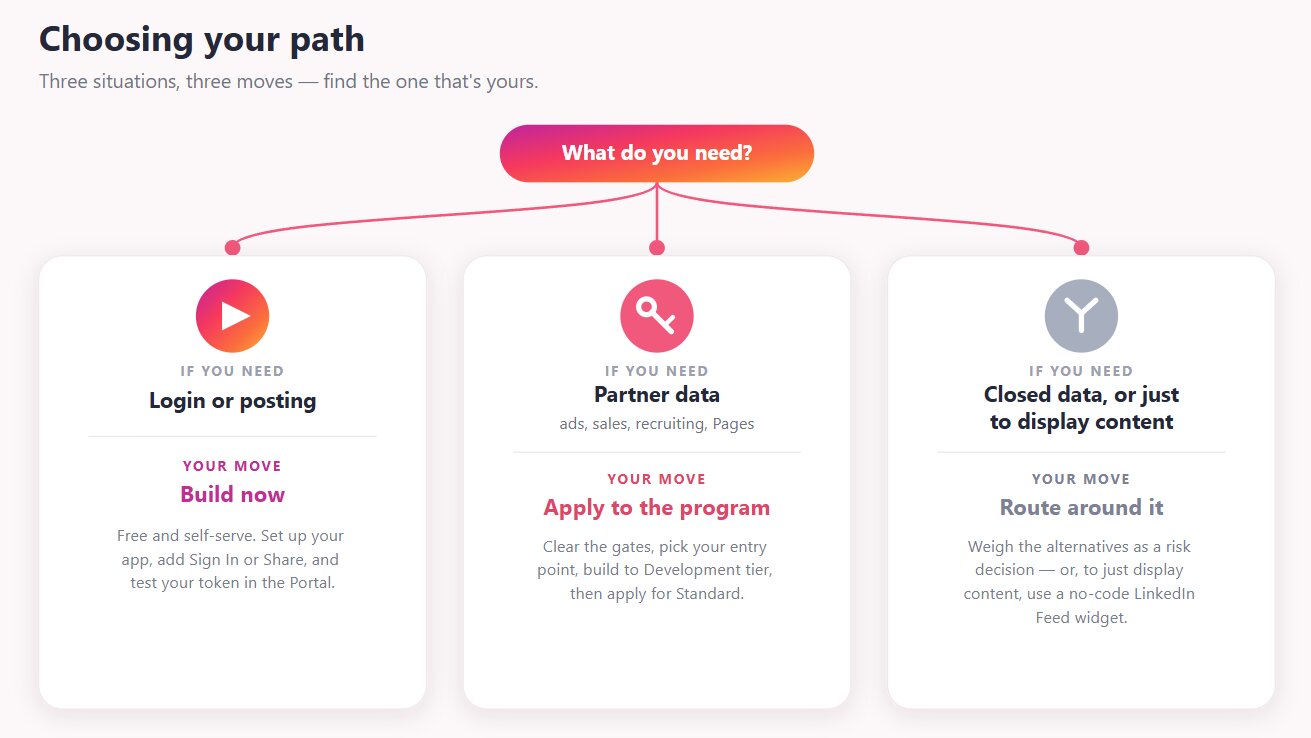
If you need login or posting
The free tier is the whole answer, and nothing is stopping you from starting today. Follow the four setup steps above to create and verify your app, add Sign In with LinkedIn or Share on LinkedIn under the Products tab, and configure your scopes.
Before wiring anything into your code, generate a token and check its scopes and lifetime in the Developer Portal’s Token Generator and Token Inspector — it’s the fastest way to confirm your auth works before you build around it.
If you need partner data
Partner access is gated, but the steps to pursue it are documented. Before you apply to any program, clear the gates that cause most rejections and check the requirements:
- A registered legal entity
- A verified business-domain email
- A verified Company Page (admin approved & app associated)
- A published privacy policy
- A specific commercial use case
Where you apply depends on the program, and the routes differ in how self-serve they are.
| Program | Where you apply | Access style |
|---|---|---|
| Marketing — Advertising, Community Management, Conversions, Lead Sync | Developer Portal → your app → Products tab | Self-serve to build; reviewed for production |
| Sales — SNAP | Become a SNAP Partner proposal form | Reviewed quarterly; LinkedIn contacts you within 90 days if you fit |
| Talent — RSC, Apply Connect, job posting | Talent Solutions Partner request form | Relationship-gated through a LinkedIn contact |
| Learning | Learning Integration Partner form | Partner members and site-license organizations |
Development vs Standard tier
The Advertising and Community Management APIs split access into two tiers. Every app starts on the Development tier, which is enough to build and test against — limited volume, read-only.
Moving to production means applying separately for the Standard tier, and the member making the request must hold the right Company Page or Ad Account role. The official Increasing Access documentation lists the requirements per program.
The upgrade is its own submission. The Advertising API needs a support ticket plus a short campaign-management video; Community Management needs an access form, a downloadable screencast of your integration, and a live Technical Sign-Off demo — the screencast is what the review turns on.
How long approval takes
LinkedIn publishes no approval timeline — no official page commits to a turnaround. The third-party estimates you’ll find range from under a week to six months and contradict one another, which is the clearest sign that there’s no reliable number. Build toward what you control: reach Development tier, then submit for Standard, rather than pinning a roadmap to an assumed approval date.
If official access isn’t open to you
In some cases, the official platform won’t serve: a solo project without a registered entity, a use case built on member data LinkedIn keeps closed (reading profiles or feeds, messaging), or anything resembling scraping. Knowing that early saves you a rejected application.
From here you have two honest options — weigh the unofficial alternatives above as the risk decision they are, not a shortcut, or step back and ask whether you need a data integration at all. If you only want to display LinkedIn content on a website, such as posts or a profile feed, you don’t need the API: a no-code LinkedIn Feed widget covers that without a single API call.
Frequently Asked Questions
Does LinkedIn have a free API?
Is there a LinkedIn API for job search?
Does LinkedIn have a messaging API?
Where is the LinkedIn API documentation?
How long does LinkedIn API partner approval take?
Is scraping LinkedIn legal?
Where to Start
From the outside, the LinkedIn API looks like a single thing you either get access to, or you don’t. Up close, it’s coherent: a small free tier for login and posting, a set of partner programs for companies building ads, sales, recruiting, and Page tooling, and a handful of permissions that stay closed to everyone.
Build on what’s open, apply for what your business qualifies for, and treat the unofficial routes as the platform-dependency risk that has already shut down companies far larger than most projects will ever be. Start from the access you can actually get, and the rest of the decision gets much simpler.
Key references
- Getting Access to LinkedIn APIs — Microsoft Learn (updated June 26, 2025): https://learn.microsoft.com/en-us/linkedin/shared/authentication/getting-access
- LinkedIn API Rate Limiting — Microsoft Learn (updated Aug 20, 2025): https://learn.microsoft.com/en-us/linkedin/shared/api-guide/concepts/rate-limits
- API Documentation Versioning — Microsoft Learn: https://learn.microsoft.com/en-us/linkedin/marketing/versioning
- Increasing Access (Marketing) — Microsoft Learn: https://learn.microsoft.com/en-us/linkedin/marketing/increasing-access
- Community Management API Overview — Microsoft Learn: https://learn.microsoft.com/en-us/linkedin/marketing/community-management/community-management-overview
- Marketing Quick Start — Microsoft Learn: https://learn.microsoft.com/en-us/linkedin/marketing/quick-start
- Goodbye Proxycurl — Steven Goh, Nubela (2025): https://nubela.co/blog/goodbye-proxycurl/
- Developer Portal Tools — Microsoft Learn: https://learn.microsoft.com/en-us/linkedin/shared/authentication/developer-portal-tools
- LinkedIn Learning API – Request Access — Microsoft Learn: https://learn.microsoft.com/en-us/linkedin/learning/getting-started/request-access