
Did you know? 97% of consumers read reviews when searching for a local business, and 93% say online reviews influence their purchasing decisions, making them one of the most powerful trust signals you can add to your website.
If you’re running a Wix website, reviews are one of the fastest ways to build trust and turn visitors into customers. Without visible feedback, users rely only on your messaging, which often isn’t enough to convince them. The challenge is that Wix’s native tools don’t always make it easy to display reviews from multiple platforms or present them in a structured, high-impact way. That’s why many website owners look for better ways to add reviews to a Wix website and showcase real customer experiences.
The Elfsight All-in-One Reviews app gives you a flexible way to embed reviews on Wix from sources like Google, Facebook, Yelp, and more. You can customize the layout, filter content, and display reviews exactly where they influence decisions.
- How to add reviews to Wix website using a ready-made app.
- Why reviews matter for trust, conversions, and decision-making on Wix pages.
- Alternative ways to add reviews to Wix website and where they fall short.
- Proven optimization tips to make reviews more persuasive and visible across your website.
To make this easy to follow, we’ll begin with the fastest way to get reviews live on your Wix website. After that, we’ll go deeper into customization, placement strategies, and practical ways to turn customer feedback into a conversion driver.
Quick Start: Add Reviews to Wix Website
If your goal is to quickly embed reviews on your Wix website without dealing with complex setup or manual work, this streamlined approach will get you there in just a few minutes:
- Open the All-in-One Reviews app editor and select a template.
- Connect your review sources (Google, Facebook, etc.).
- Click “Add to website for free” to generate the embed code.
- Paste the code into your Wix website using the Embed element.
This method works for both simple use cases, like adding a small review section, and more advanced setups where you want to display reviews across multiple pages.
Create your reviews app now in the live editor!
Why Add Reviews to Wix Website
Adding reviews to your Wix website directly shapes how visitors evaluate your business and whether they feel confident enough to take action. When used strategically, reviews become one of the most persuasive elements on your pages.
⭐ Turn visitor hesitation into confidence
When users land on your website, they’re often comparing options. Without reviews, they rely only on your messaging, which can feel one-sided. Showing real customer experiences gives them independent validation and reduces uncertainty at key decision points.
📈 Increase conversions across key pages
When you add reviews in places where users are deciding, such as product pages, service descriptions, or contact sections, you remove friction. Reviews answer unspoken questions and help users move forward without needing additional research.
🔄 Keep your website content dynamic
Static testimonials quickly become outdated. By using a solution that automatically pulls new reviews, your website stays current without manual updates. Fresh content signals that your business is active and continuously delivering value.
🎯 Highlight what matters most to customers
Not all reviews carry the same weight. Some mention speed, others focus on support or results. By filtering and displaying the most relevant feedback, you can emphasize the strengths that matter most to your audience and reinforce your positioning.
🌐 Build credibility across multiple platforms
Customers often recognize platforms like Google or Facebook. When you embed reviews Wix from these sources, you extend their credibility directly onto your website, making your content feel more trustworthy than standalone testimonials.
📱 Improve readability and user experience
Well-structured review layouts – whether grids, sliders, or lists – make feedback easy to scan and digest. Visitors can quickly browse multiple opinions without feeling overwhelmed, especially on mobile devices.
⏱️ Reduce reliance on external platforms
Instead of sending users to external review platforms where they can get distracted or leave your website, embedding reviews keeps them focused on your content. This increases time on page and gives you more control over the user journey.
Overall, when you embed customer reviews on your Wix website, you’re not just adding content – you’re strengthening your credibility, improving decision-making, and creating a more persuasive experience from the first visit.
Core Features of All-in-One Reviews App
Before integrating reviews into your web page, it’s important to understand what makes All-in-One Reviews truly effective. A simple list of testimonials can help, but a feature-rich app allows you to control how reviews are collected, displayed, and experienced across your website.
These are the key capabilities of the Elfsight Reviews app and how they translate into practical value for your Wix setup:
| Feature | Practical Use |
| Multiple review sources | Pull reviews from Google, Facebook, Yelp, and other platforms into one unified display |
| Automatic updates | New reviews appear automatically, keeping your website fresh without manual edits |
| Smart filtering options | Display only high-rated, relevant, or keyword-specific reviews to highlight your strengths |
| Layout flexibility | Choose between grid, slider, list, or badge formats depending on your page structure |
| AI-generated summaries | Automatically highlight key takeaways from multiple reviews, helping visitors grasp feedback faster |
| Review translation | Translate reviews into different languages to make your content accessible to a broader audience |
| Custom styling | Match colors, fonts, spacing, and card styles to your Wix branding for a seamless look |
| Responsive design | Ensure reviews display properly on all devices, including mobile and tablets |
These features give you full control over how reviews appear and function on your website. To see all characteristics, visit the features page.
Step-by-Step: How to Add Customer Reviews to Wix Website
Ready for deeper dive into setup and customization of your own widget? Here’s how to add your reviews to your website, from design to embedding it exactly where it will have the most impact.
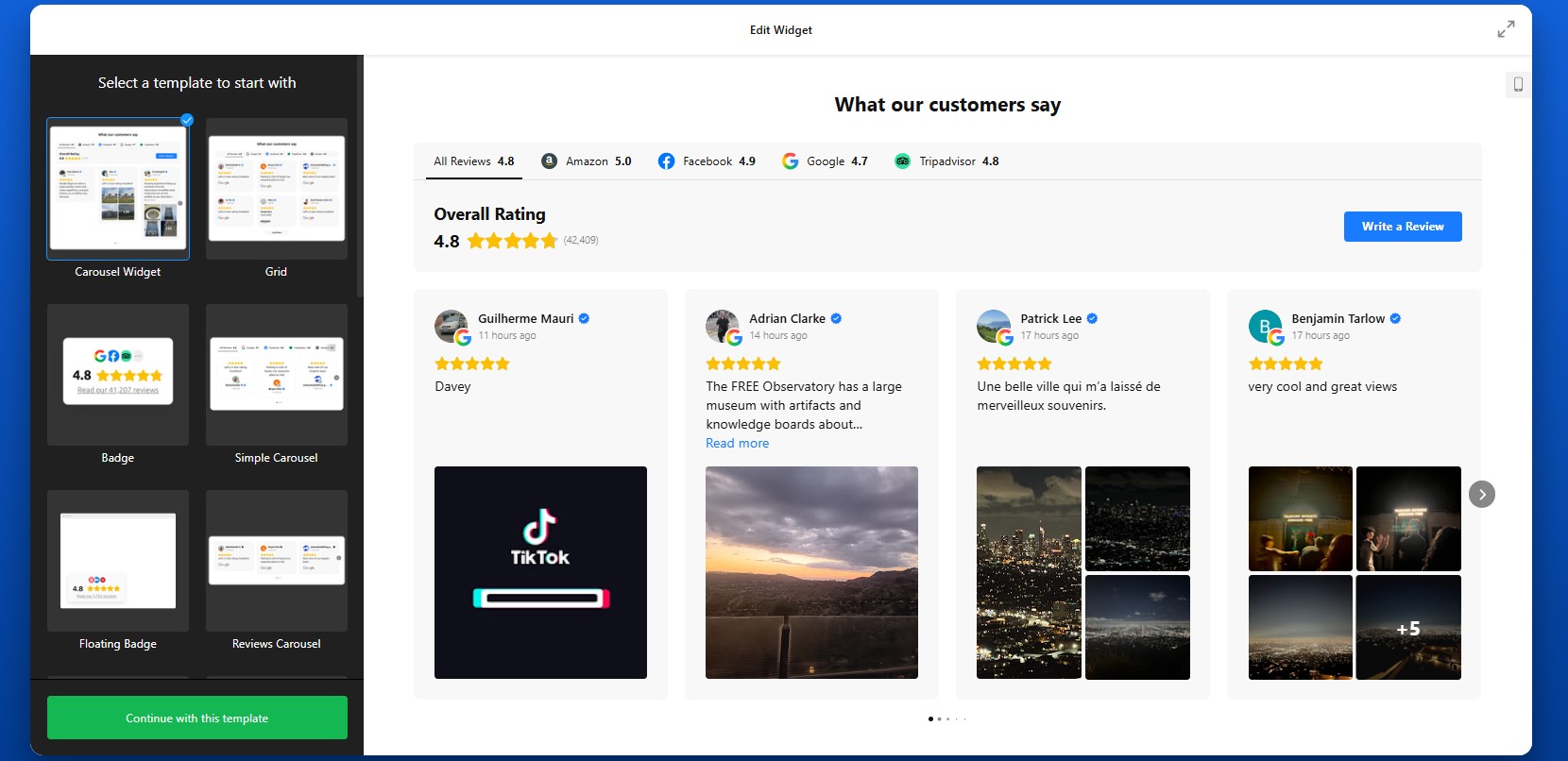
Step 1: Choose a Template
Start by opening the Elfsight editor. You’ll see a variety of ready-made templates designed for different use cases, including grids, sliders, badges, and lists.
Each layout serves a different purpose. A grid works well for showcasing volume and credibility, while a slider is better when you want to highlight a few key reviews without taking up too much space. Badges are useful for subtle trust signals in headers or footers.
At this stage, focus on choosing a structure that matches where you plan to place reviews on your Wix website. You can always adjust the design later.
Step 2: Connect Your Review Sources
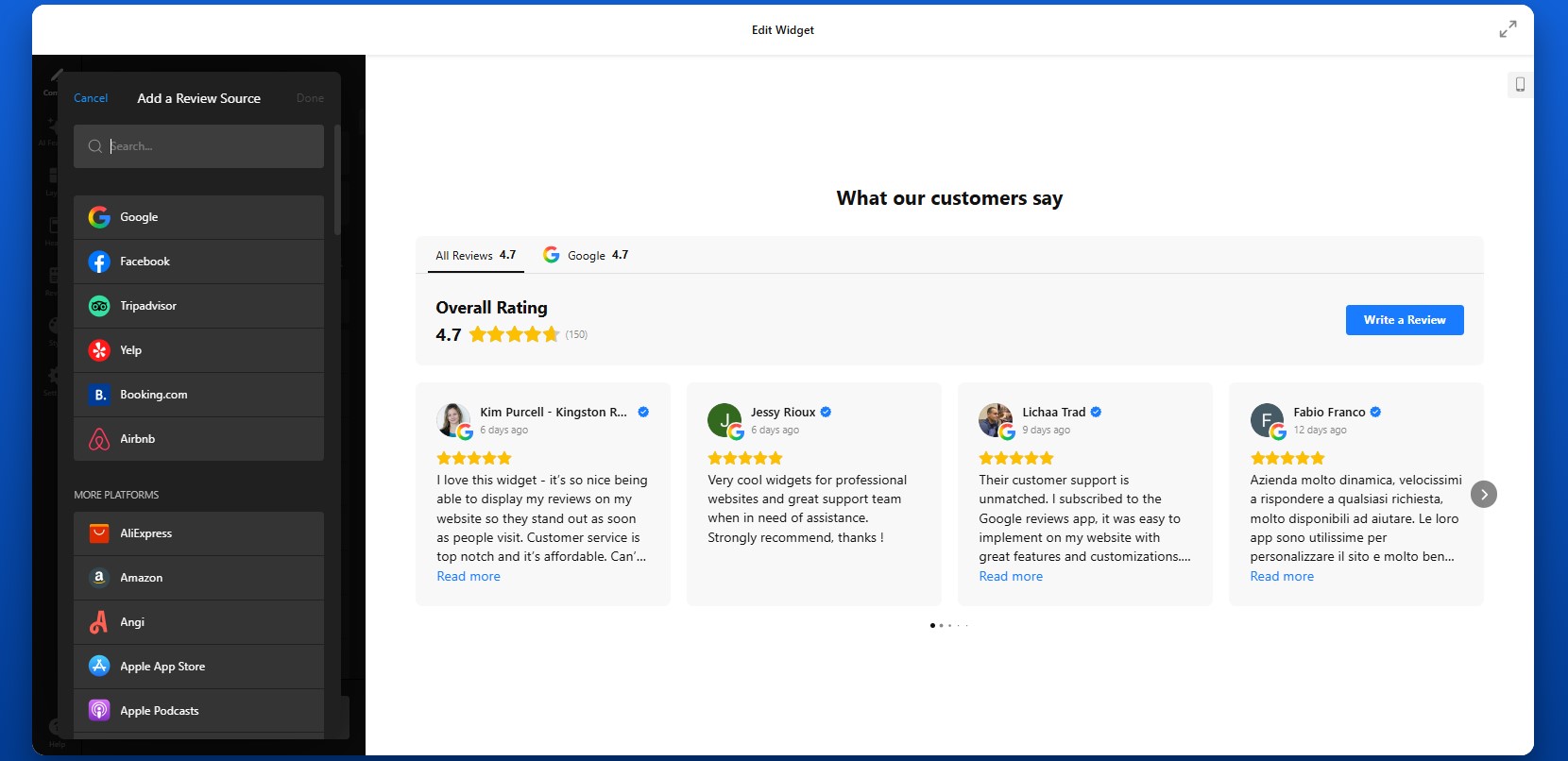
In the Source settings, connect your review platforms. This is where your content comes from.
You can add sources such as Google, Facebook, Yelp, or other supported platforms by pasting your business profile links. Once added, Elfsight will automatically pull in reviews and keep them updated over time.
Make sure you select the correct business profile if multiple options appear. This ensures that the app displays accurate and relevant reviews.
Step 3: Filter and Control Which Reviews Appear
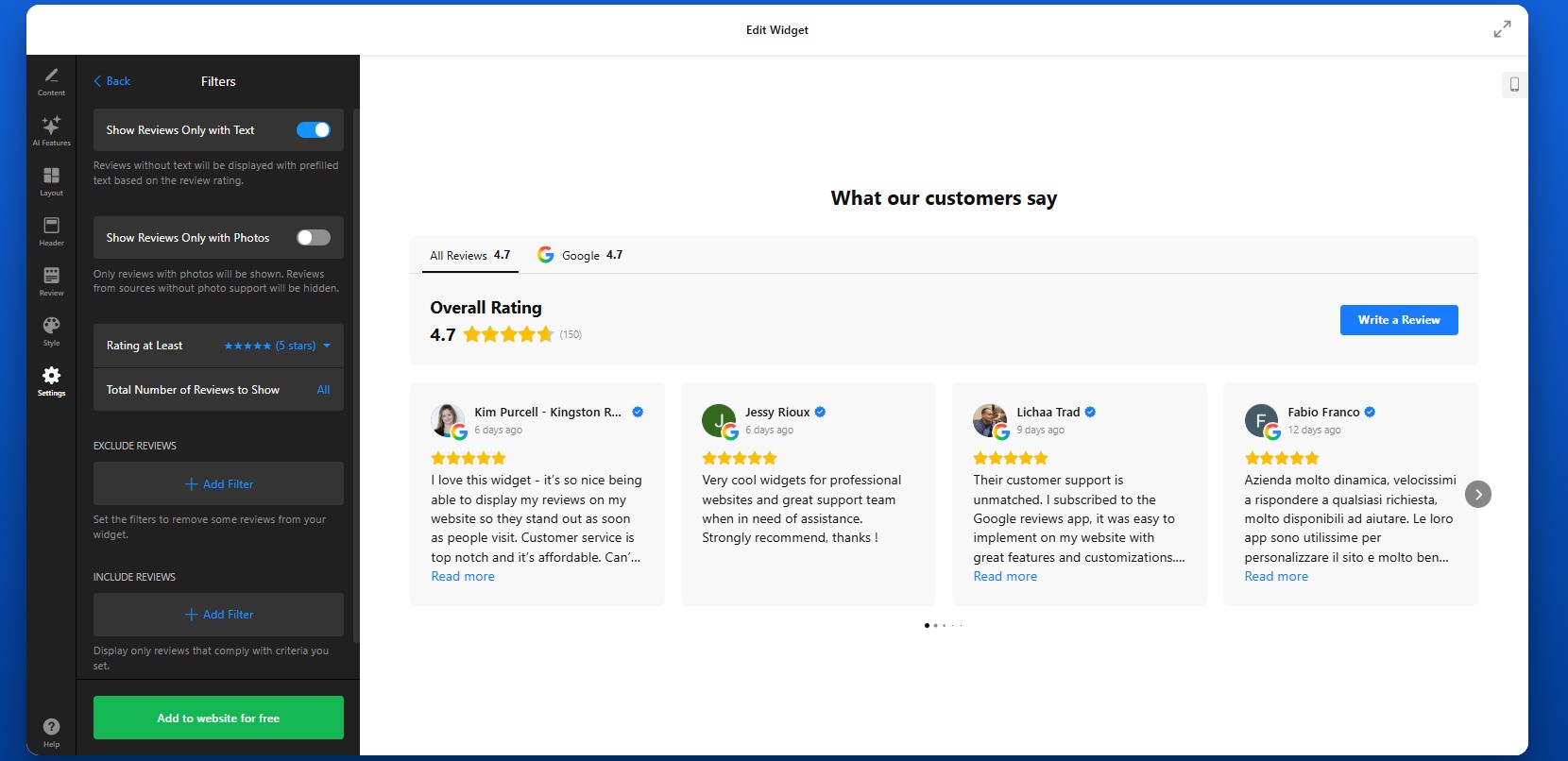
Not every review needs to be shown. With Elfsight, you can control exactly what visitors see.
In the Settings tab, you can filter reviews by star rating to show only high-quality feedback, or use keyword filtering to highlight reviews that mention specific strengths like “fast delivery” or “great support.” You can also hide reviews without text or those that don’t add meaningful value.
This step helps you create a focused and persuasive review section rather than overwhelming visitors with too much content.
Step 4: Customize Layout and Structure
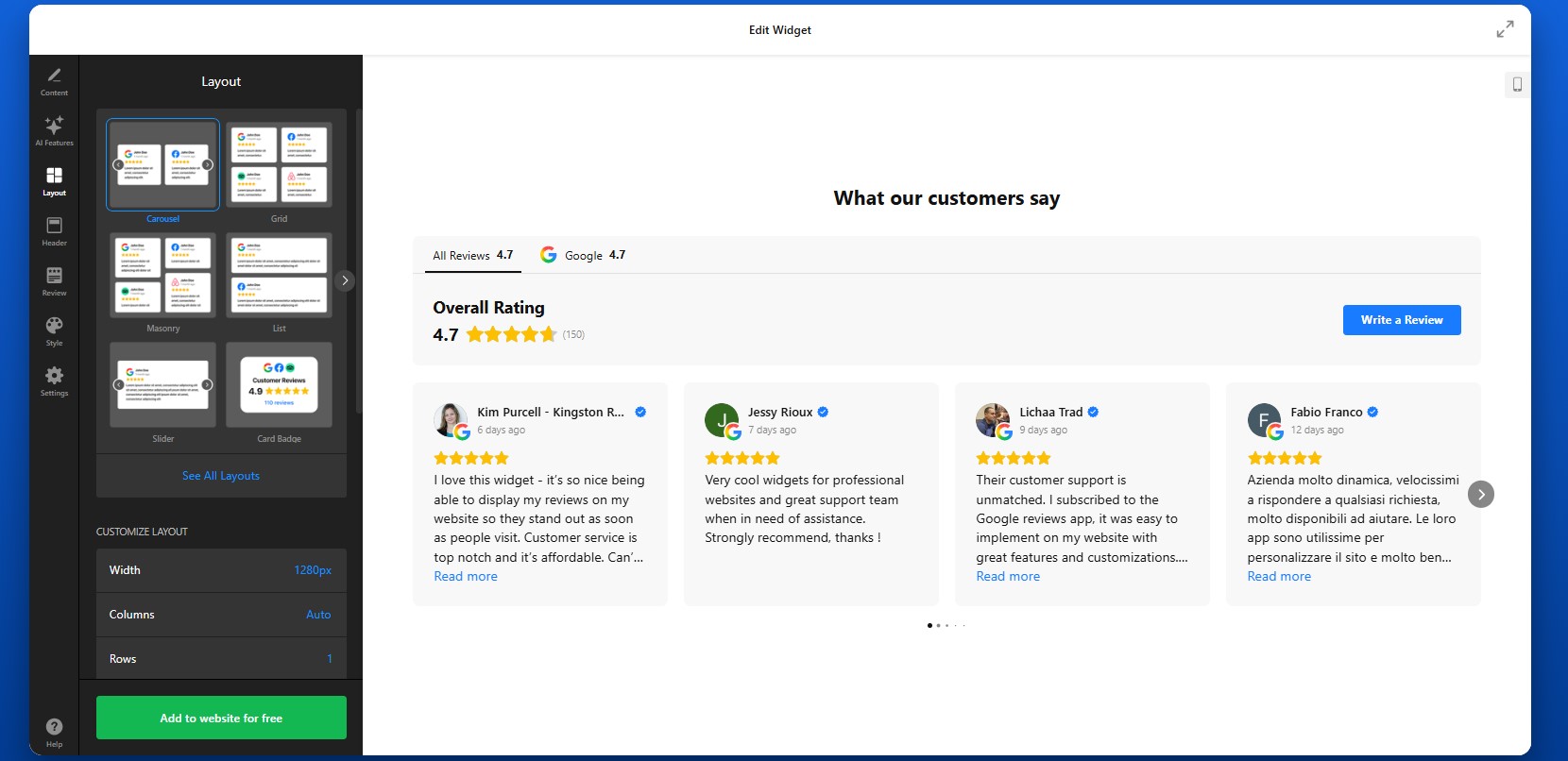
To define how reviews will appear on your Wix website move to the Layout settings.
You can adjust the number of visible reviews, choose between grid, slider, or list formats, and control spacing between elements. You can also enable navigation features such as arrows, pagination, or scrolling.
Think about how visitors will interact with your reviews. A compact slider works well for smaller sections, while a grid layout is better for dedicated review sections where you want to show volume.
Step 5: Customize the Header and Navigation Elements
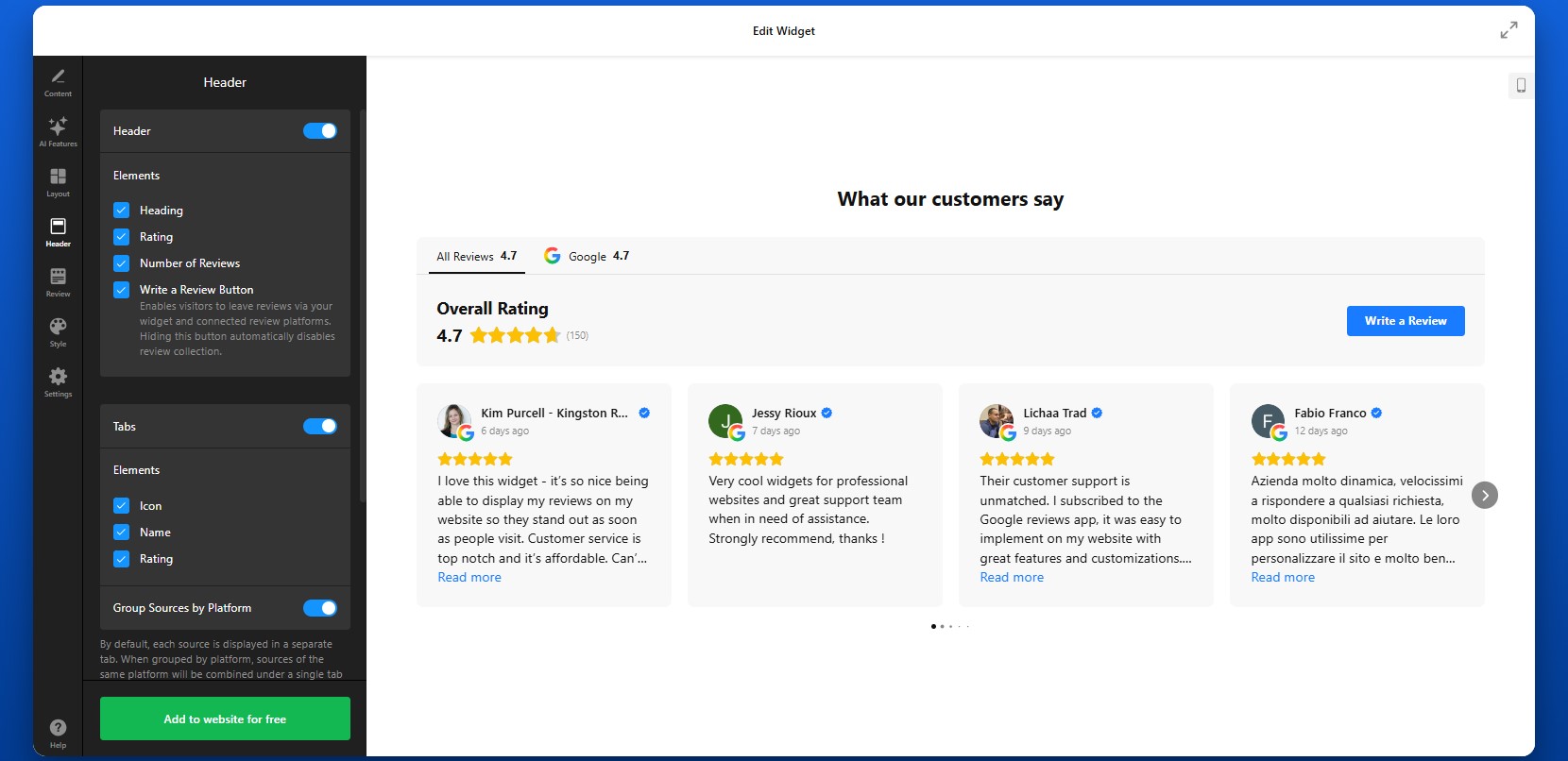
The header section allows you to control key elements such as the main heading, overall rating, and the total number of reviews displayed. This is where you can add context like “What our customers say” to immediately communicate the purpose of the section. You can also enable a “Write a Review” button, which gives visitors a direct way to leave feedback on your connected platforms. If you prefer to focus only on displaying reviews, you can hide this button.
Below the header, you can customize tabs that help organize reviews from different sources. Choose to display each source separately or group them by platform. Adjusting the header and tab settings helps structure your review section, making it easier to scan and more visually consistent with the rest of your Wix website.
Step 6: Match the Design to Your Wix Website
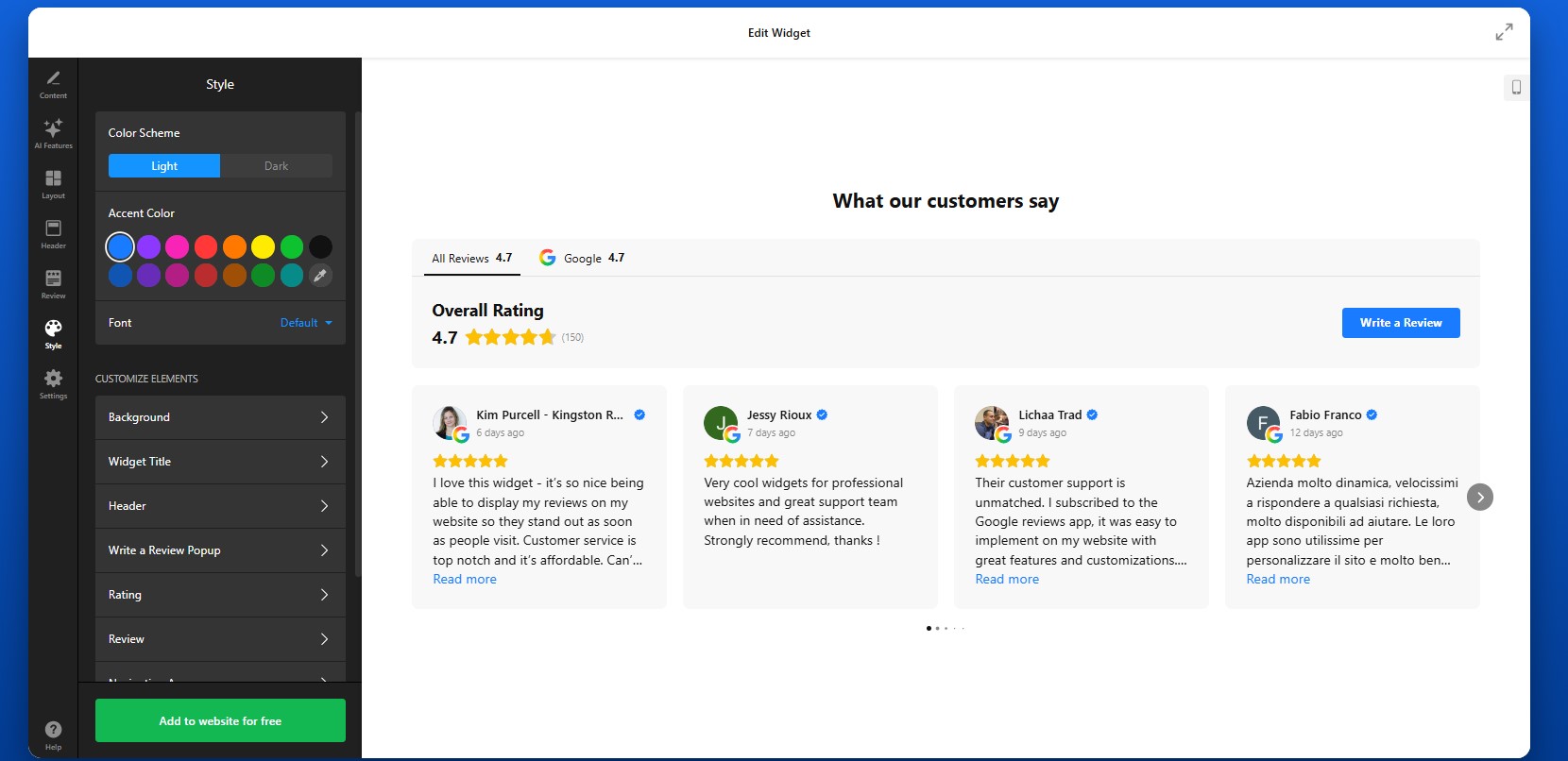
To make your reviews feel integrated, customize the visual design so it aligns with your Wix website.
You can adjust colors, fonts, card styles, and spacing. The goal is to ensure that reviews look like a natural part of your page rather than an external element.
If your website uses a minimal design, keep the review layout clean and simple. If your brand is more visual, you can use cards, shadows, and richer layouts to make reviews stand out.
Consistency in design improves trust and keeps the user experience smooth.
Step 7: Generate the Embed Code
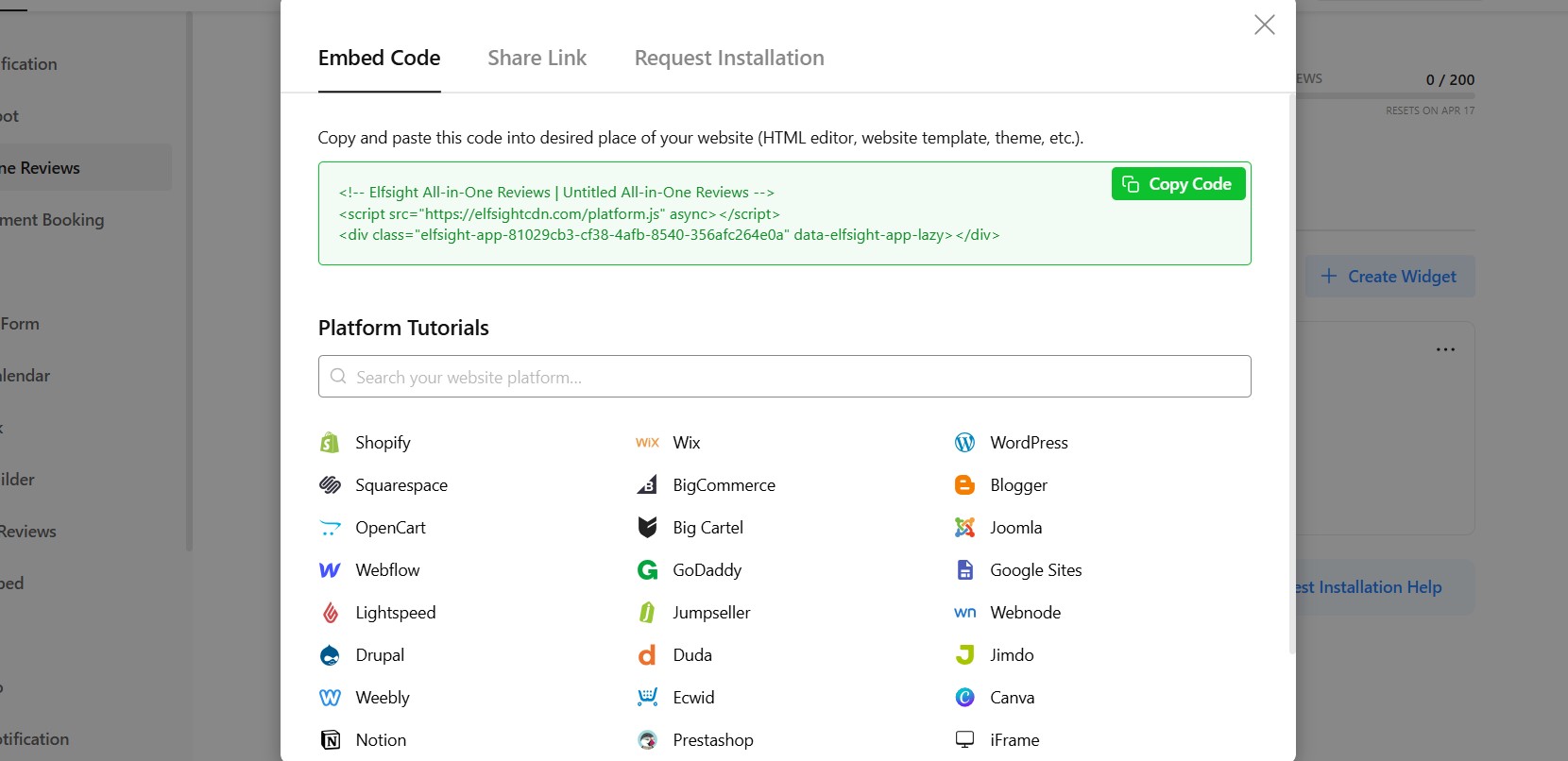
Once your widget is fully configured, click “Add to website for free” to generate your embed code. This code includes everything needed to display your reviews.
At this point, your widget is ready to be added to your Wix website.
Step 8: Embed Reviews on Your Wix Website
- To embed your reviews, open your Wix editor and navigate to the page where you want the reviews to appear.
- Add an “Embed HTML” element to your layout, then paste the code into the field.
- Position the element where it fits best – below a product section, near a contact form, or on your homepage.
- After publishing your website, the reviews will appear instantly.
It’s a good idea to preview the page and check how the reviews look across different screen sizes to ensure everything displays correctly.
- If reviews are not showing, confirm that the embed code is pasted correctly into the Wix Embed element and that the page is published.
- If the layout looks compressed, adjust the width of the container.
- If reviews don’t update, allow time for syncing or verify your source links.
By following these steps, you can fully control how to add customer reviews to your Wix website, customize their appearance, and place them exactly where they support user decisions the most.
Alternative Ways to Add Reviews to Wix Website
There are several ways to embed reviews on Wix, but most native or manual methods come with limitations in flexibility, automation, or scalability. Here’s how the main options work and what to expect from each.
Wix Testimonials App
Wix offers a built-in Testimonials app that lets you manually add and display customer feedback directly inside the editor. To use it:
Install the Testimonials app from the Wix App Market.
Add it to your page.
Manually enter customer reviews one by one.
Customize basic layout elements and display them in a structured format.
This approach works for simple use cases where you only need a small number of static testimonials.
- No automatic updates from external platforms
- Limited layout and design flexibility
- Manual effort required to maintain content
Manual Copy-Paste Reviews
Another common method is copying reviews from platforms like Google or Facebook and pasting them directly into your Wix website.
To do this, you simply copy the text of a review, add it into a text block or section, and format it manually. You can repeat this process for multiple reviews across different pages.
This method gives you full control over what content is displayed, but requires constant manual work.
- You’ll need to update reviews manually every time
- No connection to real-time customer feedback
- Hard to maintain consistency across pages
Wix HTML Embed (Iframe Method)
You can also use external embed codes (for example, from Google Maps or other review tools) and insert them into Wix using the Embed HTML element.
To implement this, open your business profile on Google Maps, for example, click “Share,” then “Embed a map,” and copy the iframe code. Paste this code into a Wix Embed HTML element to display the reviews section.
This is a quick way to show real reviews from a trusted source.
- Usually supports only one source at a time
- Limited control over layout and styling
- No filtering or content customization
Before choosing a solution, it’s helpful to compare how these approaches perform across key criteria:
| Feature | Elfsight All-in-One Reviews | Wix Testimonials | Manual Copy | Wix HTML Embed |
| Auto updates | Yes | No | No | No |
| Multiple platforms | Yes | No | No | No |
| Custom design | High | Medium | Low | Low |
| Ease of use | Easy | Easy | Medium | Medium |
| Review filtering | Yes | No | No | No |
| Scalability | High | Low | Low | Low |
| Maintenance | None | Medium | High | Medium |
| Mobile responsiveness | Built-in | Yes | Depends | Yes |
Each method can work for basic scenarios, but they vary significantly in terms of effort and long-term usability.
If you want to add reviews to Wix in a way that is scalable, customizable, and easy to maintain, Elfsight offers a more complete solution while keeping your workflow simple.
Optimization Tips for Your Reviews
Once your reviews are live, the way you present and position them can significantly influence how visitors perceive your business and whether they take action.
- Place reviews where decisions happen: Don’t isolate reviews on a separate page. Add them near product descriptions, service sections, pricing blocks, or contact forms—places where users are deciding whether to move forward.
- Prioritize high-impact feedback: Focus on reviews that mention specific results, benefits, or experiences. Feedback that tells a short story or highlights outcomes is more persuasive than generic comments.
- Choose layouts based on context: Use grids to show volume and credibility, sliders to highlight selected reviews without clutter, and compact badges for subtle trust signals across your Wix website.
- Keep the design consistent: Match colors, typography, and spacing with your Wix layout. When reviews feel like part of your website rather than an add-on, users are more likely to trust them.
- Balance quantity and readability: Avoid overwhelming visitors with too many reviews at once. Display a manageable number and use features like “Load more” or sliders to keep the section clean and easy to browse.
- Use multiple placements strategically: Instead of showing reviews only once, repeat them across key pages. For example, add a small review section on your homepage and a more detailed one on product or service pages.
- Leverage automatic updates: Keep your content fresh by allowing the widget to sync new reviews. Regular updates signal that your business is active and continuously receiving feedback.
- Test and refine over time: Monitor how users interact with your reviews. Try different placements, layouts, and filtering options to find what drives the best results for your Wix website.
Real-World Example: Hair Salon Grows Customers with Reviews on Wix
Sina Fehringer runs a hairdressing business and website where attracting new clients and building trust was a constant challenge. Like many service-based businesses, she needed a way to stand out, prove quality, and convert visitors into bookings directly on her website.
Before using Elfsight
- Low online visibility and limited user interaction
- Difficulty attracting new customers through the website
- Strong competition with little differentiation
- A need to build trust with potential clients quickly
With All-in-One Reviews on her website
“I was looking for a solution to integrate Google Reviews into my website and, at the same time, a button to generate new feedback. That’s how I came across Elfsight. The widget far exceeded my expectations in terms of customization options.”
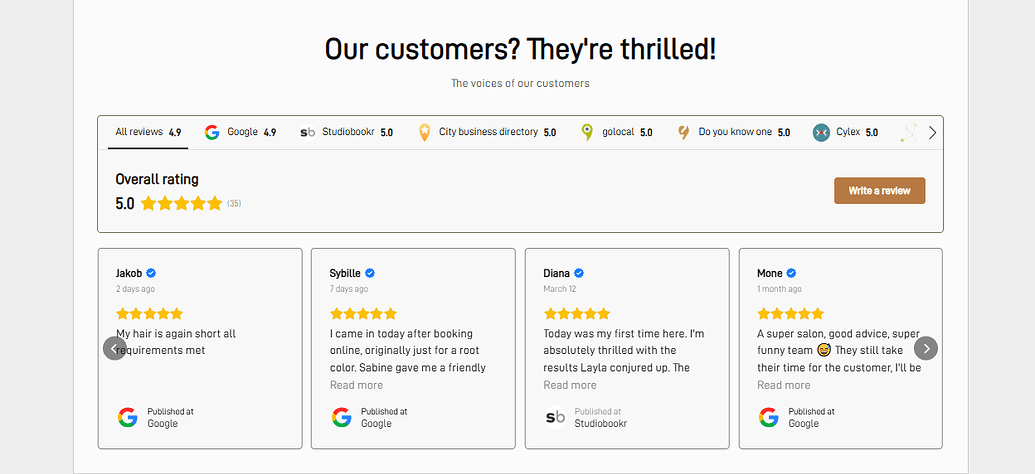
Sina integrated the All-in-One Reviews widget directly into key sections of her website, including a floating badge that expands into a scrollable list of detailed reviews. This allowed her to showcase real customer feedback without taking up too much space, while still making it easily accessible to visitors.
She also used multiple layouts across the website, combining compact review displays with more detailed sections, to highlight feedback exactly where potential customers were making decisions.
The result
Her website became a central conversion tool rather than just a showcase. Visitors could instantly see reviews, gain confidence, and move forward without needing additional research or direct communication.
The impact was measurable: a 1.5× increase in customers, driven primarily by improved trust and visibility through reviews and other interactive elements. By choosing to add reviews to her website in a structured and visible way, Sina turned customer feedback into a core part of her growth strategy making her website more persuasive, interactive, and effective at converting visitors into real clients.
Frequently Asked Questions
Can I combine reviews from multiple platforms into one widget?
Is it possible to manage reviews from multiple business locations?
Can I control which reviews appear in the app?
Can I collect new reviews directly from my Wix website?
Will updates I make in the editor appear on my website automatically?
Can I add reviews from a platform that isn’t supported by default?
Final Thoughts
Adding reviews to your Wix website is one of the most effective ways to turn visitor interest into real customer action. Instead of relying solely on your own messaging, you bring in authentic feedback that answers questions, reduces hesitation, and builds confidence at every stage of the user journey.
The All-in-One Reviews widget makes it easy to do this at scale. You can collect and display reviews from multiple platforms, highlight the most relevant feedback, and present everything in a layout that fits naturally into your Wix design.