
If you run a Shopify store that sells age-restricted products – such as alcohol, CBD, or adult goods – age verification isn’t optional. It’s a necessary step to stay compliant and protect your business.
But beyond compliance, age verification also helps set clear expectations for visitors and builds trust by showing your brand takes regulations seriously. The Elfsight Age Verification app makes it easy to create a customizable popup, control user access, and apply it across your entire website in just a few minutes, without any coding required.
- How to add age verification on Shopify quickly without coding
- How to customize age gates and messaging
- Alternative methods and their limitations
- Best practices for compliance and user experience
Let’s start with the fastest way to implement age verification on your Shopify website so you can get it live without diving into complex setup.
Quick Start: Add Age Verification to Shopify
If you prefer a straightforward, hands-on approach, here’s the simplest way to embed age verification on your Shopify store and have it working in just a few minutes:
- Open the Age Verification editor and select a template.
- Customize age rules, text, and design.
- Click “Add to website for free” to generate the embed code.
- Paste the code into your Shopify theme or page and publish.
Create your age verification popup now in the live editor!
Why Add Age Verification to Shopify Website
Adding an age gate does more than block underage users. It directly impacts how your store operates, how visitors perceive your brand, and whether you stay compliant with industry regulations. It becomes a key part of both legal protection and user experience.
🔒 Stay compliant with regulations
Many industries, such as alcohol, tobacco, CBD, and adult products, require age verification before users can access content or make purchases. By adding age verification to your Shopify website, you ensure your store aligns with these legal requirements and reduces the risk of non-compliance.
🛡 Protect your business from liability
Without a proper age gate, your store may be exposed to legal risks, fines, or restrictions. Age Verification acts as a safeguard, helping you demonstrate that you’ve taken reasonable steps to prevent underage access. This is especially important if your business operates across multiple regions with different regulations.
🎯 Set clear expectations for visitors
An age check immediately communicates what your website offers and who it’s intended for. Visitors understand right away whether they can proceed, which reduces confusion and filters out irrelevant traffic before users interact further with your content.
💬 Build trust and credibility
A well-designed verification popup shows that your business takes responsibility seriously. It signals professionalism and compliance, which can increase confidence among legitimate customers and partners.
📱 Maintain a smooth user experience
Modern age verification solutions are designed to be fast and unobtrusive. Visitors can quickly confirm their age and continue browsing without unnecessary friction. When implemented correctly, the process feels like a natural step rather than a barrier.
Overall, Age Verification is a strategic element that helps you protect your business while creating a clear and structured experience for your audience.
Core Features of the Age Verification App
Before setting up your age gate, it’s important to understand what the app can actually do and how these features translate into real control over your Shopify website experience.
The goal is to create a flexible, branded, and user-friendly system that works across different scenarios and regulations rather than just to block access.
Below is a breakdown of the key features and how they apply in practice:
| Feature | Practical Use |
| Multiple verification methods | Choose between simple yes/no confirmation, full date of birth input, or age selection depending on your compliance needs |
| Custom messaging | Tailor the text to match your brand voice and clearly explain why verification is required |
| Redirect options | Send underage visitors to a different page, homepage, or external website |
| Cookie-based memory | Remember verified users so they don’t have to repeat the process on every visit |
| Design customization | Adjust colors, fonts, and layout to match your Shopify theme and maintain visual consistency |
| Device responsiveness | Ensure the age gate works smoothly across desktop, tablet, and mobile devices |
| Flexible placement | Display the popup on entry,on all pages, or on specific ones depending on your strategy |
These features allow you to go beyond a basic age check and create a controlled, branded entry point to your website. Whether you need strict compliance for regulated products or simply want to guide user access more clearly, Elfsight gives you the flexibility to implement it without disrupting the overall experience.
For the complete feature breakdown, visit the app features page.
Now let’s move on to the installation process and see how to implement age verification step by step on your Shopify store.
Step-by-Step: How to Add Age Verification on Shopify
Now let’s go through the full setup process, from choosing the right verification format to embedding the widget into your Shopify store and making sure it works smoothly for your visitors.
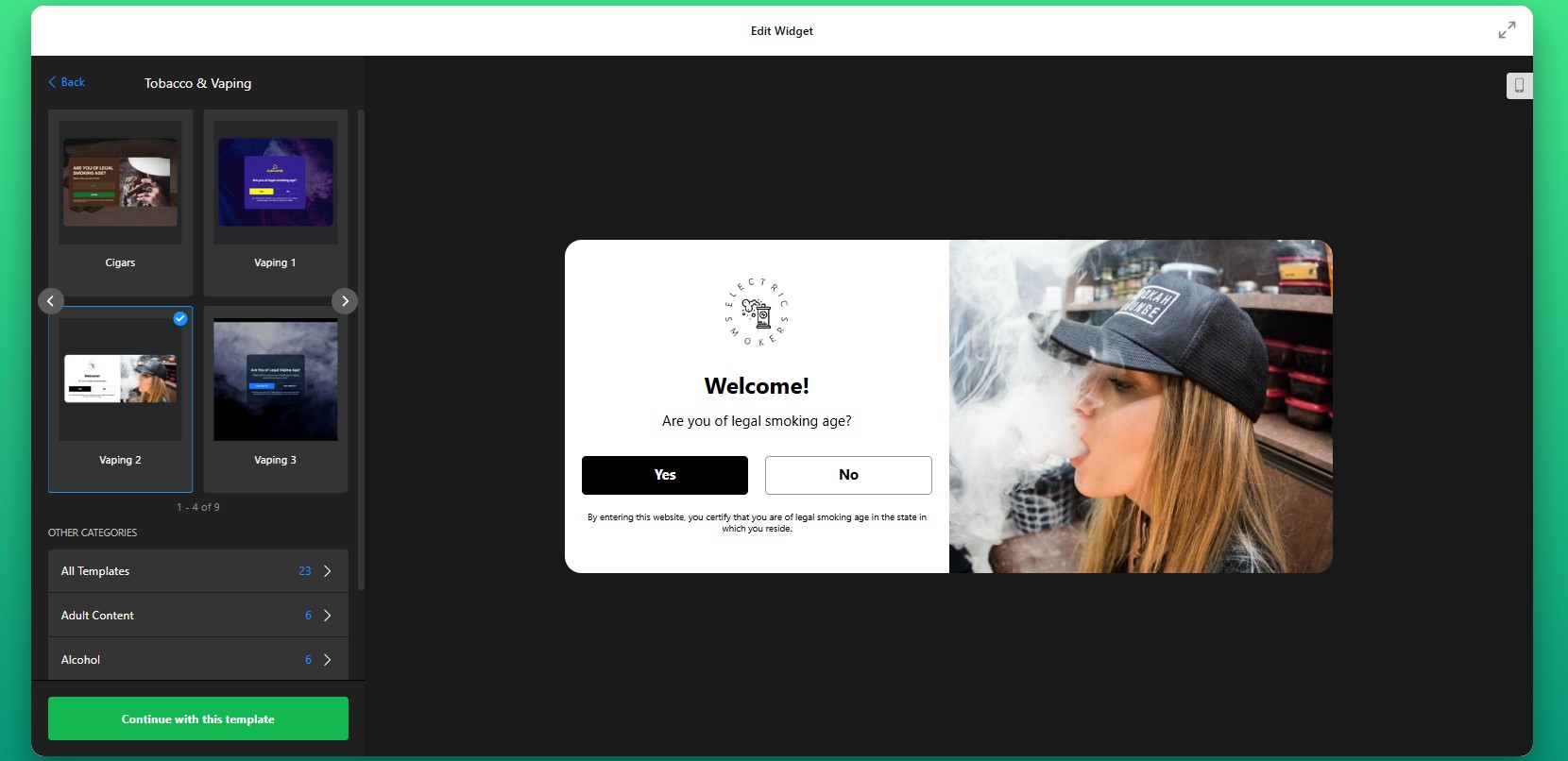
Step 1: Choose a Template
Start by opening the Elfsight editor. You’ll see various ready-made templates designed for different types of businesses and compliance needs. Choose the template that best matches your store and the level of control you need.
At this stage, don’t worry too much about visual details. The template is just your starting point, you’ll be able to customize the wording, design, and behavior in the next steps.
Step 2: Select the Verification Method
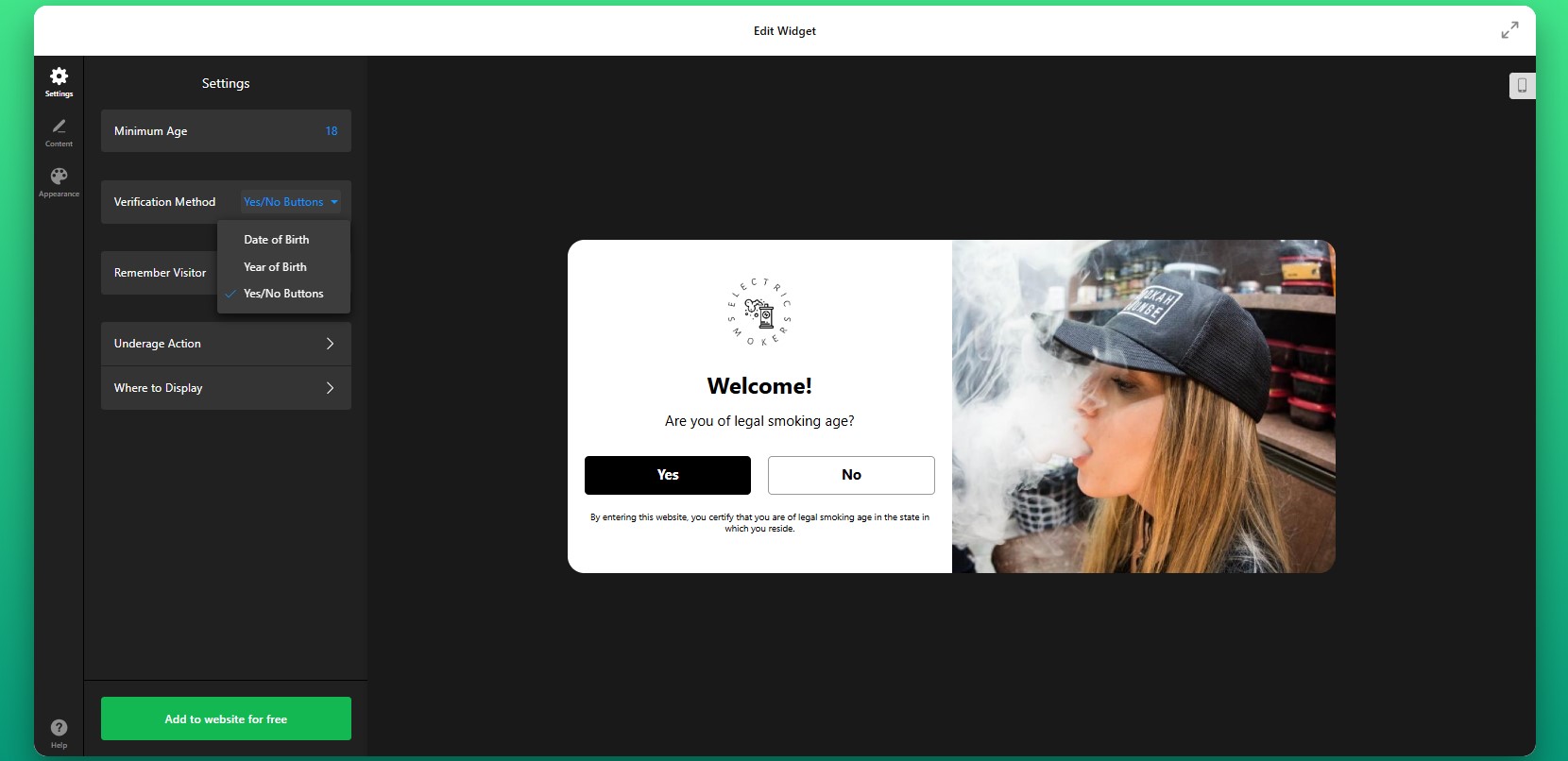
Next, decide how visitors will verify their age. This is one of the most important setup decisions because it determines how strict or lightweight the experience will feel.
You can choose a basic yes/no confirmation if you only need a fast acknowledgment before entry. This works well for stores that want a simple compliance layer without adding too much friction. If you need stronger validation, you can use a birth date field or age input to make the process more precise.
Step 3: Adjust Repeat Behavior
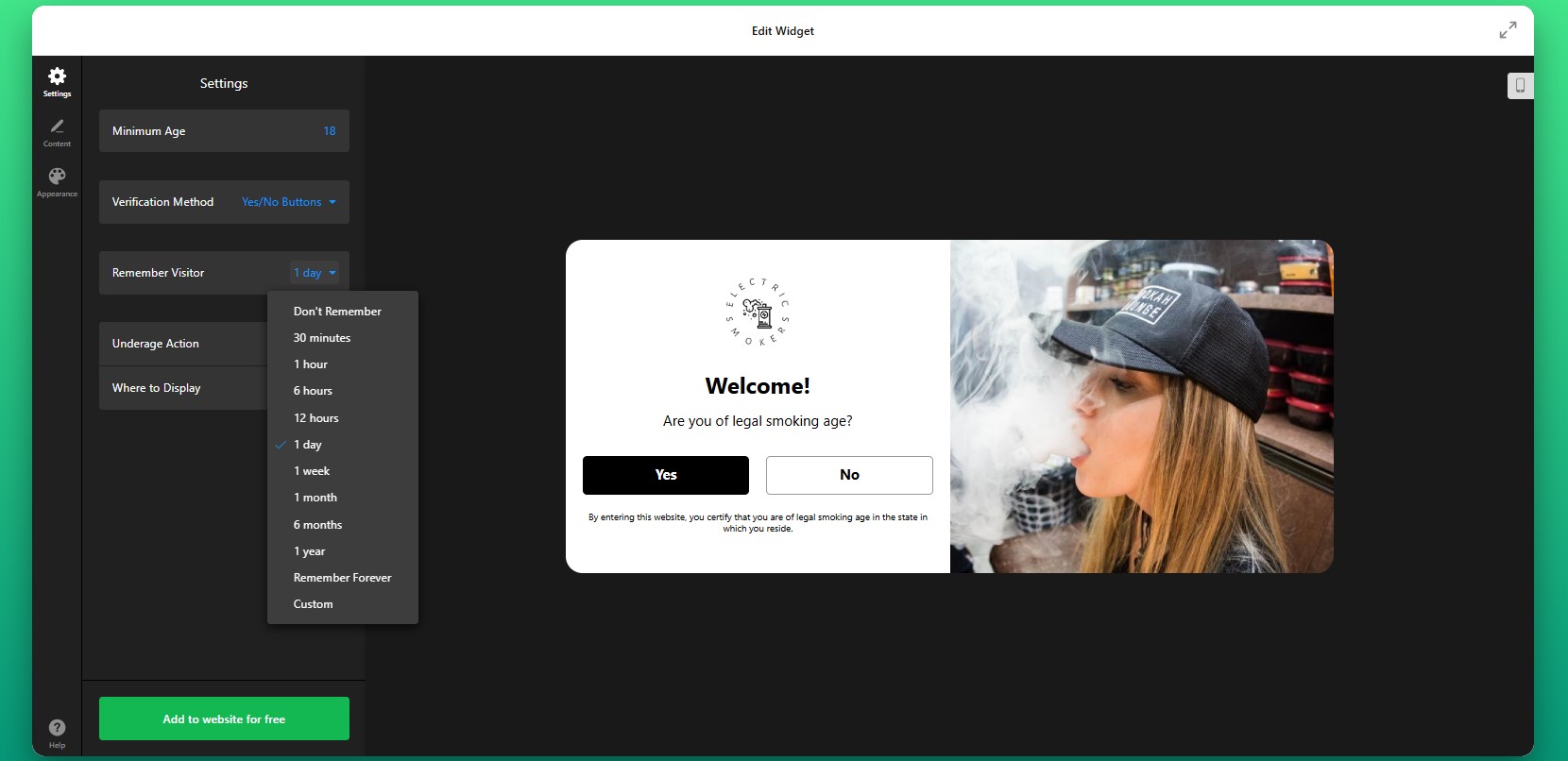
Then decide how often returning visitors should see the popup. Elfsight can remember verified users using cookies, which helps reduce friction for people who have already passed the age check.
This makes the experience much smoother for repeat visitors, especially on stores with loyal customers who browse often. Instead of asking them to confirm their age on every page load, the website can remember their response for a defined period.
Step 4: Set the Underage Action
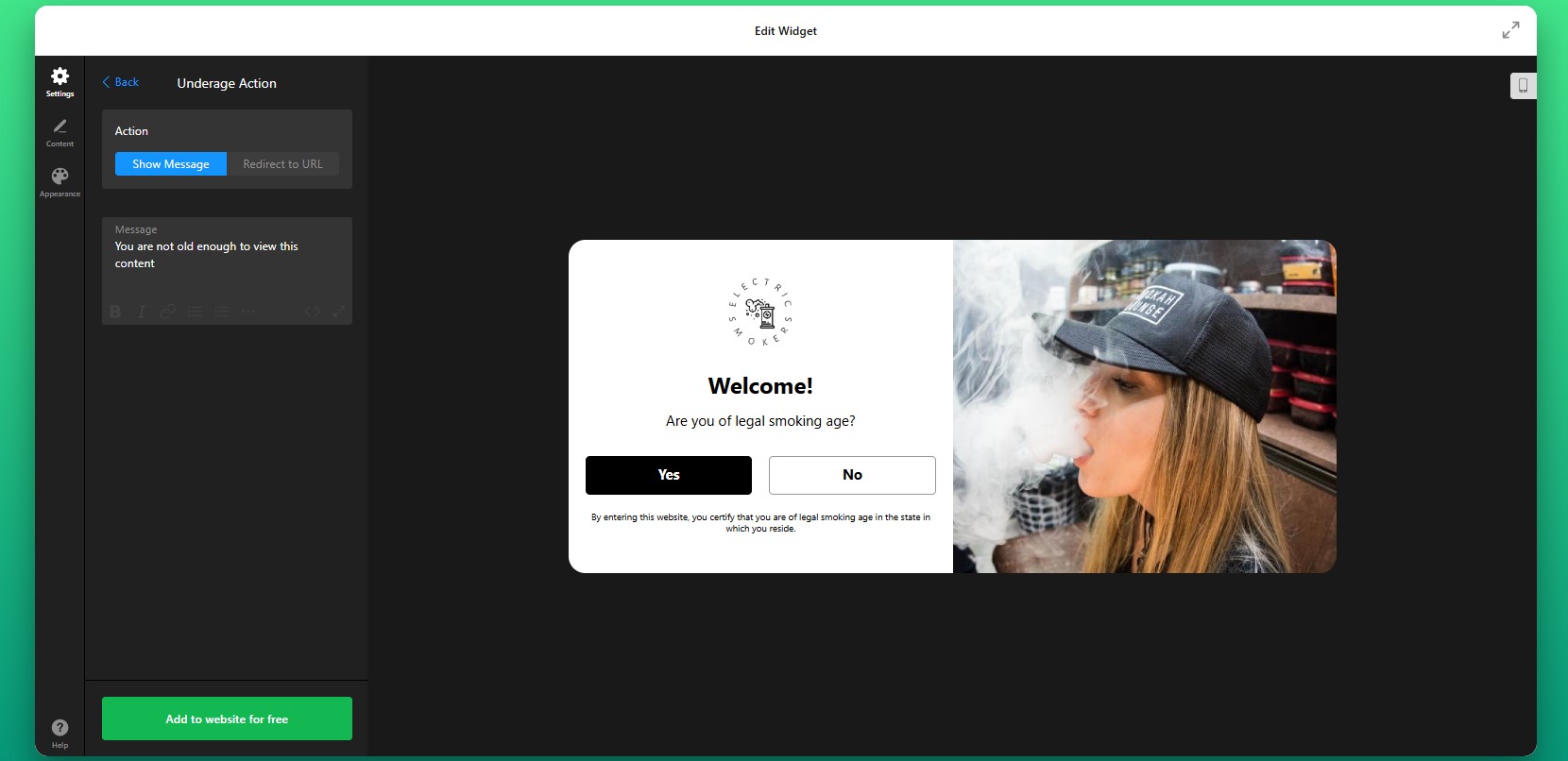
Now configure what happens after a user interacts with the popup. This is where you define how the app controls access to your Shopify website.
For users who do not qualify, you can show a custom message explaining the restriction or redirect them to another URL such as your homepage or an informational page.
You can also define whether the app should appear across the full website or only on selected pages. For some stores, it makes sense to gate the entire website. For others, age verification may only be necessary for certain product collections or landing pages.
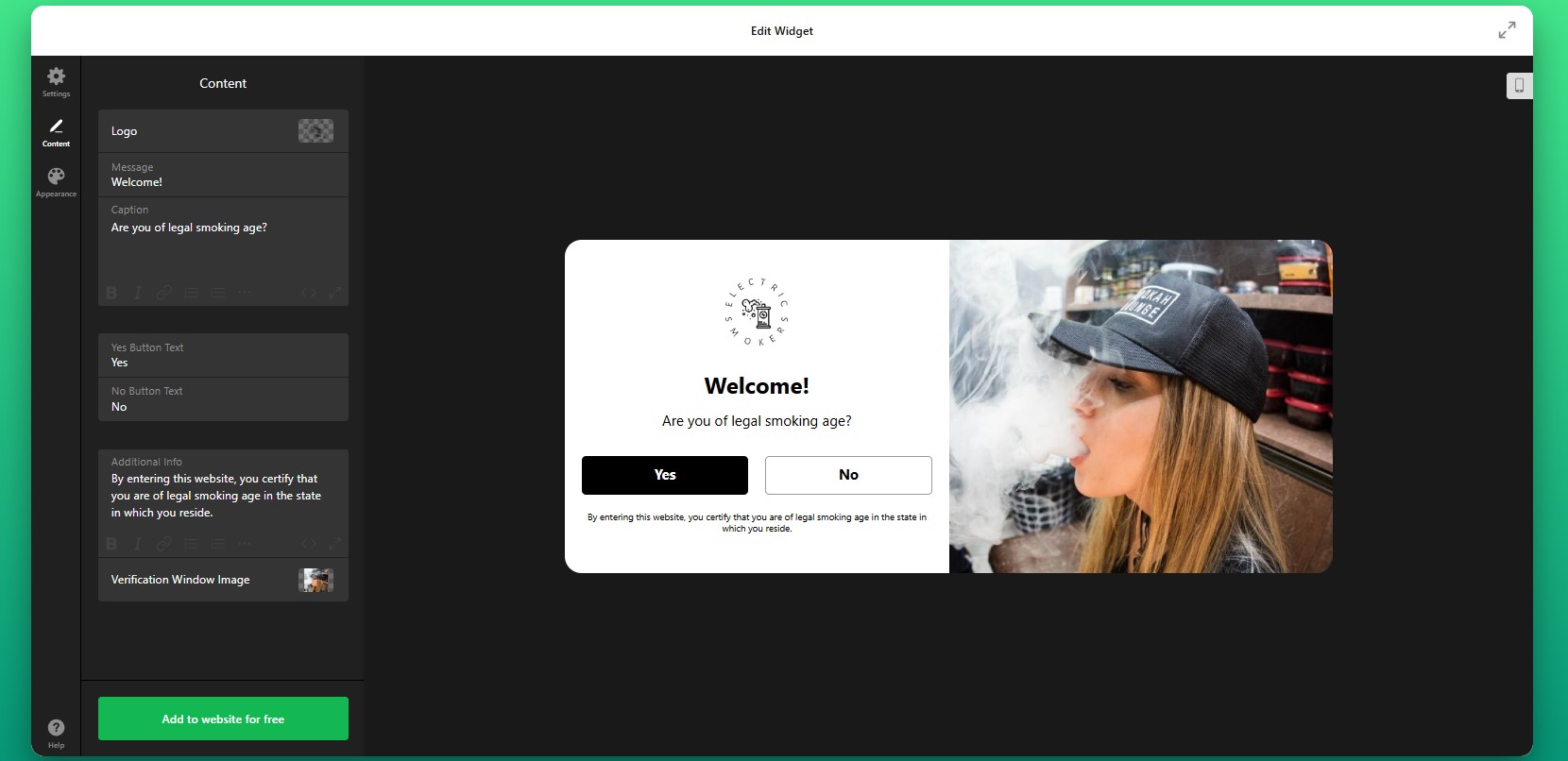
Step 5: Customize the Message
After setting the underage action, edit the popup content so it matches your store’s tone and clearly explains what users need to do. A well-written message makes the popup feel intentional and professional rather than disruptive.
Step 6: Customize the Design
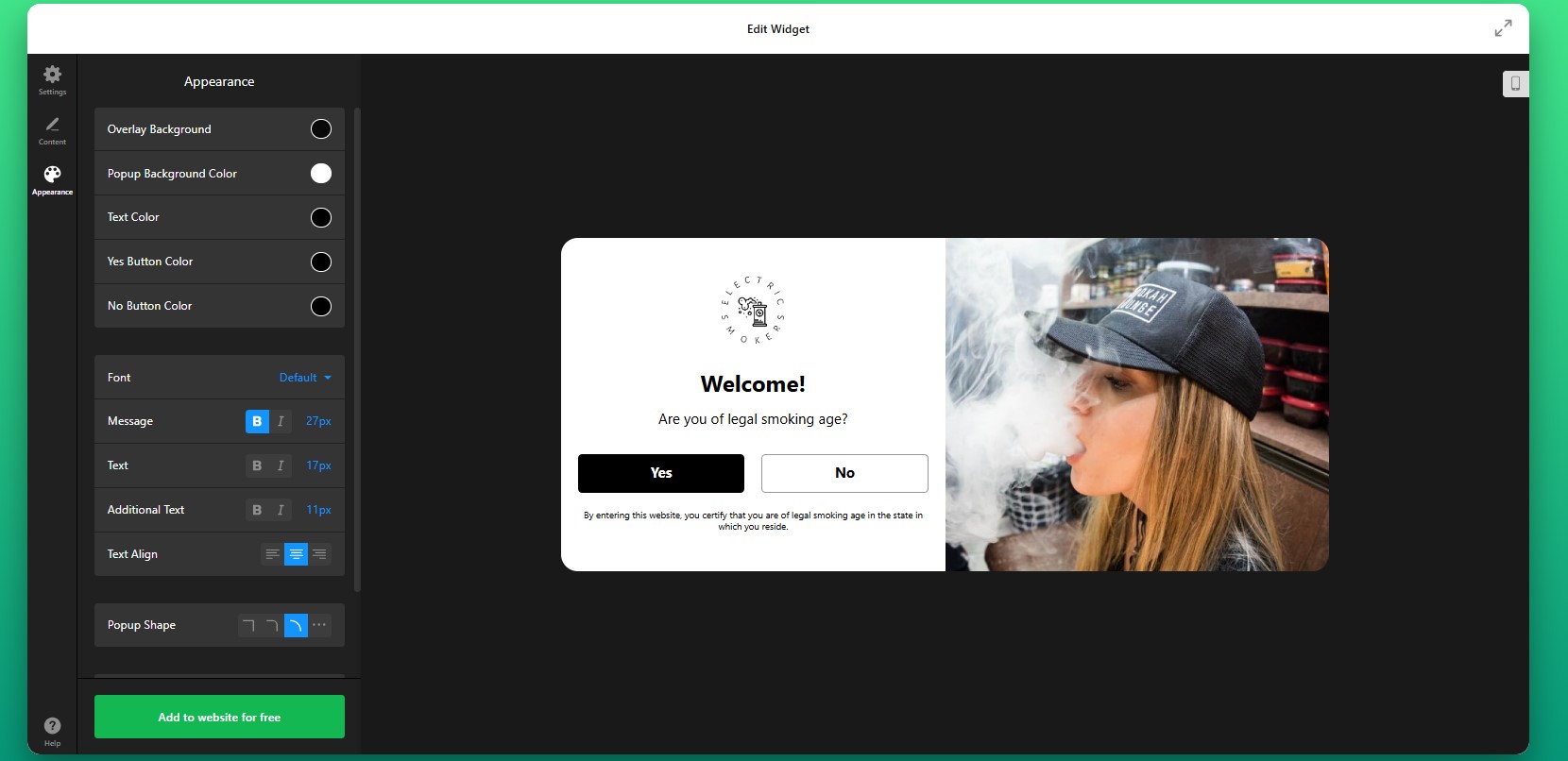
Next, move to the design settings and make the age verification popup feel like part of your storefront rather than an external add-on.
You can adjust colors, fonts, button styles, background overlays, and spacing to align the popup with your Shopify branding.
Step 7: Generate the Embed Code
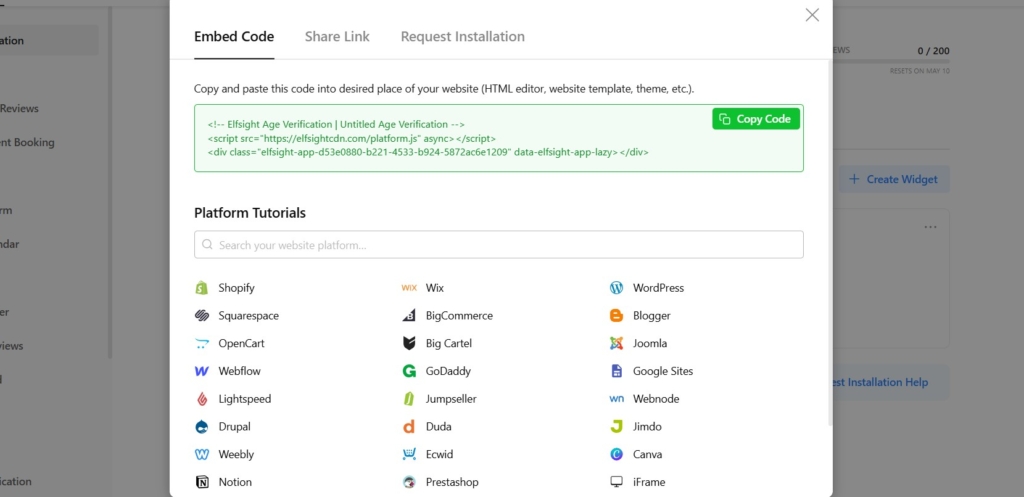
Once your settings are complete, click “Add to website for free” to generate the embed code. Copy the full code snippet exactly as it appears. It usually includes all the elements needed for the popup to load and display correctly. At this point, your age gate is fully configured and ready for installation.
Step 8: Add Age Verification to Shopify
Now open your Shopify admin and go to the area where you want to install the widget. Go to your Shopify theme editor or theme code area, depending on how your store is structured. Paste the embed code into the appropriate section so the widget loads across the pages you want to protect. If you only want to gate specific pages or product sections, place the code accordingly.
After saving the changes, open your live store and test the popup.
- If the popup doesn’t appear, first make sure the full embed code was added to the correct Shopify theme section.
- If verified users keep seeing the popup repeatedly, review your cookie and memory settings.
- If the design looks broken, check for theme styling conflicts or narrow containers affecting the popup layout.
- If redirects don’t work as expected, recheck the destination URL and your approval or denial logic in the widget settings.
Other Ways to Add Age Verification to Shopify
There are other ways to embed age verification on your Shopify store. While these methods can work for basic setups, they often lack the control and ease of use needed for long-term management.
Shopify Apps
One common approach is installing a third-party age verification app from the Shopify App Store. These apps are designed specifically for Shopify and can be added without touching code.
To implement this method, go to the Shopify App Store, search for “age verification,” install a suitable app, and follow its setup instructions. Most apps allow you to configure a popup, define age rules, and enable it across your store.
This method is relatively easy to set up, but it often comes with limitations in customization and performance.
- Limited design flexibility compared to fully customizable widgets
- May add extra load time depending on the app
- Feature restrictions on free plans
- Dependency on third-party app updates and support
Custom Code (JavaScript Age Gate)
Another option is creating your own age verification popup using JavaScript and embedding it directly into your Shopify theme.
To implement this, you would write a script that triggers a popup on page load, collects user input (such as age confirmation), and controls access based on the response. This code is then added to your theme files (usually in theme.liquid or similar).
While this approach gives you full control, it requires technical expertise and ongoing maintenance.
- Requires development knowledge to build and maintain
- Time-consuming to implement correctly
- No built-in UI or customization tools
- No automatic compliance updates or feature improvements
Theme-Based Popups or Scripts
Some Shopify themes include built-in popup functionality or allow you to add scripts via theme settings or third-party integrations.
To implement this, you would either enable a popup feature within your theme settings or inject custom scripts using Shopify’s theme customization tools or script fields.
This method can work for simple cases but is often limited in flexibility and control.
- Very limited customization options
- Not designed specifically for age verification use cases
- May lack proper access control or redirect logic
- Difficult to scale or adapt for different pages
- Dependent on theme capabilities
Before choosing a method, it’s important to compare them based on real-world factors like flexibility, maintenance, and long-term usability.
| Feature | Elfsight Age Verification | Shopify Apps | Custom Code | Theme-Based |
| Ease of setup | Easy | Easy | Hard | Medium |
| Customization | High | Medium | High | Low |
| Design control | Full | Limited | Full | Limited |
| Verification methods | Advanced | Basic–Medium | Custom | Basic |
| Maintenance required | None | Medium | High | Medium |
| Mobile optimization | Built-in | Depends | Manual | Depends |
| Compliance flexibility | High | Medium | Custom | Low |
| Automatic updates | Yes | Yes (app-based) | No | No |
Choosing the right method depends on your needs. But if you’re looking for a reliable, low-maintenance solution that scales with your store, flexibility becomes a key factor. Elfsight provides the best balance of ease, flexibility, and scalability without increasing complexity
Optimization Tips for Your Age Verification Popup
Once your age verification is live, small adjustments can make a big difference in how users interact with it and whether it supports your goals without creating friction.
- Keep the verification process simple: Avoid unnecessary steps or overly complex forms. A clear and quick interaction reduces drop-offs while still meeting compliance requirements.
- Use clear and transparent messaging: Let users know why age verification is required. When visitors understand the reason, they’re more likely to complete the process without hesitation.
- Match the popup to your brand design: Align colors, fonts, and layout with your Shopify theme so the popup feels like a natural part of your website rather than an interruption.
- Enable cookie memory for returning visitors: Allow verified users to bypass the popup on future visits. This improves the browsing experience and prevents frustration for repeat customers.
- Test behavior across devices and browsers: Make sure the popup displays correctly on mobile, tablet, and desktop, and doesn’t interfere with navigation or page loading.
- Control when and where the popup appears: Display the age gate immediately on entry or only on specific pages depending on your strategy. This ensures it appears at the right moment without disrupting the overall flow.
Frequently Asked Questions
What age verification methods are available in the app?
Can I control what happens when a user fails the age check?
Will users need to verify their age every time they visit?
Can I display Age Verification only on specific Shopify pages?
Is the Age Verification app secure and does it store user data?
Conclusion
Adding age verification to your Shopify website is a critical part of how your store operates, protects itself, and communicates with visitors. A well-implemented age gate ensures you meet regulatory requirements while creating a clear and structured entry point for your audience.
With multiple verification methods, customizable design, smart access control, and cookie-based memory for returning users, the Elfsight Age Verification app gives you everything you need to implement verification of visitors’ age without adding complexity. You can control how and where the popup appears, match it to your Shopify branding, and ensure it works smoothly for every visitor.
If you’re looking for a reliable, scalable way to add age verification to Shopify, Elfsight helps you do it quickly, while keeping both compliance and user experience in balance.