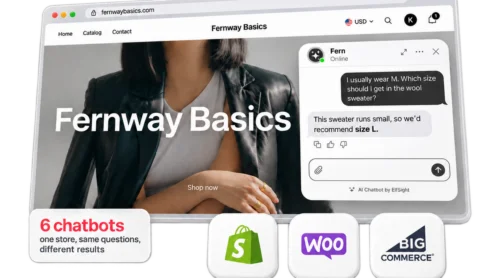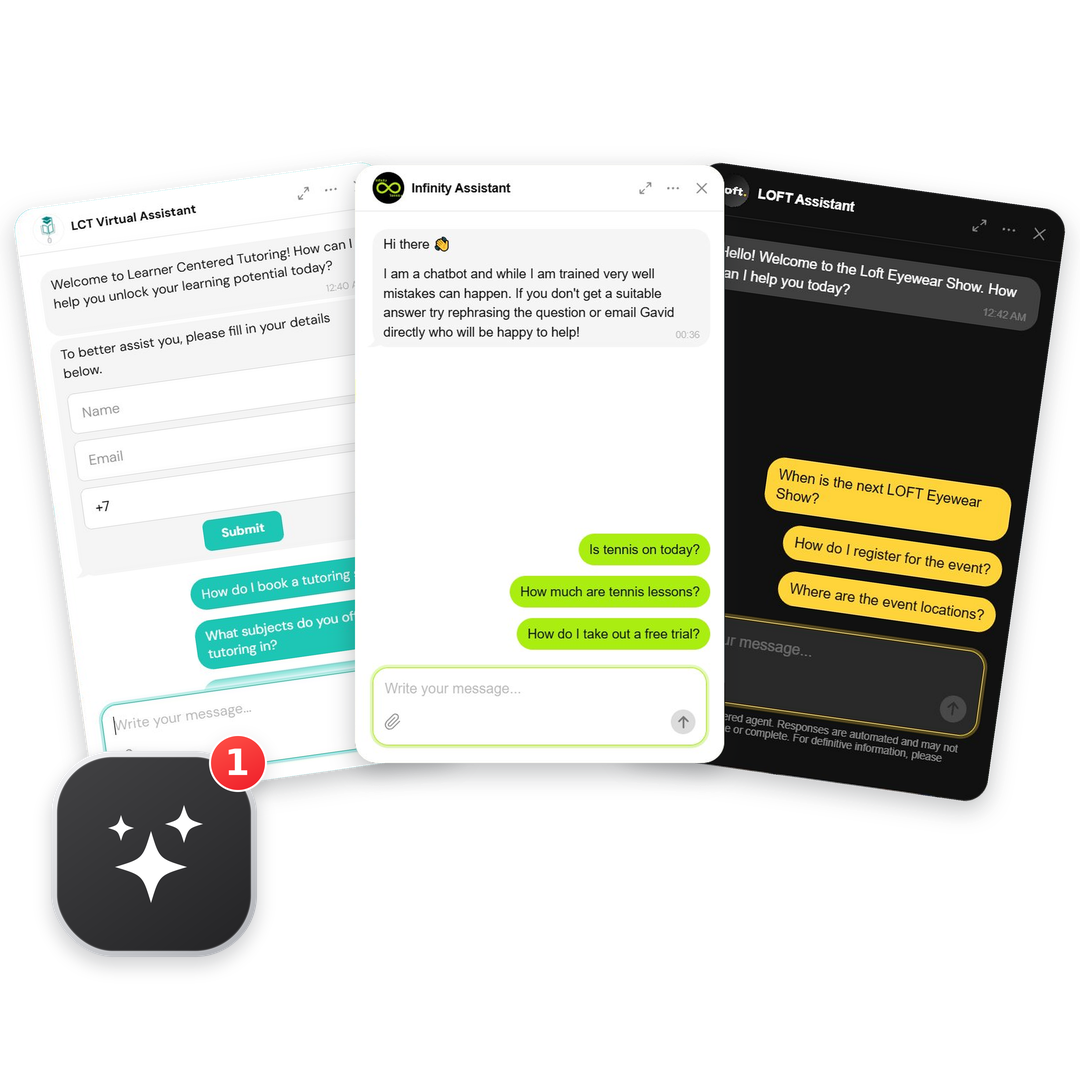
A website chatbot can take on several jobs at once, as long as it sticks to your content. For small businesses, those jobs range from quoting prices and handling returns to recommending gifts and booking trial lessons. We tested chatbots on seven real small-business websites and two test shops of our own to show them in action.
Most chatbot ideas online come from big brands, so it’s hard to picture what one would say on a small business’s website. We decided to look up and analyze examples of AI chatbots as they’re used by real business owners from different industries. All examples here run on the Elfsight AI Chatbot: seven websites that have it on their homepages, and two test shops of our own.
Below are 10 use cases with visitors’ questions, the chatbot’s reply word for word, what made each answer useful (or not), and the settings to copy for your own setup.
- A small-business chatbot can handle much more than FAQs: it can quote prices, explain policies, recommend products, collect leads, and help with bookings.
- The best answers come from clear website content, supplemented by knowledge files, Q&A pairs, and Conversation Rules.
- When a chatbot can’t confirm something, it should say so, share what it does know, and offer a direct way to reach a person instead of guessing.
- Always test your bot before launch: check whether its answers match your website, how it handles unknown or sensitive questions, and whether human handoff works.
Chatbot use cases: 7 businesses checked
How we tested
We found small businesses running the Elfsight AI Chatbot on their homepages, visited each site like any other visitor, and asked three basic questions: one the website answers, one it doesn’t, and “Can I talk to a person?”.
We also built two made-up shops on .test domains, Fernway Basics (clothing) and Larkfield Pottery, and tested them in the editor preview on the Free plan with 13 varied questions, since we weren’t using up a real owner’s monthly messages. That’s where we tried the fixes: adding files, Q&A pairs, and Conversation Rules, then asking again.
Chatbot examples by use case
The table below groups ten chatbot use cases by job and business fit, with examples behind each:
| Task | Business fit | Example | What the bot did |
|---|---|---|---|
| 1. Tell visitors about upcoming events | Events and venues | LOFT Eyewear Show, eyeware trade shows | Gave March 4–6, 2027 dates, both New York venues with addresses, and a photo. |
| 2. Quote prices and discounts | Service business | Learner Centered Tutoring, online tutoring | Quoted $75/hour, the 10% first-purchase discount, the 1-hour minimum, and monthly plans. |
| 3. Answer shipping, returns, and policy questions | Online store | Just Sweatshirts, apparel store | Stated free standard shipping on US orders of $150 or more, and mentioned carrier restrictions. |
| 4. Help with troubleshooting and care | Any business | Our test pottery shop (.test domain) | Explained how to get tea stains out of a mug from the care guide in its files. |
| 5. Recommend products by budget and preference | Online store | Our test clothing shop (.test domain) | Listed six gift options under $50 with prices, colors, sizes, and a final-sale flag. |
| 6. Handle special requests | Service business | Vuelta Canela, kindergarten | Explained its special-diet policy, said a milk-protein-free menu must be arranged with the administration first. |
| 7. Collect visitors’ contact details | Any business | AI Enablement Group, consultancy | Showed a contact form after the greeting with name and business email fields. |
| 8. Get visitors to book a trial or a call | Service business | Infinity Tennis, tennis coaching | Confirmed a 6-year-old can join, said the first session is free, and linked the trial booking page. |
| 9. Help visitors connect with you | Any business | All seven live websites | Every bot offered a way through: a contact card, a form in the chat, or contact details in the reply. |
| 10. Set expectations and keep the chat on topic | Any business | AeroPara, tandem paragliding | Opened with “I’m SkyBot, a tandem AI” and asked how it could help. |
Answering visitors’ questions automatically
Most of a chatbot’s day is support: the questions a business would otherwise answer by email or phone. The first five use cases cover that, from event dates and prices to returns, product care, and special requests, and every answer is only as good as the page or file behind it.
1. Tell visitors about upcoming events
LOFT Eyewear Show runs independent eyewear events. Naturally, their chatbot’s greeting comes with suggested questions about the next show, registration, and locations.
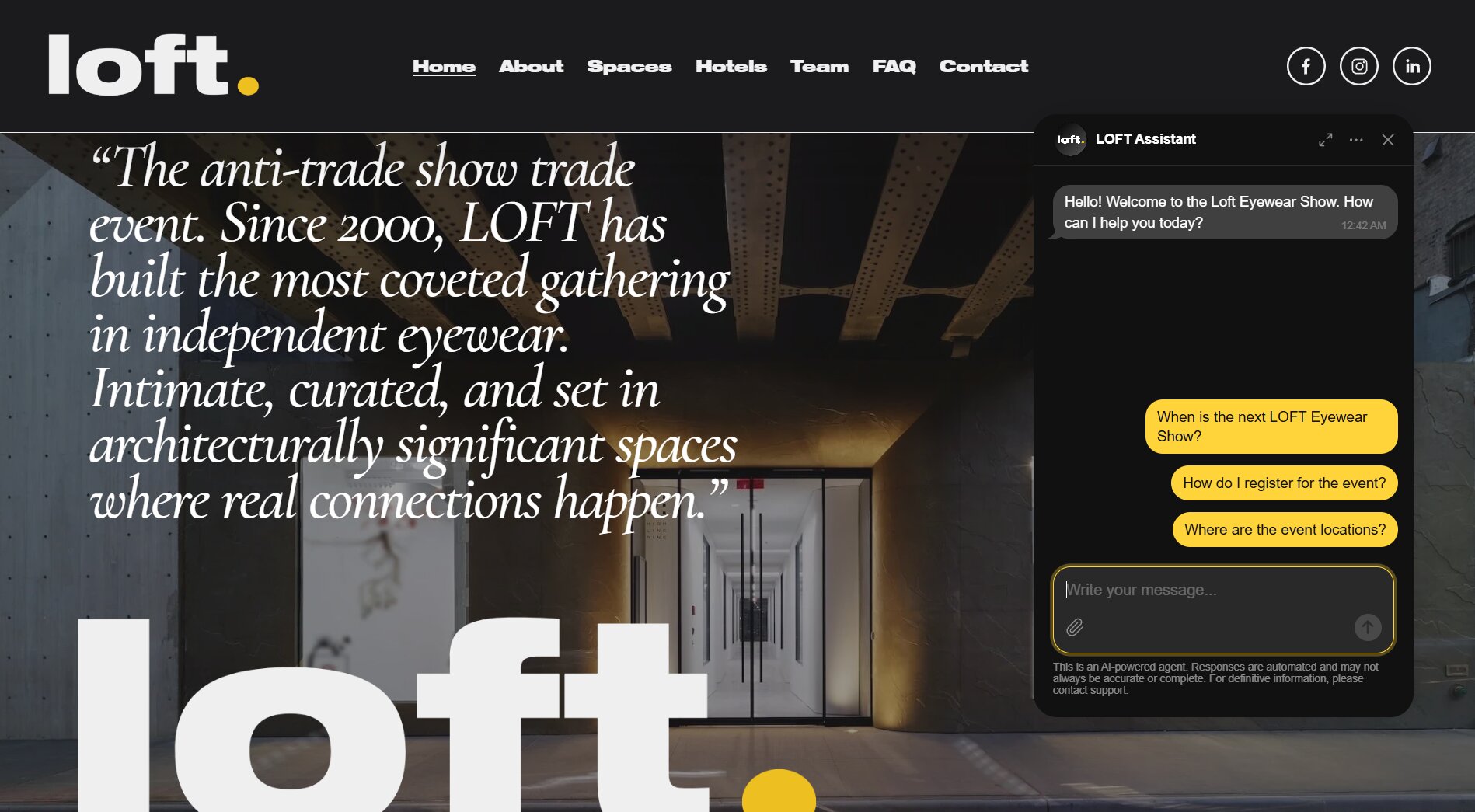
Right off the bat, we asked the obvious question, when and where the next New York show is, and got exactly what the website says: March 4–6, 2027, at two venues on West 28th Street, with a photo of the venue.
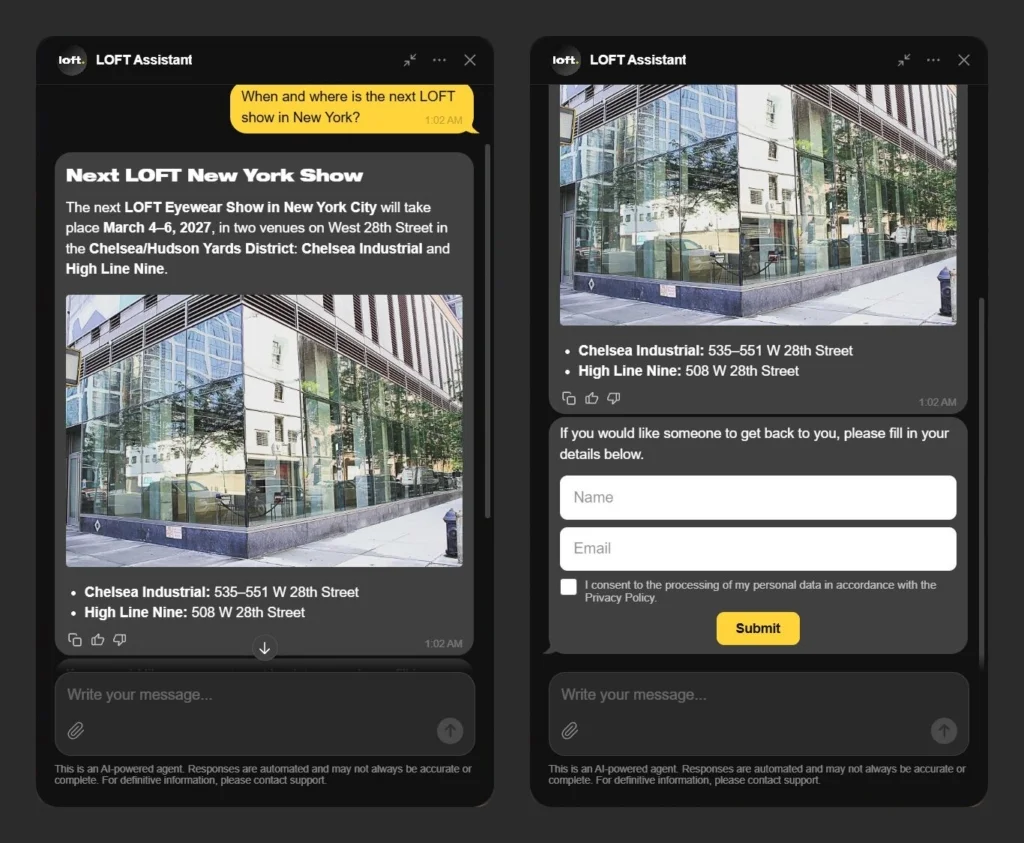
The answer came from the website’s own pages, so the setup starts there: keep dates and venues on a page the bot reads, under Web Pages. Look at the chat itself, too. It runs on the same dark theme as the site, with a single yellow accent for visitor messages, the input field, and buttons. That’s Themes & colors in the AI Chatbot’s editor.
2. Quote prices and discounts
On Learner Centered Tutoring‘s website, we asked what 1-on-1 tutoring costs per hour and whether new students get a discount. The bot answered with the numbers from the pricing page, right down to the “may” in “may offer additional savings”:
- “Standard rate: $75 per hour”
- “New student discount: 10% off the first purchase, bringing it to $67.50 per hour. The minimum purchase is 1 hour.”
- “Monthly plans may offer additional savings: 8 hours/month: $67.50/hour; 16 hours/month: $60/hour”
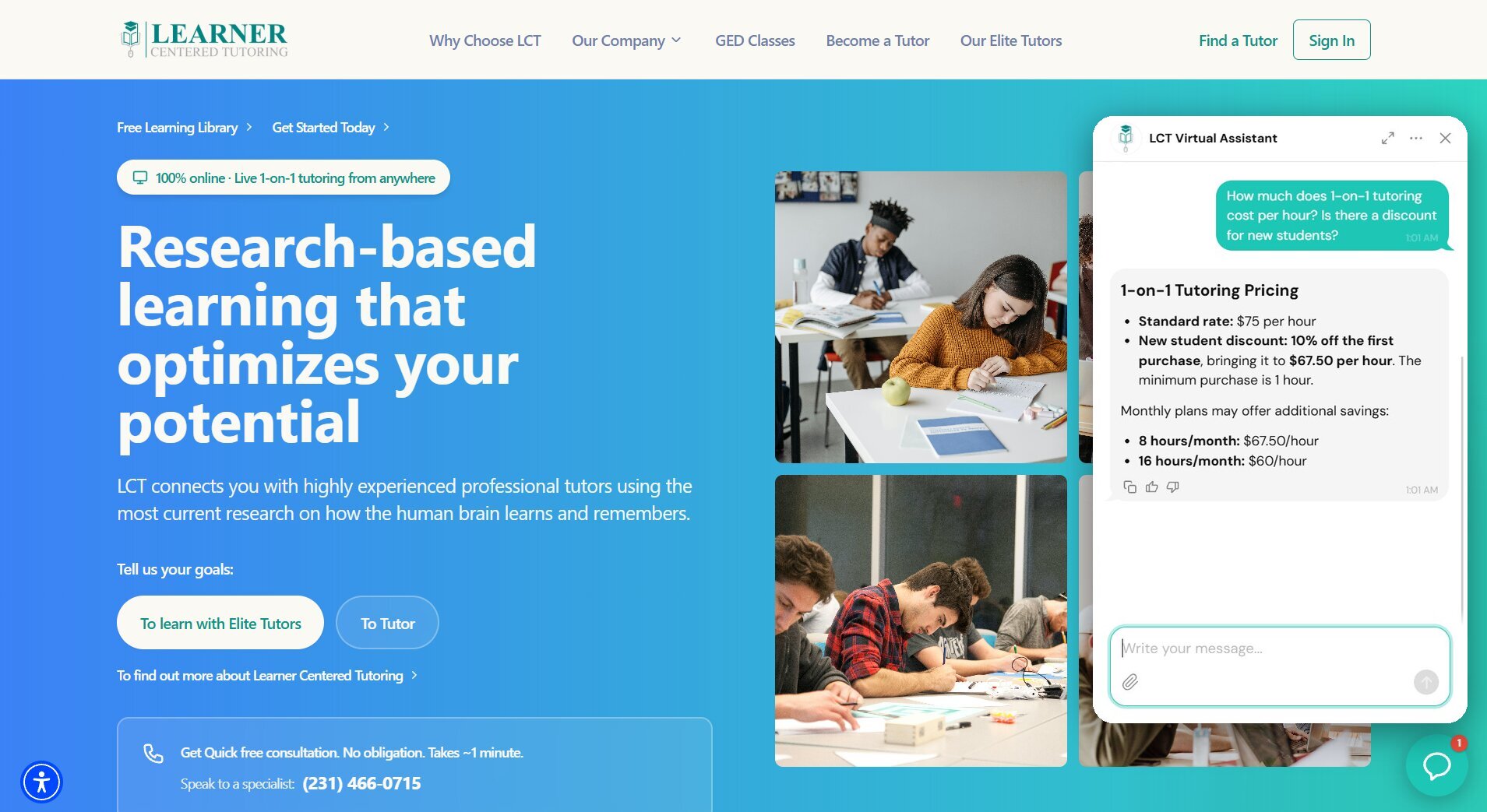
The chat picks up the teal from the site’s blue-to-teal background for visitor messages and buttons, and the company logo doubles as the agent’s avatar.
Prices come with fine print, and visitors ask about that too. AeroPara Paragliding sells tandem flights and gift vouchers on a German-language website. Asked about cable-car rides, the bot replied that the cable-car ticket is not included in the price of the tandem flight and usually has to be bought separately on the spot – a crucial detail for someone planning ahead.
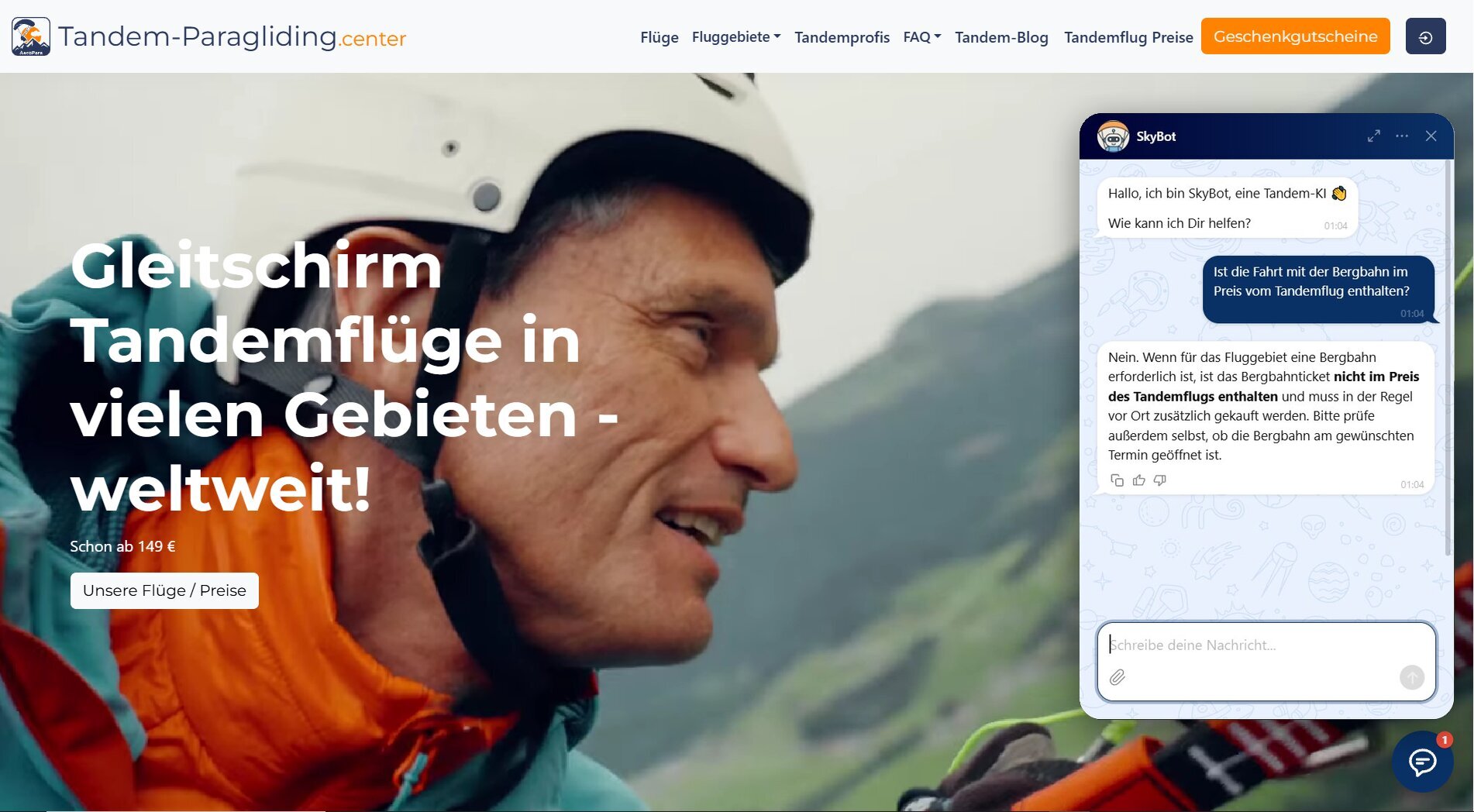
Repeating this setup is simple. Keep your prices on a page the bot reads, under Web Pages. It’s worth getting right, too: on elfsight.com, 848 of the 2,669 chatbot requests support graded (July-October 2026) were about plans and pricing.
3. Answer shipping, returns, and policy questions
Just Sweatshirts sells cotton sweatshirts. Ask it about free shipping to the US and the bot gives the full policy, conditions included: free standard shipping to the “intercontinental United States” on orders of $150 or more before taxes and discounts, standard rates below that, and a heads-up that “some locations may be excluded due to carrier restrictions.”
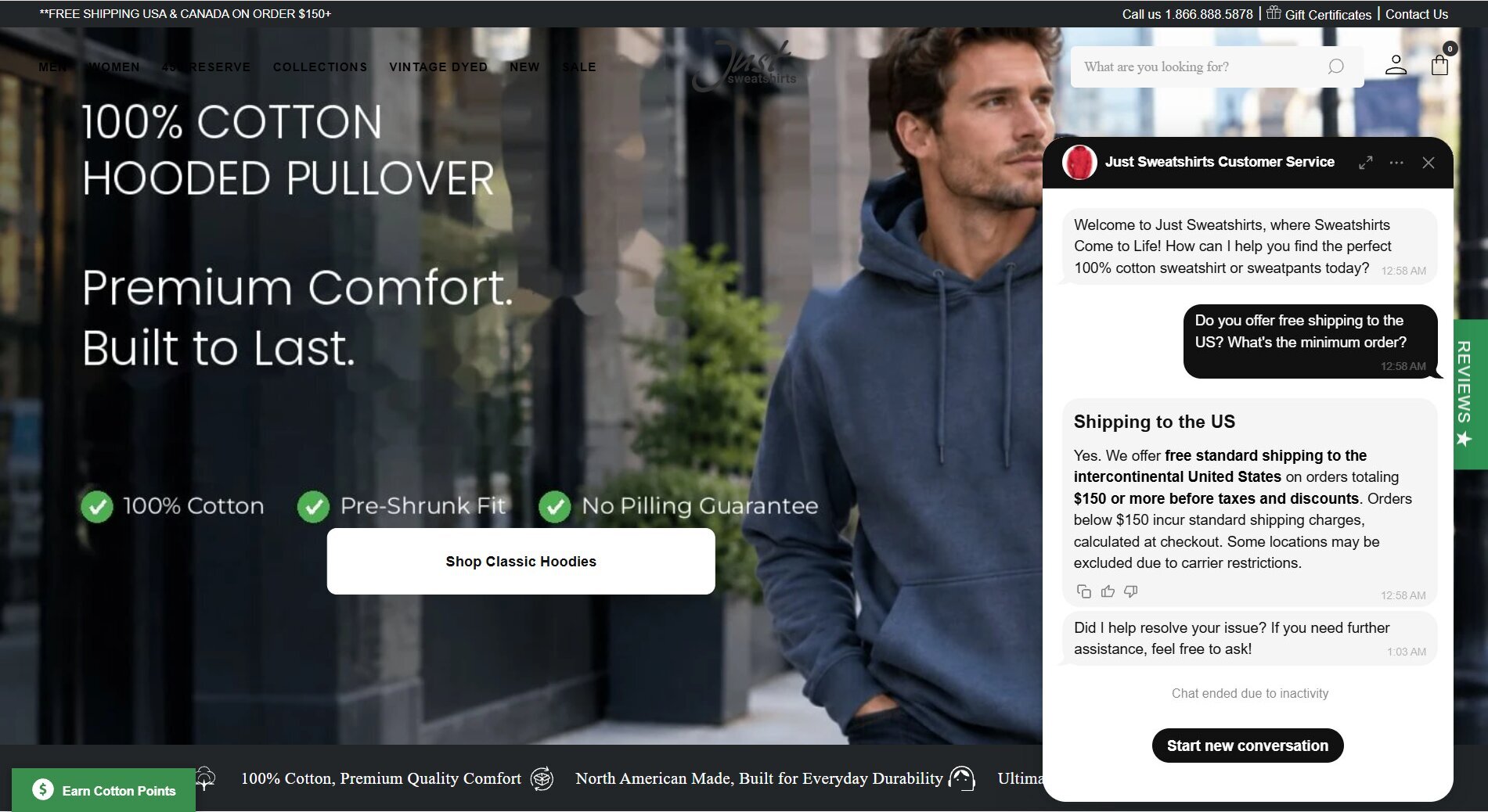
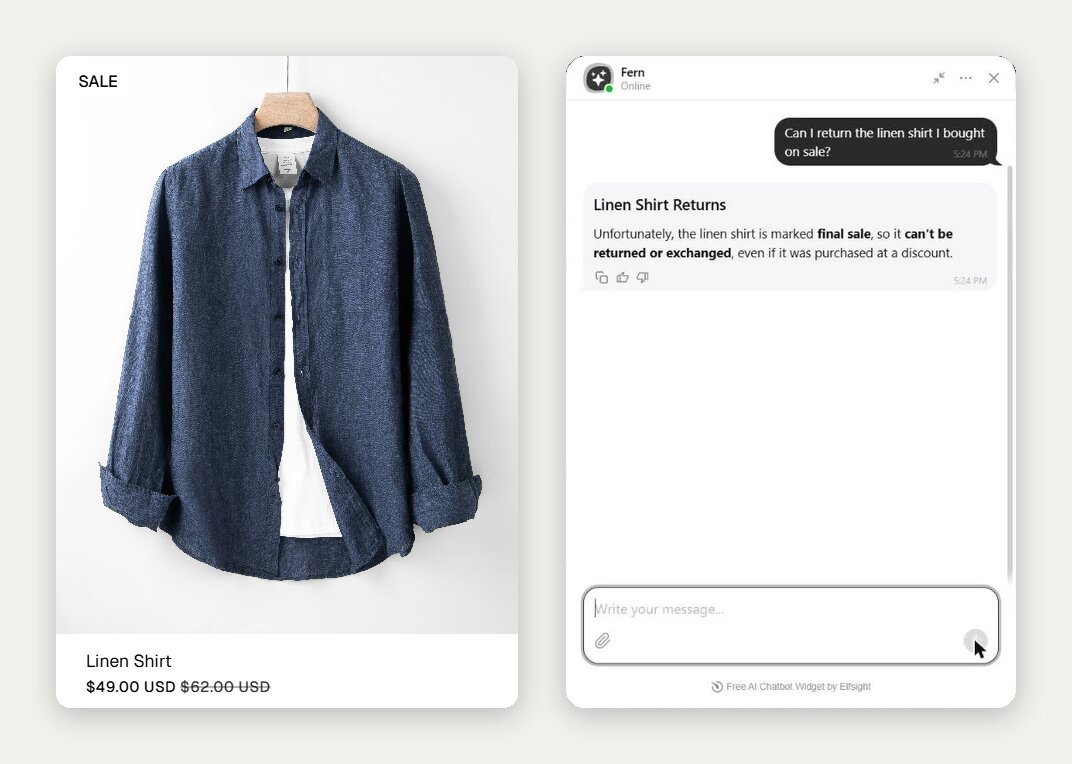
Our test clothing shop was just as clear about a sale shirt: “No. The linen shirt is marked final sale, so it cannot be returned or exchanged.”
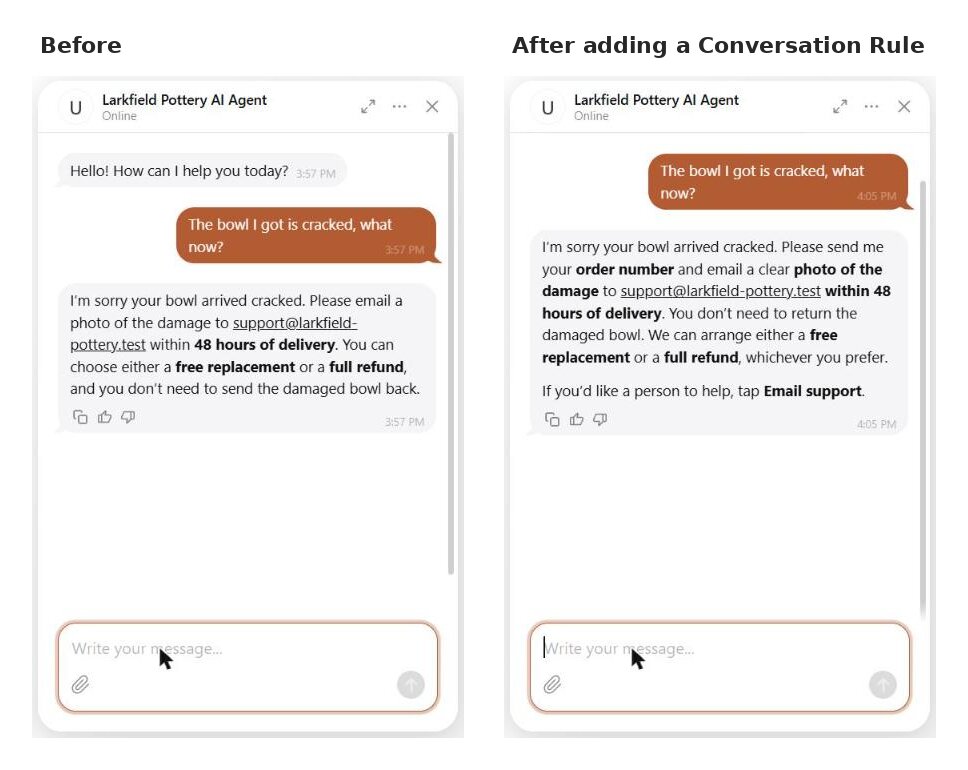
Your pages supply the facts, but you decide how the bot handles them. When we told our test pottery shop an item arrived damaged, the first answer got the policy right (email a photo within 48 hours for a replacement or refund) but never asked which order it was. One Conversation Rule later, the bot asked for the order number first, then the photo, with the policy unchanged
4. Answer how-to or setup questions
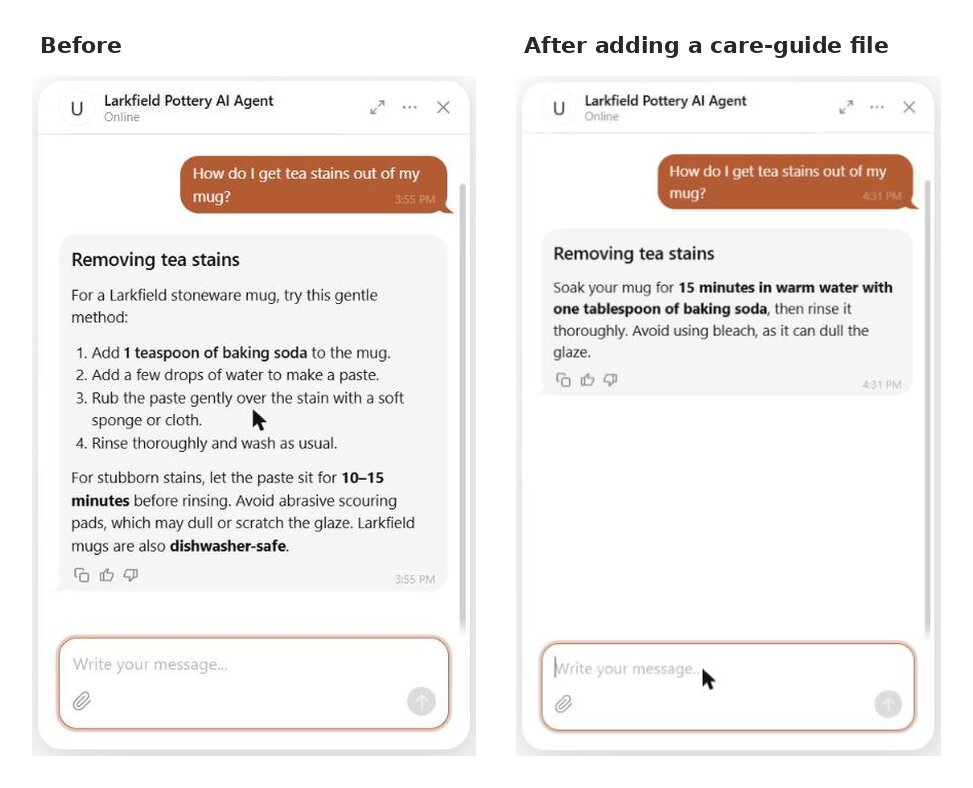
On our test pottery shop (Larkfield Pottery, .test domain), we asked how to get tea stains out of a mug – something the shop’s pages never mention. The bot answered anyway, with a general baking-soda method presented as care advice for the shop’s own mugs.
Then we uploaded a short care guide and asked again. This time the answer came straight from the file: “soak the mug for 15 minutes in warm water with a tablespoon of baking soda, rinse, and avoid bleach because it can dull the glaze.”
Knowledge Gaps, which shows you what the bot couldn’t answer, listed the chat with a suggestion of what to add.
5. Handle special requests
Vuelta Canela is a kindergarten and nursery in Santiago, Chile. We asked its chatbot, in Spanish, whether it could prepare a special menu for a child allergic to cow’s milk protein.
It explained that the kindergarten follows parents’ instructions for special diets and allergies, but said a fully milk-protein-free menu has to be arranged with the administration first. It added how meals work (menus planned monthly by an external nutritionist, a kitchen on site) and gave a phone number, an email, and a contact card with Email, Get directions, and WhatsApp buttons.
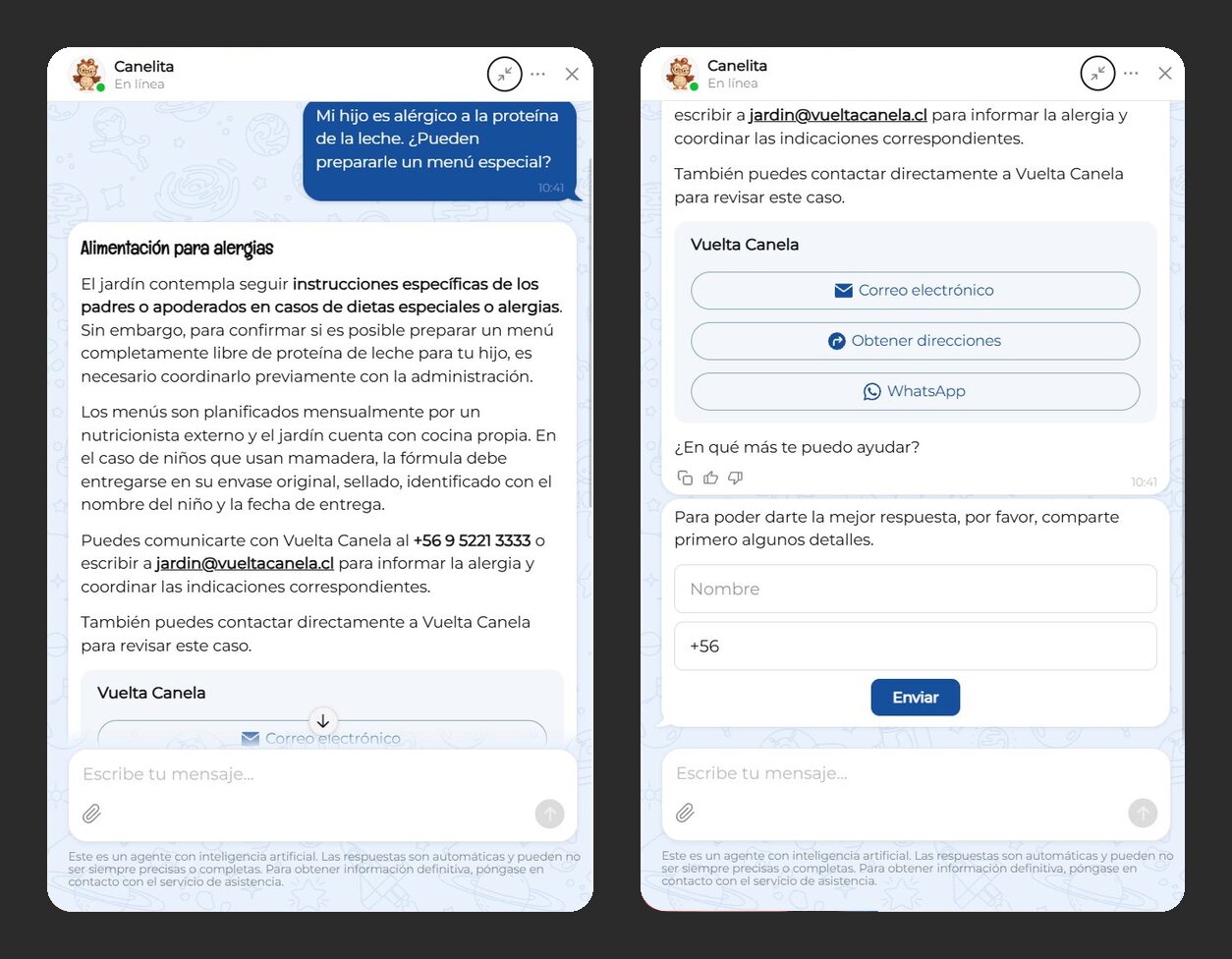
That’s the shape to aim for with any request only you can approve: the general policy, a clear “this needs a person,” and the way to reach one, all in one reply. A suggested Conversation Rule for it: “For dietary, medical, or accessibility requests, explain our general policy and ask the visitor to confirm the details with us.”
Recommending products and promoting offers
The next two go a step further. Instead of answering a question, the bot matches what a visitor asks for (a budget, a gift for someone, a need) to what the shop actually sells, and brings up the offer that’s running.
6. Recommend products by budget and preference
Our test clothing shop runs on just two uploaded files: store info and a catalog. Ask it for a gift under $50 for a brother, and you get six options with prices, colors, and sizes straight from the catalog, the final-sale warning on the $49 Linen Shirt, and gift cards for when you’re not sure.
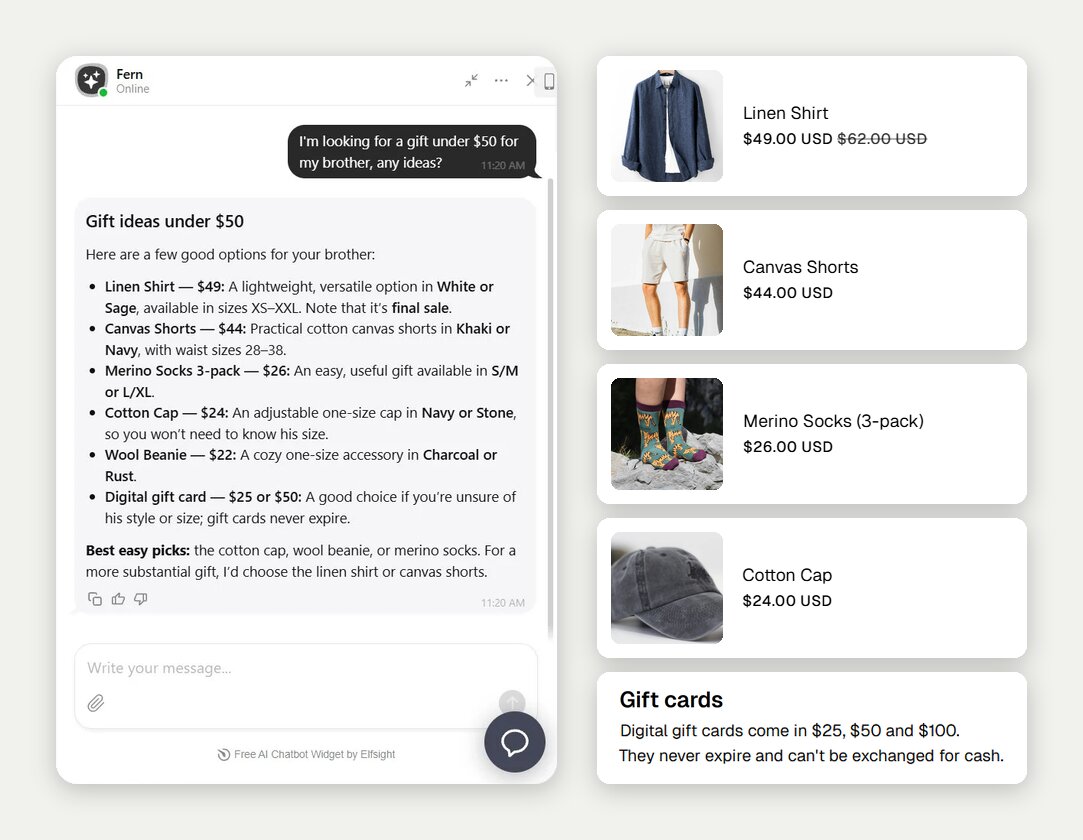
Asked for a warm layer under $80, it picked the $72 Fleece Half-Zip and noted that Medium in Forest was out of stock. On Larkfield Pottery, a gift-for-a-tea-lover question returned three mugs ($24–$29) matching its shop page.
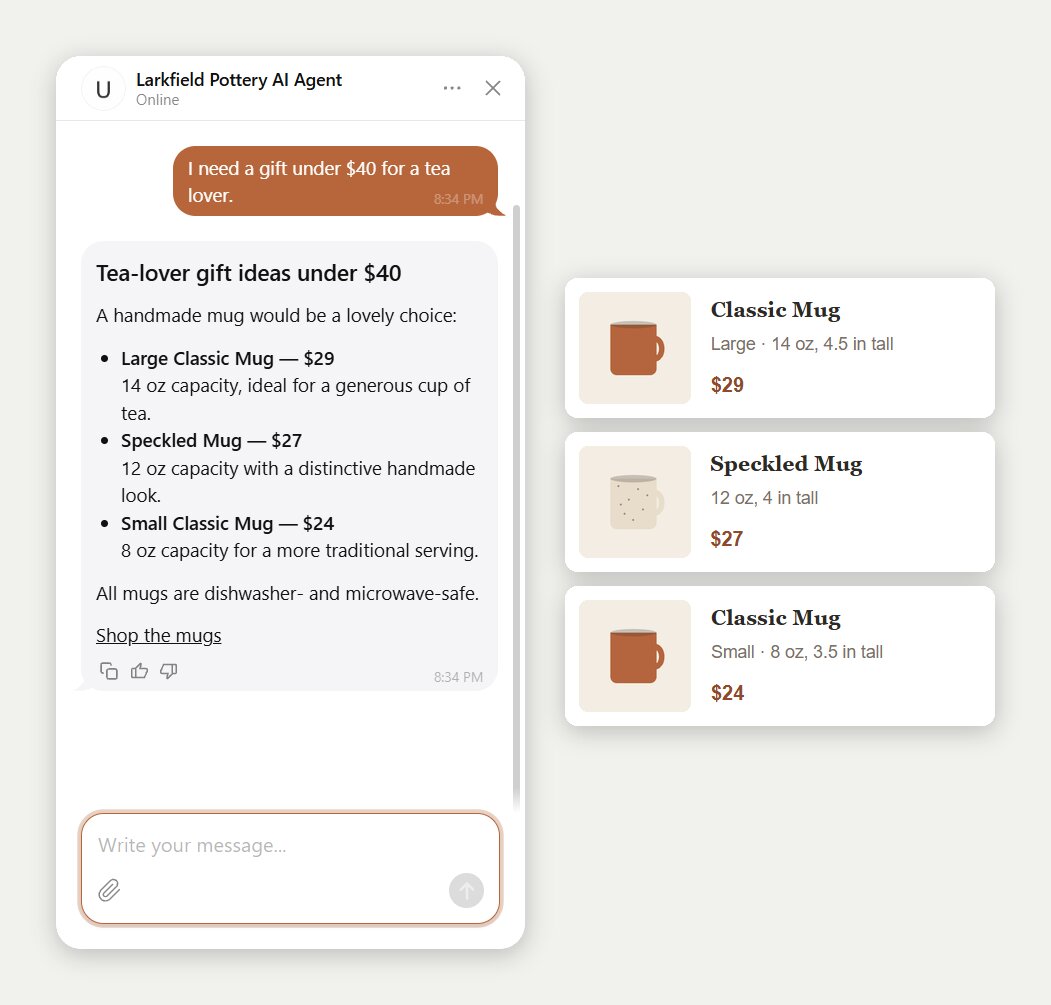
All it takes is one catalog file with prices, sizes, and sale terms under Knowledge.
Promote a limited-time offer
On our test pottery shop, the greeting announced the offer: “Free shipping on orders over $60 until Dec 15 — ask me anything about gifts.”. Asked for a discount code, the bot named the 10% first-order newsletter discount, said no other codes are published, and added the free US shipping deadline. Asked for 20% off two mugs, it said there’s no such discount and named the offers that do exist.
The slip: asked about free shipping directly, it twice said shipping is free over $60 without the “US only” condition. Suggested fix, not retested: put the condition in the offer text and add a rule to always state who an offer applies to.
Comparisons, stock and “we don’t sell that”
When we asked our made-up test clothing shop (.test domain) if it sells rain jackets, it replied: “No, we don’t currently sell rain jackets”, then named its quilted vest and chore jacket, “but neither is waterproof”.
Asked about an out-of-stock olive tee in Medium, it said the item was “currently out of stock” and showed an Email button. It also built a side-by-side comparison table for two layers that matched the catalog.
Getting leads, bookings, and handoffs to a person
These three are about getting something done: collecting contact details, booking a time, or putting the visitor in touch with a person. Which of them the bot does depends on what the owner switches on.
7. Collect visitors’ contact details
Where the form appears depends on how the business sells.
- Learner Centered Tutoring shows a name, email, and phone form right after the greeting.
- AI Enablement Group asks for name and business email with a consent checkbox.
- Vuelta Canela shows a name-and-phone form after its answers.
The first two both sell through a consultation, so the chat is meant to end in a call anyway, and asking for a business email quietly tells visitors who the service is for.
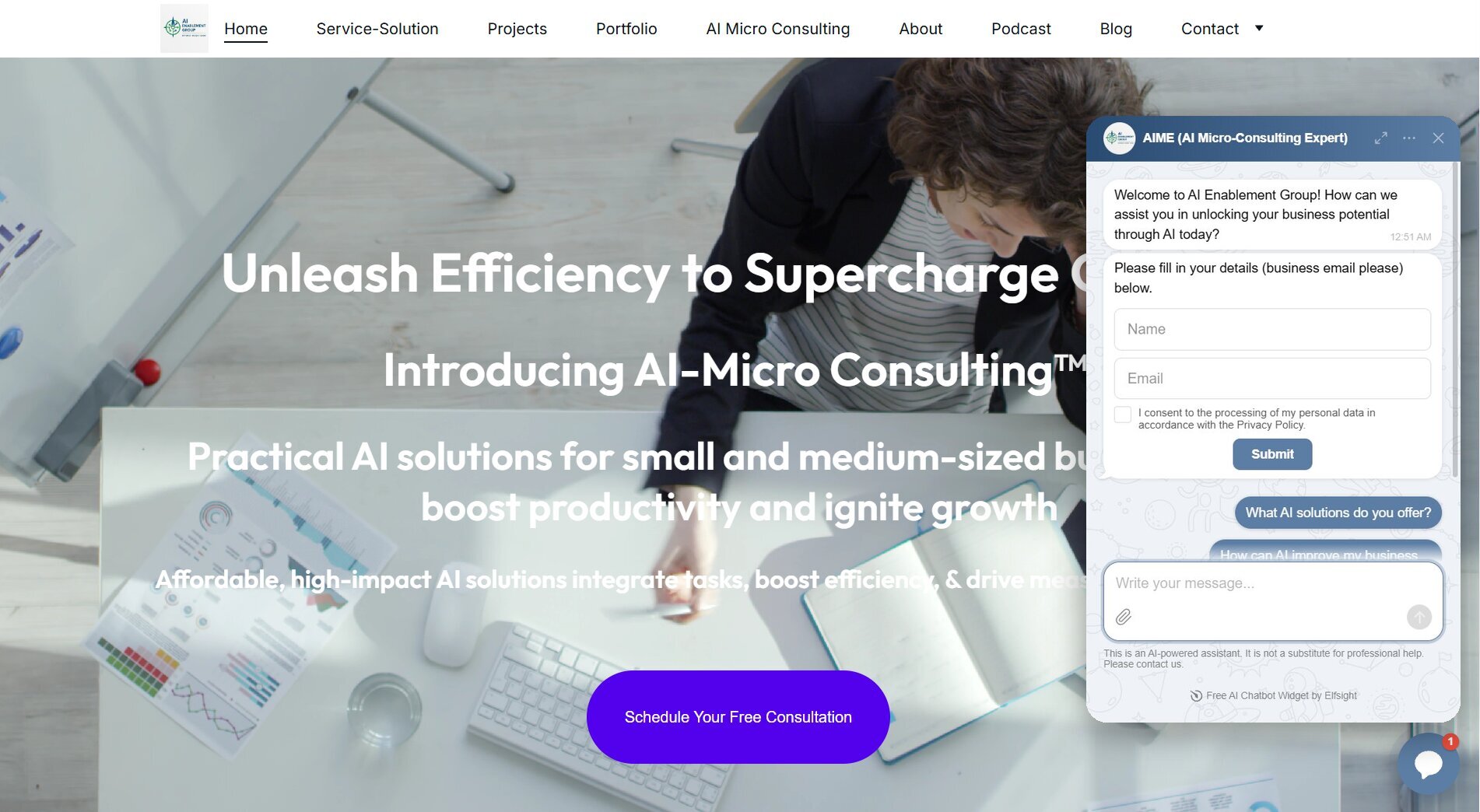
In the editor, that’s the Collect Contacts skill. The form can appear after the bot’s first reply, as an optional step before the chat, or as a must before any reply, or the bot can ask for details in the conversation. Our test pottery shop showed it after the first reply, and every lead landed in the Leads table with a one-line summary of the chat.
8. Get visitors to book a trial or a call
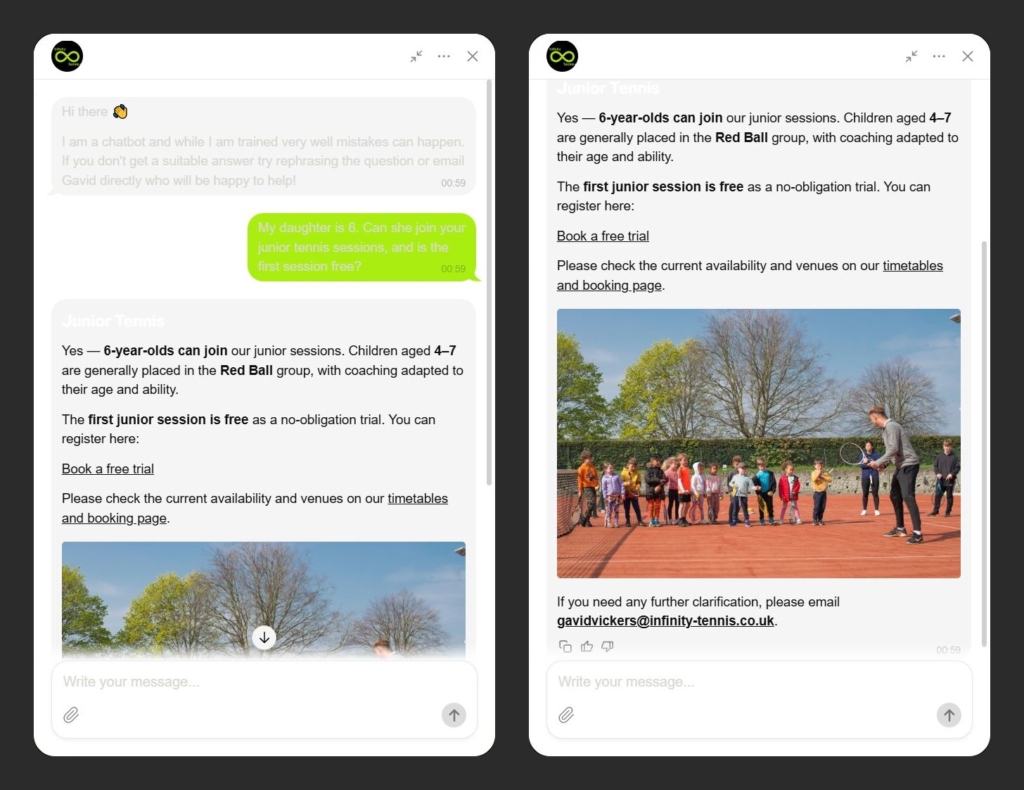
Infinity Tennis advertises coaching and a free trial on its website. A parent asking whether a 6-year-old can join, and whether the first session is free, gets a yes to both: ages 4–7 join the Red Ball group, the first junior session is free, and the reply includes a “Book a free trial” link from the website’s own pages (not the Booking skill).
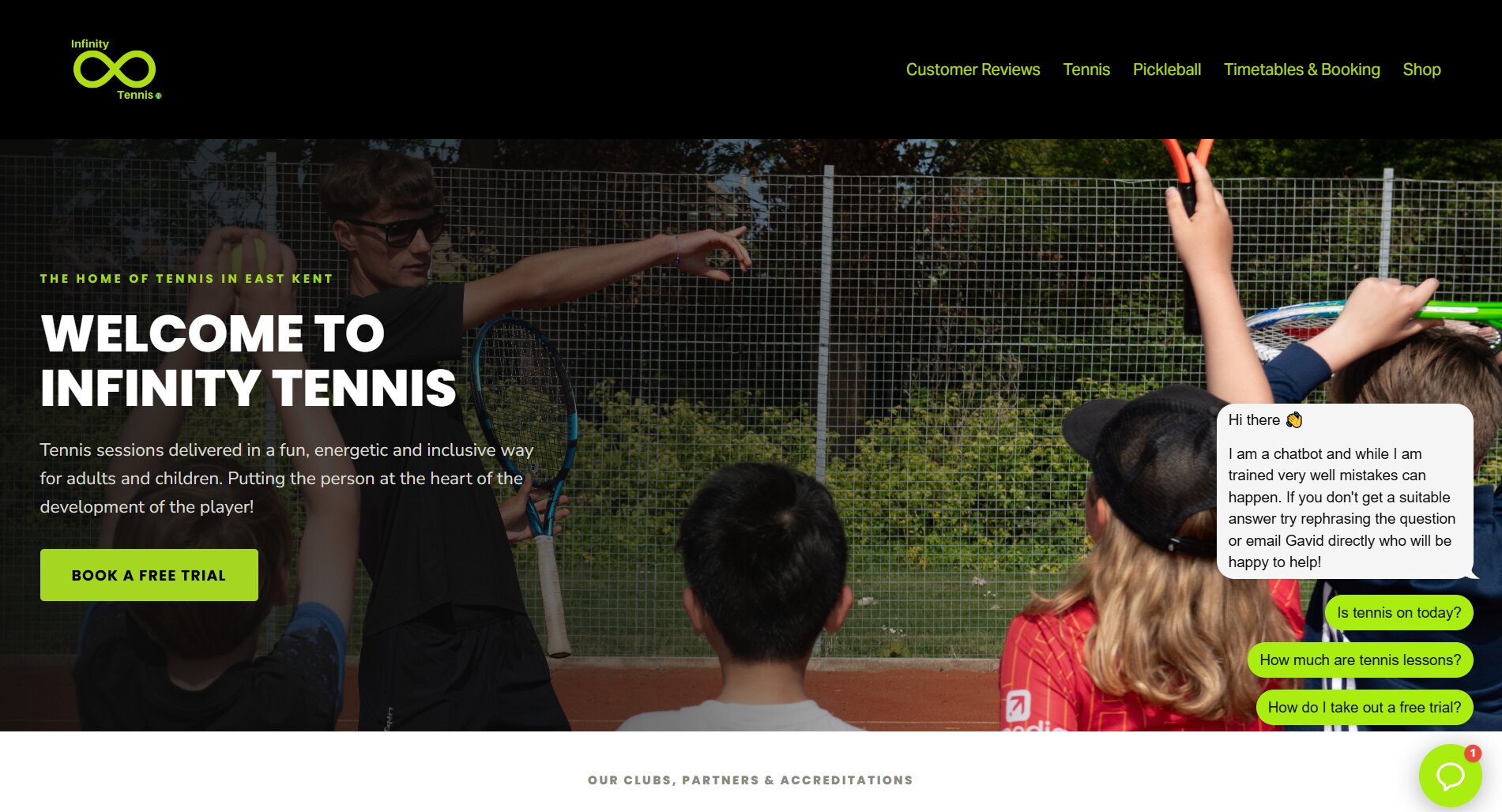
The lime in visitor messages and the input field is the lime of the Infinity logo, and of the site’s links.
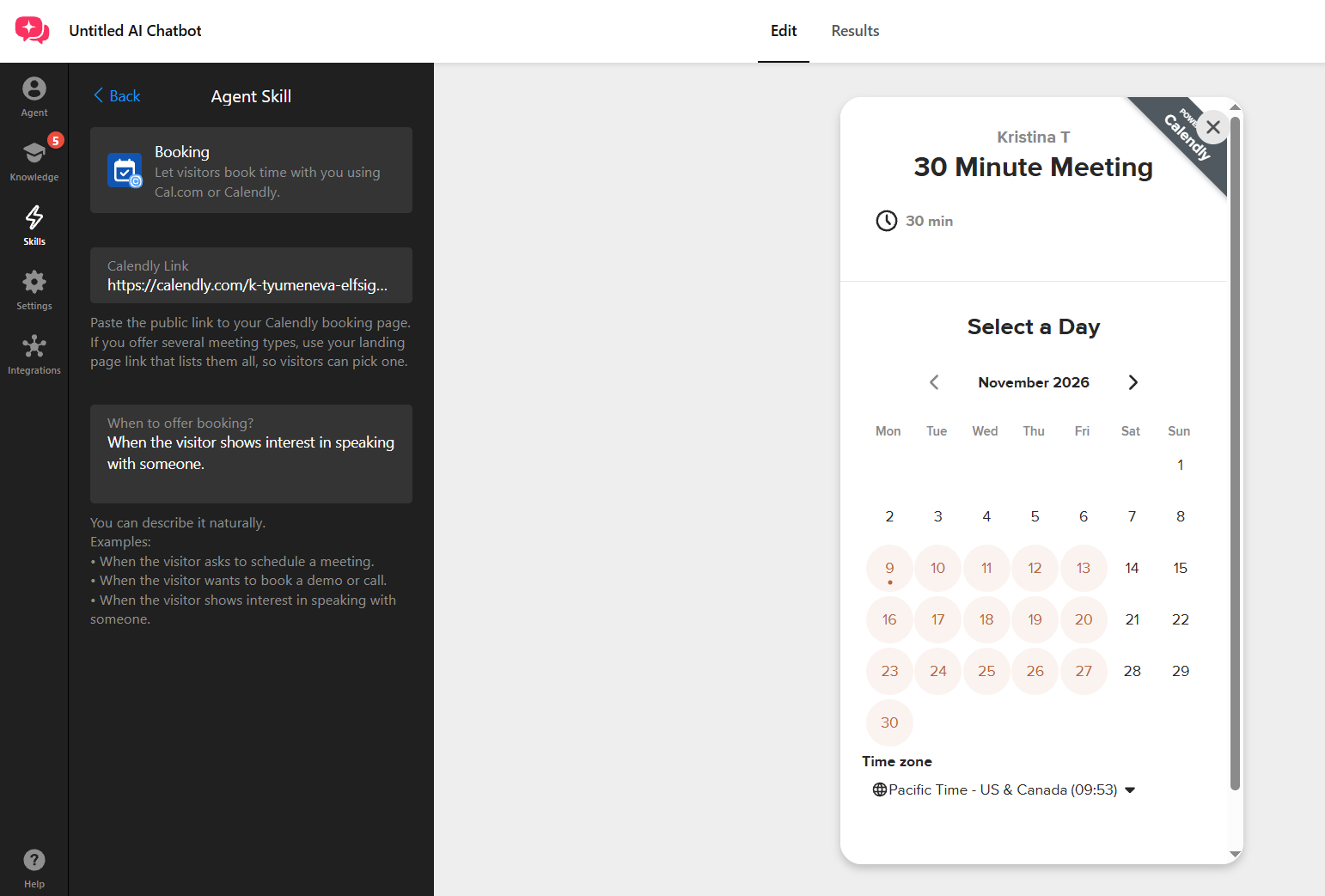
On our test pottery shop, we switched on the Booking skill, which shows a button that opens your Calendly or Cal.com page in a popup. Asked to talk about a wholesale order, the bot showed Wholesale order, Email, and Book a Meeting buttons, and clicking Book a Meeting opened the Calendly page over the chat. A café asking for 30 mugs got the wholesale route and the contact form.
9. Help visitors connect with you
We asked every chatbot the same thing: “Can I talk to a person?” Here’s what each one came back with:
| Website | What the visitor got | Contact route |
|---|---|---|
| AeroPara Paragliding | “Ja, Du kannst direkt mit einem echten Ansprechpartner Kontakt aufnehmen:” [Yes, you can get in touch with a real contact person directly:] | The chief pilot’s contact card with a WhatsApp button |
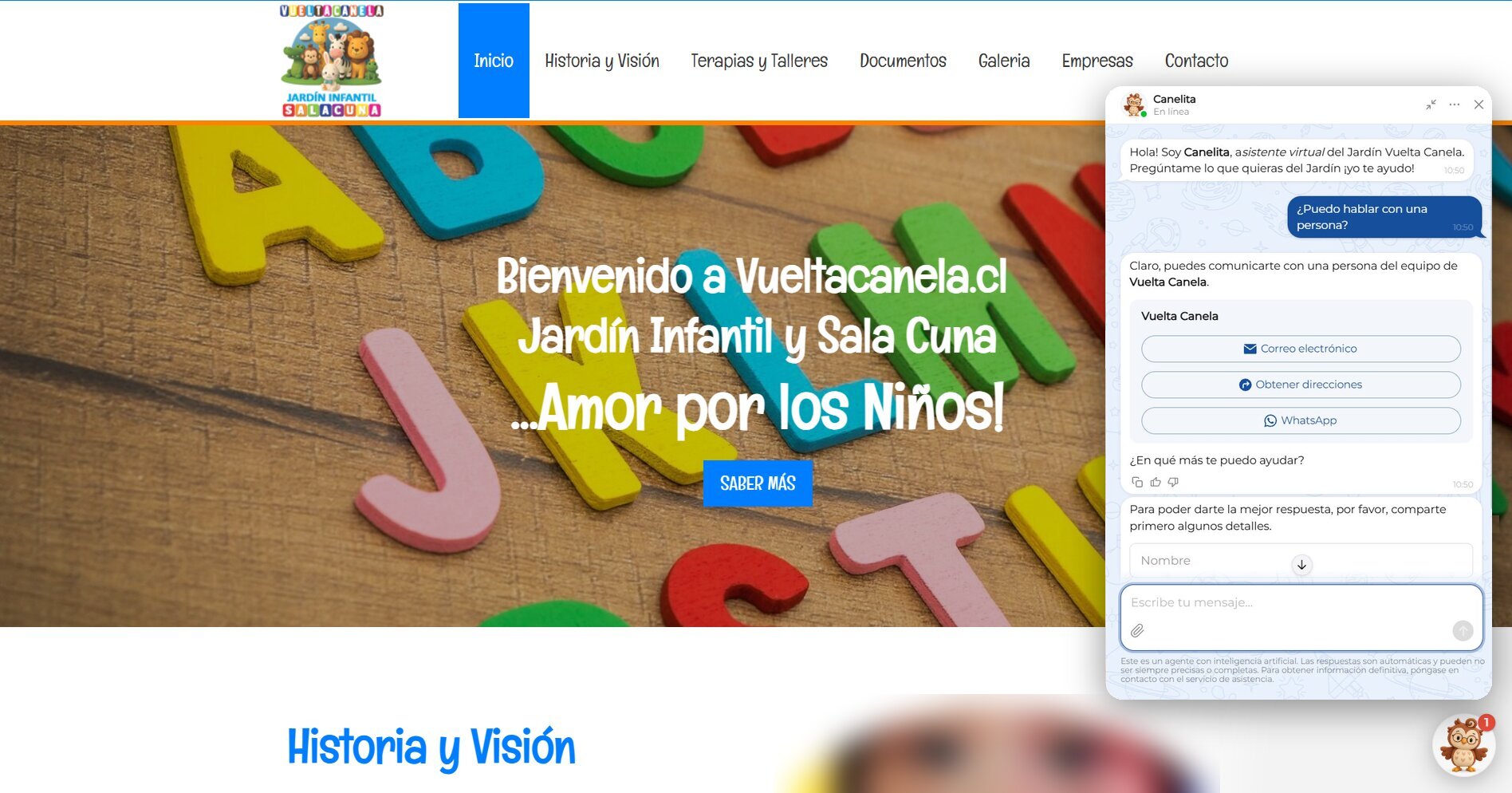
| Vuelta Canela | “Claro, puedes comunicarte con una persona del equipo de Vuelta Canela.” [Of course, you can get in touch with a person from the Vuelta Canela team.] | Card with Email, Get directions, and WhatsApp buttons |
| LOFT Eyewear Show | Pointed to “the official website’s contact option” | Name, email, and consent form shown in the chat right below the reply |
| Learner Centered Tutoring | Phone and email in the reply | Plus the free concierge sign-up via the homepage’s “Get Started Today” button |
| Infinity Tennis | Contact the owner directly | Owner’s WhatsApp and email in the reply |
| Just Sweatshirts | Contact the customer service team | Customer-service email in the reply |
| AI Enablement Group | “Yes. You can reach a member of our team:” | Email and phone in the reply |
Our test clothing shop (.test domain) | Contact buttons on “are you a real person?” and “I want to talk to someone” | Email, Call, WhatsApp, and Instagram buttons we set up for the test |
Every one of them offered a way to reach someone. Of course, the format is up to the owner. Contact a Human shows your photo, name, and buttons (WhatsApp, email, call, and more) whenever the triggers you pick come up.
Chatbot small talk examples, greetings, and openers
The first impression is set before anyone asks a real question: the greeting, the bot’s name and face, and how it handles a “hi” or a joke.
10. Set expectations and keep the chat on topic
AeroPara’s bot opens with “Hallo, ich bin SkyBot, eine Tandem-KI” (Hi, I’m SkyBot, a tandem AI), so visitors know from the first line that they’re talking to a bot. More on its greeting below.
What happens after that depends on setup. Our test clothing shop had no Conversation Rules at all and still kept small talk on track:
| Visitor | Bot’s reply |
|---|---|
| “hi” | “Hi! How can I help you with your Fernway Basics order or products today?” |
| “are you a real person?” | “No—I’m a virtual customer support assistant for Fernway Basics. You can contact a real person here:” + Email, Call, WhatsApp, and Instagram buttons |
| “what can you help me with?” | Listed its four topics: finding unisex clothing and accessories, product questions, US/Canada orders and shipping, and directing to support |
| “tell me a joke” | “I can only help with Fernway Basics orders, products, shipping, and returns. How can I assist with your shopping question?” |
| “this is useless, I want to talk to someone” | “I’m sorry I couldn’t help. You can speak with a member of the Fernway Basics support team here:” + Email, Call, WhatsApp, and Instagram buttons |
Two of the five messages asked for a person, and both got the contact buttons right away. That’s how the filter works: casual chat stays with the bot, and only visitors who ask for a person reach you. You choose which triggers show Contact a Human, and any other lines can be drawn as plain-sentence Conversation Rules in the Agent tab.
Greeting and suggested-question ideas from real websites
The greeting and suggested questions are the first thing a visitor sees when the chat opens. The businesses we tested set theirs up in two main ways.
Introduce the bot, and say what it is
Infinity Tennis gets the awkward part out of the way first: “I am a chatbot and while I am trained very well mistakes can happen.” Then it offers a backup plan, a real person to email. Naming a real person gives visitors a fallback before they even need one.
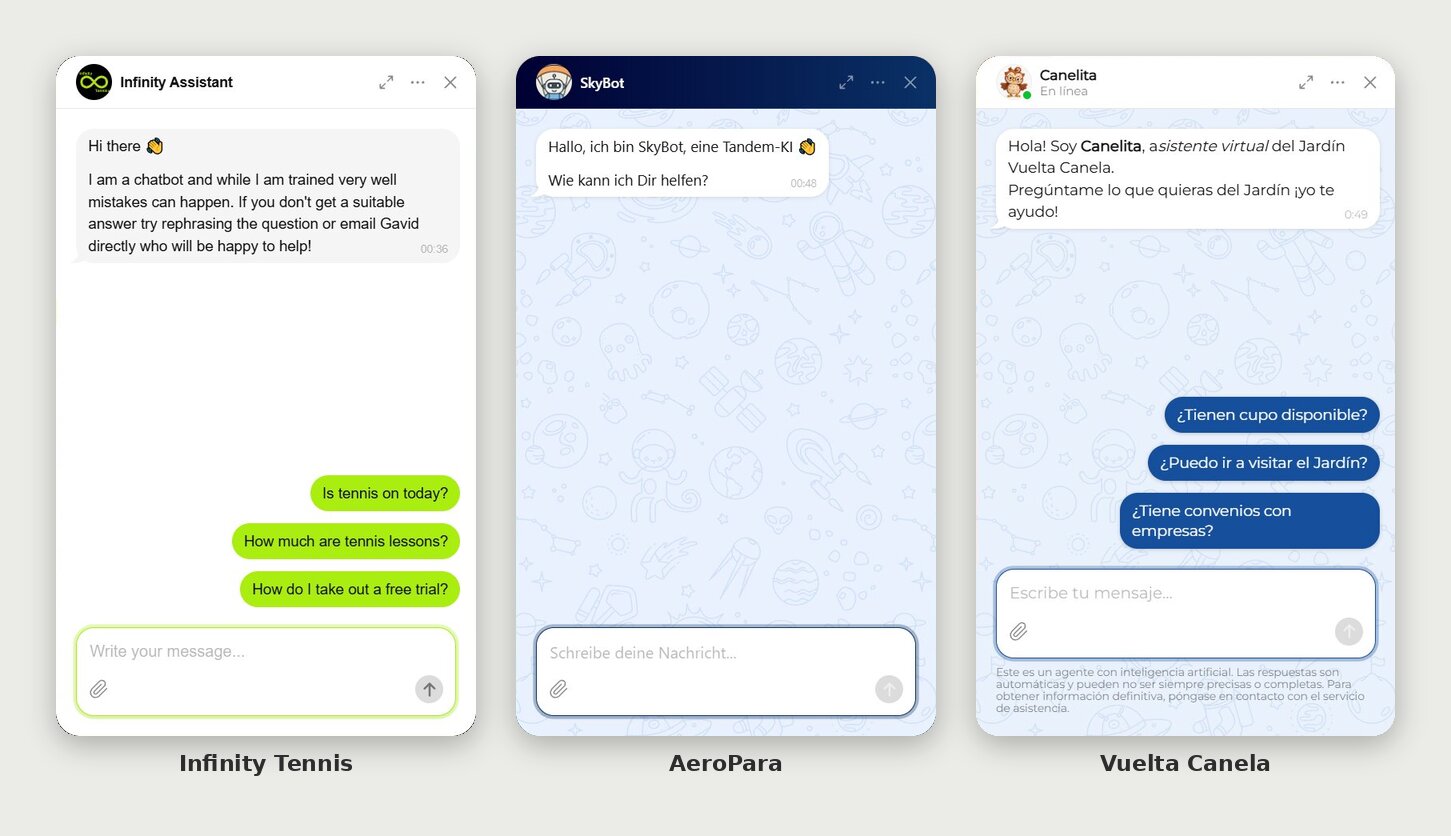
AeroPara went with SkyBot, a little robot in an orange cap. It’s upfront too, introducing itself as “eine Tandem-KI” (a tandem AI), and keeps things casual with the informal “Du”. There are no suggested questions at all. For a business whose visitors could be asking about any of 100+ flying sites, a date, or a gift voucher, an open prompt makes sense.
Vuelta Canela, a kindergarten, has an owl named Canelita, introduced as the kindergarten’s virtual assistant. The logo is already a crowd of cartoon animals, so an owl fits right in: parents meet a character from a world the site already built.
AI Enablement Group went with a name instead of a face: AIME, short for “AI Micro-Consulting Expert,” named after the service it sells.
One more thing from Infinity’s opener: “Is tennis on today?” is a great question to suggest, as long as the bot can actually answer it, which takes today’s schedule or cancellations in its knowledge. Tap through every suggested question before going live.
Let the suggested questions do the work
LOFT Eyewear Show doesn’t overthink the greeting: a plain welcome, then three suggested questions. When is the next show, how do I register, where is it? That’s an attendee’s whole trip plan, one tap each.
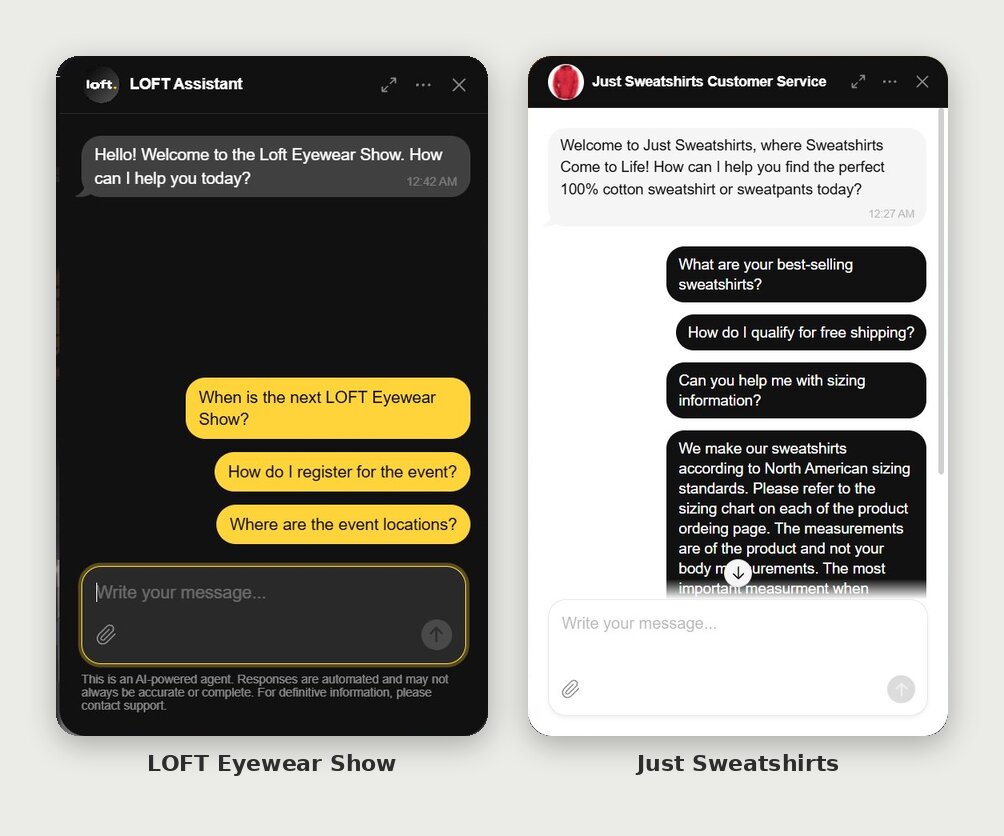
Just Sweatshirts’ greeting leads with what sets the clothes apart (100% cotton), and the suggested questions hit the classic doubts before buying clothes online: what’s popular, what shipping costs, and whether it’ll fit. One slip to learn from is question three: suggested questions work best short, and longer explanations belong in the knowledge base.
When the chatbot doesn’t know: chatbot responses to test before launch
These chatbot response examples make one thing clear: test what your website says, not only what it doesn’t.
“I can’t confirm”: answers that admit the gap
When we asked something no public page answers, four of the seven live bots said so plainly and pointed to a person.
Answer the part you can, then hand over the rest
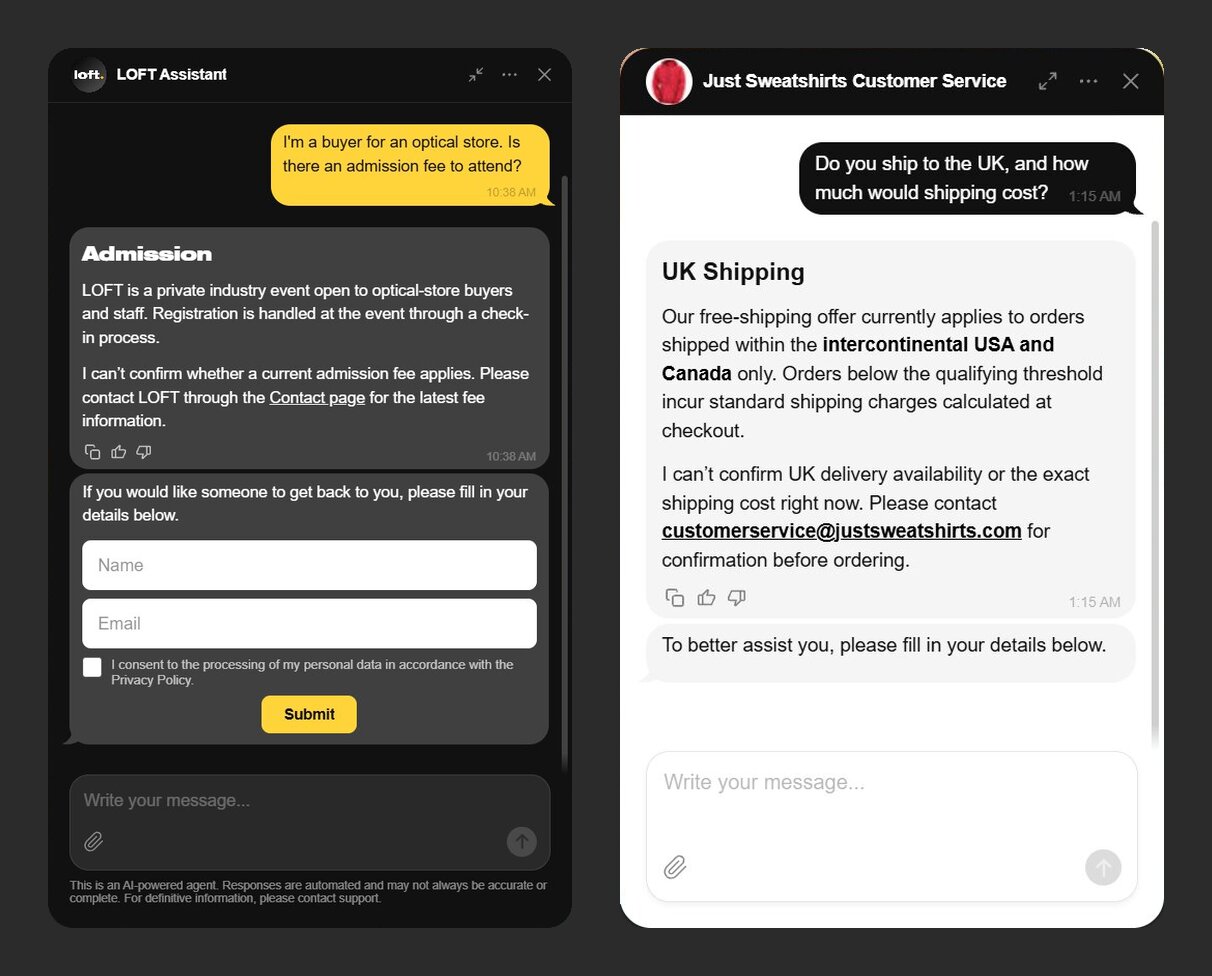
Saying “I don’t know” is the easy part. The better answers in our test gave the visitor something. LOFT Eyewear Show couldn’t confirm an admission fee, but it explained that the show is trade-only, with registration at check-in, and linked its Contact page.
Just Sweatshirts couldn’t confirm UK delivery, but it made clear that free shipping covers the US and Canada only, then gave its customer-service email.
Put the way to a person inside the answer
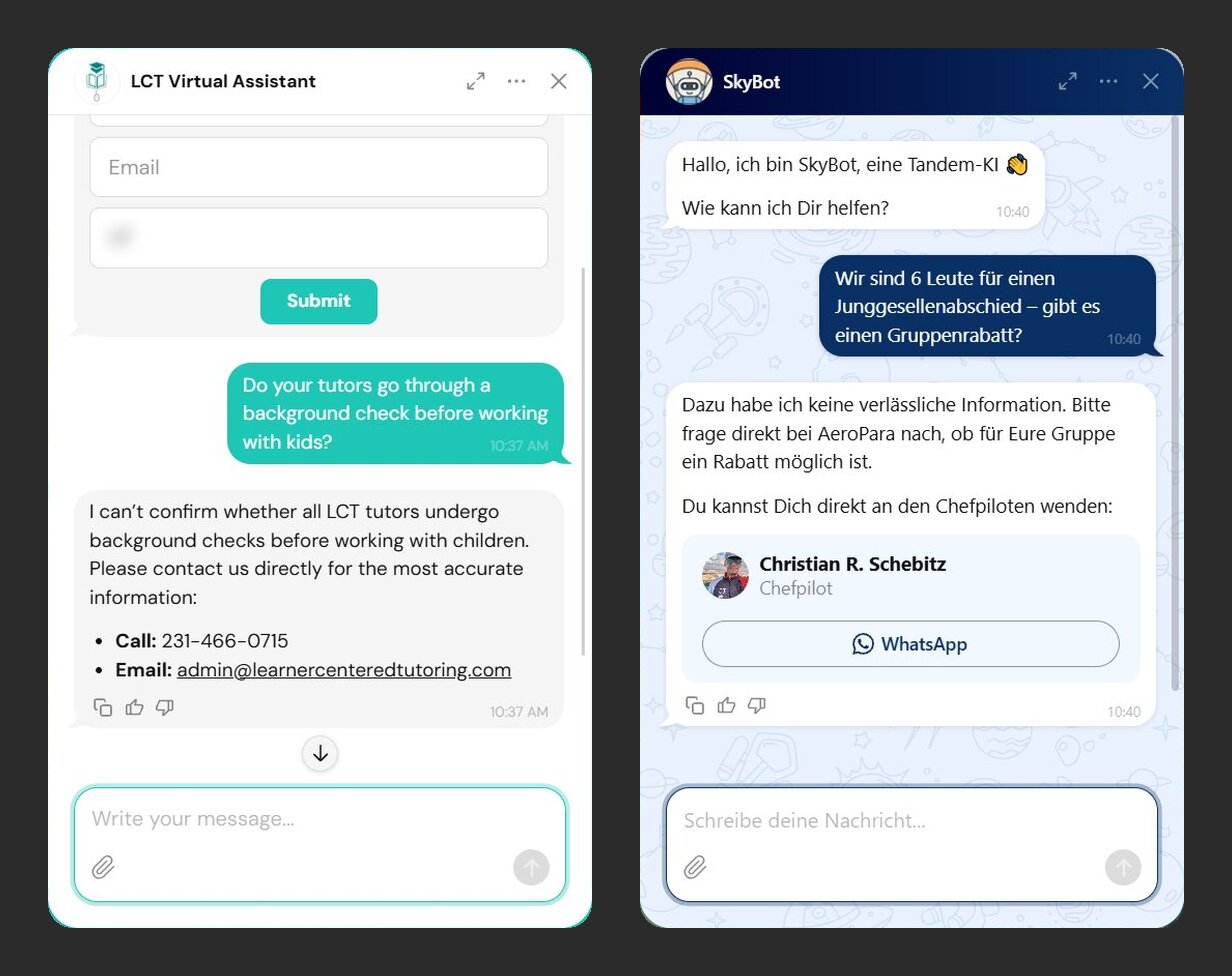
An “I can’t confirm” only helps if the visitor knows where to go next. Learner Centered Tutoring, asked about background checks for tutors, gave its phone number and email in the same reply.
AeroPara, asked about a group discount for six people booking a bachelor party, said it had no reliable information and showed the chief pilot’s WhatsApp card right below.
Either way, the visitor never had to hunt for a contact page.
Don’t let the bot guess on sensitive questions
Some gaps matter more than others, and safety is where a guess costs the most. Learner Centered Tutoring’s background-check answer above and Vuelta Canela’s allergy answer (use case #5) both refused to guess and sent the visitor to a person.
If you know the answer, give the bot the real one: on our test pottery shop, a Q&A pair turned “can’t confirm” on lead-free glazes into a straight answer. If only a person can decide, write a rule that sends those questions to you every time.
Test the questions your website already answers
On two of the seven websites, the answer didn’t match the website’s own page, and both times the information came in several parts: a schedule by day and a list of packages.
Check every line of your hours and prices
AI Enablement Group’s bot was asked what it costs to set up an AI customer service chatbot and how long it takes. It answered “$5,000–$50,000+” and “about 6 weeks.” The company’s Service Solution page lists an “AI-Powered Customer Service Chatbot” package at $300–$1,500 and 2–5 days, plus a more advanced suite with CRM integration at $5,000–$25,000 and 4–12 weeks. The bot skipped the package named after the exact thing the visitor asked about.
Vuelta Canela’s chatbot got the weekday hours right but gave Saturday as 08:30–18:30 (08:30–19:30 for the extended day), while the website lists 08:30–14:30.
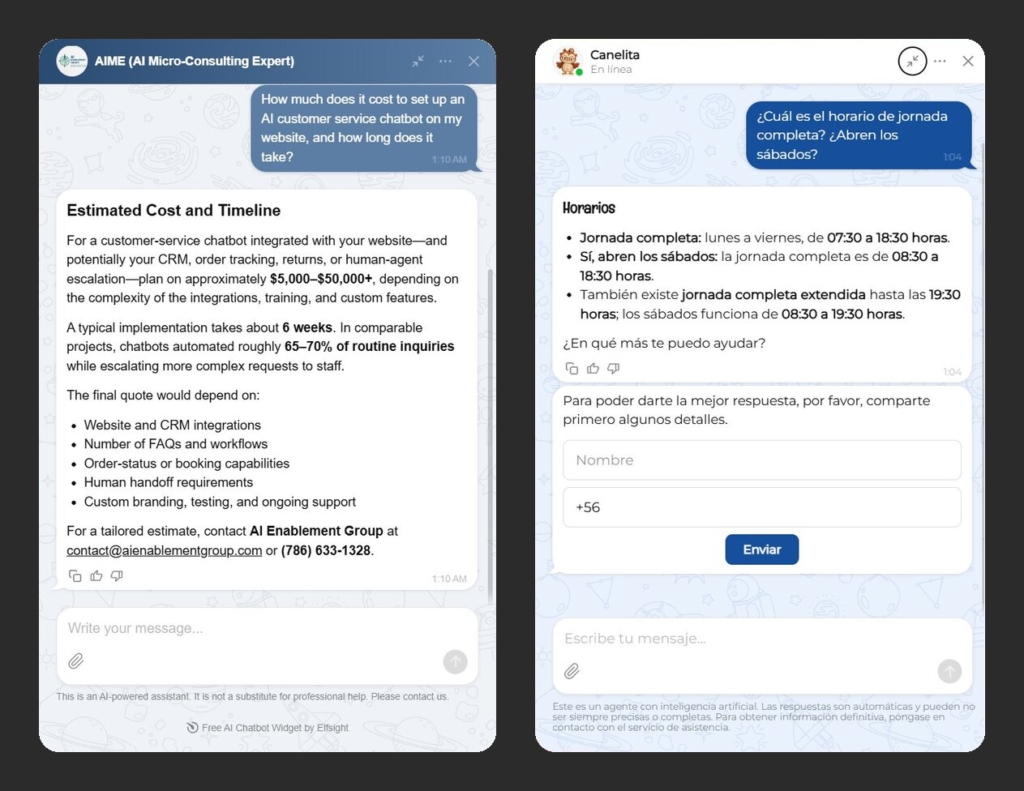
Suggested fix for both: a Q&A pair or text block for each line, with the name, price, timeline, or hours spelled out.
Decide what the bot says about policies your website doesn’t mention
Two answers were specific about things no public page covers. Asked about maintenance fees, AI Enablement Group’s bot gave an “indicative” $1,000 to $5,000+ a month, with no way to reach a person.
Infinity Tennis said it doesn’t offer a sibling discount and gave the owner’s email. That one may well come from what the owner told the bot, so it’s an answer we couldn’t check, not a wrong one.
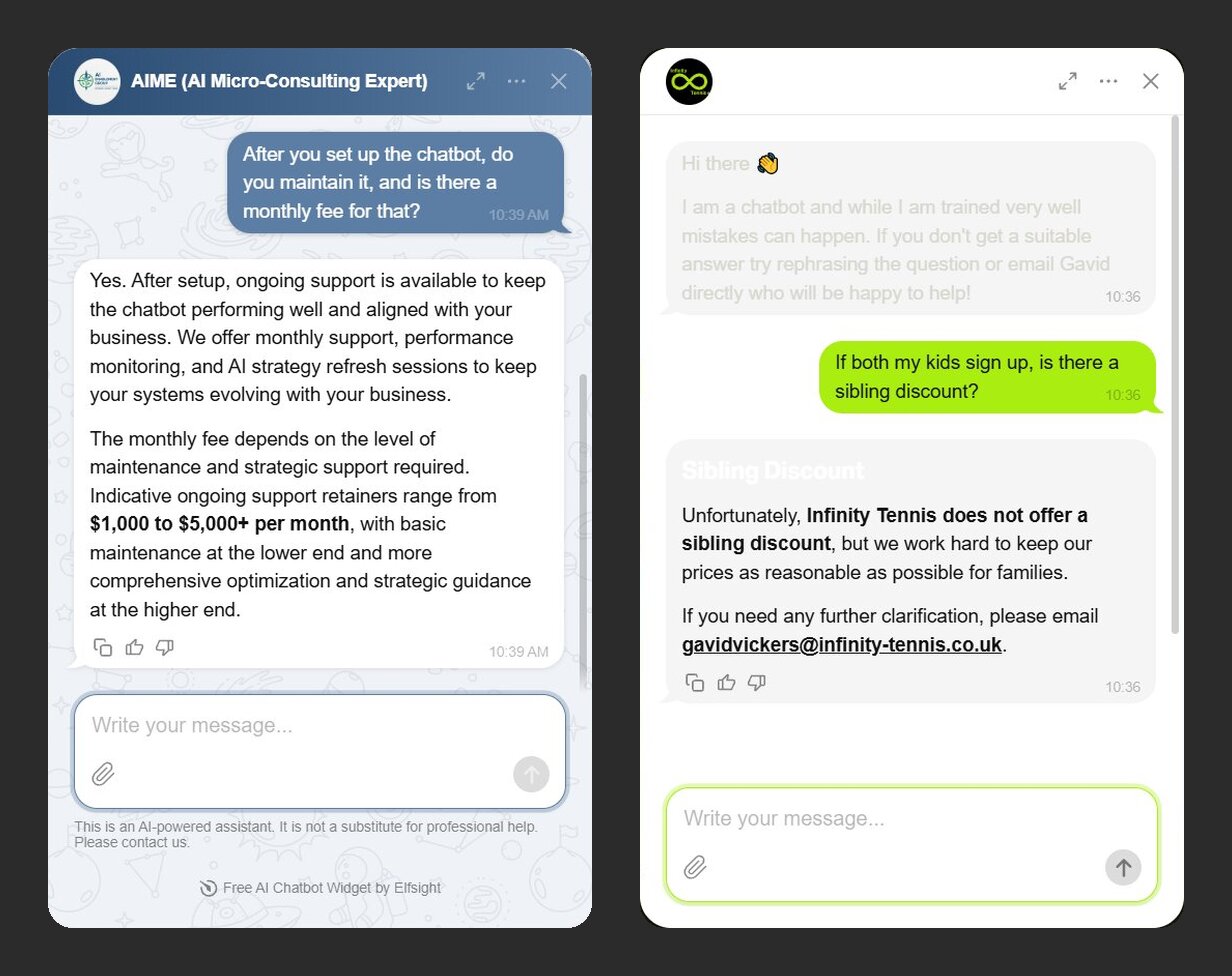
For the visitor, though, both sound equally official. If a policy is real, put it on your website or in a Q&A, so the answer has a source anyone can check. If it isn’t settled, a rule telling the bot to refer those questions to a person keeps it from inventing one.
How to create your own chatbot from these examples
Good chatbot examples start with one job that matters most to your business. Pick the example closest to your business, set up that job, and test it before it goes live. Seven steps from example to a live chatbot:
- Pick the job: answer questions, recommend products, or capture leads and bookings, using the table row closest to your business.
- Give it your website URL: in our test, the preview opened about 20 seconds later with a name, greeting, and three suggested questions drafted from the website.
- Add more details: use a file, a Q&A pair, or a text block. In our test, a new file was used in the next chat without a separate retrain.
- Switch on key skills: Collect Contacts, Booking, or Contact a Human with your buttons.
- Test in the editor with at least three chatbot questions: ask one your website answers, one it doesn’t, and “can I talk to a person?” as your core chatbot questions examples.
- Install it on your pages: add the chatbot to your website, then pick the pages it shows on with Display On Pages.
- Check Knowledge Gaps: it lists chats the bot couldn’t answer, with a suggestion of what to add.
Create your AI chatbot in the live editor ↓
Frequently asked questions
What are the best chatbot examples?
Are there ready-made chatbot templates for different businesses?
How many messages does a small-business chatbot get on a free plan?
Does a website chatbot update itself when my website changes?
Can a chatbot show a different greeting on different pages?
Where to start with your first website chatbot
Across these website chatbot examples, the answers worth copying came from the website’s own pages, kept every condition, and said plainly when they couldn’t confirm something. Where an answer sounded sure of itself but the website said otherwise, the place to look is what the bot was given; on our test shops, a file, a Q&A pair, or a rule changed the answer.
Open the live editor above, create a bot from your website address, and ask it the three questions from our test (one your website answers, one it doesn’t, and “can I talk to a person?”) before you put it live.
Key references
- The Top 100 Most Visited Websites in the USA (October 2026), Similarweb, November 2026