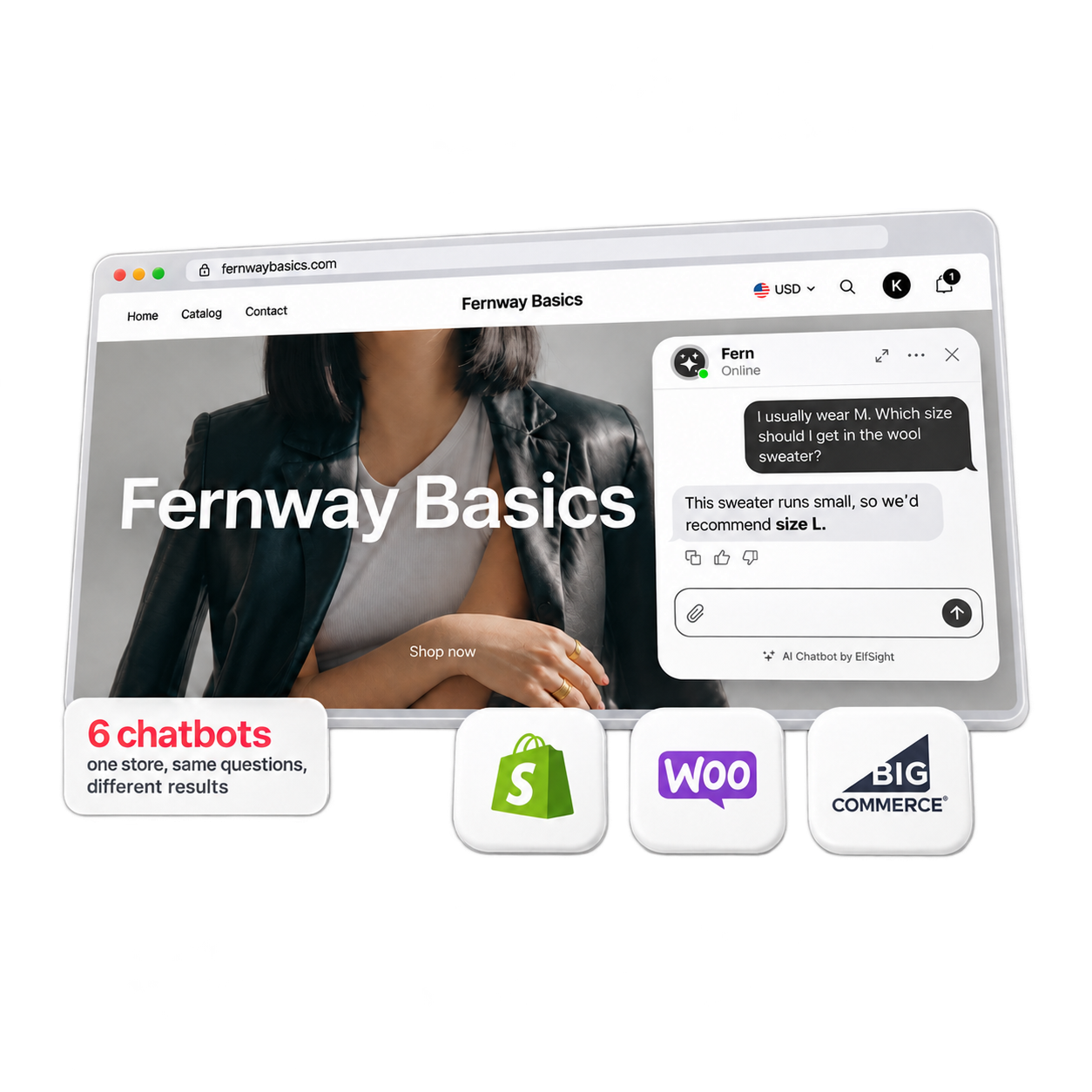
We tested six popular AI chatbots for online stores with the same shopper questions on Shopify, WooCommerce and BigCommerce, and what each could see and do in the store mattered most: answering from your pages works anywhere, but live prices and order lookups depend on a store connection.
The six are Shopify Inbox, Chatty, Tidio, Gorgias, Zipchat and Elfsight AI Chatbot, which is ours. We tested them on the same made-up apparel store—with 20 products and real orders—across every platform each bot supports. The results split sharply, though not by brand.
The difference came down to everything around the AI. On Shopify, most bots connected to the store through an app install. On WooCommerce and BigCommerce, order lookups meant handling API keys and custom actions (one took us three tries). Across the board, settings that control what shoppers actually see were often off by default or buried several menus deep.
The sections below follow the order you’d naturally decide in: which bots your platform supports, how each one handled our test store, which job each suits best, what they cost at small-store volume, and how to test your shortlist on your own questions before paying.
- For product and policy questions, Elfsight AI Chatbot was easiest to install and did just as well as live-connected bots—but across all three platforms.
- Among the six tools we tested, three were Shopify-only: Shopify Inbox, Chatty, and Gorgias’s AI Agent—even though the latter lists WooCommerce and BigCommerce as integrations.
- Only chatbots with real-time store connection and access to the product catalog quoted a newly changed price correctly right away.
- On Shopify, five of the six looked up a real order with built-in tools and no API keys, each checking the shopper a different way: a sign-in, an email, or an email and ZIP code.
- On WooCommerce and BigCommerce, only Zipchat looked up orders, after setting up an API key and a custom action.
Which of the best AI chatbots for ecommerce run on your store
On Shopify, start with the free Shopify Inbox agent and look at Tidio for the fastest price updates. On WooCommerce or BigCommerce, Zipchat is the only one that looks up orders, while Elfsight or Tidio cover product and policy questions. If answering those is the main job on any platform and you’d rather not connect APIs or store backends, Elfsight is the shortest route.
Here’s where each chatbot runs, what it could read and do in our test, and where its AI pricing starts:
| Tool | Shopify | WooCommerce | BigCommerce | Free plan or trial | AI from (monthly) |
|---|---|---|---|---|---|
| Shopify Inbox | App · live catalog, cart, orders after a customer sign-in | Not available | Not available | Free app | $0 (Shopify plan separate) |
| Elfsight AI Chatbot | Embed code · your files | Footer block · your files | Script Manager · your files | Free plan, 50 visitor messages | $6 |
| Chatty | App · catalog synced daily, cart, orders | Not available | Not available | Free plan, 50 AI conversations | $19.99 |
| Tidio Lyro | App · synced catalog, orders | Plugin · synced catalog, no orders | App · your files, no orders | 7-day trial, no card | $39 |
| Zipchat | App · catalog + your files, orders on the free plan | Plugin · page crawl, orders after setup | Snippet · your files, orders after setup | Free plan on Shopify, no card | $80 |
| Gorgias AI Agent | App · synced products, orders for signed-in customers | Helpdesk only, no AI Agent | Helpdesk only, no AI Agent | 7-day trial, then billed through Shopify | $10 helpdesk + $30 AI Agent |
Off Shopify, your options narrow to Tidio, Zipchat, and Elfsight—and even they read different data depending on the platform. Tidio has no product sync on BigCommerce, and Zipchat’s order lookups require different setup steps on each platform. For more Shopify-only apps, see our chatbots for Shopify list.
Which of these differences a shopper actually notices is a test question—so we asked.
Our test: six chatbots, one store, three platforms
Most bots handled general product, sizing and policy questions well. The real differences showed up when a price changed, when a shopper asked about a real order, and when they asked for a person.
How we tested
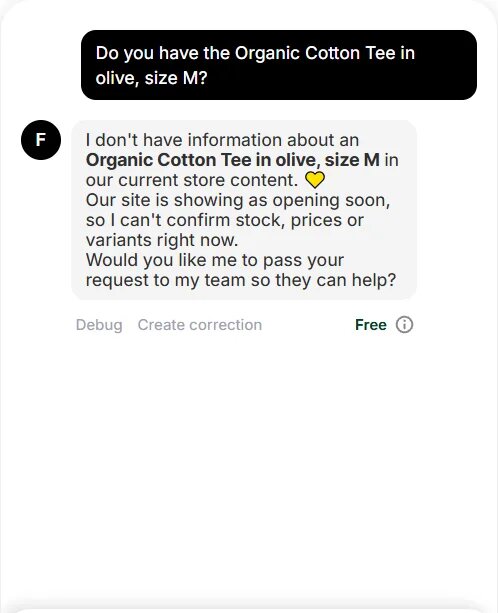
We built one apparel store on each platform with 20 products in various sizes and colors, a size guide, a final-sale item, three sold-out variants and two real orders. Every bot got the same 13 questions (each in a fresh chat, except for one follow-up), and we checked every answer against the store’s pages and catalog.

Where a bot couldn’t read a password-protected or pre-launch storefront directly, we gave it the same two files: the store pages and a product file. Each bot ran on its free plan or trial. Tidio and Gorgias answered in their test playgrounds, Zipchat on Shopify answered in its test chat, and the rest ran live on the storefront.
Product questions
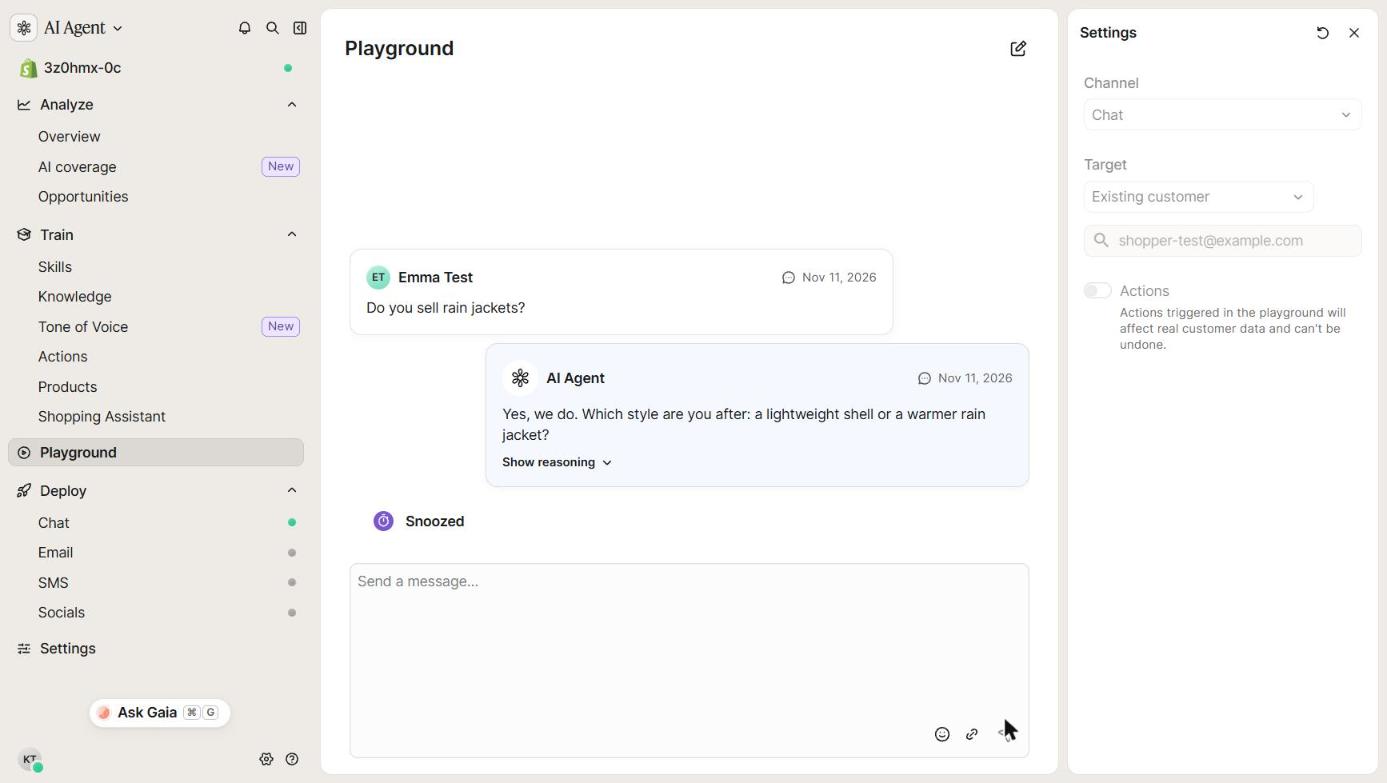
Nearly every bot got sizing right from a fit note, and most checked the specific product before answering a return question about a final-sale shirt. However, Shopify Inbox and Chatty mistakenly said the final-sale shirt could be returned, and Tidio (on Shopify and WooCommerce) gave the general return rule without checking the shirt itself. Gorgias answered “Yes, we do” when asked whether the store sold rain jackets—which it doesn’t.
When a price changed in the store
We raised the price of one product from $72 to $79 and immediately asked each bot how much it cost. Here’s what each bot quoted and what it took to get the updated price:
| Tool · platform | What it quoted | What it took |
|---|---|---|
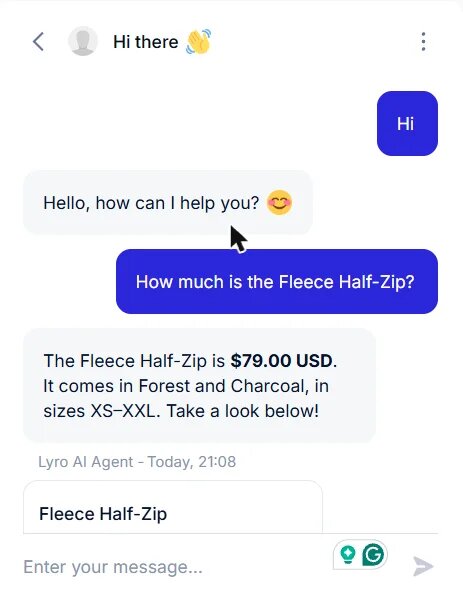
| Tidio · Shopify | $79 | Nothing, within 5 seconds |
| Tidio · WooCommerce | $79 | Nothing, about 30 seconds |
| Shopify Inbox | $79 | Nothing, about a minute |
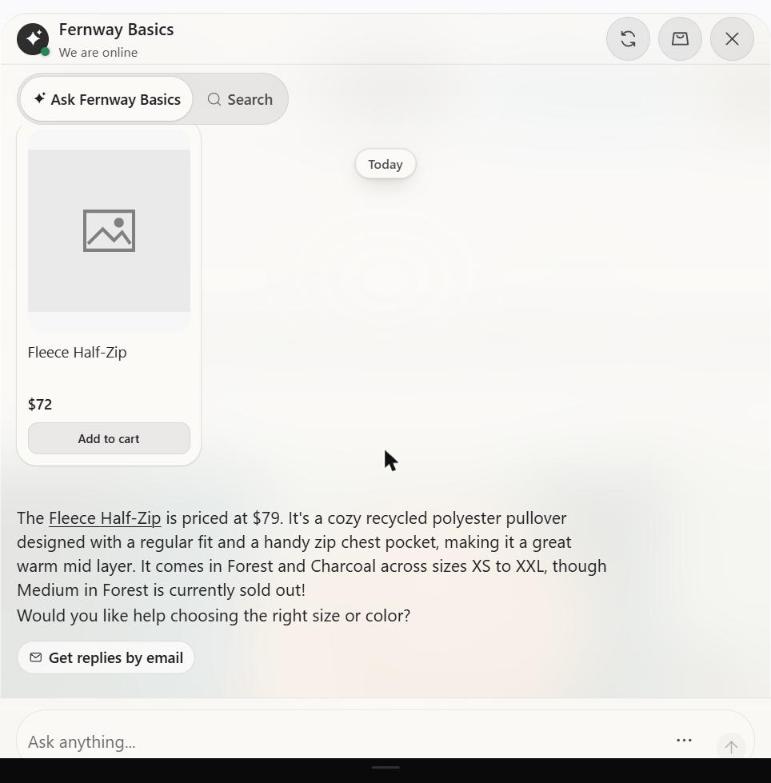
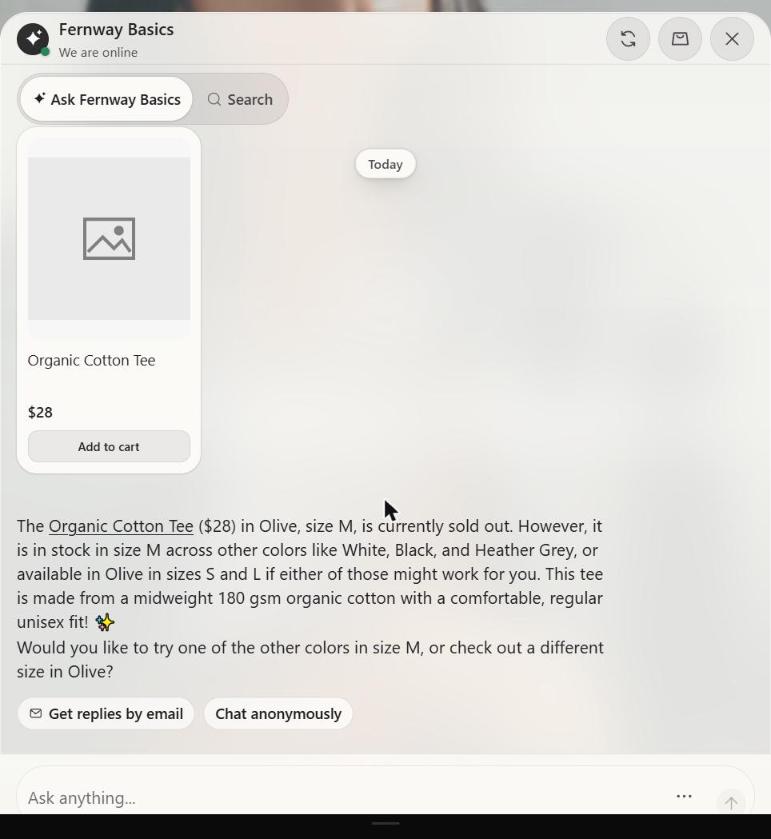
| Chatty · Shopify | $72, then $79 in the text with $72 still on the product card | A manual resync |
| Zipchat · WooCommerce | $72, then $79 | A manual page refresh, about 5 minutes |
| Gorgias · Shopify | No price | — |
| Elfsight (all three), Tidio · BigCommerce, Zipchat · Shopify and BigCommerce | $72 | Not picked up: these answered from our files |
The split comes down to how each bot gets your data. A real-time read (Tidio’s product sync, Shopify Inbox) picks up the change on its own, while a daily sync (Chatty), a page crawl (Zipchat on WooCommerce), or an uploaded file waits for you to update it.
Tidio on Shopify quoting the new $79 price seconds after the change:
Chatty after a manual resync, $79 in the reply and $72 on the product card:
Orders, cart and returns
We asked each bot for the status of a shipped order, for a size exchange on a delivered one, and also asked it to add a T-shirt to the cart:
| Tool · platform | Order status | Exchange on a delivered order | Add to cart |
|---|---|---|---|
| Shopify Inbox · Shopify | Read the order after a customer sign-in | Opened a return form that created a Shopify return (signed in) | Added it |
| Chatty · Shopify | Looked it up after an email check | Filed a return request form | Added it |
| Tidio · Shopify | Looked it up after an email and ZIP check | Gave the exchange terms, sent to support | Said it can’t |
| Zipchat · Shopify | Looked it up after an email check | Found the order, gave the terms | Said it can’t, gave the steps |
| Gorgias · Shopify | Looked it up for a signed-in customer | Confirmed delivery, gave the terms | Said it can’t |
| Elfsight · Shopify | Sent the shopper to support | Gave the terms and the support email | Gave the steps |
| Tidio · WooCommerce | Sent the shopper to support | Gave the terms | Said it can’t |
| Zipchat · WooCommerce | Looked it up after an email check | Found the order; gave a placeholder support address | Linked the product with the steps |
| Elfsight · WooCommerce | Sent the shopper to support | Gave the terms and the support email | Said it can’t, offered support |
| Tidio · BigCommerce | Sent the shopper to support | Gave the terms | Said it can’t |
| Zipchat · BigCommerce | Looked it up; refused a wrong email | Gave the terms | Said the product wasn’t in its content |
| Elfsight · BigCommerce | Sent the shopper to support | Gave the terms and the support email | Gave the steps |
On Shopify, every bot that offers order lookups handled them using built-in tools, each with its own identity check. Off Shopify, Tidio has no order lookup action, and Zipchat needed manual API setup first. Reassuringly, none of the bots without order access invented a fake order status.
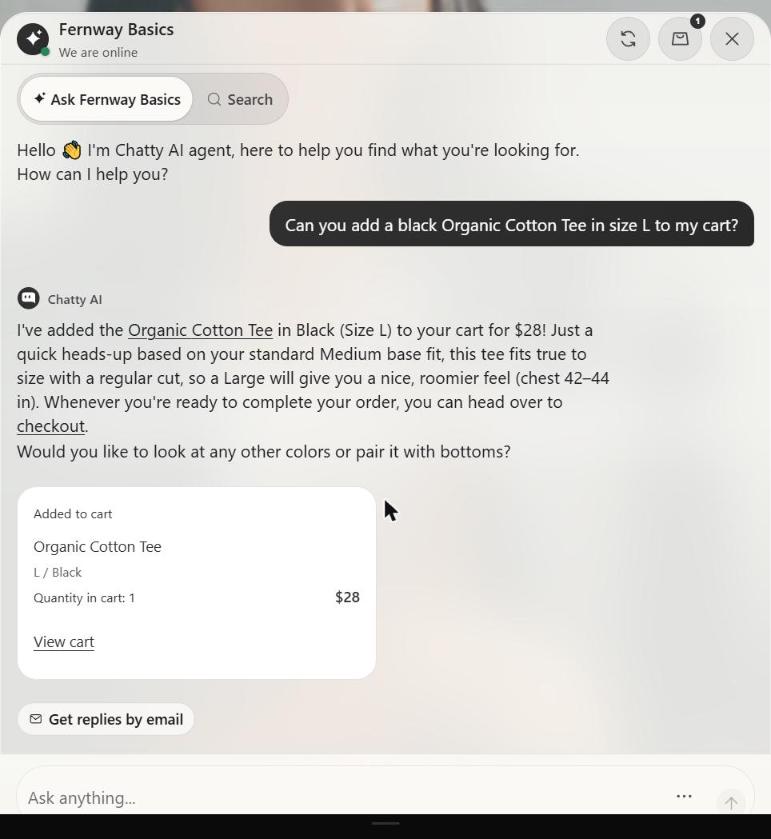
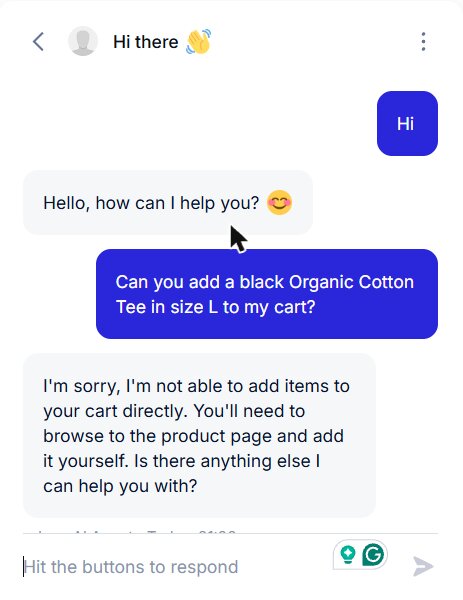
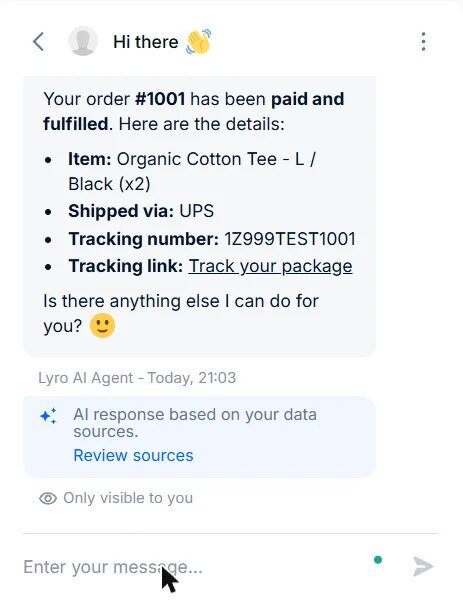
Only Shopify Inbox and Chatty added the item to the cart. Tidio’s listing says its agent can add to cart, but in our test run, it couldn’t.
Chatty’s “Added to cart” card in the chat:
Tidio add-to-cart question:
When a shopper asked for a person
We asked each bot to put us in touch with someone about a bulk order. Here’s what the shopper saw and what reached the store owner:
| Tool | What the shopper sees | What the owner gets |
|---|---|---|
| Shopify Inbox | A name and email form | A live chat in the Inbox app |
| Chatty | “Forwarded to our human support team” | The chat in Chatty’s inbox |
| Zipchat | A two-step email form | An escalated conversation to take over |
| Tidio | “Transferring you to a human” | Not checked (test playground) |
| Gorgias | “Handed over” | Not checked (test playground) |
| Elfsight | Email or messaging buttons | The shopper’s email or message, directly |
Which of these results matter most depends on the job you’re hiring the bot to do—starting with the simplest one.
Best AI chatbot for product and policy questions on any platform
A chatbot doesn’t need a live store connection to answer product, sizing, shipping, and return questions well. In our test, Tidio on BigCommerce—given the exact same two files—matched Elfsight question for question, and Zipchat came close. If answering store questions is the job, Elfsight is the option that takes the least setup across every platform.
1. Elfsight AI Chatbot (that’s us)
Elfsight suits a small team or store owner who personally responds to customer messages and wants a straightforward bot that works the same way on any platform.
What it did in our test
Across all three platforms, Elfsight gave consistent product, sizing, and policy answers from the same two files. It recommended sizing up because the store’s fit note says the sweater runs small, refused a return on the final-sale shirt, and sent order questions to the store’s support email instead of guessing a status.
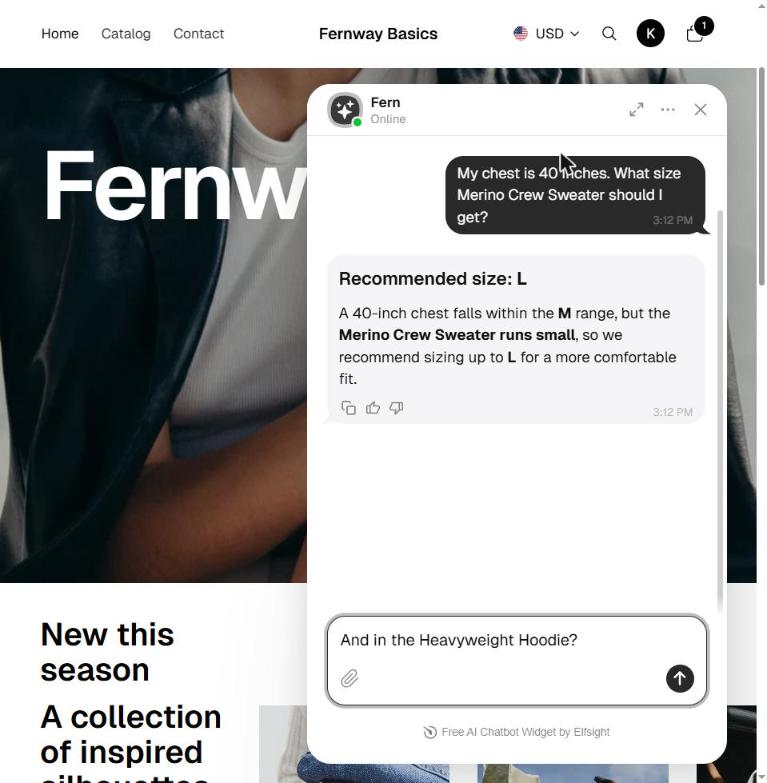
What it answers from
Everything comes from the store pages and product file you upload: sizing notes, stock, and sale rules included. Keep a final-sale rule in the file, and it checks the product before answering a return question.
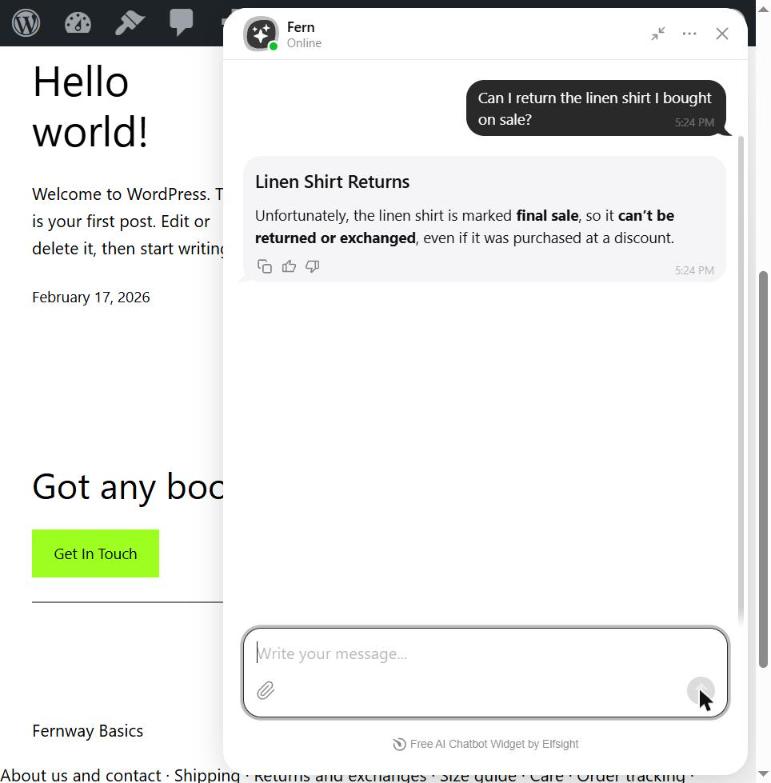
Prices and stock come from those files too, so when one changes, update the product file and retrain the bot. In our test, it quoted the old price until then. When a shopper wants a person, it shows your email or messaging buttons.
Setting it up
Everything happens in a single visual editor, with no API keys or second dashboard. The same embed code works on all three platforms:
- On Shopify, paste the 3-line embed code into a Custom Liquid section in your theme.
- On WooCommerce, use a Custom HTML block in the footer.
- On BigCommerce, add it via Script Manager in the footer on all pages.
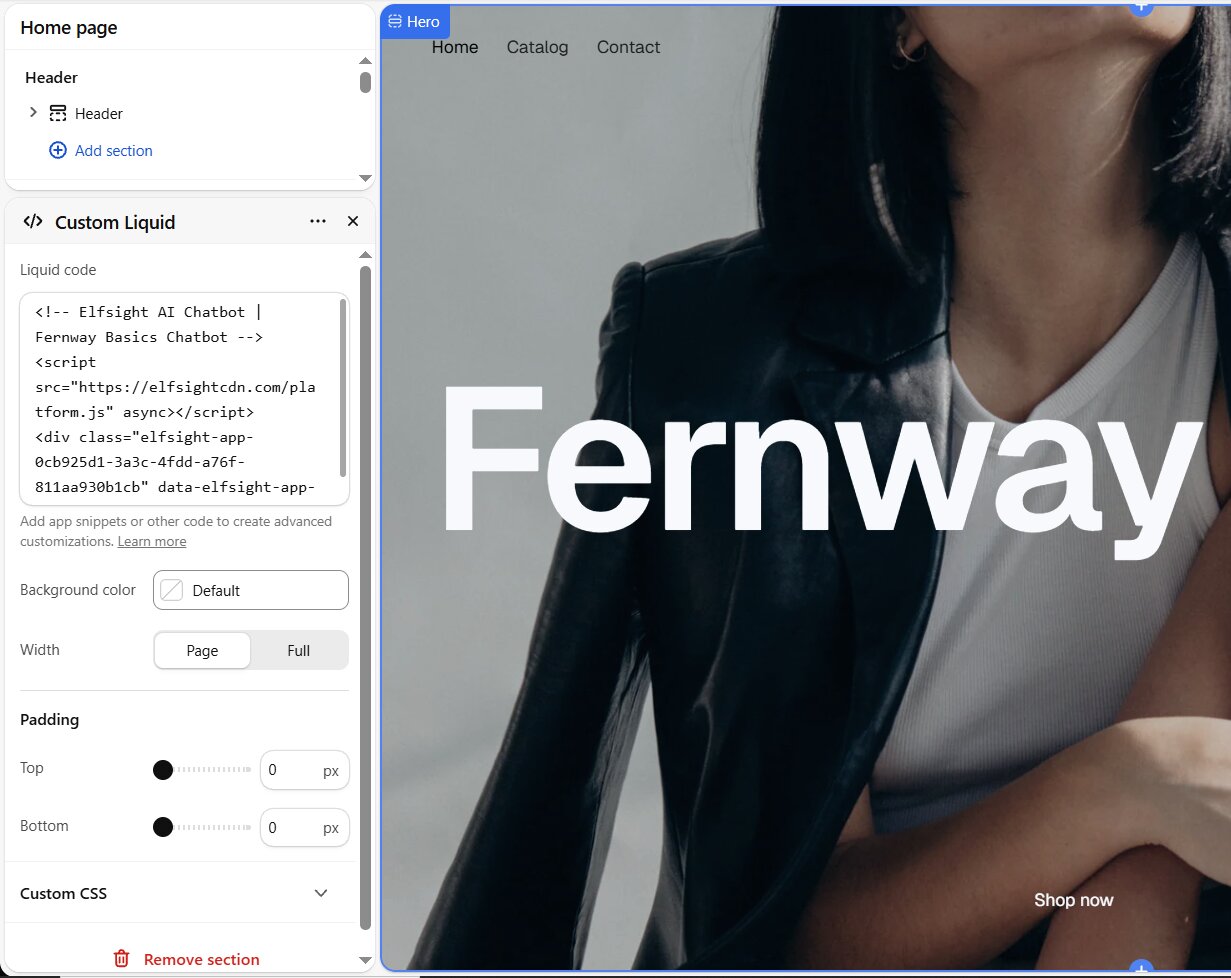
If your store is password-protected or pre-launch, upload your pages as files rather than scanning the website.
Price
The free plan gives you 50 visitor messages a month, and the bot’s replies don’t count toward the limit, so you can run a thorough test for free.
Create your store’s AI chatbot in the live editor ↓
If your stock sells out quickly or your prices change often, a bot that reads your store directly will keep up without needing a file update.
Best ecommerce chatbots for live stock, prices and orders
These four connect directly to your store, though how current they stay varies: Shopify Inbox and Tidio picked up a new price on their own, while Chatty and Zipchat needed a manual resync or refresh. Below they’re ordered from least setup to most.
2. Shopify Inbox
If you’re on Shopify, it’s the first one to try (runs there only).
What it did in our test
It read the live catalog, quoted the new price about a minute after the change, and added the item to the cart on request. For a shopper signed in as the order’s customer, it read the order and opened a return form that created a real return in Shopify. However, it did tell a shopper that the final-sale shirt could be returned.
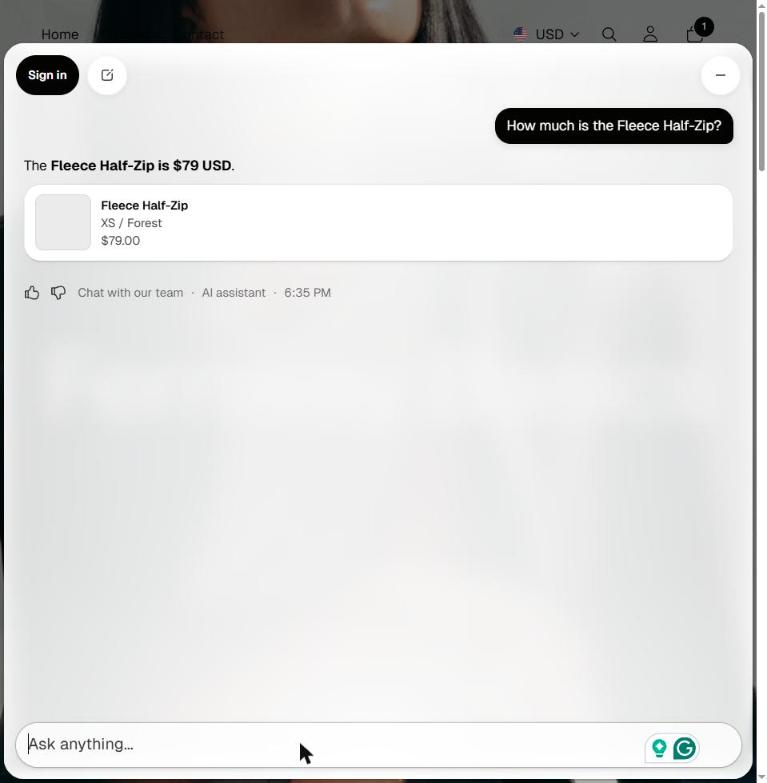
What it answers from
It reads your live catalog and stock, so a newly sold-out size shows up in the next reply. The cart button comes with View cart and Checkout.
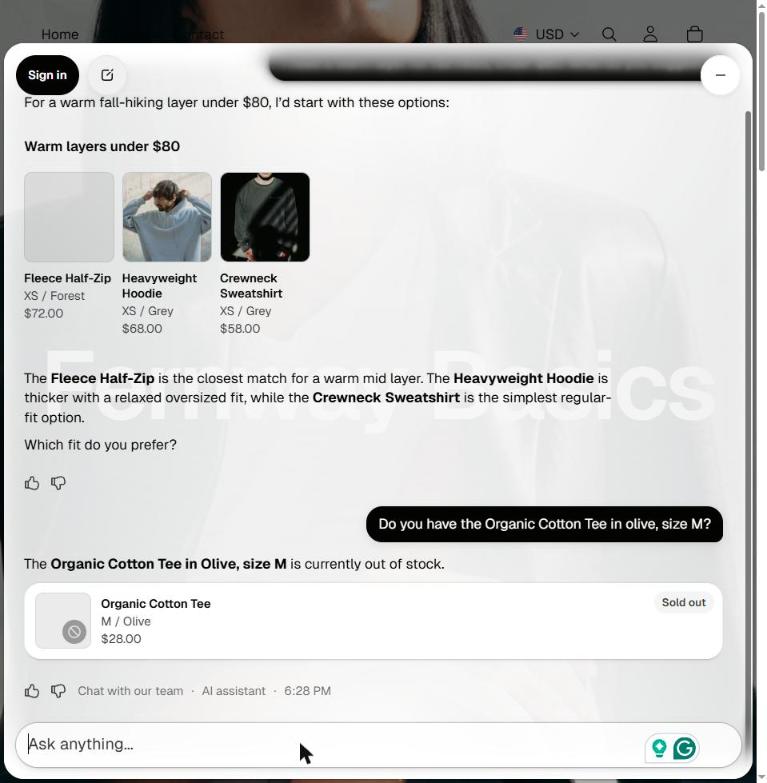
Signed-in shoppers can check an order and start a return without leaving the chat. When a shopper asks for a person, a short name and email form hands the chat to your team in the Inbox app.
Setting it up
Install it from the Shopify admin and switch on the “Online store chat” app embed in the theme editor. By default, it asks shoppers to sign in before chatting; we switched that to name and email and unticked the pre-ticked marketing opt-in.
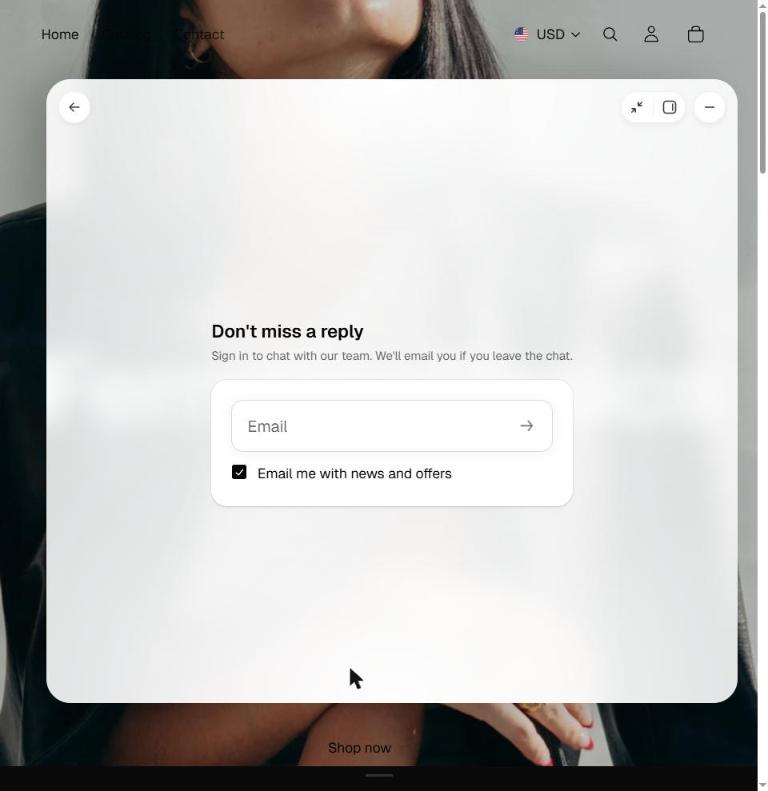
Order lookups always require a customer sign-in with a one-time code, and the AI agent requires Shopify’s new customer accounts, not legacy ones.
Price
It’s a free app (your Shopify subscription is separate).
3. Chatty
It suits a Shopify store that wants cart and order help on a free plan and can live with a regular catalog sync.
What it did in our test
Chatty added the T-shirt to the cart and looked up our test order after an email check. However, it quoted the old $72 price until we ran a manual resync, and it told the shopper the final-sale shirt could be returned.
What it answers from
It works from your synced products, variants and stock, so it can suggest in-stock alternatives. Order status questions get answered once the shopper confirms the order email. Because the catalog syncs once a day, you’ll need to run a manual resync right after changing a price. Forwarded chats land in Chatty’s inbox.
Setting it up
Onboarding switches on its own theme embed automatically. Be sure to pick AI Mode to get product search and add-to-cart in the chat, and turn on “When Chatty AI can’t answer,” which is off by default.
Price
The free plan includes 50 AI conversations a month; we ran the 7-day Pro trial.
4. Tidio Lyro
It suits a Shopify or WooCommerce store that wants live stock in its answers and a team that steps in when you’re online.
What it did in our test
On Shopify, Tidio quoted the new $79 price within 5 seconds and looked up the order after checking the shopper’s email and ZIP code. On WooCommerce, it synced the catalog quickly but had no order lookup. On BigCommerce, it answered from our uploaded files and quoted the old price.
What it answers from
On Shopify and WooCommerce, it syncs your catalog with variant stock, so it names the exact sizes still available. On BigCommerce, it answers from pages and a catalog you upload. Chats go to your team, with separate rules for when you’re online and offline.
Setting it up
On Shopify, install the app, log in to Tidio and open the “Get order status from Shopify” template to switch the action on (note that an order without a shipping address can’t pass its ZIP check).
On WooCommerce, a new project asks visitors for an email before their first message, so turn the pre-chat survey off if you don’t want that friction. On BigCommerce, upload your pages and catalog as PDFs.
Price
There’s a 7-day trial with no credit card required, and the first 50 Lyro conversations are a one-time allowance, not a monthly one.
5. Zipchat
It suits a store on WooCommerce or BigCommerce that needs order lookups and has someone willing to set up an API key.
What it did in our test
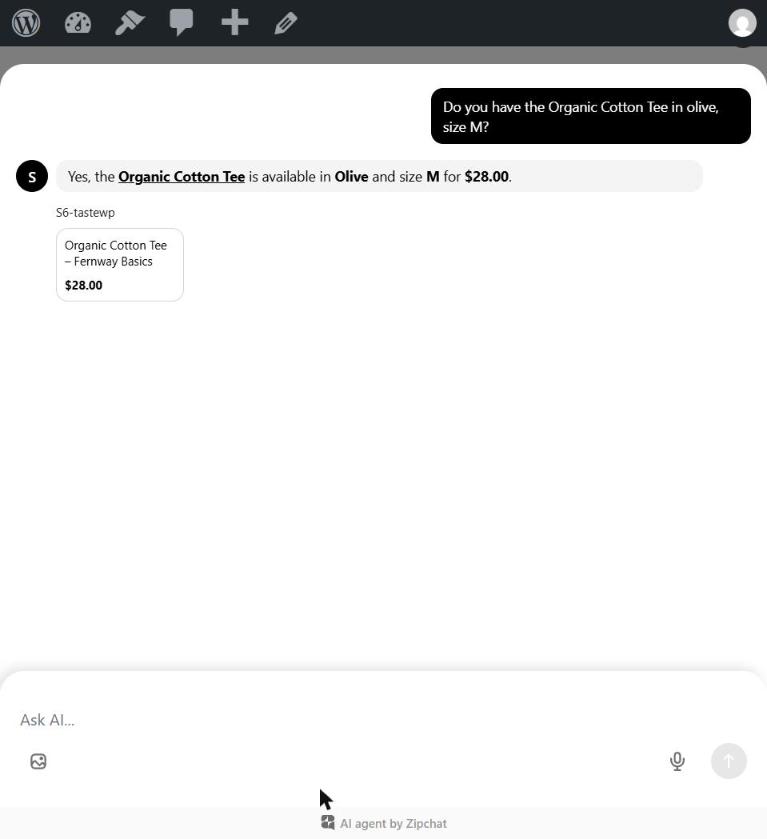
Zipchat was the only bot that looked up real orders on all three platforms—and on Shopify, it did so on the free plan. On WooCommerce, however, its page crawl claimed a sold-out size was available and needed a manual refresh before quoting our new price.
What it answers from
It answers sizing, comparison, and final-sale questions from your pages or files, and looks up orders after an email check. Handoffs go through a short email form, with the conversation waiting for you to take over.
Setting it up
On Shopify there’s no separate signup, though on a password-protected store its crawler reads only the password page, so you’ll need to add your pages as custom text. Turn on “Hand off to a human when unsure” and the escalation skill—both are off by default.
On WooCommerce, add the “WooCommerce – Order tracking” skill with a read-only REST key. On BigCommerce, you’ll need a store-level API account and a custom skill, which Zipchat’s own assistant wrote for us after our first version failed.
Price
The Shopify free plan requires no card and includes 120 AI replies a month; on the other platforms, we used the 7-day Starter trial.
Reading orders is one step; if you have a team that already answers support tickets all day, you’ll likely want the AI inside the helpdesk they already work in.
Best customer service AI chatbot for ecommerce support teams
For Shopify stores with staff answering tickets every day, these tools put the AI inside a full helpdesk—and the monthly bill counts helpdesk tickets or seats on top of the AI usage.
6. Gorgias AI Agent
It suits a Shopify store with a support team that already answers tickets every day.
What it did in our test
Gorgias was strongest after the purchase: it looked up a signed-in customer’s order, confirmed delivery before giving the exchange terms, and properly refused the final-sale return. Before the purchase, however, it struggled: when asked for a warm layer under $80, it named no product, and it offered rain jackets the store doesn’t sell.
What it answers from
It reads Shopify orders and your policies, and it can take order actions such as cancellations, returns and address changes. Every AI conversation stays in the helpdesk your team already uses.
Setting it up
Installing from the Shopify App Store sends you to create a Gorgias account. You have to verify it from the email Gorgias sends, so use an address you can open right away.
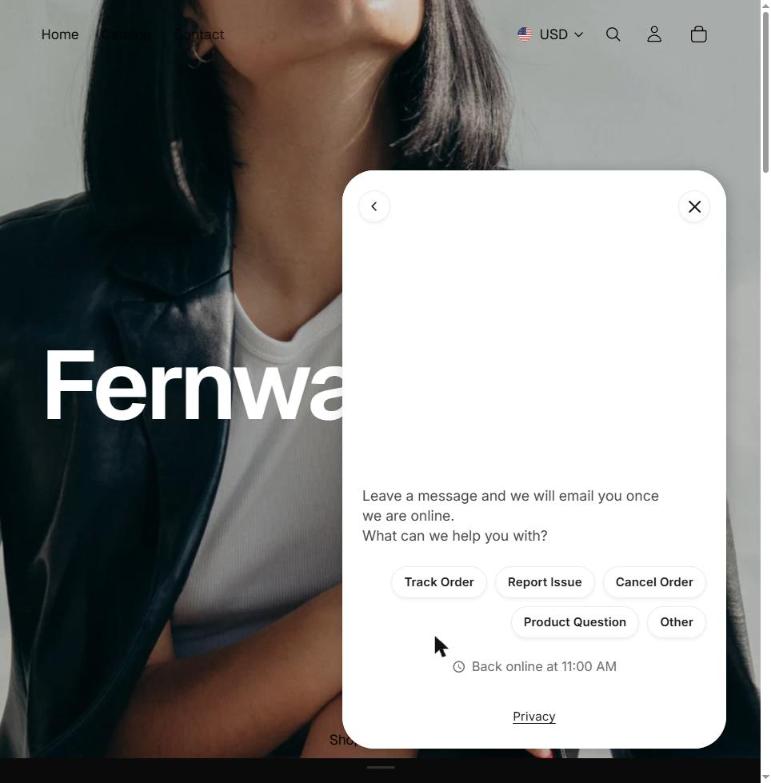
Onboarding drafted only support skills for us, so be sure to add product skills before going live. You also need to create the chat channel by hand (Settings → Channels → Chat) and set your business hours—otherwise, shoppers messaging outside those hours get an offline form instead of the AI.
Price
There’s a 7-day trial, then billing through Shopify: $10 a month for the helpdesk and $30 for AI Agent.
If you already run a helpdesk
If your team works in Intercom, Zendesk, Freshdesk or HubSpot, those helpdesks connect to store data too, mostly with a bit more setup. We tested all four on the same support questions in an earlier comparison. Here is how each connects to an online store:
- Fin by Intercom syncs a Shopify catalog natively; WooCommerce and BigCommerce require a catalog your developer publishes.
- Zendesk shows Shopify orders in the ticket sidebar, where your agents can refund or cancel them.
- Freshdesk’s Freddy AI Agent has Shopify templates for tracking, cancellations and refunds (with API credentials) as well as a BigCommerce order-status workflow.
- HubSpot’s customer agent checks order status through an API action you configure, with a ready-made Shopify order template.
Once the job and platform are settled, your real monthly cost depends on what unit each tool counts.
What an ecommerce chatbot costs at small-store volume
How a chatbot counts usage matters just as much as its starting price. Here is what each tool counts, what you get for free, and where paid AI plans start:
| Tool | What it counts | Free plan or trial | AI from (monthly) | What that includes |
|---|---|---|---|---|
| Shopify Inbox | Nothing for AI | Free app | $0 | The agent; your Shopify plan is separate |
| Elfsight AI Chatbot | Visitor messages (replies don’t count) | Free: 50 messages and 200 views a month | $6 (Basic) | 300 visitor messages a month |
| Chatty | AI conversations | Free: 50 a month | $19.99 (Basic) | 100 conversations and order tracking; $0.40 per extra |
| Tidio Lyro | Lyro conversations (one per chat with any Lyro reply) | 7-day trial, no card; first 50 one-time | $39 (Lyro) | — |
| Zipchat | AI replies | Free on Shopify: 120 a month, no card | $80 (Starter) | 750 replies a month |
| Gorgias | Helpdesk tickets + automated interactions | 7-day trial, then billed through Shopify | $10 + $30 | 50 tickets + 30 automated interactions |
A few billing details change what you’ll actually pay:
- Elfsight counts a widget view each time the chatbot loads on a page, alongside visitor messages.
- Tidio’s 50 free Lyro conversations are a one-time allowance and don’t renew monthly.
- Gorgias can count a chat resolved by its AI as both a helpdesk ticket and an automated interaction.
- Shopify-only bots require an active Shopify plan on top of their app fees.
Our guide to chatbot pricing models explains how each billing unit adds up in practice.
With your platform, job, and budget narrowed down, your shortlist should be small enough to test hands-on.
How to choose a chatbot for your ecommerce website
Narrow your options by platform and job first, then test the two or three bots left using your own store’s questions:
- On Shopify? Try the free Inbox agent first. Check its customer sign-in setting and untick the pre-ticked marketing opt-in before switching it on.
- Check what the bot can read on your platform, not just whether it installs. In our test, the same bot read the live catalog on Shopify but read only our uploaded files on BigCommerce. On a pre-launch or password-protected store, give the bot files.
- Name the job. Decide whether you need product and policy answers, live stock and price updates, or order lookups and returns. Paying for a complex integration you don’t need buys you nothing.
- Count your monthly chats and check the billing unit. Last month’s contact-form emails and live chats give a fair estimate of your volume.
- Decide who picks up a human handoff—and switch it on. Choose between answering in a live chat inbox or showing buttons that email or message you directly. Remember that two of the bots we tested had their human fallback turned off by default.
- Ask your five hardest shopper questions in the free plan or trial. Include one question the bot shouldn’t be able to answer (like a detail your pages don’t cover) and one about a final-sale item.
- Change a price, then ask again. You’ll immediately see whether the bot reads your store live or waits for a manual resync, a page refresh, or a new file.
Frequently asked questions
Will an ecommerce chatbot work on my Wix or Squarespace store?
Do I need an AI chatbot if my online store gets little traffic?
What happens when an ecommerce chatbot reaches its monthly limit?
What happens to shopper chats after hours?
Will the chatbot learn from shopper chats on its own?
Where to start with your store chatbot
In our test, only the bots reading the store in real time quoted a newly changed price right away; the others needed a manual resync, a page refresh, or an updated file. Settle whether you need live store data—and which bots run on your platform—first.
Write down your five hardest shopper questions, including one about an order and one your pages don’t cover, and ask them on a free plan or trial. On Shopify, start with the free Inbox agent. If answering product and policy questions is the main job, build an Elfsight chatbot from your pages and a product file in the live editor above.
Key references
- Assigning your Inbox agent to conversations, Shopify Help Center