As a small business owner, you’ve probably heard “get a chatbot” more than once. Industry analysts predict AI will handle 80% of customer service interactions by 2029. Your competitors are deploying them. The technology is affordable and accessible.
But here’s the tension: Gartner’s research shows that 64% of customers would prefer that companies didn’t use AI in their service at all, yet consumer behavior studies show 62% would rather use a chatbot than wait to speak with a human agent. This isn’t a contradiction – it’s the reality small business owners navigate every day.
This guide covers where AI chatbots actually help SMBs, what to look for in chatbot software, and how to implement one that solves problems rather than creates them.
- Why the customer sentiment paradox matters for implementation
- Real examples of how small businesses use AI chatbots
- What features matter most for SMB chatbot deployment success
- Implementation guidance with common pitfalls to avoid
Why Small Businesses Are Adopting AI Chatbots
The market trajectory tells a clear story. The chatbot market hit $7.76 billion in 2024 and is heading toward $27.29 billion by 2030. Small and medium businesses are the fastest-growing segment, with a 24.58% CAGR, outpacing enterprise adoption. This shift reflects technology that’s become genuinely accessible through no-code platforms.
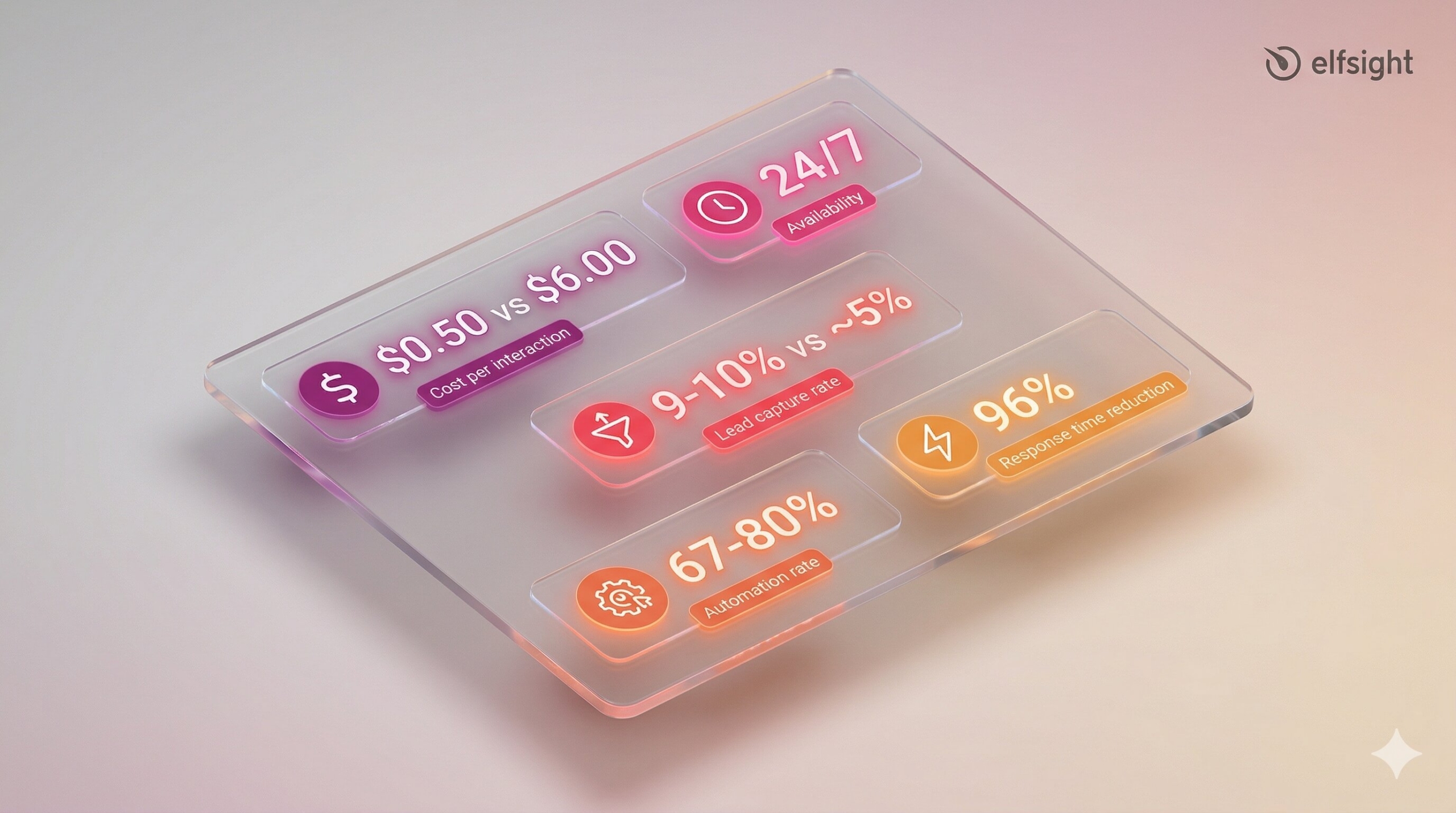
So why are SMBs deploying chatbots? The business case is straightforward:
- Roughly $0.50 chatbot vs $6.00 human per interaction (12x cost advantage)
- 24/7 availability without staffing night shifts or weekends
- Lead capture rates at 9-10% compared with ~5% for static contact forms
- Successful deployments handle up to 80% of routine inquiries automatically
- Response times drop by up to 96% for common questions
Yet these numbers only materialize with proper implementation. Customers accept AI when it solves their immediate problems – speed and availability – with a clear human escalation path and no frustrating obstacles in between. With both options presented simultaneously, 67% choose the chatbot.
How Small Businesses Use AI Chatbots
“Most companies make the wrong business case for their chatbot.” — Christina McAllister, Senior Analyst, Forrester
Website chatbots serve different purposes depending on business model and customer needs. Here’s how real SMBs implement them.
Customer Support and FAQ Handling
The most common deployment automates repetitive inquiries that consume staff time. Modern AI chatbots handle 67-80% of routine questions about shipping policies, store hours, product availability, return procedures, and account access. Mordor Intelligence data shows SMEs using chatbots trimmed response times by 96%.
Service businesses also use specialized chatbot platforms with built-in appointment-booking features that display available time slots, confirm bookings, and send reminders – though these typically require integration with scheduling tools like Calendly or direct calendar access, rather than being a core chatbot capability.
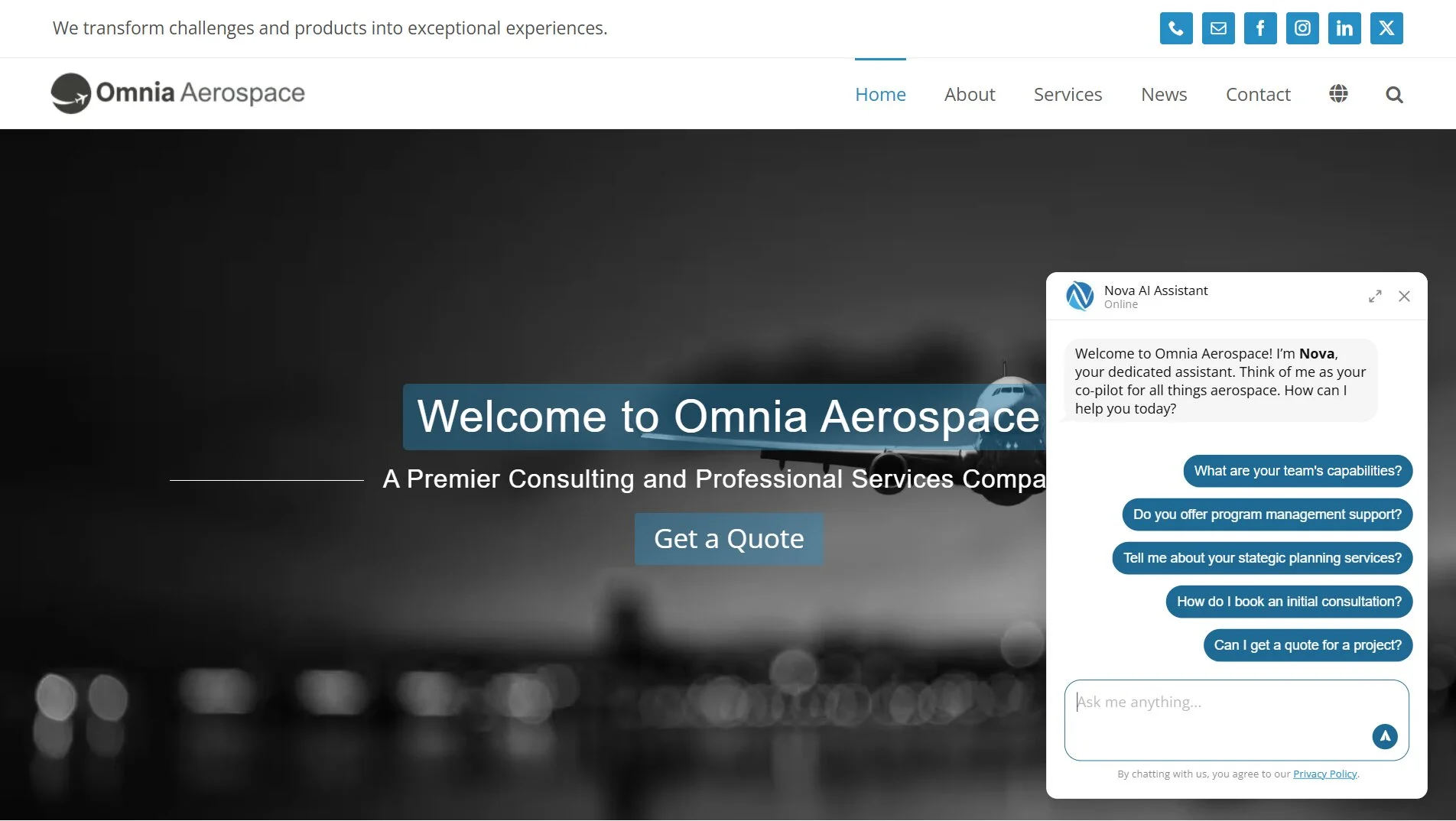
Omnia Aerospace use Elfsight’s AI Chatbot to help users navigate across their services. The chatbot automatically answers routine inquiries on capabilities, certifications, and consultation bookings, freeing the team to focus on complex tasks rather than repetitive spec and policy lookups.
Lead Generation and Qualification
Chatbots capture leads through conversational intake rather than static forms. WotNot data shows chatbot lead capture rates reach 9-10% versus approximately 5% for traditional contact forms. The chatbot qualifies visitors through natural conversation – budget, timeline, requirements – then collects contact information and routes qualified leads to sales with full context.
Legal firms collect case details and conflict-check information. Real estate agents filter prospects by location, budget, and property type before scheduling showings. This front-end qualification reduces wasted consultation time and improves lead quality for sales follow-up.
Endeksa, a Turkish real estate platform, deployed Tidio’s AI chatbot to qualify property search inquiries. The chatbot asks visitors about their location preferences, budget range, property type, and desired features, then collects their contact details to match them with listings. The result: a 138% increase in lead generation compared to their previous static contact form approach.
E-Commerce and Retail
Online stores use chatbots for product recommendations, order tracking, and cart abandonment recovery. Industry data shows that chatbots recover 25-35% of abandoned carts when deployed with timely triggers and personalized messaging.
AI-powered product recommendations also drive meaningful revenue beyond simple FAQ deflection, with some providers reporting an average order value of $430 through chatbot-assisted sales. Most chatbot platforms offer e-commerce-specific templates with pre-built flows for common scenarios like size guides, shipping policies, and return processing.
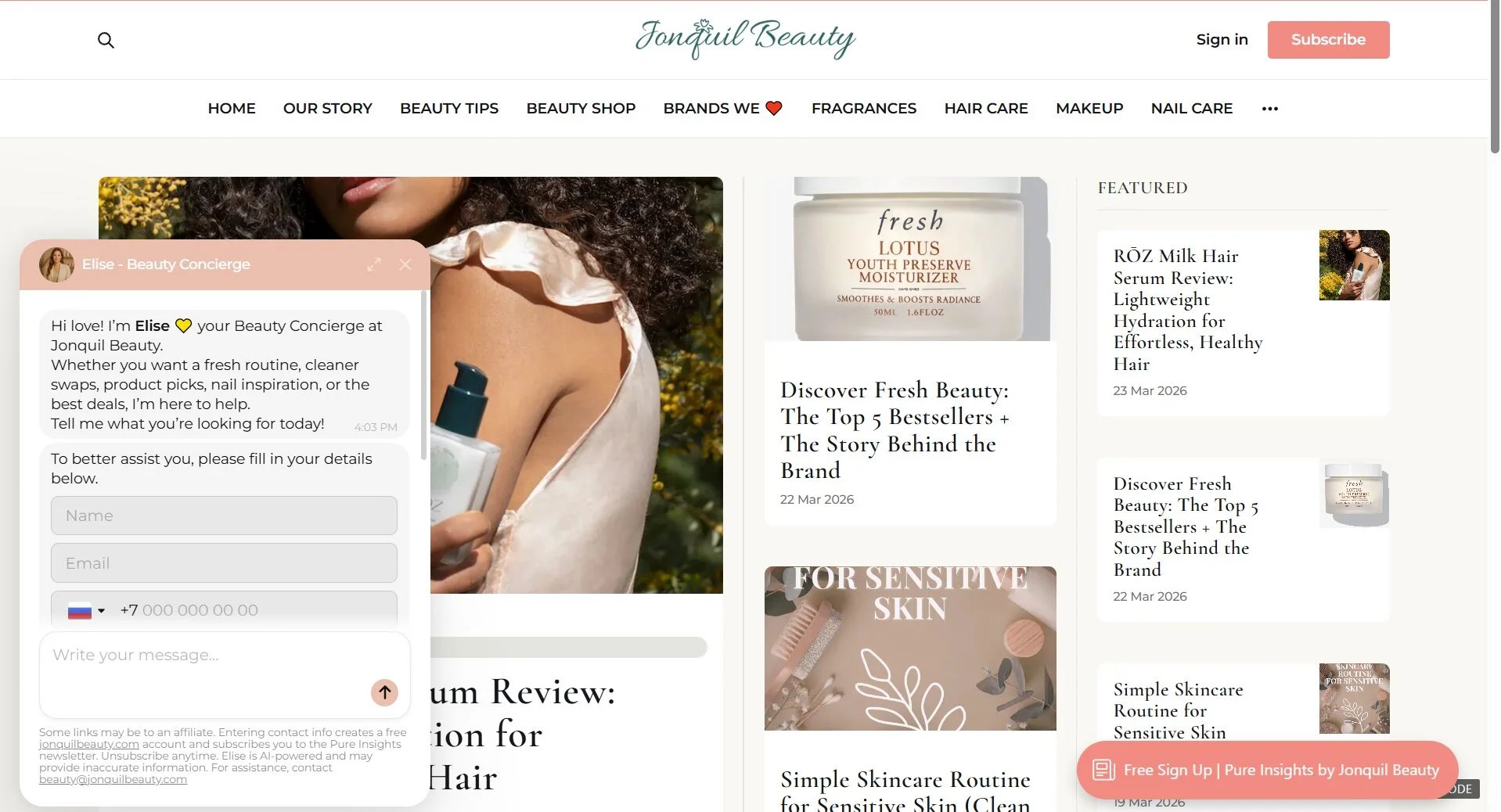
Jonquil Beauty, a skincare and beauty business, use Elfsight’s AI Chatbot to share product recommendations and guide visitors to their brand’s clean-beauty articles. The chatbot asks about skin type, concerns, and preferences, then recommends products from Jonquil’s catalog. This personalized guidance increases both conversion rates and average order values by helping customers find the right products faster.
Additional Use Cases
Beyond the three primary deployments, chatbots serve niche applications: internal helpdesk access (employees querying HR policies and IT procedures), restaurant reservations and menu guidance, healthcare appointment scheduling on HIPAA-compliant platforms, and home services project estimates.
These use cases work well for businesses with specific workflows but represent a smaller share of SMB chatbot deployments. For example, one Elfsight client uses the AI Chatbot as an internal helpdesk trained on company policies – employees ask “What’s our PTO policy?” and receive instant answers from official documentation.
What to Look for in Chatbot Software for Small Business
Not all chatbot platforms are built the same. Modern AI-powered chatbots differ fundamentally from older rule-based systems – the distinction is whether the chatbot interprets natural language and generates contextual responses, or just follows scripted decision trees. Understanding what an AI chatbot actually is helps you evaluate options.
Essential Features
Chatbot capabilities fall into three categories: core functionality that determines whether it works at all, user experience features that affect adoption rates, and integration capabilities that connect the chatbot to your business systems.
Core functions
- Knowledge base training — The chatbot learns from your actual business content (web pages, uploaded files, Q&A pairs) rather than generic internet knowledge. Without this, you get hallucinated answers that damage credibility.
- Human escalation path — Research shows that 80% of customers engage with chatbots only if they know a human option exists. The chatbot needs a visible “talk to a human” button or automatic handoff after failed resolution attempts.
- Lead capture forms — Turn conversations into actionable data by collecting contact information, visit context, and consent during the interaction. Critical for businesses using chatbots for sales rather than just support.
User experience
- Mobile responsiveness — Non-negotiable when most website traffic comes from phones
- Proactive triggers — Increase engagement by initiating conversations when visitors land on high-intent pages rather than waiting for them to click the chat button
- Welcome messages and quick replies — Reduce friction by suggesting common questions visitors can click rather than type
- Customizable branding — The chatbot should match your site’s colors, fonts, and tone for visual consistency
Integration capabilities
- CRM connections (HubSpot, Salesforce) — Automatic lead routing to sales team
- E-commerce platforms (Shopify, WooCommerce) — Access to order data for tracking inquiries
- Scheduling tools (Calendly, Google Calendar) — Appointment booking if relevant to your business
- Help desk software (Zendesk, Freshdesk) — Automatic ticket creation for escalated issues
- Zapier connectivity — Extends integration to 8,000+ applications when native connections don’t exist
- Conversation logs and analytics — Monitor resolution rates, identify knowledge gaps, and optimize over time
Pricing Tiers
Cost ranges from free tiers for testing to enterprise plans for high-volume deployments. Basic paid plans typically start at $5-$30/month; mid-tier options run $50-$100/month. What drives cost: message volume limits, number of chatbots, knowledge base storage size, branding removal, and support priority. For a detailed breakdown, see our complete guide on chatbot costs.
| Tier | Monthly Cost | Message Volume | Best For |
|---|---|---|---|
| Free | $0 | 50-100 messages | Testing, low traffic |
| Basic | $5-$30 | 300-1,000 messages | Single-site small businesses |
| Pro | $50-$100 | 3,000-10,000 messages | Multi-site or higher traffic |
| Enterprise | $200+ | Custom | Agencies, high-volume operations |
Setup Requirements
Modern no-code chatbot platforms require zero coding. The setup involves establishing a knowledge base by uploading content or providing URLs, configuring a contact form, customizing appearance, and copying a JavaScript snippet into your website. Most platforms achieve basic deployment in minutes to hours. The technical barrier is minimal.
Popular no-code platforms include Tidio (freemium with AI assistant Lyro), Intercom (enterprise-focused with Fin AI Agent), Zendesk AI (help desk integration), ChatBot.com (standalone widget), and Elfsight’s AI Chatbot (universal CMS compatibility with sitemap training). Most offer free tiers for testing, with paid plans scaling by message volume and feature access.
How to Implement a Chatbot That Actually Helps
The difference between a chatbot for small business that solves problems and one that frustrates customers comes down to the quality of setup. Here’s how to deploy thoughtfully.
Start With a Defined Use Case
Identify the specific problem you’re solving – overwhelmed support inbox, missed leads during off-hours, repetitive product questions, or appointment no-shows. The use case determines everything else: the features needed, the integrations required, and the success metrics.
Forrester’s research shows companies that design chatbots primarily to reduce call volume often fail, while chatbots focused on sales enablement and lead generation tend to perform better. The implication: choose a use case aligned with revenue growth rather than just cost reduction.
Build a Quality Knowledge Base
Chatbot response quality is entirely determined by training content. Audit your documentation first – outdated information, contradictory policies, and poorly structured FAQs produce confident wrong answers that damage trust.
Training sources include website pages where platforms like Elfsight can auto-scan your sitemap, uploaded files such as product manuals, policies, and guides, Q&A pairs for high-stakes topics like pricing, legal terms, and refund policies, plus text blocks for business context. The more comprehensive and up-to-date your knowledge base is, the better the chatbot performs.
Knowledge bases require maintenance. When products, policies, or offerings change, the chatbot needs retraining. Set a review cadence (monthly or quarterly) to keep responses current.
Design for Human Escalation
Always provide a clear path to a human. Gartner’s survey found 60% of consumers cite difficulty reaching a human as their primary concern with AI customer service.
Escalation design patterns include a visible “Talk to a human” button, automatic escalation after failed resolution attempts, a contact form for callback, and business-hours messaging showing the next-available human response time. Never trap users in bot loops.
When customers suspect they’re stuck talking to AI with no exit, frustration compounds quickly. Research published in Management Science by Zhang and Narayandas found that when customers had a prior bad chatbot experience, even AI-assisted human responses negatively affected sentiment because customers suspected they were still talking to a bot.
Test Before Full Launch
Amazon Web Services recommends a phased rollout:
“Begin with a narrowly scoped use case, like a basic FAQ chatbot. Measure impact on first-response time and repeat contacts. Expand to routing, sentiment alerts, and knowledge suggestions as you learn.”
Testing checklist before going live: verify responses to your top 50-100 actual customer inquiries, measure response speed, confirm the chatbot doesn’t hallucinate policies or make up information, and run adversarial prompts – attempts to trick the bot or force unauthorized actions – to find vulnerabilities.
Deploy to a limited customer segment first with clear feedback channels before scaling to all traffic. Monitor conversation logs regularly in the first weeks to catch issues early.
Common Pitfalls and Solutions
Most small business chatbot failures aren’t technology problems – they’re implementation mistakes. These pitfalls come from support teams and community forums where chatbot deployments went wrong. The patterns repeat across platforms and business types, but they’re all fixable with a better setup.
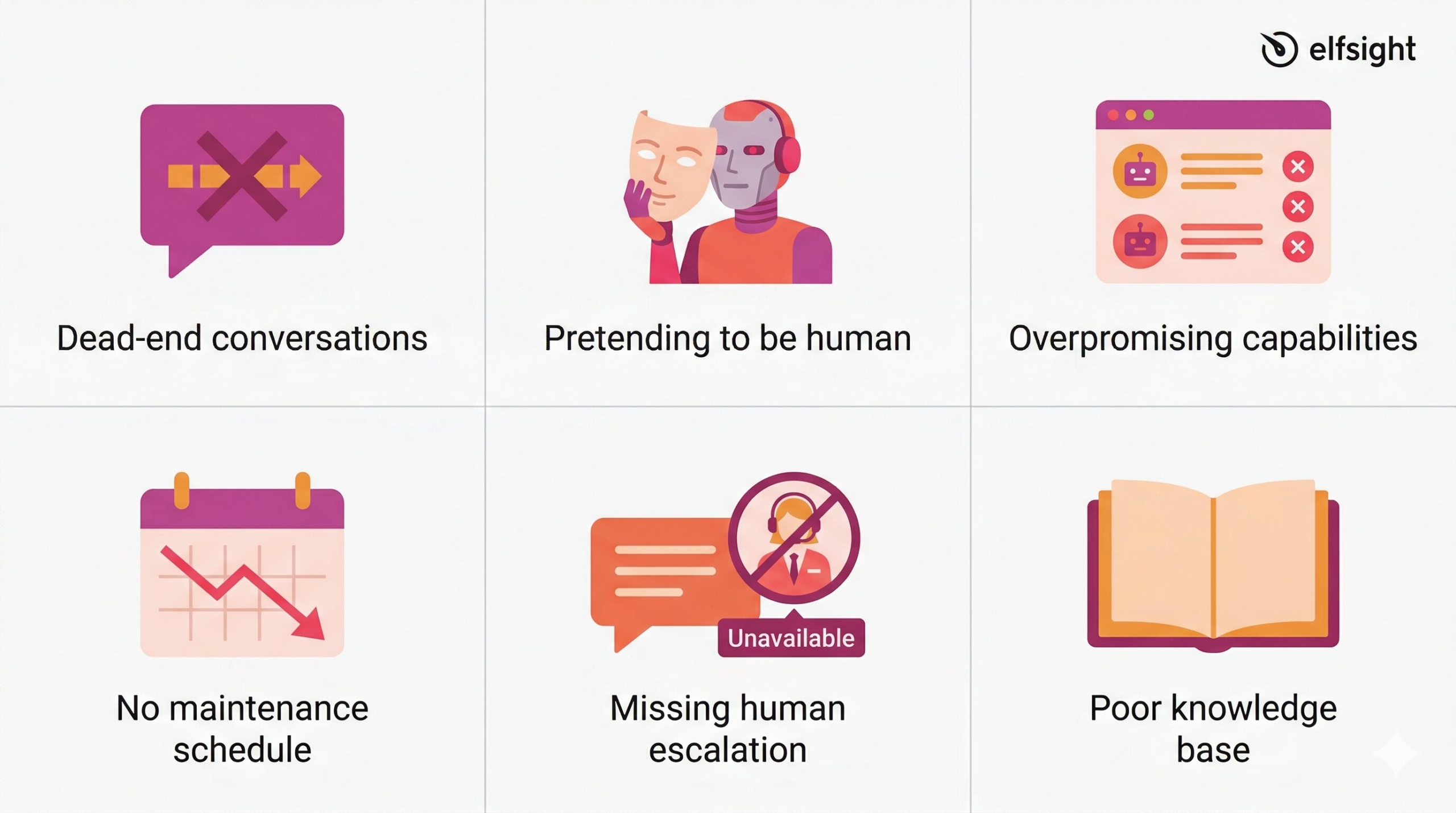
Dead-end conversations
Tidio illustrates: “Picture this: you go to a shop and ask an assistant to help you… The assistant gives you 10% off a completely different product and just leaves.” When the chatbot can’t answer, it needs a graceful exit: transfer to a human, collect contact info for a callback, or acknowledge the limitation honestly rather than changing the subject or going silent.
Pretending the bot is human
Be transparent about AI use from the first message. The U.S. Chamber of Commerce warns: “Don’t go overboard or pretend like the chatbot is human, because this can feel inauthentic.” Customers accept chatbots when they know what they’re talking to – deception damages trust even when the chatbot performs well.
The “overly helpful” problem
AI chatbots sometimes promise information they don’t actually have. An Elfsight client running a community resource directory found their chatbot offering to provide “hours of operation and eligibility details” for local services when that data didn’t exist in the training files. The fix: explicit negative instructions telling the chatbot what NOT to offer, not just what to provide.
Teaching what NOT to do is harder than what TO do
One Elfsight client’s appointment chatbot kept asking “What date and time would you like?” even though it couldn’t check availability or book appointments. Generic instructions like “be helpful” backfired. The solution: highly specific negative instructions such as “Do not ask for appointment dates or times. Only provide booking links and phone numbers.”
Set-and-forget deployment
Smith.ai warns: “You can’t just set up an AI chatbot and let it go.” Knowledge bases become outdated as products, policies, and offerings change. Set a monthly or quarterly review cadence for conversation logs, knowledge updates, and resolution rate monitoring. The chatbot that works today breaks tomorrow without maintenance.
Can’t read dynamic data
Chatbots train on static content – they can’t scrape real-time calendar availability, current inventory levels, or live pricing. If your business requires real-time information, the chatbot can direct visitors to the relevant system, but can’t pull that data directly. The knowledge base is a snapshot, not a live connection.
Frequently Asked Questions
Do I need technical skills to set up an AI chatbot for my small business?
How much does a chatbot cost for a small business?
Will customers be frustrated if I use a chatbot instead of live chat?
How long does it take to set up an AI chatbot for small business?
What's the difference between AI chatbots and older rule-based chatbots?
Can a chatbot integrate with tools like Shopify, HubSpot, or Calendly?
Next Steps
The consumer sentiment paradox resolves when you understand that customers don’t object to AI – they object to being blocked from human help when they need it. Chatbots succeed when they solve real problems like instant answers, 24/7 availability, and lead capture with a visible human escalation path. They fail when deployed as barriers to keep customers away. Understanding the balance between benefits and limitations helps you evaluate the pros and cons of chatbots for your specific situation.
Practical starting point: audit your top 50-100 customer inquiries or website visitor questions, identify 3-5 repetitive topics for automation, choose a use case aligned with revenue goals since lead capture tends to outperform support deflection, test with a small customer segment, and expand only once customers and your team trust the system.
Primary Sources
- Grand View Research, Chatbot Market Size Report (2025) – https://www.grandviewresearch.com/press-release/global-chatbot-market
- Gartner, Customer Preference Survey (July 9, 2024) – https://www.gartner.com/en/newsroom/press-releases/2024-07-09-gartner-survey-finds-64-percent-of-customers-would-prefer-that-companies-didnt-use-ai-for-customer-service
- Mordor Intelligence, Chatbot Market Report (January 2026) – https://www.mordorintelligence.com/industry-reports/global-chatbot-market
- Freshworks, 20 essential chatbot statistics – https://www.freshworks.com/chatbots/statistics/
- Forrester, “Build The Right Chatbot Business Case” (Christina McAllister) – https://www.forrester.com/blogs/build-the-right-chatbot-business-case
- Zhang & Narayandas, “When AI Chatbots Help People Be More Human,” Management Science (January 2026) – https://www.library.hbs.edu/working-knowledge/when-ai-chatbots-help-people-be-more-human
- Amazon Web Services, AI Customer Service Guide for SMBs: 7 Steps for Small Businesses – https://aws.amazon.com/smart-business/resources-for-smb/ai-customer-service-guide-7-steps-for-smbs/