Webflow Twitter Feed widget

Showcase tweets, images, and videos from X (formerly Twitter) on your Webflow website to enrich content and help visitors follow your latest updates.
4.8 rating
10,000+ reviews
Free plan available
Create Widget for Free
No credit card needed
Webflow Twitter Feed widget

Create your Twitter Feed widget

Configure your Twitter Feed and add it to your Webflow website for free!

Screenshots

Webflow Twitter Feed widget
Display your Twitter account with all functionality and details available
Select the best testimonials about your business and show them on the site
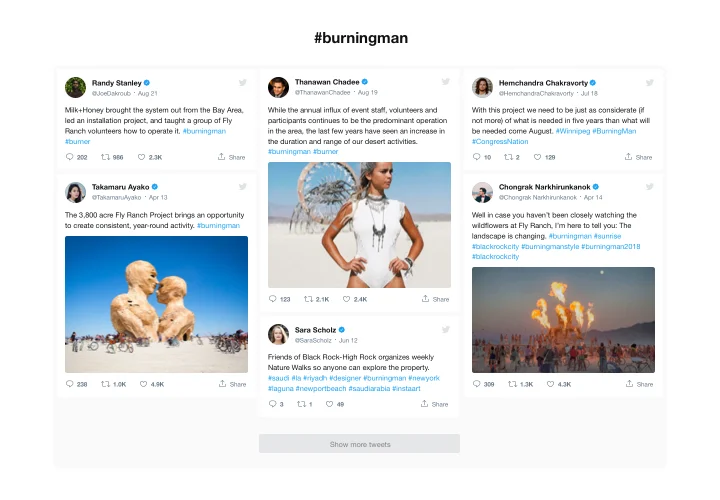
Create a selection of Tweets with required hashtags for your site
Choose the color of active feed elements to add a custom touch
Clean minimalistic look will fit any website design concept
Responsive and mobile optimized for smooth user experience
1 / 6

Embed Twitter Feed on Webflow with the Elfsight widget

Elfsight Twitter widget is an adjustable widget that enables you to introduce Twitter feed or single Tweets on a Webflow website. You have a chance to display your Twitter newsfeed or show testimonial Tweets to strengthen user engagement and grow customer trust on your website. What makes our widget a leader among others is a big amount of options, ready-to-use templates that will suit any use-cases and its adaptable design.

Increase the engagement level of your website and make it trustworthy for your clients

  • Boost engagement.
    Add vibrant content of one of the most used social media on your website to attract more attention of the audience. Enjoy a higher level of engagement on your website.
  • Have more followers.
    Interactive Elfsight Twitter feed allows users to start following your account straight from the website. So you can have another source of followers and increase the number of your Twitter community.
  • Flawless social proof for stronger trust.
    Show that your Twitter profile is active and fresh to assure users that your business is developing and you are ready to interact and become closer to your visitors.

Main features of the Twitter Feed widget

The fundamental traits of our widget, which make it one of the best solutions for Webflow websites:

  • Feed or Testimonials type of the presentation;
  • Choose full or compact header layout;
  • Share tweets in Facebook;
  • A special icon to mark verified accounts;
  • Set a custom theme color for the widget.

See a complete set of traits in the intuitive editor!

How to add Twitter Feed to Webflow website

Express guide on integration of the widget without competence in web programming or searching for a freelance web developer. The time that you will spend on it is not more than 90 seconds.

  1. Construct your custom Twitter widget.
    With the help of our free configurator, create a widget with the design and parameters that you want.
  2. Acquire a code for installing the widget.
    After you have tuned in your widget, acquire a code for its installation from the popup notification on Elfsight Apps.
  3. Embed the widget on your Webflow website.
    Add the widget to the desired spot of the page and publish the changes.
  4. You’re done!.
    Enter your website, to check your work.

If there’s something you find difficult during installation or customization, get in touch with Elfsight support team. Or study to read a full manual.

Which Webflow plans support custom embeds?

CMS, Business, and Ecommerce plans support custom HTML and JavaScript embeds.

Does the Twitter widget work with Webflow CMS collections?

Elfsight widgets can be embedded inside CMS collection templates, allowing them to appear dynamically across CMS pages.

How frequently does the Twitter feed refresh in Webflow?

Elfsight updates new posts roughly every 48 hours, balancing fresh content with consistent performance on your Webflow website.

Is API setup required to connect my account?

No, the widget manages authentication automatically, so you don’t need to configure API keys or create a developer account.

Can I control which tweets are displayed?

You can add specific tweet links to feature curated posts or hide selected tweets from the feed.

Can I display posts by hashtag or keyword?

Elfsight can pull tweets based on hashtags or defined keywords to highlight relevant content.

Does the feed support media content?

Photos and GIFs appear directly inside the widget, while clicking a video redirects users to X (Twitter) for playback.

Is a Follow button included?

Yes, a built-in Follow button can be shown in the header to help grow your audience directly from your Webflow page.

Can private accounts be displayed?

No, only public accounts and publicly accessible tweets are supported due to platform restrictions.

Pricing

14-day money back guarantee. Risk-free, you can cancel at anytime.
Webflow widget
Platform-independent version that works on any website
from $0 / month
start with free plan
Unlimited domains
Premium support
Free of charge installation service
Special deal for multiple apps
100% customizable