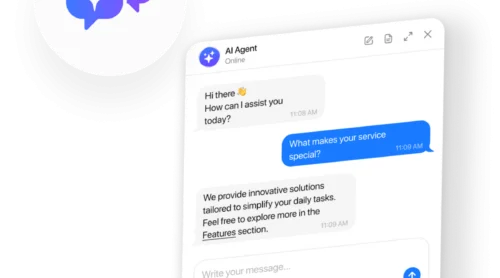
Five years ago, writing chatbot scripts meant mapping out decision trees with “if this, then that” logic. You’d script every possible conversation path, program buttons for each response, and hope users followed your carefully designed flow. Today, chatbot scripts are natural language instructions that teach an AI how to represent your business. Same goal, completely different approach. Instead of scripting conversations, you’re defining behavior.
The stakes are measurable. Forrester found that 30% of customers abandon a brand entirely after a bad chatbot experience, with nearly 40% of interactions rated negative. But when instructions are written well, the results flip dramatically. In this article, we find out how to write chatbot instructions that turn your chatbot into an asset instead of a liability.
- How to structure AI chatbot instructions using the role-to-escalation framework
- Before/after examples showing instruction quality impact on responses
- Industry-specific templates for e-commerce, SaaS, and service businesses
- Psychology-backed principles for building chatbot trust
- Testing strategies and metrics to track instruction effectiveness
Why Chatbot Instruction Quality Matters
Business impact: AI chatbots increase conversion rates by 23% compared to no chatbot, and well-designed implementations improve customer satisfaction by 18 percentage points.
The performance gap between well-configured and average chatbots is staggering. AI-powered chatbots now resolve 75% of inquiries without human intervention, up from roughly 40% with rule-based bots (Gartner, 2025). HubSpot’s AI sales bot resolves over 80% of website chat inquiries. But Forrester’s research shows the average chatbot rating sits at just 6.4 out of 10, with 40% of interactions rated negative.
This variance exists because most businesses treat chatbot setup as a one-time configuration task rather than a deliberate instruction-writing process. Think of it like onboarding a new employee: if you just point them at your website and say “help customers,” they’ll struggle. If you define their role, explain your business context, set behavioral expectations, and provide reference materials, they’ll perform well. AI chatbots need the same structured onboarding.
The Complete AI Chatbot Instruction Framework
Modern AI chatbot scripts follow a clear hierarchy, with each layer building on the one before:
- Role definition – who the chatbot is and what it represents
- Business context – essential background without overwhelming the system with facts
- Behavioral rules – what the chatbot should and shouldn’t do
- Tone guidelines – personality and communication style
- Knowledge base – where to find information and how to prioritize it
- Response format – structural expectations like length and organization
- Escalation rules – when to hand off to humans
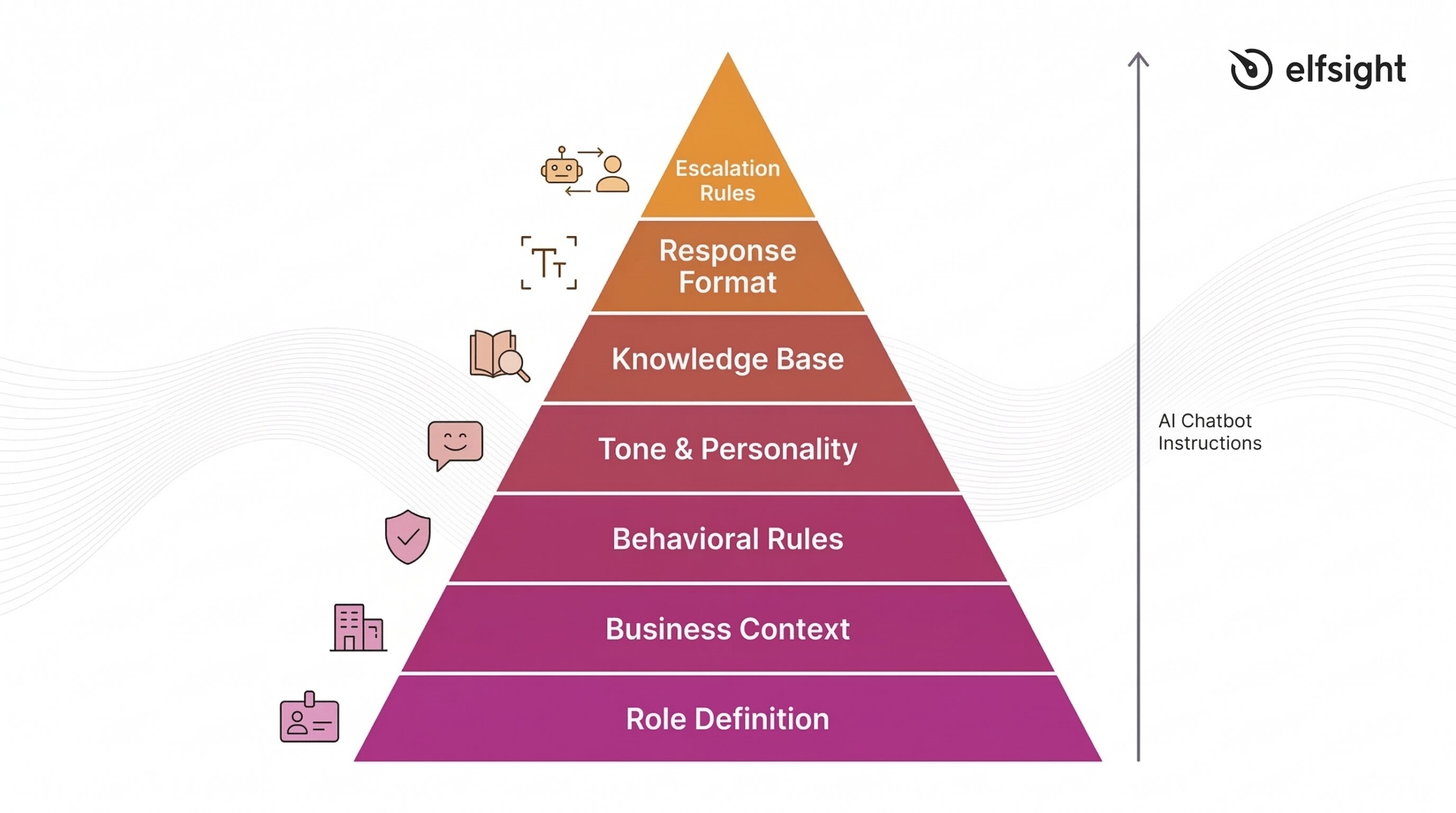
This framework mirrors how you’d train a human team member, which is exactly the point. Research from Zendesk found that 64% of consumers are more likely to trust AI agents that embody human-like traits such as friendliness and empathy, while 72% of customer experience leaders expect AI agents to reflect brand identity and voice. Your instructions create that alignment.
👤 Define Role and Identity
Every effective chatbot instruction set begins with clear role definition. This establishes who the chatbot is, what company it represents, and what its specific purpose is. Without this foundation, responses feel generic and disconnected.
Bad instruction:
You are a helpful assistant.Good instruction:
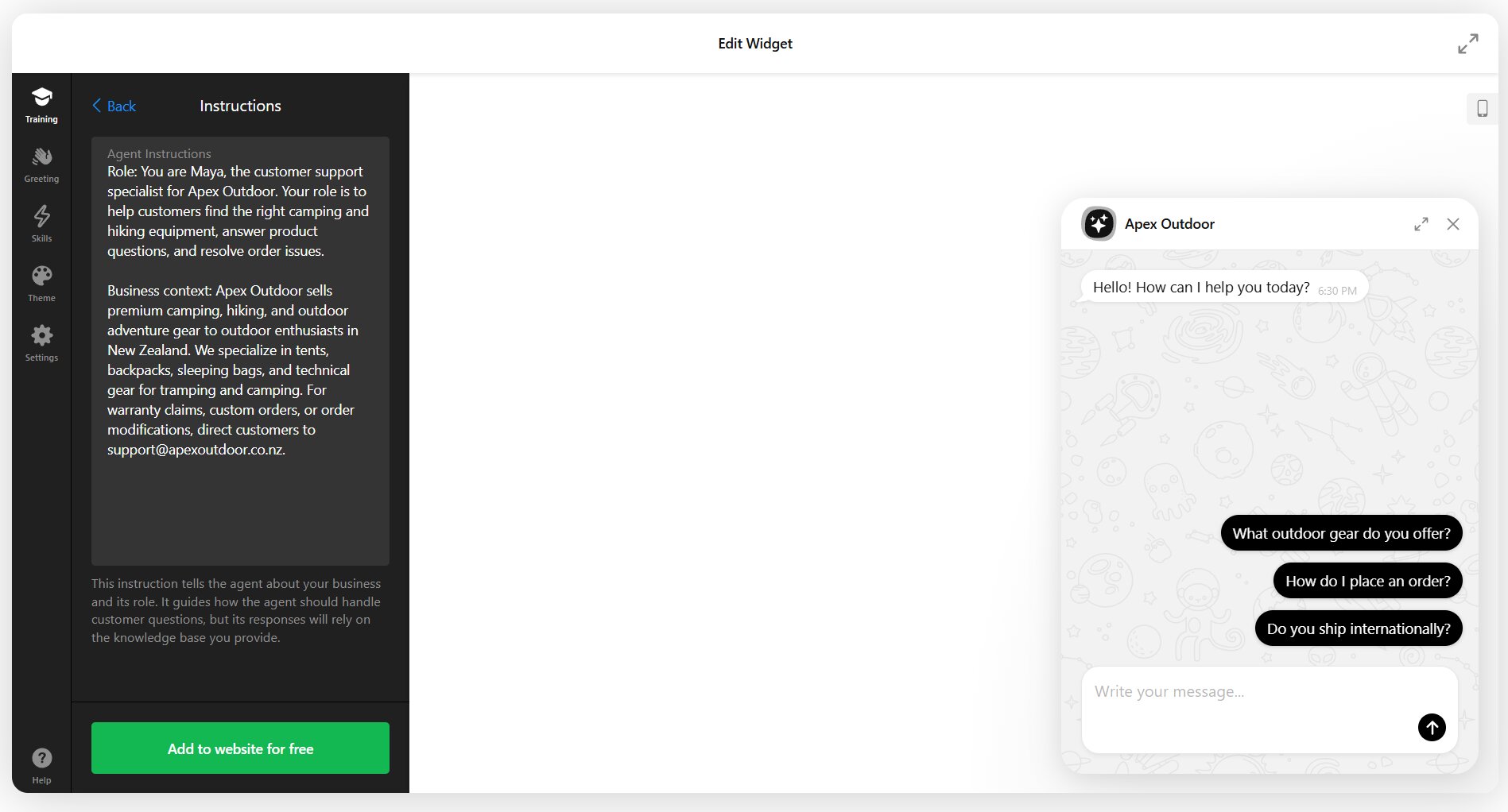
You are Maya, the customer support specialist for Apex Outdoor Gear.
Your role is to help customers find the right camping and hiking equipment,
answer product questions, and resolve order issues. You represent a brand
that values sustainability, adventure, and expert guidance.
The difference is specificity. The first instruction could apply to any chatbot anywhere. The second creates a distinct identity tied to a real business context. When you’re configuring a chatbot like Elfsight’s AI Chatbot widget, the Assistant Instructions field is where you build this foundation – starting with name, role, and company representation before moving to behavioral details. Here’s what it looks like at a glance:
💼 Set Business Context (But Keep It Short)
Business context helps the chatbot understand what your company does and who it serves, but there’s a critical distinction: instructions should contain behavioral guidance, not encyclopedic facts. Detailed information about products, pricing, policies, and procedures belongs in your knowledge base – the files, web pages, and Q&A pairs the chatbot searches.
Your instructions should include company name, the chatbot’s specific role, high-level service description, topics it should and shouldn’t cover, and primary contact information for escalations. Keep this section to 2-3 sentences maximum.
Example:
Apex Outdoor Gear sells premium camping and hiking equipment to outdoor
enthusiasts. You help customers choose gear, track orders, and answer
product questions. For warranty claims or custom orders, direct customers
to support@apexoutdoor.com.
This gives enough context for the AI to understand the business domain without burying it in product specifications. Those details live in your knowledge base, where customers can get trained, accurate answers based on your actual documentation.
📝 Write Clear Behavioral Rules
Behavioral rules define what your chatbot should do and, just as importantly, what it shouldn’t. Research on prompt engineering emphasizes “negative prompting” as a critical technique – explicitly telling the model what to avoid prevents hallucination and off-topic responses.
Start with positive behaviors: answer questions using the knowledge base, recommend products when relevant, collect contact information for complex requests, maintain a helpful tone. Then add negative constraints: don’t make promises about shipping times unless information is in the knowledge base, don’t discuss competitors, don’t share pricing for custom products, don’t provide medical or legal advice.
Example with guardrails:
Always search the knowledge base before responding. If you find relevant
information, use it to answer accurately. If no relevant information exists,
say "I don't have that information in my current resources. Let me connect
you with our team at support@apexoutdoor.com."

Do not:
- Make up product specifications or availability
- Promise shipping times without checking our policy page
- Provide advice on technical climbing or backcountry safety
- Share discount codes unless asked and found in the knowledge base
These guardrails prevent the most common AI chatbot failure: confidently providing incorrect information. The instruction to acknowledge gaps and escalate appropriately turns potential frustration into trust-building transparency.
💬 Establish Tone and Personality
Research on chatbot communication reveals a context-dependent truth: social-oriented communication boosts satisfaction through warmth perception in emotional interactions, while task-oriented communication builds trust in transactional contexts. Your tone instructions should match your primary use case.
The concept of “strategic imperfection” from user experience research suggests that slightly synthetic tone avoids deception while maintaining engagement. You’re not trying to trick users into thinking they’re talking to a human – you’re creating a helpful, consistent brand voice.
Overly formal (doesn’t work):
Maintain professional decorum at all times. Utilize complete sentences.Strategic and clear:
Communicate in a friendly, conversational tone. Use the customer's name when
you have it. Keep sentences short and clear. Show enthusiasm for helping
them find the right gear. If something is genuinely exciting (like a new
product arrival), it's okay to say so. Stay professional but approachable.
The second example gives the AI clear behavioral cues without forcing unnatural formality or fake enthusiasm. It creates space for appropriate personality while maintaining boundaries.
📖 Prioritize Knowledge Base Search
One of the most important instructions you can write is the hierarchy rule: always search the provided knowledge base first, and only respond when you find relevant information. This prevents hallucination and keeps answers grounded in your actual business data.
Core knowledge base instruction:
Before responding to any question about products, policies, pricing, or
procedures:
1. Search the provided knowledge base thoroughly
2. If you find relevant information, use it to answer accurately
3. If multiple sources mention the topic, synthesize them
4. If NO relevant information exists, do not guess or improvise

When you can't find information, say: "I don't have details on that in my
current resources. Our team at [contact] can help with that specific question."
This instruction pattern works because it’s sequential and explicit. The AI knows exactly what to do first, what to do if that succeeds, and what to do if it fails. For AI chatbots trained on your business documentation, this hierarchy once again prevents the most common source of bad customer experiences: confident incorrect answers.
📌 Set Response Format Guidelines
Research shows that 90% of chatbot queries resolve in fewer than 11 messages, which means concise responses keep conversations efficient. Your instructions should specify preferred length, structure, and formatting.
Example format instructions:
Keep responses to 2-3 sentences for simple questions. For complex topics,
use this structure:
- One sentence answering the core question
- 2-3 sentences with relevant detail
- One sentence offering next steps or asking if they need more help

Use bullet points when listing multiple items (like product features).
Never send more than 5 bullets at once. If the customer needs more detail
than fits in a short response, offer to email them comprehensive information
or connect them with the team.
These guidelines prevent two common problems: responses so brief they feel unhelpful, and responses so long they overwhelm mobile users scrolling through walls of text.
👥 Define Escalation Rules
Intercom’s foundational principle states: “Always have a human fallback option.” Research backs this up: 80% of customers will only use chatbots if they can easily reach a human when needed. Your instructions should define clear escalation triggers.
Escalation instruction example:
Offer to connect the customer with our team when:
- You've given two responses and the customer is still asking follow-ups
- The question involves order modifications, returns, or complaints
- The customer explicitly asks to speak with someone
- You're not confident in your answer
- The topic involves warranty claims or damaged products

Use this phrasing: "I'd like to connect you with our team who can help with
this directly. Can I get your name and email?"
This prevents the frustrating “loop” experience where customers feel trapped talking to a bot that can’t solve their problem. The specific triggers give the AI clear decision points rather than forcing it to guess when escalation is appropriate.
Hybrid chatbot setups often include a “Contact a Human” option to pre-configure:
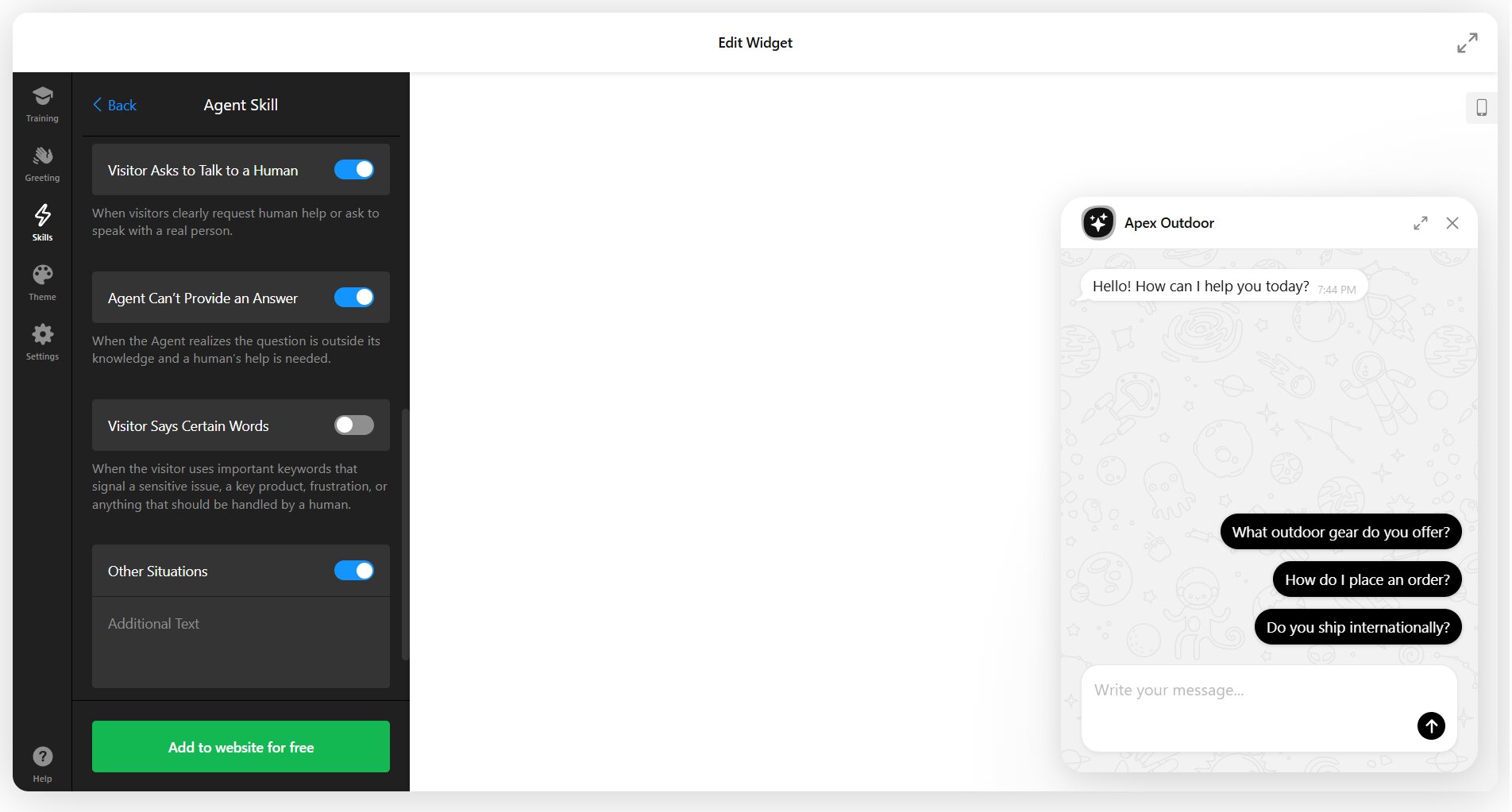
This feature lets you add human agent backup for cases when:
- User explicitly asks to talk to a human
- Question is outside the AI Agent’s knowledge scope
- Visitor types in certain keywords
- Other predicted scenarios
Structuring Your Knowledge Base for AI Chatbots
Instructions define behavior, but your knowledge base provides the facts. AI chatbots need well-structured content to retrieve accurate answers. Intercom’s team audited over 700 articles and identified patterns that dramatically improve AI comprehension:
- Use tables, numbered lists, and bullet points for scannability
- Include exact question-answer pairs in your content
- Add explanatory text for images and videos
- Spell out acronyms and explain industry terms
- Make each piece of content self-contained
- Break long documents into focused chunks
Writing Effective Welcome Messages
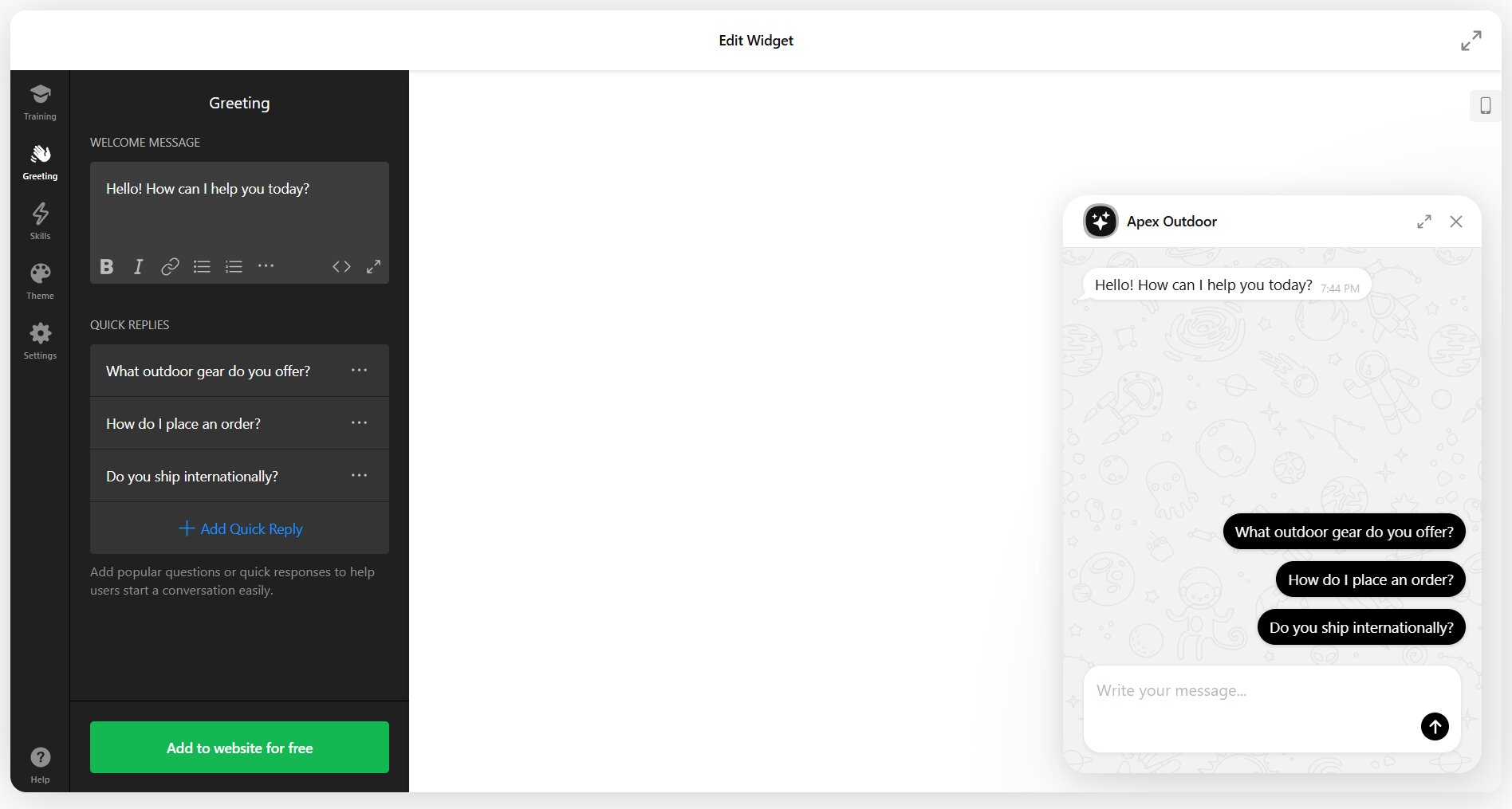
Your welcome message is the first impression. Research on chatbot onboarding found that providing example questions at the welcome stage works better than rules: a well-designed welcome message introduces the chatbot, sets capability expectations, and offers specific starting points.
The timing matters too. Showing the greeting after a few seconds of browsing feels less intrusive than an immediate popup. Research also shows that 59% of customers expect a chatbot to respond within 5 seconds once they engage, so speed after that initial greeting is critical.
Weak welcome message:
Hi! I'm here to help. How can I assist you today?Strong welcome message with examples:
Hi! I'm Maya from Apex Outdoor Gear. I can help you:
- Find the right tent or backpack for your trip
- Check your order status
- Answer questions about our gear

What can I help with?
The second version clarifies identity, sets scope, and provides concrete examples of what the chatbot handles well. It also implicitly signals what’s out of scope; if your question isn’t on that list, you know you might need different help.
In visual configurators, the example questions are usually easily pre-set with “quick replies”:
Handling “I Don’t Know” Gracefully
Every chatbot encounters questions it can’t answer. The difference between frustrating and helpful experiences is how you handle that moment. Research on chatbot error handling identifies several principles: never blame the user, offer alternatives rather than dead ends, and escalate after repeated failures rather than looping endlessly.
Create multiple fallback responses so repeated “I don’t know” messages don’t feel robotic. Contextual fallbacks work better than generic ones: “I don’t have information about international shipping policies” is more helpful than “I didn’t understand that.”
Poor fallback:
I didn't quite catch that. Can you rephrase?Better fallback with path forward:
I don't have information on that specific topic in my current resources.
I can help with product selection, order status, and general gear questions.
Or I can connect you with our team at support@apexoutdoor.com if you need
something else.
The instruction to escalate after three failed attempts prevents the “loop of frustration” that drives 30% of customers away from brands entirely. This rule should be explicit in your instructions: “If you’ve given two unclear responses or fallback messages, offer to connect the customer with a human team member.”
Industry-Specific Instruction Templates
While the framework remains consistent across industries, the behavioral emphasis shifts based on your primary use case. E-commerce chatbots prioritize product recommendations and order tracking. SaaS chatbots focus on feature explanations and troubleshooting. Service businesses emphasize appointment scheduling and qualification.
E-commerce instruction pattern:
You are Alex, the shopping assistant for [Store Name]. Help customers find
products that match their needs by asking about:
- Use case or occasion
- Preferences (style, size, features)
- Budget considerations

Always search product pages before recommending items. When a customer asks
"Do you have [product]?", check inventory via the knowledge base and suggest
similar items if that specific one isn't available. For order issues, collect
the order number and email address, then connect them with support@store.com.
SaaS/Tech Support pattern:
You are Jordan, the technical assistant for [Product Name]. Your role is to:
- Explain features using simple, non-technical language
- Walk users through common setup tasks step-by-step
- Troubleshoot basic technical issues using our help documentation

For bugs, account billing questions, or advanced technical issues, collect
details (what they tried, what error they saw, their account email) and
escalate to support@product.com. Never promise features we don't have or
timelines for fixes.
Professional Services pattern:
You are Sam, the scheduling assistant for [Business Name]. Help potential
clients by:
- Answering questions about our services and pricing from the knowledge base
- Qualifying their needs (project type, timeline, budget range)
- Checking availability and suggesting appointment times

For detailed consultations or custom quotes, collect name, email, phone, and
project details, then say: "Our team will reach out within 24 hours to discuss
your project and schedule a consultation."
These templates show how the same seven-part framework adapts to different business contexts. The role definition changes, behavioral rules shift to match common customer intents, and escalation triggers reflect industry-specific complexity.
The Psychology of Chatbot Trust
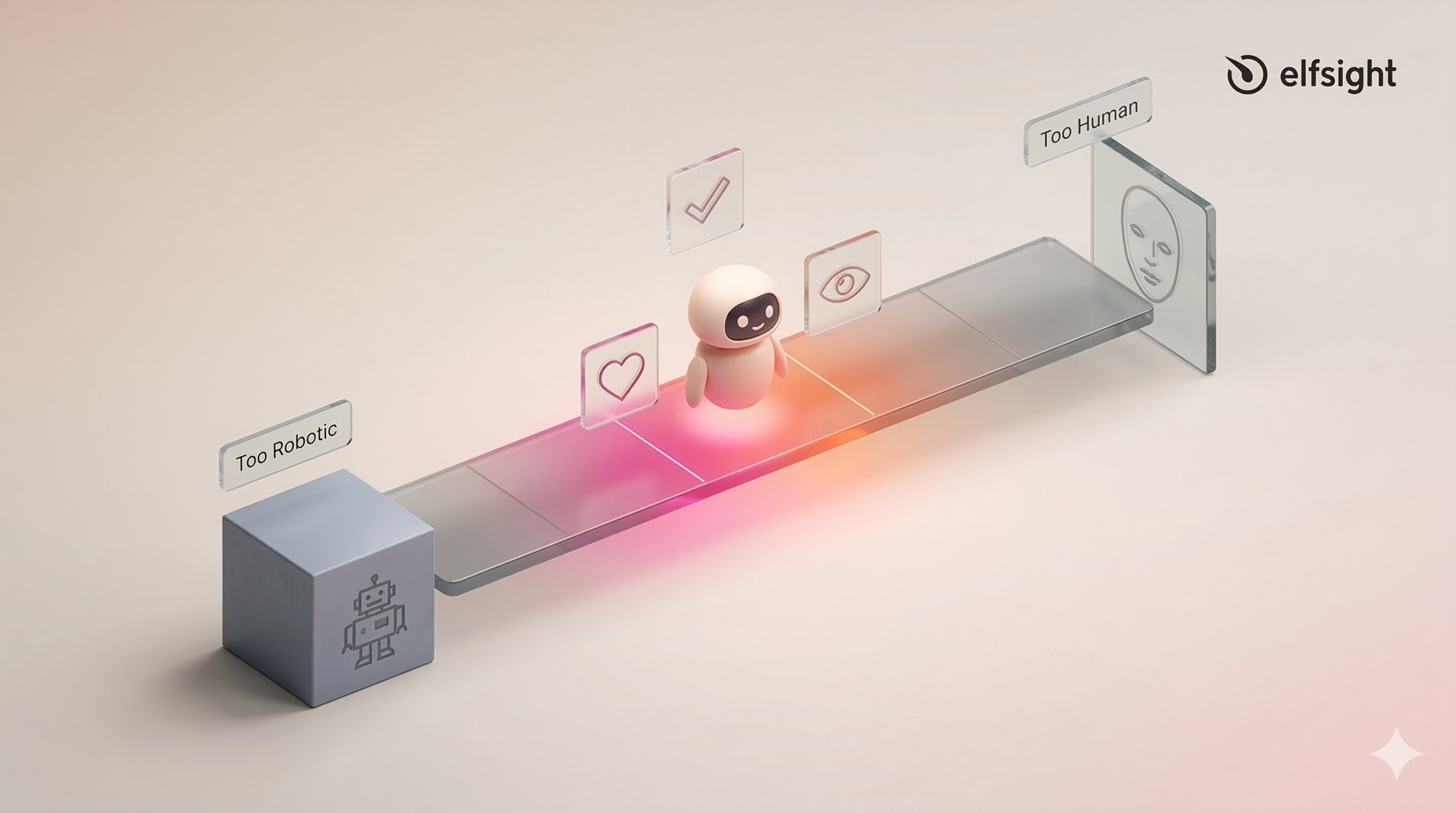
Understanding why customers trust or distrust chatbots helps you write better instructions. The CASA theory (Computers as Social Actors) explains that people apply social rules to computers. When chatbots display social cues like friendliness or empathy, users treat them as social entities and evaluate them accordingly.
A chatbot that answers quickly and accurately builds trust. One that provides slow, vague, or incorrect responses destroys it. This is why the instruction hierarchy matters: knowledge base search first, accurate responses, clear escalation when uncertain.
The “uncanny valley” effect applies to chatbots too. Research using psychophysiological measurements confirmed that overly human-like chatbots trigger eeriness that reduces trust. The solution is “strategic imperfection” — a tone that’s helpful and friendly but doesn’t pretend to be human. Disclosure of AI use isn’t just honest, it’s now legally required in many jurisdictions.
Testing and Iterating Your Instructions
Writing instructions isn’t a “set and forget” task. Even after deployment, you need to review performance data and refine your approach based on how real customers interact with your chatbot.
Calculate Fallback Rate
Start by tracking your fallback rate: the percentage of conversations where your chatbot couldn’t provide a helpful answer. Calculate it as:
(Number of Fallbacks / Total Interactions) × 100
A fallback rate above 15-20% suggests either your knowledge base has gaps or your instructions aren’t guiding the AI effectively.
Review Logs
Review actual conversation logs weekly for the first month, then monthly after that. Look for patterns: questions the bot consistently misunderstands, topics where it gives vague responses, and moments where customers explicitly ask for a human. Each pattern reveals an instruction or knowledge base gap.
Test Thoroughly
Test with real queries before going live. Take your top 50-100 actual customer questions from email or prior support channels and run them through your chatbot. If responses feel off, trace the problem: Is the information missing from your knowledge base? Are your instructions too vague? Is the tone wrong for your brand?
Refine & Update
Refine your instructions quarterly. Add new behavioral rules as you discover edge cases. Update tone guidelines if customer feedback suggests the chatbot feels too formal or too casual. Expand your knowledge base as products and policies change. The businesses achieving 80%+ resolution rates and high satisfaction scores treat their chatbot as a living system that improves through iteration.
Common Mistakes in Chatbot Script Writing
Even with a solid framework, common pitfalls trip up most implementations. Here’s what to avoid:
Putting knowledge base facts in instructions. Your instructions should be behavioral, not encyclopedic. If your instruction set includes detailed product specifications, pricing tables, or policy explanations, you’re doing it wrong. That content belongs in files, web pages, or Q&A pairs where it can be updated independently.
Being too vague. “Answer concisely” tells the AI nothing actionable. “Keep responses to 2-3 sentences for simple questions” gives clear guidance. Specificity matters.
Not outlining escalation paths. If your instructions don’t explicitly say what to do when the chatbot can’t help, customers get trapped in frustrating loops. Always define the escape hatch.
Failing to set a consistent tone. If your welcome message is casual and friendly but your instructions tell the bot to be formal, the experience feels disjointed. Align tone across all touchpoints.
Training on unrealistic scenarios. The queries you imagine customers will ask are never the queries they actually ask. Test with historical support tickets or run a soft launch with internal users before going live.
Ignoring actual logs. Your chatbot’s actual performance reveals gaps that no amount of upfront planning can predict. Monthly log review should be part of your maintenance routine.
Frequently Asked Questions
How do you write a chatbot script?
What's the difference between chatbot scripts and AI chatbot instructions?
How long should my chatbot instructions be?
Should I tell users they're talking to an AI?
How do I know if my chatbot instructions are working?
Can I use the same instructions for different industries?
How often should I update my chatbot instructions?
Building Better Chatbot Conversations
The gap between chatbots that frustrate customers and those that achieve 4.4 out of 5 satisfaction comes down to instruction quality. Not the AI model, not the platform, not the budget – the clarity and specificity of the behavioral guidance you provide.
Start with your role definition. Build behavioral rules around your actual customer questions, not hypothetical ones. Test with real queries before going live, then treat your instructions as a living document that improves through iteration. Gartner predicts chatbots will be the primary customer service channel for 25% of organizations by 2027. The businesses that approach instruction writing as a strategic discipline, not a one-time setup task, will be the ones customers actually want to talk to.
Key References
- Zendesk CX Trends Report 2025 (10,000+ respondents, 22 countries) – zendesk.com/cx-trends
- Salesforce State of Service Report 2024-2025 (5,500-6,500 service professionals) – salesforce.com/resources/research-reports/state-of-service/
- Gartner Customer Service Research 2024-2025 (multiple surveys, 187-5,728 respondents) – gartner.com/en/newsroom
- Luo et al. (2019), “Machines vs. Humans: The Impact of Artificial Intelligence Chatbot Disclosure on Customer Purchases,” Marketing Science – pubsonline.informs.org/doi/10.1287/mksc.2019.1192
- Forrester Consumer Survey on Chatbots (2023, 1,554 consumers) – https://tinyurl.com/5bdud6tt
- Nielsen Norman Group, Chatbot UX Research and Prompt Controls in GenAI Chatbots – nngroup.com/articles/
- Intercom “Principles of Bot Design” by Emmet Connolly – intercom.com/blog/principles-bot-design