We built the same chatbot scenario in six AI chatbot builders – as one plain-language rule, as drawn flows, and from an AI-written draft. The drawn flows ran every branch exactly, but when a visitor asked a side question at the email step, most of them just asked for the email again. The rule-built path answered and came back, while its question order drifted. Which of those trade-offs you can live with decides the builder more than any feature list.
Every chatbot builder’s homepage promises similar things: no-code AI, training on your website, lead capture, human handoff. What it doesn’t show is the screen you’ll actually spend your evenings in – a text box for rules, a list of steps, or a canvas full of blocks and arrows.
So we built one bot for a 12-page pottery store six times. The same knowledge and guided wholesale inquiry. The same detour in the middle. Then we went through each editor’s building blocks, AI settings, testing tools and plans. Here’s how each builder works from the inside, where the AI fits into the conversation, and the one setting that decides what happens when a visitor goes off-script.
- Pick a building style before a brand: sentence rules, written steps, or a visual canvas.
- Drawn paths ran exactly, but on default settings they held the visitor at the input step.
- Botpress answered side questions mid-path only after a bot-level switch, not a step setting.
- Chatbase, WotNot and Tidio call APIs mid-chat and Botpress runs code; Elfsight sends data after the chat ends, but can pick up details in conversation mode.
- Free plans lock different parts: Landbot’s AI chats, Chatbase’s Procedures, WotNot is trial-only.
The best AI chatbot builders compared: how building works
Here are all six tools side by side, ordered from the easiest to use in our test to the one that takes the most effort to build:
| Builder | How you build | Where the AI sits | Our wholesale path | Free plan | Entry price |
|---|---|---|---|---|---|
| Elfsight AI Chatbot | Rules written as sentences, plus skills | The whole bot is AI | One rule; all three replies exact, question order varied | Yes, live on a website: 50 visitor messages and 200 views a month | $5/mo billed annually, $6 monthly |
| Chatbase | Written instructions, Procedures with If/Else steps, Actions | The whole agent is AI; Actions add tools | Not built: Procedures need a paid plan | No free start; after the 7-day trial, Free keeps 1 agent and 50 message credits a month | Basic $120/mo billed annually, $150 monthly |
| Landbot | Visual canvas, drafted by AI Copilot | An AI Agent block inside the flow | Copilot drafted all three branches from one request | Yes: 100 chats a month, no AI chats | Starter $36/mo billed annually, $45 monthly |
| WotNot | Visual canvas, up to 75 blocks per bot | AI blocks inside the flow | Three exact branches after clearing a template | No; trial with 500 chats and 500 AI credits | Lite $29/mo |
| Tidio | Flows canvas; Lyro AI agent set up separately | Beside the flow, not inside it | Three exact branches; quantity not saved | Yes: Flows for 100 visitors a month; 50 Lyro conversations in total | Flows from $23.20/mo, Lyro from $31.20/mo (separate products) |
| Botpress | Visual Studio canvas | An Autonomous AI node plus AI cards | Three exact branches; answers saved to a table | Yes: 100 conversations [[CHECK: monthly or one-time]] | Plus $150/mo billed annually |
How we tested
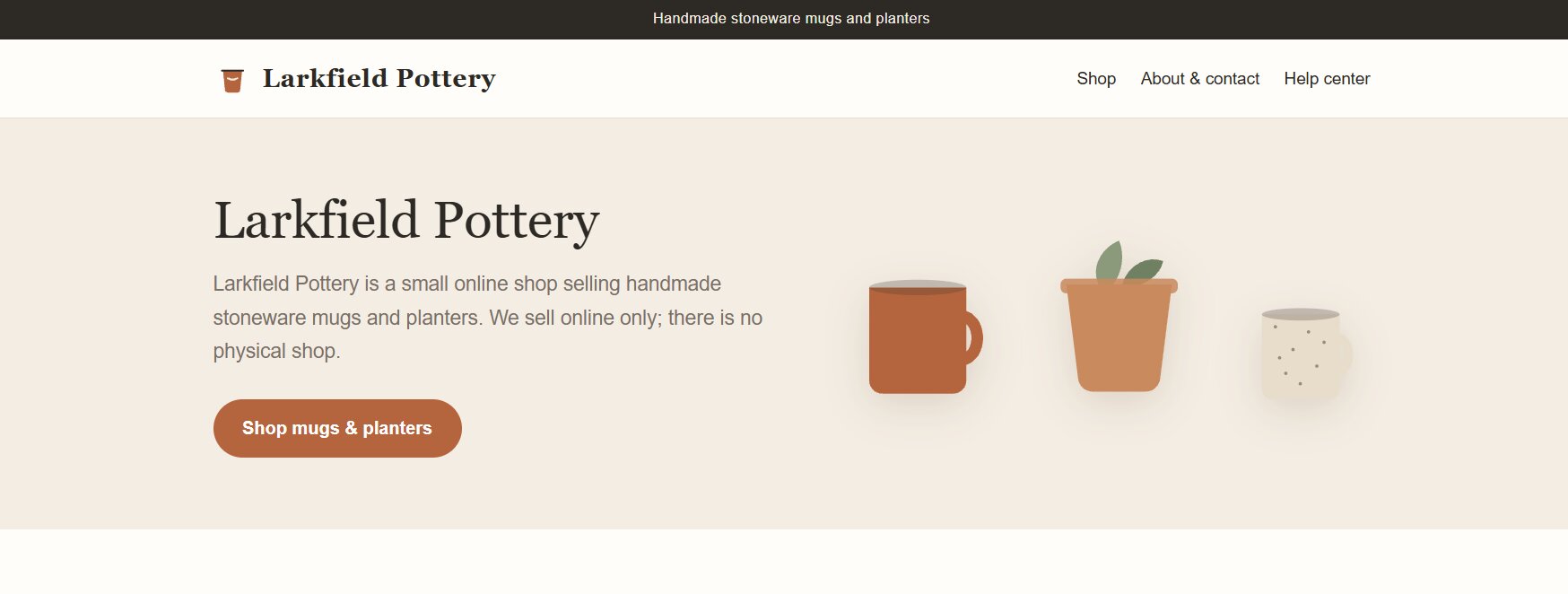
The test website is a fictional pottery store with 12 pages on products, shipping, returns, care, discounts and wholesale orders. In each builder, we loaded those pages and built one guided path: a wholesale inquiry asking for a business name, an email address and a quantity (Under 24, 24–99, or 100 or more), with a different reply for each quantity.
Then we broke it on purpose. At the email step, the “visitor” typed a store question instead: “Before that – are your mugs dishwasher safe?”
That one message shows how a builder’s AI and its flow work together. Would the bot answer, or ignore the question? Would it break the path, or save the question as an email address?
Beyond the path, we went through each editor’s blocks, AI settings, testing tools, versions and plans, on free plans or trials.
How well each bot answers customer questions is a separate test, and we ran it on the same store as a part of our comparison of the best AI chatbots for customer service. In short: once the right pages were loaded, the answers were close. So this article stays on the interface & building.
Three ways to build a chatbot without coding
Every no-code AI chatbot builder here lands somewhere between two ends: telling an AI what to do in plain sentences, or drawing every turn of the conversation yourself. Written steps sit in the middle.
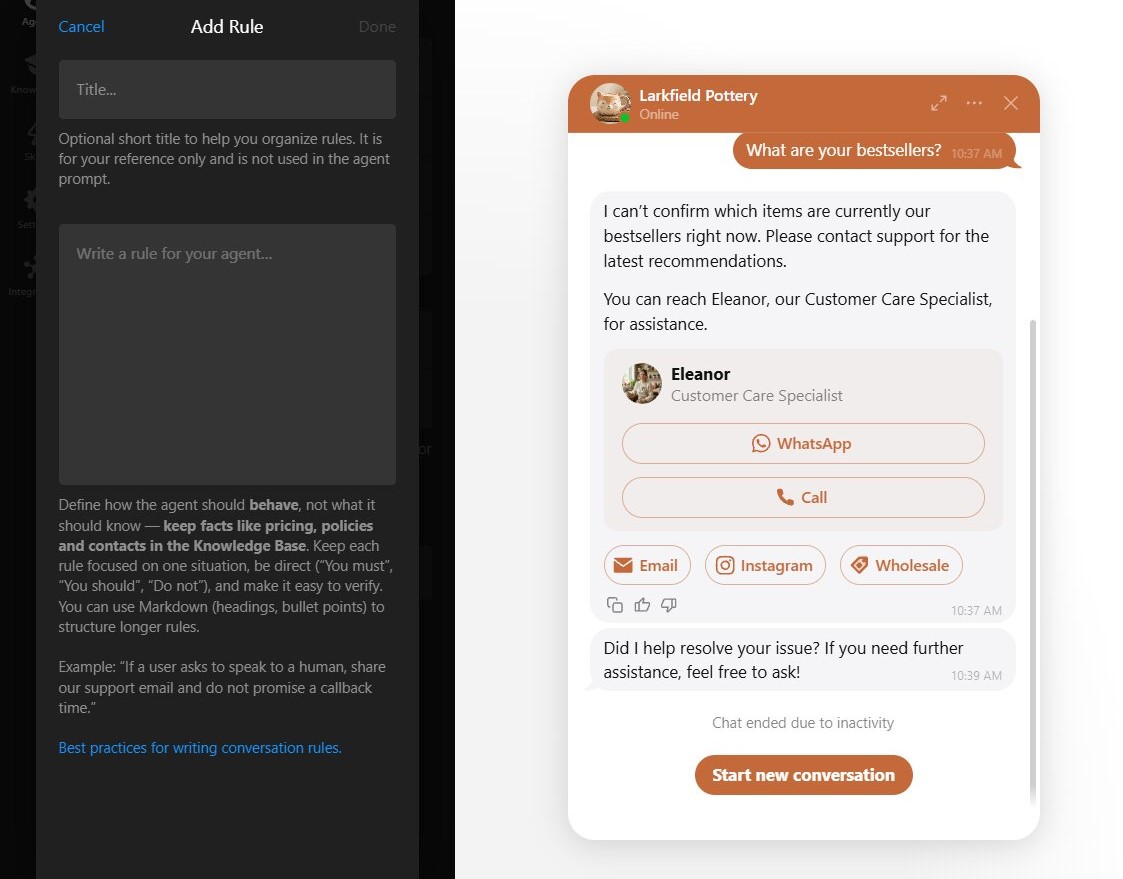
Plain-language rules
You describe the behavior and the AI decides how to run it. In Elfsight AI Chatbot, even the conditions are sentences: “When should these buttons appear?” is a text field, not a branch. The least building, the least fixed.
Written steps
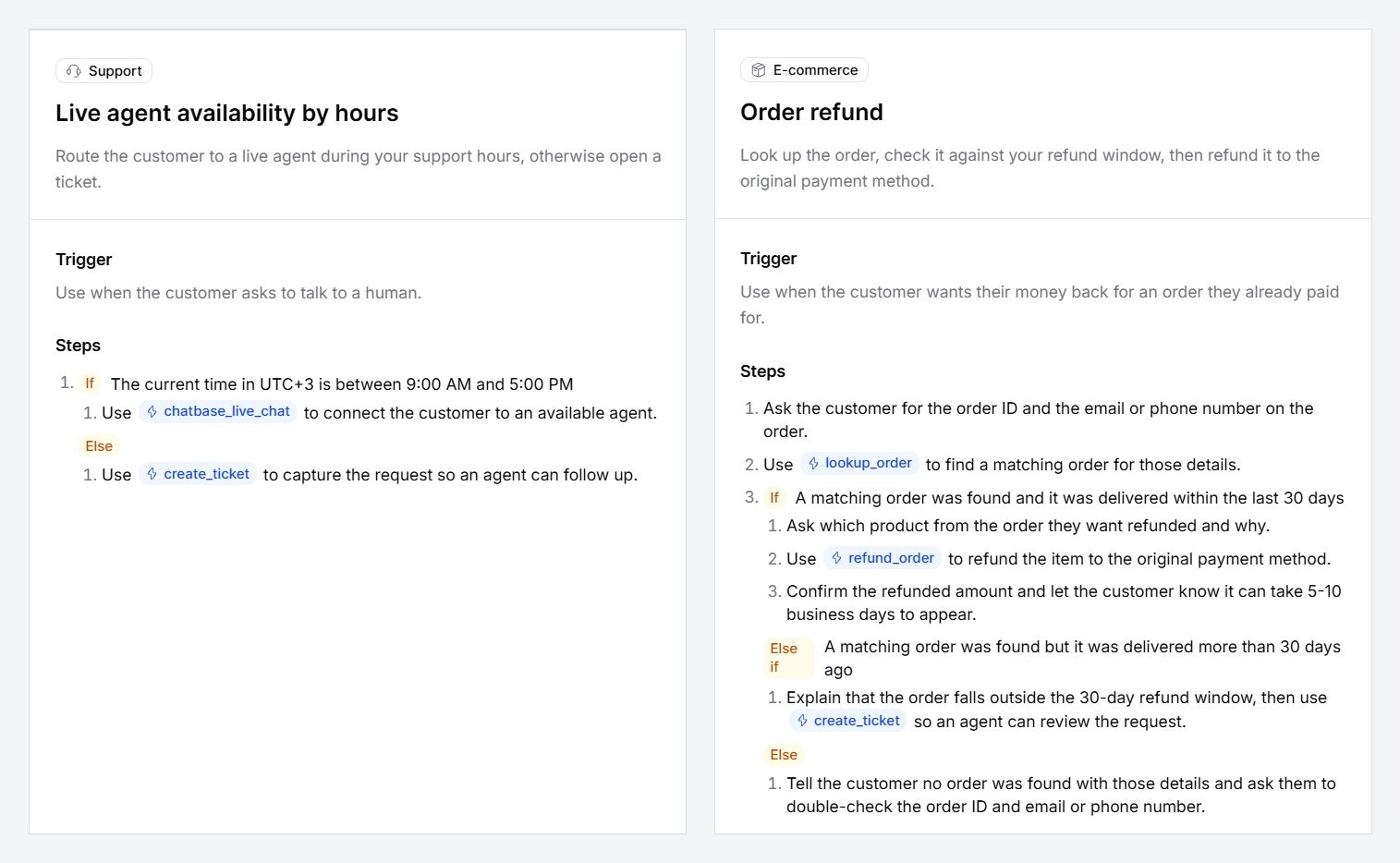
You list the steps and the branch conditions in text, like a recipe with if/else. A Chatbase Procedure reads “If a matching order was found and it was delivered within the last 30 days”, followed by the steps for that case. Tidio’s Lyro has Procedures in the same format. More control, still no canvas.
Visual canvas
You draw every question, button and branch as blocks and connect them with arrows. In WotNot, a Condition block splits the flow, and each branch is a visible line. The most building, and the path runs exactly as drawn.
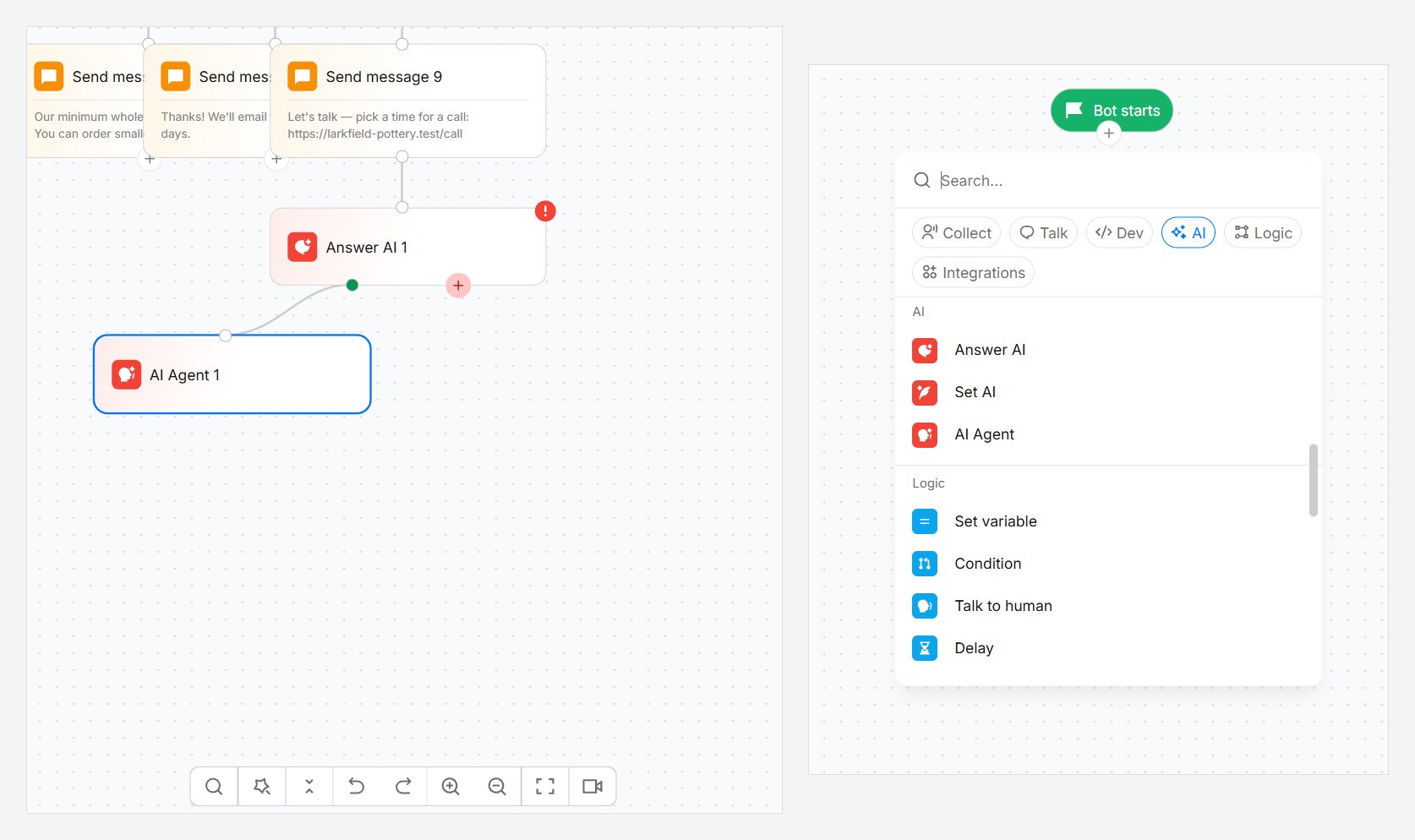
The second question is where the AI lives. In Elfsight AI Chatbot and Chatbase, the whole bot is the AI. On Landbot, WotNot and Botpress canvases, the AI is a block among many: it answers open questions, then hands the visitor to the drawn path when an exit condition matches. In Tidio, the AI runs as a separate product next to the flows – there’s no AI block in the Flows palette at all.
If an assistant on your pages is all you need, with no flows or multi-step rules to configure, a ready-made AI chatbot is the shorter route.
Inside each AI chatbot builder
Each builder got the same 12 pages and the same wholesale inquiry. Here’s what it took to get the pages in, what the editor hands you, and how the path came out.
Elfsight AI Chatbot (that’s us)
No templates and no canvas. Paste your website address, and a generator scans the site, builds the knowledge base, and drafts the agent’s name, icon, role and tone of voice. Knowledge also takes files, images, YouTube videos (Pro), Q&As, text blocks and business information.
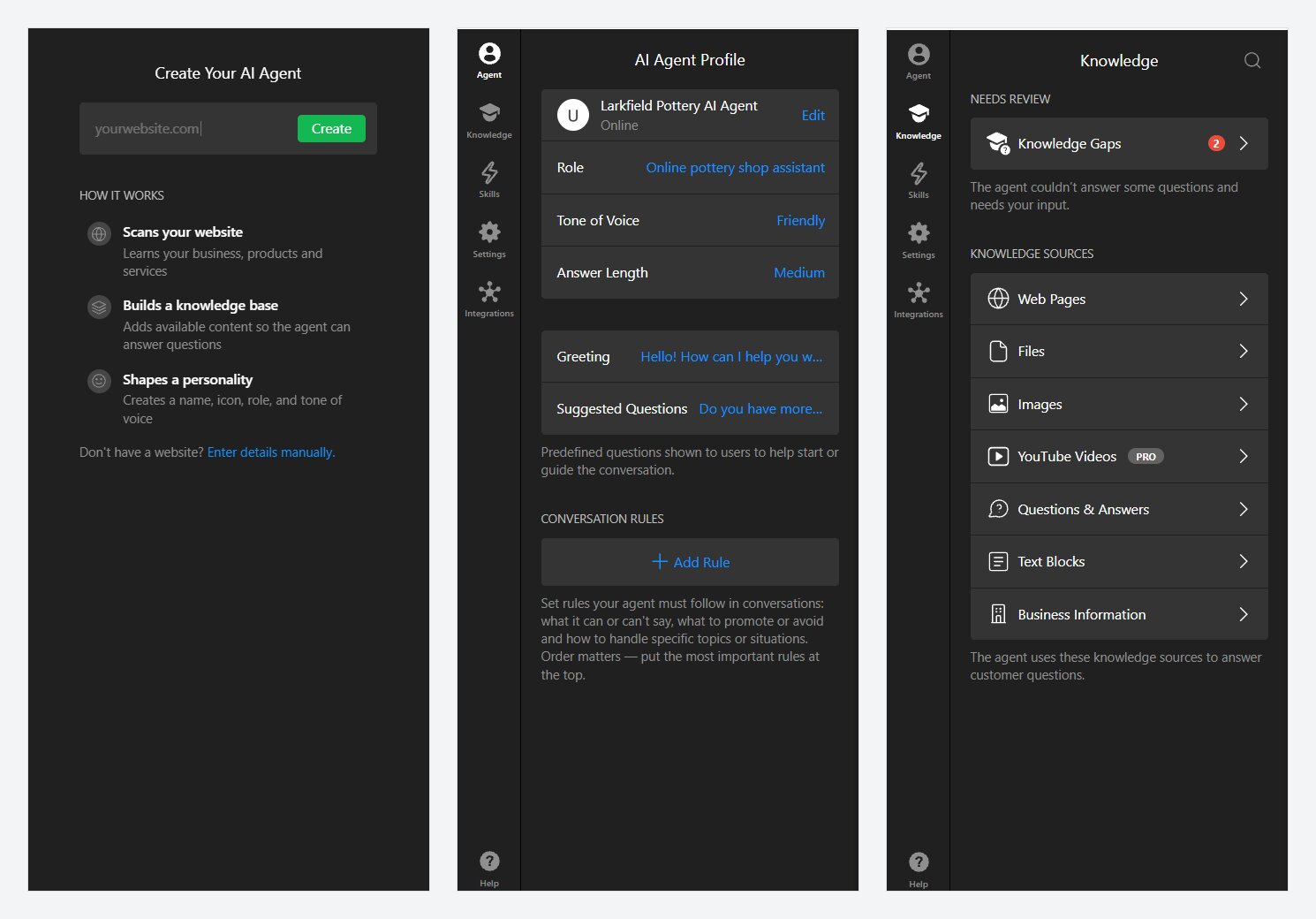
You set the role, tone and answer length, then write Conversation Rules as plain sentences. Skills cover the rest: Action Buttons, Collect Contacts, Contact a Human, Booking, Create a Ticket and Follow-up Message, several with their “when” written as a sentence. Collect Contacts has its own mini form builder – 11 field types, a form or in-conversation mode, and three timing options.
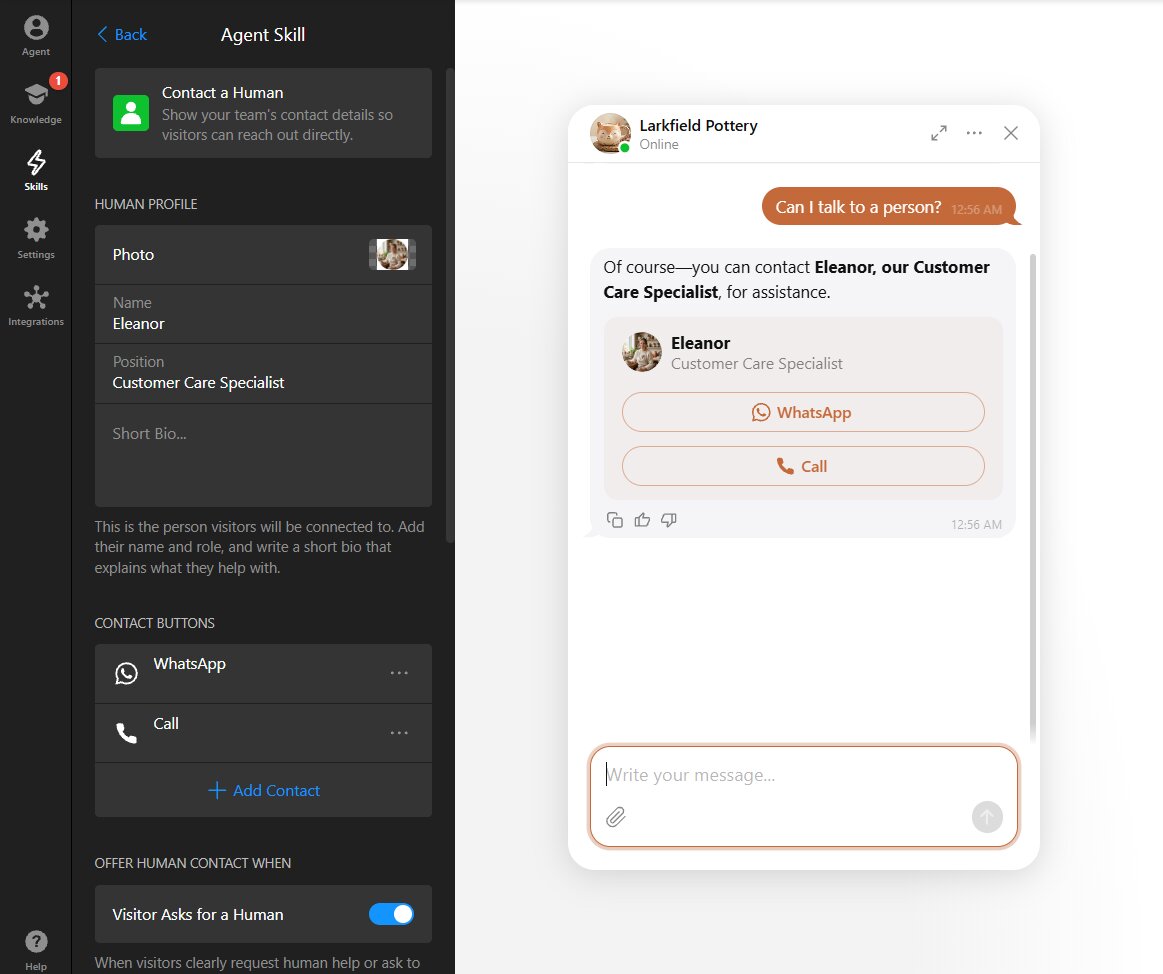
Our wholesale inquiry was one rule plus Collect Contacts in conversation mode. It returned all three quantity replies word for word. The question order varied between runs, though, and one run asked for a phone number first, rather than the piece count. A path that has to run in a fixed order is better drawn on a canvas.
Chatbase
Give it your website address, and the crawler finds and syncs every page. Sources also include files, text snippets, Q&As and Notion pages, with auto-resync on Basic and up. Creating the agent stopped at a paid-plan screen, so we started the 7-day trial with a card on file.
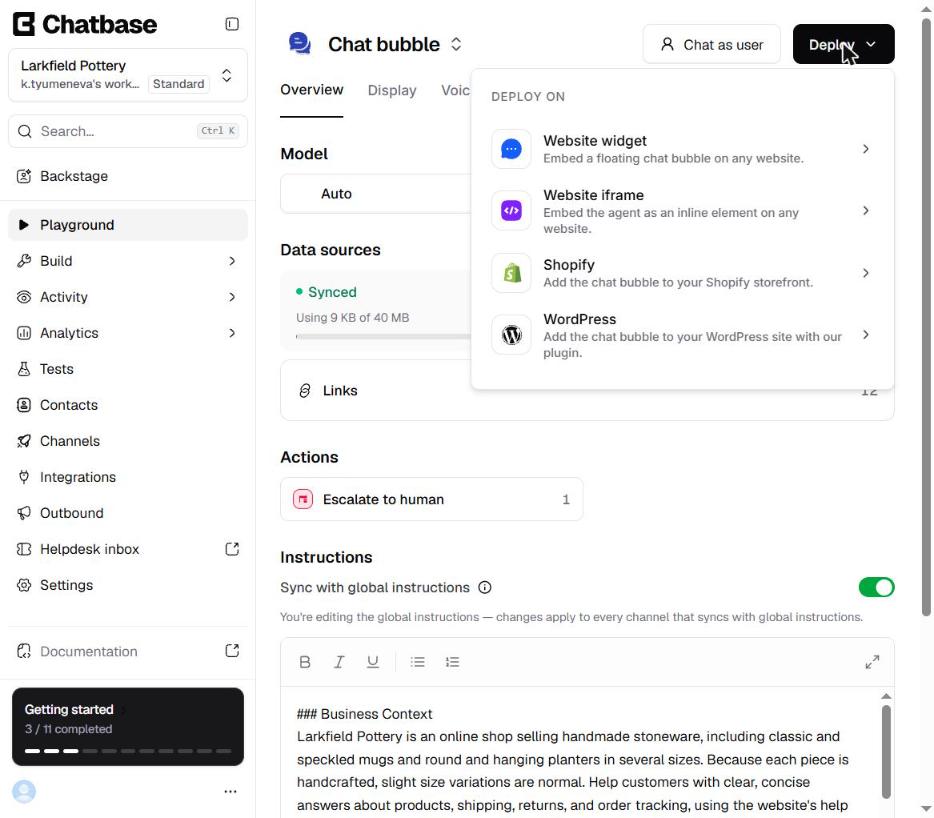
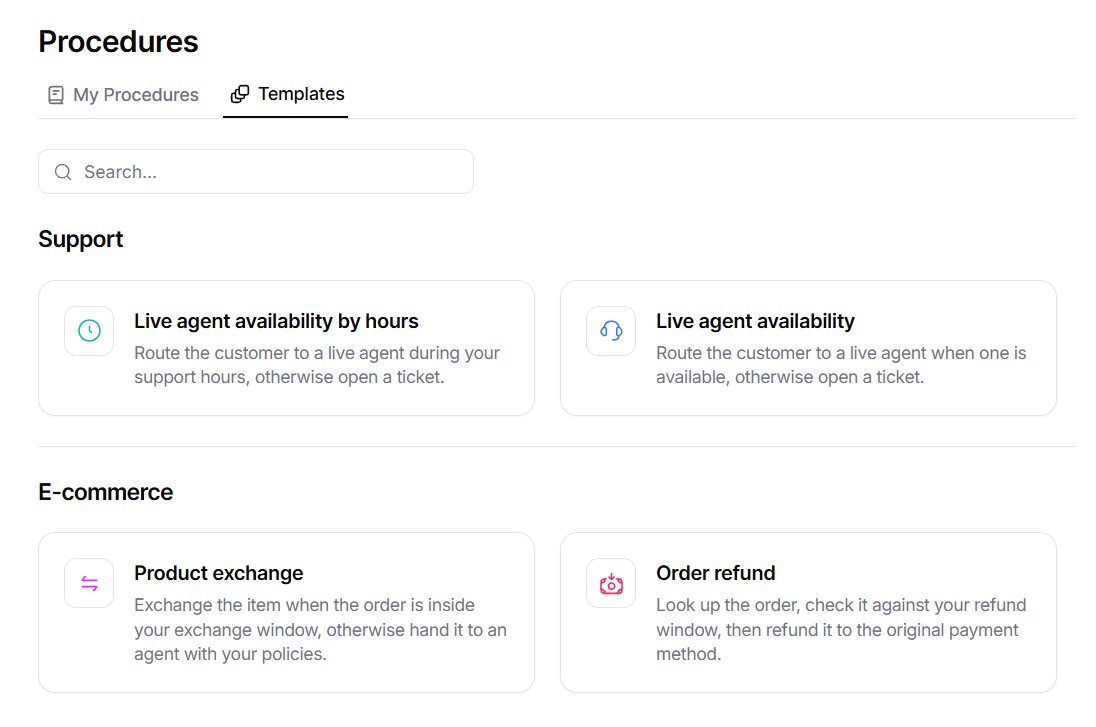
The agent is one structured prompt (business context, role, language, formatting) plus a separate Guardrails text, with a model picker and a creativity setting. Multi-step tasks are Procedures: a trigger in plain language (“Use when the customer asks to talk to a human”) and steps with If / Else if / Else, where Actions appear as tokens like lookup_order or create_ticket. Six templates cover live-agent routing, exchanges, refunds, billing disputes and booking.
We didn’t build the wholesale path here. The trial ended first, and on Free, Procedures are locked. Going by the templates, it would be one Procedure with a Collect leads action and a branch per quantity.
Landbot
Pages go in one URL at a time – 12 URLs, 12 entries. Before the preview would run, we also had to edit the default AI agent template (its instructions said it worked “for Landbot”) and fix the first block’s input rule and exit wiring.
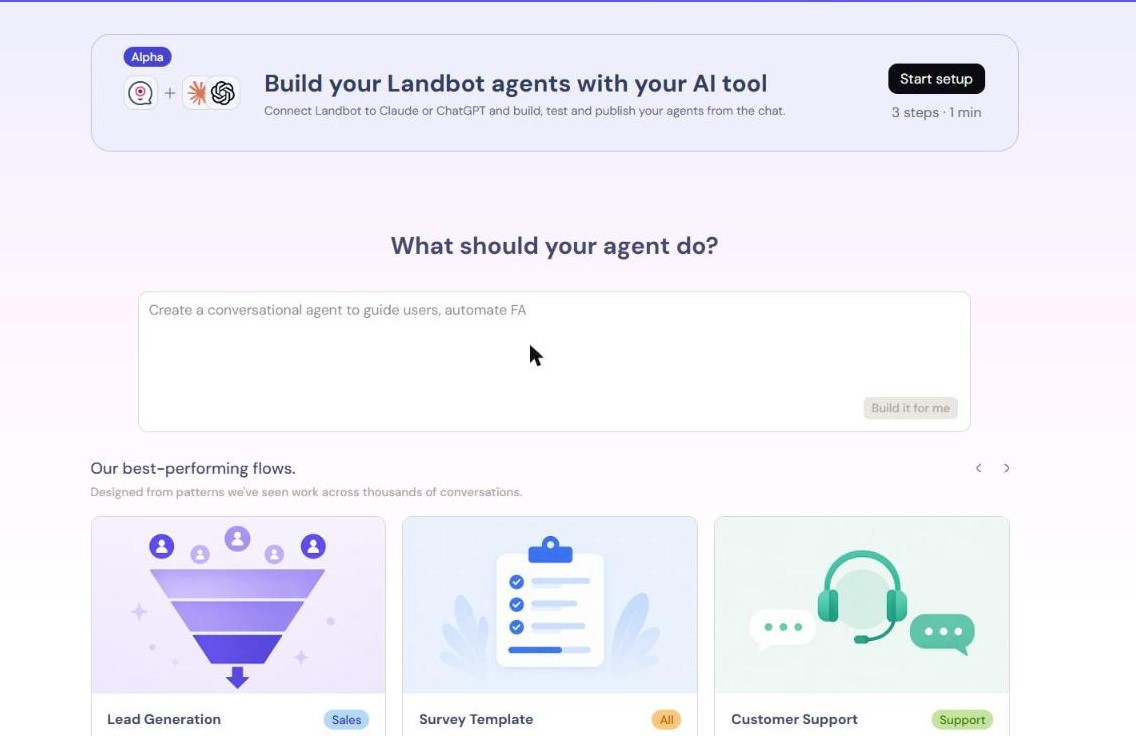
Landbot leans hardest on AI for building. The home screen has “Build it for me”, the builder has AI Copilot, and the AI Agent block has “Edit with AI”. The canvas itself is wide: Questions, Logic (conditions, formulas, lead scoring, A/B tests), Integrations, and Low code blocks (Webhook, Code, Dynamic data). Answers save to typed contact fields you reuse as @field.
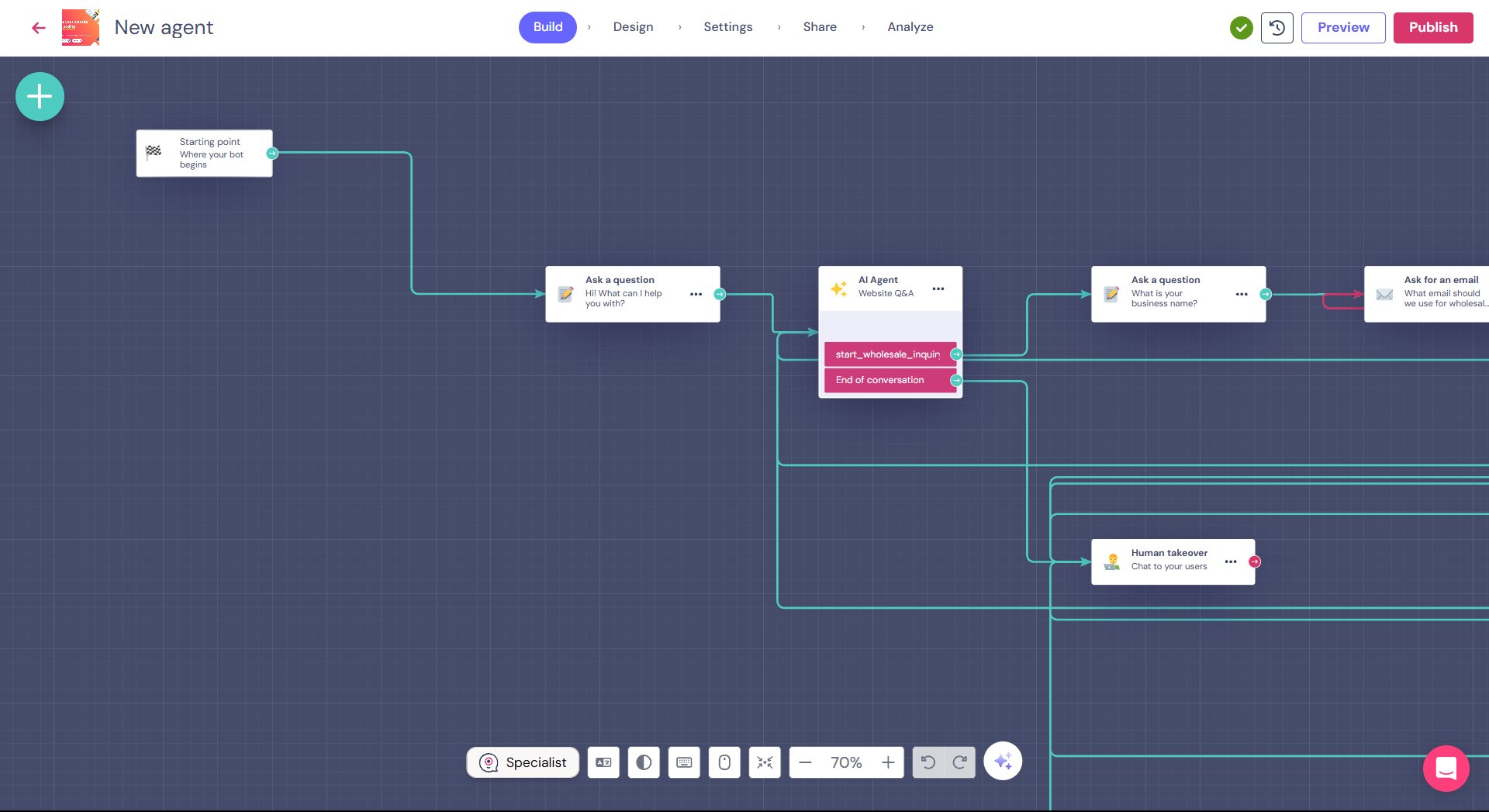
AI Copilot drafted our whole wholesale inquiry from one request, and the preview ran all three quantity buttons with the right reply on each.
WotNot
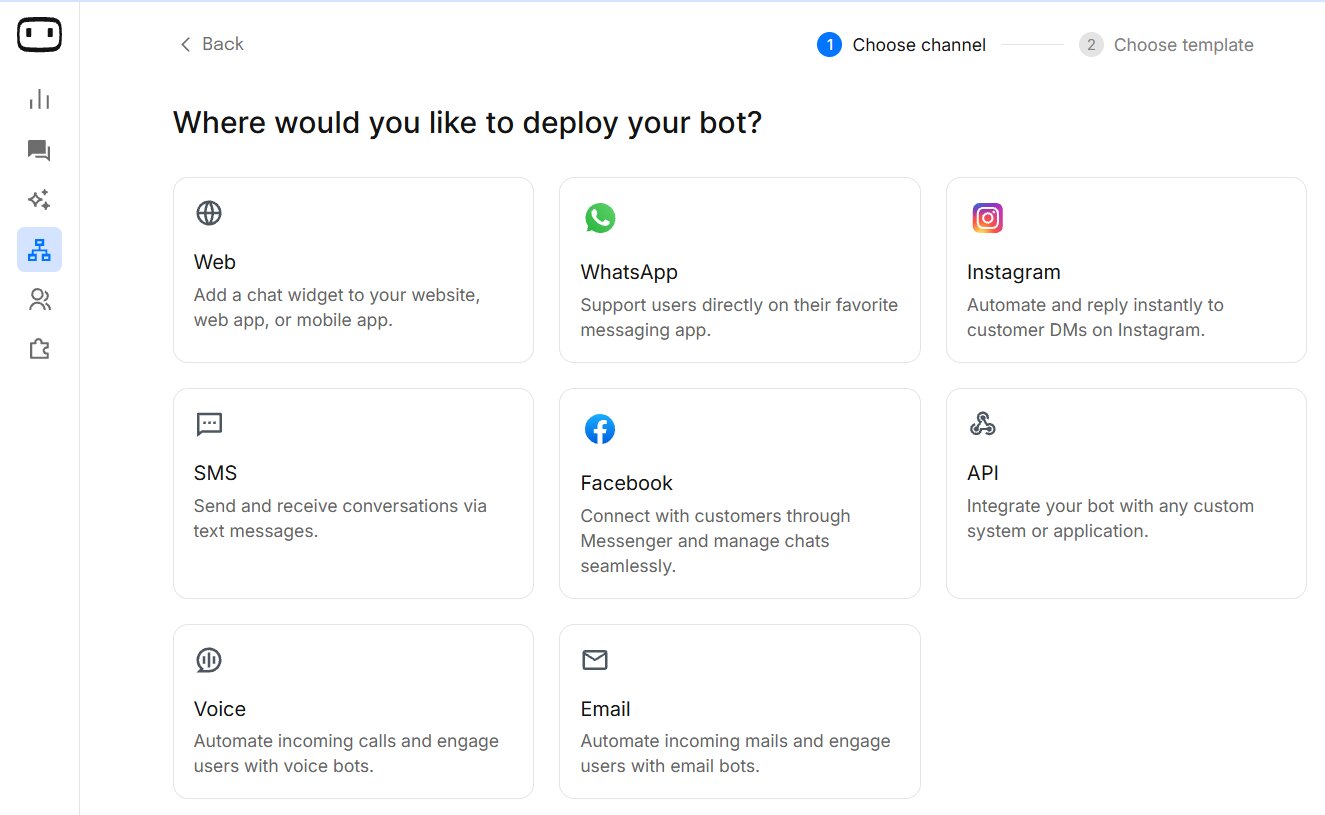
WotNot crawls your domain, all 12 pages in our case, with regular re-crawls available. A new bot starts with two choices: a channel (web, WhatsApp, Instagram, SMS, Facebook, API, voice or email), then one of 20+ templates sorted by industry, or Build from scratch.
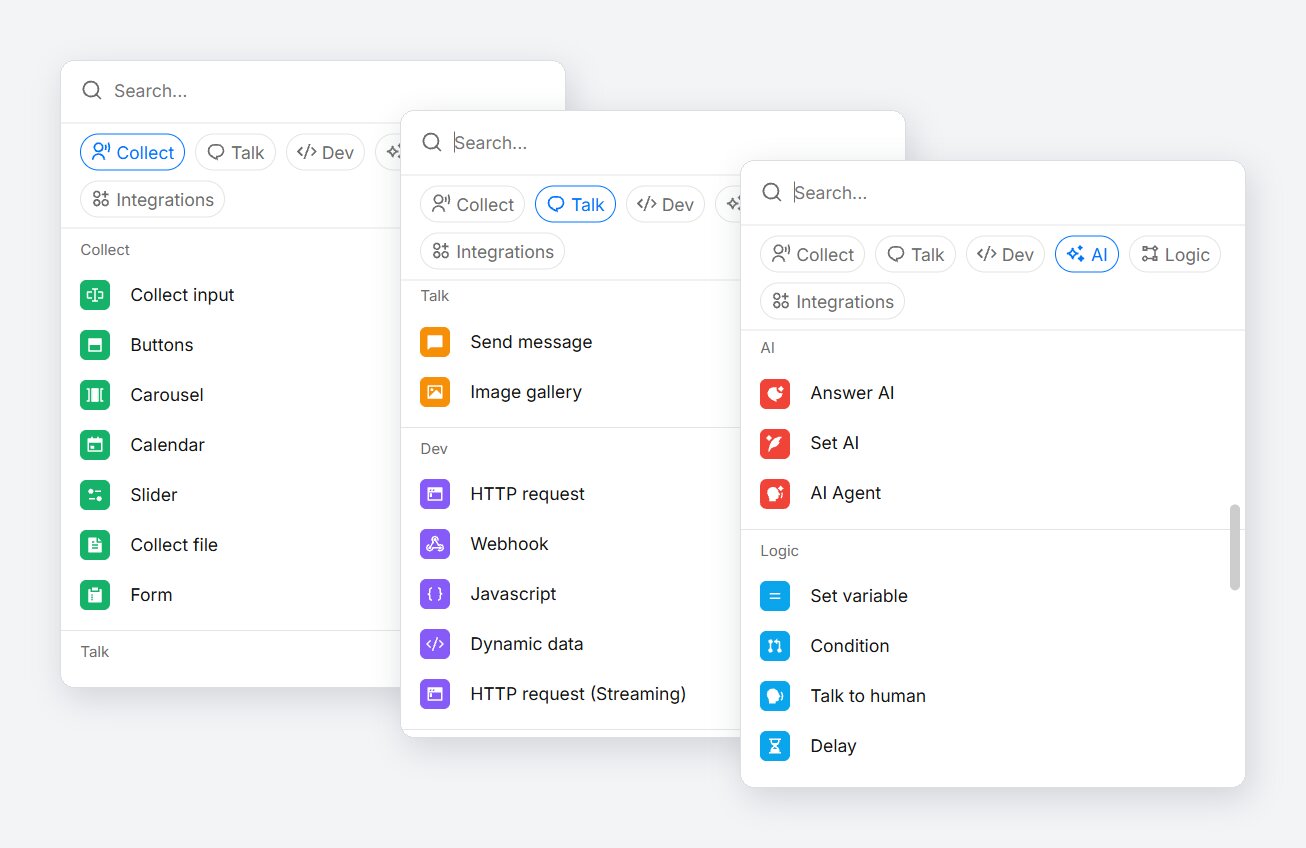
The canvas has the widest palette of the six, in six groups: Collect, Talk, Dev (HTTP request, Webhook, Javascript), AI (Answer AI, Set AI, AI Agent), Logic (Set variable, Condition, Talk to human, Flow, Jump) and Integrations. A counter on the canvas showed our bot at 12 of 75 blocks.
Our trial bot opened on a restaurant template, so the first job was clearing it out. With an orphan block from it deleted, the path started from a button, saved the buyer’s details to contact fields, and branched to all three quantity replies.
Tidio
Two products under one roof, each with its own plan. Flows is a visual canvas with 21 triggers, 13 conditions and 27 actions. Lyro is the AI agent, with its own knowledge (website URL, Q&As, CSV, PDF, Zendesk articles, products), guidance cards for tone and handoff, Procedures and Actions. Lyro’s onboarding scan picked up 7 of our 12 pages, the other 5 went in by hand.
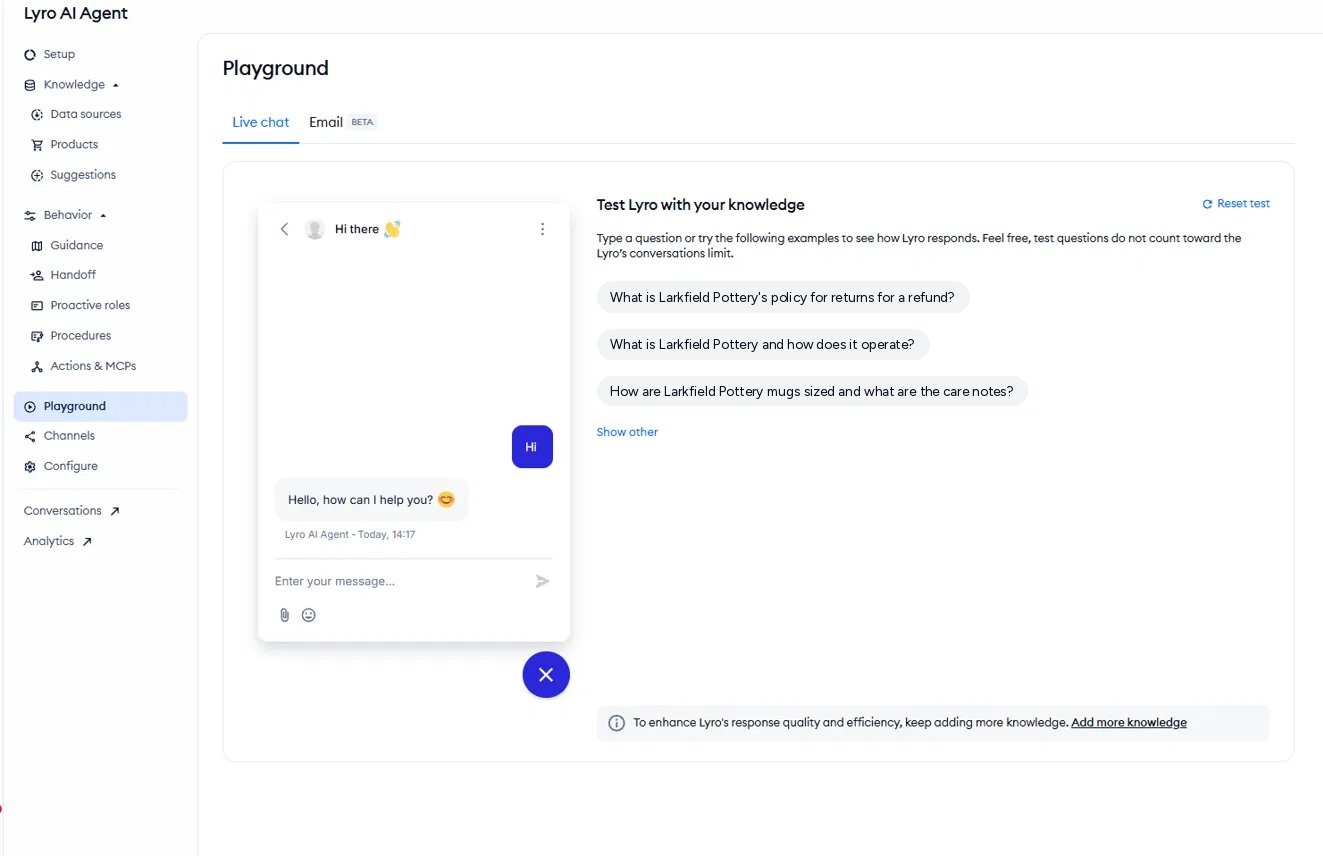
There’s no AI block in the Flows palette, so a flow can’t hand a visitor to Lyro mid-path. Flows templates do much of the drawing, though, sorted by Sales, Leads and Support, with “Request a quote” closest to our inquiry.
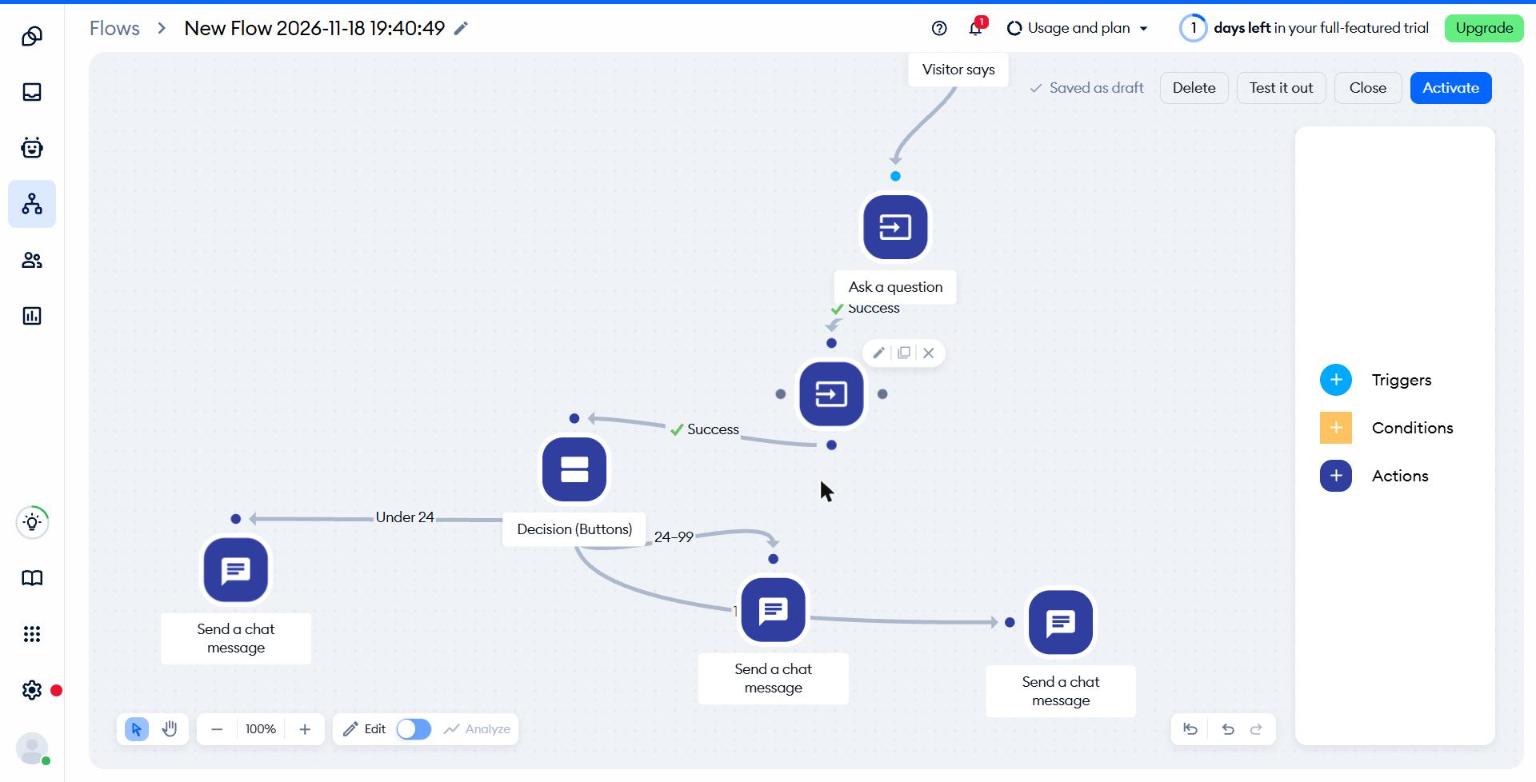
Built in Flows, our path ran all three quantity branches and saved the name and email to Contacts. The quantity didn’t make it: the Decision buttons block didn’t save the choice to a contact property.
Botpress
The most technical canvas of the six. Create Bot starts with a fork – the visual Studio or a TypeScript framework – and “this can’t be changed later”. There’s no template step: a new Studio bot opens on Start, an Autonomous node and End. Our website had no sitemap.xml, so page discovery found 0 pages and all 12 URLs went in by hand.
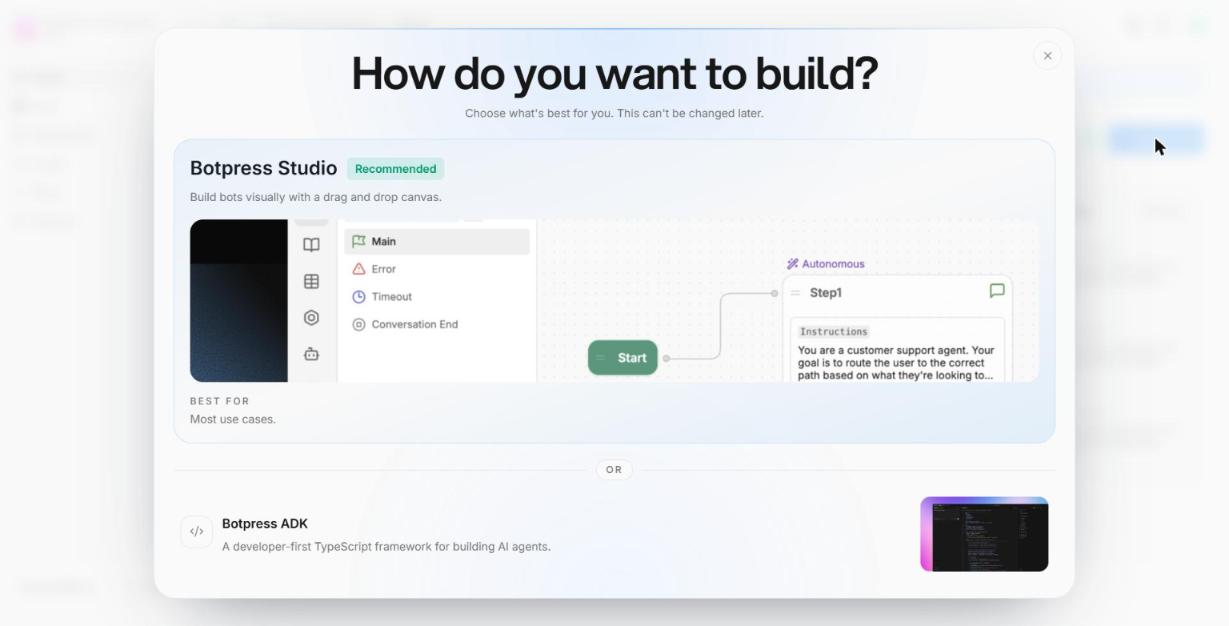
You wire nodes holding cards. The Autonomous node takes instructions and tools and leaves through exit conditions in plain language. Capture cards (Raw Input, Email, Single Choice and more) store answers in typed variables at workflow, user, conversation or bot level, and an Execute code card runs your own code.
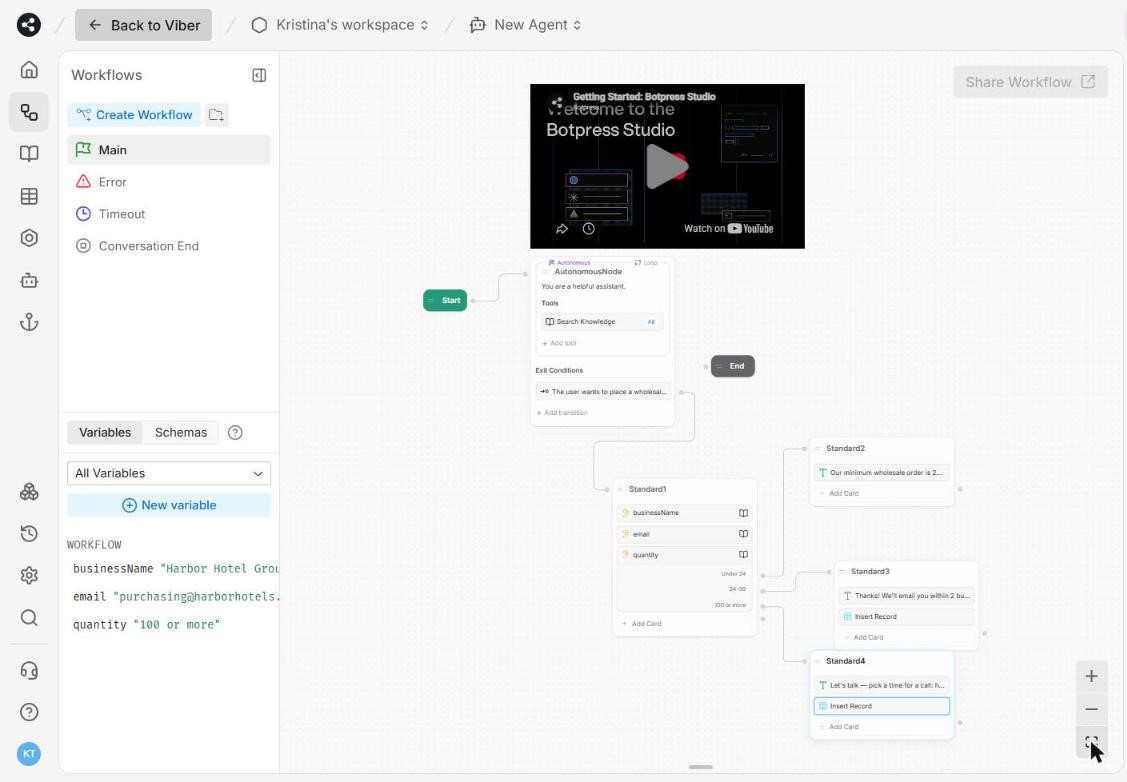
Our path came together on the Free plan: all three quantity branches routed, and the business name, email and quantity landed in a Botpress table.
What different chatbot builders offer
| Builder | Templates | AI-assisted building | Variables | Model choice |
|---|---|---|---|---|
| Elfsight AI Chatbot | No pre-sets, a generator drafts the agent from your information | From your URL or a business description | [name] in contact messages | No |
| Chatbase | 6 Procedure templates | None seen | {{variables}} in Procedures | Yes, a picker incl. Auto |
| Landbot | 6 featured flows | Build it for me, AI Copilot, Edit with AI | Typed contact fields (@field) | No; built on OpenAI tech, per the UI |
| WotNot | 20+ by industry | Generate prompt on the AI Agent | Set variable block | Per AI block |
| Tidio | Flows library by Sales, Leads, Support | None seen | Session variables, contact properties | No |
| Botpress | None | Onboarding drafts from a URL | Four scopes, typed | Per node, with defaults per task |
Curious what the generator drafts from your own pages before you open a canvas builder? Paste your website address into the editor below.
Create your AI chatbot in the live editor ↓
What happens when a visitor goes off-script
This is where building styles show their real difference. A drawn path knows what it expects at each step, but a visitor doesn’t always deliver it. At the email step, we typed “Before that – are your mugs dishwasher safe?”.
| Builder | Default settings | With a fix |
|---|---|---|
| Elfsight AI Chatbot | Answered, then went back to the path | Not needed |
| Landbot | “Please introduce a valid email”, then waited | No fix found |
| WotNot | Turned the input border red and held until a valid email came in | AI Agent exit paths (built, not tested) |
| Tidio | “Oops… it doesn’t look like an email address”, then asked again | None: Flows can’t reach Lyro |
| Botpress | “The response could not be captured. Please try again.” | Answered, then asked for the email again |
Every canvas path held its ground. That’s the point of a drawn path – and the reason a side question gets stuck. A rule-built path is run by the AI itself, so the side question simply gets answered.
On a canvas, the fix is in the building, and it sits in a different place in each builder:
Botpress
Every capture card already searches all knowledge bases by default, and that alone did nothing. What worked was a bot-level switch: turn on the Knowledge Agent and turn off its “Answer Manually” option.
After that, the email step answered the dishwasher question, asked for the email again, and the flow carried on to the quantity buttons. The catch is free-text steps: the business-name step answered too, but saved the question as the business name.
WotNot
The AI Agent block has exit paths defined by intent (“handle specific intents like booking meetings or escalating to a human”), so an AI step can take open questions and hand the visitor back to the drawn flow. We built it, but didn’t run the side-question test through it.
Landbot
The AI Agent block routes visitors into the path through a plain-language Output (ours: “trigger wholesale or bulk intent from the conversation”). We didn’t find a setting that answers side questions inside it.
Tidio
Flows has no AI block and can’t pass a visitor to Lyro, so a flow can’t answer a side question. Decide early which tool handles what.
Data, handoff, testing and updates
A builder’s ceiling shows in what the bot can do outside the chat – and how safely you can change it once it’s live.
Where data goes and where no-code ends
The clearest split: does the bot act on other systems during the conversation, or send data out after it?
| Builder | Mid-chat actions | Bringing in a person |
|---|---|---|
| Elfsight AI Chatbot | Booking only; Zapier, n8n, Integrately, Pabbly Connect and Webhooks send chat data when the conversation ends | A named contact card with buttons, action buttons to other channels, or a ticket to HubSpot, Intercom or Freshdesk |
| Chatbase | Actions the agent calls: Call API, client-side code, Stripe, Shopify, booking, web search | Live chat in Chatbase, Zendesk Messaging, Sunshine, Freshchat or Salesforce; a built-in helpdesk |
| Landbot | Low code blocks (Webhook, Code, Dynamic data) and AI Agent REST API actions; Webhooks from Professional | Human takeover block and shared inbox |
| WotNot | HTTP request, Webhook and Javascript blocks; Functions the AI can call (HTTP requests, dynamic data and webhooks on Premium) | Talk to human block; Live Chat on Premium |
| Tidio | Lyro Actions run API-call sequences (1 Action on Free, 3 on paid); Flows has an API call action | Lyro hands off to the live-chat inbox by your handoff guidance |
| Botpress | Execute code card (on Free); Webhook integration in the Hub | Escalation to Botpress Desk |
So if the bot has to check an order or a booking slot while the visitor waits, Elfsight AI Chatbot isn’t the tool – its integrations act once the chat is over. Chatbase and Tidio make that easiest without a canvas; WotNot and Landbot keep parts of it for their higher plans.
Integrations with CRM and messaging apps
If you’re comparing chatbot builders with CRM integration, the lists differ too. Elfsight AI Chatbot sends contacts to HubSpot, Intercom, Zoho CRM, Pipedrive, ActiveCampaign, Klaviyo or Brevo. WotNot and Landbot have HubSpot and Salesforce blocks on the canvas, and Tidio’s Lyro has a HubSpot Action template. For messaging apps, Elfsight AI Chatbot, Chatbase (paid plans), WotNot, Tidio and Botpress all list WhatsApp as a channel.
Chatbot builders with AI connectors
Three builders also open up to AI tools. Elfsight’s Connectors let Claude, Cursor and other MCP clients search conversations, review leads and fill unanswered questions. Chatbase’s MCP server goes further on Basic and up: an AI assistant can create and update agents, sources, Procedures and Actions. Landbot has an Alpha option to build agents from Claude or ChatGPT.
Testing before you go live
Every builder lets you test before touching your website code. What differs is how much it shows you about why the bot did what it did.
| Builder | Where you test | What you can inspect |
|---|---|---|
| Elfsight AI Chatbot | Editor preview | Preview chats saved in Chats as “Configurator Preview”, with an AI summary |
| Chatbase | Playground, Compare AI models, Tests | Tests with a simulated user, a success criterion and expected Actions, run 3 times each |
| Landbot | Preview | Analyze; no step trace seen |
| WotNot | Test bot | Deploy is blocked while the editor shows errors |
| Tidio | Lyro Playground, “Test it out” per Flow, Action and Procedure | Inbox “Simulate conversation” |
| Botpress | Studio emulator | Per-message Inspect (LLM call, model, code, timings), Logs, Event Debugger with token cost |
With Chatbase, you describe a customer in plain words, say what success looks like, list which Actions must be called, and mock their responses so nothing real runs. Botpress shows the most per message.
Updates, versions and export
| Builder | Going live | Version history | Export |
|---|---|---|---|
| Elfsight AI Chatbot | Publish | No | No |
| Chatbase | Publish, Commit version | Yes, saved on every change | Configuration, and conversations as JSON, PDF or CSV |
| Landbot | Publish | Publish history | No |
| WotNot | Deploy (“Saved, changes not deployed” until then) | Yes | Bot as JSON |
| Tidio | Flows have a Draft status | None found | None found |
| Botpress | Publish changes | Versions: save and restore snapshots (tables and knowledge bases not included) | Bot file |
On a rules builder you’d rewrite a sentence rather than rebuild a flow, so it bites less – but it’s worth knowing before a big change.
Best free AI chatbot builders and prices: what each plan lets you build
Four of the six let you start free, but each free plan locks a different part of the building, and each paid plan bills by a different unit. Four have a paid plan under $100 per month – Elfsight AI Chatbot, Landbot, WotNot and Tidio – while Chatbase and Botpress start above it.
| Builder | What the free plan holds back | What the bill counts |
|---|---|---|
| Elfsight AI Chatbot | Volume; branding removal | Visitor messages and widget views |
| Chatbase | Procedures, auto-resync, webhooks, most channels | Message credits |
| Landbot | AI chats; webhooks; branding removal | Chats and AI chats |
| WotNot | Everything after the trial | Chats and AI credits |
| Tidio | Ongoing AI answers: 50 Lyro conversations in total | Conversations per product (Lyro, Flows visitors, human support) |
| Botpress | Branding removal [[CHECK: renewal of the 100 conversations]] | Conversations plus AI spend |
Elfsight AI Chatbot
Free runs on a live website with no credit card and no trial deadline – 50 visitor messages and 200 views a month. Bot replies, and the first 100 test messages in the editor don’t count. Removing “Powered by Elfsight” takes Enterprise, where it also clears Elfsight mentions from email notifications.
Chatbase
Paid plans start with a 7-day trial: Basic is $120 per month billed yearly ($150 monthly) with 4,000 message credits, 8 Actions and 4 Procedures per agent. After the trial, Free keeps 1 agent and 50 message credits a month. Removing “Powered By Chatbase” is a $99 per month add-on.
Landbot
Free runs visual flows with 100 chats a month and no AI chats. Starter is $36 per month billed annually ($45 monthly) for 500 chats. Webhooks, HubSpot, Airtable and branding removal start on Professional at $88 per month billed annually ($110 monthly). US$ prices apply outside the EU.
WotNot
The trial includes 500 chats and 500 AI credits, and building the bot used none of them. Lite is $29 per month with 1,000 chats and 1,000 AI credits. HTTP requests, dynamic data, webhooks, Live Chat and hiding the branding all sit on Premium at $299.
Tidio
Free includes the visual Flows builder with all templates and 100 Flows visitors a month, 50 human conversations a month, and 50 Lyro AI conversations in total, plus 1 Action and 1 Procedure. Flows starts at $23.20 per month and Lyro at $31.20 per month, as separate products.
Botpress
Free includes 100 conversations, Studio, and the Execute code card. Plus is $150 per month billed annually.
For how credits, conversations and seats stack up across tiers, see our breakdown of what a chatbot costs.
How to choose the best AI chatbot builder
Four steps to shortlist options
- List your guided tasks and mark each one: does it need a fixed order, or just the right outcome?
- Pick a building style. Mostly outcomes – rules. Branches in text – written steps. Exact paths – a canvas.
- Build your longest path on a free plan or trial, then type a side question at an input step.
- Check where captured data lands and what the bill counts, at your expected monthly chat volume.
What each builder does best, and what it costs you
Elfsight AI Chatbot
- Strongest at: answering from your website with almost nothing to build – a URL, a few plain-sentence rules, and skills for contacts, booking and handoff, free to run.
- Trade-offs: no canvas for fixed-order paths, no mid-chat API calls, and no version history.
Chatbase
- Strongest at: acting in other systems while the visitor waits (Call API, client-side code, Stripe, Shopify, booking), and the only automated tests of the six, with simulated users and expected Actions. Version history and a model picker too.
- Trade-offs: no free start, Procedures locked on Free, and Basic at $120 per month billed annually.
Landbot
- Strongest at: building with AI – Copilot drafted our whole inquiry from one request, plus “Build it for me” and “Edit with AI”. A wide canvas with lead scoring and A/B test blocks.
- Trade-offs: no AI chats on Free, no model choice, and no way we found to answer side questions inside a path.
WotNot
- Strongest at: the widest block palette of the six, including HTTP and Javascript blocks, 20+ industry templates, a model per AI block, and intent-based exit paths. Deploy is blocked while errors remain.
- Trade-offs: trial-only entry, a template to clear first, and API blocks, live chat and branding removal on Premium at $299.
Tidio
- Strongest at: an AI agent and a live-chat inbox in one workspace, with Lyro Procedures, API-call Actions and a large Flows template library.
- Trade-offs: Lyro and Flows are separate products and plans, a flow can’t hand a visitor to the AI, Free has 50 Lyro conversations in total, and we found no version history.
Botpress
- Strongest at: the most control on a free plan – typed variables, tables, code, a model per node, and the deepest debugging. Side questions mid-path work once the Knowledge Agent switch is on.
- Trade-offs: the heaviest setup, no templates, manual URLs without a sitemap, and free-text steps can save a side question as the answer.
Best picks by use case
- A chatbot for your website that mostly answers questions: Elfsight AI Chatbot.
- Lead generation flows: Landbot, for Copilot drafting and lead scoring, or WotNot, for its lead generation templates.
- Actions in other systems mid-chat (orders, billing, bookings): Chatbase, or Tidio’s Lyro Actions for lighter cases.
- Software companies with developers: Botpress for code, variables and debugging, or Chatbase for custom API Actions and its MCP server.
- A team answering live chats: Tidio.
- Enterprise users: Chatbase, whose Enterprise plan lists SSO, audit logs and custom roles.
- Free to start, under $100 per month later: Elfsight AI Chatbot, Landbot or Tidio; WotNot’s Lite is under $100 too, after a trial.
Other builders worth a look
Two more came up in testing. HubSpot fits teams whose contacts already live in its CRM: a free rule-based bot (if/then branches need Service Professional) plus a paid AI Customer Agent. Voiceflow pairs a canvas with a knowledge base, but its one-time $1 Free credit ran out during our setup. Also worth a look: Botsonic for website chatbots built from files or pages, Manychat for social media DMs (Instagram, TikTok, Messenger, etc.), and Rasa for teams with developers.
Frequently asked questions
What are the best AI chatbot builders in 2026?
What's the best multilingual chatbot builder?
Do I need coding or prompt-writing skills to use an AI chatbot builder?
Can a no-code chatbot builder connect to my other tools?
Can I move my bot to another builder later?
Can I test a chatbot builder without installing anything on my website?
Where to start with chatbot builders
All six builders answer from your website once the right pages are in. The real difference is in the building – whether you write a sentence, list the steps, or draw every branch – and in what your bot does when a visitor steps off the path. Drawn paths ran exactly, the rule-built one adapted, and the only canvas that answered a side question mid-path, Botpress, needed a bot-level switch to do it.
Whatever you pick, start with your longest guided path, not your FAQ. Mostly open questions? Scroll back up to the live editor and paste your website address. Mostly fixed paths? Draw the longest one in a canvas builder’s free plan, then type a side question halfway through. Once you’ve picked, our walkthrough shows how to set up an AI chatbot on your website.