How much should a small online store pay for an AI chatbot, and which features does it actually need? To find the best AI chatbot for customer service, we set up seven of them on the same test shop and took each one through the whole cycle: from loading the store’s pages to handing a chat to a person.
Let’s face it, every list of the best AI customer service chatbot options names a different winner, and most tools promise roughly the same features at very different price points.
So we looked at what a store owner deals with day-to-day: whether the answers are right, how the bot handles product questions and the ones it can’t answer, what reaches your team when a customer wants a person, and what a year of it all costs.
We also noted where someone had to step in and fix things by hand.
- On the same store pages, the seven chatbots gave close results: all of them got the return policy right.
- The ambiguous question split them: two answered for one product instead of asking which one.
- An integration can cost less than a bigger plan: for two people, routing chats through n8n is cheaper than upgrading Intercom.
- Fixing the knowledge base mattered most: Tidio went from 7 to 10 correct answers once its missing pages were in.
The AI chatbots compared
First things first, here are the seven side by side. If you’re shortlisting the best chatbot software for customer service, note that they take different approaches: some are a widget you add to your website, some are built for a whole support team, and some focus on AI and people working in the same chat.
| Chatbot | What the vendor focuses on | Starting price for AI (monthly billing) |
|---|---|---|
| Elfsight AI Chatbot | A ready-made website chatbot, no developer needed: trains on your own content and launches fast | Free; Basic $6/mo |
| Tidio Lyro | AI and a live agent in one chat for a small team | Lyro from $39/mo |
| Chatbase | A configurable AI agent: pick the model, connect actions | Hobby $40/mo |
| Fin by Intercom | AI for an existing support team, including on top of another helpdesk | $0.99 per outcome + your helpdesk plan |
| Zendesk AI agents | Automating requests inside Zendesk | Suite Team $69 per agent/mo; AI beyond the included resolutions extra |
| Freddy AI Agent | AI inside Freshworks with ready-made workflows | $49 per 100 AI sessions + a Freshchat or Freshdesk seat |
| HubSpot customer agent | Support built on your CRM and customer data | Service Hub Professional $100 per seat/mo + $1,500 onboarding |
Keep in mind these are entry prices, not the same amount of support: a subscription on monthly billing, or the first unit or pack for tools that bill by usage. The cost examples further down use annual billing, which is cheaper.
Now for the practical part. We’ll follow the path a store owner takes, from signing up to answering customers and passing the tricky questions to a person, starting with the launch.
Check 1: How fast you can launch
For every tool, we used the same test website: Larkfield Pottery, a made-up shop selling handmade stoneware mugs and planters. Its 12 pages cover products, shipping, returns, care and discounts, and a noindex tag keeps it out of search. We counted the launch as done once the bot answered its first question from those pages.
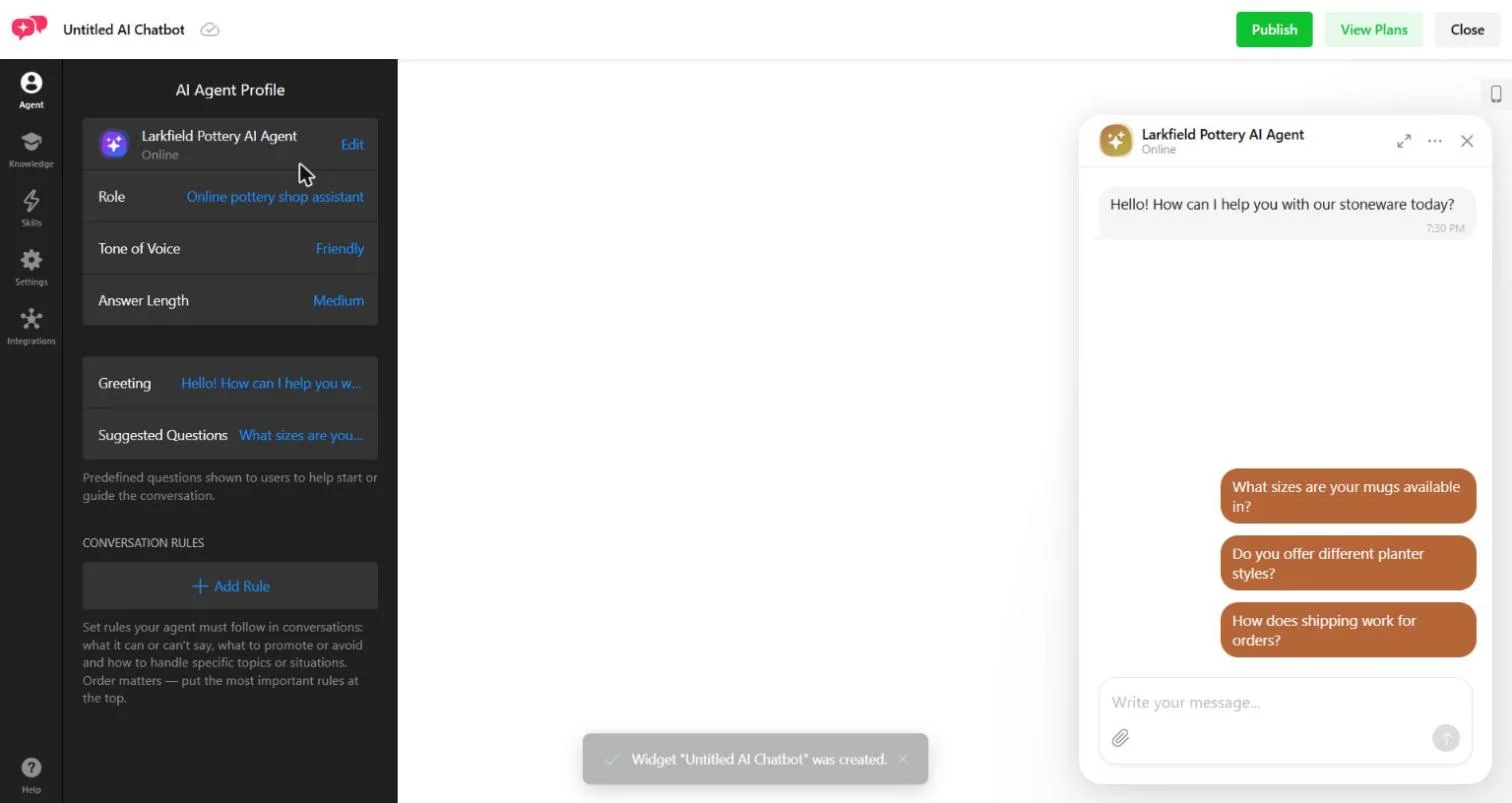
Elfsight AI Chatbot
Setup: 1 URL field · agent drafted in about 15 seconds · all 12 pages loaded in about 9 minutes
We pasted the store’s URL, and the editor opened with an agent that already had a name, a role, a greeting and suggested questions. The first import picked up only the homepage, so we added the other 11 pages by hand.
Then we set up the email contact button, which took one field, and put the widget on the test website with a three-line code snippet.
Tidio Lyro
Setup: 6 onboarding screens · 7 of 12 pages synced, 5 added by hand
With Tidio, you set up not just the AI but how your team works next to it. Lyro turned each imported page into a few AI-generated Q&As, which are worth a read before launch. Handoff to the team inbox comes switched on, and you can set separate rules for online and offline hours.
Chatbase
Setup: 7 onboarding screens, then a card on file for the trial · all 12 pages crawled in under a minute
Chatbase loaded the whole store without anything added by hand. We left the model on its default, since this step was about the launch, not answer settings. Getting chats to a person took its own setup: a support email in the instructions doesn’t create a handoff, so we switched on the Helpdesk inbox and a live-chat action.
Fin by Intercom
Setup: about 7 clicks · 9 of 12 pages on the first sync, all 12 after one re-sync
Loading the knowledge was quick. The catch is the website: Fin answered in the preview right away, but it only answers on your website once you set it live in the channel. Until then, the Messenger asks the customer for an email and puts them in line for a teammate.
Zendesk AI agents
Setup: 8 wizard screens · first answers from the pages about 20 minutes after the agent went live
The test website went in through a web crawler we edited to list the page URLs. The sources showed up in the interface before the agent actually used them, and the crawler doesn’t show which pages became records, so test a question per page.
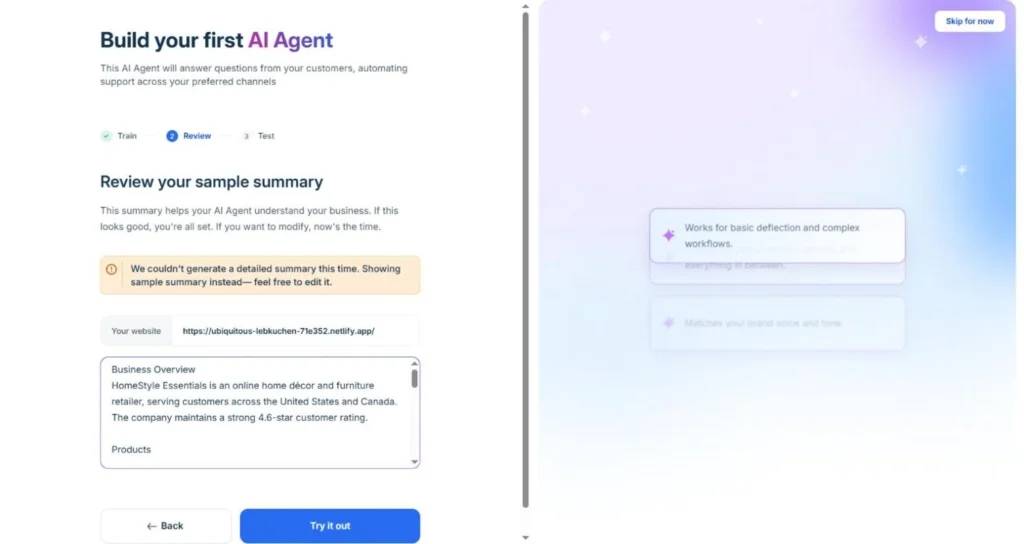
Freddy AI Agent
Setup: 3 onboarding screens and 5 clicks · 10 of 12 pages crawled in about a minute
Freddy couldn’t summarize our website and offered a sample summary of a different store instead, with its own prices and return policy, to save as the agent’s instructions. The automatic summary saves typing, but read it before you go live.
HubSpot customer agent
Setup: about 7 screens · URL import failed, the same text uploaded as a file synced within a minute
HubSpot couldn’t import our test pages, which carry a noindex tag, so check that yours come through. The bigger question is where a chat goes when a customer asks for help: HubSpot saved the customer as a lead in the CRM, but with the default handoff setting the conversation stayed with the AI agent.
A new contact in the CRM is easy to mistake for a finished setup.
Setup results
None of the seven needed code. Only Chatbase picked up every page on its own; with the others, something had to be done by hand before the bot knew the whole store.
| Chatbot | What it took to a first answer | Pages loaded on their own | Done by hand |
|---|---|---|---|
| Elfsight AI Chatbot | 1 URL field; agent drafted in ~15 seconds | 1 of 12 | Added 11 pages (~9 min in all) |
| Chatbase | 7 screens + card on file | 12 of 12, under a minute | Card on file for the trial |
| Tidio Lyro | 6 onboarding screens | 7 of 12 | Added 5 pages |
| Fin by Intercom | ~7 clicks | 9 of 12 | One re-sync for all 12 |
| Zendesk AI agents | 8 wizard screens; ~20 min until answers used the pages | 7 crawler records | Edited the crawler’s URL list |
| Freddy AI Agent | 3 screens + 5 clicks | 10 of 12 | Replaced another store’s sample summary |
| HubSpot customer agent | ~7 screens | 0 | Uploaded the same text as a file |
What this means for you: with a website chatbot, you install a widget and load your pages. With helpdesk AI, you also set up the workspace your team answers from.
Check 2: What you get for the money
With the chatbot live, the next question is what you can actually do with it. These are the eight things a small online store needs most:
| What we checked | Why your store needs it |
|---|---|
| Learn from your website and documents | Use the product descriptions, shipping terms and instructions you already have |
| Update the knowledge without rebuilding the bot | Change prices, delivery times and return rules without reinstalling |
| Set standing rules for answers | Rule out promises, discounts or advice you never approved |
| Recommend products | Suggest options by use, budget and features, and explain why |
| Link to a specific product | Take the customer from an answer to a purchase |
| Collect the customer’s contact | Follow up when a question can’t be solved right away |
| Keep the chat history | Check an answer without asking the customer to repeat it |
| Bring a person into the same chat | Finish a tricky conversation while the customer is still on your website |
What each chatbot can do
Here’s what we found in each tool’s settings during our trials. Product recommendations and links weren’t part of our test questions, so they’re left out.
| Chatbot | Website and documents | Knowledge updates | Answer rules | Contacts | History | Person in the same chat |
|---|---|---|---|---|---|---|
| Elfsight AI Chatbot | Yes | Retrain, 1 click | Conversation Rules, every plan | With a lead form | Yes, with an AI summary | No: a button to another channel |
| Tidio Lyro | Yes | Re-sync per page | Custom guidance | Pre-chat email form | Yes | Yes, built-in chat |
| Chatbase | Yes | Resync now; weekly auto-resync, not on Hobby | Instructions and guardrails | Not on the ticket by default | Yes, with an AI summary | Yes, with live chat on (from Basic) |
| Fin by Intercom | Yes | Re-sync, weekly by default | Guidance | Email field, saved as a lead | Yes | Yes, Intercom Messenger |
| Zendesk AI agents | Help center + crawler | Sync now; help center live | Tone and personalization | Typed email not saved to the requester | Yes | Yes, when agents are available |
| Freddy AI Agent | Yes | Resync once a day per source | Custom instructions | Up to 10 fields before the transfer | Yes, with an AI note | Yes, Agent handoff block |
| HubSpot customer agent | Yes, files if import fails | Re-upload; KB articles on change | Guidelines | Saved as a lead in the CRM | Yes | Yes, with live handoff set up |
On the basics, they’re close: every tool learns from your pages, follows answer rules and keeps the chat history. That covers pre-sale questions and the usual requests after a purchase.
The clearest difference is the last column. Most tools can put a person into the same chat, while Elfsight AI Chatbot hands the customer to email, WhatsApp or another channel with a button. So match the tool to how your team works, and if a feature you need is missing, compare a bigger plan with an integration by what the whole process costs.
Missing a feature? One task for $1,344 or $240
Say your store has two people answering customers: one handles shipping and returns, the other products and wholesale orders. You want each request to land with the right person, and replying later by email is fine. Nobody plans to sit in the chat all day.
In Intercom, automatic routing to teammates comes with the Advanced plan, not Essential. On annual billing, Essential is $29 and Advanced $85 per seat a month, so for two people the upgrade costs $1,344 a year: ($85 − $29) × 2 × 12. New customers get Essential at $19, which makes the gap $1,584.
The other route is Elfsight AI Chatbot plus n8n, an automation tool. Elfsight connects to n8n from the editor’s Integrations tab: after each chat, it sends the customer’s contact details, a conversation summary and the full chat.
Webhooks and Zapier work the same way. Rules you set in n8n then send each request to the right person, and anything unclear to a shared inbox.
n8n Starter is $20 a month on annual billing, or $240 a year, with 2,500 workflow executions, so 400 conversations a month take about 400 runs. At four customer messages per chat, Elfsight Premium covers the chatbot: $240 a year for up to 3,000 messages a month.
| Option | Cost per year, annual billing |
|---|---|
| Upgrade from Intercom Essential to Advanced, two seats | $1,344 |
| Intercom Advanced, full subscription for two seats | $2,040 + Fin usage |
| n8n Starter: routing outside the chatbot | $240 |
| Elfsight Premium + n8n Starter: chatbot and routing | $240 + $240 |
Add three hours of setup at $30 an hour (our assumption), and the Elfsight route comes to $240 + $330 for the first year, before tax. You can also use the same n8n plan for other jobs, like logging leads in a CRM, notifications or collecting questions for your knowledge base.
Note: This route sends finished conversations to the right person, who then replies by email. If your team wants to talk to customers in the chat itself, you need a live chat inbox, which is what Intercom’s plans are built around.
Check 3: Which chatbot answers best
Now the most interesting part. Every tool can load a catalog, so the question is how it uses it in a conversation, and this is where the best customer service chatbot earns its place.
How the test worked
Each chatbot learned from the same store pages: products, sizes, care, shipping and returns. Elfsight and Tidio missed some URLs, so we added them by hand, and HubSpot, which couldn’t read the test pages at all, got the same text as a file.
Then we put the same ten questions, word for word, to each chatbot in its preview panel and checked every reply against the store’s pages. The tenth one, a request for a person, we also ran on the test website to see what reached the team.
Questions covered
| What it checks | Questions | A good answer |
|---|---|---|
| Direct questions | 1. How long do I have to return something? 2. My mug arrived chipped. Do I need to send it back, and who pays for shipping? 5. How much is the large planter, and do you have a discount code? 9. ¿Cuánto tarda el envío a Canadá? (Spanish) | Gives the facts from the store’s pages, in the customer’s language, with no made-up code |
| An ambiguous question | 4. How big is the large one? | Asks which product, or clearly separates the options |
| Product questions | 7. Which mugs do you sell? 8. Can those go in the dishwasher? (right after) | Lists the right products and keeps the context for the follow-up |
| Questions the pages don’t answer | 3. Are your glazes lead-free? 6. Where is my order #10482? | Doesn’t invent anything, says what it can’t confirm, offers a way to find out |
| A request for a person | 10. I’d like to talk to a real person about a wholesale order. | The request reaches the team with the history and a contact; the customer knows where to expect a reply |
We didn’t give points for a friendly tone, longer explanations or neat lists: if two bots gave the same facts in different words, they got the same grade.
Results
Every reply was marked correct, partial or “no answer”, meaning a fallback reply when the store’s pages did cover the question. The handoff results come later, since there we looked at what the system did, not just what the bot said.
| Chatbot | Plan tested | Q1–9: correct / partial / no answer | Ambiguous question | Glaze question (not in the pages) | Question in Spanish |
|---|---|---|---|---|---|
| Elfsight AI Chatbot | Free | 8 / 1 / 0 | Gave both options | Couldn’t confirm, gave the support email | Answered in Spanish |
| Tidio Lyro | 7-day full-featured trial | 9 / 0 / 0 | Asked which product | Didn’t know, gave the email and a “Talk to a person” button | Answered in Spanish |
| Chatbase | Standard 7-day trial (now listed as Basic) | 9 / 0 / 0 | Gave both options | No confirmed information, gave the email | Answered in Spanish |
| Fin by Intercom | Advanced trial | 8 / 1 / 0 | Picked the mug | The store’s information doesn’t say, gave the email | Answered in Spanish |
| Zendesk AI agents | Suite Professional trial | 4 / 2 / 3 | Asked which product | Fallback with a “Talk to human” button | “I don’t speak your language.” |
| Freddy AI Agent | Enterprise Omni trial | 7 / 2 / 0 | Picked the mug | Outside what it was trained on, no contact | Answered in English |
| HubSpot customer agent | Marketing Hub Professional trial | 9 / 0 / 0 | Gave both options | No documented information, no contact | Answered in Spanish |
Across the board, 54 of the 63 graded answers were correct, and none contradicted the store’s pages or made up a discount code. Zendesk’s misses on the damaged-item, discount and follow-up questions line up with pages its crawler never cited, so they say as much about the import as about the answers.
The real split came with the ambiguous question, where a bot has to decide whether it knows enough or should ask. Here’s how that, and the other tricky questions, looked in the actual chats.
The return policy
Customer: “How long do I have to return something?” The store’s pages say unused items can go back within 30 days of delivery, in their original packaging, with the customer paying return shipping and a refund within 5 business days.
| Chatbot | Reply |
|---|---|
| Elfsight AI Chatbot | “You can return unused items within 30 days of delivery. Items must be in their original packaging, and the customer pays return shipping.” |
| Tidio Lyro | “You have 30 days from delivery to return an item. Items must be unused and in their original packaging, and return shipping costs are covered by the customer.” |
| Chatbase | “You can return an unused item in its original packaging within 30 days of delivery. Return shipping is your responsibility.” |
| Fin by Intercom | “You have 30 days from the delivery date to return an item.” Then the conditions as a list. |
| Zendesk AI agents | “You may return unused items within 30 days of delivery, in their original packaging. You pay return shipping.” |
| Freddy AI Agent | “You have 30 days from delivery to return an unused item in its original packaging. You pay the return shipping.” |
| HubSpot customer agent | “You have 30 days from delivery to return an item, as long as it’s unused and in its original packaging. Return shipping is your responsibility.” |
Fin went for a list and HubSpot left out the refund timing, but for the shopper, every answer covers the deadline, the cost and the conditions. That’s one typical question off your plate.
The ambiguous question
Customer, in a new chat: “How big is the large one?” Both the Classic Mug (14 oz, 4.5 inches tall) and the Round Planter (8 inches wide, 7 inches tall) come in a large size, and nothing in the chat says which one the customer means.
| Chatbot | Reply (shortened) | Grade |
|---|---|---|
| Elfsight AI Chatbot | “Do you mean the large Classic Mug or the large Round Planter?” + both sizes | Correct: gave both options |
| Tidio Lyro | “Could you clarify which product you’re referring to?” | Correct: asked |
| Chatbase | “Which item did you mean?” + both sizes | Correct: gave both options |
| Fin by Intercom | “The large Classic Mug is: 14 oz, 4.5 inches tall” | Partial: picked the mug |
| Zendesk AI agents | “Which product’s dimensions would you like to know?” | Correct: asked |
| Freddy AI Agent | “The large Classic Mug holds 14 oz and is 4.5 inches tall.” | Partial: picked the mug |
| HubSpot customer agent | “Which item do you mean—the large Classic Mug or the large Round Planter?” + both sizes | Correct: gave both options |
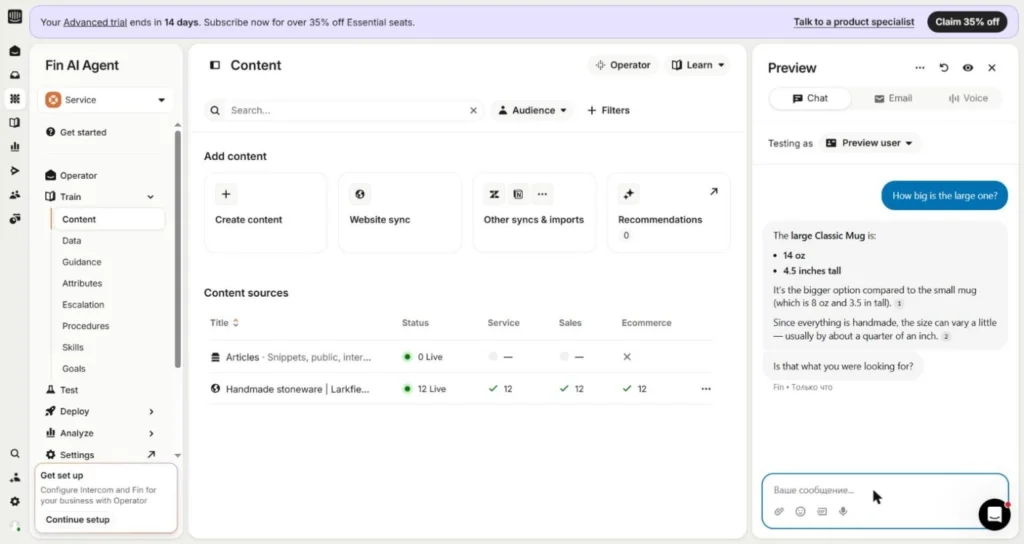
The mistake was in picking the product, and a correct fact about the wrong item doesn’t help the customer. It happens on real websites, too: when a visitor on elfsight.com typed just “Photo Slider”, our own chatbot assumed they meant the Slider app, though they wanted Photo Gallery, and our support team graded that reply poor.
Product questions with a follow-up
Customer: “Which mugs do you sell?”, then, in the same chat: “Can those go in the dishwasher?” The store’s care page says mugs are dishwasher- and microwave-safe, while planters are hand-wash only and have a drainage hole.
| Chatbot | Reply to the follow-up | Grade |
|---|---|---|
| Elfsight AI Chatbot | “Yes. The mugs are dishwasher-safe. They’re also microwave-safe.” | Correct |
| Tidio Lyro | “Yes! All our mugs are dishwasher-safe.” (after the care page was added; before that, “I don’t have specific information”) | Correct |
| Chatbase | “Yes. All our mugs are dishwasher-safe and microwave-safe.” | Correct |
| Fin by Intercom | Mugs are dishwasher-safe; planters are hand-wash only “because they have a drainage hole” | Correct for the mugs, with a reason the pages don’t give |
| Zendesk AI agents | Said dishwasher safety isn’t specified and pointed to the help center and support email | No answer |
| Freddy AI Agent | “Yes. All Larkfield Pottery mugs are dishwasher-safe and microwave-safe.” | Correct |
| HubSpot customer agent | “Yes — all of our mugs are dishwasher-safe. They’re also microwave-safe.” | Correct |
All seven understood that “those” meant the mugs. Fin came closest to inventing something, joining two separate facts into a reason the store never gave, and Zendesk’s “no answer” traces back to the care page its crawler never cited.
A question the pages don’t answer
Customer: “Are your glazes lead-free?” The store’s pages describe the products but say nothing about what’s in the glaze.
| Chatbot | Reply (shortened) | Offered a way to find out |
|---|---|---|
| Elfsight AI Chatbot | “I can’t confirm whether our glazes are lead-free right now.” | Support email |
| Tidio Lyro | “I don’t have specific information about whether our glazes are lead-free.” | Support email + “Talk to a person” button |
| Chatbase | “I don’t have confirmed information about the glaze’s lead content.” | Support email |
| Fin by Intercom | “Our help info doesn’t specifically state whether the glazes are lead-free.” | Support email |
| Zendesk AI agents | “Sorry I’m not able to answer your question. Would you like to speak to a human?” | “Talk to human” button |
| Freddy AI Agent | “This question falls outside the short summary I’m currently trained on…” | None |
| HubSpot customer agent | “I don’t have documented information confirming whether the glazes are lead-free.” | None |
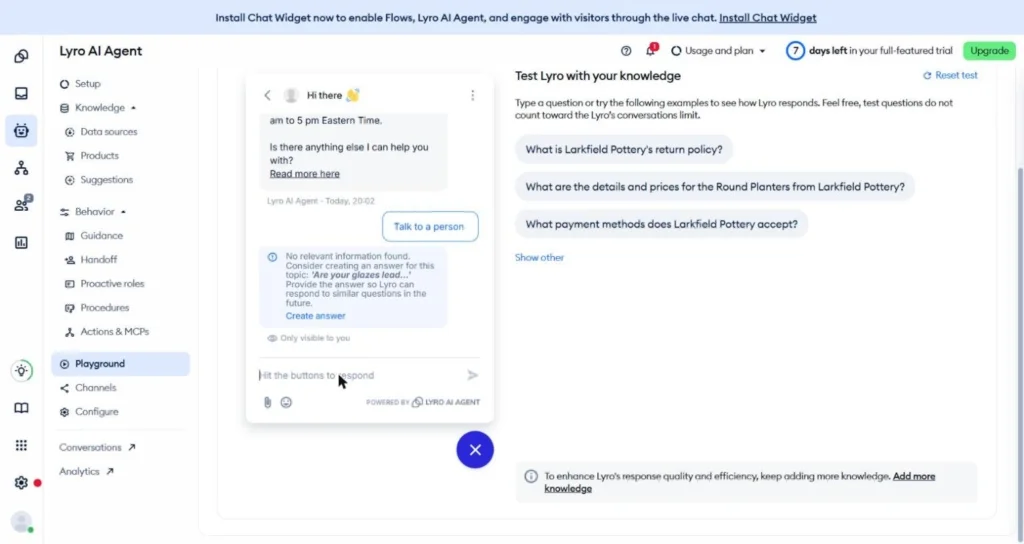
None of them made a claim about the glaze, which is exactly what you want. Still, the customer’s question stays open, and no chatbot fixes that for you: the store needs the answer, then needs to add it to its pages.
The order-status question went the same way. With no order system connected, none of the seven invented a status for “Where is my order #10482?”, and all of them offered a way to contact the store. So some questions will always end up with you or your team, which brings us to the handoff.
What reaches your team when a customer asks for a person
To see which are the best AI chatbots with human handover, we asked each bot for a real person about a wholesale order, with nobody on our team online, and looked at both sides: what the customer saw and what the team got. Elfsight’s email contact button and Chatbase’s live chat were switched on beforehand.
Chatbase’s handoff ran in its preview, and on our website, the Intercom Messenger answered without Fin, since Fin wasn’t set live yet.
| Chatbot | Where the request goes | What the team receives | What’s left to do |
|---|---|---|---|
| Elfsight AI Chatbot | The customer sees an Email button; the chat lands in the dashboard | Transcript and AI summary; no customer details by default | Reply by email |
| Tidio Lyro | Team inbox, after a pre-chat email form | Transcript, email, location and last page visited | Pick it up: it’s unassigned |
| Chatbase (in the preview) | Helpdesk ticket, with live chat on | Transcript and AI summary; requester unknown | Assign it and find the contact |
| Fin by Intercom (Messenger default, Fin not live) | Queue for a teammate, after an email field | Transcript; a lead with email and location | Pick it up: it’s unassigned |
| Zendesk AI agents | Ticket (“someone will get back to you soon”) | Transcript, AI summary on request; typed email not saved to the requester | Check the requester field before replying |
| Freddy AI Agent | Ticket (“Assigning your chat to our support agent”) | Transcript and an AI note; no contact details | Find the contact, assign it |
| HubSpot customer agent | Inbox conversation, after an email card | Transcript and page URL; contact saved as a lead | With the default setting, it stays with the AI agent |
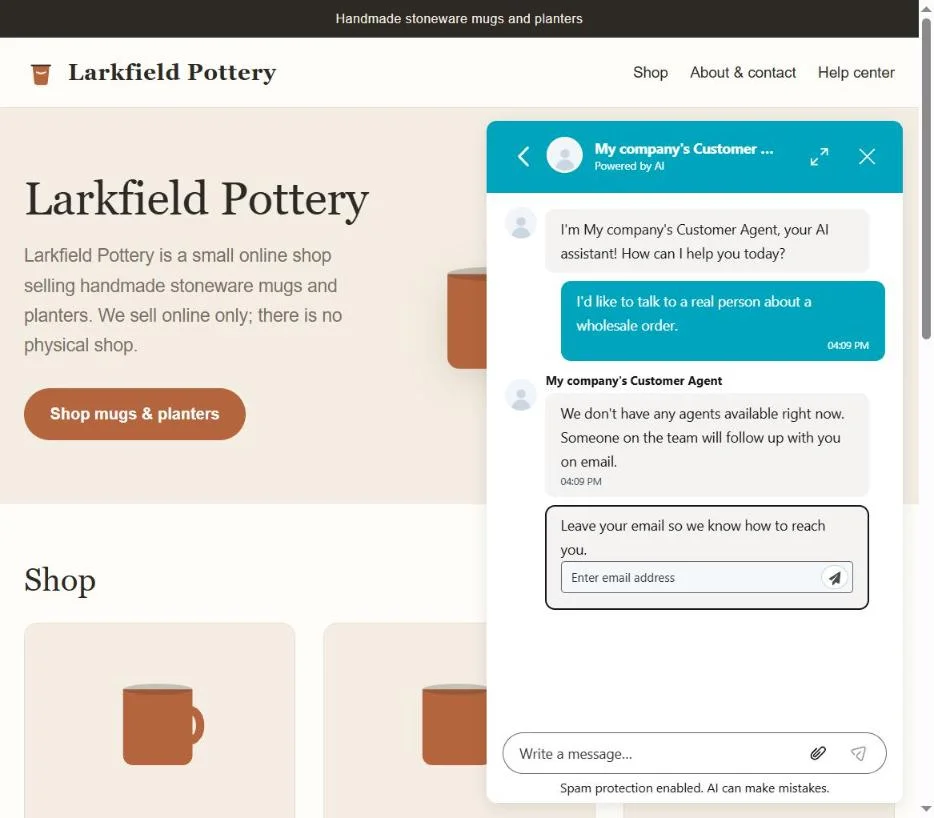
This is where the tools differ the most. In some, a person continues the chat; in others, they get an email or a ticket, and in most of the seven, someone still had to find the customer’s contact or pick up an unassigned conversation by hand.
Pick the handoff that fits your schedule. If someone watches the website during the day, continuing the same chat works best. If you answer between other jobs, an email or ticket with the history and a reply address matters more. Either way, run the whole path to your inbox before launch.
Fix the knowledge base before you switch tools
When a chatbot mixes up your shipping terms or can’t answer a product question, the first thought is to try another tool. In our test, the cause was usually the pages it had. Most tools missed part of the store on import, and every fix was to the content, not the tool.
| Chatbot | What was missing | What we did |
|---|---|---|
| Tidio Lyro | 5 of 12 pages, including damaged items, care and discounts | Added them by hand |
| Elfsight AI Chatbot | 11 of 12 pages after the first import | Added them by hand before the test |
| HubSpot customer agent | All pages (the URL import failed) | Uploaded the same text as a file |
| Fin by Intercom | 3 of 12 pages on the first sync | One manual re-sync |
| Freddy AI Agent | 2 of 12 pages | Nothing: we graded what it learned |
| Zendesk AI agents | Shipping, damaged items, care, discounts and other pages never showed up in answers | Nothing: we graded what the crawler loaded |
Tidio is the clearest case. On the 7 pages its sync picked up, Lyro scored 7 correct, 1 partial and 2 “no answer”, and every miss traced to a page it never got. When it lacked the information, it said so and pointed to support instead of guessing.
| Chatbot | Knowledge base | Correct / partial / no answer (10 questions) |
|---|---|---|
| Tidio Lyro | 7 pages from the sync | 7 / 1 / 2 |
| Tidio Lyro | 12 pages, the missing 5 added by hand | 10 / 0 / 0 |
Same plan, same settings, same questions: only the pages changed. Zendesk shows the same pattern from the other side, with its misses on the damaged-item, discount and follow-up questions all on pages its crawler never cited.
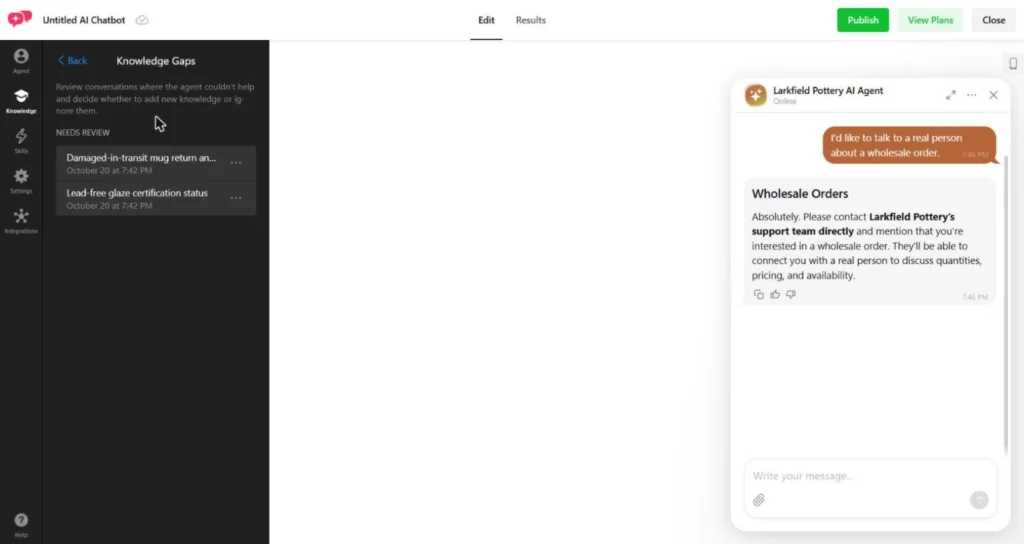
Several tools also point you to the gaps: Elfsight’s Knowledge Gaps listed the glaze question after the test, Tidio’s Suggestions tab gathers unanswered questions, and HubSpot’s tester labeled the same question a “Knowledge gap”.
When your policy changes
At the end, we changed one line on the test website, moving the return window from 30 to 45 days. Then we did whatever each tool needed to pick it up and asked “How long do I have to return something?” again.
| Chatbot | What it took | Answer after the update |
|---|---|---|
| Elfsight AI Chatbot | Retrain on the page, 1 click | 45 days on the first re-ask |
| Tidio Lyro | Re-sync; 22 hours after the last sync it still said “try again in 2 hours” | 45 days on the first re-ask once it ran |
| Chatbase | Auto-resync was off; Resync now, 2 clicks | 45 days on the first re-ask |
| Fin by Intercom | Re-sync, 2 clicks | 45 days on the first re-ask |
| Zendesk AI agents | Crawler sync “Never” by default; Sync now, 2 clicks | 45 days about 3 hours later |
| Freddy AI Agent | Resync and relearn, once every 24 hours per source | 45 days once it finished |
| HubSpot customer agent | File removed and re-uploaded | 45 days on the first re-ask |
All seven gave the new answer once the update went through. Nothing changed but the line on the page and the step to reload it.
What the comparison showed
On the same store pages, the seven chatbots gave close results, and the biggest jump came from fixing the content: Tidio went from 7 to 10 correct answers once its missing pages were in. The platforms mostly differed on ambiguous questions, where some asked what the customer meant and others picked one meaning.
So when you look for the best chatbot for customer service, look past the answers to how the work is set up: installation, what your team has to do, how a person joins a conversation, and integrations. That decides how many requests, and how much manual work, stay with you.
Check 4: What a year of AI support costs
With the answers covered, let’s count what a year with each tool would cost. Besides the subscription, that means AI usage, preparing the knowledge base, setup, updates and your team’s time on the requests the AI hands over.
One workload for every tool
Take 400 conversations a month with four customer messages each: 1,600 messages a month, or 4,800 conversations a year. The AI answers first in every conversation, solves half on its own and hands the other 200 a month to two people. These are the inputs of our example, not a measured automation rate.
Tools that bill per result count 200 resolutions a month; tools that bill per conversation or session count all 400, including the ones a person took over. For messages and credits, we used each product’s own limit, and we assumed each conversation is one session.
| Chatbot and plan | Subscriptions per year | AI and required extras | First year, service only |
|---|---|---|---|
| Elfsight Premium | $20 × 12 = $240 | 1,600 messages a month fit the 3,000 limit; nothing extra | $240 |
| Tidio Growth + Lyro | $49.17 × 12 = $590 for the team’s 200 conversations | $291.67 × 12 = $3,500 for the 500-conversation Lyro tier | $4,090 |
| Chatbase Basic | $120 × 12 = $1,440; helpdesk included | 4,000 credits a month; at our run’s rate (12 credits for 11 messages), ~1,745 a month | $1,440 |
| Fin + Intercom Essential | $29 × 2 seats × 12 = $696 | 200 outcomes × $0.99 × 12 = $2,376 | $3,072 |
| Zendesk Suite Team | $55 × 2 seats × 12 = $1,320 | 10 resolutions a month included; 190 × $1.50 × 12 = $3,420, prepaid | $4,740 |
| Freddy AI Agent + Freshchat Growth | $19 × 2 seats × 12 = $456 | 4 packs of 100 sessions × $49 × 12 = $2,352 | $2,808 |
| HubSpot Service Hub Professional | $90 × 2 seats × 12 = $2,160 | AI: (200 × 50 − 3,000) credits × $0.01 × 12 = $840; required onboarding $1,500 | $4,500 |
A few notes on the math. Chatbase’s credit use depends on the model and actions, so recount if you change either. At Zendesk’s $2.00 pay-as-you-go rate instead of $1.50 prepaid, the AI part is $4,560, or $1,140 more a year.
In HubSpot, all 3,000 included credits go to the customer agent, and Freddy’s first 500 sessions are free once, so its first year comes out slightly lower.
Adding your team’s time
Preparing the content takes four hours at $30 an hour, or $120, for every tool. For the 200 requests a month that reach people, we budgeted five minutes each: 200 hours a year, or $3,000 at $15 an hour. Even if you answer customers yourself, that time is a support cost. All hours here are our planning assumptions, not measurements.
Setup covers checking answers, contact collection, the handoff and training two people, so it takes longer than the first answer in Check 1. For knowledge base updates and reviewing conversations, we set aside an hour a month.
| Chatbot | One-time setup, $30/hour | Upkeep per year, $30/hour | Team’s work per year, incl. content and answers |
|---|---|---|---|
| Elfsight AI Chatbot | 2 hours = $60 | 12 hours = $360 | $3,540 |
| Tidio Lyro | 4 hours = $120 | 12 hours = $360 | $3,600 |
| Chatbase | 3 hours = $90 | 12 hours = $360 | $3,570 |
| Fin by Intercom | 6 hours = $180 | 12 hours = $360 | $3,660 |
| Zendesk AI agents | 8 hours = $240 | 12 hours = $360 | $3,720 |
| Freddy AI Agent | 6 hours = $180 | 12 hours = $360 | $3,660 |
| HubSpot customer agent | 8 hours = $240 | 12 hours = $360 | $3,720 |
Every row includes the same $120 for content and $3,000 for answering customers. For HubSpot, the $240 is your own team’s time; the vendor’s paid onboarding is already in the first table.
The first-year total
Here’s the service plus your team’s time. Totals built on assumptions don’t turn into confirmed prices once you add them up.
| Chatbot | Service and required fees | Team’s work | Full first-year cost |
|---|---|---|---|
| Elfsight AI Chatbot, without n8n | $240 | $3,540 | $3,780 |
| Tidio Lyro | $4,790 | $3,600 | $8,390 |
| Chatbase | $1,440 | $3,570 | $5,010 |
| Fin by Intercom | $3,072 | $3,660 | $6,732 |
| Zendesk AI agents | $4,740 | $3,720 | $8,460 |
| Freddy AI Agent | $2,808 | $3,660 | $6,468 |
| HubSpot customer agent | $4,500 | $3,720 | $8,220 |
This is a first-year budget for this one scenario, before tax. Your website and email are already paid for, so they’re not in it, while new helpdesk or CRM seats are counted in full. Moving an archive of past requests, voice, SMS or custom development aren’t included; if you need them, add them on top.
If you already pay for Intercom, Zendesk, Freshchat or HubSpot seats, subtract them when you judge what the AI itself adds: with two Intercom Essential seats already paid, Fin adds $2,376 a year in our scenario.
At 400 conversations a month, Elfsight without integrations comes to $3,780 for the first year: $240 for the service plus $3,540 of team time.
For the rest, the total depends on AI limits, seats and setup. And since your team’s time is the bigger line in every row, measure it on your own requests: if a support workspace saves two minutes on each of 200 requests a month, that’s 80 hours, or $1,200 a year at our rate. a support workspace saves two minutes on each of 200 requests a month, that’s 80 hours, or $1,200 a year at our rate.
How to choose the best AI chatbot for customer support
The best chatbot for customer support depends on how your store answers customers today. In our support team’s experiment, the AI fully resolved 17% of reviewed tickets on its own, and another 78% got a useful answer but still needed an agent, so plan the handoff from day one.
You answer customers yourself: Elfsight AI Chatbot
If your store takes questions through the website and email, Elfsight AI Chatbot can handle questions about products, shipping and returns without a separate support system. In our test, it drafted the agent from one URL, got 8 of the first 9 questions right and gave both options on the ambiguous one.
You fill the gaps in the knowledge base and handle what needs a person. If two of you share the inbox, n8n can route each conversation to the right teammate.
Note: A person can’t step into the chat. Created with small teams in mind, the human handoff is a button directing the customer to email, WhatsApp, or another channel for your team to pick up.
Create your AI chatbot in the live editor below ↓
Someone on your team helps customers in the chat: Tidio
If your store advises customers right on the website, look at Tidio. Lyro handles the typical questions, and a teammate joins the same conversation when a customer needs more help.
This works best for a team that watches the chat during working hours. For evening requests, collect contacts and queue them for the next day, since Tidio lets you set separate rules for online and offline hours. In a test chat, check that your teammate sees what the customer already asked about.
Your support already runs in a helpdesk: its own AI
If your team works in Intercom, Zendesk or Freshworks, start with Fin, Zendesk AI agents or Freddy AI Agent; if your contacts and requests live in HubSpot, try HubSpot’s customer agent. The best AI chatbot for ticketing systems is usually the one built into yours: your team keeps the customer history and the way it already handles questions.
Check the defaults before launch: Zendesk answered our Spanish question with “I don’t speak your language,” Freddy offered another store’s summary as its instructions, and with the default handoff setting, HubSpot kept the chat with the AI agent.
Then compare how long requests take before and after, including checking contacts and re-reading the problem.
You want your own workflows: Chatbase, or Elfsight with n8n
If you want to tune the model and the agent’s actions, add Chatbase to your shortlist: it was the only tool we tested with a model picker, and its ready-made actions cover Shopify orders and returns.
If the task comes after the chat, like routing a request, creating a CRM record or notifying the right person, you can build it with Elfsight and n8n.
Either way, compare the finished process: what the customer gets, what your teammate sees, and who keeps the setup running.
If you’re torn between a chatbot and an AI agent, decide whether it should only answer questions or also act in other systems, such as checking an order; that’s the line between an AI agent and a chatbot.
If most customers prefer calling to chatting, a 24/7 AI phone receptionist might be a better fit.
Frequently asked questions
Can I use ChatGPT for customer service?
Can an AI chatbot answer customers in their own language?
What happens to customer chats after hours, when no one is online?
Will an AI chatbot reduce my support team's workload?
Which of the best AI chatbots for e-commerce customer service handle order questions?
Key references
- AI Chatbot for Customer Support: What 2,498 Real Tickets Revealed, Elfsight, May 2026
- ChatGPT Business overview, OpenAI
- Using webhooks in your Elfsight AI Chatbot, Elfsight