
PrestaShop Video Gallery module

Show videos from YouTube, Instagram, TikTok, Vimeo, Twitch, and more on your PrestaShop store to help shoppers explore products, understand their benefits, and feel more confident about buying.
4.8 rating
10,000+ reviews
Free plan available
Create Widget for Free
No credit card needed
PrestaShop Video Gallery module
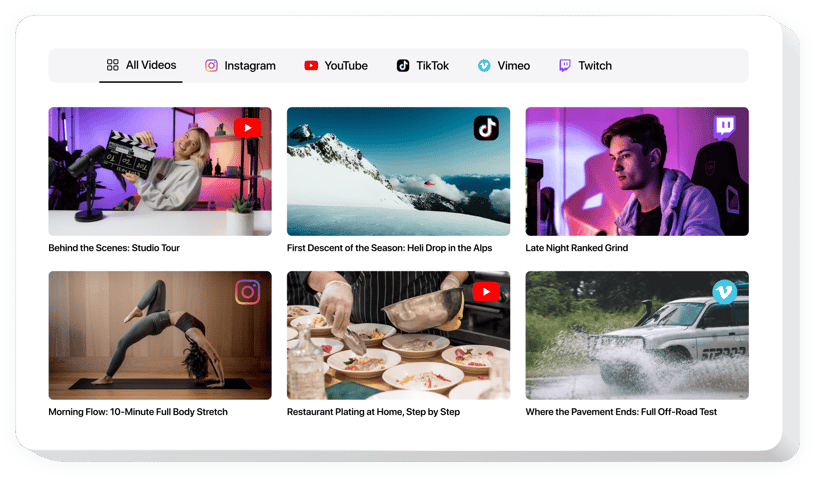
Create your Video Gallery module

Configure your video player and add it to your PrestaShop website for free!

Why People Love Elfsight

Product descriptions can explain the details, but video gives shoppers a much clearer sense of how an item looks, works, or fits into everyday use. Elfsight Video Gallery lets you enrich your PrestaShop storefront with product demonstrations, customer videos, tutorials, social clips, launches, and brand content collected in one convenient gallery.

Build your collection with links from YouTube, Instagram, TikTok, Vimeo, Twitch, or a custom source, then organize everything in the Elfsight editor. Pin videos you want customers to discover first, introduce filters and sorting for larger collections, and enable the mini-player so viewing can continue while shoppers explore. Video Behavior settings also let you control what happens after playback and use an end card to encourage another step.

PrestaShop uses modules as its standard way to extend store functionality, with installed modules managed from the back office. Elfsight’s current PrestaShop setup uses an HTML Box module to place the widget on storefront pages.

Did you know?

According to Wyzowl’s 2026 video marketing research, 85% of people say watching a video has convinced them to buy a product or service.

Give shoppers a more visual way to discover your catalog – create your Elfsight Video Gallery for PrestaShop for free.

Key Features of the PrestaShop Video Gallery

Here’s how Video Gallery can add more value to your PrestaShop storefront:

  • Videos from multiple channels: Bring YouTube, Instagram, TikTok, Vimeo, Twitch, and Custom Source content together in one gallery.
  • More informative product content: Use demonstrations, reviews, tutorials, customer stories, and social videos to show shoppers more than static product images can.
  • Pinned videos: Keep selected bestsellers, new launches, campaigns, tutorials, or other important videos at the beginning of the gallery.
  • Filters and sorting: Make extensive video collections easier to browse and help customers reach useful content faster.
  • Mini-player: Let shoppers keep watching the current video while they continue exploring the page.
  • Flexible playback flow: Replay the video, move to the next one, display an end card, or show an end card before continuing to another video.
  • Responsive presentation: Give customers a comfortable video experience across desktop, tablet, and mobile devices.

Try all features in the free editor – no signup needed.

How to Add a Video Gallery to PrestaShop

You can prepare your Elfsight Video Gallery and add it to your PrestaShop store in a few steps:

  1. Choose a Template: Open the Elfsight editor and select a Video Gallery template that suits your storefront.
  2. Build Your Video Collection: Add links from YouTube, Instagram, TikTok, Vimeo, Twitch, or Custom Source.
  3. Configure the Gallery: Adjust the layout and appearance, add filters and sorting, enable the mini-player if needed, and choose your preferred Video Behavior.
  4. Copy the Installation Code: Publish your gallery and copy the Elfsight installation code.
  5. Add It to PrestaShop: Elfsight’s current installation method uses the HTML Box module. Install it through Modules → Module Manager, configure the module, and add the required parts of your Elfsight code according to the placement you want on your store.

The exact steps vary depending on whether you want the gallery on the homepage, another store page, or across several pages, so use the corresponding option in the Elfsight PrestaShop installation guide.

Need more help? Visit the Elfsight Help Center for detailed PrestaShop setup instructions, explore our tutorials, share feature requests through the Wishlist, or follow new Video Gallery releases in the Changelog.

Is Video Gallery a PrestaShop module?

Video Gallery is presented as a PrestaShop module on this platform page because module is PrestaShop’s standard term for functionality added to a store. PrestaShop defines modules as components that extend or modify store features. The Elfsight gallery itself is created online and embedded with generated installation code, rather than downloaded as a traditional standalone Video Gallery ZIP package from the PrestaShop Marketplace.

Do I need to install anything in PrestaShop to use Video Gallery?

For Elfsight’s current PrestaShop installation method, you need the HTML Box module, which allows the required Elfsight script to run on your storefront. Elfsight’s guide explains how to download the appropriate version and upload it through Modules → Module Manager. After that, you can add your Video Gallery installation code and choose where it should appear.

What video sources does the Video Gallery support?

Video Gallery supports YouTube, Instagram, TikTok, Vimeo, Twitch, and Custom Source. You can collect content from several supported platforms and turn it into one consistent gallery instead of managing separate video embeds throughout your PrestaShop store.

Can I mix videos from several platforms in one gallery?

Yes, you can combine videos from YouTube, Instagram, TikTok, Vimeo, Twitch, and custom sources in a single Video Gallery. This works particularly well when product demos, customer content, tutorials, and social videos are published across different channels but should be easy for shoppers to discover together.

Can I upload video files directly to Elfsight?

No, Video Gallery uses video links rather than direct file uploads. Publish or host your video through a supported source first, then add its URL to the Elfsight editor to include it in your collection.

Can I highlight specific videos in my PrestaShop gallery?

Pinning lets you place selected videos at the beginning of the gallery. Use it to give extra visibility to new products, bestselling items, current promotions, key demonstrations, seasonal content, or customer videos that you want shoppers to see first.

Can I organize a large PrestaShop Video Gallery?

Yes, filters and sorting help keep larger collections easier for customers to navigate. They’re useful when your gallery contains videos for several product categories, tutorials, campaigns, customer stories, or other types of content that shoppers may want to explore separately.

Does Video Gallery include a mini-player?

You can enable the mini-player so the active video stays visible while shoppers continue exploring other content. This creates a more continuous viewing experience without requiring customers to remain focused on the gallery’s main player.

What can happen after a video ends?

The Video Behavior settings let you control the experience after playback. You can replay the current video, play the next video, show an end card, or display an end card and then continue to the next video. An end card can include promotional content that draws attention to a product, special offer, category, campaign, service, or another relevant next step.

Pricing

14-day money back guarantee. Risk-free, you can cancel at anytime.
Elfsight Apps
Multi-platform software
from $0 / month
start with free plan
Unlimited websites
Premium customer support
Charge-free installation support
Special offer for multiple apps
Flexible design