WordPress Notification Bar Plugin

Show purchase alerts on your WordPress website to highlight real customer activity, build urgency, and motivate visitors to act faster.
4.8 rating
10,000+ reviews
Free plan available
Create Widget for Free
No credit card needed
WordPress Notification Bar Plugin

Create your Sales Notification plugin

Configure your Notification bar and add it to your WordPress website for free.

Why People Love Elfsight

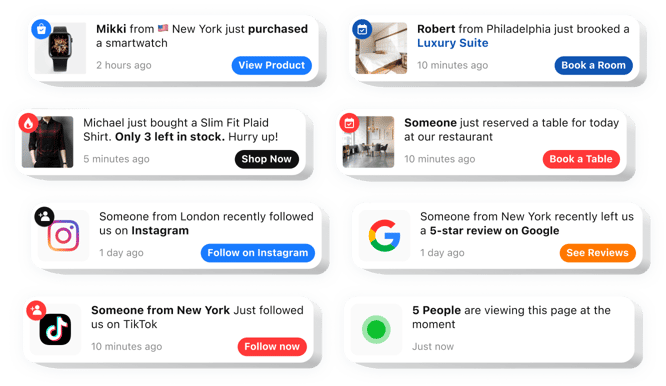
When people shop online, they want reassurance that others are buying too. That’s where the Elfsight Sales Notification plugin comes in. It lets you display friendly popups or banners showing real purchases and activity on your WordPress store.

Setup takes minutes, the design fits right into your website, and the effect is immediate – customers feel like they’re part of something popular. It’s social proof in action.

Think about it: would you rather buy from a store that looks quiet or one where you can clearly see others placing orders? That simple difference can nudge visitors into becoming paying customers.

Did you know?

Studies show, 35% of consumers say they trust a product more when it appears to be selling out fast – scarcity builds confidence and triggers action.

Turn that confidence into conversions – start showing real-time purchase alerts with Elfsight’s free Notification Bar today.

Key Features of the WordPress Notification Plugin

Elfsight is packed with features that make it useful every day:

  • Custom messages: Not just sales – highlight signups, downloads, or any action you want.
  • Flexible design: Style your notification bar to match your branding with custom fonts, colors, and sizes.
  • Smart display options: Choose when and where the notification appears.
  • Mobile-ready: Works smoothly on phones, tablets, and desktops with no extra setup.
  • Easy setup: Works right out of the box, no coding needed – copy, paste, and you’re done.

Explore all features in the live editor – no account required.

How to Add Notification Bar to WordPress

Embedding a Notification plugin is simple – just follow these steps to get started:

  1. Select a template: Open the Elfsight editor and pick the template that fits you best.
  2. Customize the design: Set up its position, timing, and style.
  3. Generate code: Click “Add to website for free” and copy the snippet provided.
  4. Embed on your website: Paste the code into your WordPress website using a Custom HTML block or widget area, or insert it directly into your page’s code section.

That’s it – your Notification bar plugin will be live and showing activity in minutes.
Need help? Follow the blog guide on how to add notifications, or share ideas in the Wishlist. You can also follow new updates in the Changelog.

Does the Sales Notification work with popular WordPress builders?

Elfsight plugins are compatible with most WordPress themes and builders, including Elementor, Gutenberg, and WPBakery.

Do I need a paid WordPress.com plan to use a Notification plugin?

Yes, WordPress.com requires a Business plan or higher to add custom JavaScript, while WordPress.org has no such limits.

What types of notifications can be shown in WordPress?

Elfsight can display recent purchases, bookings, reviews, sign-ups, or follower activity as small popups on your WordPress website, helping build trust through real-time social proof.

Is there a limit to how many notifications I can create?

No, you can configure multiple notification popups inside the plugin and rotate them to highlight different offers or recent actions.

Can I control how often popups appear?

Yes, Elfsight allows you to set the initial delay, display duration, and interval between notifications to keep your WordPress pages balanced.

Are animation effects available in WordPress?

You can choose effects such as fade, slide, bounce, or zoom to make popups noticeable without distracting visitors.

Can popup positions differ on desktop and mobile?

Yes, you can define separate positions for desktop and mobile devices to ensure optimal placement across your WordPress website.

Can visitors close notification popups?

An optional close button lets users dismiss notifications if they prefer an uninterrupted browsing experience.

Can the order of notifications be randomized?

Yes, Elfsight includes a shuffle option so notifications appear in varied sequences instead of repeating the same order.

Can alerts link to product or offer pages?

Each popup can include a custom URL that directs visitors to specific pages while enabling click tracking in analytics tools.

Pricing

14-day money back guarantee. Risk-free, you can cancel at anytime.
Elfsight Apps
Multi-platform solution
From $0 / month
start with a free plan
Unlimited domains
Professional and on-time support
Charge-free installation support
100% customizable
Special deal for multiple apps