
Elementor Sales Notification widget
Show purchase alerts on your Elementor website to highlight real customer activity, build urgency, and motivate visitors to act faster.
Create Widget for Free
No credit card needed
Trusted by over 3,000,000 small business, agencies and top global brands worldwide
Create Elementor Order Notifications widget
Design your Sales Notification widget and embed it to your Elementor website at no cost.
Embed Sales Notification into Elementor with the Elfsight widget
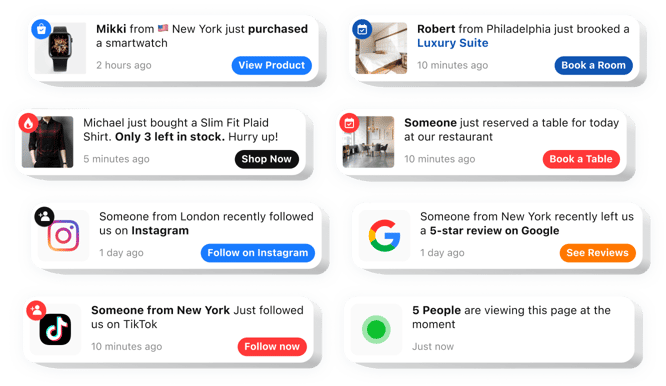
The social proof notifications Elementor widget is an effective solution to boost engagement and drive sales on your website. It presents real-time notifications of recent purchases to build trust and motivate visitors to place an order. This simple tool integrates your website effortlessly and is fully flexible to fit your brand’s aesthetic. It boosts conversions, generating urgency and promoting faster decisions.Increase the visibility of your real-time sales and interactions to strengthen trust with pops.
This versatile widget not only fosters trust by showcasing recent activity but also pushes visitors to take action through personalized alerts. Below is a full list of its key benefits:
- Fast setup. The app is incredibly simple to install, requiring no technical skills, and ensures rapid setup on your website.
- Cohesive appearance. Full customization to align with your website’s design, delivering a seamless user experience.
- Real-time sales notifications. Live updates on recent transactions give visitors a sense of activity and engagement.
- Time-sensitive offers. Elementor notifications for low stock and timed promotions generate urgency and encourage faster purchase decisions.
- Personalized layouts. Fully adjustable components let you align every element with your brand’s unique identity.
- Diverse alerts. From transaction updates to product availability, the widget keeps your customers informed and engaged.
- Multiple notification types. From recent purchases to product availability, it keeps customers engaged.
How can I embed Sales Notification into my Elementor website?
To place the notifications widget on your website, complete these easy steps:
- Access the app editor and pick a template that matches your website style.
- Customize the widget by updating its layout, text, visuals, and adding features like a badge.
- Preserve your changes and copy the provided HTML code.
- Paste the code into your website’s CMS and activate the changes.
- Job’s done! Your Elementor order notification widget is now active.
For comprehensive instructions, visit our article on how to create a Sales Notification widget.
In case you have to deal with any problems as you embed the widget into a website, feel free to contact our Customer Support team. We will be happy to help you add and manage your Sales Notification widget.
Do I need Elementor Pro to use the Sales Notification widget?
You can add the widget using Elementor Free while some advanced display and layout options may require Elementor Pro.
Is the Sales Notification compatible with Elementor layouts?
Elfsight integrates smoothly with Elementor sections, columns, and templates, adapting automatically to responsive designs.
What kind of activity can notifications show in Elementor?
Elfsight can display recent purchases, reviews, bookings, sign-ups, or follower updates as popups on your Elementor pages to increase social proof.
How many notifications can I add?
You can create multiple notification popups and rotate them within the widget to highlight ongoing activity.
Can I manage how often popups appear on my Elementor website?
Yes, you can customize the initial delay, visibility duration, and spacing between popups to keep your Elementor layout balanced.
Are animations available?
Yes, Elfsight offers animation styles such as fade, slide, bounce, and zoom to enhance visual impact without being intrusive.
Can I set separate positions for desktop and mobile?
Popup placement can be configured independently for desktop and mobile to suit different layouts.
Can visitors dismiss notifications?
Yes, an optional close button lets users hide popups if they wish to continue browsing without interruptions.
Can notification order be randomized?
Elfsight can shuffle notifications so messages appear in varied sequences for returning visitors.
Can notifications link to offers or products?
Each popup can include a custom link directing users to a specific page while supporting click tracking.
Pricing
14-day money back guarantee. Risk-free, you can cancel at anytime.
Elfsight Apps
Platform-independent software
From $0 / month
start with a free plan
Unlimited domains
Premium and on-time support
Charge-free installation assistance
Flexible design
Special deal for multiple apps