
PrestaShop Multilingual Translator addon
Create your Multilingual Translator addon
How the Multilingual Translator for PrestaShop Can Enhance Your Website
Language should never be a barrier between your business and potential customers. With Elfsight, you can instantly make your website accessible in multiple languages, helping you connect with a broader global audience. Whether you’re running an online store in Europe, Asia, or the Americas, offering content in your users’ native language dramatically increases trust, engagement, and sales.
Designed for ease of use, this addon doesn’t require any coding knowledge and fits seamlessly into any PrestaShop layout. It supports automatic translation of your entire website and allows for manual tweaks to ensure accuracy. From product descriptions and cart details to help pages and checkout instructions, everything can be translated effortlessly. With customizable design, the translator blends perfectly with your brand’s look and feel.
Integrate the Elfsight Multilingual Translator addon into your PrestaShop website for free today and experience the difference it makes in global reach and customer satisfaction!
Key Features of the PrestaShop Multilingual Translator
Elfsight offers a powerful set of features tailored to help businesses serve international audiences more effectively. Here are the standout capabilities:
- Automatic website translation: Instantly translate your entire PrestaShop store into 100+ languages using advanced Google translation engine.
- Manual translation editing: Refine and correct translations for better accuracy and brand consistency.
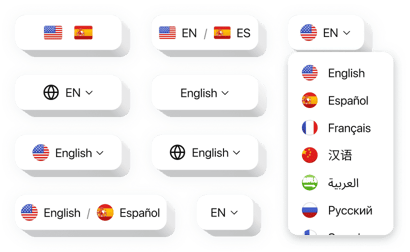
- Customizable widget design: Adjust the translator’s appearance to match your store’s theme, including language selector styles, positions, and color schemes.
- No coding needed: A user-friendly editor allows any store owner to implement and customize the widget without technical skills.
- Compatible with all PrestaShop themes: Seamlessly integrates without affecting your website’s performance or layout.
Try all features in the free editor – no registration required!
How to Add the Multilingual Translator to PrestaShop
Follow these simple steps to embed the Multilingual Translator addon on your PrestaShop store using Elfsight:
- Select your template: Visit the Elfsight editor and pick a template that suits your needs.
- Customize your widget: Tailor the languages, design, and display preferences to fit your branding and customer base.
- Copy the generated code: Once you’re satisfied with the settings, copy the installation code provided by the editor.
- Embed the code: Go to your PrestaShop admin panel and insert the code into a custom HTML block or your theme’s layout file.
If you need help, our support team is always ready to assist you with installation and setup – no tech experience required!