
Jimdo Language Switcher widget
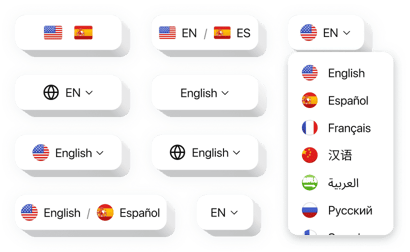
Create your Language Switcher widget
How the Language Switcher for Jimdo Can Expand Your Reach
Elfsight is a powerful widget that lets you present your content in multiple languages, making your website more inclusive and user-friendly. Whether you run a personal blog, a portfolio, or an ecommerce store, it allows visitors to effortlessly switch between languages, enhancing their experience and removing language barriers.
With Elfsight, you don’t need to write code or redesign your website. Just drag, drop, and configure – it’s that simple. Seamlessly integrated into your existing design, the widget automatically detects the current language and provides users with a sleek dropdown or flag-based selector to change it.
By adding this widget to your website, you’ll attract a broader audience, increase your chances of global conversions, and show your commitment to accessibility and internationalization.
Start using the Elfsight Language Switcher integration on your Jimdo website for free today and expand your audience without hassle!
Key Features of the Jimdo Language Switcher
Elfsight is built to be intuitive and easy to use, with a host of features that give you full control over how it looks and works:
- Multiple Display Formats: Choose between flags, dropdown menus, or language names – whatever fits your design.
- Auto Language Detection: Automatically translate your content into multiple languages for a smooth user experience.
- Flexible Positioning: Place the widget anywhere on the page: header, footer, sidebar, or embedded in content.
- Fully Responsive Design: The widget adapts perfectly to all screen sizes, ensuring functionality across mobile and desktop.
- No Coding Required: Easily configure and embed the widget using Elfsight’s visual editor.
- Styling Options: Customize colors, font sizes, paddings, and alignments to match your branding.
- Compatibility with All Jimdo Themes: Works seamlessly with both Jimdo Creator and Dolphin themes.
Try all features of the widget in the free editor – no signup needed!
How to Add Language Switcher to Jimdo
Follow these quick steps to embed the Language Switcher into your Jimdo website using Elfsight. No programming skills required!
- Select your template: Visit the Elfsight editor and choose a template that suits your website’s layout and goals.
- Customize your widget: Adjust the languages, layout, colors, and placement settings. Preview the result live as you go.
- Copy the generated code: After customization, click “Add to website for free,” then “Publish” and copy the auto-generated JavaScript embed code.
- Embed the code in Jimdo: For Jimdo Creator: Add an HTML Widget to your page and paste the code. For Jimdo Dolphin: Use the Custom Code section in your website settings.
If you encounter any issues or have platform-specific questions, our friendly support team is here to help!