Remember when Instagram was just for filtered brunch photos? Those days feel like ancient history. Today, the platform has transformed into one of the most powerful digital storefronts around, and if you’re not selling there – you’re leaving money on the table.
But here’s the catch: Instagram Shopping in 2026 looks nothing like it did a year ago. The Shop tab is gone, native checkout has been mostly deprecated, and those 30-hashtag tactics everyone swore by? They can actually tank your reach now.
- Instagram Shopping in 2026 drives discovery through product tags, but all purchases happen on your own website.
- Setup requires a Business account, verified domain, synced catalog via Shopify or similar, and Commerce Manager approval.
- Tag 2-5 products precisely in posts, Reels, and Stories for shoppable content.
- Focus on semantic keywords in titles and captions instead of hashtag spam – limit to 3-5.
- Track taps, clicks, and sales with Pixel plus CAPI, then test creatives and integrate CRM to scale.
Whether you’re setting up your first storefront or trying to fix one that suddenly feels broken, this guide breaks down everything you need to know – from how Instagram Shopping actually works today to the SEO tactics that’ll get your products discovered. Let’s dive in.
What Instagram Shopping Is (and What You Can Sell)
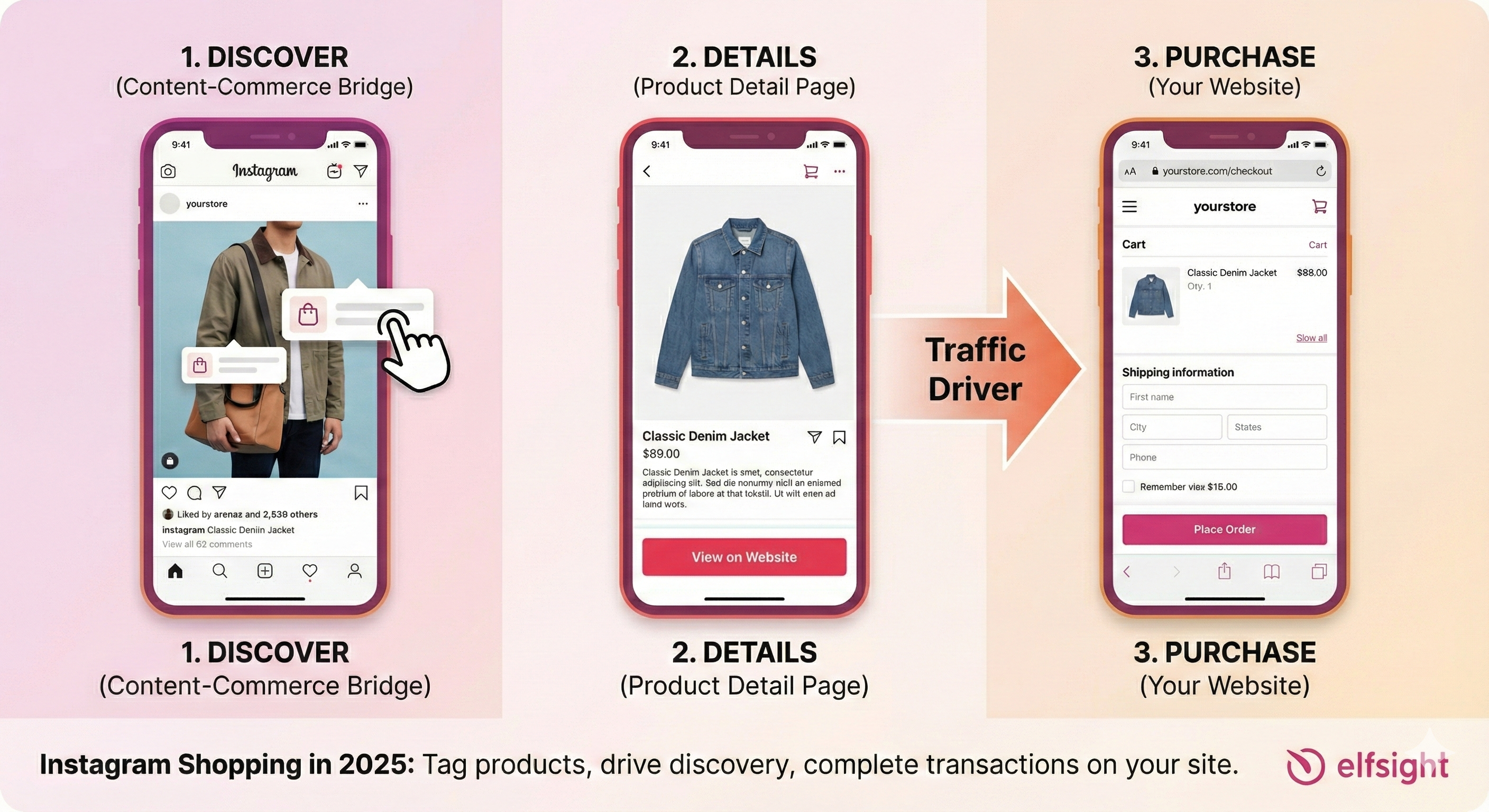
At its core, Instagram Shopping is a content-commerce bridge. It lets you tag products directly in your photos, videos, Reels, and Stories. When someone taps a tag, they see a Product Detail Page with pricing, descriptions, and images. Simple concept, powerful execution.
But here’s the critical 2026 update that trips up so many sellers: the transaction happens on your website now, not inside Instagram.
That’s right – by mid-2025, Meta began phasing out this feature for most regions and businesses to streamline its platforms, reduce regulatory complexities around handling payments, and refocus on advertising and discovery rather than direct transactions.
Who Benefits Most?
Direct-to-consumer brands are the obvious winners here. Your feed becomes a living, breathing catalog where every post can drive sales. But you’re not alone in this opportunity:
- Creators can tag products from brand partners (when whitelisted), turning influence into income.
- Local retailers get a digital storefront that reaches far beyond their neighborhood.
- Emerging brands can compete with established players through creative content alone.
Where Your Products Actually Appear
The Shop Tab may have disappeared from Instagram’s main navigation, but your products still show up across multiple surfaces:
Feed Posts
Feed Posts remain the cornerstone of Instagram commerce strategy, offering straightforward and reliable product visibility with continuous discoverability through hashtags, search, and recommendations. You can tag up to 5 products per single static image, with the ability to scale significantly through carousels, reaching up to 20 products across a carousel.
Reels
Reels represent the apex of Instagram’s content hierarchy in 2026, delivering the highest organic reach on the platform and the most impactful placement for product tags – up to 30 per reel. The “View Products” overlay appears prominently at the bottom of Reels, catching viewers at peak engagement moments when they’re most receptive to product discovery.
Stories
Stories use interactive sticker-based tagging – up to 5 per story – perfect for flash sales, new arrivals, and behind-the-scenes product reveals. The 24-hour lifespan creates urgency: users know the content will disappear, which psychologically accelerates purchase decisions.
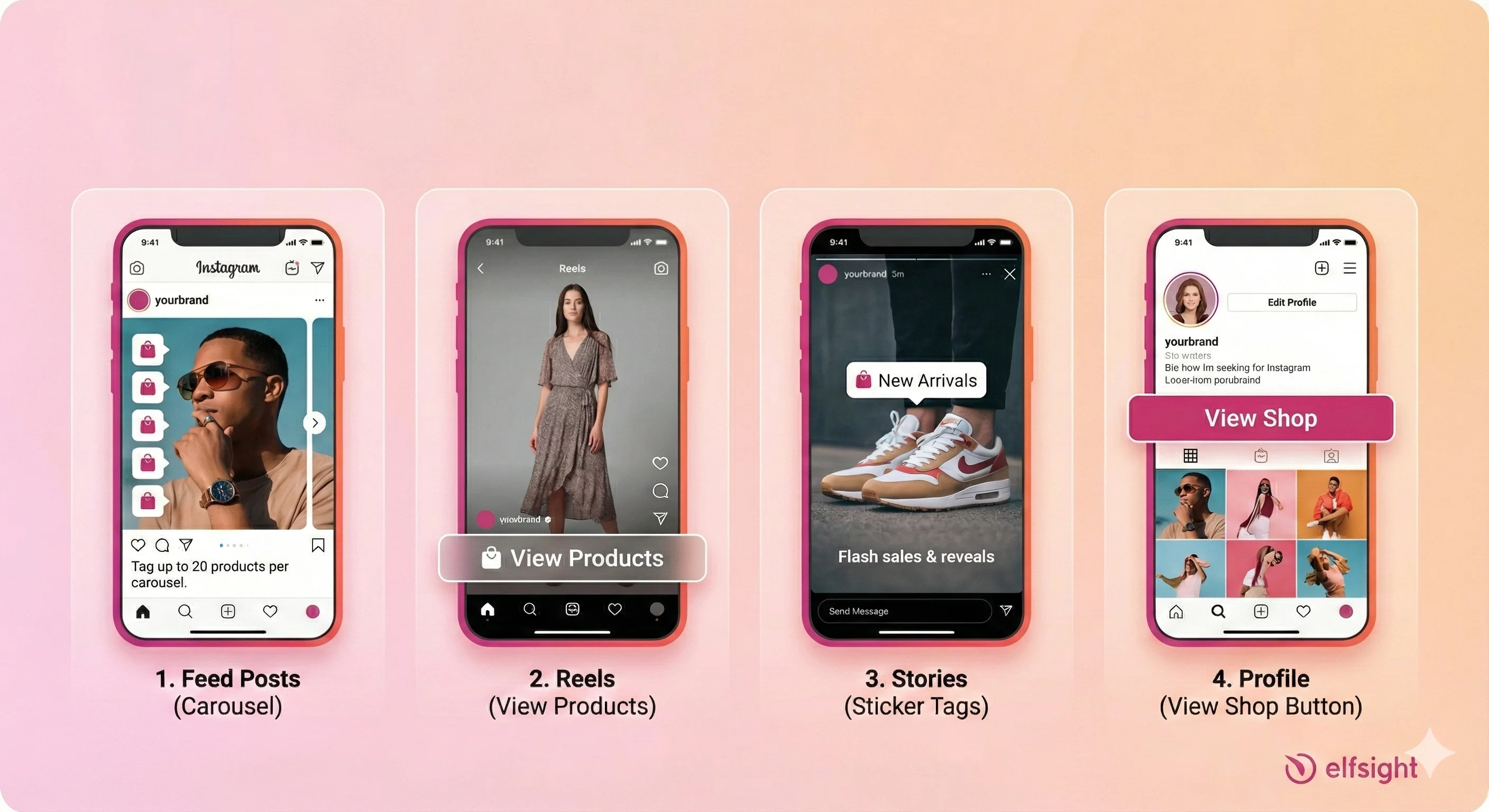
And yes, users can still visit your full shop by tapping the “View Shop” button on your profile. It’s just no longer prominently featured in the app’s bottom navigation.
The “Is It Free?” Question
Let’s address this directly because it causes so much confusion.
Setup is completely free. There’s no monthly subscription, no activation fee, no hidden charges to create your shop and start tagging products.
Selling fees have shifted. Since checkout now occurs on your own website – whether that’s Shopify, WooCommerce, or another platform – you pay your provider’s transaction fees, not Meta’s. Remember that 5% selling fee during the native checkout era? That’s essentially gone for most sellers.
Requirements + Setup: Your Start-to-Finish Checklist
Getting approved for Instagram Shopping feels mysterious until you understand what Meta actually wants. Let’s demystify it.
The 2026 Checkout Reality Check
Before you do anything else: you need your own ecommerce website. The DM-to-buy model won’t cut it if you want product tags. The “I’ll just send people to my Etsy” approach gets complicated fast.
Here’s the timeline that caught many sellers off-guard:
- Previous rule (2024): US shops were required to use Instagram’s internal checkout.
- Current rule (late 2025): You must have your own domain to link products to.
This isn’t Instagram abandoning commerce, it’s Instagram getting out of the payment processing business while doubling down on discovery.
Account & Policy Requirements
Account type matters. You must have a Business or Creator account. Personal profiles cannot tag products, period. If you’re still running a personal account, converting takes about 30 seconds in settings.
When should you choose Business vs. Creator? Business accounts unlock better analytics and advertising options, which is ideal for brands with multiple products and marketing budgets. Creator accounts work well for individual sellers and influencers who want simpler commerce features alongside their content tools.
Domain verification is non-negotiable. You must claim and verify the domain you sell from in Meta Business Manager. This single requirement causes more rejections than anything else.
Approval typically takes 24-48 hours, but can stretch longer during high-volume periods. Don’t submit on a Friday if you need access by Monday.
Catalog Options: Where Your Products Come From
Your product catalog is the database powering your entire Instagram Shopping experience. You have three ways to build it:
Partner Platform Sync (recommended)
If you use Shopify, BigCommerce, or WooCommerce, their native integrations automatically sync inventory, price changes, and stock status. When something sells out on your site, it disappears from Instagram. When you update a price, it reflects everywhere. This automation prevents embarrassing customer experiences and policy violations.
Data Feed Uploads
Data feed uploads work for custom websites. You’ll provide a CSV or XML file with your product information. The challenge? Maintaining real-time inventory accuracy. Every manual update you forget creates potential customer friction.
Manual Entry
This is viable for very small catalogs – think fewer than 10 products. But it’s risky if you forget to update stock levels. Nothing kills trust faster than selling something you don’t actually have.
The Setup Path: Step by Step
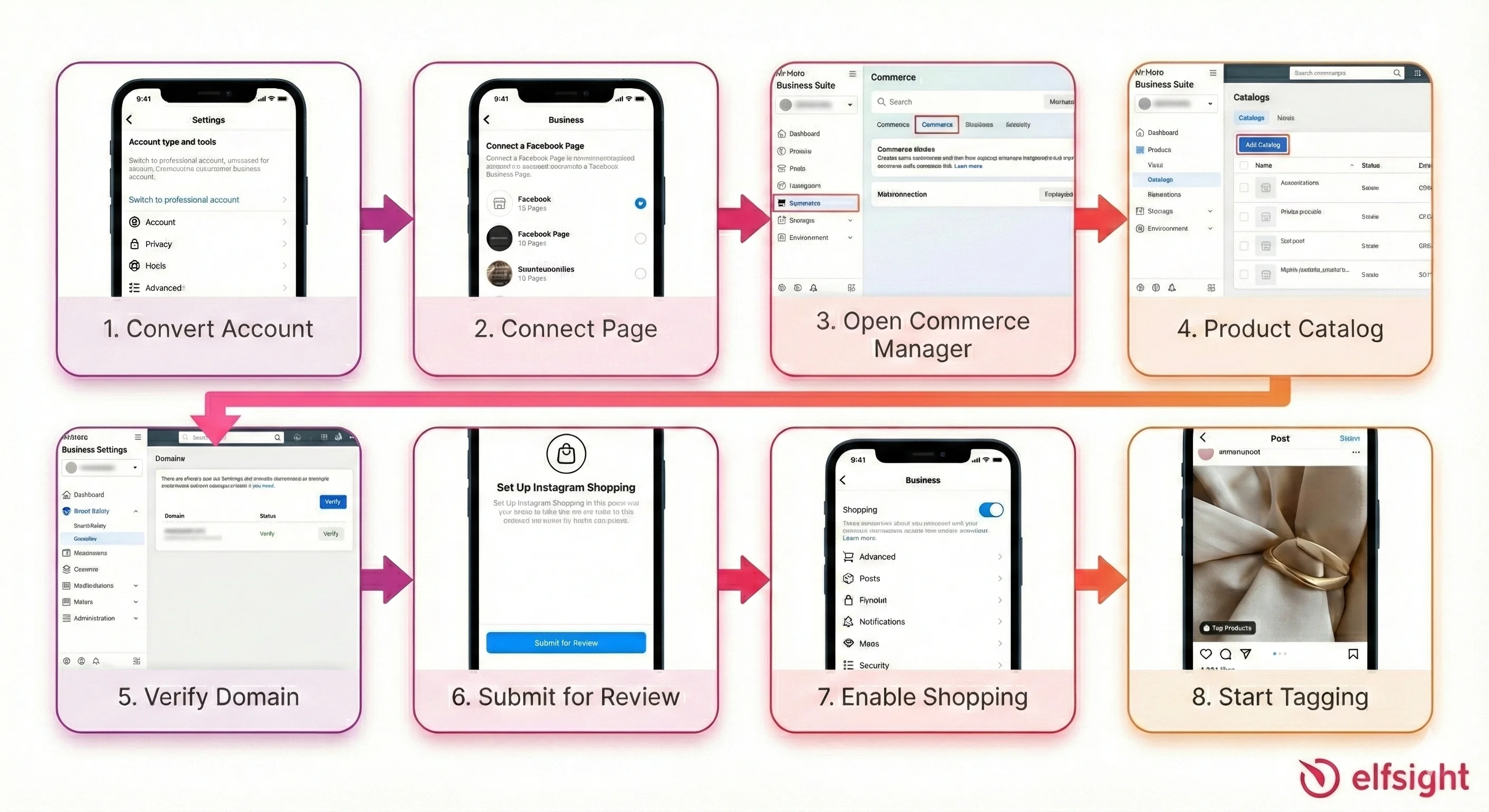
- Convert to a Business or Creator account (if you haven’t already). This conversion is done directly in Instagram Settings > Account Type, and the change takes effect immediately. Your follower list and content remain intact, only your account permissions and feature access change.
- Connect your Instagram account to a Facebook Business Page. The process takes 5–10 minutes and requires basic business information (name, category, location).
- Navigate to Commerce Manager in Meta Business Suite. Access it at business.facebook.com, then select your business account and navigate to “Commerce Manager” under the main menu.
- Create or connect your product catalog: (1) Create it manually within Commerce Manager and add products one-by-one, ideal for small inventories or unique products; or (2) Connect an existing catalog from your eCommerce platform.
- Verify your domain in Business Settings. Access Business Settings > Brand Safety > Domains, then add your domain (without “www”—just “example.com”). To verify, (1) Add a Meta tag to your website’s HTML code, (2) Upload an HTML verification file, or (3) Add a DNS record. Then return to Facebook and click “Verify Domain” – it typically completes within 72 hours.
- Submit your shop for review by clicking “Finish Setup” within Commerce Manager (some accounts are approved within 24–48 hours while others take 2–3 weeks).
- Enable Shopping. Once approved, go to Settings > Business > Shopping and toggle on “Enable Shopping.” Select your verified product catalog from the dropdown.
- Start tagging products in your content.
Common Blockers (and How to Avoid Them)
Getting rejected during the Instagram shop approval process is frustrating, but most denials stem from a handful of preventable mistakes. Understanding these common blockers and addressing them upfront dramatically increases your approval odds on the first submission.
- Domain mismatch is the leading cause of rejection. Triple-check that every product URL in your catalog points to the exact domain you’ve verified. Subdomains count as different domains.
- Policy violations happen when products fall into restricted categories. Review Meta’s commerce policies before submitting—things like weapons, adult products, and certain supplements will get flagged immediately.
- Missing business information delays approval. Complete your business details in Commerce Manager before submitting, including physical address and contact information.
- Incomplete profiles raise red flags. An account with 3 posts and no profile picture looks suspicious. Build some content history before applying.
Additionally, ensure your product catalog meets minimum requirements: Meta requires at least 9 distinct products (counting variations like size options separately) to approve a shop. Your website must also demonstrate legitimacy: include visible privacy policy, clear shipping information, professional design with a functional shop page, and transparent contact details.
Commerce Manager: Catalogs, Shops, and Collections
Commerce Manager is your behind-the-scenes command center. Users never see it, but it controls everything about your Instagram Shopping experience.
Structuring Your Catalog for Scale
If you’re selling more than a handful of products, organization becomes crucial. Here’s how to think about it:
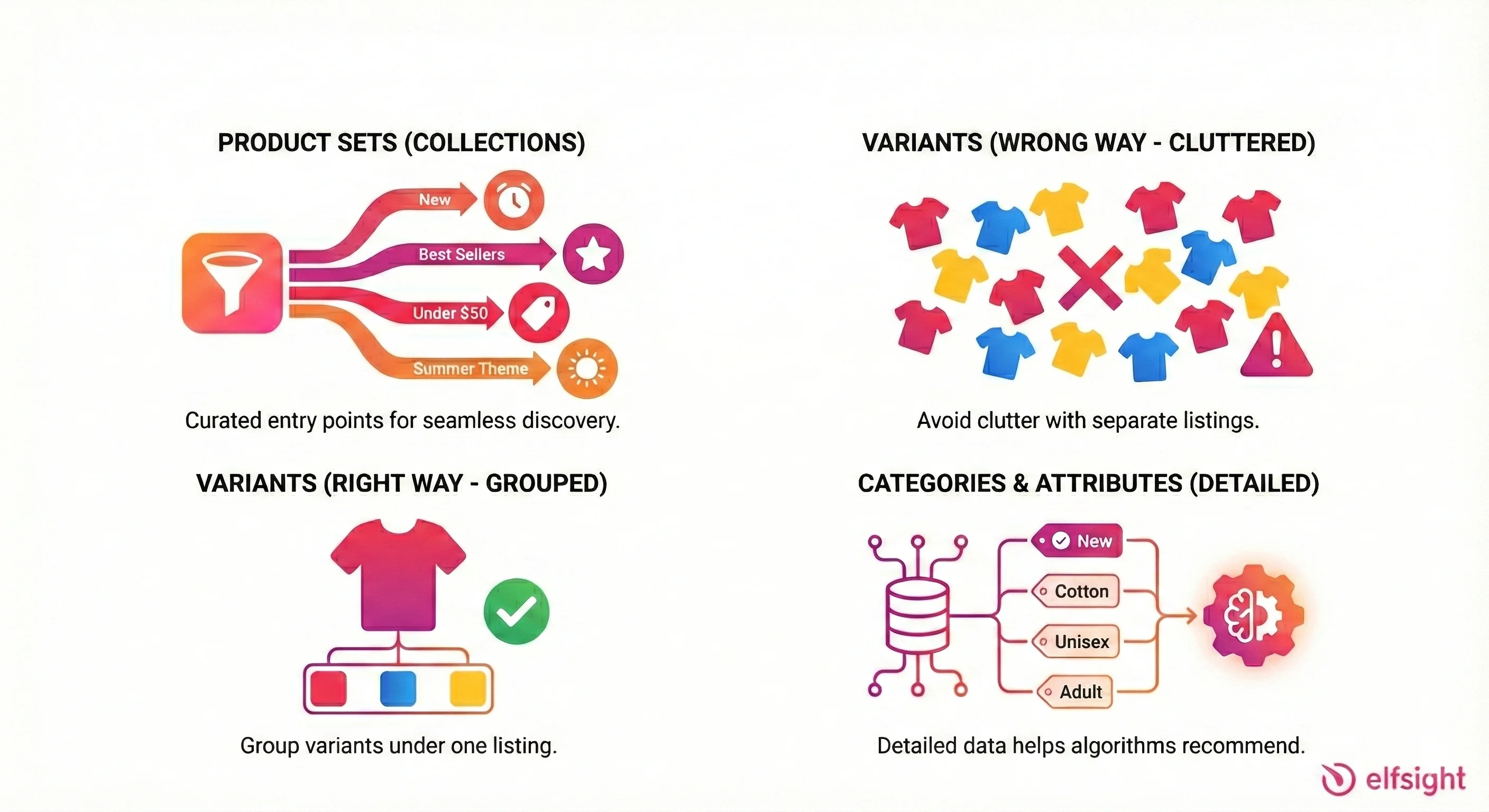
Product Sets
These become your Collections – curated groupings users browse on your profile. Create Sets for “New Arrivals,” “Best Sellers,” “Under $50,” or seasonal themes, giving shoppers entry points beyond scrolling through everything.
Variants Require Proper Grouping
If you sell a shirt in three colors, those shouldn’t appear as three separate products cluttering your catalog. Use the item_group_id field in your product data to group variants together. Users should see one shirt with color options, not three seemingly identical listings.
Categories and Attributes
They help Instagram’s algorithm understand and recommend your products. Don’t skip the detailed fields (condition, material, gender, age group), even if they feel tedious.
Building Your Shop Experience
Even without the prominent Shop Tab, your profile’s shop button remains important. Here’s how to make it count:
Navigate to Commerce Manager → Shops → Edit Shop. From here, you can customize your shop’s landing page with:
- Hero images that establish your brand aesthetic
- Featured collections spotlighting key products
- Arrangement of product groupings
The layout you create here is what users see when they tap “View Shop” on your profile. Treat it like your website homepage – first impressions matter.
Product Data That Actually Converts
Here’s something most sellers miss: your product feed is your SEO. The information you provide doesn’t just display to customers, it determines whether Instagram surfaces your products to the right people.
Expert Insight: “Your product titles need specificity. Structure them as: Brand + Gender + Product Type + Key Attribute + Material. ‘Blue Shirt’ is useless for discovery; ‘Men’s Slim Fit Oxford Shirt – Navy Blue – Cotton’ tells the algorithm exactly what you’re selling.” — Instagram Commerce Optimization Best Practice
Descriptions should front-load value. The first 150 characters appear in previews. Don’t waste them on fluffy brand storytelling, lead with what makes the product compelling.
Images deserve strategic thinking. White background shots are standard for catalogs, but lifestyle images showing products in use convert better on social. The good news? Commerce Manager lets you set different images for your “Shop” view versus your advertising. Use both.
Pricing accuracy prevents policy issues. If your Instagram price differs from your website price, you’re creating both customer distrust and potential compliance problems.
Reducing Disapprovals
Product rejections happen, but most are avoidable:
- Include GTINs (barcodes) when you have them
- Mark product condition accurately (new, refurbished, etc.)
- Ensure URLs actually work and point to matching products
- Keep availability status current – selling unavailable items violates policies
Product Tagging: Making Your Content Shoppable
Tagging is where the magic happens, it’s how you transform regular content into commerce opportunities. But there’s an art to doing it well.

The Basic Workflow
- Create your content (photo, carousel, Reel, or Story)
- Before publishing, tap “Tag Products”
- Search your catalog for the relevant item
- Place the tag directly on the product (not floating in empty space)
- Publish and monitor performance
That last point about tag placement matters more than you’d think. A tag floating above someone’s head feels disconnected from the product. A tag sitting directly on the handbag in the image creates an intuitive “tap to learn more” interaction.
Format-Specific Best Practices
Feed posts give you the most tagging flexibility. Single images support up to 5 tags, while carousels can hold up to 20 across all slides. But data suggests 2-3 focused tags outperform cluttered posts. Choose your hero products rather than tagging everything visible.
Stories use the product sticker, which is wonderfully interactive. Just ensure the sticker doesn’t obscure the actual product – position it beside, not on top of, what you’re selling.
Carousels deserve special attention. Use them to tell a story: “3 Ways to Style This Jacket” with each slide showing a different look, tagged with the specific items featured. This approach increases “taps per impression” because you’re giving viewers multiple reasons to engage.
The Do’s and Don’ts of Tagging
DO tag the exact variant shown. If the model is wearing the dress in sage green, tag the sage green variant. Users who tap expecting one thing and find another feel deceived.
DO match your creative to your tagged products. A lifestyle shot featuring your new sneakers? Tag the sneakers. A flat lay including items from multiple brands? Only tag what you actually sell.
DON’T over-tag. Just because you can tag 5 products doesn’t mean you should. More tags create visual clutter and decision paralysis. Be selective.
DON’T use misleading tags. Tagging a dress in a landscape photo will trigger “content mismatch” policy violations. Instagram is looking for this.
DON’T spam calls-to-action. “TAP TO BUY!!! SHOP NOW!!!” in your caption alongside product tags feels desperate. Let the tags do their job.
SEO + Visibility: Getting Discovered in 2026
Here’s where things have changed dramatically. The old playbook (stuff 30 hashtags in every caption and pray for virality) is officially dead. Instagram’s discovery engine has evolved, and your strategy needs to evolve with it.
The Hashtag Revolution
Users are now reporting pop-ups warning against using more than 3-5 hashtags. This isn’t a rumor—it signals a hard algorithmic pivot away from hashtag-based discovery toward semantic search.
What does this mean practically? Instead of #SummerDress #FloralDress #CottonDress #VacationOutfit #BeachStyle, your caption should read:
“Looking for a breathable floral summer dress for your next beach vacation? Our new cotton collection is designed for exactly that moment.”
See the difference? Natural language, conversational keywords, same discovery potential without the spammy appearance.
On-Platform SEO Tactics
Product titles are search terms. When someone searches “minimalist gold necklace,” products with those words in their titles surface. Generic names like “The Emma” or “SKU-4429” are invisible to search.
Captions should include keywords naturally. Think about what someone would type when looking for your product. Work those phrases into your caption copy without making it feel forced.
Alt text is an underused advantage. Edit the alt text on your photos to describe the product in plain English. Instagram’s search engine indexes this, but most sellers never bother customizing it.
Your brand name matters. Consistent naming across your catalog, captions, and profile strengthens relevance signals. If you’re “River & Stone Jewelry” in your bio but “R&S” in your product titles, you’re diluting your searchability.
Building a Keyword Framework (Apparel Example)
For clothing sellers, structure your keyword strategy around multiple attributes:
| Attribute | Examples | Where to Use |
|---|---|---|
| Style | Minimalist, bohemian, preppy | Product titles, captions |
| Material | Cotton, linen, silk, recycled | Product titles, descriptions |
| Occasion | Wedding guest, workwear, vacation | Captions, alt text |
| Fit | Oversized, slim, relaxed | Product titles, descriptions |
| Color/Pattern | Sage green, navy stripe, floral | Product titles, variant names |
Apply this same thinking to whatever you sell. Keywords should appear consistently across your catalog data and your content.
Discovery Signals That Matter
Beyond keywords, Instagram’s algorithm watches specific engagement patterns:
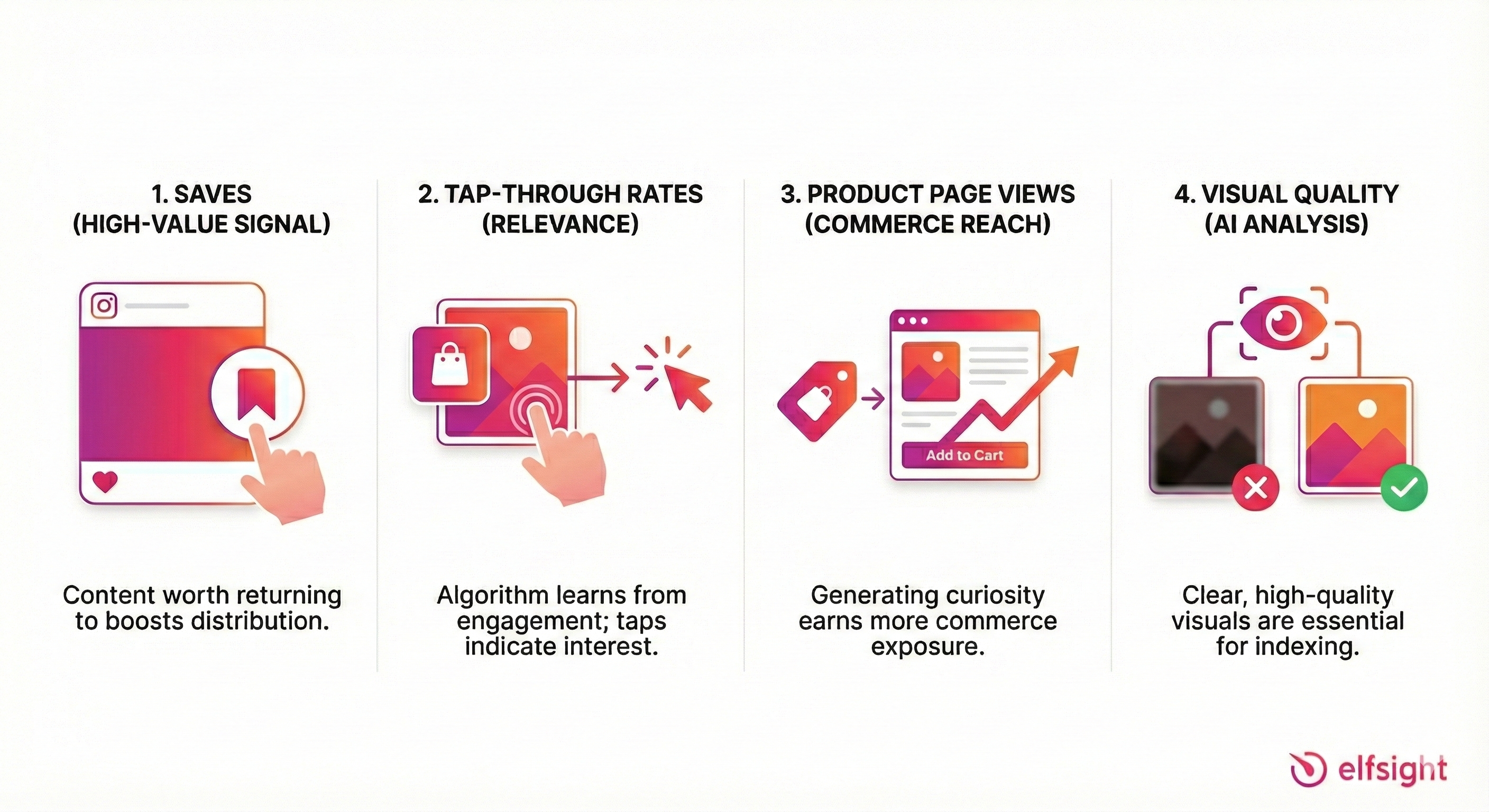
Saves are gold. When someone saves your post, they’re telling Instagram it’s worth returning to—the highest-value engagement signal. Create “saveable” content by adding genuine utility. “Save this for your holiday wishlist” isn’t just a nice CTA; it’s strategic.
Tap-through rates indicate relevance. If people see your tagged product but never tap, the algorithm learns your content isn’t matching user intent. This affects future distribution.
Product page views matter for commerce specifically. Instagram tracks whether your tagged products actually get explored. Posts that generate curiosity earn more commerce-related reach.
Visual quality affects indexing. Instagram’s AI analyzes your images. Blurry, dark, or poorly composed photos won’t surface in Shop discovery feeds regardless of how well you’ve optimized everything else.
Encouraging Saves and Wishlists
Since Instagram removed native checkout, the “save for later” behavior has shifted back to in-app saves and collections. You can encourage this:
- Create roundup posts (“5 fall essentials under $100—save this for your next shopping trip”)
- Tell stories that make products memorable
- Position products as solutions to problems worth remembering
The more saves your content earns, the more Instagram distributes it to similar audiences.
Analytics: Measuring Success Without Native Checkout
When checkout happened inside Instagram, tracking was simple—you saw revenue directly in your insights. Now that transactions occur on your website, measurement requires more intentionality.
The New Funnel
Your success metrics have shifted:
Impressions tell you whether people saw your content at all. Low impressions usually means a content quality or timing issue.
Product taps reveal whether your creative sparked curiosity. High impressions but low taps? Your content might not be effectively showcasing your products.
Outbound clicks (or “link clicks”) show whether your Product Detail Page convinced users to visit your site. This is your new primary Instagram-side conversion metric. The product description, pricing, and imagery on the PDP all influence this number.
Website purchases complete the picture, tracked via your Meta Pixel and Conversions API (more on this shortly).
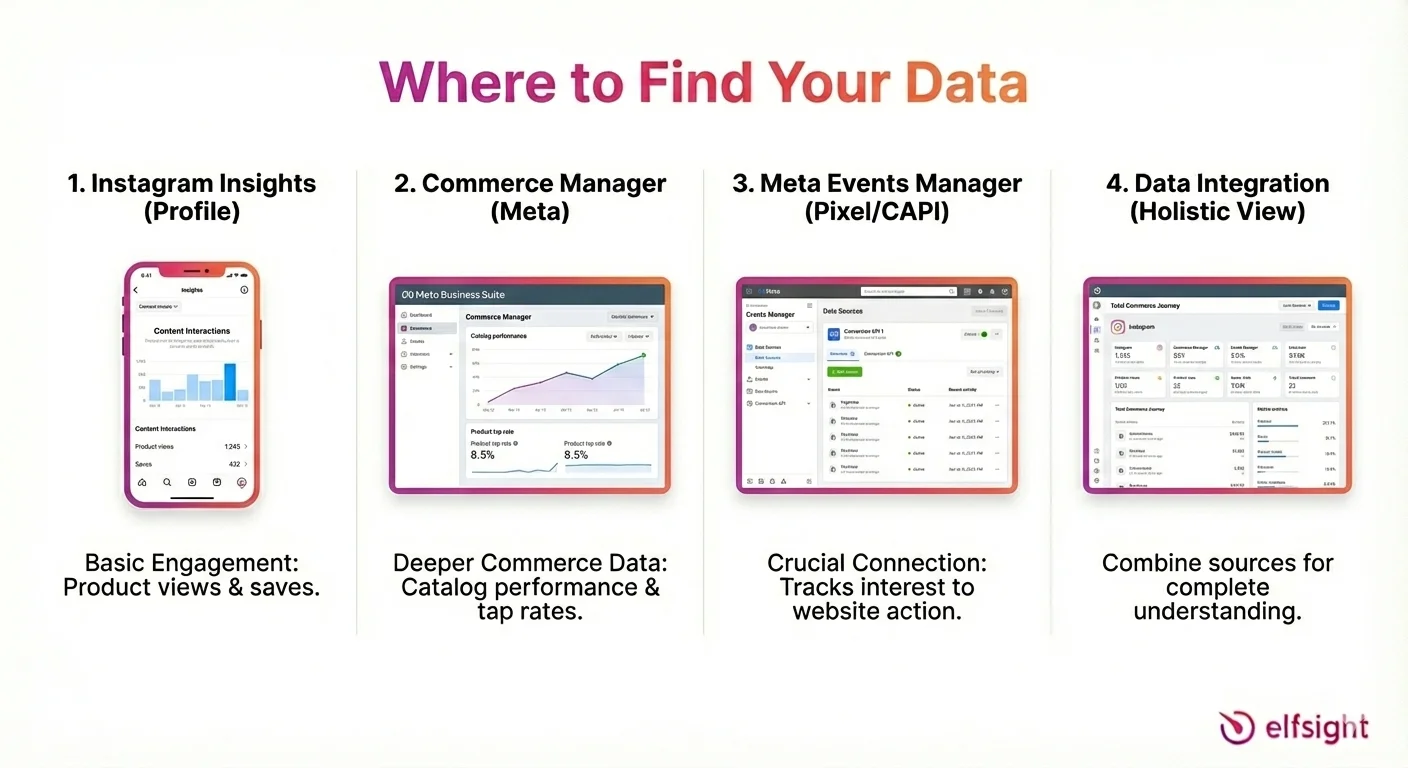
Where to Find Your Data
Instagram Insights (accessed from your profile) shows basic engagement metrics including product views and saves.
Commerce Manager Insights provides deeper commerce-specific data: catalog performance, product tap rates, and shop visits.
Meta Events Manager tracks pixel and CAPI events—the crucial connection between Instagram interest and website action.
The Optimization Loop
Data only matters if you act on it. Here’s a practical framework:
- Test creative by varying formats (static vs. carousel vs. Reel), tagging approaches, and caption styles
- Measure performance weekly, focusing on product tap rates and outbound clicks
- Update catalog data based on what you learn (better images, improved descriptions, optimized titles)
- Retag top performers by reusing high-converting products in fresh content
Funnel Troubleshooting
When results disappoint, diagnose systematically:
High views, low product taps? Your creative isn’t highlighting products effectively. Try lifestyle shots where products are more central, clearer tag placement, or stronger visual contrast.
High taps, low outbound clicks? Your Product Detail Page isn’t converting. Check your pricing (is it competitive?), descriptions (are they compelling?), and images (do they match the post?).
High clicks, low website sales? Instagram’s job is done—the problem is downstream. Audit your landing page experience, shipping costs, checkout flow, and payment options.
A Simple Reporting Dashboard
Metrics to Track Weekly
- By format: Which content types (posts, carousels, Reels, Stories) drive the most product engagement?
- By product: Which items get tapped most? Which convert best?
- By collection: Are certain categories outperforming others?
- By audience: What demographics engage with shopping content?
Hypotheses to Test Monthly
- “Carousel posts with styled flatlays will outperform single product shots”
- “Bundling related products in one post increases total taps”
- “Adding price in the caption reduces Product Detail Page drop-off”
Integrations + Scaling with Platforms and CRM
Once your basic shop is running, integrations become your scaling superpower. The right connections automate tedious tasks and improve the data flowing between platforms.
Ecommerce Platform Connections
Shopify offers the most seamless integration through its “Facebook & Instagram” sales channel app. Products sync automatically, inventory updates in real-time, and order data flows back to your store. Ensure your “Checkout Method” is set to “Your Website” given the native checkout deprecation.
BigCommerce and WooCommerce provide similar functionality through their respective Meta integrations. The key features to confirm: automatic inventory sync (preventing overselling), price update propagation, and variant support.
| Platform | Sync Features | Key Consideration |
|---|---|---|
| Shopify | Full catalog, inventory, orders | Checkout page compatibility for tracking |
| BigCommerce | Catalog, inventory, variants | Direct Meta integration available |
| WooCommerce | Catalog, inventory via extension | May require additional plugins for full functionality |
Pixel and Conversions API: Why You Need Both
With browser cookies disappearing and iOS tracking restrictions tightening, relying solely on the Meta Pixel leaves huge data gaps.
CAPI sends purchase and conversion events directly from your server to Meta, bypassing browser limitations entirely. This matters for two reasons:
Attribution accuracy improves dramatically. You’ll see which Instagram content actually drove sales, not just clicks.
Algorithm optimization depends on conversion data. When Meta knows which users actually purchase, it can find more people like them. Without CAPI, you’re starving the algorithm of its most valuable learning signal.
If you’re spending on Instagram ads alongside organic shopping, CAPI setup isn’t optional, it’s essential.
CRM and Email Integration
Instagram Shopping drives discovery, but rarely completes the customer relationship. Smart sellers connect their Instagram traffic to broader marketing systems:
Email capture becomes crucial when someone clicks through from Instagram. Offer pop-ups with genuine value—discount codes, early access, style guides—in exchange for addresses. Now you can remarket to interested browsers.
Abandoned cart sequences recover lost revenue. Someone who tapped a product tag, visited your site, added to cart, but didn’t buy? That’s a warm lead who deserves a reminder.
Post-purchase flows turn buyers into repeat customers and potential UGC creators. A “how did you style it?” email requesting photos feeds your content pipeline while building community.
Operational Workflows to Consider
Scaling Instagram Shopping means more than just tagging products. Think about:
- Returns handling: How do website returns from Instagram traffic get processed?
- Customer support: Who responds to Instagram DMs asking product questions?
- Catalog governance: Who updates products, and how often?
- Content-commerce coordination: How does your content team know which products to feature?
These boring operational questions prevent chaos as volume grows.
Case Studies: What Actually Works
Theory is nice. Results are better. Here’s how real businesses have made Instagram Shopping work.
The Frankie Shop: From Boutique to Global Brand
The challenge: A Lower East Side boutique wanting to scale beyond local foot traffic.
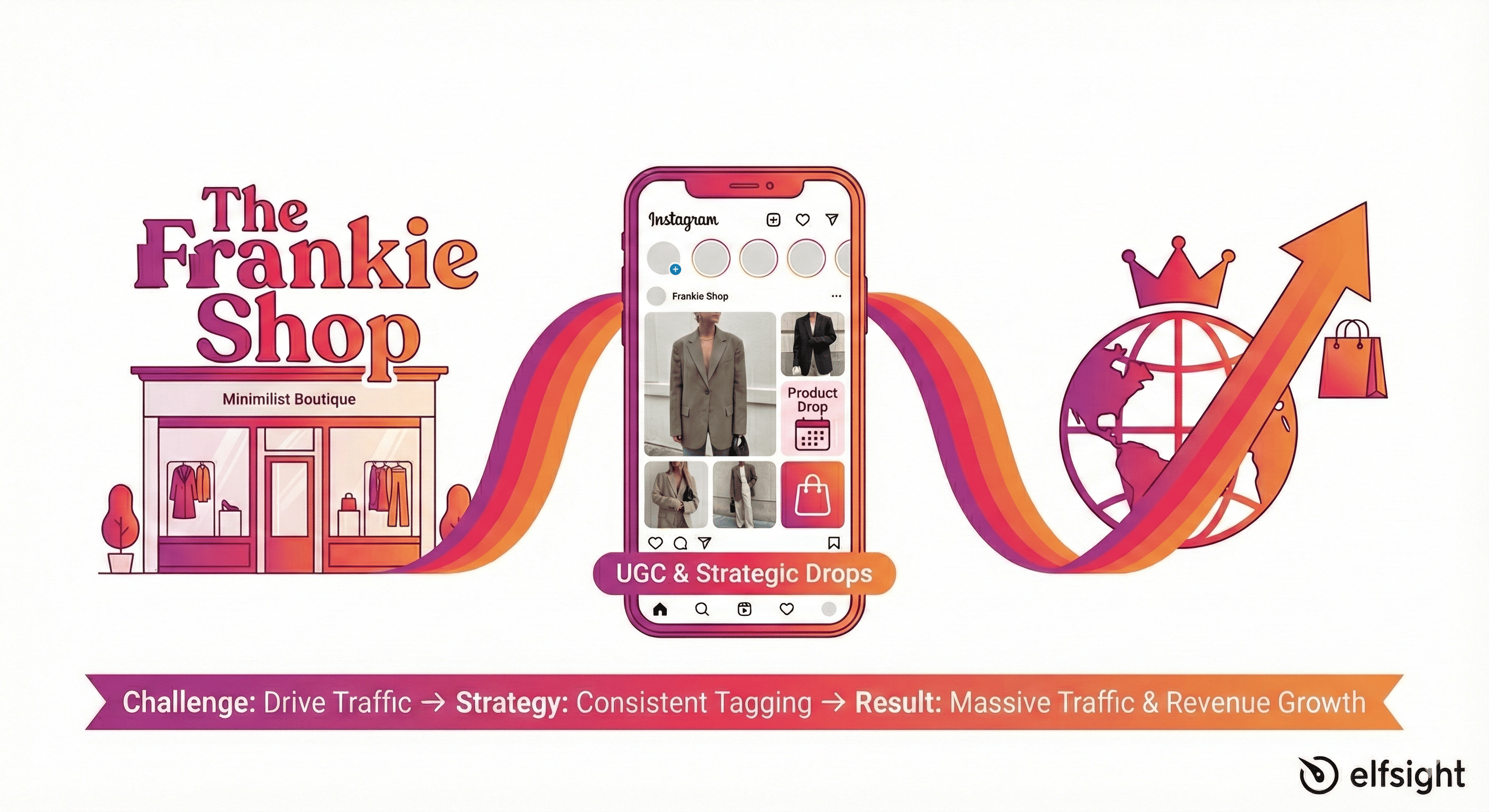
The strategy: Heavy investment in user-generated content combined with strategic “Product Drop” launches. The Frankie Shop reposts customer photos and tags the products featured, creating social proof alongside direct purchase paths.
What made it work: The UGC approach accomplished two things simultaneously—it provided endless authentic content (customers became the marketing team) while creating urgency through limited drops. When followers see real people wearing pieces that might sell out, FOMO drives action.
The result: Expanded from a single boutique location to global brand recognition, with Instagram Shopping cited as a primary growth driver.
The Natori Company: Consistency Wins
The challenge: An established fashion brand wanting to drive more website traffic from Instagram.
The strategy: Simply implementing a rigorous, consistent tagging schedule across all content formats.
Expert Insight: “Sometimes the boring fundamentals beat clever tactics. Discipline matters more than creativity.” — Instagram Shopping Case Study Analysis
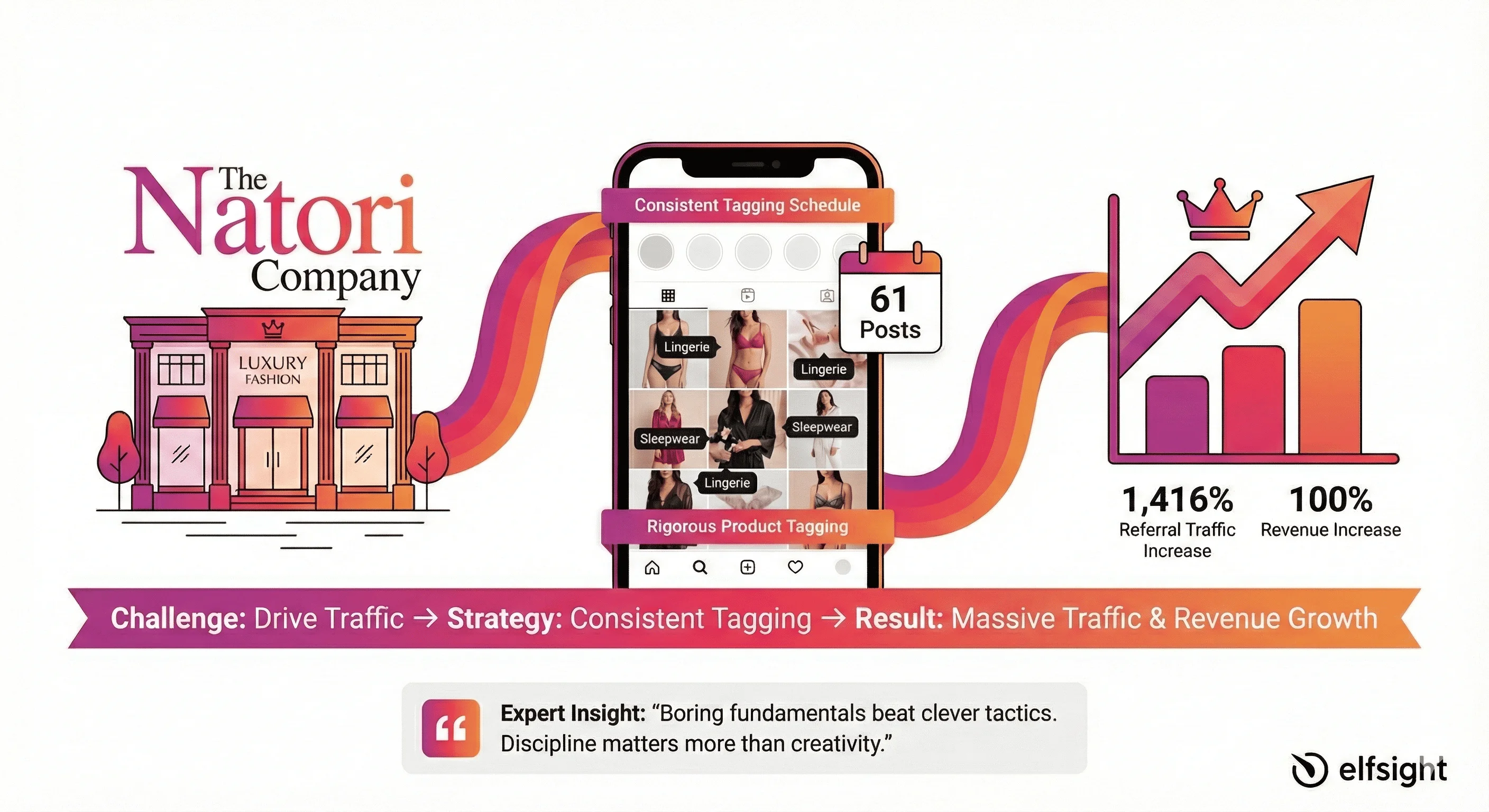
What made it work: Discipline over creativity. The team committed to tagging products in 61 posts during their test period. Every piece of content became a commerce opportunity.
The result: 1,416% increase in referral traffic and a 100% increase in revenue week-over-week. Sometimes the boring fundamentals beat clever tactics.
The insight extends beyond Natori’s results. Research shows that brands tagging products at least five times monthly achieve significantly higher visibility on Instagram’s Shopping Explore page, proving that frequency and consistency amplify algorithmic reach far more than occasional creative bursts.
Native Union: Quality Over Quantity
The challenge: A tech accessories brand wanting efficient Instagram commerce without constant posting.
The strategy: Focused carousel posts emphasizing product utility and minimalist design aesthetics, with precise product tagging.
What made it work: Targeting over volume. Rather than posting daily with mediocre content, they created fewer but higher-quality posts with clear intent. Carousels allowed storytelling—multiple angles, use cases, and lifestyle contexts.
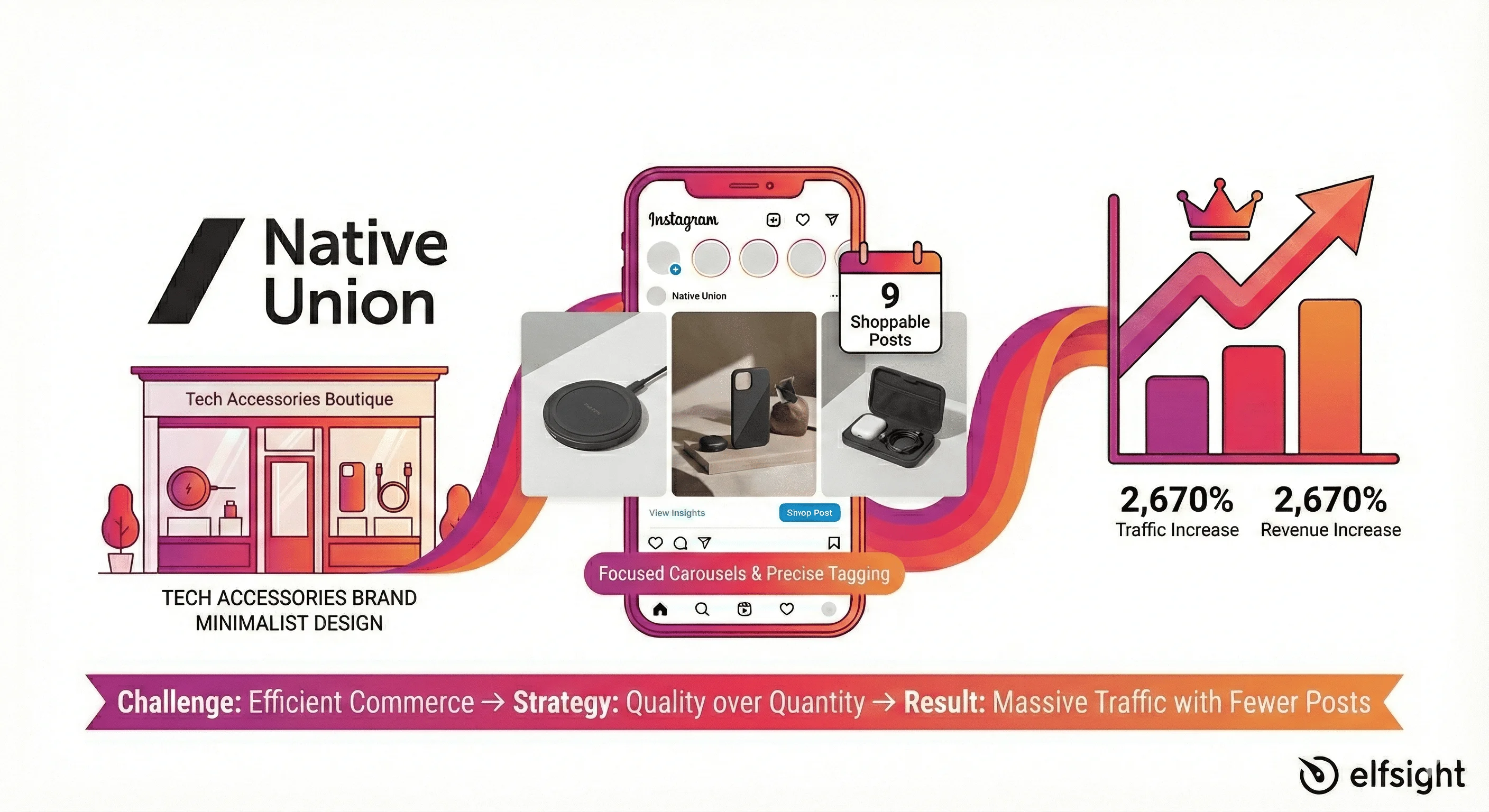
The result: 2,670% increase in traffic month-over-month with just 9 shoppable posts. Proof that relevance beats frequency.
Frequently Asked Questions
How long does Instagram shop approval take, and what disqualifies my application?
Why isn't my shop button showing on Instagram, and how do I activate it?
Do I need a website to sell on Instagram, and what happens at checkout?
What are the minimum requirements to get approved for Instagram product tagging?
Can I use my personal Instagram account for product tagging, or must it be business?
What product information must be identical on my website and Instagram catalog to avoid rejection?
The Bottom Line
Instagram Shopping in 2026 isn’t about processing transactions inside the app anymore. It’s about turning the platform’s massive engaged audience into traffic for your own store—traffic that’s already interested in what you’re selling because they tapped on your product.
The opportunity is real. According to industry research, 70% of active Instagram users shop on the platform, and social commerce sales account for 17% of global ecommerce transactions. But success requires adapting to the new reality: website-based checkout, keyword-focused discovery, engagement-driven visibility, and strategic content creation.
Start with your foundation: get your catalog data impeccable, your domain verified, and your basic tagging workflow established. Then build from there –testing formats, optimizing based on data, and connecting Instagram traffic to your broader marketing ecosystem.
The brands winning at Instagram Shopping aren’t necessarily the biggest or most creative. They’re the most consistent, the most strategic about their product data, and the most willing to let the numbers guide their decisions.
Your products deserve to be discovered. Now go tag them.