
The X API (formerly Twitter API) has undergone dramatic changes since Elon Musk’s acquisition in 2023. What was once a free, developer-friendly platform is now a premium service with strict pricing tiers and carefully controlled access levels. For developers building bots, integrating real-time data, or creating social media management tools, understanding the current X API landscape is critical.
This comprehensive guide walks you through everything you need to know about obtaining X API credentials in 2026, understanding actual costs, and optimizing your implementation for efficiency.
- How X API pricing evolved from free to paid and the emerging pay-per-use model
- Current tiers breakdown and which tier fits your use case
- Step-by-step process to get your API credentials from the Developer Portal
- Modern authentication methods and permission scopes
- Five proven optimization strategies to reduce costs and improve performance
Let’s start by understanding where the X API fits into your development workflow and what’s currently available.
The X API Evolution: What Changed
The Twitter API has evolved dramatically over the years. Here’s the timeline of major changes:
| Date | Event | Impact on Developers |
|---|---|---|
| October 2022 | Elon Musk acquires Twitter | Speculation about API changes begins |
| February 2023 | Free API access eliminated | Third-party clients (Tweetbot, Echofon) shut down; pricing becomes mandatory |
| March 2023 | Paid tiers introduced ($100, $2,500, $42,000) | Entry price jumps 100x; developer ecosystem fragments |
| June 2024 | Basic tier pricing doubles to $200/month | Increased barrier to entry for indie developers |
| October 2024 | Official rebrand: Twitter → X | All documentation and branding updated; confusing for legacy users |
| November 2025 | Pay-per-use pricing beta launches | New consumption-based model with $500 developer vouchers for testing |
Free access became $200–$5,000/month in four years. Before planning an implementation, understand what the API actually provides and which tier matches your needs.
What Can You Build With the X API?
The X API enables programmatic access to X’s infrastructure—from retrieving data to publishing content to automating responses. Here are the most common applications:
Brand Monitoring & Social Intelligence
Track mentions, competitor activity, and trending conversations in real-time. Filtered streams deliver instant alerts when specific keywords or accounts generate activity, enabling teams to respond quickly to brand-relevant events.
Content Scheduling
Automate posting schedules, manage multiple accounts from a single dashboard, and coordinate content workflows. Agencies and creators use these tools to handle dozens of X accounts without manual login-and-post cycles.
Website Content Integration
Embed live X feeds, individual tweets, and trending topics directly into websites. Publishers keep content synchronized with live X activity without requiring manual updates or outdated embeds.
Data Analysis and Research
Access structured data for large-scale studies, trend analysis, and market research. The API provides historical search, engagement metrics, and user data at volumes that would be impossible to collect manually.
AI & Sentiment Analysis
Feed real-time X data into machine learning models, language models, and sentiment analysis systems. Applications range from audience monitoring to discourse analysis to predictive analytics.
X API Pricing: The 2026 Tier System
As of today, X is testing a revolutionary pay-per-use pricing model, but the traditional tier system remains the active standard. Here’s what you need to know about both approaches.
💲 Current Standard Pricing
The tiered pricing structure consists of three main tiers, each designed for different scales of usage:
| Tier | Monthly Cost | Annual Savings | Best For | Key Capabilities |
|---|---|---|---|---|
| Free | $0 | — | Development and testing only | 500 posts/month, read-heavy, 1 req per 24hrs on most endpoints, limited endpoint access |
| Basic | $200 | $2,100/year (12.5% savings) | Small projects, content monitoring, single app usage | 15,000 read requests/month, 50,000 write requests/month, standard endpoint access |
| Pro | $5,000 | $54,000/year (10% savings) | Growing applications, full feature set, mission-critical systems | 1,000,000 read requests/month, 300,000 write requests/month, full endpoint access, priority support |
| Enterprise | $42,000+ | Custom pricing | Large-scale systems, dedicated infrastructure | Custom rate limits, SLAs, dedicated support, advanced features, volumetric discounts |
While Basic is 25x cheaper ($200 vs $5,000), Pro gives you 100x more read capacity and unlocks critical features like full-archive search and real-time filtering. Most companies scale directly from Free → Basic → Pro.
💢 What Changed: The Death of Free Access
The shift from free to paid access served two purposes: generating revenue from the platform’s data value, and reducing abuse. Free API access enabled spam bots, data scrapers, and malicious automation at scale.
Available with Free Tier
- 500 posts per calendar month (about 16-17 per day)
- Rate-limited to 1 request per 24 hours on most endpoints
- No posting, liking, or engaging – read-only access to public data only
- Cannot write posts, create resources, or perform account actions
- No access to trends, direct messaging, or advanced features
🔮 The New Pay-Per-Use Model (Beta)
In November 2025, X launched a closed beta for a revolutionary pricing approach: pay only for what you use. Instead of fixed monthly fees, developers in the beta pay individual prices for different API operations – similar to AWS or Google Cloud’s consumption-based billing.
How Pay-Per-Use Works
The beta pricing model assigns specific costs to each operation type. For example:
- Reading a post costs a specific price (varies by operation)
- Searching posts costs more (higher computational load)
- Creating a post has its own rate
- Accessing trends uses a different pricing tier
- Direct messaging has separate pricing
All developers in the closed beta receive a $500 voucher to experiment before committing to production usage.
Potential Benefits Over Fixed Tiers
- No payment for unused capacity (unlike fixed tier pricing)
- Ability to scale up or down without tier changes
- Granular control over spending per feature
- More transparent cost attribution
X provides an interactive API cost calculator where you can input your expected usage patterns and see exactly what you’d pay.
X Authentication: How to Prove Your Identity
Before making any API request, you need to authenticate – prove to X that you’re authorized to access specific data. The X API v2 supports multiple authentication methods, each suited for different scenarios.
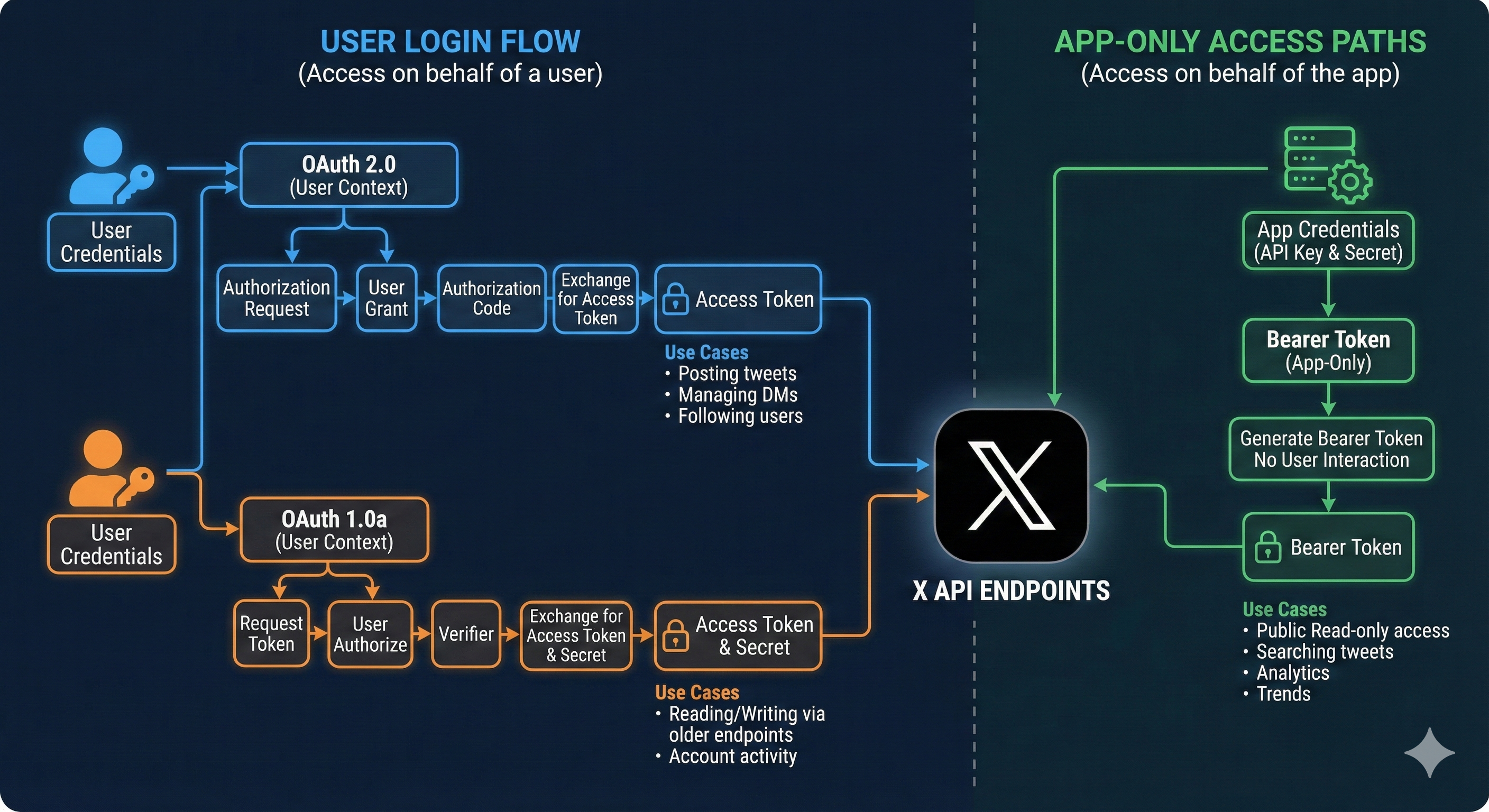
🔐 OAuth 2.0 Authorization Code (Recommended for New Development)
OAuth 2.0 is the modern standard for authentication and is recommended for all new development. It’s more secure than legacy approaches and handles both public and private user data.
When to Use OAuth 2.0
- Building new applications from scratch
- Web applications and mobile apps requiring user login
- Accessing private user data (private lists, draft posts)
- Performing actions on behalf of users (posting, liking, following)
How It Works
- User clicks “Sign in with X” in your application
- Your app redirects them to X’s authorization page
- User grants permissions (you define the scopes requested)
- X returns an authorization code
- Your app exchanges the code for an access token
- You use this token for API requests on behalf of the user
Required credentials: Client ID, Client Secret, and redirect URI (configured in your developer app settings).
🔑 OAuth 1.0a User Context (Legacy, Still Supported)
This older method is still supported but not recommended for new development. OAuth 1.0a authenticates on behalf of a specific user and is primarily useful for legacy applications.
- Posted tweets or direct messages on a user’s behalf
- Retrieving a specific user’s private timeline
- Managing user-specific resources
👥 Bearer Token (App-Only, Best for Public Data)
Bearer token authentication is the simplest approach for accessing public data without user context. Use this when you’re building tools that only need public information.
When to Use
- Searching for public posts
- Retrieving public user profiles
- Accessing publicly available trends
- Building analytics tools for public content
How it works: Provide your app’s credentials (API Key and Secret), receive a Bearer Token, include the token in API request headers. No user involvement required.
X API v2: Endpoints and Resource Types
The X API comes in two versions: v1.1 (legacy, no longer updated) and v2 (current standard). All new projects should use v2, which provides access to endpoints organized by resource type – Posts, Users, Trends, Engagement, and more. Each resource supports specific operations (read, create, update, delete) depending on your tier and permissions.
Posts (Tweets) – The Core Resource
What you can do: Retrieve posts, search for posts matching criteria, create new posts, delete posts, access timelines
Common endpoints:
- GET /2/tweets — Lookup specific posts by ID
- GET /2/tweets/search/recent — Search recent posts (last 7 days)
- POST /2/tweets — Create a new post
- GET /2/users/:id/tweets — Get posts from a specific user
Posts are the foundation of the X API. Almost every use case involves retrieving, searching, or creating posts in some way.
Users – Profile Information
What you can do: Access user profiles, get follower information, search for users
Common endpoints:
- GET /2/users/by/username/:username — Get user by handle
- GET /2/users/:id — Get user by ID
- GET /2/users/:id/followers — Get user’s followers
User endpoints let you build profiles, track followers, and verify account information without manually visiting X.
Engagement – Likes, Retweets, Replies
What you can do: See engagement metrics, track who liked or retweeted posts, manage user engagement
Common endpoints:
- GET /2/tweets/:id/liked_by — See who liked a post
- POST /2/users/:id/likes — Like a post
- GET /2/tweets/:id/quote_tweets — Get quote tweets (retweets with added commentary)
Engagement endpoints power analytics dashboards and community management tools by tracking interactions and responses to content.
Lists – User Collections
What you can do: Create and manage curated lists of users, access posts from list members
Common endpoints:
- GET /2/lists — List your lists
- POST /2/lists/:id/members — Add member to list
- GET /2/lists/:id/tweets — Get posts from list members
Lists are useful for organizing accounts and creating targeted feeds without following everyone publicly.
Trends – What’s Happening Now
What you can do: Access real-time trending topics and hashtags
Common endpoints:
- GET /2/trends — Get trending topics
- GET /2/users/personalized_trends — Get personalized trending topics for a user
Trends data powers discovery features and helps applications surface relevant conversations happening right now on X.
Filtered Stream – Real-Time Data
What you can do: Subscribe to a real-time stream of posts matching your rules, receive notifications as posts are created
Common endpoints:
- GET /2/tweets/search/stream — Connect to filtered stream
- POST /2/tweets/search/stream/rules — Create or modify stream rules
Filtered stream is powerful for applications that need real-time updates (monitoring brand mentions, tracking specific keywords, etc.) without constantly polling the search endpoint.
Direct Messages – Private Communication
What you can do: Send and receive direct messages, manage conversations
Common endpoints:
- GET /2/dm_events — Retrieve direct messages
- POST /2/dm_conversations/:id/messages — Send a message
Direct message endpoints enable customer support automation and notification systems built on top of X.
Rate Limits and Quota Management
The X API v2 enforces two types of limits: request rate limits (per 15-minute windows) and monthly post consumption limits (tracked across the calendar month).
📨 Request Rate Limits (Per 15-Minute Windows)
Different endpoints have different rate limits based on your tier.
| Endpoint Example | Free Tier | Basic Tier | Pro Tier |
|---|---|---|---|
| GET /2/users/:id (lookup user) | 1 req / 24 hours | 100 requests / 24 hours | 900 requests / 15 mins |
| POST /2/tweets (create post) | Not available | Available | Available |
| GET /2/tweets/search/recent | Limited | Available | 450 requests / 15 mins |
Free tier uses per-endpoint limits measured in 24-hour windows (very restrictive). Basic and Pro tiers use 15-minute windows, which are much more generous because the window resets frequently.
📊 Monthly Post Consumption Limits
Separate from request rate limits, search and stream endpoints consume from a monthly “post quota.” Once consumed, you can’t query these endpoints until the next calendar month.
- Free tier: 10,000 posts/month
- Basic tier: 500,000 posts/month
- Pro tier: 2,000,000+ posts/month
These limits apply specifically to: recent search, filtered stream, user timelines, and mention timelines.
🚨 What Happens When You Hit a Limit
When you exceed a rate limit, X returns an HTTP 429 (Too Many Requests) error response with a Retry-After header indicating how many seconds to wait before retrying.
When you exhaust your monthly post quota, X returns a 429 error indicating the quota limit is reached. You’re blocked from querying that endpoint until the next calendar month begins.
Five Optimization Strategies: Reduce Costs and Improve Performance
With limited rate limits and monthly quotas, optimization directly impacts your application’s capability and cost. Here are proven strategies to reduce API consumption.
1. Use Field Selection to Reduce Response Size
By default, API responses return many fields you might not need. The fields parameter lets you request only specific data.
Instead of:
GET /2/tweets?ids=TWEET_IDUse:
GET /2/tweets?ids=TWEET_ID&tweet.fields=created_at,public_metrics&expansions=author_id&user.fields=usernameThe second request returns only the data you need, resulting in smaller responses and faster processing.
2. Implement Application-Level Caching
Cache API responses in your database or cache layer with appropriate TTL values:
- Static content (usernames, display names): 24 hours
- Semi-dynamic content (post text, engagement counts): 6 hours
- Real-time content (trending topics): 30 minutes to 1 hour
Real impact: A dashboard that previously fetched trending posts every 15 minutes can drop to every 2 hours with caching, reducing daily API calls from 96 to 12—an 87.5% reduction.
3. Batch Requests Whenever Possible
Some endpoints accept multiple IDs in a single request.
Instead of 3 separate requests:
GET /2/tweets?ids=ID1 GET /2/tweets?ids=ID2 GET /2/tweets?ids=ID3Use 1 batch request:
GET /2/tweets?ids=ID1,ID2,ID3This reduces your consumption from 3 requests to 1, saving 67% of your quota.
4. Use Backoff and Retry Logic
When hitting rate limits or temporary errors, retry with exponential backoff:
- Wait 1 second before retry 1
- Wait 2 seconds before retry 2
- Wait 4 seconds before retry 3
- Wait 8 seconds before retry 4
This prevents hammering the API and gives temporary issues time to resolve.
5. Consider Filtered Stream Instead of Polling
Instead of repeatedly asking “Are there new posts matching my criteria?” (polling), subscribe to webhooks where X pushes notifications when matching posts appear.
Polling approach: Check every 5 minutes = 288 checks/day. Most checks return “no new data” (wasted quota).
Filtered stream approach: Receive notification only when data changes. Zero wasted requests. Real-time updates.
Error Handling: Common Issues and Solutions
Understanding common error codes helps you debug and recover gracefully.
| Error Code | HTTP Status | Cause | Solution |
|---|---|---|---|
| Invalid Request | 400 | Malformed request or missing required fields | Review request format, ensure all required parameters present |
| Unauthorized | 401 | Missing or invalid credentials | Check that Bearer Token or OAuth tokens are correct and not expired |
| Forbidden | 403 | Authenticated but not authorized (insufficient permissions) | Request additional scopes in your OAuth flow, get user re-approval |
| Not Found | 404 | Resource doesn’t exist (invalid ID, deleted content) | Verify resource ID is correct and still exists |
| Rate Limited | 429 | Too many requests within the time window | Implement backoff, wait for rate limit window to reset (check Retry-After header) |
| Quota Exceeded | 429 | Monthly post quota exhausted | Wait until next calendar month, or request quota increase |
🔧 Parsing Error Responses
When an error occurs, X returns JSON with details:
{ "errors": [ { "message": "The `ids` query parameter value is invalid", "type": "https://api.x.com/2/problems/invalid-request" } ] }Best practice: Always wrap API calls in try-catch blocks and log errors to a monitoring system. This helps you identify patterns and debug issues faster.
Get Your X API Key: Step-by-Step
The process has simplified significantly compared to the old Twitter API, but there are still critical steps:
🔗 Step 1: Create a Developer Account
- Navigate to X Developer Portal
- Sign in with your X account (or create one)
- Complete developer profile setup
- Await approval (typically 5-10 minutes)
First-time users will see an onboarding wizard that guides you through creating your first Project and App. If you don’t see this, click “Projects & Apps” in the left sidebar.
📂 Step 2: Create a Project
A Project is a container for one or more Apps. Think of it as a workspace.
- In the Developer Portal, click “Create Project”
- Name your project (e.g., “Analytics Dashboard”)
- Describe your use case
- Select your access tier (start with Free for testing)
By default, you’re on the Free tier. To upgrade: Go to the “Products” section in the developer portal → Find the X API v2 card and click “View Access Levels” → Select the tier you want
🔨 Step 3: Create an App
- Within your project, click “Create App”
- Choose an App name (e.g., “Brand Monitor Bot”)
- Accept terms
- Generate your API keys
🔑 Step 4: Access Your Credentials
Navigate to your app’s “Keys and Tokens” tab. You’ll find:
- API Key (Consumer Key): A public identifier for your app. Safe to share in source code.
- API Secret Key (Consumer Secret): Keep this secure! Never expose it in client-side code or version control.
- Bearer Token (for app-only auth): Used for app-only authentication (read-only, no user context needed). Also keep secure.
- Client ID & Secret (for OAuth 2.0): OAuth 2.0 credentials. Only visible if you enable OAuth 2.0 in your app settings.
Recommended Tools & Resources
- Official X API Documentation: The authoritative source for all endpoints, parameters, and examples.
- Rate Limits Reference: Complete breakdown of all endpoint rate limits by tier.
- X Postman Collection: Pre-built API requests for testing in Postman. Eliminates manual endpoint crafting.
- X Developer Community Forum: Connect with other developers, ask questions, report issues.
- X Dev GitHub: Official sample code, SDKs, and libraries for Python, JavaScript, Java, and more.
- Client Libraries: Official and community-maintained SDKs in multiple languages. Saves time vs. raw HTTP requests.
FAQ: Common Questions About the X API
Can I use the X API for free?
What's the difference between OAuth 2.0 and Bearer tokens?
How long do access tokens last?
What happens if I exceed my rate limit?
Can I increase my rate limits or monthly post quota?
Which tier should I choose for my project?
Need more help? Check the X Developer Documentation or visit the X Developer Community Forum to connect with other developers and get answers from the community.
Next Steps
Building with the X API is straightforward once you understand the pricing, rate limits, and optimization strategies. Whether you’re monitoring brand conversations, automating content, or analyzing trends, the API provides everything you need. Start with a small project, implement the five optimization strategies early, and grow from there.
The difference between a scalable application and one that struggles often comes down to implementation details. Plan thoroughly, optimize aggressively from day one, and your X integration will thrive. Ready to get started? Head to developer.x.com, create your first project, and begin building!