
If you’re integrating with Amazon as a seller, affiliate, or advertiser, you’ll face a critical choice: which API actually fits your needs? Amazon offers four distinct APIs, each designed for different use cases.
With the deprecation of legacy Marketplace Web Services (MWS), all modern Amazon integrations must choose between the Selling Partner API, Product Advertising API, Amazon Advertising API, and specialized APIs like the Vendor Central API. This guide walks you through the entire ecosystem, from identifying which API you need to understanding authentication methods, so you can make informed decisions about your integration strategy.
- The four main Amazon APIs and what each one does
- Real-world rate limits and current billing structure
- Authentication methods and getting started with APIs
- Error handling and troubleshooting steps
- Optimization strategies for efficient API usage
Understanding your use case is the first step. Let’s explore the key concepts, beginning with common applications across Amazon’s APIs.
Where Are Amazon APIs Applied?
Amazon’s API ecosystem serves multiple communities, each with distinct use cases and business models.
🛒 Amazon Sellers & Multichannel Operators
Professional sellers rely on the Selling Partner API to manage inventory across FBA (Fulfillment by Amazon) and FBM (Fulfillment by Merchant), automate pricing strategies, generate reports, handle orders and refunds programmatically, or to integrate Amazon with ERP systems, accounting software, and inventory management platforms.
🔗 Affiliate Marketers & Content Creators
Affiliate marketers and content creators use the Product Advertising API to fetch Amazon product information, reviews, pricing, and availability data to display on their websites. Whether building product comparison tools, review aggregators, or niche product blogs, the API enables monetization through Amazon Associates commission structures without direct selling.
📢 Advertising Agencies & PPC Specialists
Agencies managing Amazon advertising campaigns at scale use the Amazon Advertising API to create, update, pause, and optimize sponsored products, brands, and display ads programmatically. The API provides real-time campaign performance metrics, bid automation capabilities, and attribution data that manual optimization simply cannot achieve.
💻 SaaS Platform Builders
Developers building SaaS solutions for Amazon sellers integrate the SP-API to create management dashboards, repricing tools, automated listing tools, analytics platforms, and industry-specific applications. One example is a repricing SaaS that monitors competitor prices and automatically adjusts your prices to stay competitive while maintaining profit margins.
🏭 Vendors & Dropshippers
Amazon Vendors and specialized vendor platforms use dedicated vendor APIs to manage their supply chain, access sales data aggregated at the catalog level, and integrate with procurement systems. Dropshippers often combine Product Advertising API with SP-API to manage product feeds and orders automatically.
Understanding Amazon’s API Ecosystem
By March 31, 2024, Amazon switched off its legacy MWS endpoints, meaning every serious seller tool now has to run on the modern Selling Partner API (SP-API) to keep pulling orders, inventory, and payout data reliably.
Today, Amazon doesn’t provide a single unified API – instead, it offers specialized APIs optimized for different workflows. Before choosing an API, you need to understand what each one does.
The Four Main Amazon APIs
This table highlights how SP-API, Product Advertising, Amazon Advertising, and Vendor Central APIs differ in purpose, best-fit scenarios, primary users, and auth models, giving you a clear first filter for your choice.
| API | Purpose | Best For | Primary Users | Authentication |
|---|---|---|---|---|
| Selling Partner API (SP-API) | Order, inventory, listing, and financial data management | Sellers and vendors automating operations | Professional sellers, vendors, developers | OAuth 2.0 + LwA (Login with Amazon) |
| Product Advertising API | Product data retrieval for affiliate sites | Displaying Amazon products on external sites | Affiliate marketers, content creators, review sites | API Key + OAuth 2.0 |
| Amazon Advertising API | Campaign management and ad performance | Managing sponsored ads programmatically | Ad agencies, sellers, brand managers | OAuth 2.0 + LwA |
| Vendor Central API (Vendor Proprietary) | Vendor-specific supply chain and reporting | Supply chain and procurement | Amazon vendors only | AWS credentials or OAuth |
Each API operates independently with separate authentication, rate limits, and pricing structures. Choosing the right one depends entirely on what you’re trying to accomplish.
📑 Quick Decision Framework
If you’re not sure which Amazon API you actually need, use this short framework before you dive into documentation. It maps the most common goals to the right API so you don’t waste time integrating the wrong one.
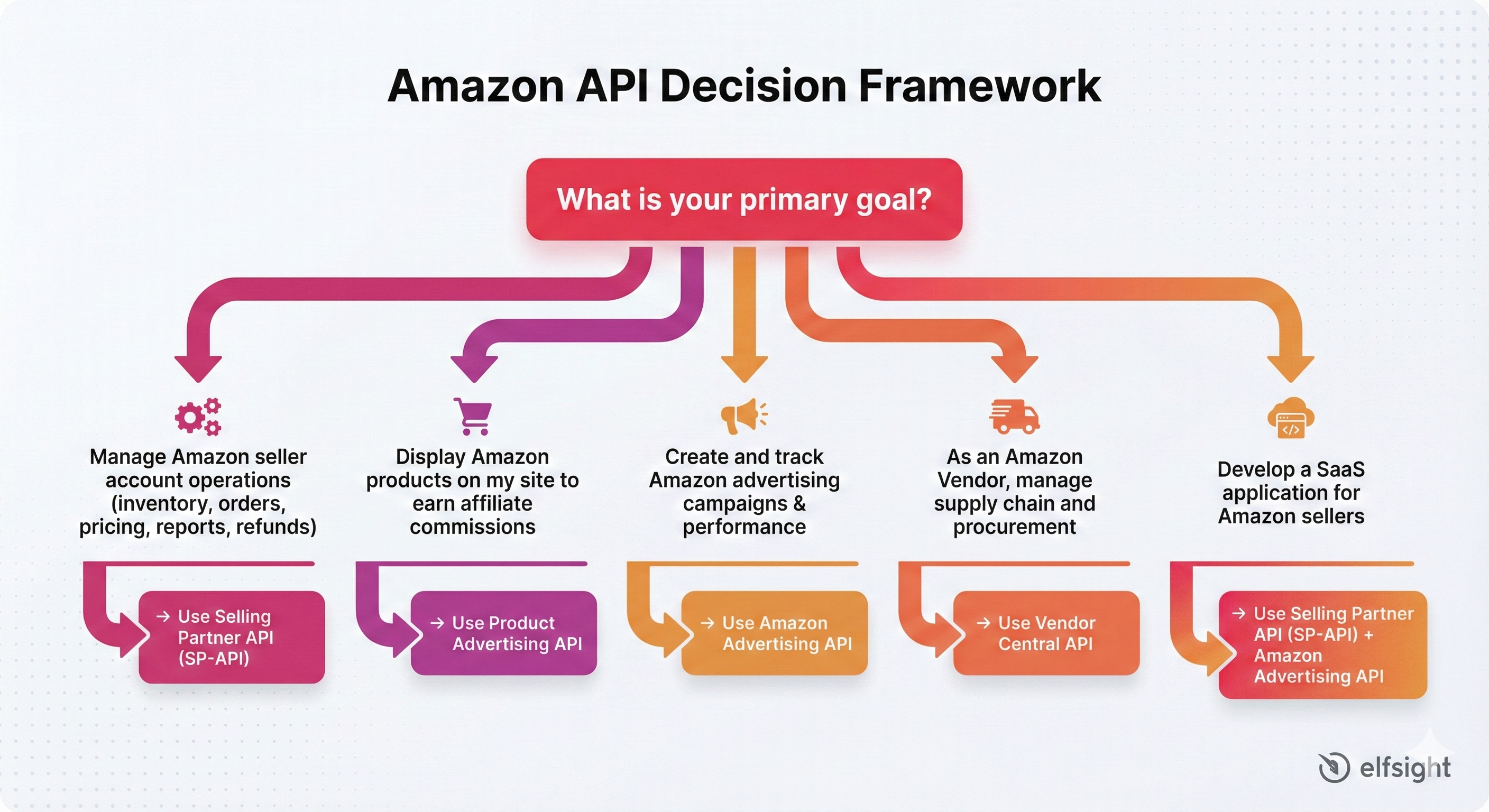
Choosing an Amazon API becomes much easier once you anchor it to a single, concrete goal. As your stack grows, you might combine multiple APIs in one solution, but this framework will keep every integration grounded in a clear purpose instead of technology for its own sake. In the next sections, we’ll walk through each API in detail, including capabilities, limitations, and how to get started.
Selling Partner API (SP-API): The Modern Seller’s Backbone
In September 2021, SP‑API became the new standard and functional successor of the legacy MWS (Marketplace Web Services). It’s currently the primary API for Amazon sellers worldwide and serves as the foundation for professional selling operations.
🔑 What Is SP-API?
The Selling Partner API is a REST-based API that gives Amazon sellers programmatic access to their business data. It covers orders, shipments, inventory levels, product listings, financial transactions, returns, and detailed reporting. 1 million+ sellers worldwide use SP-API to automate and scale their operations.
What Can You Do With SP-API?
- Inventory & listing management. Add, update, or delete product listings programmatically, manage stock across multiple SKUs and marketplaces, and push bulk updates for large catalogs instead of editing everything manually in Seller Central.
- Order & shipment processing. Retrieve orders in real time, confirm shipments, update tracking numbers, handle cancellations and refunds, and generate packing slips so orders can flow straight from Amazon to your fulfillment center.
- Pricing automation. Adjust prices automatically based on inventory levels, sales velocity, competitor activity, or marketplace trends, using repricing logic that can optimize thousands of SKUs in real time.
- Financial data & reporting. Pull detailed reports on sales performance, traffic, inventory aging, restock recommendations, and financial events without downloading CSVs manually, enabling up‑to‑date analysis in your own dashboards.
- Returns, refunds & external integrations. Automate the returns workflow (return details, labels, refunds) and sync Amazon with ERP, CRM, accounting, and shipping systems so operational data moves between tools without manual data entry.
🚀 Quick Start: Your First SP-API Call (Python)
Here’s a minimal example to retrieve your recent orders:
import requests
from datetime import datetime, timedelta

access_token = "YOUR_ACCESS_TOKEN"
region = "us-east-1"

headers = {
  "Authorization": f"Bearer {access_token}",
  "Content-Type": "application/json"
}

created_after = (datetime.utcnow() - timedelta(days=7)).isoformat() + "Z"

url = "https://sellingpartnerapi-na.amazon.com/orders/v0/orders"
params = {
  "CreatedAfter": created_after,
  "OrderStatuses": "Unshipped,PartiallyShipped,Pending"
}

response = requests.get(url, headers=headers, params=params)

if response.status_code == 200:
  orders = response.json()
  print(f"Retrieved {len(orders['Orders'])} orders")
  for order in orders["Orders"]:
    print(f"Order {order['AmazonOrderId']}: ${order['OrderTotal']['Amount']}")
else:
  print(f"Error: {response.status_code} - {response.text}")
SP-API Rate Limits by Operation
Different SP-API operations have different rate limits. Here’s what you need to know:
| Operation | Rate Limit | Burst | Use Case | Impact |
|---|---|---|---|---|
| GetOrder | 0.5 req/sec | 1 | Retrieve single order details | Best for real-time order lookups |
| ListOrders | 0.5 req/sec | 1 | Fetch batch of orders | Use for daily order syncing |
| GetInventorySummaries | 2 req/sec | 10 | Check inventory levels | Monitor stock across SKUs |
| UpdateInventory | 2 req/sec | 5 | Adjust stock quantities | Batch updates recommended |
| GetListingOffersBatch | 0.1 req/sec | 1 | Retrieve pricing/offers | Most restrictive operation |
| PutProduct | 10 req/sec | 10 | Create/update listings | Bulk listing operations |
| CreateInboundShipment | 2 req/sec | 10 | FBA shipment creation | Manage inbound logistics |
Key takeaway: GetListingOffersBatch is the most restrictive (0.1 req/sec), so pricing checks need careful throttling. Use batch operations where possible.
SP-API Limitations & Important Considerations
Even though the Selling Partner API is extremely powerful, it comes with several practical constraints you should plan for before integrating it into your stack.
| Aspect | What to Know | What It Means for You |
|---|---|---|
| Registration requirements | You must have a Professional seller account with an active Professional selling plan to access SP-API. | Budget for the monthly plan and confirm your account status before you start building or testing. |
| Rate limiting | SP-API enforces operation-specific request limits; going over them triggers throttling responses (HTTP 429). | Implement request queuing, batching where possible, and exponential backoff to avoid failures under load. |
| Regional restrictions | Credentials are tied to individual marketplaces (e.g., amazon.com vs amazon.co.uk). | For multi-region setups you’ll need separate credentials and routing logic per marketplace. |
| Sandbox environment | Amazon provides a sandbox endpoint for non-production testing. | Use the sandbox for initial development and regression tests so you don’t risk real orders or account data. |
If you design your integration with these limits in mind from day one, your SP-API implementation will be much more stable, scalable, and easier to maintain as your Amazon business grows.
Product Advertising API: The Affiliate Marketer’s Tool
The Product Advertising API allows affiliates to retrieve Amazon product data for display on external websites. It’s designed specifically for Amazon Associates who want to programmatically fetch product information, reviews, pricing, and availability.
🛒 What Is Product Advertising API?
The Product Advertising API provides read-only access to Amazon’s product catalog. You can search for products using keywords, retrieve detailed product information including title, description, images, pricing, availability, and customer reviews. Crucially, all data retrieved must be displayed on a website – the API is not designed for bulk data scraping or offline analysis.
What Can You Do With Product Advertising API?
- Product search. Query Amazon’s catalog by keywords and get matching products with key details, ideal for dynamic product blocks that update based on what users search for.
- Retrieve rich product details. Pull full metadata for specific items, including title, description, images, brand, ratings, review count, pricing, and ASIN, so you can build detailed product cards and comparison tables.
- Fetch customer reviews. Get review text, ratings, dates, and reviewer names to power review widgets, testimonials sections, or standalone review aggregation pages on your site.
- Check availability and pricing. Access near real-time price and stock status, which is crucial for comparison sites that must show whether an item is currently available or temporarily out of stock.
- Build complete shopping experiences. Create mini shopping flows with carts, pull offers from multiple sellers for the same product, and send users to Amazon with tracking links so affiliate commissions are attributed correctly.
🚀 Quick Start: Product Search in Node.js
Here’s a simple example to search for products:
de>const axios = require("axios");

const partnerId = "YOUR_PARTNER_TAG";
const apiKey = "YOUR_API_KEY";
const apiHost = "webservices.amazon.com";

async function searchProducts(keyword) {
  const endpoint = "/paapi5/searchitems";

  const payload = {
    Keywords: keyword,
    PartnerTag: partnerId,
    PartnerType: "Associates",
    SearchIndex: "All",
    Resources: [
      "Images.Primary.Medium",
      "ItemInfo.Title",
      "Offers.Listings.Price",
      "CustomerReviews.Count",
      "CustomerReviews.StarRating"
    ]
  };

  try {
    const response = await axios.post(
      `https://${apiHost}${endpoint}`,
      payload,
      {
        headers: {
          "Content-Type": "application/json",
          "X-API-Key": apiKey
        }
      }
    );

    const products = response.data.SearchResult.Items;
    console.log(`Found ${products.length} products for "${keyword}"`);

    products.forEach((item) => {
      console.log(`- ${item.ItemInfo.Title.DisplayValue}`);
      console.log(
        `  Price: $${item.Offers.Listings[0].Price.DisplayPrice}`
      );
      console.log(
        `  Rating: ${item.CustomerReviews.StarRating.DisplayValue}★`
      );
    });
  } catch (error) {
    console.error(
      `Error: ${error.response.status} - ${error.response.data.Errors[0].Message}`
    );
  }
}

searchProducts("best gaming headphones");
Product Advertising API Limitations & Important Considerations
Before you start building around the Product Advertising API, make sure you understand these constraints so your affiliate integration doesn’t run into unexpected roadblocks.
| Aspect | What to Know | What It Means for You |
|---|---|---|
| Amazon Associate approval | You need an active Amazon Associates account that has been approved for at least 30 days and has generated a minimum number of qualifying sales. | You can’t rely on this API for a brand-new site; plan time to get traffic and initial conversions before development. |
| Read-only access | The API only returns catalog data; it cannot create, update, or delete listings. | Use it for product data and links, not for managing inventory or offers on Amazon’s side. |
| Usage limits | Daily request quotas apply (100,000 requests per 24-hour period). Higher tiers available for successful affiliates. | Cache product data, batch calls, and monitor request volume so you don’t hit hard limits on busy days. |
| Display requirements | Data must be shown on a public website with proper attribution and kept reasonably up to date. | Don’t use the API purely for offline analysis or to republish data into non-compliant channels or closed tools. |
| Geographic restrictions | Access is tied to specific regional Associate programs and supported countries. | If you target multiple regions, you may need separate Associate accounts and configuration per locale. |
Design your integration with these rules in mind, and the Product Advertising API will stay stable, compliant, and scalable as your affiliate traffic grows.
Amazon Advertising API: The Campaign Manager’s Choice
The Amazon Advertising API enables programmatic management of sponsored product, brand, and display advertising campaigns. It’s designed for agencies, sellers, and platforms managing advertising at scale.
📢 What Is Amazon Advertising API?
The Amazon Advertising API provides programmatic access to your advertising accounts. You can create and manage campaigns, adjust bids and budgets, retrieve detailed performance metrics, and optimize advertising spend automatically. Unlike manual campaign management in Advertising Console, the API enables real-time optimization based on actual performance data.
What Can You Do With Amazon Advertising API?
- Campaign management. Create new campaigns, pause underperforming ones, restart them when conditions improve, and adjust targeting, budgets, and schedules programmatically.
- Bid optimization. Change bids automatically based on metrics like impressions, clicks, conversions, or ACoS so high‑performing keywords get more budget and weak ones get scaled back.
- Performance reporting. Pull detailed reports with impressions, clicks, spend, conversions, and revenue at campaign, ad group, and keyword levels to power custom dashboards and alerts.
- Multi‑account management. Manage campaigns for many brands or clients from a single system, apply global optimization rules, and standardize reporting across accounts.
- Attribution insights. Use attribution data to connect off‑Amazon traffic sources (search, social, email) with resulting Amazon sales and understand full‑funnel ROI.
🚀 Quick Start: Fetch Campaign Performance (Python)
de>import requests
from datetime import datetime, timedelta

access_token = "YOUR_OAUTH_TOKEN"
profile_id = "YOUR_PROFILE_ID"

headers = {
    "Authorization": f"Bearer {access_token}",
    "Content-Type": "application/json",
    "Amazon-Advertising-API-ClientId": "YOUR_CLIENT_ID"
}

# Get campaign metrics from last 7 days
end_date = datetime.today().strftime('%Y%m%d')
start_date = (datetime.today() - timedelta(days=7)).strftime('%Y%m%d')

payload = {
    "reportDate": end_date,
    "metrics": "impressions,clicks,costPerClick,spend,sales,asin",
    "filters": [
        {
            "field": "campaignStatus",
            "operator": "IN",
            "values": ["ENABLED"]
        }
    ]
}

url = "https://advertising-api.amazon.com/v2/reports"

response = requests.post(
    url,
    headers=headers,
    json=payload,
    params={"profileId": profile_id}
)

if response.status_code == 202:
    report_id = response.json()["reportId"]
    print(f"Report generated: {report_id}")
    # Poll for results...
else:
    print(f"Error: {response.status_code}")
Amazon Advertising API Limitations & Important Considerations
Like other Amazon APIs, the Advertising API comes with its own access rules and technical constraints you should factor into your campaign tooling.
| Aspect | What to Know | What It Means for You |
|---|---|---|
| Advertising account required | You need an active Amazon Advertising account with at least one approved campaign. | Set up and validate campaigns in the console first, then layer the API on top for automation. |
| Rate limiting | The API limits requests to 10 requests per second. Exceeding limits results in HTTP 429 responses. | Implement batching, backoff, and scheduling so reporting and optimization jobs don’t get throttled. |
| Regional separation | Credentials and entities are tied to a specific marketplace (e.g., US vs. EU). | Cross-region reporting or management requires handling each region’s credentials and entities separately. |
| Limited historical window | The API typically provides performance data for the last 60 days. Older data requires using Amazon’s Reports functionality. | Persist data in your own storage if you need long-term trend analysis beyond the native lookback window. |
By planning for these constraints up front, you can build an advertising automation stack that stays reliable even as spend, traffic, and the number of managed accounts increase.
Vendor Central API & Other Specialized APIs
If you’re an Amazon Vendor (not a Seller), your integration needs differ significantly. Amazon Vendors operate through a different business model where Amazon purchases inventory directly from you.
💼 Vendor Central API
The Vendor Central API provides supply chain management capabilities including purchase orders, invoices, shipment tracking, and inventory management. It’s designed exclusively for Amazon Vendors and uses different authentication methods than SP-API.
Key capabilities
- View and manage incoming purchase orders from Amazon
- Track shipment status and delivery information
- Retrieve financial reports at the catalog level
- Manage invoice submissions and payment tracking
- Monitor inventory performance metrics
Vendor API access requires invitation from your Amazon Vendor manager. Access isn’t self-service like SP-API – you must work with your Vendor Business Manager to set up credentials.
Authentication Methods & Getting Started
All Amazon APIs require authentication, but the methods differ depending on which API you’re using.
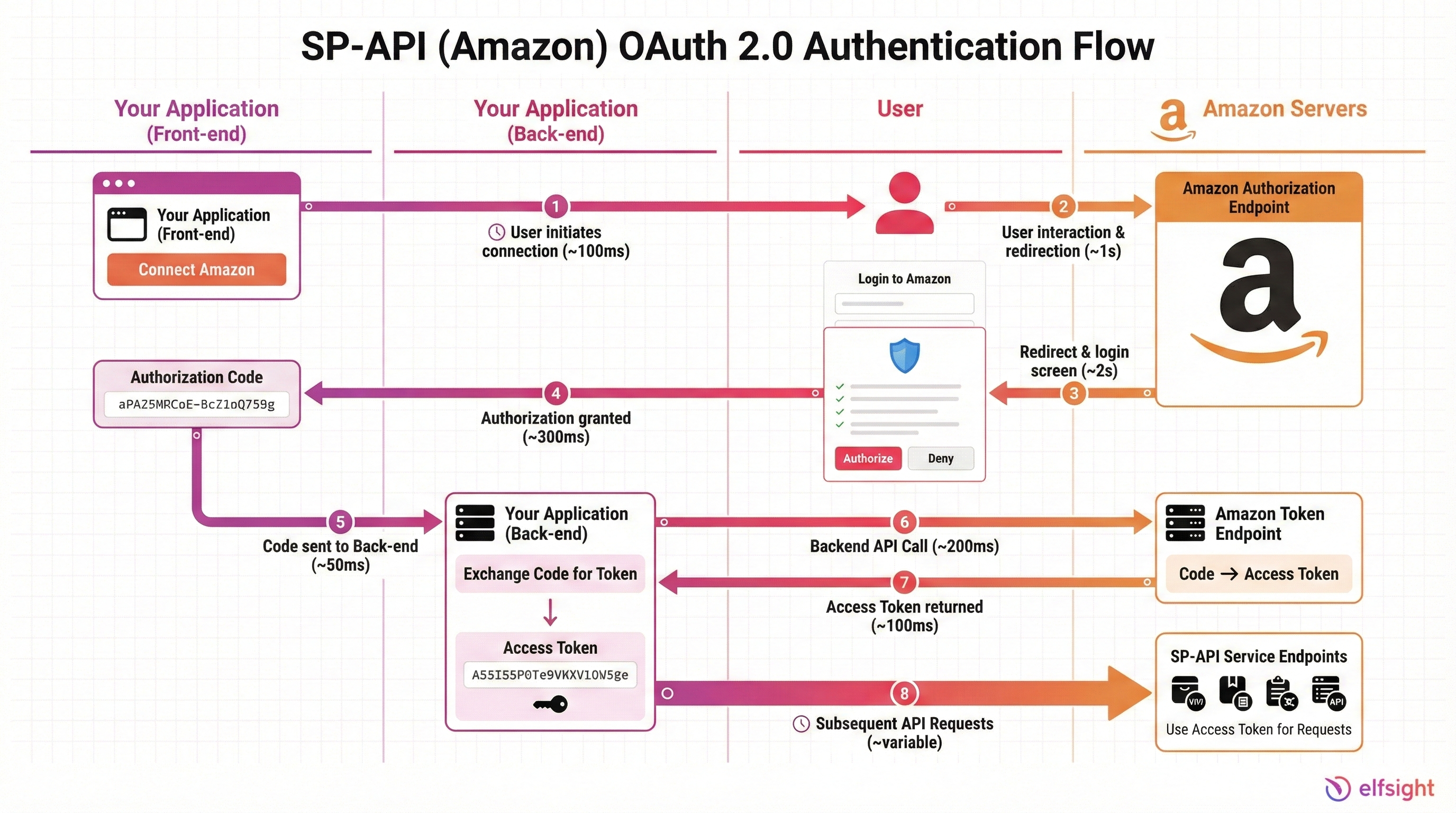
🔐 SP-API: OAuth 2.0 + Login with Amazon
SP-API uses OAuth 2.0 combined with Login with Amazon (LwA) for secure authorization.
How It Works
- Your application redirects the seller to Amazon’s authorization page
- Seller logs in and grants permissions to your app
- Amazon returns an authorization code
- Your app exchanges the code for an access token
- You use the token for all API requests
Getting Started
Visit https://developer.amazonservices.com/register and follow these steps:
- Create a seller account (Professional plan required)
- Register as a developer in Seller Central
- Create an IAM role in AWS
- Register your application and get your LwA credentials
- Implement the OAuth flow in your application
🔗 Product Advertising API: API Key
Product Advertising API uses a simpler API key authentication method.
Getting Started
- Ensure you have an active, approved Amazon Associates account
- 30+ days must have passed since your first approval
- At least 3 commissions earned
- Visit https://associates.amazon.com/
- Navigate to Tools → Product Advertising API
- Copy your API key
- Start making requests with your key
📱 Amazon Advertising API: OAuth 2.0
Amazon Advertising API also uses OAuth 2.0 for authentication.
Getting Started
- Register at https://advertising.amazon.com/
- Go to your advertising console settings
- Find API access credentials
- Choose OAuth 2.0 and follow the authorization flow
- Use returned tokens for API requests
In practice, all three APIs follow the same core idea: your app never talks to Amazon anonymously. Whether you use OAuth tokens or an API key, you authenticate first, then call the endpoints your credentials allow. Once this foundation is in place, you can focus on building features instead of worrying about low-level auth details.
Amazon API Pricing & Costs (2025-2026)
“Starting January 31, 2026, all third-party developers integrated with SP-API will be charged an annual subscription fee of $1400 USD.”
Selling Partner API Pricing
This subscription covers access to the Solution Provider Portal, support, and live SP‑API use, with billing starting on a developer’s first production call or on the specified start date for existing accounts.
From April 30, 2026, Amazon adds a monthly fee based on GET call volume, with four usage tiers (Basic, Pro, Plus, Enterprise) and a free Basic tier. Developers can preview expected charges in a fee preview tool and are given six months’ notice plus call‑optimization guidance so they can reduce unnecessary calls and keep fees lower.
| Tier | Monthly GET Calls Included | Monthly Fee | Overage Cost |
|---|---|---|---|
| Basic | 2.5 million | $0 | $0.40 per 1,000 calls |
| Pro | 25 million | $1,000 | $0.40 per 1,000 calls |
| Plus | 250 million | $10,000 | $0.40 per 1,000 calls |
| Enterprise | Custom | Custom | Contact Amazon |
Key points
- All developers default to the Basic tier
- PUT, PATCH, POST requests are unmetered (unlimited, subject to rate limits)
- Only GET requests count toward your monthly allowance
- Overage charges apply when you exceed your tier’s included calls
Error Handling & Troubleshooting Guide
Even well-designed integrations encounter errors. Here’s how to handle common Amazon API errors:
HTTP Status Codes & Solutions
| Status Code | Error Type | Meaning | Solution |
|---|---|---|---|
| 400 | Bad Request | Malformed request (invalid JSON, missing required fields) | Check your request payload; validate against API docs |
| 401 | Unauthorized | Invalid or expired authentication token | Refresh your OAuth token; verify credentials |
| 403 | Forbidden | You lack permissions for this operation | Verify your app has the required scopes; check seller account status |
| 404 | Not Found | Resource doesn’t exist (order/ASIN not found) | Verify the resource ID is correct; check if it exists |
| 429 | Too Many Requests | Rate limit exceeded | Implement exponential backoff; check your tier limits; consider upgrading |
| 500 | Internal Server Error | Amazon’s servers encountered an error | Retry after 30s; check Amazon Service Health; contact support if persistent |
| 503 | Service Unavailable | Amazon service is temporarily down | Wait 5-10 minutes; check status page; retry with backoff |
In practice, most issues boil down to a handful of patterns: bad input (400s), missing or invalid auth (401/403), rate limits (429), or temporary platform problems on Amazon’s side (500/503). If you centralize your error handling, log responses, and apply consistent retry and backoff rules, you can turn these codes into predictable signals instead of production emergencies.
Quick Optimization Tips for Amazon APIs
Once you’ve chosen the right Amazon API, a few simple optimization techniques can dramatically reduce call volume, speed up responses, and keep your integration within comfortable cost and rate-limit boundaries.
- Request only what you need. Use field filters and narrow scopes instead of pulling full payloads for every order or product.
- Add smart caching. Cache stable data for hours and fast‑changing data for minutes to cut repeat calls from dashboards and reports.
- Batch whenever possible. Prefer batch endpoints that accept multiple IDs in one request instead of looping over single‑item calls.
- Handle rate limits gracefully. On HTTP 429, back off with increasing delays instead of retrying immediately.
- Watch your usage. Monitor call volume, latency, and error rates, and set alerts before you hit hard limits or overage tiers.
- Use events over polling. Where available, replace “check every minute” patterns with webhooks/notifications to slash needless API traffic.
Common Questions about Amazon APIs
Below are some of the most frequently asked questions regarding Amazon APIs:
Can I use multiple Amazon APIs together?
Which API is easiest to implement?
Do Amazon APIs cost money?
What happens if I exceed rate limits?
Can I scale my API usage?
Do I need a Professional seller account for SP-API?
Can I use Product Advertising API for data scraping or internal tools only?
If you need more guidance, Amazon Developer Center links out to all Selling Partner, Advertising, and Associates docs in one place, while the Seller Central Help Center covers account, policy, and operational questions your API integration depends on.
Moving Forward
Whether you’re automating your Amazon selling operations, building affiliate income streams, managing advertising campaigns at scale, or creating SaaS tools for the Amazon ecosystem, the right API unlocks significant efficiency gains and revenue opportunities.
Once you’ve chosen your API, invest time in understanding authentication, rate limits, and optimization strategies. These fundamentals separate integrations that fail under load from systems that scale reliably to thousands of requests daily. Amazon regularly updates its APIs and services. Check official documentation at https://developer.amazon.com for the latest changes and updates.