
Joomla Announcement Bar widget
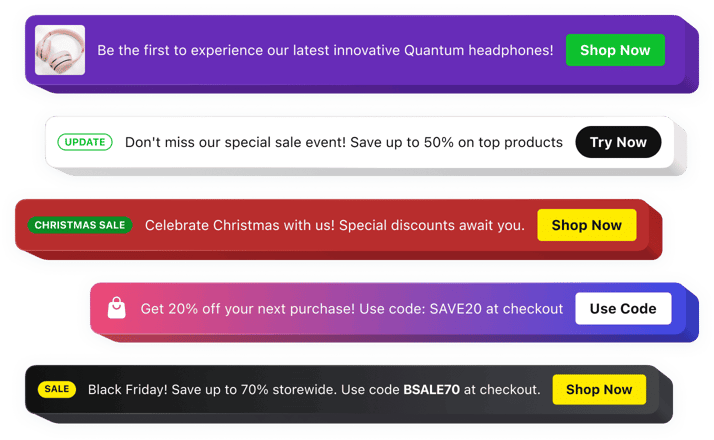
Joomla Announcement Bar Widget
Why People Love Elfsight
Your Joomla website is constantly changing — new articles, updates, promotions, and important announcements appear regularly. The Elfsight Announcement Bar widget helps you bring these messages forward and make sure visitors notice them right away.
Whether you want to promote a special campaign, share company news, announce upcoming events, or direct users to a specific page, the widget gives you a clear and effective way to communicate. Create a stylish announcement area that blends naturally with your Joomla website design.
There is no need for advanced technical knowledge. Simply customize your message, adjust the look and feel, and add the widget to your Joomla website with an easy installation process.
Did you know?
According to VWO research, optimized announcement bars can achieve strong engagement rates, with top-performing bars reaching significantly higher click-through rates than average website elements.
Add an Announcement Bar to your Joomla website for free and keep your audience informed from the first visit.
Key Features of the Joomla Announcement Bar Widget
Explore the features that make Elfsight a convenient solution for sharing updates and increasing visitor engagement:
- Quick integration: Add the widget to your Joomla website without complicated development steps or coding experience.
- Prominent messaging: Place important announcements where visitors can easily spot them when browsing your pages.
- Custom call-to-action buttons: Encourage visitors to take action by adding links to products, forms, articles, or external resources.
- Personalized styling: Adapt fonts, colors, layouts, backgrounds, and buttons to match your website identity.
- Flexible display settings: Choose the best position and visibility options for your announcement bar.
- Automatic scheduling: Prepare announcements ahead of time and display them during selected campaigns.
- Responsive performance: Make sure your messages look great across computers, tablets, and smartphones.
- Different content formats: Combine text, buttons, icons, badges, images, and videos to create richer announcements.
See all these features in action in the free editor – no signup required.
How to Add an Announcement Bar to Joomla
Adding an announcement bar to your Joomla website takes only a few minutes. Follow these simple steps:
Method 1: Inline Announcement Bar
Perfect for displaying notifications, promotions, and updates inside your website pages.
- Choose a template: Open the Elfsight editor and select an announcement bar layout that fits your Joomla website.
- Customize the widget: Add your message, buttons, images, icons, and adjust the design settings.
- Generate the embed code: Click “Add to website for free” and copy the ready code snippet.
- Insert into Joomla: Open your Joomla editor, module area, or custom HTML block, then paste the code where you want the announcement to appear.
Method 2: Floating Announcement Bar
A great choice for keeping important information visible while users move through your website.
- Select a floating layout: Choose a design that stays noticeable during scrolling and navigation.
- Adjust your settings: Customize the position, message, buttons, colors, and display preferences.
- Copy your widget code: Generate the installation snippet after completing the setup.
- Publish in Joomla: Add the code through a custom module or HTML section and save your changes.
It’s that easy! Your Announcement Bar is now active on your Joomla website. You can update the content, design, and settings anytime from your Elfsight dashboard.
Need help? Visit our Help Center for detailed tutorials and setup instructions. You can also suggest improvements through the Wishlist, check the updates in the Changelog, and exchange ideas with other users in the Community.