
GoDaddy Announcement plugin
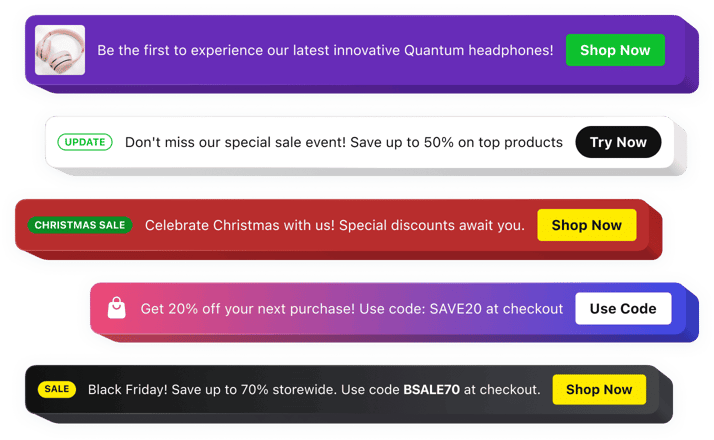
GoDaddy Announcement Bar plugin
Why People Love Elfsight
When visitors land on your GoDaddy website, you only have a few seconds to capture their attention. The Elfsight Announcement Bar plugin helps you deliver important updates, offers, and messages instantly without making users search for information.
Whether you want to promote a seasonal sale, announce a service update, share a company message, or guide visitors toward a specific action, the plugin places your content front and center. Create a clean, professional announcement that naturally fits your website style.
You don’t need design or coding experience to use it. Build your message, adjust the appearance, and add the plugin to your GoDaddy website with just a few simple steps.
Did you know?
According to Shopify Plus research, announcement bars can influence a noticeable share of customer interactions because they appear consistently across website pages instead of relying on a single visitor action.
Add an Announcement Bar to your GoDaddy website for free and turn every page visit into an opportunity to share what matters most.
Key Features of the GoDaddy Announcement Bar Plugin
Here’s how Elfsight helps businesses, creators, and website owners communicate updates more effectively:
- Simple installation: Add an announcement bar to your website without complicated setup or programming knowledge.
- Always-visible messaging: Keep important notices easy to find with a bar that stays in a prominent position.
- Marketing campaigns: Promote discounts, special events, product releases, and important announcements directly to visitors.
- Clickable call-to-action buttons: Encourage visitors to explore offers, contact you, subscribe, or visit specific pages.
- Personalized appearance: Modify colors, fonts, spacing, backgrounds, and layouts to match your GoDaddy website design.
- Flexible placement: Display the announcement at the top, bottom, or another suitable area of your website.
- Content scheduling: Prepare upcoming announcements in advance and show them exactly when needed.
- Responsive layout: Make sure your message remains clear and attractive on any screen size.
- Multiple media options: Combine text, buttons, icons, badges, images, and videos to create richer announcements.
See all these features in action in the free editor – no signup required.
How to Add an Announcement Bar to GoDaddy
Adding an announcement bar to your GoDaddy website is quick and straightforward. Follow these steps to get started:
Method 1: Inline Announcement Bar
A great option for placing promotions, updates, or notifications inside specific website sections.
- Choose a template: Open the Elfsight editor and select an announcement bar design that fits your website.
- Edit your message: Add your text, buttons, images, icons, and adjust the visual style.
- Create your embed code: Click “Add to website for free” and copy the generated code.
- Insert into GoDaddy: Open your GoDaddy Website Builder editor, add an HTML section, and paste the code where you want the announcement to appear.
Method 2: Floating Announcement Bar
Perfect for keeping your message visible as visitors explore different pages.
- Select a floating layout: Pick a template designed to stay noticeable during browsing.
- Customize the widget: Set the position, colors, content, buttons, and display preferences.
- Copy the snippet: Generate your unique installation code after finishing the setup.
- Add it to your website: Place the code into the HTML area of your GoDaddy website and publish the changes.
Your Announcement Bar is now active on your GoDaddy website. You can return to the Elfsight dashboard anytime to update messages, designs, or campaign settings.
Need help? Visit our Help Center for detailed tutorials and setup instructions. You can also suggest improvements through the Wishlist, check the updates in the Changelog, and exchange ideas with other users in the Community.