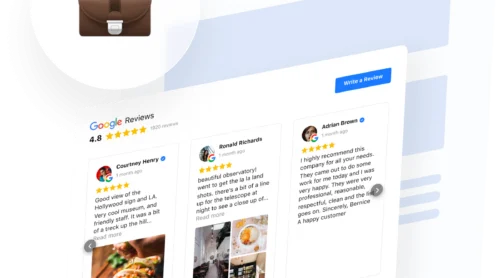
Social proof works best when it meets buyers where they need reassurance. Surprisingly, most small businesses leave much of it scattered across review platforms. Of the 30 local businesses we checked, 27 had reviews on at least three platforms, including Google and Facebook. Only 2 websites showed reviews from more than one.
You have customers who like you. Some said so on Google, a few on Facebook or Yelp, and one sent a thank-you email that never made it onto your website. Social proof marketing puts that on show: the ratings, reviews, testimonials, customer photos and videos that make choosing you feel less risky.
This social proof marketing strategy runs in six steps, in the order a buyer meets your business. It’s built on two things we did ourselves: an audit of 30 small-business websites and a reviews widget we built, plus the Google, Yelp, and FTC rules on collecting reviews that most fail to consider.
- Pick which social proof conent to display by the customer doubt it answers: whether the business is real, if the product fits their case, and whether payment is safe.
- Your strongest proof is probably already on Google, Facebook or Yelp, and almost none of the small-business websites we checked showed it from more than one platform.
- Ask every customer the same way and never pay for a positive review: Google bans selective asking and incentives, and Yelp asks businesses not to ask at all.
- Put ratings strategically: next to key decision points, not hidden away on a separate reviews page.
Step 1: Match the proof to your buyer’s doubt
A buyer hesitates for three different reasons at three different moments, and each one needs its own kind of proof. Logos, counters, and quotes stacked on every page answer none of them well. The doubts come in a predictable order: on the first visit, while comparing, and at the moment of paying.
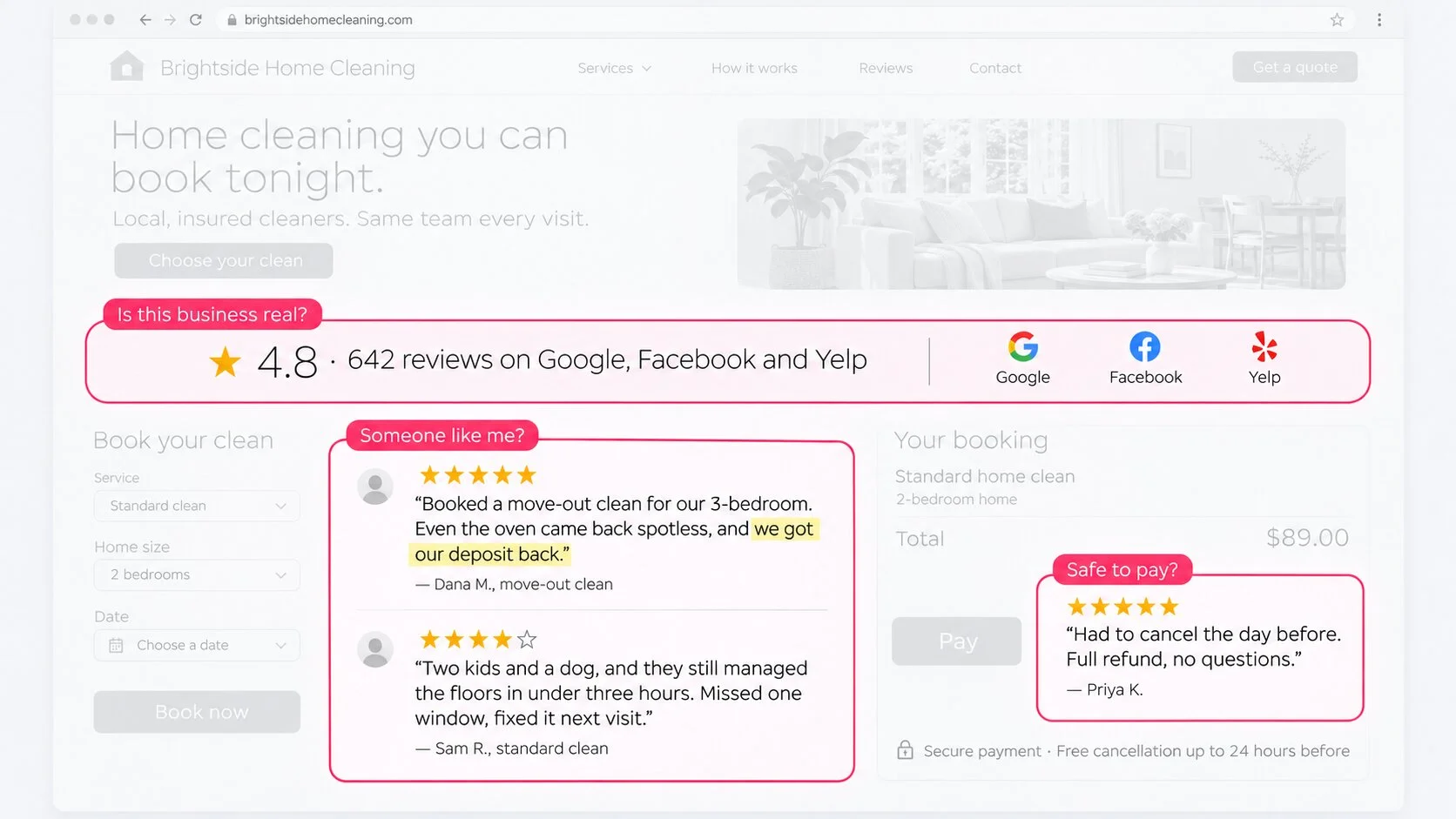
Is this business real?
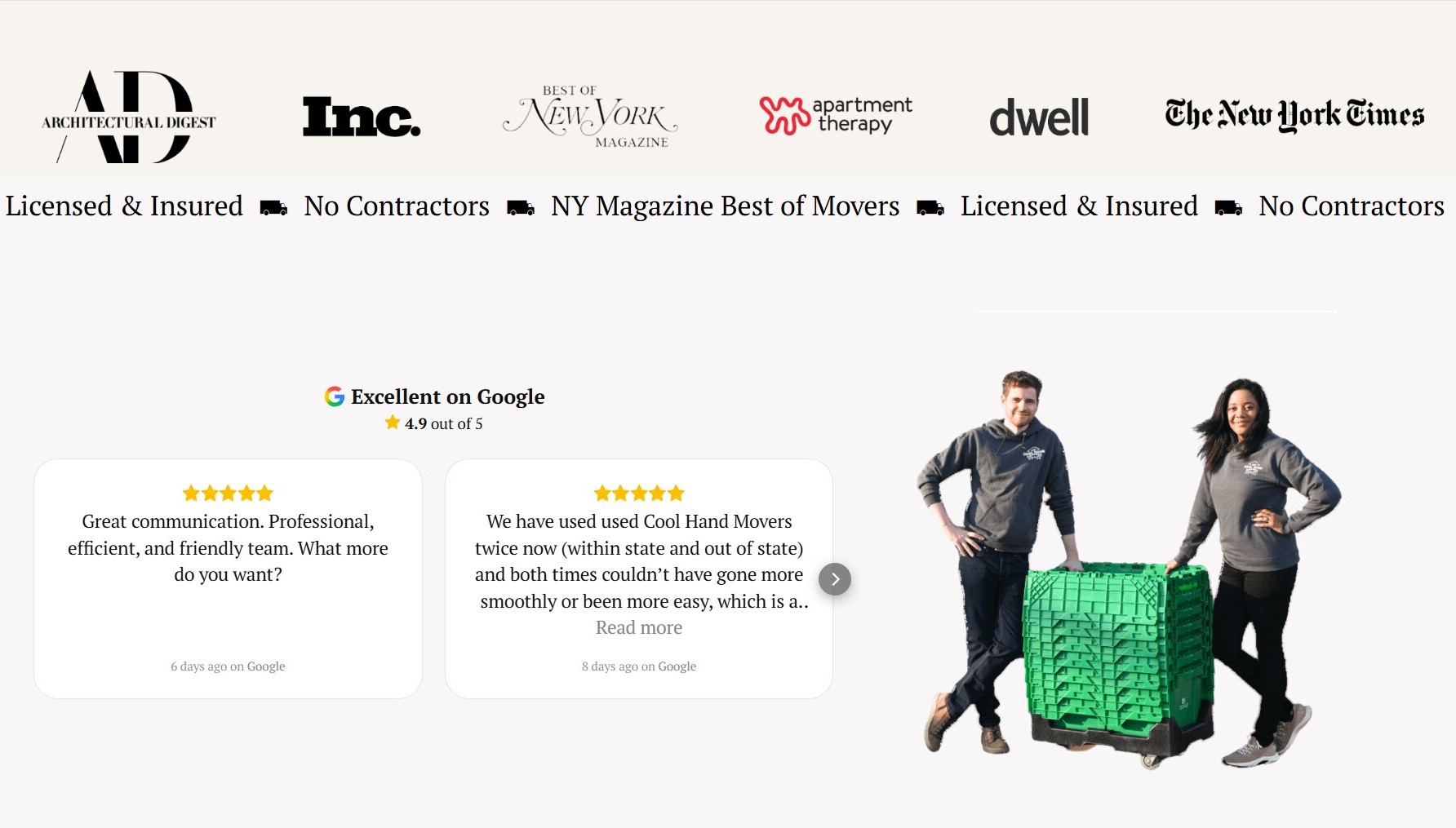
This is the first-visit doubt, from someone who arrived through a search or an ad and has never heard of you. The quickest answer is a rating and review count from a platform they already trust, a few recent reviews, and client logos or “as seen in” mentions when they’re true.
For a plumber, that’s the Google rating and a few recent jobs described by customers. For a dental practice – the Google or Healthgrades rating. An online store would do well showcasing ratings on each product. And for a SaaS, ratings from software review platforms and logos of customers who agreed to be named.
Will it work for someone like me?
Once a buyer is comparing you with two or three others, a star rating stops being enough. They look for someone in their own situation, and three kinds of proof show them one. This is social proof personalization in practice: matching the proof to the reader’s case instead of showing everyone the same five stars.
- Choose detailed reviews that name the service, product, or problem, so a reader can find their own case in them.
- Add video testimonials from customers in a situation like your buyer’s, so a viewer sees someone with the same problem describe how it went.
- Show customers’ own Instagram posts, collected through a branded hashtag, so buyers see what you sold in real customers’ hands.
Video and Instagram social proof works best when the person on screen represents the buyer you’re trying to reach.
Is it safe to pay?
At checkout or on a booking form, the doubt narrows to money and data. Payment and security signals, a short rating near the button, and clear refund and delivery terms answer it. The cost of leaving it open is real: 19% of US online shoppers who abandoned a cart for a reason other than just browsing said they didn’t trust the website with their credit card information (Baymard Institute).
For the first two doubts, most of the businesses we checked already hold the answer. It just sits on someone else’s website.
Step 2: Start with the proof you’ve already earned
Reviews on Google, Facebook, Yelp, and other platforms for your category are usually the strongest evidence you have, and most small-business websites we checked show none or at most one.
That gap matters because buyers come to your website after reading reviews, still deciding. According to BrightLocal’s 2026 consumer survey, 97% of US consumers read reviews when looking at local businesses, and after reading positive ones, 54% go on to the business’s website.
What we found on 30 local business websites
We took the first 10 independent restaurants, plumbers, and dentists that Google Maps shows for a random location – in our case, Columbus, Ohio – skipping chains and businesses without a website. For each, we noted the platforms it was reviewed on (Google, Yelp, and Facebook, plus Tripadvisor, BBB, or Healthgrades by category) and what its homepage and any review pages showed.
The top of Google Maps in one city means established businesses, not a random sample, and the platform counts are lower bounds. Here is what each business’s website shows:
| What the website shows | Restaurants | Plumbers | Dentists | Total |
|---|---|---|---|---|
| Reviews from several platforms | 0 | 0 | 2 | 2 |
| Reviews from one platform | 2 | 4 | 2 | 8 |
| Testimonials with no platform named | 3 | 4 | 4 | 11 |
| A “review us” link only | 0 | 1 | 1 | 2 |
| Nothing | 6 | 0 | 1 | 6 |
Meanwhile, 27 of the 30 businesses were reviewed on three or more platforms, and 12 on all four we checked. The gap is between the proof these businesses have earned and the proof they show: 19 of the 29 websites showed no reviews from any review platform, only testimonials without a source, a link, or nothing at all.
Several platforms matter because buyers arrive from different places. Someone who found you on Yelp or Healthgrades recognizes reviews from the platform they already read, and a rating with its source named answers “is this business real?” faster than a quote with no name on it.
How to show reviews from several platforms
Before choosing a tool, take stock of what you already have. Three quick steps settle what your website needs:
- List every platform where you have reviews, with the review count on each.
- Note ones specific to your category, like Healthgrades for dentists or Tripadvisor for restaurants.
- Decide what your website should show: one platform, or several combined under one rating.
There are several ways to get platform reviews onto your website, each suited to a different situation.
| Approach | What the visitor sees | Stays current? | Fits when |
|---|---|---|---|
| Hand-copied quotes | The quotes and numbers you pasted | No, the numbers drift as new reviews arrive | You have offline praise or only a few reviews |
| A single-platform widget or badge | One platform’s rating and reviews | Yes, from that platform | You’re reviewed mostly in one place |
| A multi-source widget | Reviews from several platforms under one combined rating | Yes, from each source | You’re reviewed in two or more places |
If nearly all your reviews are on one platform, a single-platform widget or badge is enough. Once buyers find you in two or more places, one combined widget saves you from showing two widgets that look nothing alike on the same page.
Combine all platforms in one widget with JustReviews
JustReviews pulls customer feedback from every platform you choose to connect into one widget with a combined rating. We built one on the Free plan with three of Elfsight’s own review profiles (Google, G2, and Product Hunt).
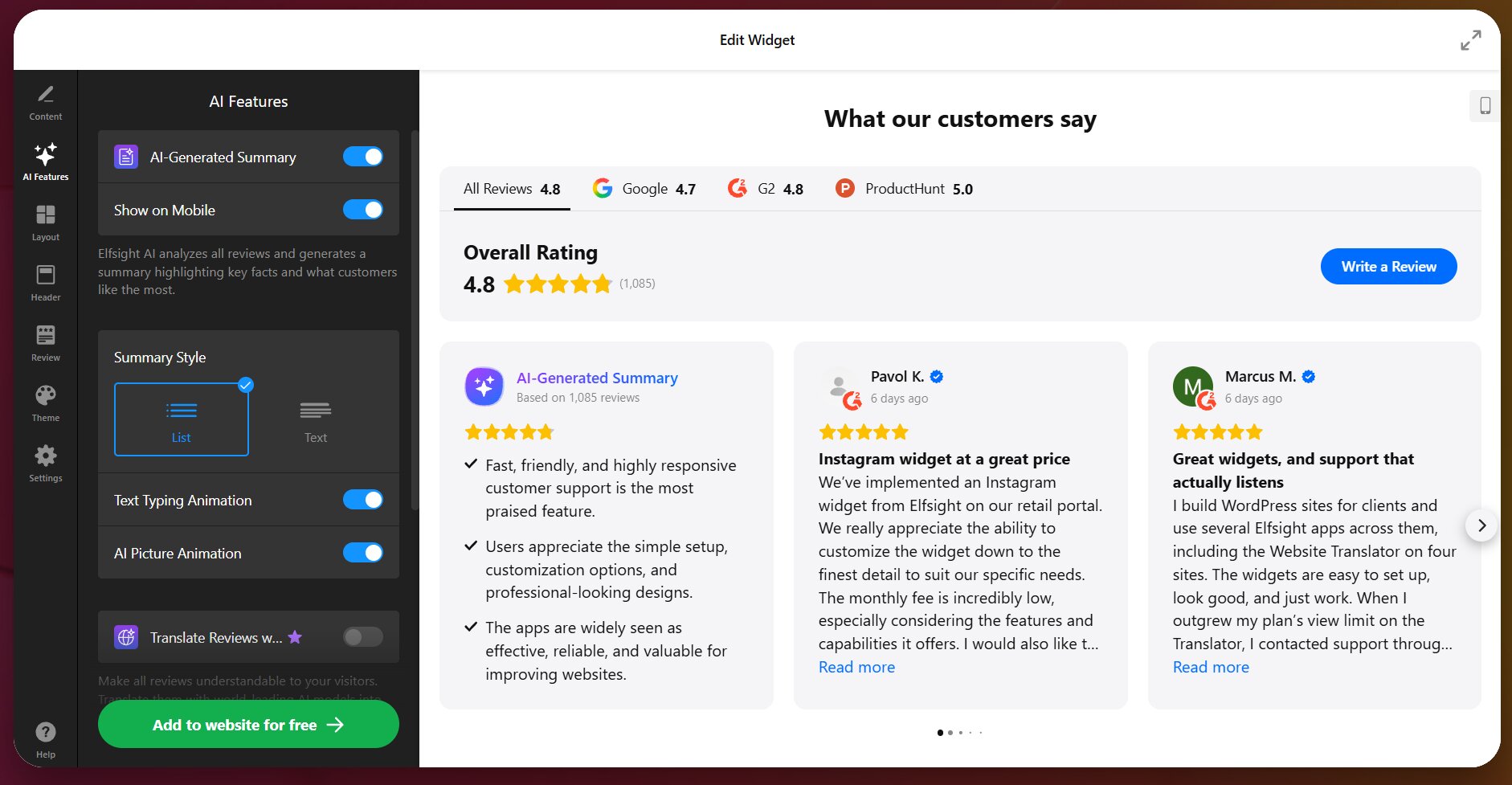
The setup takes under 5-7 minutes to reach a working widget:
- Connect your listings: add each platform’s listing as a source (e.g., business name and address for Google, or your listing URL).
- Check your combined rating: our header showed 4.8 overall, with tabs for Google (4.7), G2 (4.8), and Product Hunt (5.0), and the Google tab’s 4.7 matched the rating on the Google listing.
- Put it next to your main button: add the widget beside the booking, call, or buy button on the page where people decide, not on a separate reviews page.
The Free plan covers one widget and 200 views per month across unlimited websites, with multiple sources, custom layout, and a small Elfsight badge.
Combine reviews from all platforms in one widget ↓
Once the reviews you have are on your website, the next question is how to get more of them without breaking the rules.
Step 3: Collect more reviews without breaking platform or FTC rules
Ask every customer the same way, at the same moment, and never pay for or filter toward positive reviews. Google allows asking but not selective asking or incentives. Yelp discourages asking altogether, and the FTC rule bans incentives tied to a review’s sentiment, as well as fake reviews, testimonials, and social media indicators.
Point people to the platforms where customers actually write: in the past year, 45% of US consumers wrote a Google review, 34% a Facebook review, and 24% a Yelp review (BrightLocal). A second-most-popular platform your buyers read, such as Healthgrades or Tripadvisor, is worth asking for too.
The table shows what each set of rules allows:
| What you do | Yelp | FTC rule | |
|---|---|---|---|
| Ask customers for a review | Allowed, for genuine reviews without incentives | Asks businesses not to ask anyone | Fine as a general email to all recent customers, even if a few turn out to be employees |
| Ask only happy customers | Not allowed | Asks businesses not to ask anyone | — |
| Offer an incentive | Not allowed | — | Allowed only if it doesn’t require a positive review, and disclosed |
| Discourage negative reviews | Not allowed | — | Suppressing them through threats is banned |
The FTC rule also bans fake and AI-generated reviews (not AI summaries), testimonials, undisclosed insider reviews, company-run “independent” review websites, and bought bot followers or other fake social media indicators.
You may request a customer review soon after the job is done and include a direct link to your review page, removing unnecessary friction of searching for your business listing. When you ask for reviews by email or text, keep the message to two or three lines.
You can also collect reviews on your own website. JustReviews’ Write a Review button opens a form inside the widget, or sends visitors to Google or another connected platform.
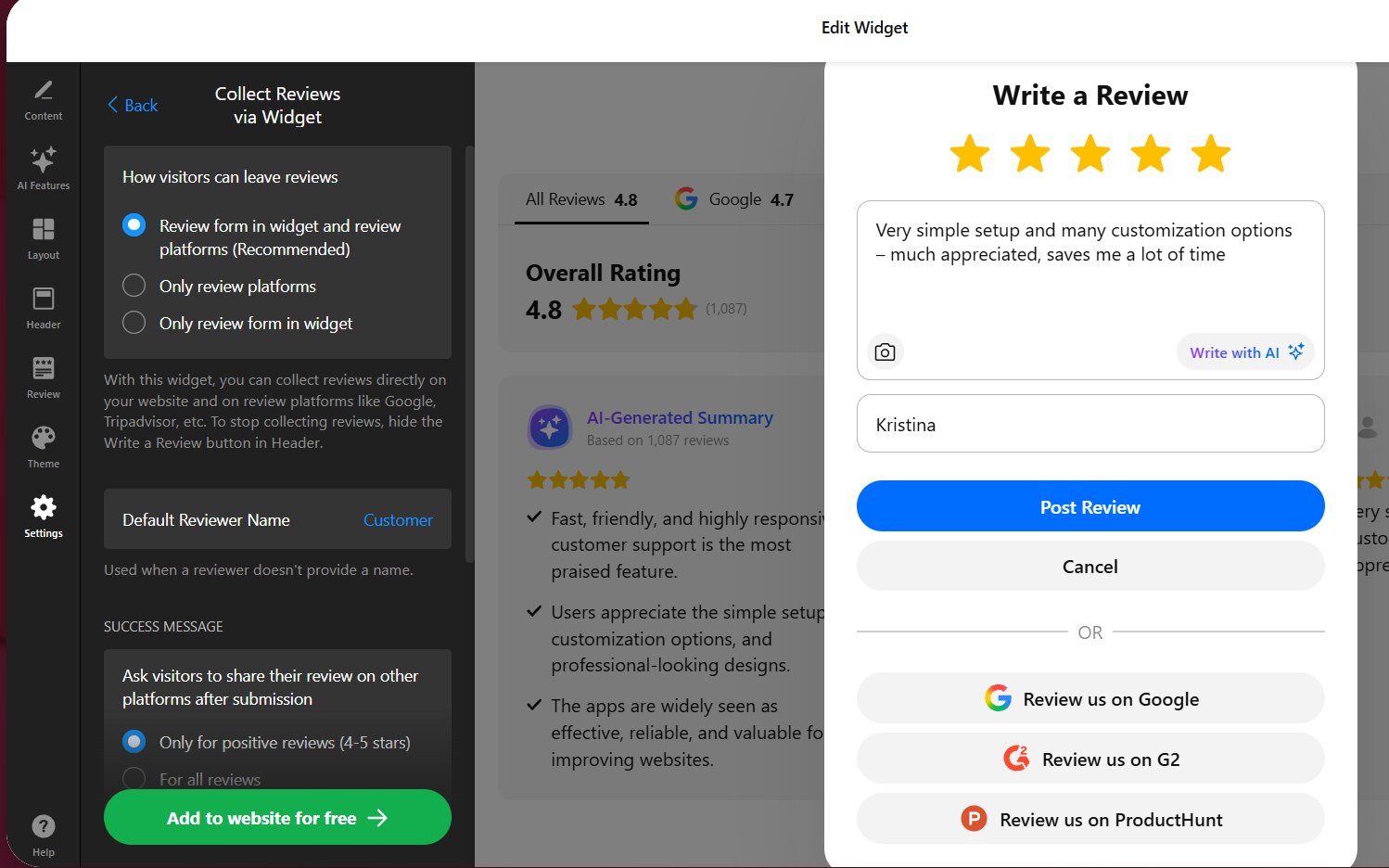
After a review is submitted, the widget can ask the visitor to post it on Google or another platform too. Switch it to “For all reviews” in the editor to avoid the “happy-customers-only” bias.
Step 4: Put each kind of social proof where a doubt comes up
Ratings and reviews belong next to the button people decide on, detailed stories and videos for big purchases, security signals at checkout, and one short quote in ads and emails. Here is where each doubt comes up on a typical small-business website:
| Page | The doubt there | What to show | Format |
|---|---|---|---|
| Homepage and landing pages from ads | Is this business real? | Combined rating and review count | A badge or sticker near the top |
| Service or product page | Will it work for someone like me? | Reviews that mention that service or product, pinned to the top | A section next to the price or booking button |
| Checkout or booking form | Is it safe to pay? | A short rating, payment and refund terms | A compact badge |
| Ads and emails | Is this business real? | One short, recent quote with its rating | Text or image |
Placement was a weak spot in our audit, too: at least 3 of the 10 websites that showed platform reviews kept them only on a separate reviews page, rather than on the homepage or checkout. Shopify Community merchants and service providers commonly give the opposite advice: move reviews up next to the price and add-to-cart button.
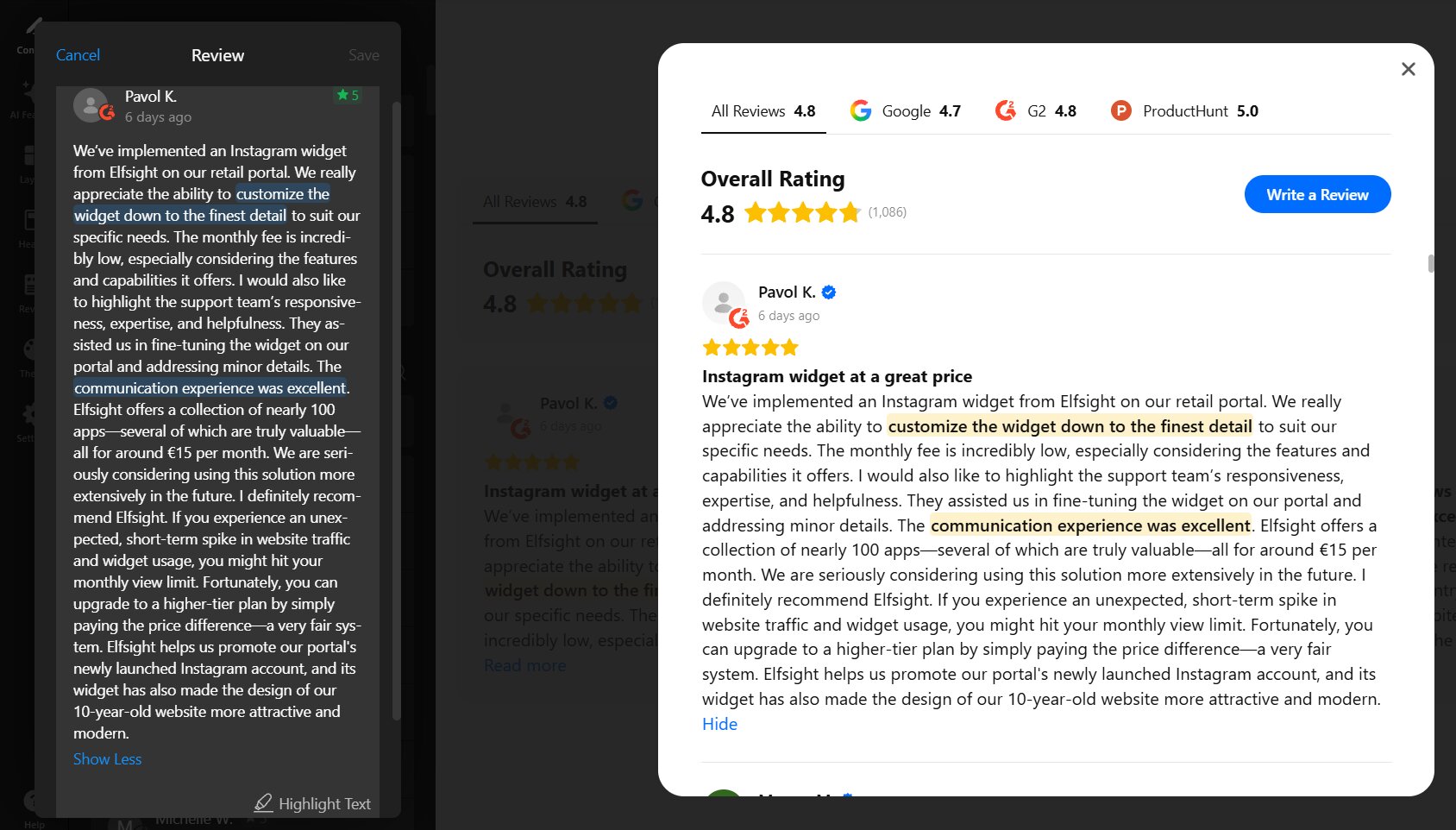
Make the review that addresses the doubt the first one your visitors see. In the JustReviews widget, you can pin a review to the top and highlight the sentence that matters:
Social proof on social media can work on your website too. On a service or product page, video testimonials and customers’ Instagram posts can sit next to the reviews. Elfsight’s Video Gallery puts videos from YouTube, Vimeo, TikTok, or Instagram Reels in one widget, and its Instagram Feed pulls posts from accounts and hashtags.
Step 5: Keep it real so it doesn’t backfire
Social proof backfires when it looks too perfect, when filtering leaves no trace, and when its numbers or dates have gone stale. Each of the three turned up in our audit.
Five-star-only quotes
One plumbing business in our audit showed only five-star quotes with no platform named, while its Google average was 3.5. FTC staff say picking especially positive reviews for marketing isn’t suppression under the rule, but using non-representative reviews can still be deceptive. Show a sample that looks like your real rating, with the source named.
Filters that leave no trace
We tested the rating filter in our widget. At “at least 4 stars”, a 3-star review disappeared while the header kept the overall rating of 4.8 from 1,086 reviews; at “at least 5 stars”, a 4-star review went too, with the rating unchanged. Mind that hiding a review removes it from your website only.
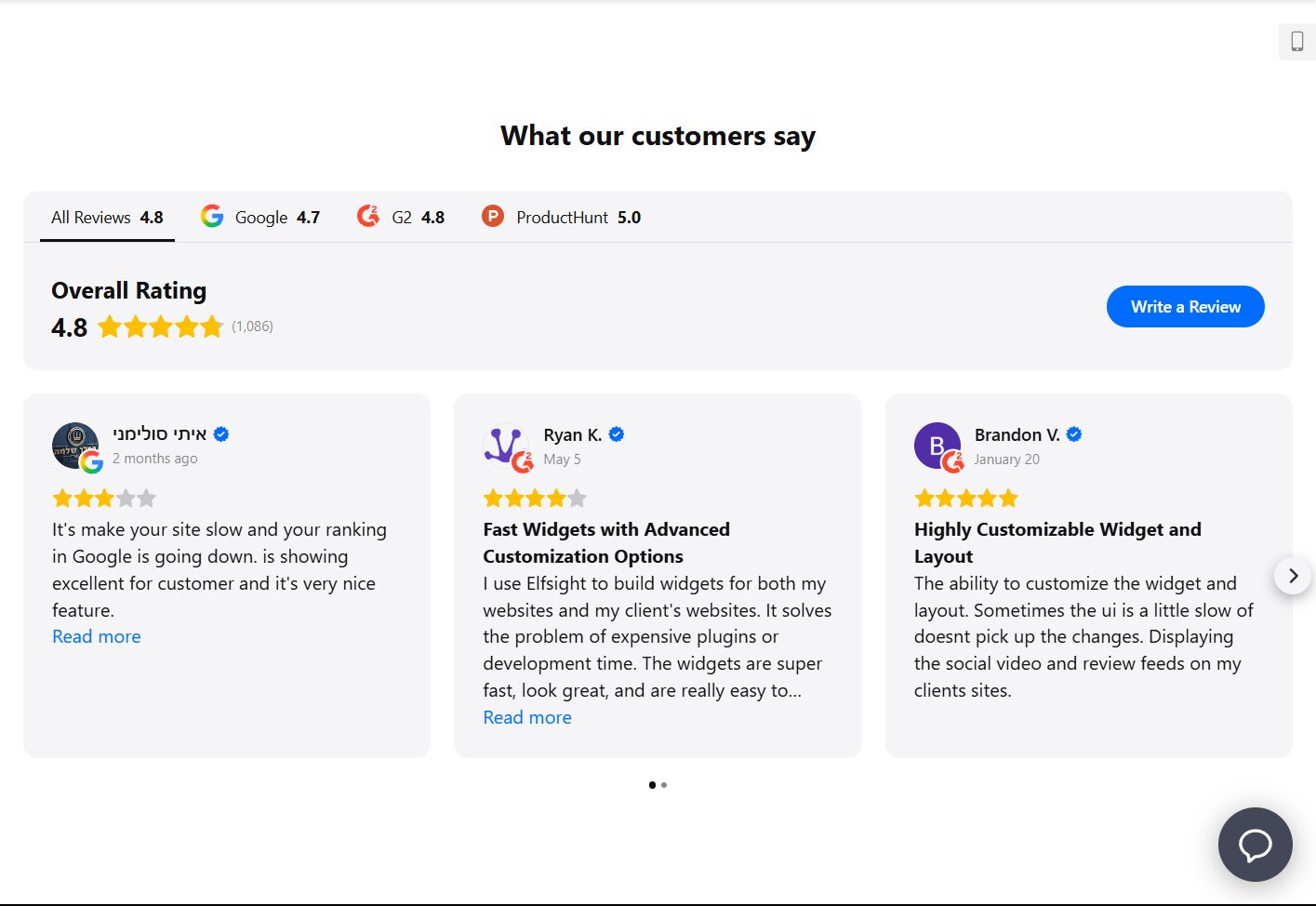
FTC staff say organizing reviews isn’t suppression, while ordering them so negative ones are hard to find could be deceptive. Filter out spam and off-topic reviews, not every 3-star one, and keep the overall rating visible.
And remember, the closer proof sits to the decision, the more a too-perfect or outdated piece of it costs you.
Old numbers and dates
Hand-copied numbers drift. In our audit, one dentist’s badge claimed 1,696 Google ratings while Google Maps showed 839, and a plumber’s website said “4.8 / 800+” against 4.9 from 833 ratings on Maps.
Dates matter to buyers too. 74% of US consumers only care about reviews written in the last three months (BrightLocal). Show reviews that update from the platform, or re-check hand-copied numbers on a schedule.
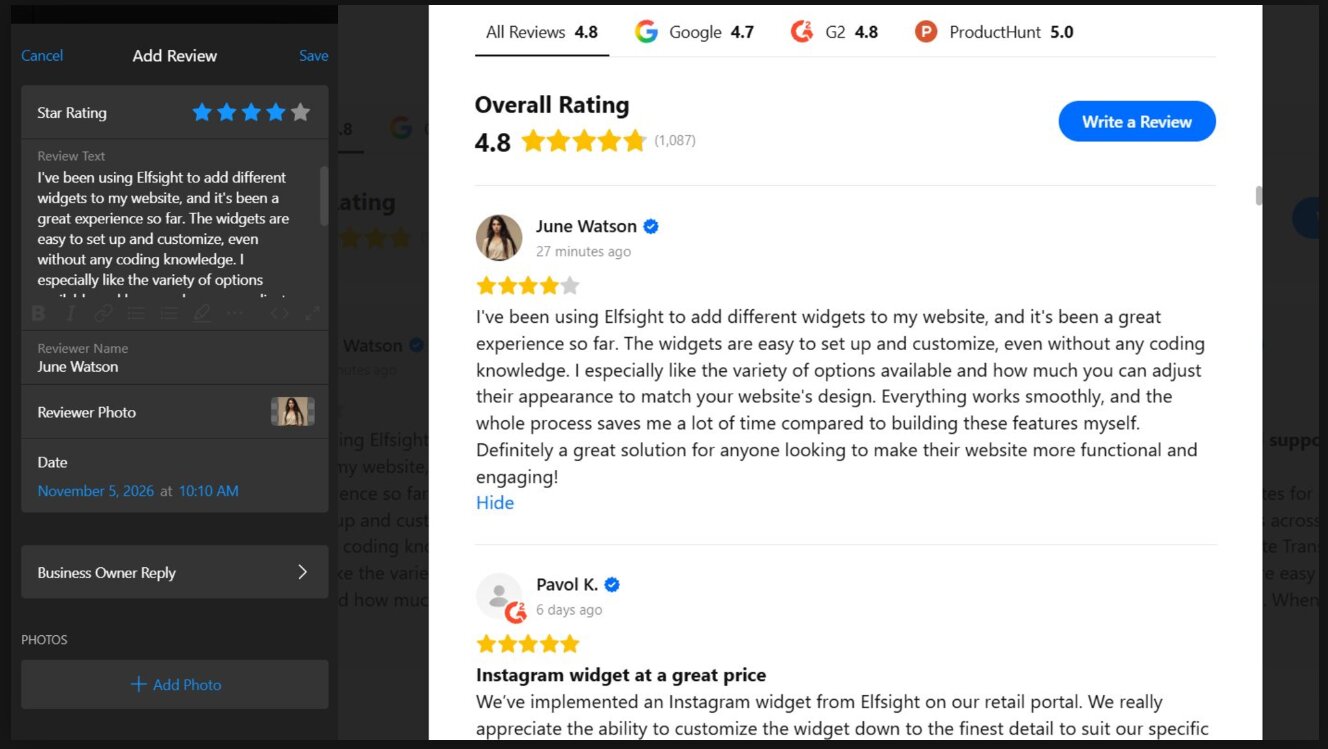
Testimonials you add by hand need the same care. In our widget, a hand-added review had an editable date field, so it can carry any date, and it showed with the same blue checkmark as platform reviews, only without a platform icon. Add only real testimonials, with their real dates.
Honest proof in the right place still has to show that it moved something.
Step 6: Check whether your social proof works
Change one thing on one page, compare a before and an after window on the action that page exists for (calls, bookings, add-to-cart), and treat small-website numbers as a signal, not proof. A split test divides thin traffic in two: note the page’s main action for a set period, make one change, and compare the same period after it.
Merchants on the Shopify Community forum gave a store owner testing product images similar advice: check traffic first, read low-volume results as directional, change one thing at a time, and compare add-to-cart rate.
Here is what to measure for each change in this plan:
| What you changed | What to measure | Where |
|---|---|---|
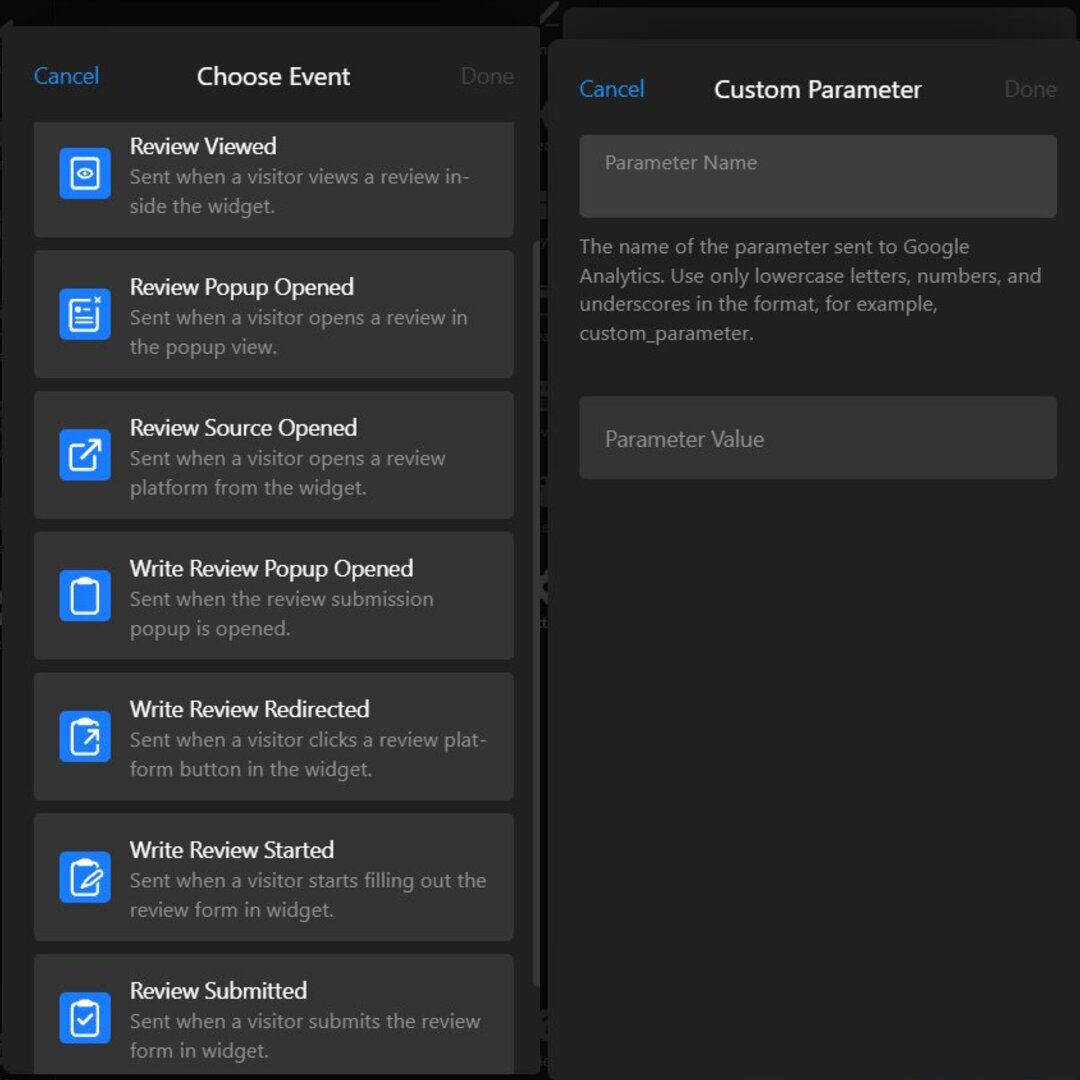
| Reviews from several platforms on the page (Step 2) | Whether visitors see and open reviews | Widget events Review Viewed, Review Popup Opened, Review Source Opened |
| Collecting reviews (Step 3) | Reviews started and submitted on your website, plus new reviews per platform each month | Widget events Write Review Started, Review Submitted, Write Review Redirected; platform counts |
| Placement (Step 4) | The page’s main action before and after | Google Analytics conversions for that page |
| Honesty and freshness (Step 5) | Review dates and counts shown against the platform | A monthly check |
The JustReviews widget sends these as Google Analytics events (Free plan included). You can rename each event, and each carries parameters such as the source and the rating.
Frequently asked questions
What are some examples of social proof marketing?
How many reviews do I need before showing them?
Are 'X people are viewing this' pop-ups good social proof?
Does social proof work for B2B and SaaS companies?
How do I add social proof to emails?
Where to start this week
In our audit, 27 of 30 businesses had reviews on at least three platforms, while only two showed more than one, so your strongest proof is probably already written. Of the social proof strategies in this guide, showing it is the cheapest place to start.
This week, list every platform you’re reviewed on with its review count, compare that with what your website shows, and note this week’s conversions on your most important page so you have a “before”. Then put the combined rating next to that page’s main button and measure the same stretch of time after the change.
Key references
- Local Consumer Review Survey 2026, BrightLocal, February 2026
- Consumer Reviews and Testimonials Rule: Questions and Answers, Federal Trade Commission, November 2024