Building a website used to mean one of two things: learn complicated code yourself or hire an expensive developer. Not anymore. ChatGPT can generate website code, write compelling copy, and guide you through design decisions—all within a single conversation. But here’s the thing most people get wrong: ChatGPT isn’t a drag-and-drop website builder. It’s a powerful assistant that works best when you know exactly how to ask for what you need.
The difference between spending three frustrating hours with ChatGPT and walking away with a working website? It all comes down to preparation and prompting strategy.
This guide walks you through the entire process: from planning your site structure to publishing it online, with practical templates you can use immediately.
- Planning your website structure and goals before writing any prompts
- Using specific prompt templates to generate clean, accessible code
- Iterating with ChatGPT to refine design and functionality
- Publishing your site using free or paid hosting platforms
- Optimizing for mobile responsiveness, speed, and accessibility
Plan Your Website Before You Prompt ChatGPT
Here’s a pattern that plays out constantly: someone opens ChatGPT, types “create me a website,” and gets back something generic and unhelpful. Then they blame the AI.
The real problem? They skipped the planning step.
Think of this blueprint as your architectural drawing. If you skip this step and go straight to construction (prompting), you risk building a “Winchester Mystery House” of a website – functional parts that don’t fit together coherently. The AI lacks your context; without a clear plan, it will hallucinate a generic purpose that likely won’t match your actual business needs.
Define the Website Goal and Target Audience
Start by answering three fundamental questions:
What is the main goal? A freelancer portfolio serves completely different purposes than an event landing page or a small business site. Your answer shapes every decision that follows.
Who is visiting? Potential clients browsing your services? Employers reviewing your resume? Newsletter subscribers looking for valuable content? Each audience expects different things.
What action should visitors take? Should they book a consultation call? Make a purchase? Sign up for your email list? Every page needs a clear next step.
Here’s the difference between weak and strong goal-setting:
Weak: “I want a website about my services.”
Strong: “I want a freelance web design portfolio that convinces small business owners to book a discovery call.”
See how the second version gives ChatGPT (and you) so much more to work with?
List Required Pages and Sections
Map out your site structure before asking ChatGPT to generate any code. Most websites need some combination of these elements:
- Homepage – Hero section showcasing your value proposition and primary call-to-action
- About/Services – Your background, offerings, and why people should choose you
- Portfolio/Work – Examples demonstrating your capabilities or products
- Contact/Lead Form – Easy ways for visitors to reach you
- Blog/Resources (optional) – Articles, FAQs, or case studies that build trust
- Footer – Navigation links, social media, and legal pages
For a simple personal website, you might skip the portfolio and blog entirely. For a SaaS landing page, you’d focus heavily on hero, features, pricing, FAQ, and a strong call-to-action. Match your structure to your goal.
Decide on Style and Gather References
Before ChatGPT writes a single line of code, collect your design building blocks:
Color palette: Pick two to three primary colors. If you’re not sure, find competitor websites with color schemes you like and note them.
Font style: Do you want minimalist and clean? Bold and attention-grabbing? Classic and professional?
Tone of voice: How should your copy sound? Formal and authoritative? Casual and friendly? Technical and precise?
Reference links: Two or three websites you admire. Be ready to explain why you like them: is it the layout? The colors? The messaging?
Brand assets: Your logo, taglines, key selling points, and any existing marketing copy.
Create a Prompt Checklist
Before you start prompting, run through this checklist to make sure you’ve covered the essentials:
- Page structure (which pages and sections do you need?)
- Target audience (who will visit and what do they want?)
- Key CTAs (what should users do on each page?)
- SEO requirements (title tags, meta descriptions, heading structure)
- Accessibility standards (WCAG 2.2 AA compliance)
- Responsive design (must work on mobile, tablet, and desktop)
- Code constraints (frameworks to avoid, semantic HTML requirements)
Having this checklist ready transforms vague conversations into productive ones.
Prompt Templates That Work
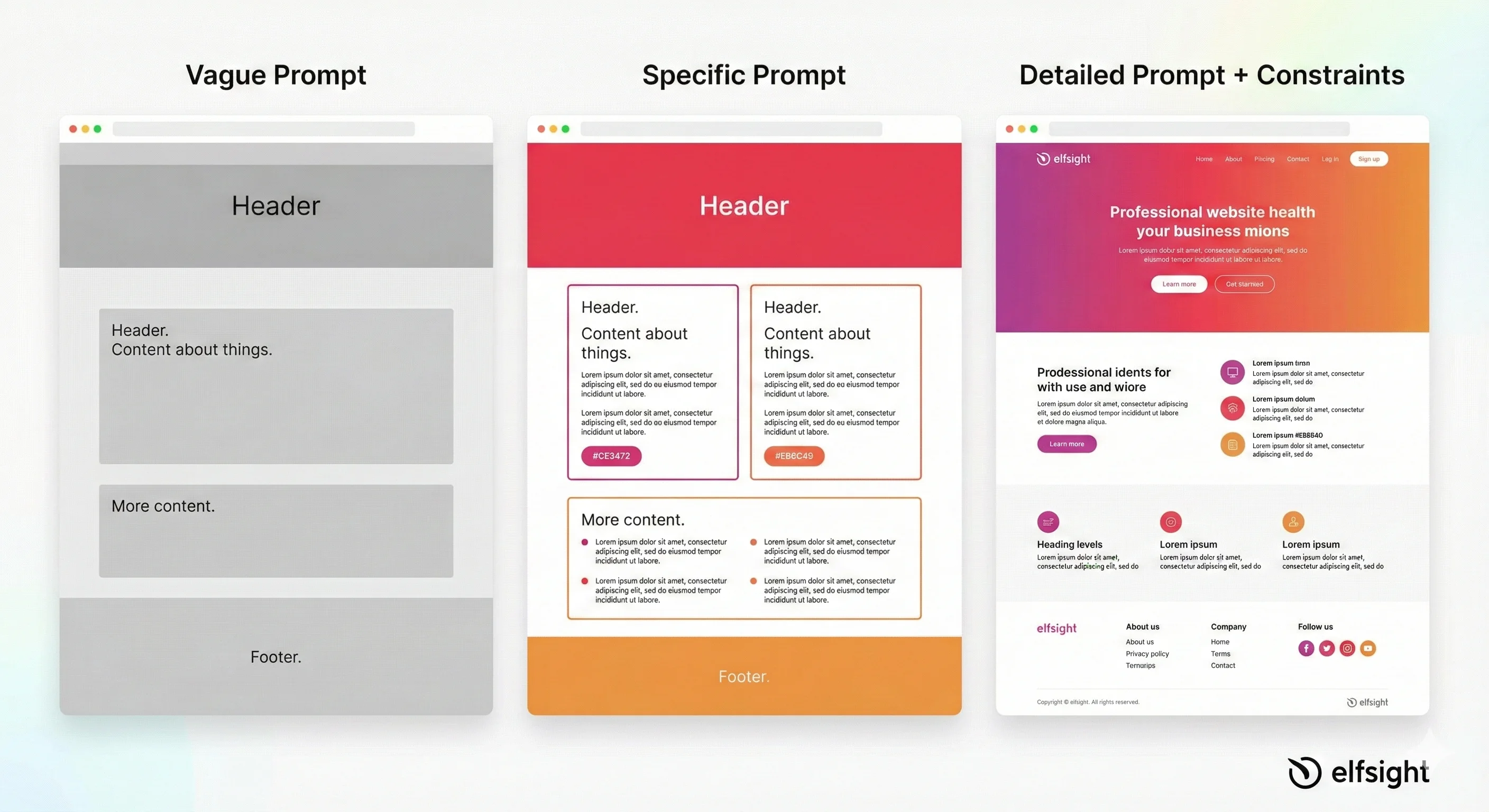
Generic prompts produce generic websites. Specific, structured prompts produce usable code.
Here are three templates you can copy, customize, and use immediately, each designed for different scenarios.
Template 1: One-Page Landing Site
Create a semantic HTML/CSS landing page for [your business/service].

The page should include:
- Hero section with headline: "[your headline]", subheading, and CTA button: "[button text]"
- Features section with [3-4] key benefits
- Testimonials section with [2-3] customer quotes
- Footer with contact email and social links

Design requirements:
- Mobile-first responsive design
- Color scheme: [primary color] and [secondary color]
- Font: [sans-serif/serif], clean and professional
- WCAG 2.2 AA accessibility compliant
- Semantic HTML (no divs for structure)
- All images have descriptive alt text
- Keyboard navigation fully supported

Return: Complete HTML file with embedded CSS and JavaScript. No frameworks.
Template 2: Multi-Page Business Webite
Generate HTML structure for a [business type] website with the following pages:

1. **Home** – Hero + features + CTA
2. **About** – Company story, team, credentials
3. **Services** – Detailed service offerings with icons
4. **Portfolio** – [3-5] past project examples
5. **Contact** – Contact form (name, email, message) + email link

Design:
- Color palette: [primary], [secondary]
- Mobile-responsive (specify mobile-first or desktop-first)
- Navigation: Sticky header with hamburger menu on mobile
- Forms: Validate email, require all fields
- SEO: Include title tags, meta descriptions, h1/h2 structure

Return: index.html with navigation structure. CSS in <style> tag. Include form handling.
Template 3: Redesign or Improve Existing Code
I have this current [page/website] code: [paste code or describe current setup]

Improve it by:
- Enhancing the hero section CTA (make it more compelling)
- Adding a testimonials section
- Improving color contrast for accessibility
- Adding mobile responsiveness
- Optimizing for SEO (better headings, meta tags)

Keep the same [overall design/brand] but modernize [specific areas].

Return: Improved code with explanations of changes.
Constraints That Make the Difference
Adding these specific constraints to any prompt dramatically improves output quality:
“Use semantic HTML only” – Prevents messy, div-heavy code and improves accessibility automatically.
“Mobile-first design” – Ensures your site works on phones first, then scales up gracefully.
“WCAG 2.2 AA accessibility” – Protects you legally and ensures everyone can use your site.
“No CSS frameworks” – Keeps file sizes small and avoids dependency headaches.
“Include proper alt text for all images” – Covers both accessibility and SEO in one requirement.
Without these explicit guardrails, LLMs default to “valid but outdated” coding practices, which technically works but creates “technical debt” immediately: it hurts your SEO ranking (search engines can’t understand your page structure) and makes the website impossible for screen readers to navigate.
Generate the Website Code with ChatGPT
You’ve done the planning. You have your templates. Now it’s time to actually generate code.
Here’s what to realistically expect: ChatGPT rarely produces perfect code on the first try. The magic happens through iteration.
Build a Simple MVP First
Start smaller than you think you need to. Your first goal should be a Minimum Viable Product – the simplest possible version that actually works.
For most projects, that means:
- A single responsive homepage, OR
- A three-page site (Home, About, Contact) with basic styling
Why start small? Because troubleshooting a simple page is infinitely easier than debugging a complex one. Get the foundation working perfectly before adding complexity.
Once your basic structure is solid, ask ChatGPT to add components one at a time:
- Hero section with background image
- Features or services grid
- Testimonials carousel
- Pricing table
- FAQ accordion
- Contact form with validation
Each component gets its own prompt. Each gets tested before moving to the next.
Use Iterative Prompting
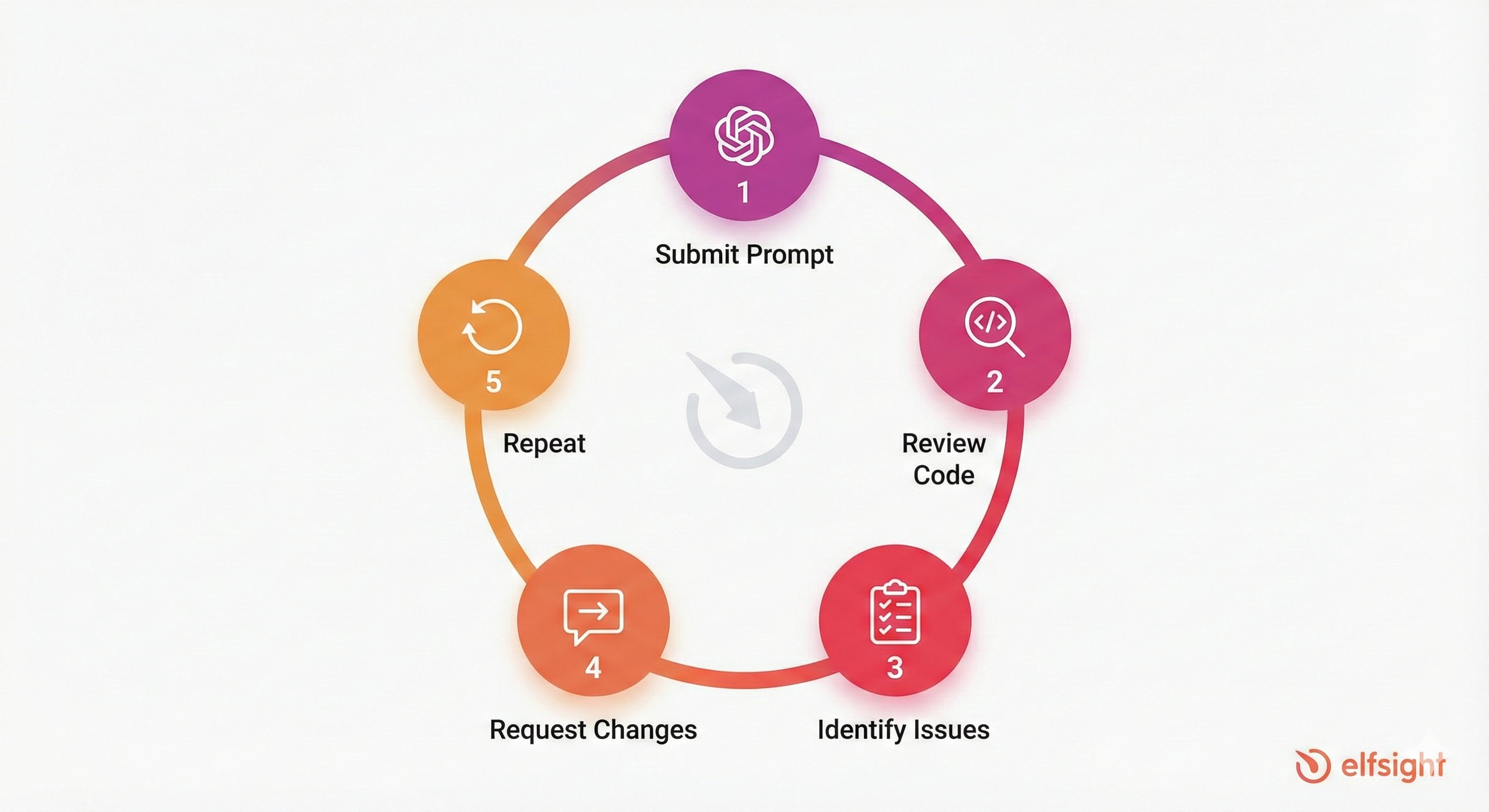
Think of your conversation with ChatGPT as a collaboration, not a single request. The workflow looks like this:
Step 1: Submit your initial prompt with all requirements.
Step 2: Review the generated code. Open it in a browser or code editor. Does it match your plan?
Step 3: Identify specific gaps. Is the layout wrong? Colors off? Missing accessibility features?
Step 4: Ask for targeted revisions:
- “Change the hero background to a gradient from teal to cream”
- “Add contact form validation that requires a valid email format”
- “Increase the button text contrast for accessibility”
Step 5: Repeat until satisfied.
Real-World Insight: “One developer who used ChatGPT-4 for a 30-hour project noted that approximately 95% of the code was AI-generated—they mainly focused on UI refinement.” — Developer Experience Report, Reddit
This metric reveals the true value of AI in development: it acts as a velocity multiplier, not a replacement for judgment. The developer didn’t save time by being lazy; they shifted their effort from typing syntax to making high-level architectural decisions. The “5%” of human effort is where the actual magic happens, ensuring the user experience feels polished rather than robotic.
Include SEO Essentials in Your Prompts
Don’t treat SEO as an afterthought. Include it in your initial code request:
- Title tags – Under 60 characters, include your primary keyword
- Meta descriptions – Compelling summaries under 160 characters
- Heading hierarchy – Proper h1 → h2 → h3 structure (never skip levels)
- Schema markup – JSON-LD structured data for rich search results
- Open Graph tags – So your pages look good when shared on social media
Add this segment to your prompts: “Include proper SEO: a descriptive title tag, meta description under 160 characters, and JSON-LD schema markup. Ensure one H1 per page with no skipped heading levels.”
Customize Design with Modern Styling
ChatGPT generates functional code. Functional doesn’t mean beautiful. Default AI output often looks generic (perfectly adequate but unmemorable). Here’s how to elevate it.
Use CSS Variables for Maintainable Color Systems
Instead of hardcoded color values scattered throughout your CSS, ask ChatGPT to use CSS custom properties:
:root {
  --color-primary: #208090;
  --color-secondary: #FFFCF5;
  --color-text: #1F2121;
  --color-accent: #32B8C6;
}

button {
  background-color: var(--color-primary);
  color: white;
}
Why does this matter? You can change your entire color scheme by editing four lines instead of hunting through hundreds of lines of CSS. It also makes implementing dark mode trivially easy later.
Prompt ChatGPT: “Use CSS custom properties for all colors, spacing, and typography. Define them in :root so the design is easy to customize globally.”
Build a Library of Reusable Components
Ask ChatGPT to create consistent UI patterns you can use throughout your website:
- Buttons: Primary, secondary, and outline variants with clear hover and focus states
- Cards: With icons, images, or text-only versions
- Sections: Hero layouts, feature grids, testimonials, pricing tables
- Forms: Input fields, textareas, select dropdowns, checkboxes – all styled consistently
Here’s a useful prompt: “Create CSS classes for five button styles: .btn-primary, .btn-secondary, .btn-outline, .btn-small, .btn-large. Include hover and focus states with smooth transitions. Ensure minimum 4.5:1 contrast ratio.”
Improve Typography and Spacing
Generic ChatGPT code often has awkward spacing and inconsistent typography. Request specific improvements:
- Font size scale: Use a logical progression (14px, 16px, 18px, 20px, 24px, 30px)
- Line height: 1.5 for body text (readability), 1.2 for headings
- Spacing scale: Consistent gaps (8px, 16px, 24px, 32px)
- Maximum line length: Limit content width to 650-700px for comfortable reading
Add Modern Visual Polish
Small details separate amateur websites from professional ones: rounded corners on buttons and cards (8-12px feels modern), subtle shadows that create depth without looking dated, gradient accents on backgrounds or buttons, smooth hover animations (250ms transitions), consistent iconography using SVG or icon fonts, etc.
Make It Responsive, Fast, and Accessible
A gorgeous website that breaks on mobile phones or excludes people with disabilities isn’t just bad UX, it’s a failed website.
Mobile-First Responsive Layout
Over half of web traffic comes from mobile devices. Your site needs to work flawlessly on small screens. Mobile-first CSS starts with styles for small screens, then adds complexity for larger ones:
/* Default: mobile styles */
.hero { padding: 20px; font-size: 18px; }

/* Tablet: 768px and up */
@media (min-width: 768px) {
  .hero { padding: 40px; font-size: 24px; }
}

/* Desktop: 1024px and up */
@media (min-width: 1024px) {
  .hero { padding: 60px; font-size: 32px; }
}
Tell ChatGPT: “Use mobile-first CSS with breakpoints at 768px and 1024px. Ensure all text is readable on small screens without zooming. Use flexible units where possible instead of fixed pixel widths.”
Performance Fundamentals
Fast websites rank better and convert better. Cover these basics:
Image optimization: Compress images before uploading. WebP format saves significant file size compared to JPEG or PNG.
Minimize code: Remove unused CSS and JavaScript.
Lazy loading: Defer loading images that aren’t immediately visible.
Add to your prompts: “Include lazy loading for images below the fold using loading=’lazy’. Flag any obvious performance optimization opportunities.”
Accessibility: WCAG 2.2 AA Compliance
This isn’t optional. Accessibility is legally required in many contexts and ethically essential everywhere. ChatGPT’s default code frequently lacks proper accessibility – you need to specifically request it.
| Requirement | Why It Matters | Implementation |
|---|---|---|
| Color contrast | Readable by people with low vision | Minimum 4.5:1 ratio for text |
| Semantic HTML | Screen readers understand structure | Use <button>, <nav>, <main> correctly |
| Alt text | Describes images for blind users | Specific descriptions, not “image” |
| Keyboard navigation | Works without a mouse | Tab through all interactive elements |
| Form labels | Announces input purposes | Every input needs a linked label |
| Focus indicators | Shows current keyboard position | Visible outline on focused elements |
Research Finding: “Researchers testing ChatGPT-4’s accessibility output found that default code had multiple WCAG violations. However, after prompting with specific accessibility requirements, ChatGPT achieved over 90% accuracy in fixing those errors.” — Accessibility Research Study
Common automated failures include missing aria-labels on icon buttons (which makes them invisible to blind users) and poor color contrast ratios. By specifically prompting for “WCAG 2.2 AA compliance,” you force the model to prioritize these non-visual requirements over simple visual aesthetics, effectively flipping a switch in its training data to focus on inclusivity.
- WAVE – Visual accessibility checker
- Axe DevTools – Chrome extension for automated testing
- Lighthouse – Built into Chrome DevTools
- Manual keyboard testing – Tab through your entire website; everything interactive should be reachable
UX Tips for AI-Built Websites
Code quality matters, but user experience matters even more. ChatGPT can generate technically correct HTML, but you determine whether visitors actually accomplish anything on your website.
Make CTAs Crystal Clear
Every page needs one obvious next step. Visitors should never wonder “what am I supposed to do here?”
- Primary CTA: Bold, contrasting button color. Action-oriented text like “Book a Call” or “Get Started”—not vague labels like “Submit” or “Click Here.”
- Secondary CTA: Subtle styling for less critical actions like “Learn More” or “View Pricing.”
- Strategic placement: Hero section (immediately visible), end of each content section, and footer.
Reduce Form Friction
Long forms kill conversions. Every additional field costs you potential leads.
- Essential fields only: Name, email, and one message field are usually enough for initial contact.
- Clear error messages: “Please enter a valid email” is infinitely better than “Invalid input.”
- Confirmation feedback: Show “Message sent successfully!” instead of silent form clearing.
- Mobile optimization: One field per row on phones, larger touch targets, appropriate keyboard types for each input.
Add Trust Signals
People do business with people they trust, which is why you should make sure to utilize:
- Social proof: Customer testimonials, client logos, review counts
- Security indicators: SSL badge, privacy policy link
- Personal presence: Photo and bio on About page (especially for freelancers)
- Contact information: Phone number and address if applicable
Manage Images, Assets, and Content the Right Way
ChatGPT generates placeholder code and placeholder websites don’t impress anyone.
Replace Every Placeholder
Default ChatGPT output includes generic image references like src="placeholder.jpg". Your job is to replace every single one with real content.
Finding images:
- Free sources: Unsplash, Pexels, and Pixabay offer high-quality photos without attribution requirements
- Paid options: Shutterstock or Getty for more specific needs
- Custom photography: Best for portfolios and personal brands
Before uploading images:
- Compress them using TinyPNG or ImageOptim
- Rename files descriptively:
hero-background.jpgnotIMG_4521.JPG - Write specific alt text: “Sarah Chen presenting at the 2024 design conference” not “photo”
Organize Your Project Folders
A clean file structure saves headaches later:
/your-website
  ├── index.html
  ├── about.html
  ├── contact.html
  ├── styles.css
  ├── script.js
  ├── /images
  │   ├── logo.svg
  │   └── hero-background.jpg
  └── /assets
      └── icons/
Use lowercase with hyphens for all file names. Be descriptive—future you will thank present you.
Rewrite Content for Your Brand Voice
ChatGPT defaults to corporate-sounding copy. It’s functional but forgettable. Tell ChatGPT your specific voice: “Rewrite this homepage copy in a friendly, conversational tone for small business owners. Our brand voice is warm and approachable – like a trusted advisor, not a salesperson.”
But some content only you can write:
- Your personal story and background
- Specific client results and case studies
- The unique way you describe your services
- Details that make your offering different
Publish Your Website: Free and Paid Hosting Options
You’ve got working code. Now it needs a home on the internet.
What ChatGPT Can and Cannot Do
Let’s be clear about limitations. ChatGPT cannot:
- Buy domain names for you
- Configure hosting directly
- Upload files to servers
- Manage DNS settings
ChatGPT can:
- Explain how each hosting platform works
- Walk you through setup steps
- Troubleshoot error messages
- Suggest the best option for your needs
Think of it as having a knowledgeable friend on call – helpful guidance, but you still do the clicking.
Free Hosting: Zero Cost, Real Results
For simple static sites (HTML, CSS, JavaScript with no server-side processing), these platforms work beautifully:
GitHub Pages – Best for developer portfolios and personal sites. Upload code to a GitHub repository, enable Pages in settings, and your site goes live at username.github.io. Free SSL included.
Netlify – Best for modern sites needing forms or basic functionality. Drag-and-drop file uploads, automatic HTTPS, and built-in form handling. The free tier includes 300 build minutes monthly—plenty for most personal projects.
Vercel – Best for React, Next.js, or other modern frameworks. Fast deployments and generous free tier for hobby projects.
Surge.sh – Best for quick static deploys. One command (surge) and you’re live.
| Platform | Best For | Setup Difficulty | Key Features |
|---|---|---|---|
| GitHub Pages | Portfolios, static sites | Medium | Free SSL, custom domains |
| Netlify | Modern sites, forms | Easy | Forms, analytics, auto-deploy |
| Vercel | React/Next.js apps | Easy | Fast CDN, serverless functions |
| Surge.sh | Quick static deploys | Very Easy | CLI deployment |
Paid Hosting: When You Need More
If you want technical support, more resources, or specific features:
Shared hosting (GoDaddy, Bluehost, SiteGround) – $5-15/month. Good for small business sites with moderate traffic.
Managed hosting (WP Engine, Kinsta) – $25-50+/month. WordPress-specific with automatic updates and security.
VPS hosting (DigitalOcean, Linode) – $5-50+/month. Full control for developers who want it.
Custom Domain Names
Your domain (yourname.com) typically costs $10-15 per year from registrars like Namecheap or Google Domains. All the free hosting platforms mentioned support connecting custom domains—you just need to update DNS settings.
Real-World Use Cases and Examples
Theory is helpful. Seeing how real projects come together is better. This comparison breaks down exactly what the AI contributes versus what requires your manual effort.
| Project Type | Goal & Timeline | What ChatGPT Handled | What Required Human Work | Stack & Cost |
|---|---|---|---|---|
| Freelancer Portfolio | Showcase work to attract clients. Timeline: 5-10 hours (over 1-2 weeks) |
|
| ChatGPT, VS Code, Netlify $0-15/year |
| Small Business Page | Local presence for inquiries/bookings. Timeline: 3-5 hours |
|
| ChatGPT, GitHub Pages/Netlify $0-10/year |
| Event Landing Page | Drive webinar/conference registrations. Timeline: 2-4 hours |
|
| Static hosting ~$0/year |
| Startup MVP | Test market interest for an app. Timeline: 30-60 hours (High complexity) |
|
| Full Dev Stack Cost Varies |
Key insight from developers: For simple websites, ChatGPT generates 90-95% of usable code. For complex applications, expect 60-70%—the remaining work requires human problem-solving.
Where ChatGPT Struggles (Honest Assessment)
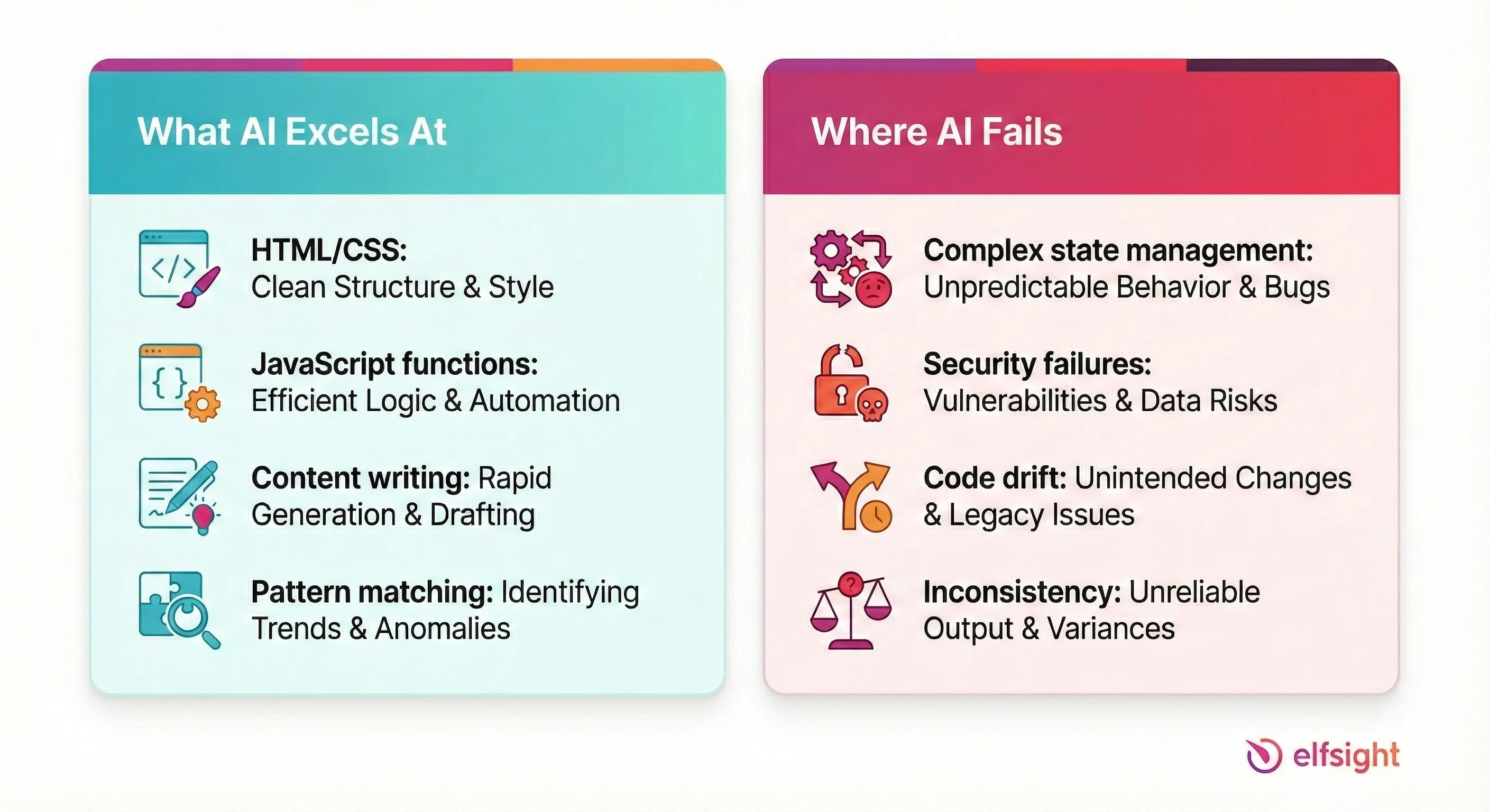
To get the most out of AI, you need to understand its fundamental nature: ChatGPT is a brilliant sprinter, but a terrible marathon runner. It excels at solving isolated problems but struggles to maintain the “big picture” of a complex application.
The Sweet Spot: Where AI Shines
Think of ChatGPT as an incredibly fast Junior Developer. It knows the syntax of every language perfectly, never forgets a semicolon, and can type 100x faster than a human. It is unbeatable for:
- Boilerplate & Syntax: It creates the scaffolding for HTML/CSS layouts instantly, saving you the tedious work of writing
<div>structures by hand. - Isolated Logic (Small Scripts): Need a JavaScript function to validate an email address or toggle a dark mode switch? It can write these standalone scripts perfectly in seconds.
- Content & Copy: Unlike traditional lorem ipsum, ChatGPT generates context-aware placeholder text that helps you visualize the final design better.
- Pattern Matching: If you show it one card design and ask for “three more variations with different colors,” it executes the pattern flawlessly.
The Danger Zone: Where AI Fails
ChatGPT lacks “object permanence” for large projects. It doesn’t inherently “know” how a change in your CSS file might break a button on a completely different HTML page. Its biggest pitfalls include:
1. The “Context Window” & Amnesia
As your code grows, ChatGPT eventually “forgets” the beginning of the file. This leads to it hallucinating variable names that don’t exist or suggesting code that conflicts with what you built five minutes ago. It struggles to hold the mental model of a complex, multi-page application.
2. Silent Security Failures
AI prioritizes functionality over security. It might write a PHP form handler that works perfectly but leaves your database wide open to SQL injection attacks because it didn’t strictly sanitize the inputs. It assumes a “happy path” where no malicious users exist.
3. “Code Drift”
Have you ever asked for a small tweak, only for the AI to rewrite the whole section and accidentally remove a feature you liked? This is code drift. The AI often prefers to rewrite rather than edit, which introduces regression bugs (breaking things that used to work).
Frequently Asked Questions
Can I build a website with ChatGPT?
Is the ChatGPT website generator free?
How long does it take ChatGPT to create a website?
What's the best AI tool to build a website?
What is the 30% rule for AI?
Is there a completely free AI website builder?
Final Thoughts
The most effective way to use ChatGPT for web development is to shift your mindset from a coder to a technical architect. If you skip the planning phase and jump straight to prompting, you will likely end up with generic, disjointed code that is difficult to fix. Your primary responsibility is to define the site structure, content strategy, and design constraints before you even open the chat interface.
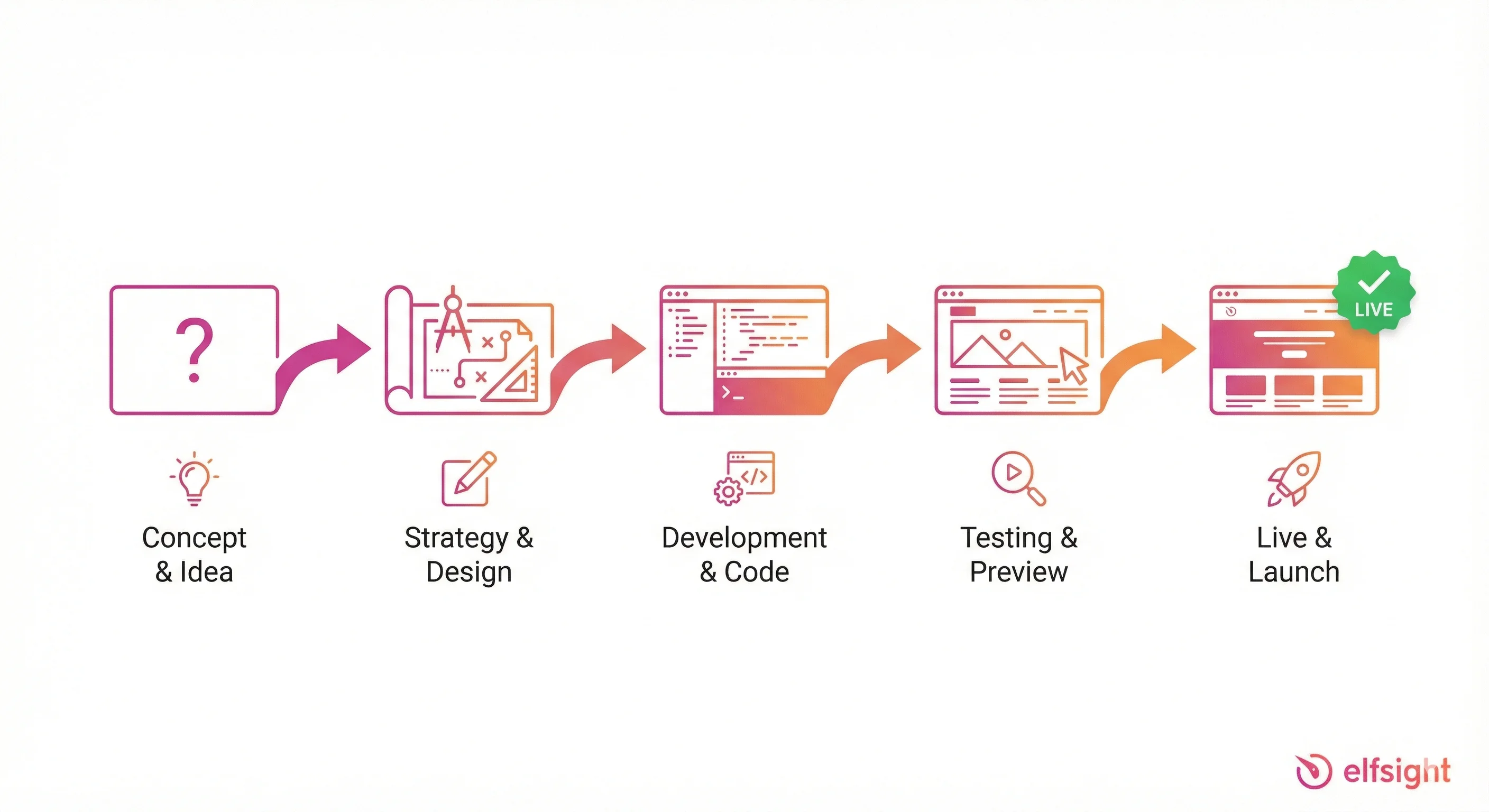
Once you begin generating code, expect the process to be iterative rather than instantaneous. The first output is rarely perfect, and you will need to guide the model through specific refinements to fix layout bugs and enforce standards. By strictly requiring semantic HTML and WCAG accessibility compliance in your prompts, you ensure the underlying code is robust enough for real-world use rather than just looking good in a screenshot.
Finally, remember that generating the script is only half the battle. To launch a live website, you must take ownership of the deployment process, from setting up hosting to replacing placeholder assets with authentic content. With a clear plan and the patience to refine the output, you can move from a blank screen to a live URL in a fraction of the time it would typically take.