You’re fielding more customer questions than ever while your team drowns in routine tasks, and the standard advice is “just add AI” – but which kind? The virtual assistant vs chatbot debate used to be straightforward: chatbots were scripted website widgets, virtual assistants were Siri and Alexa on your phone. Different tools, separate use cases.
That framing is outdated. Both now run on the same large language models and retrieval architectures, and a new wave of agentic AI is reshaping what both categories can do. The real difference isn’t the underlying AI. It’s the interface, the scope, and the degree of autonomy.
The competitive advantage isn’t picking one tool. It’s connecting them into a coordinated system. This article clarifies the conversational AI vs. chatbot terminology, shows where chatbots and virtual assistants each fit, and walks you through building a unified system – starting with your website.
- Chatbots handle website volume; virtual assistants automate workflows. You need both.
- Conversational AI is the umbrella – chatbots and assistants are implementations of it.
- Most SMBs already have the “assistant” layer in their CRM or productivity tools.
- The real advantage isn’t AI adoption – it’s the handoff between tools.
- Start with a knowledge-trained chatbot, then connect it to your stack.
AI Assistant vs Chatbot: Defining the Roles
Before diving into specifics, it helps to clarify the umbrella term: conversational AI is the underlying technology – the combination of natural language processing, machine learning, and generative models that power human-like interactions. Chatbots and virtual assistants are both implementations of conversational AI, but they apply it differently. Same engine, different vehicles.
What Is a Modern AI Chatbot?
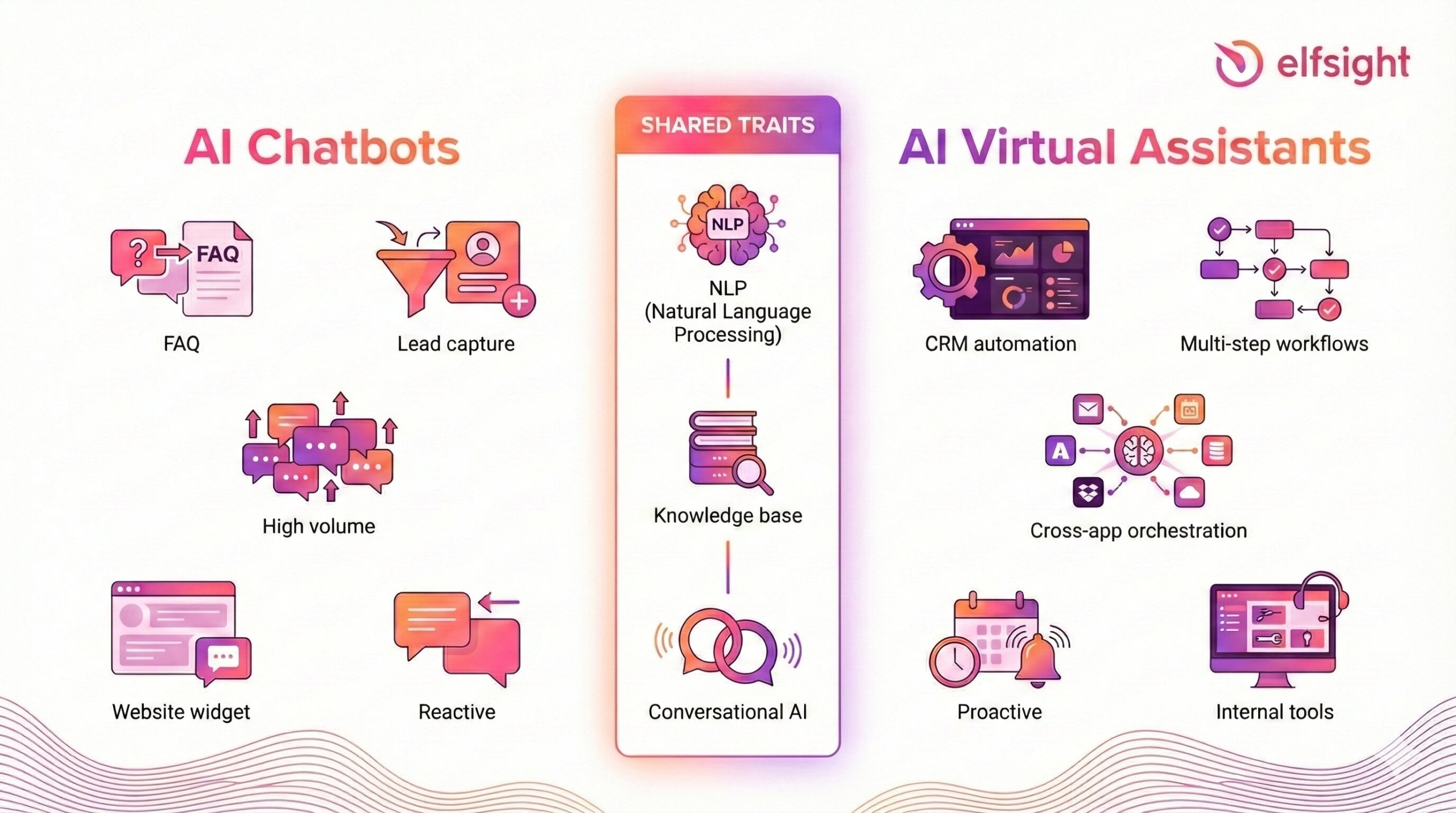
Think of a modern AI chatbot as your front-desk concierge. It’s the first point of contact for anyone who lands on your website, and its job is to handle high-volume, short-turnaround interactions quickly and accurately.
A typical AI chatbot for website handles FAQs, product lookups, lead qualification, bookings, and order tracking – all reactive by design. Visitors ask, the bot answers, then moves to the next conversation. Most commercial chatbots blend rule-based logic (buttons, quick replies, guided flows) with AI-powered natural language understanding and RAG from a knowledge base, so they go well beyond canned responses – but they stay focused on a defined set of intents like “pricing,” “shipping,” or “request a demo.”
Where chatbots shine is volume. They handle hundreds of concurrent conversations without breaking a sweat, making them indispensable during traffic spikes, product launches, or seasonal peaks.
What Is an AI Virtual Assistant?
If the chatbot is your front-desk concierge, an AI virtual assistant for business is your digital chief of staff. It engages in richer, multi-step interactions and executes tasks across applications and channels – authenticating users, accessing CRM records, scheduling meetings, triggering backend APIs, and maintaining context over longer conversations. The key distinction is autonomy: a chatbot answers a question and closes the loop. An assistant keeps working.
The latest generation, powered by agentic AI, goes further – breaking goals into subtasks and executing sequences without hand-holding. Think of a CRM copilot that researches a new lead, enriches their profile, drafts outreach, and schedules a follow-up, all from a single trigger.
In practice, business virtual assistants rarely ship as a standalone product you install. They live inside the tools your team already uses – AI copilots in CRMs, smart features in productivity suites, automated workflows in collaboration platforms. They act on internal data that can’t be exposed in a public chat widget, which is why they’re often described as operational co-pilots rather than customer-facing interfaces.
Where They Overlap, and Where They Don’t
Both conversational AI chatbots and virtual assistants process complex queries using advanced NLP, which is why the two categories feel blurry. But the action-oriented nature of virtual assistants positions them to handle a wider range of functions: scheduling, CRM manipulation, and cross-app orchestration, which chatbots aren’t built for.
The distinction isn’t technical – it’s functional. Chatbots empower customers through self-service. Virtual assistants enable assisted agents and automate operational support. And increasingly, agentic AI is adding a third dimension: systems that proactively identify opportunities and execute without waiting for a prompt.
That’s why the question isn’t “chatbot or assistant?” It’s “which combination delivers the results you need?”
Why Your Business Needs Both
The case for combining these tools isn’t theoretical – it maps directly to how SMBs operate day-to-day. Here’s how the pairing works across three dimensions.
Speed at the Edge, Depth Behind the Scenes
A website chatbot delivers immediate, one-touch answers – store hours, pricing, shipping options – in seconds. An AI assistant for business process automation focuses on depth: scheduling follow-ups, updating CRM records, drafting personalized emails, or analyzing a prospect’s history.
The chatbot absorbs high-frequency, narrow queries at the top of the funnel. The virtual assistant picks up the baton for lower-volume but higher-value work, such as sales follow-up, account management, and internal coordination.
Customer-Facing vs. Team-Facing
“AI is not the differentiator anymore. How intelligently you apply it is.” — Tom Eggemeier, CEO, Zendesk
Here’s a practical way to think about this: your chatbot shields your team from the 80% of repetitive questions, while your assistant helps staff handle the remaining 20% that require nuance.
The data supports this split. Salesforce’s 2025 State of Service report found that service reps using AI spend 20% less time on routine cases, freeing up an estimated four hours per week for complex work. Those with agentic AI tools dedicate even more time to high-complexity cases, spending a quarter of their week on the hardest problems.
On the internal side, Zendesk’s 2025 CX Trends report found that 90% of early-adopting CX leaders report positive ROI from AI tools that assist their teams, while 79% of support agents say having an AI copilot improves their performance. AI features embedded in productivity suites, CRMs, and collaboration tools are effectively turning those platforms into virtual assistants for knowledge work.
Consistency Through a Shared Knowledge Base
The technical pattern that makes this synergy work is a shared knowledge base. When both your chatbot and your internal assistant draw from the same source of truth – your product docs, policy pages, manuals, and Q&A content – the customer hears the same story from the website that your internal team communicates over email or phone.
Modern AI chatbot platforms make this straightforward. Elfsight’s AI Chatbot, for example, lets you build a knowledge base from your own web pages, uploaded files, and custom Q&A pairs. The same source documents can then be fed into internal tools like Notion AI or HubSpot’s knowledge base, so both sides of the pipeline reference the same canonical content, even if they don’t share a database.
When This Approach Doesn’t Work
Combining tools isn’t a universal fix. A few common pitfalls to watch for:
If your knowledge base is messy – outdated docs, contradictory policies, unstructured content) – both the chatbot and the assistant will confidently serve wrong answers. The “garbage in, garbage out” principle applies double when two systems draw from the same source.
If your team lacks the bandwidth to maintain the system, even a simple chatbot becomes a liability. Knowledge bases need regular updates as products, pricing, and policies change. An assistant connected to a stale CRM does more harm than good.
And if your customer interactions are overwhelmingly high-touch and complex (think bespoke consulting or enterprise sales), a chatbot may create friction rather than reduce it. Not every business needs a front-desk concierge. Some need a direct line to a human from the start.
Use Cases: When to Use Which?
Theory is useful, but the real test is whether these tools solve actual problems. Here are three scenarios where the chatbot-assistant split pays off:
⚡ Scenario A: Website Traffic Spikes
During promotions, product launches, or seasonal peaks, an AI chatbot acts as a buffer, preventing your support channels from collapsing. Shipping costs, return policies, store hours, basic troubleshooting, login help – when a bot handles these at scale, your human staff reserves capacity for escalations and complex issues.
Consider a practical example: an e-commerce or booking website where terms, conditions, and insurance details vary by product. Rather than hard-coding every variation into scripted flows, you point the chatbot at detailed policy pages and let it answer questions based on that content. High-volume, detail-heavy – exactly the workload modern website chatbots are built for.
📄 Scenario B: Internal Knowledge Access
An AI virtual assistant for business can serve as a knowledge access layer over your company documents. Upload policy manuals, product catalogs, and onboarding guides, and employees can ask natural-language questions such as “What’s our PTO policy?” or “What are the key phases of client onboarding?” and receive instant, context-driven answers pulled dynamically from the source files.
This eliminates the “browse the intranet for 15 minutes” problem that plagues most teams. And if the same knowledge base powers both your website chatbot and your internal assistant, you get consistency as a bonus.
🔗 Scenario C: Post-Sale Support Escalation
Here’s a scenario that doesn’t fit neatly into either category – and that’s the point.
A customer contacts your website chatbot about a billing discrepancy. The bot can pull up general billing policies and explain common charges, but it can’t access the customer’s account, issue a refund, or escalate with full context. Without an assistant layer, the conversation hits a wall: the customer repeats their issue to a human agent who starts from scratch.
With an integrated assistant, the chatbot gathers the initial complaint and relevant details, then hands the full context to an internal AI that pulls up the account, flags the discrepancy, and either resolves it automatically or prepares a summary for the support agent. The customer never repeats themselves. The agent spends two minutes instead of ten. That’s the synergy in action: not two tools doing the same thing, but two tools handling different stages of the same interaction.
Virtual Assistant AI Software: What to Actually Deploy
With roles and use cases defined, the practical question is: what do you actually buy? The answer depends on where the AI lives (website vs. internal platform), who it serves (customers vs. employees), and how deep it integrates with your stack. For most SMBs, it’s not about choosing between a chatbot and a virtual assistant — it’s about layering the right tools at each stage.
| Category | Examples | Best For | Typical User |
|---|---|---|---|
| Website AI Chatbot | Elfsight AI Chatbot | Visitor engagement, knowledge-based support, and lead capture | SMBs, solopreneurs |
| AI-Augmented Business Tools | HubSpot AI, Notion AI, Microsoft Copilot | CRM automation, drafting, internal knowledge, workflow assist | SMBs to mid-market |
| Enterprise Support Platforms | Zendesk, Intercom | Multi-agent help desks, complex ticketing, omnichannel support | Mid-market to enterprise |
Elfsight: More Than a Simple Chatbot
Elfsight’s AI Chatbot occupies the space where most SMBs actually live – you need something smarter than an FAQ bot, but you’re not ready to manage a full enterprise support platform.
What sets it apart is how it learns your business: during setup, the widget can automatically pull up to 200 pages from your sitemap to build its knowledge base in one pass. It also recognizes which page a visitor is on, delivering contextually relevant answers without the visitor having to explain where they are.
On the lead-capture side, a built-in contact form collects names, emails, and phone numbers directly inside the chat, with a consent checkbox for compliance, and delivers submissions alongside full chat transcripts via email. The chatbot doesn’t just answer questions; it captures leads with the conversation context your team needs to follow up.
AI-Augmented Business Tools: The Assistant Layer You Already Have
Here’s what the virtual assistant vs chatbot conversation often misses: most SMBs don’t need to buy a separate “virtual assistant” product. The assistant layer is increasingly built into tools you already pay for.
CRM platforms like HubSpot now include AI that drafts emails, summarizes deal histories, and suggests next actions. Productivity suites offer AI copilots that pull answers from internal documents, generate meeting summaries, and automate routine workflows. Project management tools use AI to assign tasks, flag blockers, and surface relevant context.
These embedded AI features are the virtual assistant side of the equation. When your website chatbot captures a lead and pushes it into a CRM where AI handles the categorization, follow-up drafting, and task creation – that’s the chatbot-to-assistant pipeline in action, without a separate product purchase.
Zendesk and Intercom: Enterprise Support Platforms
Zendesk and Intercom represent the other end of the spectrum: full customer service platforms with embedded AI agents, multi-agent help desks, SLAs, advanced routing, and deep CRM integrations. Powerful, but potentially overkill if your primary need is a website chatbot and a lightweight internal assistant.
Most smaller businesses start with embedded AI chatbots and features inside existing tools, then graduate to enterprise suites as their support operations scale.
Implementation: Building the Chatbot-to-Assistant Pipeline
You’ve picked your tools – now here’s how to set up the chatbot-to-assistant pipeline. These steps cover both sides: configuring the chatbot as the front end and connecting it to the tools that handle the back end. Using Elfsight as the chatbot example, since it’s the most accessible starting point for SMBs.
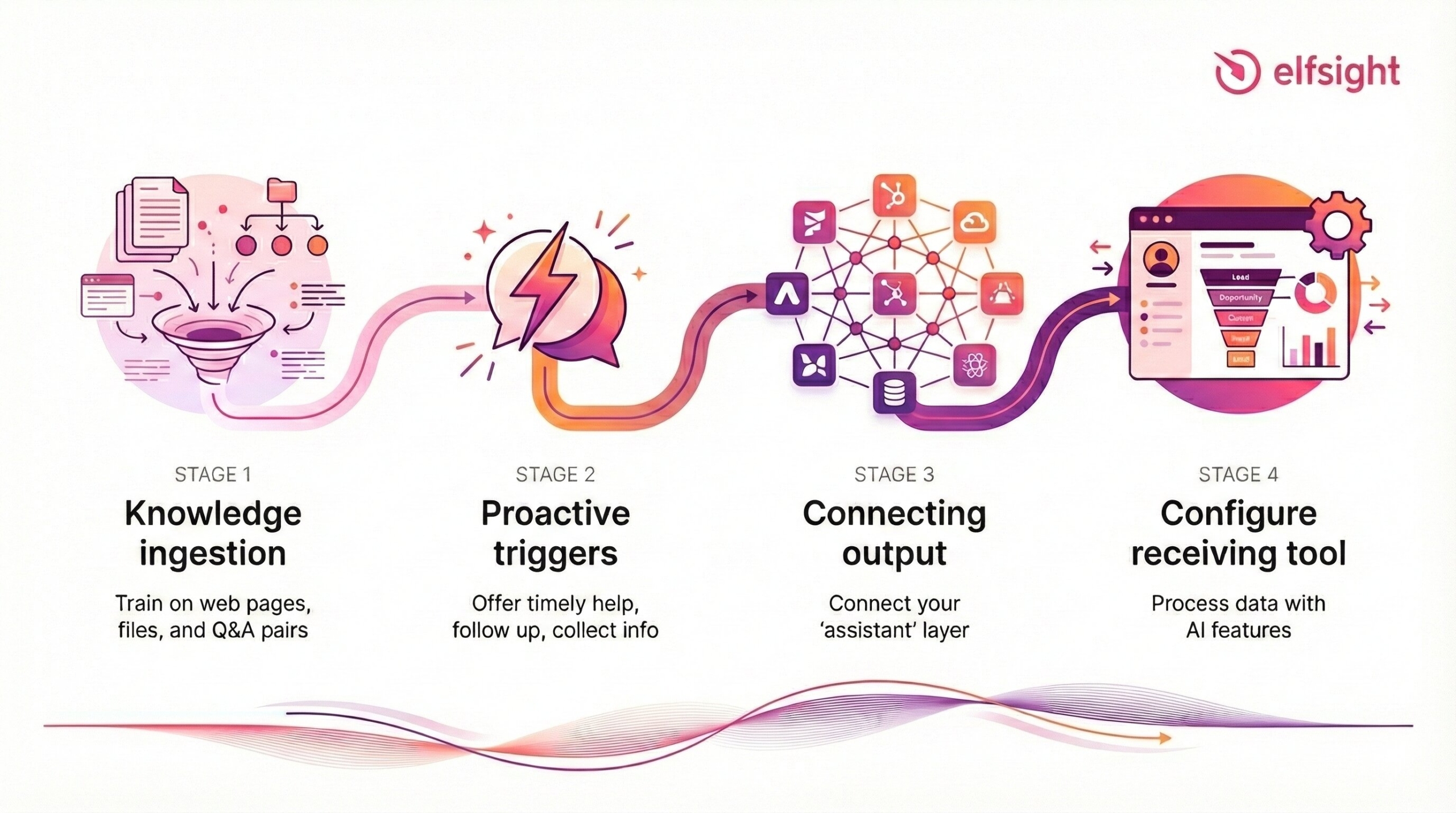
Step 1: Knowledge Ingestion
The quality of your chatbot’s answers is entirely determined by the content it’s trained on. Start here; everything else builds on this foundation.
Train your Chatbot
- The fastest path is sitemap-based ingestion: enter your website URL during setup, and the widget automatically pulls up to 200 pages.
- For content that doesn’t live on your website, like internal manuals, product spec sheets, or training guides, upload files directly in PDF, DOCX, PPTX, TXT, JSON, HTML, or MD format.
- For high-stakes topics where you need exact answers (pricing, legal disclaimers, refund terms), add manually curated Q&A pairs that take priority over general knowledge base content.
This is also where the “garbage in, garbage out” pitfall hits hardest. If your source content is outdated, contradictory, or poorly structured, the chatbot will confidently serve wrong answers – and any downstream tools trained on the same content will do the same. Audit your docs before you train, and build a review cadence to keep them current.
The same knowledge corpus can power both your public chatbot and internal tools. One source of truth, multiple touchpoints.
Step 2: Proactive Triggers
Don’t just wait for questions. Shift your chatbot from purely reactive to proactively helpful – that’s what moves it into assistant territory.
Page-Based Engagement
Elfsight’s page-awareness feature means the bot knows which page a visitor is on. Use this to initiate conversations when a visitor lands on high-intent pages, such as pricing, checkout, or product comparisons. Offer help with shipping, returns, or discount questions before they bounce.
Follow-Up Messages
The widget can automatically send follow-up messages after periods of inactivity, re-engaging visitors who might be stuck or undecided. This mirrors how a virtual assistant anticipates needs rather than waiting for explicit requests.
Qualified Escalation
When a visitor’s questions signal buying intent or require human judgment, use the built-in form to capture their details mid-conversation. Collect name, email, and phone number with a consent checkbox, then pass the full chat transcript to your sales or support team. That context is what transforms a raw lead into an actionable one.
Step 3: Connect the Chatbot Output
The chatbot does its job – answers questions, captures leads, and gathers context. Now that data needs to reach the people or systems responsible for the next step. This is the handoff.
Elfsight delivers chat transcripts and form submissions via email, which gives you a usable starting point. From there, route the data into your existing tools:
- Direct email routing works for small teams: transcripts land in a shared inbox, and the team acts on them manually. Simple, no setup cost, but doesn’t scale.
- Automation platforms like Zapier or Make let you automatically parse incoming emails and push structured data into your CRM, ticketing system, or project management tool.
- Native integrations in your CRM or helpdesk may also accept email-based input. Many ticketing systems (Zendesk, Freshdesk, HelpScout) can convert incoming emails into tickets with tags and assignment rules.
Step 4: Configure the Receiving End
This is where the pipeline becomes a system. The chatbot captured the data. Now the assistant layer needs to be ready to act on it.
If your receiving tool is a CRM with AI features (HubSpot, Salesforce, etc.), configure it to:
- Auto-categorize incoming leads based on tags or page context from the chatbot transcript
- Draft follow-up emails using the conversation context (most CRM AI copilots can do this when the transcript is attached to the contact)
- Create follow-up tasks or trigger workflow sequences based on lead type
If your receiving tool is a helpdesk or ticketing system, set up:
- Routing rules so chatbot-originated tickets go to the right team
- Priority tagging based on the nature of the inquiry (billing issue vs. general question)
- Template responses that reference the chatbot conversation, so the customer sees continuity
If your receiving tool is a collaboration platform (Slack, Teams, Notion), set up:
- Channel notifications for new leads or escalations from the chatbot
- A shared knowledge base (Notion, Confluence) trained on the same source docs your chatbot uses, so internal AI features give consistent answers
You don’t need all of these. Pick the one or two tools your team already uses and configure the handoff for those.
Frequently Asked Questions
Can a single system act as both a chatbot and a virtual assistant?
Do small businesses actually need both, or is a chatbot enough?
Will AI chatbots and virtual assistants replace human staff?
What's the biggest mistake businesses make when deploying AI chatbots?
Is a personal AI assistant different from a team-wide virtual assistant?
Where to Start
The virtual assistant vs chatbot debate was never really about choosing between two products. It’s about designing a pipeline: a customer-facing chatbot handles volume and captures data at the front, while AI embedded in your existing tools handles the deeper work behind the scenes. The U.S. Chamber of Commerce’s 2025 report found that 58% of small businesses now use generative AI — more than double the rate in 2023. But adoption alone isn’t the advantage. The handoff is.
Start with a website chatbot trained on your actual content. Connect its output to the tools your team already uses. Configure those tools to act on what the chatbot captures. That’s the pipeline – and everything else scales from there.