
WooCommerce Announcement Bar plugin
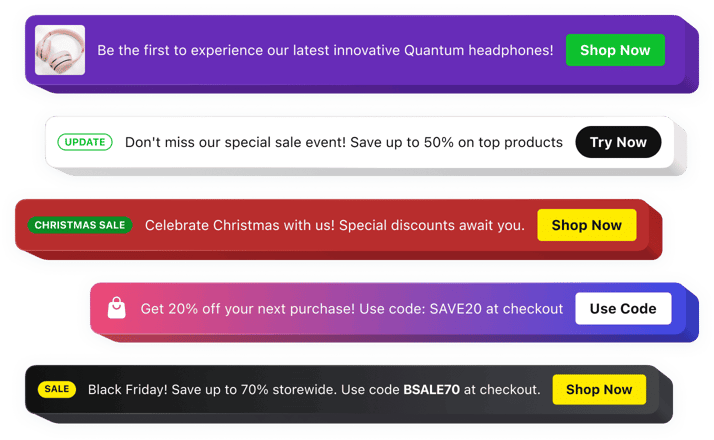
WooCommerce Announcement Bar plugin
Why People Love Elfsight
For WooCommerce store owners, every visit is a chance to connect with customers and increase sales. The Elfsight Announcement Bar plugin helps you deliver important messages instantly, whether you want to promote a discount, share a store update, or highlight a new product.
It gives you a simple way to keep shoppers informed without using intrusive popups or distracting elements. Create eye-catching notifications that guide visitors toward special offers, important pages, or actions you want them to take.
No design skills or coding experience are needed. Build your announcement in a few clicks, customize it to match your WooCommerce website, and add it wherever you want your visitors to see it.
Did you know?
According to Shopify Plus research, optimized announcement bars can contribute to 5-12% higher conversion rates by keeping important offers visible throughout the customer journey.
Add an Announcement Bar to your WooCommerce website for free and turn everyday visits into more meaningful interactions.
Key Features of the WooCommerce Announcement Bar Plugin
Explore the features that make it easier to communicate with shoppers and promote your store updates:
- Quick implementation: Add the plugin to your WooCommerce website without complicated development or custom-built solutions.
- Promotional messaging: Highlight sales, discount codes, new collections, and limited-time offers where customers can see them.
- Custom call-to-action buttons: Add buttons that encourage visitors to explore products, claim offers, or visit specific pages.
- Complete design control: Adjust colors, fonts, layouts, backgrounds, and buttons to fit your store’s visual style.
- Flexible display options: Place announcements where they work best and create a smoother browsing experience.
- Campaign scheduling: Prepare your announcements beforehand and show them during selected dates or events.
- Responsive appearance: Make sure your messages remain clear and attractive on desktop, tablet, and mobile.
- Engaging content formats: Combine text, buttons, icons, badges, images, and videos to make your announcements stand out.
- Better customer awareness: Keep shoppers informed about important updates that can influence their purchase decisions.
See all these features in action in the free editor – no signup required.
How to Add an Announcement Bar to WooCommerce
You can add an announcement bar to your WooCommerce website in just a few easy steps:
Method 1: Inline Announcement Bar
Ideal for displaying promotions and updates directly within your store pages.
- Select a template: Open the Elfsight editor and choose a layout that matches your WooCommerce website design and business goals.
- Personalize the plugin: Add your message, buttons, images, icons, and adjust the appearance settings.
- Generate the embed code: Click “Add to website for free” and copy your ready-to-use code snippet.
- Add it to WooCommerce: In your WordPress dashboard, open the page or section where you want the plugin, add a Custom HTML block, and paste the code.
Method 2: Floating Announcement Bar
A great option if you want your message to stay visible while customers browse different parts of your store.
- Choose a floating template: Pick a layout that keeps your announcement noticeable during scrolling.
- Configure the plugin: Set the position, customize the design, and update the message and buttons.
- Copy the generated code: Once everything looks right, get your unique embed snippet.
- Publish in WooCommerce: Add the code through your WordPress theme or custom HTML section and save the changes.
That’s it — your Announcement Bar is now live on your WooCommerce website. You can edit messages, refresh the design, or update your campaigns anytime from your Elfsight dashboard.
Need help? Visit our Help Center for detailed tutorials and setup instructions. You can also suggest improvements through the Wishlist, check the updates in the Changelog, and exchange ideas with other users in the Community.