
Facebook Page Announcement Bar widget
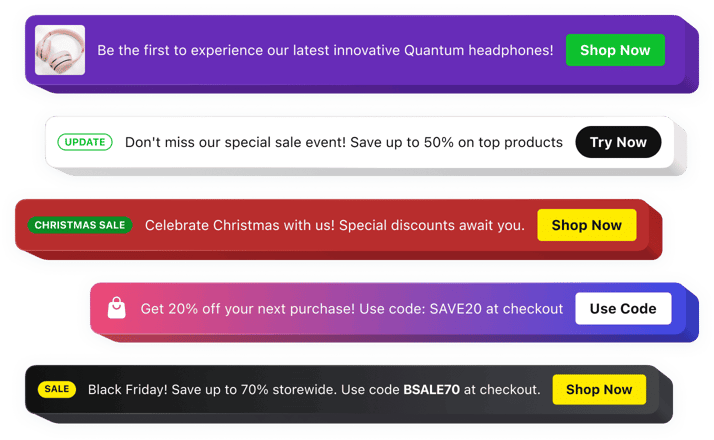
Facebook Page Announcement Bar widget
Why People Love Elfsight
Your Facebook Page is often the first place people interact with your brand, organization, or community. The Elfsight Announcement Bar widget helps you make sure important messages stand out, whether you’re promoting an event, sharing a special offer, or directing followers to key information.
Instead of relying on visitors to find updates in posts or page content, you can place announcements in a highly visible location. Highlight promotions, business updates, registration deadlines, or new releases with a professional-looking notification that grabs attention without feeling intrusive.
The setup process is simple and beginner-friendly. Create your message, customize the appearance, and add the widget to your Facebook Page in just a few steps.
Did you know?
Studies by Nielsen Norman Group show that announcement bars are among the first interface elements users notice when visiting a webpage, making them highly effective for delivering important information quickly.
Add an Announcement Bar to your Facebook Page for free and help visitors discover your most important updates from the moment they arrive.
Key Features of the Facebook Page Announcement Bar Widget
Here’s what makes Elfsight a practical solution for businesses, creators, nonprofits, and communities looking to improve communication with their audience:
- No-code installation: Launch announcements quickly without technical skills or development resources.
- Persistent visibility: Keep important messages in front of visitors instead of letting them get buried among other content.
- Promotion-focused design: Showcase sales, events, special campaigns, registrations, and limited-time opportunities.
- Action-driving buttons: Encourage visitors to click through to landing pages, forms, products, booking pages, or external websites.
- Flexible styling options: Adjust colors, typography, icons, buttons, and layouts to complement your branding.
- Targeted communication: Display relevant announcements for specific campaigns and audience goals.
- Scheduled publishing: Plan announcements in advance and let them appear automatically when needed.
- Responsive display: Ensure your announcements look polished on desktop and mobile devices alike.
- Rich media support: Enhance messages with text, buttons, icons, badges, images, and videos.
See all these features in action in the free editor – no signup required.
How to Add an Announcement Bar to a Facebook Page
Creating an announcement for your Facebook Page is quick and straightforward. Here’s how to get started:
- Choose a template: Open the Elfsight editor and select an announcement bar layout that fits your objectives.
- Customize the widget: Add your message, upload images if needed, configure buttons, and personalize the design.
- Generate the code: Click “Add to website for free” and copy the generated installation code.
- Add it to your Facebook Page: Use the available integration method to display the widget where visitors can easily see it.
It’s that easy! Your Announcement Bar is ready to help communicate important updates, promotions, and messages to your Facebook Page visitors.
Need help? Visit our Help Center for detailed tutorials and setup instructions. You can also suggest improvements through the Wishlist, check the updates in the Changelog, and exchange ideas with other users in the Community.