
Drupal Announcement Bar module
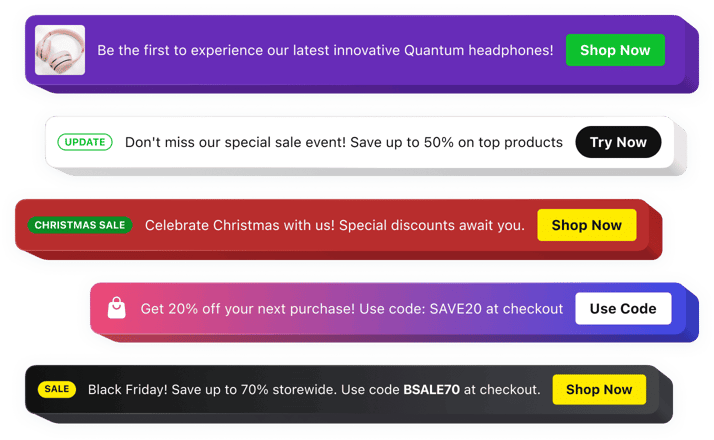
Drupal Announcement Bar module
Why People Love Elfsight
Your Drupal website may contain valuable content, but visitors can still miss important announcements, promotions, or updates. The Elfsight Announcement Bar module helps you put key messages where they’re most visible, ensuring your audience notices them right away.
Whether you’re promoting an event, sharing a company update, announcing a new feature, or encouraging newsletter signups, the module helps you communicate effectively without disrupting the browsing experience. With flexible layouts and extensive customization options, your announcements can look like a natural part of your Drupal website.
No coding knowledge is required. Create your announcement, customize its appearance, and publish it on your website in just a few simple steps.
Did you know?
According to Nielsen Norman Group research, announcement bars are among the first interface elements visitors notice on a webpage, with 72% of users seeing them immediately after landing on a website.
Add an Announcement Bar to your Drupal website for free today and make every important message impossible to miss.
Key Features of the Drupal Announcement Bar Module
Here’s why website owners choose Elfsight to highlight important information and increase visitor engagement:
- Easy no-code setup: Create and publish announcement bars without developers or technical expertise.
- Floating display option: Keep announcements visible while visitors browse your website.
- Promotional campaigns: Draw attention to special offers, events, product launches, donations, or important updates.
- Call-to-action buttons: Guide visitors to specific pages, forms, products, articles, or external resources.
- Complete design control: Customize colors, fonts, layouts, icons, buttons, and spacing to match your Drupal website.
- Flexible positioning: Display announcements at the top, bottom, or within page content.
- Scheduling capabilities: Automatically display announcements during selected dates and campaigns.
- Mobile-friendly design: Deliver a seamless experience across desktop, tablet, and mobile devices.
- Rich content support: Combine text, buttons, icons, badges, images, and videos to create engaging announcements.
See all these features in action in the free editor – no signup required.
How to Add an Announcement Bar to Drupal
Adding an announcement bar to your Drupal website takes only a few minutes. Follow these simple steps to get started:
Method 1: Inline Announcement Bar
Perfect for displaying announcements within specific pages, landing pages, articles, or content sections.
- Select a template: Open the Elfsight editor and choose a template that suits your goals.
- Customize your widget: Add your message, buttons, images, icons, and customize the design.
- Generate your code: Click “Add to website for free” and copy the generated embed code.
- Embed in Drupal: Open the page, block, or content area where you want the announcement to appear and paste the code.
Method 2: Floating Announcement Bar
Ideal for keeping important messages visible across your entire website while visitors navigate between pages.
- Choose a sticky template: Select a layout designed to remain visible during scrolling.
- Personalize the widget: Configure positioning, colors, buttons, icons, and display behavior.
- Copy the code: Generate your installation code by clicking “Add to website for free”.
- Add it to Drupal: Insert the code into your theme, layout builder, or global content area so it appears across the website.
Your Announcement Bar is now live on your Drupal website. You can update messages, styling, targeting, and scheduling settings anytime from your Elfsight dashboard.
Need help? Visit our Help Center for detailed tutorials and setup instructions. You can also suggest improvements through the Wishlist, check the updates in the Changelog, and exchange ideas with other users in the Community.