
Blogger Announcement Bar widget
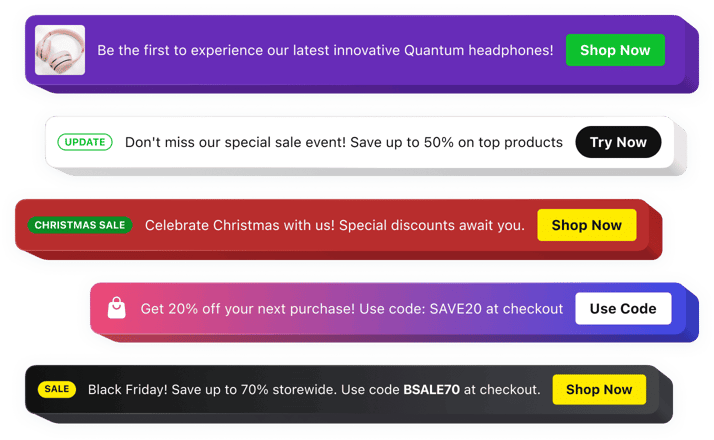
Blogger Announcement Bar Widget
Why People Love Elfsight
Every Blogger website has important messages that deserve more attention — whether it’s a new article, a limited-time offer, a newsletter signup, or an upcoming event. The Elfsight Announcement Bar widget helps you place those messages where visitors are most likely to see them.
Instead of hoping readers notice important updates buried within your content, you can display them prominently at the top or bottom of your website. Create eye-catching announcements with buttons, icons, countdowns, and custom styling that fit perfectly with your Blogger design.
No coding or design experience is required. Simply create your announcement, customize its appearance, and add it to your Blogger website in just a few minutes.
Did you know?
Research from Nielsen Norman Group found that announcement bars are among the first elements visitors notice on a webpage, with 72% of users seeing them immediately after landing on a website.
Add an Announcement Bar to your Blogger website for free today and make sure your most important messages never go unnoticed.
Key Features of the Blogger Announcement Bar Widget
Here’s why content creators, bloggers, and business owners choose Elfsight to communicate with their audience:
- Fast setup process: Create and publish professional-looking announcement bars without writing a single line of code.
- Sticky announcements: Keep your message visible while visitors scroll through articles and pages.
- Promotional campaigns: Highlight discounts, affiliate offers, giveaways, launches, and seasonal campaigns.
- Call-to-action buttons: Drive visitors to specific pages, signup forms, products, or important content with clickable buttons.
- Advanced customization: Personalize colors, typography, backgrounds, icons, and layouts to match your Blogger website.
- Scheduling options: Plan announcements ahead of time and automatically display them during specific periods.
- Audience targeting: Adjust your bar’s visibility for your website’s pages and user devices and set up events, after which the bar will stop displaying to the visitors.
- Mobile-ready design: Ensure announcements look great on smartphones, tablets, and desktop devices.
- Multiple content types: Combine text, buttons, icons, badges, and countdown timers within a single announcement bar.
See all these features in action in the free editor – no signup required.
How to Add an Announcement Bar to Blogger
Creating and displaying announcements on your Blogger website is quick and beginner-friendly. Follow these simple steps:
Method 1: Inline Announcement Bar
Ideal for displaying promotions, updates, or notifications within specific pages or blog posts.
- Choose a template: Open the Elfsight editor and select the design that fits your website.
- Customize the widget: Add your message, button, colors, icons, and display preferences.
- Generate the code: Click “Add to website for free” and copy the installation code.
- Embed in Blogger: Open the Blogger page or post where you want the announcement to appear and paste the code into the HTML editor.
Method 2: Floating Announcement Bar
Perfect for keeping important information visible throughout the visitor’s browsing session.
- Select a floating template: Choose a layout designed to remain visible during scrolling.
- Personalize your announcement: Configure the position, design, message, button, and visibility settings.
- Copy the installation code: Generate your unique embed code in the editor.
- Add it to Blogger: Open Theme → Edit HTML and paste the code before the closing
</body>tag.
Your Announcement Bar is now live on your Blogger website. You can return to the Elfsight editor anytime to update content, styling, targeting, or scheduling settings.
Need help? Visit our Help Center for detailed tutorials and setup instructions. You can also suggest improvements through the Wishlist, follow new releases in the Changelog, and exchange ideas with other users in the Community.