
Wix Language Translation plugin
Create your Website Transator app
Why People Love Elfsight
Your visitors come from all over the world, so why keep your message in just one language? The Elfsight Website Translator lets you automatically translate your Wix website into 100+ languages, so everyone can understand and enjoy your content.
It’s easy to install, works right inside Wix, and doesn’t require any coding. You can place a sleek language switcher anywhere on your pages, choose how it looks, and let the translations happen instantly. Even if you’re not technical, you’ll have a multilingual website up and running in minutes.
Did you know?
A study by CSA Research found that 76% of consumers are more likely to buy from websites in their own language.
Make your content multilingual to grow your audience and increase trust – add the Elfsight Language Translation app for free today.
Key Features of the Wix Localization App
Here’s why users call it one of the best Wix language apps – simple setup, automatic translations, and total control over design.
- Automatic translation: Instantly translate your entire website using Google Translate – no separate pages needed.
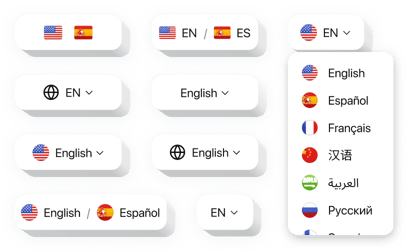
- Language switcher: Add a customizable dropdown or floating button that lets visitors pick their preferred language.
- Flexible design: Change colors, flags, fonts, and styles to match your brand perfectly.
- Over 100 supported languages: From English to Arabic, cover every major language your visitors use.
- Mobile-friendly: The switcher works smoothly on any screen – desktop, tablet, or phone.
- Quick install: Set it up in minutes with simple copy–paste steps – no coding required.
Play around with all features in our editor – no registration needed
How to Add the Website Translator to Wix
Embedding the Elfsight Translation app is quick and straightforward. Here’s how to do it step by step.
Method 1: Inline Translator
Perfect if you’d like the switcher inside your header, footer, or any content block.
- Select a template: Open the Elfsight editor and choose a design that fits your website’s style.
- Customize the widget: Pick languages, change appearance, and adjust behavior.
- Generate the code: Click “Add to website for free” and copy the provided installation code.
- Embed on your website: In your Wix dashboard, open the page editor and paste the code into the Embed widget.
Method 2: Floating Translator
Great for adding a fixed button that follows visitors as they browse.
- Pick a template: In the Elfsight editor, select the layout you like.
- Personalize the widget: Add the languages, set your preferred position, size, and colors.
- Get the code: Once you’re done with customization, hit “Add to website for free” and copy the generated code.
- Embed on Wix: Paste it into your Wix website’s custom code area or footer scripts.
Need a hand? Visit our Help Center for detailed tutorials. You can also share your feature ideas in our Wishlist or follow new updates in the Changelog.