
Drupal Comments module
Create your Comments module
Embed Comments into Drupal with an Elfsight module
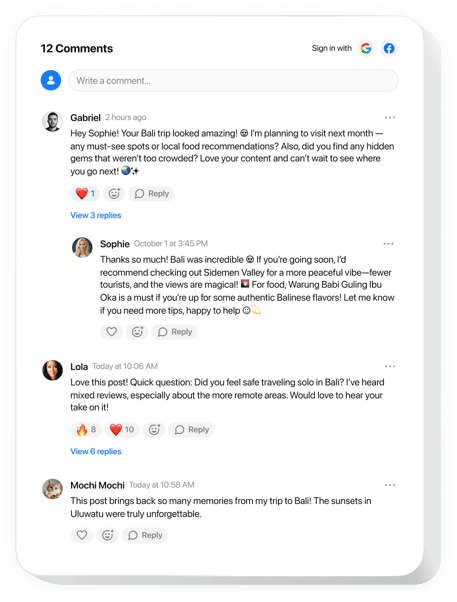
Let visitors post as guests or sign in and join multi-level discussions on your pages and posts with a Drupal comments module from Elfsight. The module is fully responsive, so the conversation looks right on any device.
It also includes built-in moderation tools, spam protection and comment sharing, plus user editing options and admin insights, so you stay in control of every discussion.
Elfsight module or a Drupal catalog module?
Elfsight Comments is set up in the Elfsight editor, not built from scratch. You start from a template, adjust the style and settings, then copy the HTML code from your dashboard and paste it into the Drupal pages where Comments should appear. You do not need to develop a module of your own.
Key features of the Comments module
- Guest commenting and sign-in with Google or Facebook – visitors can share their thoughts without submitting private info, or sign in if they prefer.
- Moderation with teammates – review every comment and share moderation duties with the teammates you choose.
- Likes, dislikes, mentions and sharing – visitors can like or dislike, mention other users and share any individual comment.
- Unlimited users, replies and pages – the module supports an unlimited number of users, replies and content pages.
- Built-in spam protection – keep your discussions secure and lively.
- Schema.org markup – comments are marked up with schema.org structured data to help search engines understand your content.
- User editing and admin insights – give commenters editing options and keep an overview of the discussion.
- Responsive on any device – discussions look natural on desktop and mobile.
Test the online editor to see what the Comments module can do.
How to add the Comments module to Drupal
Build the module in the Elfsight editor, then place its code on your Drupal pages. It takes no coding.
Good to know: the installation code appears in your dashboard as soon as you finish building the module. You can paste it on a specific Drupal page or on all pages. If you get stuck, our customer support will help you embed and adjust the comment box.
Add the Comments module to a specific Drupal page
- Open the Elfsight editor and pick a template.
- Adjust the style and settings.
- Copy the installation code from your dashboard.
- Log in to your Drupal website’s backend, click Manage, then select Content.
- Select the page where the comments should appear and click Edit.
- Convert the page into the Full HTML format.
- Click the Source button to switch to the HTML view.
- Paste the installation code into the required page area.
- Save the changes and publish.
Add the Comments module to all Drupal pages
- Log in to your Drupal website’s backend, go to the Structure tab and click Block layout.
- Scroll down, choose a Footer section, for example Footer first, and click Place block.
- Press Add custom block.
- Enter the name of the block.
- Convert the block into the Full HTML format.
- Click the Source button and paste the installation code into the required area.
- Save the block.
- Uncheck Display title and check all the pages of your website within the Content types section.
- Select the needed Region in the Select dropdown and click Save.
- Scroll down to the bottom of the page and click Save blocks.