
HTML Appointment Booking widget
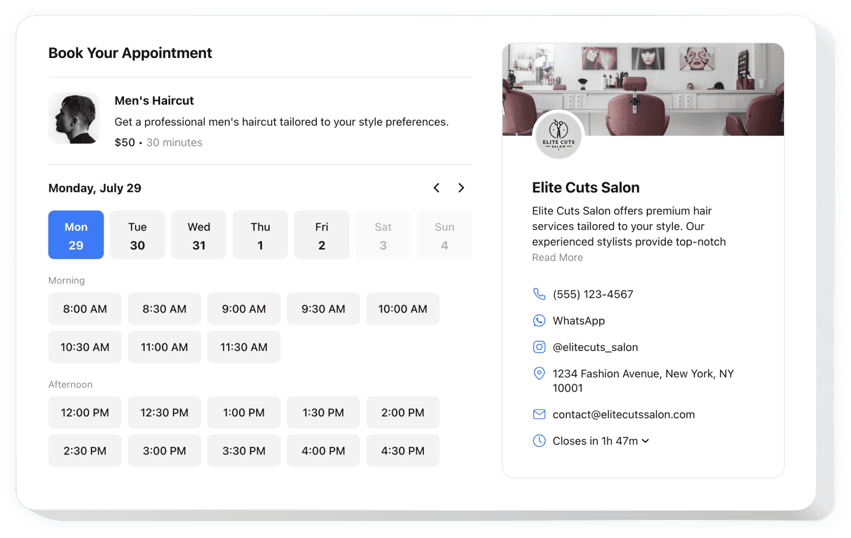
Create your Appointment Booking widget
Embed Appointment Booking on HTML with the Elfsight widget!
The Appointment Booking widget is available to help prospective patrons in reserving slots directly on your HTML website, minimizing the manual work—like constantly staying available at all times to avoid missing messages, calls, and emails—from you. It’s like having a virtual assistant working 24/7 that sends automated notifications and can be connected with external integrations, such as Google Calendar.
Now is the moment to elaborate further on your service or event, specify the time frame, disclose contact information, and set the pricing to facilitate clients’ decision-making process. Furthermore, you get to choose the widget’s visual aesthetics by modifying custom elements and features with no requirement to perfect the coding abilities or employ a developer!
Allow your business to rock and become accessible to a larger audience with online booking for appointments on your website!
The widget includes practical and fast features, see some of them:
- Offer a thorough overview of your service—name, details, picture, and duration—and set the pricing in diverse currencies.
- Send automated notifications to confirm the scheduled slots to clients and yourself.
- Synchronize the widget with outsourcing integrations, such as Google Calendar, to ensure real-time updates.
- Showcase your business contact info as social proof and permit users to reach out in case of unexpected circumstances.
- Code-free customization with advanced design settings: pre-made templates, colors, multiple layout designs layouts, fonts, Custom CSS editor, Custom JS editor, and more.
How to embed the Appointment Booking on my HTML website?
To embed the Appointment Booking on your HTML website, do the following:
- Launch our free configurator and start building your personalized LinkedIn Feed plugin.
Determine the selected layout and characteristics of the tool and apply the corrections. - Acquire your personal code popping up in the window on Elfsight Apps.
As soon as the establishing of your personal widget is complete, copy the exclusive code from the appearing popup and save it for future use. - Start using the plugin on your HTML website.
Place the code copied before on your website and save the improvements. - You’re done! The integration is fully ended.
Visit your website to review the functioning of the widget.
If you deal with any difficulties, feel free to contact our customer service staff. Our people are eager to resolve all the questions you may have with the tool.