
Webnode Announcement Bar widget
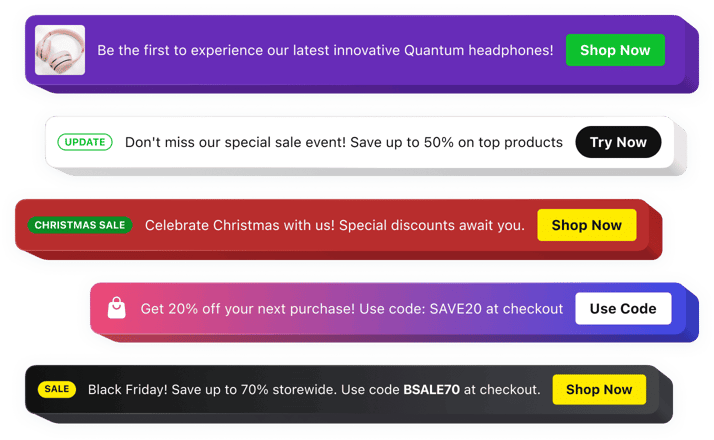
Webnode Announcement Bar widget
Why People Love Elfsight
Every Webnode website has something important to share – whether it’s a new offer, a company update, or a message for returning visitors. The Elfsight Announcement Bar widget helps you place these updates in a highly noticeable area without making your website feel crowded.
Use it to promote limited-time deals, announce upcoming events, share important information, or guide visitors toward the next step. The widget helps you create a direct communication point between your website and your audience.
Getting started is simple. Choose a ready-made layout, personalize the content and design, then add the widget to your Webnode website without any complicated setup.
Did you know?
Nielsen Norman Group found that 72% of visitors notice announcement bars immediately after landing on a website, making them one of the first elements users see on a webpage.
Add an Announcement Bar to your Webnode website for free and make your most important updates impossible to miss.
Key Features of the Webnode Announcement Bar Widget
With Elfsight, you can create announcements that look great and help visitors discover important information faster:
- Effortless setup: Add the widget to your Webnode website quickly without coding or technical experience.
- Important message display: Put promotions, updates, and notices in front of visitors as soon as they arrive.
- Marketing opportunities: Use announcements to showcase sales, launches, events, and special offers.
- Actionable buttons: Include clickable CTAs that send users to pages, products, forms, or other resources.
- Personalized appearance: Adjust colors, fonts, layouts, backgrounds, and button styles to fit your website.
- Flexible placement: Choose the position that works best for your content and visitor flow.
- Announcement scheduling: Prepare campaigns in advance and display messages during selected time frames.
- Responsive layout: Keep your notifications easy to read on mobile devices, tablets, and desktops.
- Multiple content types: Combine text, buttons, icons, badges, images, and videos to create engaging announcements.
See all these features in action in the free editor – no signup required.
How to Add an Announcement Bar to Webnode
You can install an announcement bar on your Webnode website in just a few simple steps:
Method 1: Inline Announcement Bar
A suitable option for placing updates and promotions directly inside your website pages.
- Choose your template: Open the Elfsight editor and select a template that matches your Webnode website design and business goals.
- Customize the content: Add your message, buttons, images, icons, and adjust the visual appearance.
- Create the embed code: Click “Add to website for free” and copy the generated code.
- Add to Webnode: Open your Webnode editor, insert an HTML block, paste the code, and publish your changes.
Method 2: Floating Announcement Bar
A great choice if you want your message to remain visible while visitors explore different sections of your website.
- Select a floating template: Pick a layout that keeps your announcement noticeable while scrolling.
- Modify the settings: Configure the position, colors, text, buttons, and display preferences.
- Copy the widget code: Generate your final embed snippet after completing the customization.
- Embed into Webnode: Paste the code into the HTML section of your website and save the updates.
That’s it! Your Announcement Bar is now working on your Webnode website. You can edit your message, refresh the design, or update your campaign anytime from your Elfsight dashboard.
Need help? Visit our Help Center for detailed tutorials and setup instructions. You can also suggest improvements through the Wishlist, check the updates in the Changelog, and exchange ideas with other users in the Community.