
Jimdo Announcement Bar widget
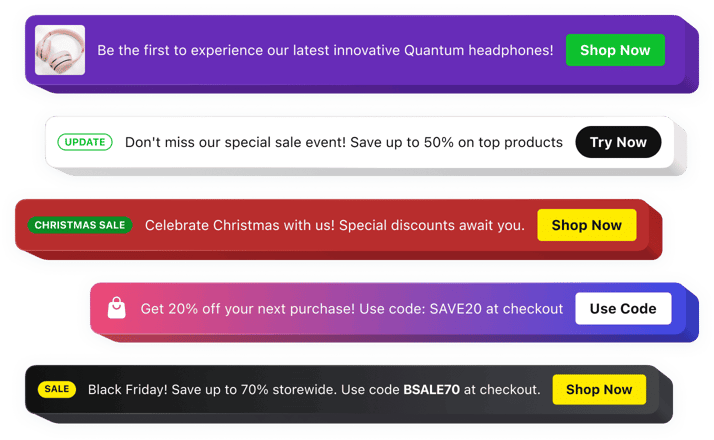
Jimdo Announcement Bar widget
Why People Love Elfsight
Your Jimdo website is a great place to share your ideas, services, or products, but important updates can easily get overlooked. The Elfsight Announcement Bar widget helps you bring attention to the messages that matter most by placing them in a highly visible area of your website.
From limited-time promotions and upcoming events to business news and important reminders, the widget makes sure visitors quickly discover your latest information. Create eye-catching announcements that support your goals while keeping the browsing experience smooth and enjoyable.
Everything is simple to manage, even if you have no technical background. Customize your announcement, adjust the design, and add it to your Jimdo website without complicated setup.
Did you know?
Research from Nielsen Norman Group shows that 72% of users mentioned announcement bars as the first element they notice when they open a webpage, helping websites deliver key information faster.
Add an Announcement Bar to your Jimdo website for free and turn regular visits into more meaningful interactions.
Key Features of the Jimdo Announcement Bar Widget
Discover how Elfsight helps you create noticeable announcements and communicate with your audience more effectively:
- Easy setup process: Add the widget to your website quickly without any coding or technical assistance.
- Attention-grabbing notifications: Highlight important updates, offers, and messages where visitors can see them instantly.
- Action buttons: Add clickable buttons that guide users toward purchases, registrations, contact forms, or other pages.
- Fully adjustable design: Change fonts, colors, backgrounds, layouts, and other elements to fit your Jimdo website.
- Smart placement options: Choose where your announcement appears to create the best user experience.
- Content scheduling: Prepare messages in advance and display them during the right moments automatically.
- Responsive appearance: Make sure your announcements look polished on desktops, tablets, and smartphones.
- Engaging content elements: Combine text, buttons, icons, badges, images, and videos to create informative announcements.
See all these features in action in the free editor – no signup required.
How to Add an Announcement Bar to Jimdo
Setting up an announcement bar on your Jimdo website is fast and beginner-friendly. Follow these steps to get started:
Method 1: Inline Announcement Bar
Ideal for displaying updates, promotions, and notifications directly inside your website content.
- Pick a template: Open the Elfsight editor and select an announcement bar layout that suits your website.
- Customize your widget: Add your message, buttons, images, icons, and adjust the appearance to match your style.
- Create the embed code: Click “Add to website for free” and copy the generated code.
- Add it to Jimdo: Open your Jimdo editor, insert an HTML element, and paste the code into the required section.
Method 2: Floating Announcement Bar
A convenient solution when you want important messages to remain noticeable while visitors explore your pages.
- Select a floating layout: Choose a template designed to stay visible during scrolling.
- Configure the widget: Set the position, colors, text, buttons, and display preferences.
- Copy the code: Generate your unique embed snippet after finishing the customization.
- Embed in Jimdo: Add the code through the HTML block and publish your website changes.
That’s it – your Announcement Bar is now running on your Jimdo website. You can return to Elfsight anytime to update your message, appearance, or campaign settings.
Need help? Visit our Help Center for detailed tutorials and setup instructions. You can also suggest improvements through the Wishlist, check the updates in the Changelog, and exchange ideas with other users in the Community.