
BigCommerce Announcement Bar app
Build a BigCommerce Announcement Bar app
Why People Love Elfsight
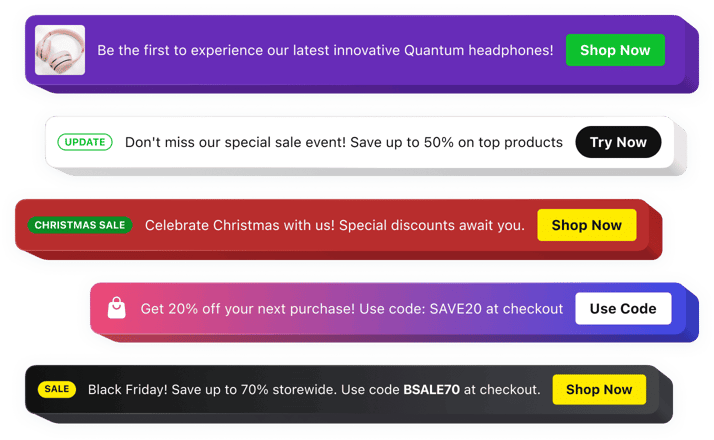
Running a BigCommerce store means constantly sharing promotions, updates, and important information with your customers. The Elfsight Announcement Bar app helps you display these messages in a clear, eye-catching way that visitors can’t miss.
Whether you’re announcing a flash sale, promoting free shipping, launching a new product, or sharing holiday hours, the app keeps your message front and center. With flexible layouts and customization options, you can create announcement bars that perfectly match your store’s branding.
No technical skills are needed. Simply create your message, customize the design, and publish it on your BigCommerce website in just a few minutes.
Did you know?
Nielsen Norman Group found that announcement bars are among the first elements visitors notice on a webpage, with 72% of users seeing them immediately after landing on a website.
Add an Announcement Bar to your BigCommerce website with Elfsight for free today and make sure your most important messages always get noticed.
Key Features of the BigCommerce Announcement Bar App
Here’s what makes Elfsight a valuable addition for businesses that want to communicate important information more effectively:
- Quick and easy setup: Create and publish an announcement bar in minutes without coding or technical expertise.
- Attention-grabbing display: Highlight important messages without disrupting the shopping experience.
- Promote special offers: Draw attention to discounts, free shipping, seasonal sales, and limited-time promotions.
- Share news and updates: Keep customers informed about product launches, events, shipping changes, and business announcements.
- Flexible positioning: Display your announcement bar at the top or bottom of the page and make it sticky if needed.
- Design customization: Adjust colors, fonts, buttons, icons, and layouts to match your BigCommerce store.
- Call-to-action buttons: Add clickable buttons that direct visitors to products, collections, landing pages, or special offers.
- Scheduling options: Set start and end dates for promotions and announcements to automate your campaigns.
- Mobile-friendly: Your Announcement Bar looks great and works smoothly on all devices.
See all these features in action in the free editor – no signup required.
How to Add an Announcement Bar to BigCommerce
Adding an announcement bar to your website takes just a few minutes. Here’s how to set it up step by step:
Method 1: Inline Announcement Bar
Perfect for displaying promotions, announcements, or updates directly within your page content.
- Select a template: Open the Elfsight editor and choose the announcement template you like.
- Customize your widget: Add your message, choose colors, buttons, icons, display settings, and other design options.
- Generate your code: Click “Add to website for free” and copy the generated embed code.
- Embed in BigCommerce: Open the page where you want the announcement to appear and paste the code into the appropriate HTML section.
Method 2: Floating Announcement Bar
Perfect if you want your message to remain visible while visitors browse your website.
- Choose a floating template: Select a layout designed to stay visible as users scroll.
- Personalize the widget: Customize the message, position, appearance, button, and behavior.
- Copy the code: Once customization is complete, click “Add to website for free” to generate your unique code.
- Paste into BigCommerce: Add the code to your store’s theme files or script manager so the bar appears across your website.
That’s it – your announcements are now active on your BigCommerce website. You can update the message, design, targeting, and scheduling settings anytime from your Elfsight dashboard.
Need help? Visit our Help Center for step-by-step guides. You can also share feedback through the Wishlist, follow new releases in the Changelog, and connect with other users in the Community.