
WordPress AliExpress Reviews plugin
Create your AliExpress Reviews plugin
Why People Love Elfsight
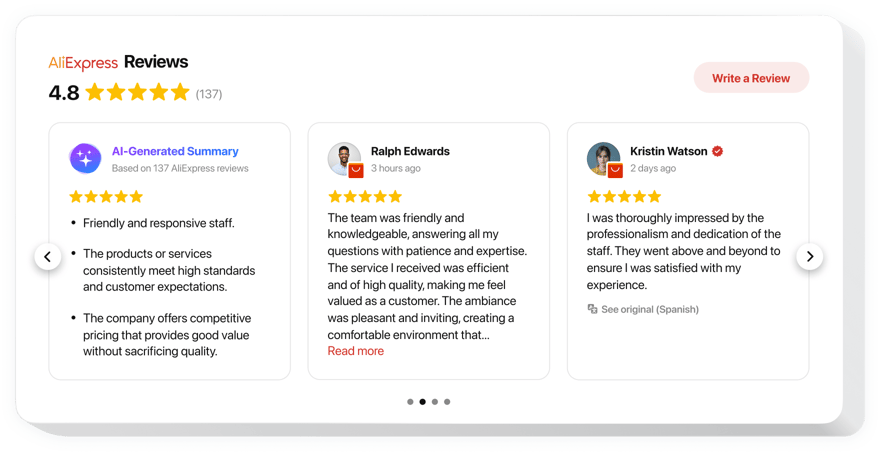
The Elfsight AliExpress Reviews plugin makes it easy to display real customer experiences from AliExpress directly on your WordPress website. Whether you run an online store, dropshipping business, or product catalog, showcasing genuine buyer feedback helps visitors feel more confident about making a purchase.
It helps you showcase real customer experiences, highlight product quality, and build instant credibility with new visitors. With customizable layouts, you can display reviews as sliders, grids, masonry feeds, or review lists that seamlessly match your website’s design.
You don’t need to be technical – everything works right out of the box. Simply add an AliExpress product URL, choose a layout, and your reviews can be live on your website in minutes.
Did you know?
According to a BrightLocal survey, nearly a half of all consumers trust online reviews just as much as recommendations from their own friends or family.
Add AliExpress reviews to your WordPress website with Elfsight for free today and let real customer experiences help turn more visitors into buyers.
Key Features of the WordPress AliExpress Reviews Plugin
Here’s what makes Elfsight a must-have for online stores, dropshippers, and ecommerce businesses focused on building trust:
- Automatic review import: Connect an AliExpress product and sync reviews instantly – no manual copy-pasting.
- Smart filtering: Show only the reviews you want – filter by rating, keywords, or review content.
- Customer photos and videos: Display visual feedback from real buyers to strengthen social proof.
- Custom layouts: Choose from list, grid, masonry, slider, or carousel styles that fit your WordPress design.
- Design flexibility: Change fonts, colors, cards, and spacing to match your brand’s look and feel.
- AI review summary: Automatically generate a short, friendly summary of what customers love most about your products.
- Automatic updates: New AliExpress reviews appear automatically, keeping your feedback fresh and relevant.
- Mobile-friendly: Reviews look great on any device – from desktop to phone.
- No coding required: If you can paste a code snippet, you can use this plugin. It’s that easy.
See all these features in action in the free editor – no signup required.
How to Add AliExpress Reviews to WordPress
Adding your reviews takes just a few minutes. Here’s how to set it up step by step:
Method 1: Inline Reviews
Best for showing reviews directly on your product pages, landing pages, or homepage.
- Select a template: Go to the Elfsight editor and choose the template you like.
- Customize your widget: Add your AliExpress product URL, configure filters, and adjust the design.
- Generate your code: Click “Add to website for free” and copy the embed code.
- Embed in WordPress: Open the page or post where you want the reviews to appear, add a Custom HTML block, and paste the code.
Method 2: Floating Reviews Panel
Perfect if you want reviews accessible from any page without taking up valuable content space.
- Pick a template: In the editor choose a floating template that suits you best.
- Personalize the widget: Add your AliExpress product, define the position and size, and customize the design.
- Copy the code: Once all the customization is finished, click “Add to website for free” to get your unique snippet.
- Paste into WordPress: Add the code before the closing
</body>tag or use a code insertion plugin.
That’s it – your AliExpress reviews are now visible on your WordPress website. You can update design, filters, or layout anytime from your Elfsight dashboard.
Need help? Visit our Help Center for step-by-step guides. You can also share feedback on the Wishlist or follow product updates in the Changelog.