Features
Everything your AI chatbot can do
The chat on your website — how it looks, where it shows and what visitors can do in it — plus the agent behind it and the results, all in one place.
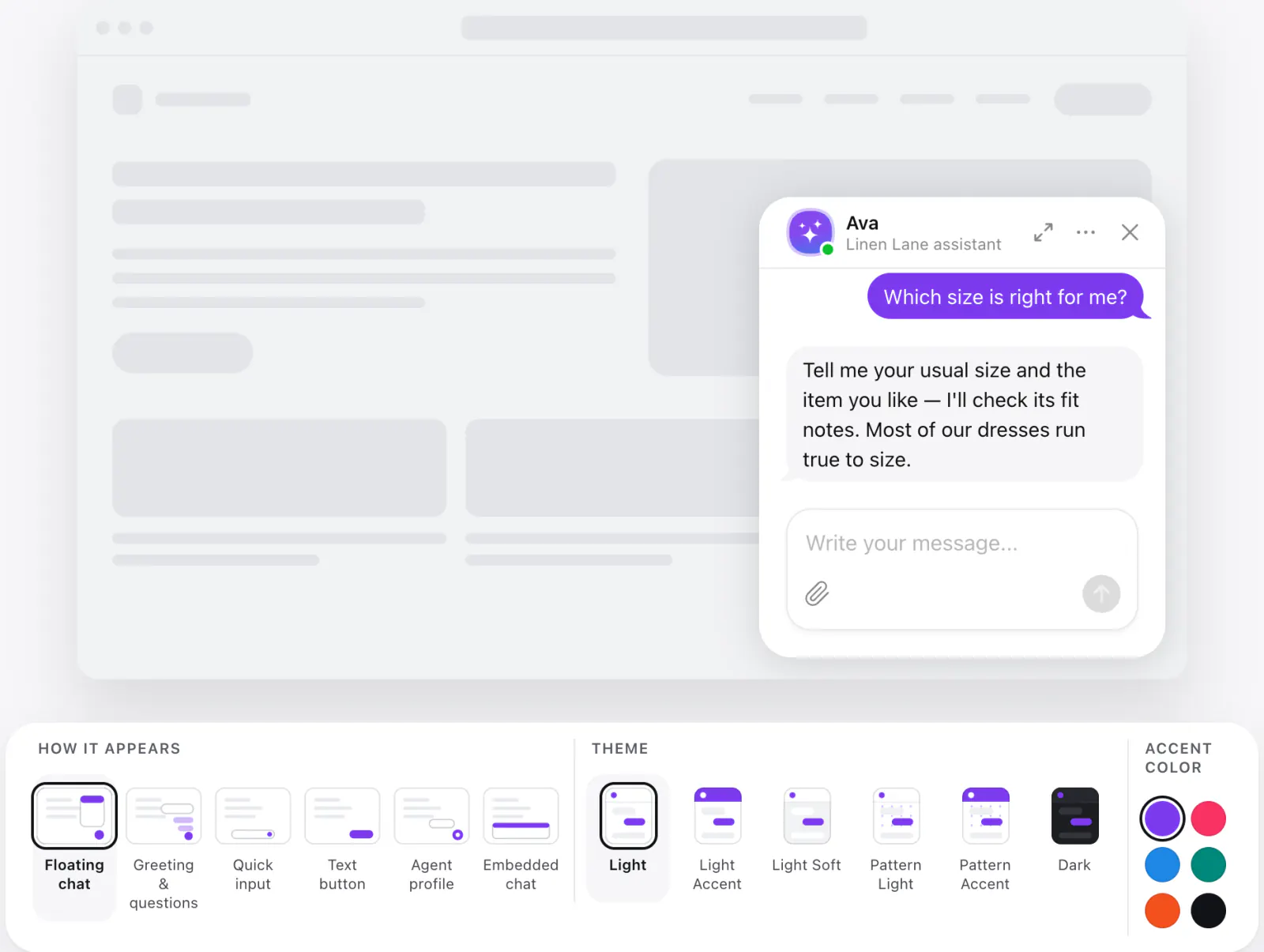
Your website widget
Linen Lane assistant
Hi! 👋 Ask me about sizes, shipping or returns.
Which size is right for me?
When will it arrive?
How do returns work?
Ask a question
Need help choosing?
Tell me your usual size and the item you like — I'll check its fit notes. Most of our dresses run true to size.
How it appears
Floating chat
Greeting & questions
Agent profile
Embedded chat
Light Accent
Pattern Light
Pattern Accent
Accent color
Layout
Floating or embedded
A chat that floats over every page, or one set right into a page of yours.
- Floating chatA launcher on the page and a chat window that pops up over it.
- Embedded chatThe chat inline in the part of the page you choose, at the width and height you set.
- Window sizeSet the floating window's size; on desktop, visitors can move and resize it.
Launcher
How visitors open the chat
Pick the launcher that suits your page, and put it left, right or bottom center.
- ButtonA round chat bubble in the corner.
- Text buttonA button with your words on it, like «Ask us anything».
- Quick inputA small message field right on the page — visitors start typing at once.
- Agent profileYour agent's face as the launcher, inviting a chat.
First impression
Greet visitors before they ask
A welcome and a few questions to start with — and the chat opens when you want it to.
- Welcome messageRich text that greets every visitor.
- Suggested questionsPrompts visitors tap to start; they go once the chat begins.
- Open by itselfShow the greeting and questions by the launcher, or open the chat on its own (desktop).
- On load or after a delayGreet at once, or wait until the visitor has looked around.
Themes & colors
A chat that looks like your site
Start from a theme, then make every part your own.
- Six themesLight, Light Accent, Light Soft, Pattern Light, Pattern Accent and Dark — each with its accent palette.
- Every colorThe launcher, the header, the messages, the buttons and the message field — each to your colors.
- BackgroundsA color, an image or a pattern behind the chat, with the corner radius you like.
- Your fontUse your website's font in the chat.
Display rules
Where and when it shows
Show the chat on the pages and devices you choose, in your language.
- Page rulesShow or hide it on pages by their address.
- DevicesAll devices, or only desktop or mobile.
- Chat sessionEnd a quiet chat after 5, 10, 15 or 30 minutes, or an hour.
- Language and time zoneSet the widget's language and your time zone.
- Footer textAdd a short note under the chat, like a disclaimer.
In the chat
What visitors can do in the chat
A chat that feels like a good messenger — and a few things that make it better.
- Answers as they're writtenTyping, «Thinking…», then the answer streaming in — with formatting and links.
- Send filesPDF, images, TXT, CSV or Markdown — by the clip, paste or drag and drop; up to 5 per message.
- Rate answersThumbs up or down on any answer, and copy its text.
- Save the transcriptVisitors download the conversation as a text file.
- Start a new chatA fresh conversation from the menu, any time.
- SoundsOptional sounds for opening the chat and new messages — visitors can mute them.
Advanced
Custom CSS, custom JS and your branding
When the editor's settings aren't enough, take it further with your own code — and remove Elfsight's branding on Enterprise plans.
- Custom CSSStyle any part of the chat beyond the theme and colors — to match your site down to the pixel.
- Custom JSAdd your own scripts to the widget for the logic your site needs.
- No Elfsight brandingOn any Enterprise plan the chat shows no «Powered by Elfsight» link, and the emails don't mention Elfsight.
Your AI agent
AI agent
The AI agent behind the chat
How it learns your business, how it talks and what it can do — each has a page of its own.
- Automatic setupPaste your website's address — it learns your business and sets itself up.
- Agent profileIts name, face, role, tone of voice and the rules it follows.
- KnowledgeTrain it on your site, files, images and Q&A — and fill the gaps it finds.
- SkillsCollects contacts, follows up, shows action buttons and hands over to a person.
Your results
Results
Every conversation, in your hands
Read the chats, see the leads and get it all by email.
- Chat historyEvery conversation in your dashboard, with its leads.
- Transcripts by emailWhen a chat ends, its history comes to your inbox — to the people you choose, from your own sender if you like.
- AnalyticsWhat visitors ask and how your agent helps — with reports by email.
- MCPConnect Claude, ChatGPT or another MCP client and ask it about your conversations.
Integrations
Connected to your tools
Send conversations and leads where your team works.
- Google SheetsA row for each conversation, with its contacts.
- ZapierStart automations on chat events, in thousands of apps.
- WebhooksConversation data posted to your own address when a chat ends.
- Google AnalyticsChat opened, started, messages and forms — as events on your site.
Create your AI agent for free
- 1. Enter your website
- 2. Shape your agent
- 3. Add to website